2012 CHEVROLET VOLT ECO mode
[x] Cancel search: ECO modePage 239 of 454

Black plate (1,1)Chevrolet Volt Owner Manual - 2012
Driving and Operating 9-1
Driving and
Operating
Driving Information
Driving for Better EnergyEfficiency . . . . . . . . . . . . . . . . . . . . 9-2
Distracted Driving . . . . . . . . . . . . . 9-4
Defensive Driving . . . . . . . . . . . . . 9-5
Drunk Driving . . . . . . . . . . . . . . . . . 9-5
Control of a Vehicle . . . . . . . . . . . 9-5
Braking . . . . . . . . . . . . . . . . . . . . . . . 9-6
Steering . . . . . . . . . . . . . . . . . . . . . . . 9-6
Off-Road Recovery . . . . . . . . . . . . 9-7
Loss of Control . . . . . . . . . . . . . . . . 9-7
Driving on Wet Roads . . . . . . . . . 9-8
Highway Hypnosis . . . . . . . . . . . . 9-9
Hill and Mountain Roads . . . . . . 9-9
Winter Driving . . . . . . . . . . . . . . . 9-10
If the Vehicle Is Stuck . . . . . . . . 9-12
Vehicle Load Limits . . . . . . . . . . 9-12
Starting and Operating
New Vehicle Break-In . . . . . . . . 9-17
Power Button . . . . . . . . . . . . . . . . 9-18
Starting and Stopping the Vehicle . . . . . . . . . . . . . . . . . . . . . 9-20 Retained Accessory
Power (RAP) . . . . . . . . . . . . . . . 9-21
Shifting Into Park . . . . . . . . . . . . 9-22
Shifting out of Park . . . . . . . . . . 9-23
Parking over Things That Burn . . . . . . . . . . . . . . . . . . 9-23
Electric Vehicle Operating
Modes
System Operation . . . . . . . . . . . 9-24
Electric Mode . . . . . . . . . . . . . . . . 9-24
Extended Range Mode . . . . . . 9-24
Driver Selected OperatingModes . . . . . . . . . . . . . . . . . . . . . . 9-25
Out of Fuel/Engine Unavailable . . . . . . . . . . . . . . . . 9-27
Maintenance Modes . . . . . . . . . 9-28
Engine Exhaust
Engine Exhaust . . . . . . . . . . . . . . 9-30
Running the Vehicle While Parked . . . . . . . . . . . . . . . . . . . . . 9-30
Electric Drive Unit
Electric Drive Unit . . . . . . . . . . . 9-31
Brakes
Antilock BrakeSystem (ABS) . . . . . . . . . . . . . . 9-33
Electric Parking Brake . . . . . . . 9-34
Regenerative Braking . . . . . . . . 9-36
Ride Control Systems
Traction Control System (TCS) . . . . . . . . . . . . . . 9-36
Electronic Stability Control (ESC) . . . . . . . . . . . . . . 9-38
Cruise Control
Cruise Control . . . . . . . . . . . . . . . 9-40
Object Detection Systems
Ultrasonic Parking Assist . . . . 9-42
Rear VisionCamera (RVC) . . . . . . . . . . . . . 9-45
Charging
Plug-In Charging . . . . . . . . . . . . . 9-48
Delayed ChargingOverride . . . . . . . . . . . . . . . . . . . . 9-51
Charging Status Feedback . . . . . . . . . . . . . . . . . . 9-52
Page 240 of 454

Black plate (2,1)Chevrolet Volt Owner Manual - 2012
9-2 Driving and Operating
Charge Cord . . . . . . . . . . . . . . . . . 9-55
Utility Interruption ofCharging . . . . . . . . . . . . . . . . . . . 9-58
Electrical Requirements for Battery Charging . . . . . . . . . . . 9-58
Fuel
Fuel . . . . . . . . . . . . . . . . . . . . . . . . . 9-59
Gasoline Specifications (U.S.
and Canada Only) . . . . . . . . . . 9-60
California Fuel Requirements . . . . . . . . . . . . . . 9-60
Fuels in Foreign Countries . . . 9-60
Fuel Additives . . . . . . . . . . . . . . . 9-60
Filling the Tank . . . . . . . . . . . . . . 9-62
Filling a Portable Fuel Container . . . . . . . . . . . . . . . . . . . 9-64
Towing
General Towing
Information . . . . . . . . . . . . . . . . . 9-64
Conversions and Add-Ons
Add-On ElectricalEquipment . . . . . . . . . . . . . . . . . 9-65
Driving Information
Driving for Better Energy
Efficiency
Use the following tips to help
maximize energy efficiency and
range.
Driving Style
Efficiency Gauge (Instrument
Cluster)
The ball indicator should be kept
green and in the center of the
gauge.
Inefficient acceleration is indicated
when the ball turns yellow and
travels above the center of the
gauge.
Aggressive braking is indicated
when the ball turns yellow and
travels below the center of the
gauge. Acceleration/Braking/Coasting
Avoid unnecessary rapid
accelerations and decelerations.
Electric range is maximized at
80 km/h (50 mph) and below. Higher
speeds use more energy and can
significantly reduce electric range.
Use cruise control when
appropriate.
Plan ahead for decelerations and
coast whenever possible. For
example, do not rush to traffic
signals.
Do not shift to N (Neutral) to coast.
The vehicle recovers energy while
coasting and braking in D (Drive)
or L (Low).
Drive Mode and PRNDL Selection
Use Normal Mode when possible.
Sport Mode provides more
responsive acceleration than
Normal Mode but can reduce
efficiency.
Page 241 of 454

Black plate (3,1)Chevrolet Volt Owner Manual - 2012
Driving and Operating 9-3
Use Mountain Mode prior to
climbing long, steep grades in
mountainous areas. Be sure to
engage Mountain Mode before
starting to climb. Mountain Mode
reduces electric range and power
but may be needed to maintain
speeds above 96 km/h (60 mph)
when climbing grades of 5% or
greater.
Use L (Low) in heavy stop‐and‐go
traffic or when traveling downhill.
L (Low) requires less brake pedal
application and provides a
controlled, efficient way to slow the
vehicle down.
Climate Setting
Using the heat and air conditioning
systems decreases the energy
available for electric driving.
Optimal energy efficiency is
achieved with the heat, air
conditioning, and fan turned off.Less energy is used at low fan
speeds. When using the fan:
.Fan Only is the most energy
efficient climate setting as long
as
0is not selected.
.ECO is for moderate air
conditioning and heater
operation and is the next most
energy efficient setting as long
as
0is not selected.
.Comfort provides the most
comfort but is the least energy
efficient.
Use the auto heated seat feature
instead of climate settings. Heating
the seat uses less energy than
heating the vehicle interior. Use remote start to heat or cool the
interior when the vehicle is plugged
in to maximize the electric range by
utilizing electricity from the electrical
outlet.
Engine Assisted Heating operation,
if equipped, can be personalized.
See
Vehicle Personalization on
page 5‑56 for more information.
In hot weather, avoid parking in
direct sunlight or use sunshades
inside the vehicle.
Turn off the front and rear window
defog/defrost when they are no
longer needed.
Avoid driving with the windows open
at highway speeds.
Page 247 of 454

Black plate (9,1)Chevrolet Volt Owner Manual - 2012
Driving and Operating 9-9
Other Rainy Weather Tips
Besides slowing down, other wet
weather driving tips include:
.Allow extra following distance.
.Pass with caution.
.Keep windshield wiping
equipment in good shape.
.Keep the windshield washer fluid
reservoir filled.
.Have good tires with proper
tread depth. SeeTires on
page 10‑44.
.Turn off cruise control.
Highway Hypnosis
Always be alert and pay attention to
your surroundings while driving.
If you become tired or sleepy, find a
safe place to park the vehicle
and rest. Other driving tips include:
.Keep the vehicle well ventilated.
.Keep the interior
temperature cool.
.Keep your eyes moving
—scan
the road ahead and to the sides.
.Check the rearview mirror and
vehicle instruments often.
Hill and Mountain Roads
Driving on steep hills or through
mountains is different than driving
on flat or rolling terrain. See
“Mountain Mode” underDriver
Selected Operating Modes on
page 9‑25. Tips for driving in these
conditions include:
.Keep the vehicle serviced and in
good shape.
.Check all fluid levels and brakes,
tires, cooling system, and
electric drive unit.
.Keep the vehicle in gear when
going down steep or long hills.
{WARNING
Coasting downhill in N (Neutral)
or with the vehicle turned off is
dangerous. The brakes will have
to do all the work of slowing down
the vehicle and could become too
hot. Hot brakes may not be able
to slow the vehicle enough to
maintain speed and control. You
could crash. Always have the
vehicle running and in gear
(preferably LOW range) when
going downhill. This will allow the
electric drive unit to assist in
slowing and maintaining speed.
.Stay in your own lane. Do not
swing wide or cut across the
center of the road. Drive at
speeds that let you stay in your
own lane.
.Top of hills: Be
alert —something could be in
your lane (stalled car, accident).
Page 256 of 454
Black plate (18,1)Chevrolet Volt Owner Manual - 2012
9-18 Driving and Operating
Power Button
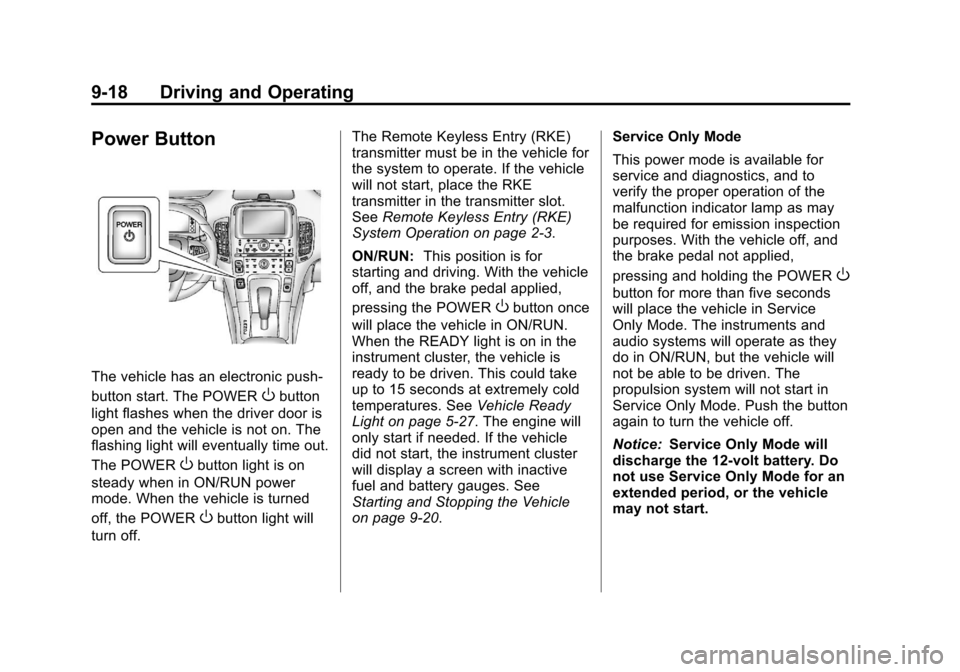
The vehicle has an electronic push‐
button start. The POWER
Obutton
light flashes when the driver door is
open and the vehicle is not on. The
flashing light will eventually time out.
The POWER
Obutton light is on
steady when in ON/RUN power
mode. When the vehicle is turned
off, the POWER
Obutton light will
turn off. The Remote Keyless Entry (RKE)
transmitter must be in the vehicle for
the system to operate. If the vehicle
will not start, place the RKE
transmitter in the transmitter slot.
See
Remote Keyless Entry (RKE)
System Operation on page 2‑3.
ON/RUN: This position is for
starting and driving. With the vehicle
off, and the brake pedal applied,
pressing the POWER
Obutton once
will place the vehicle in ON/RUN.
When the READY light is on in the
instrument cluster, the vehicle is
ready to be driven. This could take
up to 15 seconds at extremely cold
temperatures. See Vehicle Ready
Light on page 5‑27. The engine will
only start if needed. If the vehicle
did not start, the instrument cluster
will display a screen with inactive
fuel and battery gauges. See
Starting and Stopping the Vehicle
on page 9‑20. Service Only Mode
This power mode is available for
service and diagnostics, and to
verify the proper operation of the
malfunction indicator lamp as may
be required for emission inspection
purposes. With the vehicle off, and
the brake pedal not applied,
pressing and holding the POWER
O
button for more than five seconds
will place the vehicle in Service
Only Mode. The instruments and
audio systems will operate as they
do in ON/RUN, but the vehicle will
not be able to be driven. The
propulsion system will not start in
Service Only Mode. Push the button
again to turn the vehicle off.
Notice:
Service Only Mode will
discharge the 12‐volt battery. Do
not use Service Only Mode for an
extended period, or the vehicle
may not start.
Page 259 of 454

Black plate (21,1)Chevrolet Volt Owner Manual - 2012
Driving and Operating 9-21
The instrument cluster displays an
active fuel or battery gauge, along
with an audio startup cue, when the
vehicle is ready to be driven. This
could take up to 15 seconds at
extremely cold temperatures. The
engine will only start if needed.
If the vehicle did not start, the
instrument cluster will display a
screen with inactive fuel and battery
gauges. SeeStarting and Stopping
the Vehicle on page 9‑20.
Restarting Procedure
If the vehicle must be restarted
while it is still moving, move the shift
lever to N (Neutral) and press the
POWER
Obutton twice without
pressing the brake pedal. The
propulsion system will not restart in
any other position. Computers determine when the
engine needs to run. The engine
may start, if required, when the
propulsion system is on. Some
vehicle conditions that force the
engine to run are:
.Cold ambient temperatures.
.The hood is open or not
completely latched.
.The high voltage battery has a
low charge.
.The engine is needed to
maintain the high voltage battery
temperature.
.The engine needs to run for
maintenance.
See Maintenance Modes on
page 9‑28.
A chime will sound if the driver door
is opened while the vehicle is in ON/
RUN. Always press the POWER
O
button to turn the vehicle off before
exiting.
Stopping Procedure
For information on how to turn the
vehicle off, see Power Button on
page 9‑18.
Retained Accessory
Power (RAP)
The following features will operate
for up to 10 minutes or until the
driver door is opened:
.Audio System
.Power Windows
.Accessory Power Outlets
Page 262 of 454
Black plate (24,1)Chevrolet Volt Owner Manual - 2012
9-24 Driving and Operating
Electric Vehicle
Operating Modes
System Operation
This vehicle is an Extended Range
Electric Vehicle (EREV). It uses an
electric propulsion system to drive
the vehicle at all times. Electricity is
the vehicle's primary source of
energy, while gasoline is the
secondary source.
The vehicle has two modes of
operation: Electric and Extended
Range. In both modes, the vehicle
is propelled by its electric drive unit.
It converts electrical energy into
mechanical energy to drive the
wheels. The vehicle's performance
remains the same in either mode.
SeeDriving for Better Energy
Efficiency on page 9‑2.
Electric Mode
In Electric Mode, the vehicle does
not use fuel or produce tailpipe
emissions. During this primary
mode, the vehicle is powered by
electrical energy stored in the high
voltage battery. The vehicle can
operate in this mode until the
battery has reached a low charge.
There are some conditions when the
battery charge is high enough to
provide Electric Mode operation, but
the engine still runs. They are:
.Cold ambient temperatures.
.Hot or cold high voltage battery
temperatures.
.The hood being open or not
completely closed and latched.
.Certain high voltage battery fault
conditions.
.Engine Maintenance Mode or
Fuel Maintenance Mode
being run.
Extended Range Mode
When the vehicle reaches the end
of its electric range, it switches to
Extended Range Mode (ERM). In
this secondary mode, electricity is
produced by the fuel‐powered
engine. This secondary source of
electric power extends the vehicle
range. Operation will continue in
ERM until the vehicle can be
plugged in to recharge the high
voltage battery and restore
Electric Mode.
The high voltage battery will
continue to provide some power and
work together with the engine to
provide peak performance when it is
required, such as driving up a steep
incline or for high acceleration
maneuvers. The battery will not be
charged nor will electric vehicle
range be restored by the engine.
Page 263 of 454

Black plate (25,1)Chevrolet Volt Owner Manual - 2012
Driving and Operating 9-25
In either Electric Mode or Extended
Range Mode, when the hood is
open, the engine will run without
turning off if the vehicle is on. The
high voltage battery is neither
charged nor discharged when this
occurs.
In either Electric Mode or Extended
Range Mode, if there is a high
voltage battery fault, the engine may
run without turning off to generate
needed electricity. The malfunction
indicator lamp will turn on. See
Malfunction Indicator Lamp on
page 5‑19.Driver Selected Operating
Modes
While driving in Electric or Extended
Range Mode, additional operating
modes can be selected.
Press the DRIVE MODE button to
display selectable drive modes in
the Driver Information Center (DIC).
Continue pressing to scroll through
the modes.
Highlight either the Mountain or
Sport Mode, then release the
DRIVE MODE button. After
three seconds, the new drive
mode will become active.
Pressing the DRIVE MODE button
again will return to Normal Mode,
and become active after
three seconds.
At next start, the vehicle will default
to Normal Mode. Drive modes can
then be selected again as desired.
During some conditions, certain
drive modes may be unavailable.
The unavailable mode is grayed out
in the DIC menu and cannot be
selected.