2012 CHEVROLET VOLT turn signal
[x] Cancel search: turn signalPage 240 of 454

Black plate (2,1)Chevrolet Volt Owner Manual - 2012
9-2 Driving and Operating
Charge Cord . . . . . . . . . . . . . . . . . 9-55
Utility Interruption ofCharging . . . . . . . . . . . . . . . . . . . 9-58
Electrical Requirements for Battery Charging . . . . . . . . . . . 9-58
Fuel
Fuel . . . . . . . . . . . . . . . . . . . . . . . . . 9-59
Gasoline Specifications (U.S.
and Canada Only) . . . . . . . . . . 9-60
California Fuel Requirements . . . . . . . . . . . . . . 9-60
Fuels in Foreign Countries . . . 9-60
Fuel Additives . . . . . . . . . . . . . . . 9-60
Filling the Tank . . . . . . . . . . . . . . 9-62
Filling a Portable Fuel Container . . . . . . . . . . . . . . . . . . . 9-64
Towing
General Towing
Information . . . . . . . . . . . . . . . . . 9-64
Conversions and Add-Ons
Add-On ElectricalEquipment . . . . . . . . . . . . . . . . . 9-65
Driving Information
Driving for Better Energy
Efficiency
Use the following tips to help
maximize energy efficiency and
range.
Driving Style
Efficiency Gauge (Instrument
Cluster)
The ball indicator should be kept
green and in the center of the
gauge.
Inefficient acceleration is indicated
when the ball turns yellow and
travels above the center of the
gauge.
Aggressive braking is indicated
when the ball turns yellow and
travels below the center of the
gauge. Acceleration/Braking/Coasting
Avoid unnecessary rapid
accelerations and decelerations.
Electric range is maximized at
80 km/h (50 mph) and below. Higher
speeds use more energy and can
significantly reduce electric range.
Use cruise control when
appropriate.
Plan ahead for decelerations and
coast whenever possible. For
example, do not rush to traffic
signals.
Do not shift to N (Neutral) to coast.
The vehicle recovers energy while
coasting and braking in D (Drive)
or L (Low).
Drive Mode and PRNDL Selection
Use Normal Mode when possible.
Sport Mode provides more
responsive acceleration than
Normal Mode but can reduce
efficiency.
Page 345 of 454
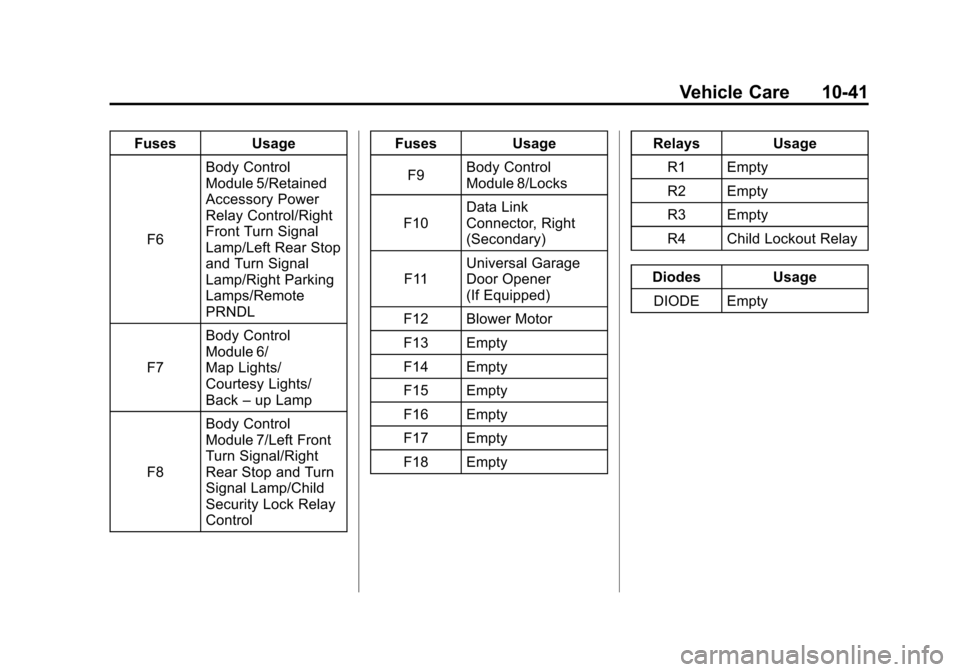
Black plate (41,1)Chevrolet Volt Owner Manual - 2012
Vehicle Care 10-41
FusesUsage
F6 Body Control
Module 5/Retained
Accessory Power
Relay Control/Right
Front Turn Signal
Lamp/Left Rear Stop
and Turn Signal
Lamp/Right Parking
Lamps/Remote
PRNDL
F7 Body Control
Module 6/
Map Lights/
Courtesy Lights/
Back
–up Lamp
F8 Body Control
Module 7/Left Front
Turn Signal/Right
Rear Stop and Turn
Signal Lamp/Child
Security Lock Relay
Control Fuses
Usage
F9 Body Control
Module 8/Locks
F10 Data Link
Connector, Right
(Secondary)
F11 Universal Garage
Door Opener
(If Equipped)
F12 Blower Motor
F13 Empty
F14 Empty
F15 Empty
F16 Empty
F17 Empty
F18 Empty Relays
Usage
R1 Empty
R2 Empty
R3 Empty
R4 Child Lockout Relay
Diodes Usage DIODE Empty
Page 360 of 454

Black plate (56,1)Chevrolet Volt Owner Manual - 2012
10-56 Vehicle Care
Follow the TPMS sensor matching
process:
1. Set the parking brake.
2. Put the vehicle in ON/RUN andplace the vehicle in P (Park).
3. If the DIC display is minimized, press the SELECT knob to
maximize it.
4. Use the SELECT knob to scroll to the Tire Pressure display
screen.
5. Press and hold the SELECT knob for five seconds to begin
the sensor matching process.
A message displays confirming
to begin the process.
6. Use the SELECT knob to select YES with the highlighted
selection, and press the
SELECT knob again to confirm
the selection. The horn sounds twice to signal
the receiver is in relearn mode
and the TIRE LEARNING
ACTIVE message displays on
the DIC screen.
7. Start with the driver side front tire.
8. Place the relearn tool against the tire sidewall, near the valve
stem. Then press the button to
activate the TPMS sensor.
A horn chirp confirms that the
sensor identification code has
been matched to this tire and
wheel position.
9. Proceed to the passenger side front tire, and repeat the
procedure in Step 8.
10. Proceed to the passenger side rear tire, and repeat the
procedure in Step 8. 11. Proceed to the driver side rear
tire, and repeat the procedure
in Step 8. The horn sounds
two times to indicate the
sensor identification code has
been matched to the driver
side rear tire, and the TPMS
sensor matching process is no
longer active. The TIRE
LEARNING ACTIVE message
on the DIC display screen
goes off.
12. Turn the vehicle off.
13. Set all four tires to the recommended air pressure
level as indicated on the Tire
and Loading Information label.
Page 440 of 454

Black plate (6,1)Chevrolet Volt Owner Manual - 2012
14-6 OnStar
OnStar service cannot work unless
your vehicle is in a place where
OnStar has an agreement with a
wireless service provider for service
in that area, and the wireless
service provider has coverage,
network capacity, reception, and
technology compatible with OnStar’s
service. Service involving location
information about the vehicle cannot
work unless GPS signals are
available, unobstructed, and
compatible with the OnStar
hardware. OnStar service may not
work if the OnStar equipment is not
properly installed or it has not been
properly maintained. If equipment or
software is added, connected,
or modified, OnStar service may not
work. Other problems beyond
OnStar ’s control may prevent
service such as hills, tall buildings,
tunnels, weather, electrical system
design and architecture of the
vehicle, damage to the vehicle in a
crash, or wireless phone network
congestion or jamming. See
Radio Frequency Statement on
page 13‑17 for information
regarding Part 15 of the Federal
Communications Commission (FCC)
rules and Industry Canada
Standards RSS-GEN/210/220/310.
Services for People with
Disabilities
Advisors provide services to help
subscribers with physical disabilities
and medical conditions.
Push
Qfor help with:
.Locating a gas station with an
attendant to pump gas.
.Finding a hotel, restaurant, etc.,
that meets accessibility needs.
.Providing directions to the
closest hospital or pharmacy in
urgent situations.
TTY Users
OnStar has the ability to
communicate to the deaf,
hard‐of‐hearing, or speech‐impaired
customers while in the vehicle. The
available dealer‐installed TTY
system can provide in-vehicle
access to all of the OnStar services,
except Virtual Advisor and OnStar
Turn‐by‐Turn Navigation.
Onstar.com
The website provides access to
account information, manages the
OnStar subscription, and allows
viewing of videos of each service.
Get subscription plan pricing and
sign up for OnStar Vehicle
Diagnostics. Click on the “My
Account” tab on the home page.
Page 441 of 454

Black plate (7,1)Chevrolet Volt Owner Manual - 2012
OnStar 14-7
OnStar Personal Identification
Number (PIN)
A PIN is needed to access some of
the OnStar services, like Remote
Door Unlock and Stolen Vehicle
Assistance. You will be prompted to
change the PIN the first time when
speaking with an Advisor. To
change the OnStar PIN, call OnStar
and provide the Advisor with the
current number.
Warranty
OnStar equipment may be
warranted as part of the new-vehicle
limited warranty. The manufacturer
of the vehicle furnishes detailed
warranty information.
Languages
The vehicle can be programmed to
respond in French or Spanish. Push
Qand ask an Advisor. Advisors
can speak French or Spanish.
Potential Issues
Some OnStar services are disabled
after five days. OnStar cannot
perform Remote Door Unlock or
Stolen Vehicle Assistance after the
vehicle has been off continuously
for five days. After five days, OnStar
can contact Roadside Assistance
and a locksmith to help gain access
to the vehicle.
Global Positioning
System (GPS)
.Obstruction of the GPS can
occur in a large city with tall
buildings; in parking garages;
around airports; in tunnels,
underpasses, or parking
garages; or in an area with very
dense trees. If GPS signals are
not available, the OnStar system
should still operate to call
OnStar. However, OnStar could
have difficulty identifying the
exact location.
.In emergency situations, OnStar
can use the last stored GPS
location to send to emergency
responders.
.A temporary loss of GPS can
cause loss of the ability to send
a Turn-by-Turn Navigation route.
The Advisor may give a verbal
route or may ask for a call back
after the vehicle is driven into an
open area.
Cellular and GPS Antennas
Avoid placing items over or near the
antenna to prevent blocking cellular
and GPS signal reception. Cellular
reception is required for OnStar to
send remote signals to the vehicle.
Page 452 of 454

Black plate (10,1)Chevrolet Volt Owner Manual - 2012
i-10 INDEX
Safety Defects ReportingCanadian Government . . . . . . 13-15
General Motors . . . . . . . . . . . . . 13-15
U.S. Government . . . . . . . . . . . 13-14
Safety Locks . . . . . . . . . . . . . . . . . . . 2-13
Safety System Check . . . . . . . . . . 3-17
Satellite Radio . . . . . . . . . . . . . . . . . 7-11
Scheduling Appointments . . . . . . 13-8
Sealant Kit, Tire . . . . . . . . . . . . . . 10-67
Seats Adjustment, Front . . . . . . . . . . . . . . 3-4
Head Restraints . . . . . . . . . . . . . . . 3-2
Heated Front . . . . . . . . . . . . . . . . . . 3-6
Rear . . . . . . . . . . . . . . . . . . . . . . . . . . . 3-8
Reclining Seatbacks . . . . . . . . . . . 3-5
Securing Child
Restraints . . . . . . . . . . . . . . 3-50, 3-53
Security Light . . . . . . . . . . . . . . . . . . . . . . . . . . 5-27
OnStar
®. . . . . . . . . . . . . . . . . . . . . . 14-2
Vehicle . . . . . . . . . . . . . . . . . . . . . . . 2-15
Service Accessories andModifications . . . . . . . . . . . . . . . . 10-3
Doing Your Own Work . . . . . . . . 10-6
Engine Soon Light . . . . . . . . . . . . 5-19 Service (cont'd)
Maintenance Records . . . . . . .11-14
Maintenance, General
Information . . . . . . . . . . . . . . . . . . 11-1
Parts Identification Label . . . . . 12-1
Publications Ordering Information . . . . . . . . . . . . . . . . 13-13
Scheduling Appointments . . . . . 13-8
Vehicle Messages . . . . . . . . . . . . 5-54
Service Electric Parking Brake Light . . . . . . . . . . . . . . . . . . . 5-23
Servicing the Airbag . . . . . . . . . . . 3-31
Shifting Into Park . . . . . . . . . . . . . . . . . . . . . . 9-22
Out of Park . . . . . . . . . . . . . . . . . . . 9-23
Signals, Turn and Lane-Change . . . . . . . . . . . . . . . . . 6-4
Specifications and
Capacities . . . . . . . . . . . . . . . . . . . . 12-2
Speedometer . . . . . . . . . . . . . . . . . . 5-14
Sport Mode Light . . . . . . . . . . . . . . 5-24
StabiliTrak OFF Light . . . . . . . . . . . . . . . . . . . . . 5-24
Start Remote . . . . . . . . . . . . . . . . . . . . . . . . 2-8 Starting and Stopping the
Vehicle . . . . . . . . . . . . . . . . . . . . . . . 9-20
Starting the Vehicle Messsages . . . . . . . . . . . . . . . . . . . 5-54
Status Screens Charging . . . . . . . . . . . . . . . . . . . . . 9-52
Steering . . . . . . . . . . . . . . . . . . . . . . . . 9-6
Wheel Adjustment . . . . . . . . . . . . . 5-5
Wheel Controls . . . . . . . . . . . . . . . . 5-5
Storage Areas Cargo Cover . . . . . . . . . . . . . . . . . . . 4-2
Floor Console . . . . . . . . . . . . . . . . . 4-1
Glove Box . . . . . . . . . . . . . . . . . . . . . 4-1
Instrument Panel . . . . . . . . . . . . . . 4-1
Umbrella . . . . . . . . . . . . . . . . . . . . . . . 4-2
Storing the Tire Sealant
and Compressor Kit . . . . . . . . . 10-74
Stuck Vehicle . . . . . . . . . . . . . . . . . . 9-12
Sun Visors . . . . . . . . . . . . . . . . . . . . . 2-21
Symbols . . . . . . . . . . . . . . . . . . . . . . . . . . iv
System Infotainment . . . . . . . . . . . . . . . . . . . 7-1
System Operation . . . . . . . . . . . . . 9-24
Page 453 of 454

Black plate (11,1)Chevrolet Volt Owner Manual - 2012
INDEX i-11
T
Text Telephone (TTY) Users . . . 13-4
Theft-Deterrent Systems . . . . . . . 2-16Immobilizer . . . . . . . . . . . . . . . . . . . 2-16
Tires Buying New Tires . . . . . . . . . . . 10-59
Chains . . . . . . . . . . . . . . . . . . . . . . 10-65
Designations . . . . . . . . . . . . . . . 10-46
Different Size . . . . . . . . . . . . . . . 10-61
If a Tire Goes Flat . . . . . . . . . . 10-65
Inflation Monitor System . . . . 10-53
Inspection . . . . . . . . . . . . . . . . . . 10-57
Lifting the Vehicle . . . . . . . . . . . . . 10-3
Messages . . . . . . . . . . . . . . . . . . . . 5-55
Pressure Light . . . . . . . . . . . . . . . . 5-25
Pressure Monitor System . . . 10-51
Rotation . . . . . . . . . . . . . . . . . . . . 10-57
Sealant andCompressor Kit . . . . . . . . . . . 10-67
Sealant and Compressor
Kit, Storing . . . . . . . . . . . . . . . . 10-74
Sidewall Labeling . . . . . . . . . . . 10-45
Terminology and Definitions . . . . . . . . . . . . . . . . . 10-47
Uniform Tire Quality
Grading . . . . . . . . . . . . . . . . . . . 10-61 Tires (cont'd)
Wheel Alignment and Tire
Balance . . . . . . . . . . . . . . . . . . . 10-63
Wheel Replacement . . . . . . . . 10-63
When It Is Time for New
Tires . . . . . . . . . . . . . . . . . . . . . . 10-58
Winter . . . . . . . . . . . . . . . . . . . . . . 10-45
Total Vehicle Range . . . . . . . . . . . 5-15
Towing General Information . . . . . . . . . . 9-64
Recreational Vehicle . . . . . . . . 10-83
Vehicle . . . . . . . . . . . . . . . . . . . . . 10-81
Traction Control System (TCS) . . . . . . . . 9-36
Control System (TCS)/
StabiliTrak
®Light . . . . . . . . . . . . 5-25
Off Light . . . . . . . . . . . . . . . . . . . . . . 5-24
Transportation Program,
Courtesy . . . . . . . . . . . . . . . . . . . . . 13-9
Trip Odometer . . . . . . . . . . . . . . . . . 5-14
Turn and Lane-Change Signals . . . . . . . . . . . . . . . . . . . . . . . . 6-4
U
Ultrasonic Parking Assist . . . . . . 9-42
Umbrella Storage . . . . . . . . . . . . . . . 4-2
Uniform Tire QualityGrading . . . . . . . . . . . . . . . . . . . . . 10-61
Universal Remote System . . . . . 5-65 Operation . . . . . . . . . . . . . . . . . . . . . 5-68
Programming . . . . . . . . . . . . . . . . . 5-65
Using This Manual . . . . . . . . . . . . . . . . iv
Utility Interruption of Charging . . . . . . . . . . . . . . . . . . . . . 9-58
V
Vehicle
Canadian Owners . . . . . . . . . . . . . . . iii
Control . . . . . . . . . . . . . . . . . . . . . . . . 9-5
IdentificationNumber (VIN) . . . . . . . . . . . . . . . 12-1
Load Limits . . . . . . . . . . . . . . . . . . . 9-12
Messages . . . . . . . . . . . . . . . . . . . . 5-47
Personalization . . . . . . . . . . . . . . . 5-56
Reminder Messages . . . . . . . . . . 5-55
Security . . . . . . . . . . . . . . . . . . . . . . 2-15
Speed Messages . . . . . . . . . . . . . 5-55