2012 CHEVROLET VOLT light
[x] Cancel search: lightPage 263 of 454

Black plate (25,1)Chevrolet Volt Owner Manual - 2012
Driving and Operating 9-25
In either Electric Mode or Extended
Range Mode, when the hood is
open, the engine will run without
turning off if the vehicle is on. The
high voltage battery is neither
charged nor discharged when this
occurs.
In either Electric Mode or Extended
Range Mode, if there is a high
voltage battery fault, the engine may
run without turning off to generate
needed electricity. The malfunction
indicator lamp will turn on. See
Malfunction Indicator Lamp on
page 5‑19.Driver Selected Operating
Modes
While driving in Electric or Extended
Range Mode, additional operating
modes can be selected.
Press the DRIVE MODE button to
display selectable drive modes in
the Driver Information Center (DIC).
Continue pressing to scroll through
the modes.
Highlight either the Mountain or
Sport Mode, then release the
DRIVE MODE button. After
three seconds, the new drive
mode will become active.
Pressing the DRIVE MODE button
again will return to Normal Mode,
and become active after
three seconds.
At next start, the vehicle will default
to Normal Mode. Drive modes can
then be selected again as desired.
During some conditions, certain
drive modes may be unavailable.
The unavailable mode is grayed out
in the DIC menu and cannot be
selected.
Page 264 of 454

Black plate (26,1)Chevrolet Volt Owner Manual - 2012
9-26 Driving and Operating
If in Sport or Mountain Mode, either
may become unavailable and the
vehicle will return to Normal Mode.
The indicator light goes off and a
DIC message displays. See
Propulsion Power Messages on
page 5‑52.
Sport Mode
Sport Mode provides more
responsive acceleration than
Normal Mode, but can reduce
efficiency. Use Normal Mode
whenever possible.
Press the DRIVE MODE button to
select Sport Mode.Press the DRIVE MODE button
again to return to Normal Mode and
it becomes active after
three seconds.
The Sport light comes on when
Sport Mode is selected. See
Sport
Mode Light on page 5‑24.
Each time the vehicle is started, it
will return to Normal Mode.
Mountain Mode
Mountain Mode should be selected
at the beginning of a trip before
climbing steep, uphill grades and
when expecting to drive in very hilly
or mountainous terrain. This mode
maintains a reserve electrical
charge of the high voltage battery to provide better grade climbing
performance. While driving in
Mountain Mode, the vehicle will
have less responsive acceleration.
Mountain Mode will not change
normal vehicle braking performance
for steep downhill grades. See
Hill
and Mountain Roads on page 9‑9
and Electric Drive Unit on
page 9‑31.
Press the DRIVE MODE button to
select Mountain Mode. If steep hill
driving is expected, it is
recommended to select Mountain
Mode at least 20 minutes before
driving on steep grades. This will
allow the vehicle time to build a
sufficient battery charge reserve.
If Mountain Mode is not selected for
these conditions, propulsion power
may be reduced and the engine
speed may increase. See
Propulsion Power Messages on
page 5‑52.
Page 265 of 454

Black plate (27,1)Chevrolet Volt Owner Manual - 2012
Driving and Operating 9-27
The engine may run when Mountain
Mode is selected, depending on
high voltage battery charge, to build
reserve battery charge for uphill
climbs. If Mountain Mode is entered
with a sufficient battery charge
reserve, the estimated electric range
will adjust accordingly and any
battery charge reserve still unused
upon exiting Mountain Mode will be
added back to the electric range
display.
Press the Drive Mode button again
to return to Normal Mode and it
becomes active after three seconds.
The Mountain light comes on when
Mountain Mode is selected. See
Mountain Mode Light on page 5‑24.
Each time the vehicle is started, it
will return to Normal Mode to
maintain a smaller battery charge
reserve for normal driving.Out of Fuel/Engine
Unavailable
If the vehicle runs out of fuel, or the
engine will not start due to a
malfunction, the vehicle can
continue to be driven in Electric
Mode. The vehicle will have less
responsive acceleration. DIC
messages indicate reduced
propulsion power, that the engine is
not available, and the need for fuel
or service.Once the vehicle is refueled, or the
malfunction is corrected, the engine
will start the next time the vehicle is
turned on to perform a self test, and
DIC messages will not be displayed.
Once the engine starts successfully,
normal operation will continue in
either Electric or Extended Range
Mode. The engine will stop running
after the self test is completed, and
based on the current mode of
operation. See
Fuel System
Messages on page 5‑50 and
Service Vehicle Messages on
page 5‑54.
Page 271 of 454

Black plate (33,1)Chevrolet Volt Owner Manual - 2012
Driving and Operating 9-33
Brakes
Antilock Brake
System (ABS)
This vehicle has the Antilock Brake
System (ABS), an advanced
electronic braking system that helps
prevent a braking skid.
When propulsion is active and the
vehicle begins to drive away, ABS
checks itself. A momentary motor or
clicking noise might be heard while
this test is going on, and it might
even be noticed that the brake
pedal moves a little. This is normal.
If there is a problem with ABS, this
warning light stays on. SeeAntilock
Brake System (ABS) Warning Light
on page 5‑23. If driving safely on a wet road and it
becomes necessary to slam on the
brakes and continue braking to
avoid a sudden obstacle, a
computer senses that the wheels
are slowing down. If one of the
wheels is about to stop rolling, the
computer will separately work the
brakes at each wheel.
ABS can change the brake pressure
to each wheel, as required, faster
than any driver could. This can help
the driver steer around the obstacle
while braking hard.
As the brakes are applied, the
computer keeps receiving updates
on wheel speed and controls
braking pressure accordingly.
Remember: ABS does not change
the time needed to get a foot up to
the brake pedal or always decrease
stopping distance. If you get too
close to the vehicle in front of you,
there will not be enough time to
apply the brakes if that vehicle
suddenly slows or stops. Always
leave enough room up ahead to
stop, even with ABS.
Using ABS
Do not pump the brakes. Just hold
the brake pedal down firmly and let
ABS work. You might hear the ABS
pump or motor operating and feel
the brake pedal pulsate, but this is
normal.
Braking in Emergencies
ABS allows the driver to steer and
brake at the same time. In many
emergencies, steering can help
more than even the very best
braking.
Page 272 of 454
Black plate (34,1)Chevrolet Volt Owner Manual - 2012
9-34 Driving and Operating
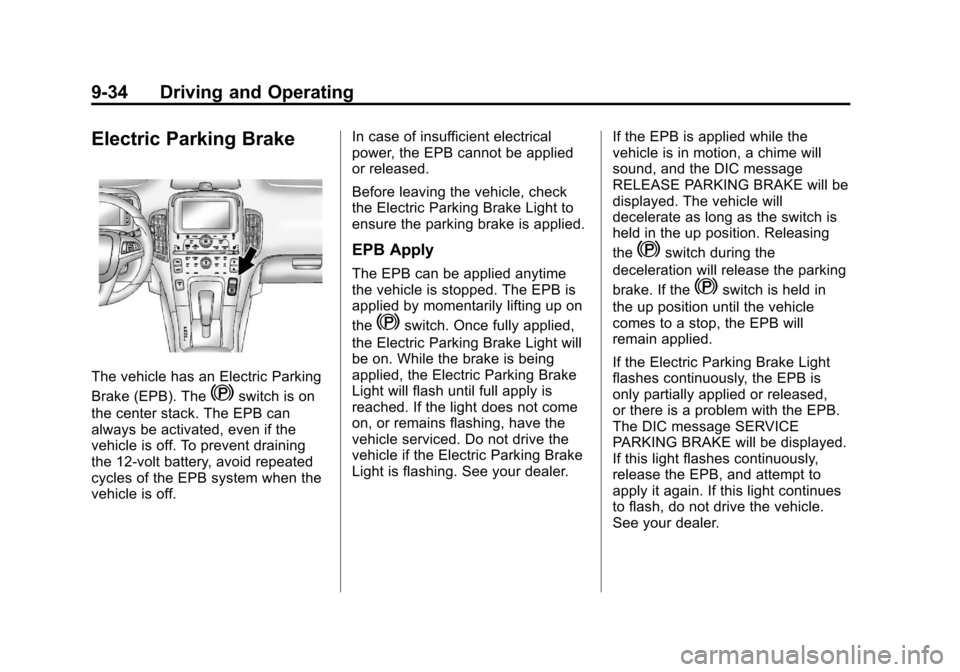
Electric Parking Brake
The vehicle has an Electric Parking
Brake (EPB). The
Yswitch is on
the center stack. The EPB can
always be activated, even if the
vehicle is off. To prevent draining
the 12‐volt battery, avoid repeated
cycles of the EPB system when the
vehicle is off. In case of insufficient electrical
power, the EPB cannot be applied
or released.
Before leaving the vehicle, check
the Electric Parking Brake Light to
ensure the parking brake is applied.
EPB Apply
The EPB can be applied anytime
the vehicle is stopped. The EPB is
applied by momentarily lifting up on
the
Yswitch. Once fully applied,
the Electric Parking Brake Light will
be on. While the brake is being
applied, the Electric Parking Brake
Light will flash until full apply is
reached. If the light does not come
on, or remains flashing, have the
vehicle serviced. Do not drive the
vehicle if the Electric Parking Brake
Light is flashing. See your dealer. If the EPB is applied while the
vehicle is in motion, a chime will
sound, and the DIC message
RELEASE PARKING BRAKE will be
displayed. The vehicle will
decelerate as long as the switch is
held in the up position. Releasing
the
Yswitch during the
deceleration will release the parking
brake. If the
Yswitch is held in
the up position until the vehicle
comes to a stop, the EPB will
remain applied.
If the Electric Parking Brake Light
flashes continuously, the EPB is
only partially applied or released,
or there is a problem with the EPB.
The DIC message SERVICE
PARKING BRAKE will be displayed.
If this light flashes continuously,
release the EPB, and attempt to
apply it again. If this light continues
to flash, do not drive the vehicle.
See your dealer.
Page 273 of 454

Black plate (35,1)Chevrolet Volt Owner Manual - 2012
Driving and Operating 9-35
If the Service Electric Parking Brake
Light is on, the EPB has detected a
system problem and is operating
with reduced functionality. To apply
the EPB when this light is on, lift up
on the
Yswitch and hold it in the
up position. Full application of the
parking brake by the EPB system
may take a longer period of time
than normal when this light is on.
Continue to hold the
Yswitch until
the Electric Parking Brake Light
remains on. If the Service Electric
Parking Brake Light is on, see your
dealer.
If the EPB fails to apply, the rear
wheels should be blocked to
prevent vehicle movement.
For maximum EPB force when
parking on a hill, pull the EPB
switch twice.
EPB Release
To release the EPB, place the
vehicle in ON/RUN, apply and hold
the brake pedal, and push down
momentarily on the
Yswitch.
If attempting to release the EPB
without the brake pedal applied, a
chime will sound, and the DIC
message STEP ON BRAKE TO
RELEASE PARK BRAKE will be
displayed. The EPB is released
when the Electric Parking Brake
Light is off.
If the Service Electric Parking Brake
Light is on, the EPB has detected a
system problem, and is operating
with reduced functionality. To
release the EPB when this light is
on, push down on the
Yswitch
and hold it in the down position.
EPB release may take a longer
period of time than normal when this
light is on. Continue to hold the
Y
switch until the Electric Parking
Brake Light is off. If the light is on,
see your dealer. Notice:
Driving with the parking
brake on can overheat the brake
system and cause premature
wear or damage to brake system
parts. Make sure that the parking
brake is fully released and the
Electric Parking Brake Light is off
before driving.
Automatic EPB Release
The EPB will automatically release if
the vehicle is running, placed into
gear, and an attempt is made to
drive away. Avoid rapid acceleration
when the EPB is applied, to
preserve parking brake lining life.
See Electric Parking Brake Light on
page 5‑22, Service Electric Parking
Brake Light on page 5‑23, and
Brake System Messages on
page 5‑48.
Page 274 of 454

Black plate (36,1)Chevrolet Volt Owner Manual - 2012
9-36 Driving and Operating
Regenerative Braking
Regenerative braking takes some of
the energy from the moving vehicle
and turns it back into electrical
energy. This energy is then stored
back into the high voltage battery
system, contributing to increased
energy efficiency.
The hydraulic disc brakes work with
the regenerative braking to ensure
effective braking, such as when a
high braking demand is requested.
The braking system is computer
controlled and blends the
regenerative braking with the
conventional hydraulic disc brakes
to meet any requirements for
deceleration. The controllerinterprets the braking request and
uses regenerative braking,
conventional hydraulic braking, or a
combination of both as necessary.
Because the controller applies the
hydraulic brakes through its high
pressure accumulator, you may
occasionally hear the motor‐driven
pump when it recharges the system.
This is normal.
See
Warning Lights, Gauges, and
Indicators on page 5‑8 andDriver
Information Center (DIC) on
page 5‑45. In the event of a
controller problem, the brake pedal
may be harder to push and the
stopping distance may be longer.
Ride Control Systems
Traction Control
System (TCS)
The vehicle has a Traction Control
System (TCS) that limits wheel spin.
The system operates if it senses
that one or both of the drive wheels
are slipping or beginning to lose
traction. When this happens, the
system brakes the spinning wheel(s)
and/or reduces power to limit
wheel spin.
The system may be heard or felt
while it is working, but this is
normal.
To assist with directional control of
the vehicle, TCS automatically
comes on whenever the vehicle is
turned on. To limit wheel spin,
especially in slippery road
conditions, the system should
always be left on. But, TCS can be
turned off if needed.
Page 275 of 454

Black plate (37,1)Chevrolet Volt Owner Manual - 2012
Driving and Operating 9-37
When the vehicle is started and
begins to move, the system
performs several diagnostic checks
to ensure there are no problems.
The system may be heard or felt
while it is working. This is normal
and does not mean there is a
problem with the vehicle. The
system should initialize before the
vehicle reaches 32 km/h (20 mph).
In some cases, it may take
approximately 3.2 km (2 mi) of
driving before the system initializes.
The TCS may activate on dry or
rough roads or under conditions
such as heavy acceleration while
turning or abrupt changes in output
from the electric drive unit. When
this happens, a reduction in
acceleration may be noticed, or a
noise or vibration may be heard.
This is normal.dflashes to indicate that TCS is
active. See Traction Control System
(TCS)/StabiliTrak
®Light on
page 5‑25 for more information.
If there is a problem detected with
TCS, SERVICE TRACTION
CONTROL is displayed on the
Driver Information Center (DIC).
See Ride Control System Messages
on page 5‑53. When this message
is displayed and
dcomes on and
stays on, the vehicle is safe to drive
but the system is not operational.
Driving should be adjusted
accordingly.
If
dcomes on and stays on, reset
the system:
1. Stop the vehicle.
2. Turn the engine off and wait 15 seconds.
3. Start the engine.
If
dstill comes on and stays on, the
vehicle needs service. Notice:
Do not repeatedly brake
or accelerate heavily when TCS is
off. The vehicle's driveline could
be damaged.
TCS can be turned off by pressing
and releasing the TCS/ESC button
located on the overhead console.
When TCS is turned off,
icomes
on, and the appropriate DIC
message also displays. See Ride
Control System Messages on
page 5‑53. With TCS turned off, the
system does not limit wheel spin.