2012 CHEVROLET SONIC clock
[x] Cancel search: clockPage 274 of 352

Black plate (66,1)Chevrolet Sonic Owner Manual - 2012
10-66 Vehicle Care
SeeIf a Tire Goes Flat on
page 10‑58 for other important
safety warnings.
1. Remove the compressor from its storage location. See Storing the
Tire Sealant and Compressor Kit
on page 10‑67.
2. Remove the air only hose (J) and the power plug (I) from the
bottom of the compressor.
3. Place the compressor on the ground near the flat tire.
Make sure the tire valve stem is
positioned close to the ground
so the hose will reach it.
4. Remove the valve stem cap from the flat tire by turning it
counterclockwise.
5. Attach the air only hose (J) to the tire valve stem by turning it
clockwise until tight.
6. Plug the power plug (I) into the accessory power outlet in the
vehicle. Unplug all items from
other accessory power outlets.
See Power Outlets on page 5‑5. If the vehicle has an accessory
power outlet, do not use the
cigarette lighter.
If the vehicle only has a cigarette
lighter, use the cigarette lighter.
Do not pinch the power plug
cord in the door or window.
7. Start the vehicle. The vehicle must be running while using the
air compressor.
8. Press the on/off button (E) to turn the tire sealant and
compressor kit on.
The compressor will inflate the
tire with air only.
9. Inflate the tire to the recommended inflation pressure
using the pressure gauge (H).
The recommended inflation
pressure can be found on the
Tire and Loading Information
label. See Tire Pressure on
page 10‑45.
The pressure gauge (H) may
read higher than the actual tire
pressure while the compressor is on. Turn the compressor off to
get an accurate pressure
reading. The compressor may
be turned on/off until the correct
pressure is reached.
Notice: If the recommended
pressure cannot be reached after
approximately 25 minutes, the
vehicle should not be driven
farther. The tire is too severely
damaged and the tire sealant and
compressor kit cannot inflate the
tire. Remove the power plug from
the accessory power outlet and
unscrew the inflating hose from
the tire valve. See Roadside
Assistance Program on
page 13‑5.
10. Press the on/off button (E) to turn the tire sealant and
compressor kit off.
Be careful while handling the
compressor as it could be
warm after usage.
11. Unplug the power plug (I) from the accessory power outlet in
the vehicle.
Page 275 of 352

Black plate (67,1)Chevrolet Sonic Owner Manual - 2012
Vehicle Care 10-67
12. Turn the air only hose (J)counterclockwise to remove it
from the tire valve stem.
13. Replace the tire valve stem cap.
14. Return the air only hose (J) and power plug (I) back to their
original storage location.
15. Return the equipment to its original storage location in the
vehicle.
The tire sealant and compressor kit
has accessory adapters located in a
compartment on the bottom of its
housing that can be used to inflate
air mattresses, balls, etc.Storing the Tire Sealant
and Compressor Kit
The tire sealant and compressor kit
is located in the rear storage area.
1. Lift the trim cover.
2. Remove the tire sealant canister (A) and the
compressor (B). To store the tire sealant canister and
compressor:
1. Attach the sealant/air hose to
the sealant canister inlet valve.
2. Return the sealant canister and the compressor to their original
storage location.
Tire Changing
Removing the Spare Tire and
Tools
The compact spare tire and tools
are located in the storage
compartment in the rear of the
vehicle.
To access the spare tire and tools:
1. Open the trunk or liftgate. See
Trunk (Sedan) on page 2‑8 or
Liftgate (Hatchback) on
page 2‑10.
2. Lift the trim cover.
Page 276 of 352

Black plate (68,1)Chevrolet Sonic Owner Manual - 2012
10-68 Vehicle Care
3. Turn the retainercounterclockwise and remove it
from the compact spare.
4. Remove the compact spare tire. See Compact Spare Tire on
page 10‑73 for more information.A. Extension
B. Jack
C. Wheel Wrench
D. Strap
5. The jack and tools are stored below the spare tire. Remove
them from their container and
place them near the tire being
changed.
Removing the Flat Tire and
Installing the Spare Tire
1. Do a safety check before
proceeding. See If a Tire Goes
Flat on page 10‑58.
2. Remove the wheel cover, if the vehicle has one, to reach the
wheel bolts.
Page 277 of 352
Black plate (69,1)Chevrolet Sonic Owner Manual - 2012
Vehicle Care 10-69
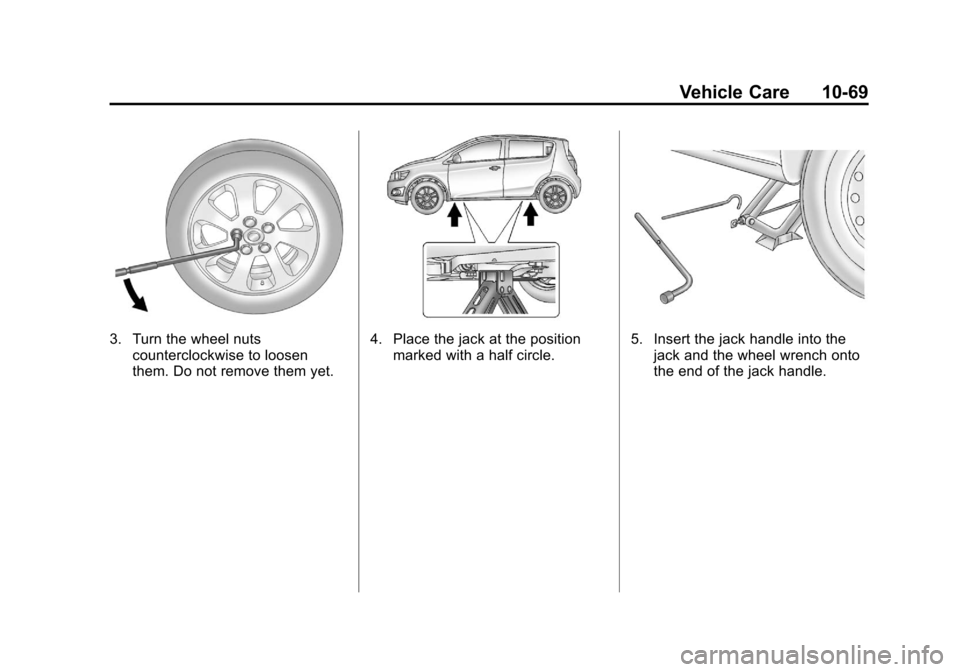
3. Turn the wheel nutscounterclockwise to loosen
them. Do not remove them yet.4. Place the jack at the positionmarked with a half circle.5. Insert the jack handle into thejack and the wheel wrench onto
the end of the jack handle.
Page 278 of 352
Black plate (70,1)Chevrolet Sonic Owner Manual - 2012
10-70 Vehicle Care
6. Turn the wheel wrenchclockwise until the lift head is
firmly contacting the proper
lifting point nearest the flat tire.
{WARNING
Getting under a vehicle when it is
jacked up is dangerous. If the
vehicle slips off the jack, you
could be badly injured or killed.
Never get under a vehicle when it
is supported only by a jack.
{WARNING
Raising the vehicle with the jack
improperly positioned can
damage the vehicle and even
make the vehicle fall. To help
avoid personal injury and vehicle
damage, be sure to fit the jack lift
head into the proper location
before raising the vehicle. 7. Turn the wheel wrench
clockwise to raise the vehicle.
Raise the vehicle far enough off
the ground so there is enough
room for the compact spare tire
to fit underneath the wheel well.
8. Turn the wheel nuts counterclockwise to
remove them.
9. Remove the flat tire.
{WARNING
Rust or dirt on a wheel, or on the
parts to which it is fastened, can
make wheel nuts become loose
after time. The wheel could come
off and cause an accident. When
changing a wheel, remove any
rust or dirt from places where the
wheel attaches to the vehicle. In
an emergency, a cloth or a paper
towel can be used; however, use
a scraper or wire brush later to
remove all rust or dirt.
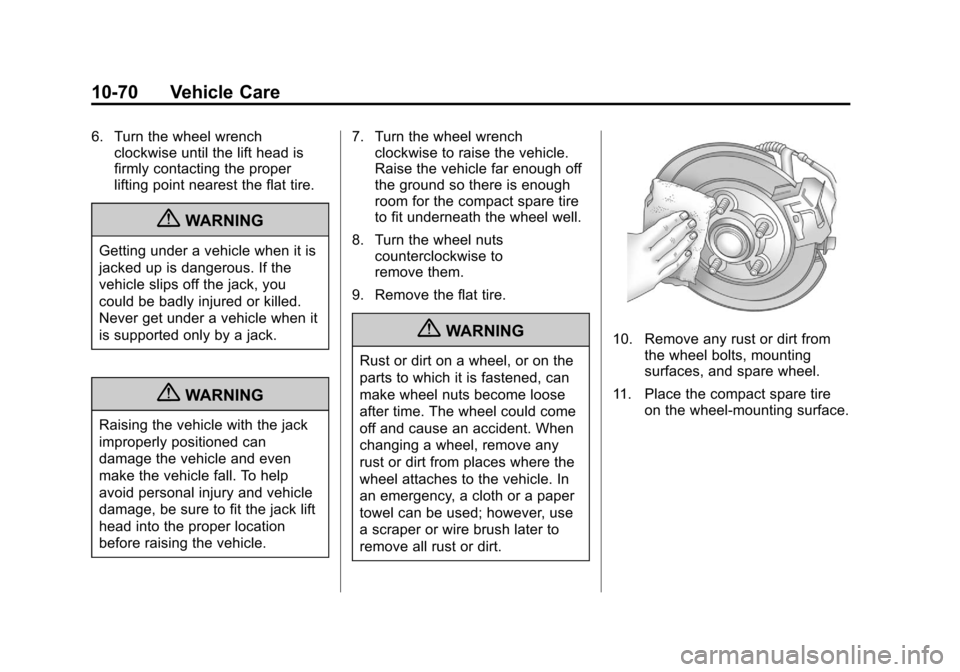
10. Remove any rust or dirt from the wheel bolts, mounting
surfaces, and spare wheel.
11. Place the compact spare tire on the wheel-mounting surface.
Page 279 of 352

Black plate (71,1)Chevrolet Sonic Owner Manual - 2012
Vehicle Care 10-71
{WARNING
Never use oil or grease on bolts
or nuts because the nuts might
come loose. The vehicle's wheel
could fall off, causing a crash.
12. Reinstall the wheel nuts. Tighten each nut by hand until
the wheel is held against
the hub.
13. Lower the vehicle by turning the wheel wrench
counterclockwise. Lower the
jack completely.
{WARNING
Wheel nuts that are improperly or
incorrectly tightened can cause
the wheels to become loose or
come off. The wheel nuts should
be tightened with a torque wrench
to the proper torque specification
after replacing. Follow the torque
(Continued)
WARNING (Continued)
specification supplied by the
aftermarket manufacturer when
using accessory locking wheel
nuts. SeeCapacities and
Specifications on page 12‑2 for
original equipment wheel nut
torque specifications.
Notice: Improperly tightened
wheel nuts can lead to brake
pulsation and rotor damage. To
avoid expensive brake repairs,
evenly tighten the wheel nuts in
the proper sequence and to the
proper torque specification. See
Capacities and Specifications on
page 12‑2 for the wheel nut
torque specification.
14. Tighten the wheel nuts firmly in
a crisscross sequence, as
shown.
Notice: Wheel covers will not fit
on the vehicle's compact spare.
If you try to put a wheel cover on
the compact spare, the cover or
the spare could be damaged.
Page 343 of 352

Black plate (3,1)Chevrolet Sonic Owner Manual - 2012
INDEX i-3
Child RestraintsInfants and Young
Children . . . . . . . . . . . . . . . . . . . . . 3-35
Lower Anchors and Tethers for Children . . . . . . . . . 3-41
Older Children . . . . . . . . . . . . . . . . 3-33
Securing . . . . . . . . . . . . . . . . 3-47, 3-49
Systems . . . . . . . . . . . . . . . . . . . . . . 3-37
Cigarette Lighter . . . . . . . . . . . . . . . . 5-6
Circuit Breakers . . . . . . . . . . . . . . 10-34
Cleaning Exterior Care . . . . . . . . . . . . . . . 10-80
Interior Care . . . . . . . . . . . . . . . . 10-83
Climate Control Systems . . . . . . . 8-1 Air Conditioning . . . . . . . . . . . . . . . 8-1
Heating . . . . . . . . . . . . . . . . . . . . . . . . 8-1
Clock . . . . . . . . . . . . . . . . . . . . . . . . . . . 5-4
Cluster, Instrument . . . . . . . . . . . . . 5-8
Clutch, Hydraulic . . . . . . . . . . . . . 10-13
Code Set Indicator . . . . . . . . . . . . . 5-15 Collision Damage Repair . . . . . . 13-9
Compact Spare Tire . . . . . . . . . . 10-73
Compartment . . . . . . . . . . . . . . . . . . . 4-1
Load . . . . . . . . . . . . . . . . . . . . . . . . . . . 4-1
Compass . . . . . . . . . . . . . . . . . . . . . . . 5-4
Compressor Kit, Tire Sealant . . . . . . . . . . . . . . . . . . . . . . 10-60
Connections, OnStar
®. . . . . . . . . 14-4
Control of a Vehicle . . . . . . . . . . . . . 9-4
Convex Mirrors . . . . . . . . . . . . . . . . 2-12
Coolant Engine . . . . . . . . . . . . . . . . . . . . . . 10-16
Engine TemperatureWarning Light . . . . . . . . . . . . . . . 5-18
Cooling System . . . . . . . . . . . . . . . 10-15
Courtesy Lamps . . . . . . . . . . . . . . . . 6-5
Courtesy Transportation Program . . . . . . . . . . . . . . . . . . . . . . 13-8
Cover Cargo . . . . . . . . . . . . . . . . . . . . . . . . . . 4-2 Cruise Control . . . . . . . . . . . . . . . . . 9-32
Light . . . . . . . . . . . . . . . . . . . . . . . . . . 5-22
Customer Assistance . . . . . . . . . . 13-4 Offices . . . . . . . . . . . . . . . . . . . . . . . . 13-3
Text Telephone (TTY)Users . . . . . . . . . . . . . . . . . . . . . . . 13-4
Customer Information
Service PublicationsOrdering Information . . . . . . .13-11
Customer Satisfaction Procedure . . . . . . . . . . . . . . . . . . . . 13-1
D
Damage Repair, Collision . . . . . . 13-9
Danger, Warnings, and
Cautions . . . . . . . . . . . . . . . . . . . . . . . . iii
Data Recorders, Event . . . . . . . 13-14
Daytime Running Lamps (DRL) . . . . . . . . . . . . . . . . . . 6-2
Indicator Light . . . . . . . . . . . . . . . . 5-21
Defensive Driving . . . . . . . . . . . . . . . 9-3
Delayed Locking . . . . . . . . . . . . . . . . 2-7