2012 CHEVROLET SILVERADO window
[x] Cancel search: windowPage 1 of 584

Black plate (1,1)Chevrolet Silverado Owner Manual - 2012
2012 Chevrolet Silverado Owner ManualM
In Brief. . . . . . . . . . . . . . . . . . . . . . . . 1-1
Instrument Panel . . . . . . . . . . . . . . 1-2
Initial Drive Information . . . . . . . . 1-8
Vehicle Features . . . . . . . . . . . . . 1-25
Performance and Maintenance . . . . . . . . . . . . . . . . 1-33
Keys, Doors, and Windows . . . . . . . . . . . . . . . . . . . . 2-1
Keys and Locks . . . . . . . . . . . . . . . 2-2
Doors . . . . . . . . . . . . . . . . . . . . . . . . . . 2-9
Vehicle Security . . . . . . . . . . . . . . 2-11
Exterior Mirrors . . . . . . . . . . . . . . . 2-14
Interior Mirrors . . . . . . . . . . . . . . . . 2-17
Windows . . . . . . . . . . . . . . . . . . . . . 2-18
Roof . . . . . . . . . . . . . . . . . . . . . . . . . . 2-20 Seats and Restraints
. . . . . . . . . 3-1
Head Restraints . . . . . . . . . . . . . . . 3-2
Front Seats . . . . . . . . . . . . . . . . . . . . 3-3
Rear Seats . . . . . . . . . . . . . . . . . . . 3-11
Safety Belts . . . . . . . . . . . . . . . . . . 3-13
Airbag System . . . . . . . . . . . . . . . . 3-23
Child Restraints . . . . . . . . . . . . . . 3-42
Storage . . . . . . . . . . . . . . . . . . . . . . . 4-1
Storage Compartments . . . . . . . . 4-1
Instruments and Controls . . . . 5-1
Controls . . . . . . . . . . . . . . . . . . . . . . . 5-2
Warning Lights, Gauges, and Indicators . . . . . . . . . . . . . . . . . . . 5-12
Information Displays . . . . . . . . . . 5-32
Vehicle Messages . . . . . . . . . . . . 5-42
Vehicle Personalization . . . . . . . 5-52
Universal Remote System . . . . 5-60 Lighting
. . . . . . . . . . . . . . . . . . . . . . . 6-1
Exterior Lighting . . . . . . . . . . . . . . . 6-1
Interior Lighting . . . . . . . . . . . . . . . . 6-8
Lighting Features . . . . . . . . . . . . . . 6-9
Infotainment System . . . . . . . . . 7-1
Introduction . . . . . . . . . . . . . . . . . . . . 7-1
Radio . . . . . . . . . . . . . . . . . . . . . . . . . . 7-8
Audio Players . . . . . . . . . . . . . . . . 7-16
Rear Seat Infotainment . . . . . . . 7-40
Phone . . . . . . . . . . . . . . . . . . . . . . . . 7-52
Trademarks and License Agreements . . . . . . . . . . . . . . . . . 7-59
Climate Controls . . . . . . . . . . . . . 8-1
Climate Control Systems . . . . . . 8-1
Air Vents . . . . . . . . . . . . . . . . . . . . . 8-11
Page 7 of 584

Black plate (1,1)Chevrolet Silverado Owner Manual - 2012
In Brief 1-1
In Brief
Instrument Panel
Instrument Panel(Base/Uplevel Version) . . . . . . 1-2
Instrument Panel (Premium Version) . . . . . . . . . . . 1-6
Initial Drive Information
Initial Drive Information . . . . . . . . 1-8
Remote Keyless Entry (RKE)System . . . . . . . . . . . . . . . . . . . . . . 1-8
Remote Vehicle Start . . . . . . . . . 1-8
Door Locks . . . . . . . . . . . . . . . . . . . 1-9
Windows . . . . . . . . . . . . . . . . . . . . . . 1-9
Seat Adjustment . . . . . . . . . . . . . 1-10
Memory Features . . . . . . . . . . . . 1-13
Heated and Ventilated Seats . . . . . . . . . . . . . . . . . . . . . . . 1-14
Head Restraint Adjustment . . . . . . . . . . . . . . . . . 1-14
Safety Belts . . . . . . . . . . . . . . . . . . 1-15
Passenger Sensing System . . . . . . . . . . . . . . . . . . . . . 1-15
Mirror Adjustment . . . . . . . . . . . . 1-16 Steering Wheel
Adjustment . . . . . . . . . . . . . . . . . 1-17
Throttle and Brake Pedal Adjustment . . . . . . . . . . . . . . . . . 1-17
Interior Lighting . . . . . . . . . . . . . . 1-17
Exterior Lighting . . . . . . . . . . . . . 1-18
Windshield Wiper/Washer . . . . 1-19
Climate Controls . . . . . . . . . . . . . 1-20
Transmission . . . . . . . . . . . . . . . . 1-22
Four-Wheel Drive . . . . . . . . . . . . 1-23Vehicle Features
Radio(s) . . . . . . . . . . . . . . . . . . . . . 1-25
Satellite Radio . . . . . . . . . . . . . . . 1-26
Portable Audio Devices . . . . . . 1-26
Bluetooth
®. . . . . . . . . . . . . . . . . . . 1-27
Steering Wheel Controls . . . . . 1-27
Cruise Control . . . . . . . . . . . . . . . 1-28
Navigation System . . . . . . . . . . . 1-28
Driver Information
Center (DIC) . . . . . . . . . . . . . . . 1-28
Rear Vision Camera (RVC) . . . . . . . . . . . . . 1-29
Ultrasonic Parking Assist . . . . 1-30
Power Outlets . . . . . . . . . . . . . . . 1-30
Universal Remote System . . . 1-30
Sunroof . . . . . . . . . . . . . . . . . . . . . . 1-31
Performance and Maintenance
StabiliTrak®System . . . . . . . . . 1-33
Tire Pressure Monitor . . . . . . . . 1-33
Engine Oil Life System . . . . . . 1-34
Fuel E85 (85% Ethanol) . . . . . 1-34
Driving for Better Fuel Economy . . . . . . . . . . . . . . . . . . . 1-34
Roadside Assistance Program . . . . . . . . . . . . . . . . . . . . 1-35
OnStar
®. . . . . . . . . . . . . . . . . . . . . 1-35
Page 15 of 584

Black plate (9,1)Chevrolet Silverado Owner Manual - 2012
In Brief 1-9
When the vehicle starts, the parking
lamps will turn on and remain on as
long as the engine is running. The
doors will be locked and the climate
control system may come on.
The engine will continue to run for
10 minutes. Repeat the steps for a
10-minute time extension. Remote
start can be extended only once.
Canceling a Remote Start
To cancel a remote start:
.Aim the RKE transmitter at the
vehicle and press and hold
/
until the parking lamps turn off.
.Turn on the hazard warning
flashers.
.Turn the ignition on and then
back off.
See Remote Vehicle Start on
page 2‑5.
Door Locks
There are several ways to lock and
unlock the vehicle.
From outside, use the Remote
Keyless Entry (RKE) transmitter or
the key in the driver door.
From inside, use the power door
locks or the manual door locks.
To lock or unlock the door with the
manual locks, push down or pull up
on the manual lock knob.
Power Door Locks
If available, the switches are on the
front doors.
K: Press to unlock the doors.
Q:Press to lock the doors.
See Door Locks on page 2‑7.
Windows
Turn the hand crank on each door
to manually raise or lower the
manual windows.
Power Windows
Crew Cab Shown
If available, the power window
switches are located on each door.
The driver door also has a switch for
the passenger and rear windows.
Push the switch to lower the
window. Pull the switch up to
raise it.
For more information, see:
.Windows on page 2‑18.
.Power Windows on page 2‑18.
Page 16 of 584
Black plate (10,1)Chevrolet Silverado Owner Manual - 2012
1-10 In Brief
Power Sliding Rear Window
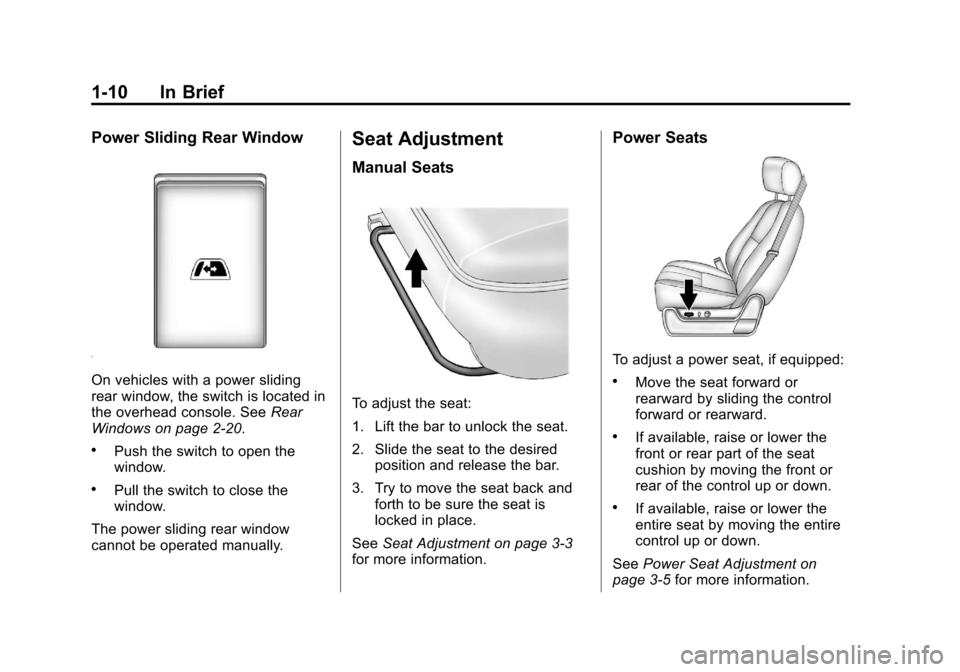
On vehicles with a power sliding
rear window, the switch is located in
the overhead console. SeeRear
Windows on page 2‑20.
.Push the switch to open the
window.
.Pull the switch to close the
window.
The power sliding rear window
cannot be operated manually.
Seat Adjustment
Manual Seats
To adjust the seat:
1. Lift the bar to unlock the seat.
2. Slide the seat to the desired position and release the bar.
3. Try to move the seat back and forth to be sure the seat is
locked in place.
See Seat Adjustment on page 3‑3
for more information.
Power Seats
To adjust a power seat, if equipped:
.Move the seat forward or
rearward by sliding the control
forward or rearward.
.If available, raise or lower the
front or rear part of the seat
cushion by moving the front or
rear of the control up or down.
.If available, raise or lower the
entire seat by moving the entire
control up or down.
See Power Seat Adjustment on
page 3‑5 for more information.
Page 26 of 584
Black plate (20,1)Chevrolet Silverado Owner Manual - 2012
1-20 In Brief
Climate Controls
These systems control the heating, cooling, and ventilation.
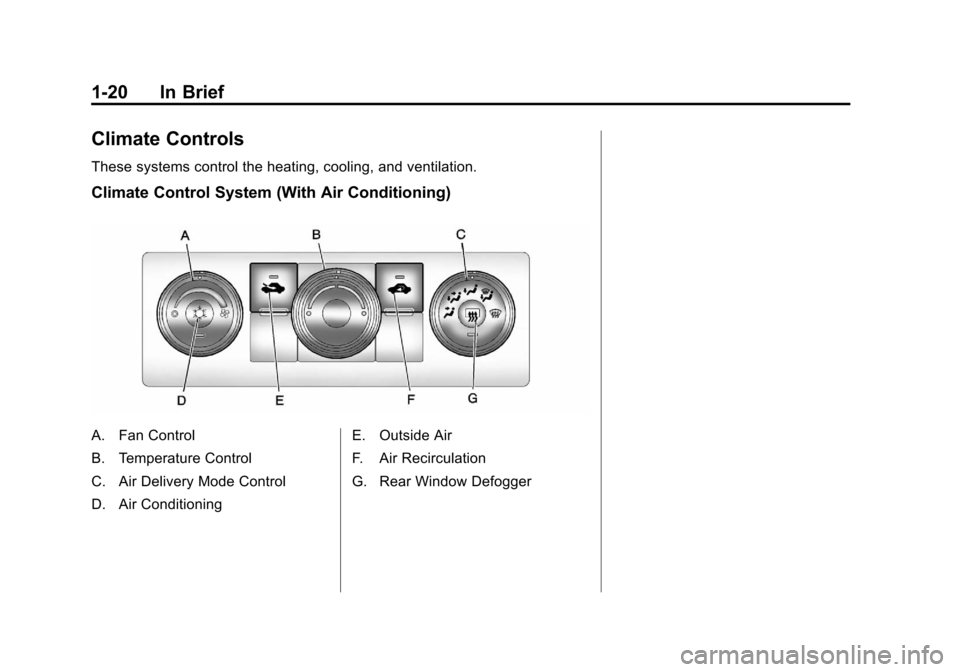
Climate Control System (With Air Conditioning)
A. Fan Control
B. Temperature Control
C. Air Delivery Mode Control
D. Air ConditioningE. Outside Air
F. Air Recirculation
G. Rear Window Defogger
Page 28 of 584
Black plate (22,1)Chevrolet Silverado Owner Manual - 2012
1-22 In Brief
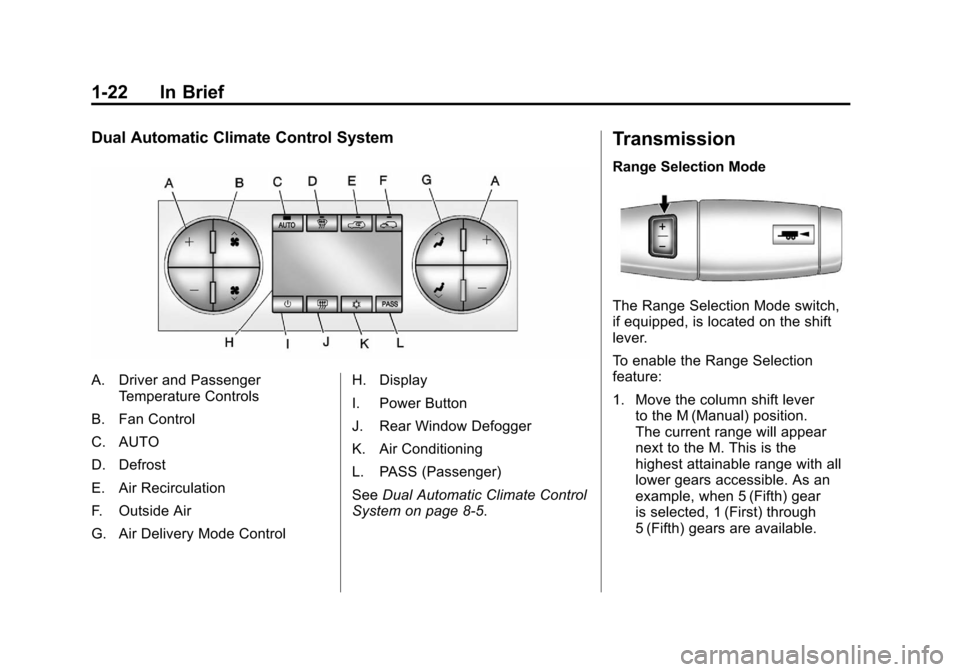
Dual Automatic Climate Control System
A. Driver and PassengerTemperature Controls
B. Fan Control
C. AUTO
D. Defrost
E. Air Recirculation
F. Outside Air
G. Air Delivery Mode Control H. Display
I. Power Button
J. Rear Window Defogger
K. Air Conditioning
L. PASS (Passenger)
See
Dual Automatic Climate Control
System on page 8‑5.
Transmission
Range Selection Mode
The Range Selection Mode switch,
if equipped, is located on the shift
lever.
To enable the Range Selection
feature:
1. Move the column shift lever to the M (Manual) position.
The current range will appear
next to the M. This is the
highest attainable range with all
lower gears accessible. As an
example, when 5 (Fifth) gear
is selected, 1 (First) through
5 (Fifth) gears are available.
Page 43 of 584

Black plate (1,1)Chevrolet Silverado Owner Manual - 2012
Keys, Doors, and Windows 2-1
Keys, Doors, and
Windows
Keys and Locks
Keys . . . . . . . . . . . . . . . . . . . . . . . . . . 2-2
Remote Keyless Entry (RKE)System . . . . . . . . . . . . . . . . . . . . . . 2-3
Remote Keyless Entry (RKE) System Operation . . . . . . . . . . . 2-3
Remote Vehicle Start . . . . . . . . . 2-5
Door Locks . . . . . . . . . . . . . . . . . . . 2-7
Power Door Locks . . . . . . . . . . . . 2-8
Delayed Locking . . . . . . . . . . . . . . 2-8
Automatic Door Locks . . . . . . . . . 2-8
Lockout Protection . . . . . . . . . . . . 2-8
Safety Locks . . . . . . . . . . . . . . . . . . 2-8
Doors
Rear Doors (Extended Cab) . . . . . . . . . . . . . . 2-9
Tailgate . . . . . . . . . . . . . . . . . . . . . . 2-10
Vehicle Security
Vehicle Security . . . . . . . . . . . . . . 2-11
Anti-theft Alarm System . . . . . . 2-11
Immobilizer . . . . . . . . . . . . . . . . . . 2-12
Immobilizer Operation . . . . . . . 2-12
Exterior Mirrors
Convex Mirrors . . . . . . . . . . . . . . 2-14
Manual Mirrors . . . . . . . . . . . . . . . 2-14
Trailer-Tow Mirrors . . . . . . . . . . . 2-15
Power Mirrors . . . . . . . . . . . . . . . . 2-15
Folding Mirrors . . . . . . . . . . . . . . . 2-15
Heated Mirrors . . . . . . . . . . . . . . . 2-16
Park Tilt Mirrors . . . . . . . . . . . . . . 2-17
Interior Mirrors
Manual Rearview Mirror . . . . . . 2-17
Automatic Dimming Rearview Mirror . . . . . . . . . . . . . . . . . . . . . . . 2-17
Windows
Windows . . . . . . . . . . . . . . . . . . . . . 2-18
Manual Windows . . . . . . . . . . . . 2-18
Power Windows . . . . . . . . . . . . . 2-18
Rear Windows . . . . . . . . . . . . . . . 2-20
Sun Visors . . . . . . . . . . . . . . . . . . . 2-20
Roof
Sunroof (Extended Cab) . . . . . 2-20
Sunroof (Crew Cab) . . . . . . . . . 2-22
Page 44 of 584

Black plate (2,1)Chevrolet Silverado Owner Manual - 2012
2-2 Keys, Doors, and Windows
Keys and Locks
Keys
{WARNING
Leaving children in a vehicle with
the ignition key is dangerous for
many reasons. Children or others
could be badly injured or even
killed. They could operate the
power windows or other controls
or even make the vehicle move.
The windows will function with the
keys in the ignition and children
could be seriously injured or killed
if caught in the path of a closing
window. Do not leave the keys in
a vehicle with children.
The key is used for the ignition and
all door locks.
The key has a bar-coded key tag
that the dealer or qualified locksmith
can use to make new keys. Store
this information in a safe place,
not in the vehicle.See your dealer if a replacement
key or additional key is needed.
Notice:
If the keys get locked in
the vehicle, it may have to be
damaged to get them out.
Always carry a spare key.
If you are locked out of the vehicle,
call the Roadside Assistance
Center. See Roadside Assistance
Program (U.S. and Canada) on
page 13‑7 orRoadside Assistance
Program (Mexico) on page 13‑9.
With an active OnStar subscription,
an OnStar Advisor may remotely
unlock the vehicle. See OnStar
Overview on page 14‑1.