Page 149 of 378

Black plate (3,1)Chevrolet Orlando Owner Manual - 2012
Infotainment System 7-3
D.#
.CD: Moves up one folder
level while playing an MP3.
E.
k
.CD: Pauses playback, and
stops playback.
F.
!
.CD: Moves back one folder
level while playing an MP3.
G.
l
.Radio: Seeks the next
station.
.CD: Selects the next track
or fast forwards within a
track.
H. CLOCK
.Opens the clock menu. I. INFO
.Radio: Shows available
information about the
current station.
.CD: Shows available
information about the
current track.
J. TONE
.Opens the tone menu.
K. AS
.Radio: Opens the
autostore stations list.
L. BAND
.Changes the band while
listening to the radio.
.Selects the radio when
listening to a different
audio source.
M. CD/AUX
.Selects the CD player or
an external audio source.
N. CONFIG
.Opens the settings menu. O.
5\>
.Opens the phone
main menu.
.Mutes the audio system.
P. FAV
.Radio: Opens the
favorites list.
Q. BACK
.Menu: Moves one
level back.
.Character Input: Deletes
the last character.
R. MENU
.Turn to open menus,
highlight menu items,
or set numeric values while
in a menu.
.Press to select menu
items.
.Radio: Manually selects
radio stations.
.CD: Selects tracks.
Page 150 of 378
Black plate (4,1)Chevrolet Orlando Owner Manual - 2012
7-4 Infotainment System
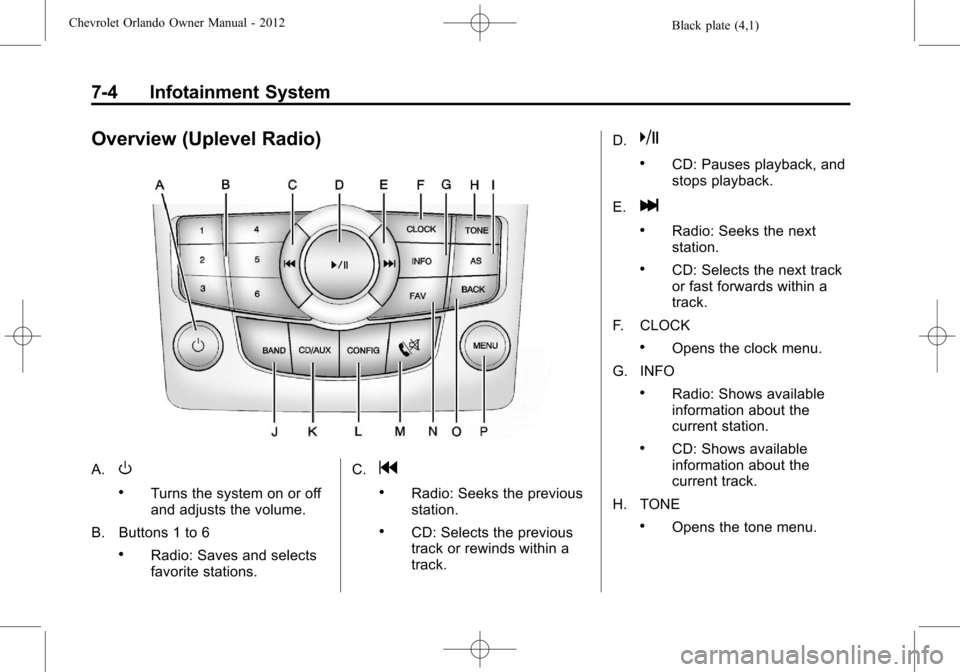
Overview (Uplevel Radio)
A.O
.Turns the system on or off
and adjusts the volume.
B. Buttons 1 to 6
.Radio: Saves and selects
favorite stations. C.
g
.Radio: Seeks the previous
station.
.CD: Selects the previous
track or rewinds within a
track.D.
k
.CD: Pauses playback, and
stops playback.
E.
l
.Radio: Seeks the next
station.
.CD: Selects the next track
or fast forwards within a
track.
F. CLOCK
.Opens the clock menu.
G. INFO
.Radio: Shows available
information about the
current station.
.CD: Shows available
information about the
current track.
H. TONE
.Opens the tone menu.
Page 151 of 378
Black plate (5,1)Chevrolet Orlando Owner Manual - 2012
Infotainment System 7-5
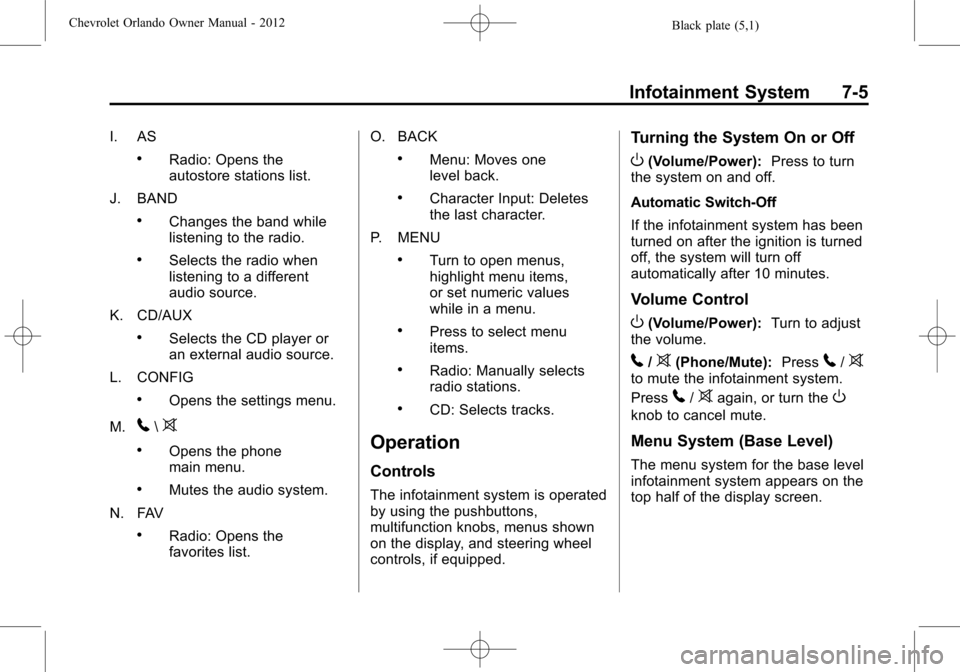
I. AS
.Radio: Opens the
autostore stations list.
J. BAND
.Changes the band while
listening to the radio.
.Selects the radio when
listening to a different
audio source.
K. CD/AUX
.Selects the CD player or
an external audio source.
L. CONFIG
.Opens the settings menu.
M.
5\>
.Opens the phone
main menu.
.Mutes the audio system.
N. FAV
.Radio: Opens the
favorites list. O. BACK
.Menu: Moves one
level back.
.Character Input: Deletes
the last character.
P. MENU
.Turn to open menus,
highlight menu items,
or set numeric values
while in a menu.
.Press to select menu
items.
.Radio: Manually selects
radio stations.
.CD: Selects tracks.
Operation
Controls
The infotainment system is operated
by using the pushbuttons,
multifunction knobs, menus shown
on the display, and steering wheel
controls, if equipped.
Turning the System On or Off
O(Volume/Power): Press to turn
the system on and off.
Automatic Switch-Off
If the infotainment system has been
turned on after the ignition is turned
off, the system will turn off
automatically after 10 minutes.
Volume Control
O(Volume/Power): Turn to adjust
the volume.
5/>(Phone/Mute): Press5/>to mute the infotainment system.
Press
5/>again, or turn theO
knob to cancel mute.
Menu System (Base Level)
The menu system for the base level
infotainment system appears on the
top half of the display screen.
Page 152 of 378
Black plate (6,1)Chevrolet Orlando Owner Manual - 2012
7-6 Infotainment System
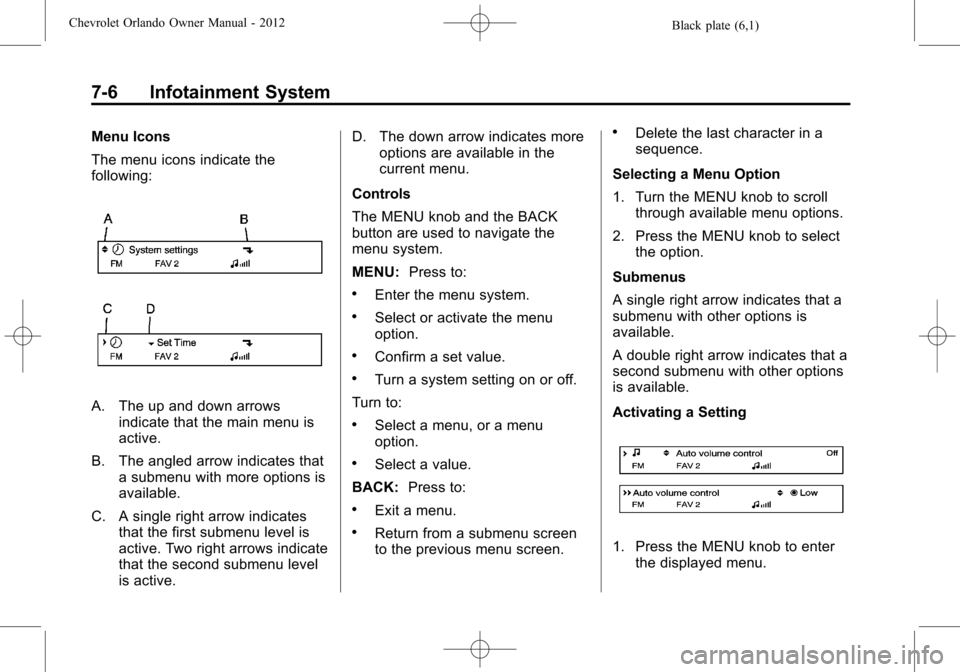
Menu Icons
The menu icons indicate the
following:
A. The up and down arrowsindicate that the main menu is
active.
B. The angled arrow indicates that a submenu with more options is
available.
C. A single right arrow indicates that the first submenu level is
active. Two right arrows indicate
that the second submenu level
is active. D. The down arrow indicates more
options are available in the
current menu.
Controls
The MENU knob and the BACK
button are used to navigate the
menu system.
MENU: Press to:
.Enter the menu system.
.Select or activate the menu
option.
.Confirm a set value.
.Turn a system setting on or off.
Turn to:
.Select a menu, or a menu
option.
.Select a value.
BACK: Press to:
.Exit a menu.
.Return from a submenu screen
to the previous menu screen.
.Delete the last character in a
sequence.
Selecting a Menu Option
1. Turn the MENU knob to scroll through available menu options.
2. Press the MENU knob to select the option.
Submenus
A single right arrow indicates that a
submenu with other options is
available.
A double right arrow indicates that a
second submenu with other options
is available.
Activating a Setting
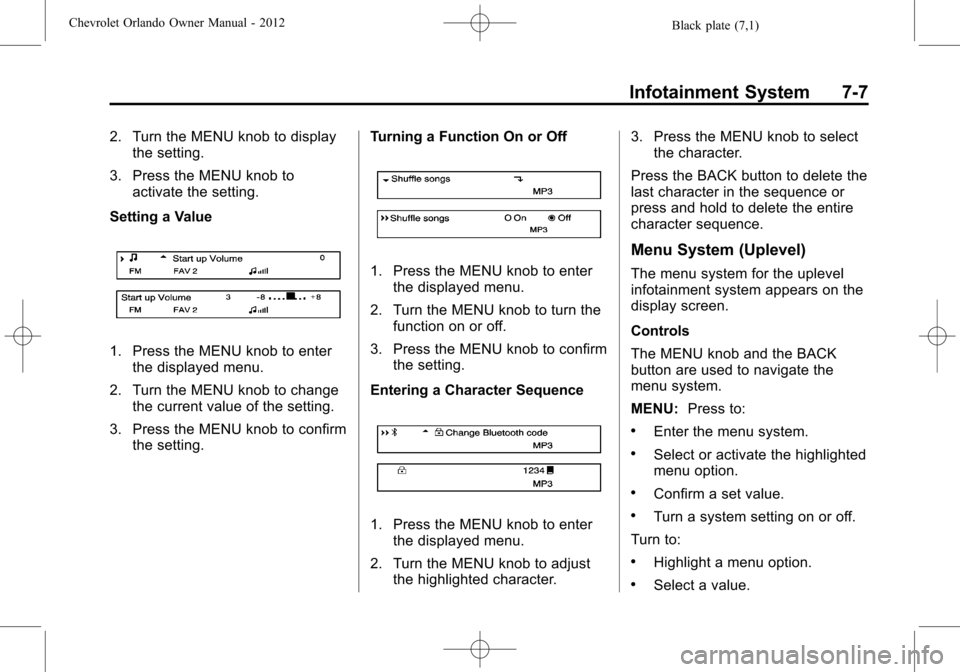
1. Press the MENU knob to enter the displayed menu.
Page 153 of 378
Black plate (7,1)Chevrolet Orlando Owner Manual - 2012
Infotainment System 7-7
2. Turn the MENU knob to displaythe setting.
3. Press the MENU knob to activate the setting.
Setting a Value
1. Press the MENU knob to enter the displayed menu.
2. Turn the MENU knob to change the current value of the setting.
3. Press the MENU knob to confirm the setting. Turning a Function On or Off
1. Press the MENU knob to enter
the displayed menu.
2. Turn the MENU knob to turn the function on or off.
3. Press the MENU knob to confirm the setting.
Entering a Character Sequence
1. Press the MENU knob to enter the displayed menu.
2. Turn the MENU knob to adjust the highlighted character. 3. Press the MENU knob to select
the character.
Press the BACK button to delete the
last character in the sequence or
press and hold to delete the entire
character sequence.
Menu System (Uplevel)
The menu system for the uplevel
infotainment system appears on the
display screen.
Controls
The MENU knob and the BACK
button are used to navigate the
menu system.
MENU: Press to:
.Enter the menu system.
.Select or activate the highlighted
menu option.
.Confirm a set value.
.Turn a system setting on or off.
Turn to:
.Highlight a menu option.
.Select a value.
Page 154 of 378
Black plate (8,1)Chevrolet Orlando Owner Manual - 2012
7-8 Infotainment System
BACK:Press to:
.Exit a menu.
.Return from a submenu screen
to the previous menu screen.
.Delete the last character in a
sequence.
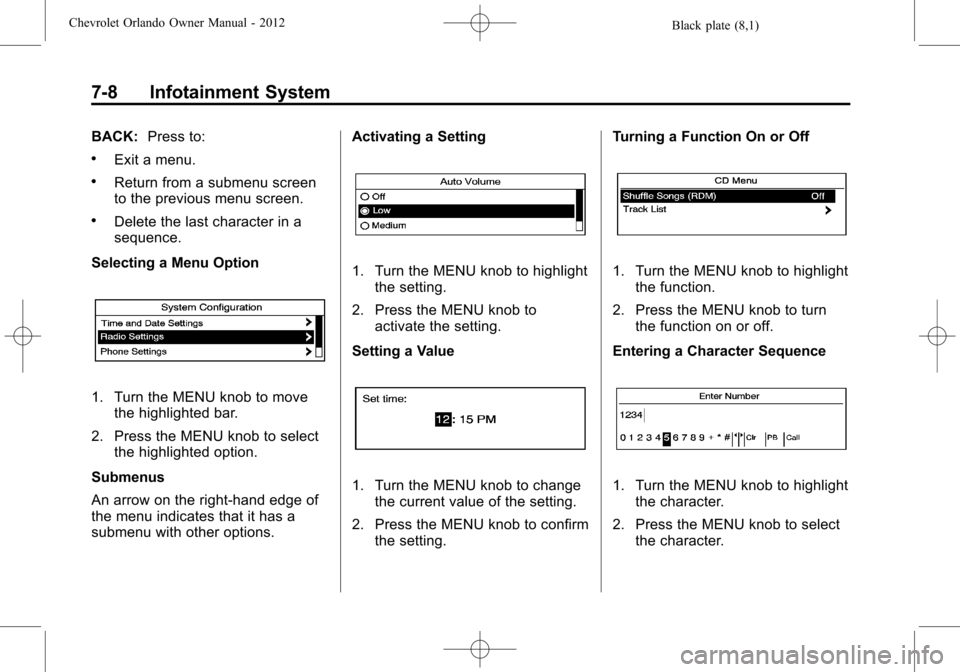
Selecting a Menu Option
1. Turn the MENU knob to move the highlighted bar.
2. Press the MENU knob to select the highlighted option.
Submenus
An arrow on the right-hand edge of
the menu indicates that it has a
submenu with other options. Activating a Setting
1. Turn the MENU knob to highlight
the setting.
2. Press the MENU knob to activate the setting.
Setting a Value
1. Turn the MENU knob to change the current value of the setting.
2. Press the MENU knob to confirm the setting. Turning a Function On or Off
1. Turn the MENU knob to highlight
the function.
2. Press the MENU knob to turn the function on or off.
Entering a Character Sequence
1. Turn the MENU knob to highlight the character.
2. Press the MENU knob to select the character.
Page 155 of 378
Black plate (9,1)Chevrolet Orlando Owner Manual - 2012
Infotainment System 7-9
Press the BACK button to delete the
last character in the sequence or
press and hold to delete the entire
character sequence.
Audio Settings
The audio settings can be set for
each radio band and each audio
player source.
To quickly reset an audio setting
value to 0:
1. Press the TONE button.
2. Select the audio setting.
3. Press and hold the MENUbutton until the value
changes to 0.
Press the BACK button to go back
to the Tone Settings menu.
Adjusting the Treble, Midrange,
and Bass
1. Press the TONE button.
2. Select Treble, Midrange, or Bass.
3. Select the value. Press the BACK button to go back
to the Tone Settings menu.
Adjusting the Fader and Balance
1. Press the TONE button.
2. Select Fader or Balance.
3. Select the value.
Press the BACK button to go back
to the Tone Settings menu.
Adjusting the EQ (Equalizer)
For vehicles that have an equalizer:
1. Press the TONE button.
2. Select EQ presets.
3. Select the setting.
Press the BACK button to go back
to the Tone Settings menu.
System Settings
Configuring the Number of
Favorite Pages
To configure the number of available
favorite pages:
1. Press the CONFIG button.
2. Select Radio Settings.
3. Select Radio Favorites.
4. Select the number of available
favorite pages.
5. Press the BACK button to go back to the System
Configuration menu.
Auto Volume
The auto volume feature
automatically adjusts the radio
volume to compensate for road and
wind noise as the vehicle speeds up
or slows down, so that the volume
level is consistent.
The level of volume compensation
can be selected, or the auto volume
feature can be turned off.
1. Press the CONFIG button.
2. Select Radio Settings.
3. Select Auto Volume.
4. Select the setting.
5. Press the BACK button to go back to the System
Configuration menu.
Page 156 of 378
Black plate (10,1)Chevrolet Orlando Owner Manual - 2012
7-10 Infotainment System
Maximum Startup Volume
The maximum volume played when
the radio is first turned on can
be set.
1. Press the CONFIG button.
2. Select Radio Settings.
3. Select Maximum StartupVolume.
4. Select the setting.
5. Press the BACK button to go back to the System
Configuration menu.Radio
AM-FM Radio
Control Buttons
The buttons used to control the
radio are:
BAND: Press to turn the radio on
and choose between AM, FM, and
XM™, if equipped.
MENU: Turn to navigate the
available menus and to search for
stations.
INFO: Press to display additional
information that may be available for
the current song.
gorl: Press to search for
stations.
FAV: Press to open the favorites
list and select the favorites page.
1 to 6: Press to select preset
stations.
AS (Autostore): Press to open the
autostore list.
RDS (Radio Data System)
The radio may have RDS. The RDS
feature is available for use only on
FM stations that broadcast RDS
information. This feature only works
when the information from the radio
station is available. In rare cases,
a radio station could broadcast
incorrect information that causes the
radio features to work improperly.
If this happens, contact the radio
station.
While the radio is tuned to an
FM-RDS station, the station name
or call letters display.
Radio Menus
Radio menus are available for AM
and FM.
Turn the MENU knob to open the
main radio menu for that band.
Selecting a Band
Press the BAND button to choose
AM, FM, or XM, if equipped. The
last station that was playing starts
playing again.