2012 CHEVROLET MALIBU light
[x] Cancel search: lightPage 222 of 398
Black plate (30,1)Chevrolet Malibu Owner Manual - 2012
9-30 Driving and Operating
Ride Control Systems
Traction Control
System (TCS)
The vehicle may have a Traction
Control System (TCS) that limits
wheel spin. This is especially
useful in slippery road conditions.
The system operates only if it
senses that the front wheels are
spinning too much or are beginning
to lose traction. When this happens,
the system works the front brakes
and reduces engine power by
closing the throttle and managing
engine spark to limit wheel spin.
This light will flash when the traction
control system is limiting wheel spin.The system may be heard or felt
while it is working, but this is
normal.
If the vehicle is in cruise control
when TCS begins to limit wheel
spin, the cruise control will
automatically disengage. The cruise
control may be re-engaged when
road conditions allow. See
Cruise
Control on page 9‑33.
When this light is on solid and
either the SERVICE TRACTION or
TRACTION OFF message is
displayed, the system will not limit
wheel spin.
Adjust your driving accordingly.
See Ride Control System Messages
on page 5‑28 for more information. The Traction Control System is
automatically enabled whenever the
vehicle is started. To limit wheel
spin, especially in slippery road
conditions, always leave the system
enabled. TCS can be turned off if
needed.
It is recommended to leave the
system on for normal driving
conditions, but it may be necessary
to turn the system off if the vehicle
is stuck in sand, mud, ice or snow,
and you want to
“rock”the vehicle to
attempt to free it. It may also be
necessary to turn off the system
when driving in extreme off-road
conditions where high wheel spin is
required. See If the Vehicle Is Stuck
on page 9‑10.
To turn the system off or on, press
and release this button located on
the center console.
Page 223 of 398
Black plate (31,1)Chevrolet Malibu Owner Manual - 2012
Driving and Operating 9-31
The traction off light comes on and
the DIC will display the appropriate
message as described previously
when the button is pressed.
Traction Control Operation
Traction control limits wheel spin by
reducing engine power to the
wheels (engine speed management)
and by applying brakes to each
individual wheel (brake-traction
control) as necessary.
The traction control system is
enabled automatically when the
vehicle is started, and it will activate
and flash the ESC/TCS light and
display the LOW TRACTION
message if it senses either of the
front wheels are spinning or
beginning to lose traction while
driving. For more information on theLOW TRACTION message, see
Ride Control System Messages on
page 5‑28.
Notice:
If the wheel(s) of one axle
are allowed to spin excessively
while the ESC/TCS, ABS and
Brake warning lights and the
SERVICE ESC and/or SERVICE
TRACTION messages are
displayed, the differential could
be damaged. The repairs would
not be covered by the vehicle
warranty. Reduce engine power
and do not spin the wheel(s)
excessively while these lights and
this message are displayed.
Notice: When traction control is
turned off, it is possible to lose
traction. If you attempt to shift
with the front wheels spinning
with a loss of traction, it is
possible to cause damage to the
transmission. Do not attempt to
shift when the front wheels do not
have traction. Damage caused by
misuse of the vehicle is not
covered. See your warranty book
for additional information. The traction control system may
activate on dry or rough roads or
under conditions such as heavy
acceleration while turning or
abrupt upshifts/downshifts of the
transmission. When this happens,
a reduction in acceleration may be
noticed, or a noise or vibration may
be heard. This is normal.
If the vehicle is in cruise control
when the system activates, the
ESC/TCS light will flash and the
cruise control will automatically
disengage. The cruise control
may be re-engaged when road
conditions allow. See
Cruise Control
on page 9‑33.
Adding non‐dealer accessories can
affect the vehicle's performance.
See Accessories and Modifications
on page 10‑3 for more information.
Page 224 of 398
Black plate (32,1)Chevrolet Malibu Owner Manual - 2012
9-32 Driving and Operating
Electronic Stability
Control (ESC)
The vehicle has an Electronic
Stability Control (ESC) system
which combines antilock brake,
traction and stability control systems
and helps the driver maintain
directional control of the vehicle in
most driving conditions.
When you first start the vehicle and
begin to drive away, the system
performs several diagnostic checks
to ensure there are no problems.
The system may be heard or felt
while it is working. This is normal
and does not mean there is a
problem with the vehicle. The
system should initialize before the
vehicle reaches 32 km/h (20 mph).
If the system fails to turn on or
activate, the ESC/TCS light will be
on solid, and the ESC OFF or
SERVICE ESC message will be
displayed.For more information, see
Ride
Control System Messages on
page 5‑28.
This light will flash on the instrument
panel cluster when the ESC system
is both on and activated.
The system may be heard or felt
while it is working; this is normal.
When the light is on solid and either
the SERVICE ESC or ESC OFF
message is displayed, the system
will not assist the driver in
maintaining directional control of the
vehicle. Adjust your driving
accordingly. See Ride Control
System Messages on page 5‑28.
The Electronic Stability Control
(ESC) system is automatically
enabled whenever the vehicle is
started. To assist the driver with vehicle directional control,
especially in slippery road
conditions, the system should
always be left on. But, ESC can be
turned off if needed.
If the vehicle is in cruise control
when the system begins to assist
the driver maintain directional
control of the vehicle, the ESC/TCS
light will flash and the cruise
control will automatically disengage.
The cruise control system may be
re-engaged when road conditions
allow. See
Cruise Control on
page 9‑33.
The ESC/TCS button is located on
the instrument panel.
Page 225 of 398
Black plate (33,1)Chevrolet Malibu Owner Manual - 2012
Driving and Operating 9-33
The traction control system can be
turned off or back on by pressing
the ESC/TCS button. To disable
both traction control and ESC,
press and hold the button briefly.
When the ESC system is turned off,
the traction off light and the ESC off
light will be on to warn the driver
that both traction control and ESC
are disabled. The TRACTION OFF
and ESC OFF messages will appear
on the DIC,It is recommended to leave the
system on for normal driving
conditions, but it may be necessary
to turn the system off if the vehicle
is stuck in sand, mud, ice or snow,
and you want to
“rock”the vehicle to
attempt to free it. It may also be
necessary to turn off the system
when driving in extreme off-road
conditions where high wheel spin is
required. See If the Vehicle Is Stuck
on page 9‑10.
ESC may also turn off automatically
if it determines that a problem exists
with the system. The ESC OFF and
SERVICE ESC messages and the
ESC/TCS light will be on solid to
warn the driver that ESC is disabled
and requires service. If the problem
does not clear after restarting the
vehicle, see your dealer for service.
See Ride Control System Messages
on page 5‑28 for more information.
Adding non‐dealer accessories can
affect the vehicle's performance.
See Accessories and Modifications
on page 10‑3 for more information.
Cruise Control
Cruise control lets a speed of about
40 km/h (25 mph) or more be
maintained without keeping your
foot on the accelerator. This can
really help on long trips. Cruise
control does not work at speeds
below 40 km/h (25 mph).
When the brakes are applied,
the cruise control shuts off.
If the vehicle is in cruise control and
the Traction Control System (TCS)
or Enhanced Traction System (ETS)
begins to limit wheel spin, the cruise
control automatically disengages.
SeeTraction Control System (TCS)
on page 9‑30 andElectronic
Stability Control (ESC) on
page 9‑32. When road conditions
allow, the cruise control can be
used again.
Page 226 of 398
Black plate (34,1)Chevrolet Malibu Owner Manual - 2012
9-34 Driving and Operating
{WARNING
Cruise control can be dangerous
where you cannot drive safely at
a steady speed. So, do not use
the cruise control on winding
roads or in heavy traffic.
Cruise control can be dangerous
on slippery roads. On such roads,
fast changes in tire traction can
cause excessive wheel slip, and
you could lose control. Do not use
cruise control on slippery roads.
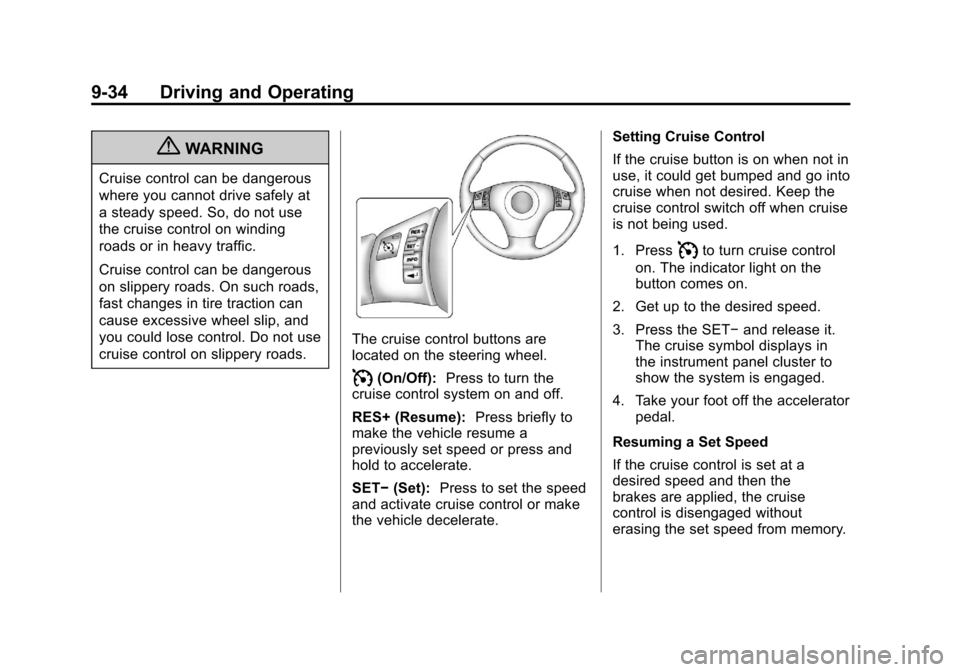
The cruise control buttons are
located on the steering wheel.
I(On/Off):Press to turn the
cruise control system on and off.
RES+ (Resume): Press briefly to
make the vehicle resume a
previously set speed or press and
hold to accelerate.
SET− (Set): Press to set the speed
and activate cruise control or make
the vehicle decelerate. Setting Cruise Control
If the cruise button is on when not in
use, it could get bumped and go into
cruise when not desired. Keep the
cruise control switch off when cruise
is not being used.
1. Press
Ito turn cruise control
on. The indicator light on the
button comes on.
2. Get up to the desired speed.
3. Press the SET− and release it.
The cruise symbol displays in
the instrument panel cluster to
show the system is engaged.
4. Take your foot off the accelerator pedal.
Resuming a Set Speed
If the cruise control is set at a
desired speed and then the
brakes are applied, the cruise
control is disengaged without
erasing the set speed from memory.
Page 227 of 398
Black plate (35,1)Chevrolet Malibu Owner Manual - 2012
Driving and Operating 9-35
The cruise symbol in the instrument
panel cluster also goes out
indicating cruise is no longer
engaged. Once the vehicle speed
is 40 km/h (25 mph) or greater,
press the RES+ button on the
steering wheel. The vehicle returns
to the previously set speed and
stays there.
Increasing Speed While Using
Cruise Control
If the cruise control system is
already activated,
.Press and hold the RES+ button
on the steering wheel until the
desired speed is reached, then
release it.
.To increase the vehicle speed in
small amounts, press the RES+
button briefly. Each time this is
done, the vehicle goes about
1.6 km/h (1 mph) faster.Reducing Speed While Using
Cruise Control
If the cruise control system is
already activated,
.Press and hold the SET−
on the
steering wheel until the lower
speed desired is reached, then
release it.
.To slow down in small amounts,
press the SET− button briefly.
Each time this is done, the
vehicle goes about 1.6 km/h
(1 mph) slower.
Passing Another Vehicle While
Using Cruise Control
Use the accelerator pedal to
increase the vehicle speed. When
you take your foot off the pedal,
the vehicle will slow down to the
previously set cruise control speed.
Using Cruise Control on Hills
How well the cruise control works
on hills depends upon the vehicle
speed, load, and the steepness of the hills. When going up steep hills,
you might have to step on the
accelerator pedal to maintain the
vehicle speed. When going
downhill, you might have to brake or
shift to a lower gear to keep the
vehicle at a lower speed. When the
brakes are applied this ends the
cruise control.
Ending Cruise Control
There are two ways to end cruise
control:
.To disengage the cruise control,
step lightly on the brake pedal.
.To turn off cruise control, press
the
Ibutton.
Erasing Speed Memory
The cruise control set speed is
erased from memory, by pressing
the
Ibutton or if the ignition is
turned off.
Page 233 of 398
Black plate (41,1)Chevrolet Malibu Owner Manual - 2012
Driving and Operating 9-41
{WARNING
If a fire starts while you are
refueling, do not remove the
nozzle. Shut off the flow of fuel by
shutting off the pump or by
notifying the station attendant.
Leave the area immediately.
Notice: If a new fuel cap is
needed, be sure to get the right
type of cap from your dealer.
The wrong type of fuel cap might
not fit properly, might cause the
malfunction indicator lamp to
light, and could damage the fuel
tank and emissions system.
See Malfunction Indicator Lamp
on page 5‑16.
Filling a Portable Fuel
Container
{WARNING
Never fill a portable fuel container
while it is in the vehicle. Static
electricity discharge from the
container can ignite the fuel
vapor. You can be badly burned
and the vehicle damaged if this
occurs. To help avoid injury to
you and others:
.Dispense fuel only into
approved containers.
.Do not fill a container while
it is inside a vehicle, in a
vehicle's trunk, pickup bed,
or on any surface other than
the ground.
(Continued)
WARNING (Continued)
.Bring the fill nozzle in contact
with the inside of the fill
opening before operating the
nozzle. Contact should be
maintained until the filling is
complete.
.Do not smoke while
pumping fuel.
.Do not use a cellular phone
while pumping fuel.
Page 245 of 398
Black plate (5,1)Chevrolet Malibu Owner Manual - 2012
Vehicle Care 10-5
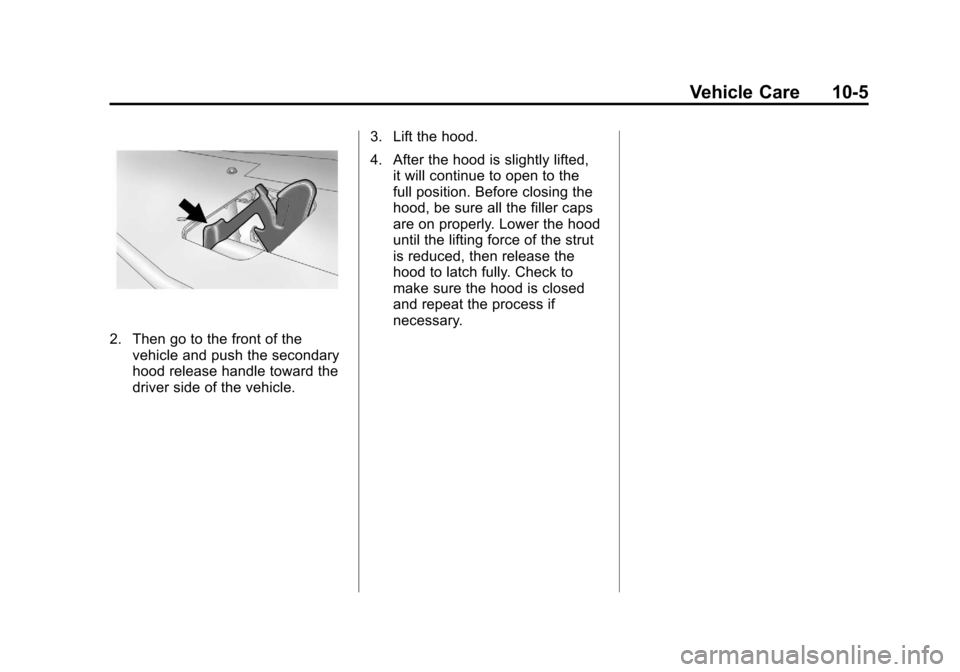
2. Then go to the front of thevehicle and push the secondary
hood release handle toward the
driver side of the vehicle. 3. Lift the hood.
4. After the hood is slightly lifted,
it will continue to open to the
full position. Before closing the
hood, be sure all the filler caps
are on properly. Lower the hood
until the lifting force of the strut
is reduced, then release the
hood to latch fully. Check to
make sure the hood is closed
and repeat the process if
necessary.