2012 CHEVROLET IMPALA AUX
[x] Cancel search: AUXPage 21 of 374
Black plate (15,1)Chevrolet Impala Owner Manual - 2012
In Brief 1-15
Portable Audio Devices
This vehicle may have an auxiliary
input jack, located on the audio
faceplate. External devices such as
iPods
®, MP3 players, etc. can be
connected to the auxiliary input jack
using a 3.5 mm (1/8 in) input jack
cable.
See “Using the Auxiliary Input Jack”
under Auxiliary Devices on
page 7‑19.
Bluetooth®
For vehicles with a Bluetooth
system, it allows users with a
Bluetooth‐enabled cell phone to
make and receive hands-free calls
using the vehicle’ s audio system
and controls.
The Bluetooth‐enabled cell phone
must be paired with the Bluetooth
system before it can be used in the
vehicle. Not all phones will support
all functions. For more information,
visit www.gm.com/bluetooth. For more information, see
Bluetooth
on page 7‑20.
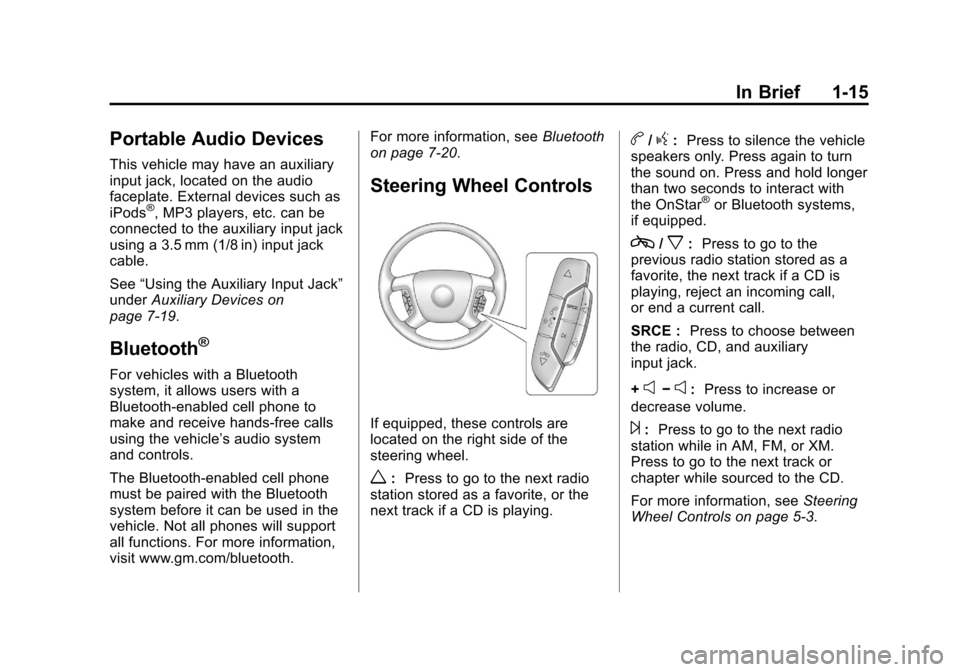
Steering Wheel Controls
If equipped, these controls are
located on the right side of the
steering wheel.
w: Press to go to the next radio
station stored as a favorite, or the
next track if a CD is playing.
b/g: Press to silence the vehicle
speakers only. Press again to turn
the sound on. Press and hold longer
than two seconds to interact with
the OnStar
®or Bluetooth systems,
if equipped.
c/x: Press to go to the
previous radio station stored as a
favorite, the next track if a CD is
playing, reject an incoming call,
or end a current call.
SRCE : Press to choose between
the radio, CD, and auxiliary
input jack.
+
e−e: Press to increase or
decrease volume.
¨: Press to go to the next radio
station while in AM, FM, or XM.
Press to go to the next track or
chapter while sourced to the CD.
For more information, see Steering
Wheel Controls on page 5‑3.
Page 105 of 374
Black plate (3,1)Chevrolet Impala Owner Manual - 2012
Instruments and Controls 5-3
Steering Wheel Controls
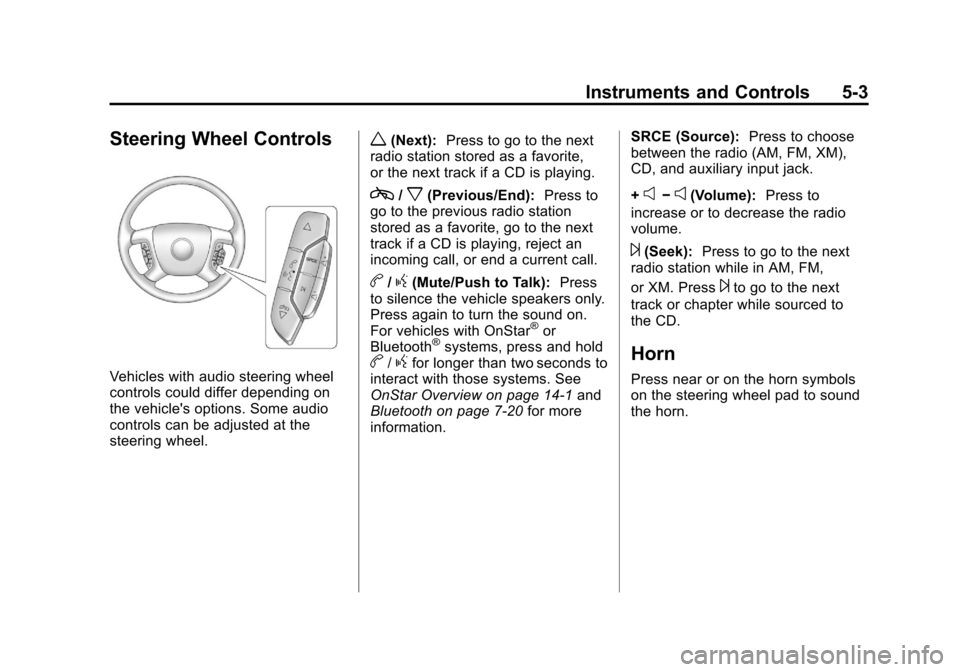
Vehicles with audio steering wheel
controls could differ depending on
the vehicle's options. Some audio
controls can be adjusted at the
steering wheel.
w(Next):Press to go to the next
radio station stored as a favorite,
or the next track if a CD is playing.
c/x(Previous/End): Press to
go to the previous radio station
stored as a favorite, go to the next
track if a CD is playing, reject an
incoming call, or end a current call.
b/g(Mute/Push to Talk): Press
to silence the vehicle speakers only.
Press again to turn the sound on.
For vehicles with OnStar
®or
Bluetooth®systems, press and holdb/gfor longer than two seconds to
interact with those systems. See
OnStar Overview on page 14‑1 and
Bluetooth on page 7‑20 for more
information. SRCE (Source):
Press to choose
between the radio (AM, FM, XM),
CD, and auxiliary input jack.
+
e−e(Volume): Press to
increase or to decrease the radio
volume.
¨(Seek): Press to go to the next
radio station while in AM, FM,
or XM. Press
¨to go to the next
track or chapter while sourced to
the CD.
Horn
Press near or on the horn symbols
on the steering wheel pad to sound
the horn.
Page 159 of 374
Black plate (1,1)Chevrolet Impala Owner Manual - 2012
Infotainment System 7-1
Infotainment
System
Introduction
Infotainment . . . . . . . . . . . . . . . . . . . 7-1
Theft-Deterrent Feature . . . . . . . 7-2
Operation . . . . . . . . . . . . . . . . . . . . . 7-2
Radio
AM-FM Radio . . . . . . . . . . . . . . . . . 7-6
Satellite Radio . . . . . . . . . . . . . . . . 7-8
Radio Reception . . . . . . . . . . . . . 7-12
Backglass Antenna . . . . . . . . . . 7-13
Satellite Radio Antenna . . . . . . 7-13
Audio Players
CD Player . . . . . . . . . . . . . . . . . . . 7-14
Auxiliary Devices . . . . . . . . . . . . 7-19
Phone
Bluetooth . . . . . . . . . . . . . . . . . . . . 7-20
Introduction
Infotainment
Determine which radio the vehicle
has and read the following pages to
become familiar with its features.
{WARNING
Taking your eyes off the road
for extended periods could
cause a crash resulting in injury
or death to you or others. Do not
give extended attention to
entertainment tasks while driving.
This system provides access to
many audio and non-audio listings.
To minimize taking your eyes off the
road while driving, do the following
while the vehicle is parked:
.Become familiar with the
operation and controls of the
audio system.
.Set up the tone, speaker
adjustments, and preset radio
stations.
For more information, see Defensive
Driving on page 9‑3.
Notice: Contact your dealer
before adding any equipment.
Adding audio or communication
equipment could interfere with
the operation of the engine, radio,
or other systems, and could
damage them. Follow federal
rules covering mobile radio and
telephone equipment.
The vehicle has Retained
Accessory Power (RAP). With RAP,
the audio system can be played
even after the ignition is turned off.
See Retained Accessory Power
(RAP) on page 9‑20 for more
information.
Page 173 of 374
Black plate (15,1)Chevrolet Impala Owner Manual - 2012
Infotainment System 7-15
If the ignition or radio is turned off
when a CD is in the player, the CD
stays in the player. If the ignition or
radio is turned on when a CD is in
the player, the CD starts to play
where it stopped, if it was the last
selected audio source.
Buttons and Knobs
The buttons and knobs on the radio
control the following features.
f(Tune):Turn to select tracks on
the CD.
©SEEK: Press to go to the start of
the current track, if more than
10 seconds have played. Press and
hold or press multiple times to
continue moving backward through
the tracks on the CD.
¨SEEK: Press to go to the next
track. Press and hold or press
multiple times to continue moving
forward through the tracks on
the CD.
sREV (Reverse): Press and hold
to reverse playback quickly within a
track. Sound is heard at a reduced
volume and the elapsed time of the
track displays. Release to resume
playing the track.
\FWD (Fast Forward): Press
and hold to advance playback
quickly within a track. Sound is
heard at a reduced volume and the
elapsed time of the track displays.
Release to resume playing the
track.
4(Information): Press to display
available additional information
about the current track.
BAND: Press to listen to the radio
while a CD is playing. The CD
remains inside the CD player.
CD/AUX (CD/Auxiliary): Press to
play a CD while listening to the
radio or a portable audio device.
Press this button again and the
system automatically searches for
an auxiliary input device, such as a
portable audio player. If a portable audio player is not connected, No
Aux Input Device Found may
display.
Softkeys
The six softkeys below the radio
display are used to control functions
that display as tabs.
The softkeys below the radio display
control the following features.
RDM (Random):
Tracks can be
listened to in random, rather than
sequential order.
To use random:
1. Press the softkey below the RDM tab until Random Current
Disc displays.
2. Press the softkey again to turn off random play.
Page 175 of 374

Black plate (17,1)Chevrolet Impala Owner Manual - 2012
Infotainment System 7-17
.Play begins from the first track in
the first folder and continues
sequentially through all tracks in
each folder. When the last track
of the last folder has played,
play continues from the first
track of the first folder.
When playback starts from a new
folder, the new track name displays
unless folder mode has been
chosen as the default display, then
the new folder name displays.
Buttons and Knobs
The buttons and knobs on the radio
control the following features.
f(Tune): Turn to select MP3 files
on the disc.
©SEEK: Press to go to the start of
the track, if more than 10 seconds
have played. Press and hold or
press multiple times to continue
moving backward through tracks.
¨SEEK: Press to go to the next
track. Press and hold or press
multiple times to continue moving
forward through tracks.
sREV (Reverse): Press and hold
to reverse playback quickly. Sound
is heard at a reduced volume and
the elapsed time of the track
displays. Release
sREV to
resume playing.
\FWD (Fast Forward): Press
and hold to advance playback
quickly. Sound is heard at a reduced
volume and the elapsed time of the
track displays. Release
\FWD to
resume playing.
4(Information): Press to display
available additional information
about the current track.
BAND: Press to listen to the radio
while an MP3 disc is playing. The
MP3 disc remains inside the CD
player. CD/AUX (CD/Auxiliary):
Press to
play an MP3 disc while listening to
the radio or a portable audio device.
Press this button again and the
system automatically searches for
an auxiliary input device, such as a
portable audio player. If a portable
audio player is not connected, No
Aux Input Device Found may
display.
Softkeys
The six softkeys below the radio
display are used to control functions
that display as tabs.
The softkeys below the radio display
control the following features.S c(Previous Folder): Press
the softkey below
S cto go to the
first track in the previous folder.
cT (Next Folder): Press the
softkey below
cT to go to the first
track in the next folder.
Page 177 of 374
Black plate (19,1)Chevrolet Impala Owner Manual - 2012
Infotainment System 7-19
.The disc is dirty, scratched, wet,
or upside down.
.The air is very humid. If so, wait
about an hour and try again.
.A problem occurred while
burning the disc.
.The label is caught in the CD
player.
If the disc is not playing correctly for
any other reason, try a known
good disc.
If any error occurs repeatedly or if
an error cannot be corrected,
contact your dealer. If the radio
displays an error message, write it
down and provide it to your dealer
when reporting the problem.
Auxiliary Devices
Using the Auxiliary Input Jack
The radio system has an auxiliary
input jack located on the lower
right side of the faceplate. This is
not an audio output; do not plug the
headphone set into the front
auxiliary input jack. However, an
external audio device such as an
iPod, laptop computer, MP3 player,
CD changer, or cassette tape player
can be connected to the auxiliary
input jack as another source for
audio listening.
Drivers are encouraged to set up
any auxiliary device while the
vehicle is in P (Park). See Defensive
Driving on page 9‑3 for more
information on driver distraction.
To use a portable audio player,
connect a 3.5 mm (1/8 in) cable to
the radio's front auxiliary input jack. While a device is connected, press
the radio CD/AUX button to begin
playing audio from the device over
the vehicle speakers.
O(Power/Volume):
Turn to
increase or decrease the volume of
the portable player. Additional
volume adjustments might need to
be made from the portable device.
BAND: Press to listen to the radio
while a portable audio device is
playing. The portable audio device
continues playing until it is stopped
or turned off.
CD/AUX (CD/Auxiliary): Press to
play a CD while a portable audio
device is playing. Press again and
the system begins playing audio
from the connected portable audio
player. If a portable audio player is
not connected, No Aux Input Device
Found may display.
Page 273 of 374

Black plate (31,1)Chevrolet Impala Owner Manual - 2012
Vehicle Care 10-31
The vehicle may not have all of the
fuses, relays, and features shown.Fuses Usage
A/C CMPRSR Air Conditioning
Compressor
ABS MTR 1 Antilock Brake
System (ABS)
Motor 1
ABS MTR 2 ABS Motor 2
AIR PUMP Air Pump
AIR SOL Air Injection
Reactor Solenoid
AIRBAG/
DISPLAY Airbag, Display
AUX PWR Auxiliary Power
BATT 1 Battery 1
BATT 2 Battery 2
BATT 3 Battery 3
BATT 4 Battery 4
BCM Body Control
Module (BCM)
Page 276 of 374

Black plate (34,1)Chevrolet Impala Owner Manual - 2012
10-34 Vehicle Care
Instrument Panel Fuse
Block
The fuse block is on the passenger
side of the vehicle in the carpet
molding. Remove the fuse block
door to access the fuses.
The vehicle may not be equipped
with all of the fuses, relays, and
features shown.Fuses Usage
AIRBAG Airbags
AMP Amplifier
AUX Auxiliary Outlets
CNSTR Canister
DR/LCK Door Locks
HTD/SEAT Heated Seats
PWR/MIR Power Mirrors
PWR/SEAT Power Seats
PWR/WNDW Power Window
RAP Retained
Accessory Power
S/ROOF Sunroof
TRUNK Trunk
TRUNK Trunk Relay
XM XM™Radio