Page 187 of 430

Black plate (19,1)Chevrolet Express Owner Manual - 2012
Infotainment System 7-19
Auxiliary Devices
Using the Auxiliary Input Jack
Radios with an auxiliary input jack
located on the lower right side of the
faceplate can connect to an external
audio device such as an iPod
®,
MP3 player, or CD player, for use as
another source for audio listening.
This input jack is not an audio
output; do not plug headphones into
the front auxiliary input jack.
Drivers are encouraged to set up
any auxiliary device while the
vehicle is in P (Park). See
Defensive Driving on page 9‑3 for
more information on driver
distraction. To use a portable audio player,
connect a 3.5 mm (1/8 in) cable to
the radio's front auxiliary input jack.
When a device is connected, press
the radio CD/AUX button to begin
playing audio from the device over
the vehicle speakers.
For optimal sound quality, increase
the portable audio device's volume
to the loudest level.
It is always best to power the
portable audio device through its
own battery while playing.
O(Power/Volume):
Turn clockwise
or counterclockwise to increase or
decrease the volume of the
portable player. Additional volume
adjustments might have to be made
from the portable device if the
volume is not loud or soft enough. BAND:
Press to listen to the radio
when a portable audio device is
playing. The portable audio device
continues playing.
CD/AUX (CD/Auxiliary): Press to
play a CD when a portable audio
device is playing. Press again and
the system begins playing audio
from the connected portable audio
player. If a portable audio player is
not connected, “No Input Device
Found” displays.
Page 189 of 430

Black plate (21,1)Chevrolet Express Owner Manual - 2012
Infotainment System 7-21
Connecting a USB Storage
Device or iPod
The USB port can be used to
control an iPod or a USB storage
device.
To connect a USB storage device,
connect the device to the USB port
located on the instrument panel.
To connect an iPod, connect one
end of the USB cable that came
with the iPod to the iPod’s dock
connector and connect the other
end to the USB port located on the
instrument panel. If the vehicle is
on and the USB connection works,
“OK to disconnect”and a GM logo
may appear on the iPod, and iPod
appears on the radio display. The
iPod music appears on the radio
display and begins playing.
The iPod charges while it is
connected to the vehicle if the
vehicle is in the ACC/ACCESSORY
or ON/RUN position. When the
vehicle is turned off, the iPod automatically powers off and will
not charge or draw power from the
vehicle's battery.
If you have an older iPod model that
is not supported, it can still be used
by connecting it to the auxiliary
input jack using a standard 3.5 mm
(1/8 in) stereo cable. See
“Using the
Auxiliary Input Jack” earlier for more
information.
Using the Radio to Control a
USB Storage Device or iPod
The radio can control a USB
storage device or an iPod using
the radio buttons and knobs, and
display song information on the
radio display.
f(Tune): Turn to select files.
©SEEK:Press to go to the start of
the track, if more than 10 seconds
have played. Press and hold or
press multiple times to continue
moving backward through tracks.
¨SEEK: Press to go to the next
track. Press and hold or press
multiple times to continue moving
forward through tracks.
sREV (Reverse): Press and hold
to reverse playback quickly. Sound
is heard at a reduced volume.
Release
sREV to resume playing.
The elapsed time of the file
displays.
\FWD (Fast Forward): Press
and hold to advance playback
quickly. Sound is heard at a reduced
volume. Release
\FWD to
resume playing. The elapsed time of
the file displays.
4(Information): Press to display
additional information about the
selected track.
Page 203 of 430
Black plate (5,1)Chevrolet Express Owner Manual - 2012
Climate Controls 8-5
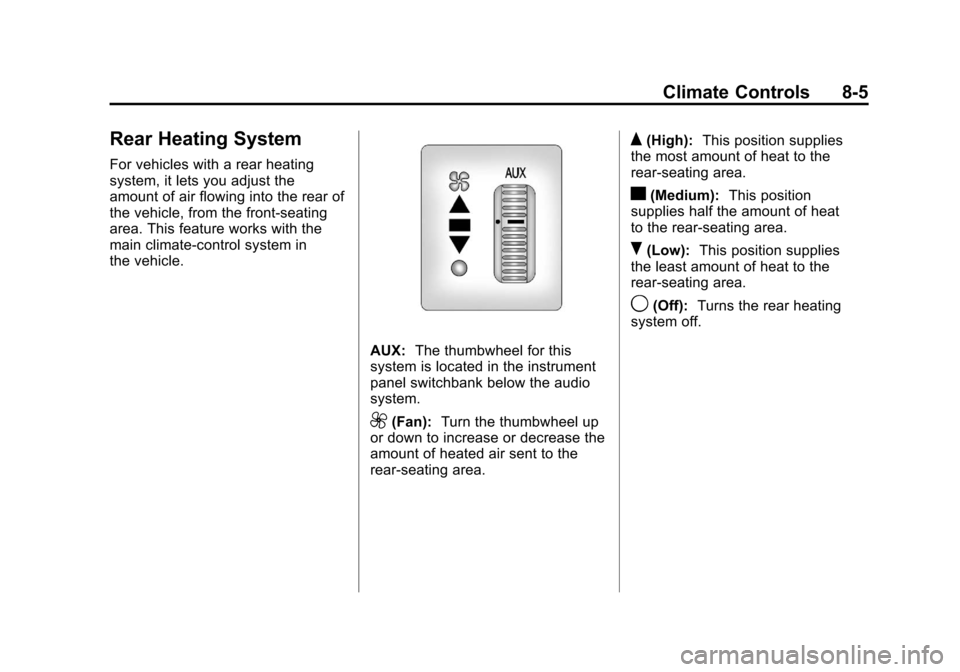
Rear Heating System
For vehicles with a rear heating
system, it lets you adjust the
amount of air flowing into the rear of
the vehicle, from the front-seating
area. This feature works with the
main climate-control system in
the vehicle.
AUX:The thumbwheel for this
system is located in the instrument
panel switchbank below the audio
system.
9(Fan): Turn the thumbwheel up
or down to increase or decrease the
amount of heated air sent to the
rear-seating area.
Q(High): This position supplies
the most amount of heat to the
rear-seating area.
c(Medium): This position
supplies half the amount of heat
to the rear‐seating area.
R(Low): This position supplies
the least amount of heat to the
rear-seating area.
9(Off): Turns the rear heating
system off.
Page 205 of 430

Black plate (7,1)Chevrolet Express Owner Manual - 2012
Climate Controls 8-7
When the fan knob is in the AUX position, the rear climate control panel can
be used to adjust the climate settings in the rear seating area.
Rear Climate Control Panel
A. Fan Control
B. Air Delivery Mode Control
C. Temperature Control For vehicles with a rear climate
control panel, it is located overhead
behind the driver and front
passenger, centered in front of the
second row. To adjust the rear
climate control panel settings by a
rear seat passenger, the front
climate control panel fan knob must
be in the AUX position. The fan
speed, air delivery mode, and
temperature can then be adjusted.AUX (Auxiliary):
Turn the fan knob
on the front climate control panel to
AUX to let rear seat passengers use
the control panel in the rear seating
area. This disables the front control
panel. To return control to the front
panel, move the fan knob out
of AUX.
9: Turns the system off.
9(Fan Control): Turn clockwise
or counterclockwise to increase or
decrease the fan speed in the
rear-seating area.
Page 307 of 430
Black plate (43,1)Chevrolet Express Owner Manual - 2012
Vehicle Care 10-43
Mini Fuse Usage3 Right Stop/Turn
Trailer
4 Spare
5 Spare
6 Fuel System
Control Module
Ignition
7 Body Control
Module 5
8 Body Control
Module 7
9 Body Control
Module 4
10 Instrument Panel
Cluster Mini Fuse Usage
11 Trailer Wiring
12 Spare
13 Spare
14 Windshield Washer
16 Horn
17 Transmission
18 Air Conditioning
Compressor
19 Engine Control
Module Battery
20 Spare
21 Left Stop/Turn
Trailer Mini Fuse Usage
22 Spare
23 Spare
24 Fuel Pump
25 Auxiliary Power
Outlet
26 Body Control
Module 3
27 Special Equipment
Option
28 Airbag
29 Steering Wheel
Sensor
30 Engine Control
Module Ignition/
Glow Plug Module
Page 308 of 430
Black plate (44,1)Chevrolet Express Owner Manual - 2012
10-44 Vehicle Care
Mini Fuse Usage31 Transmission
Control Module
Ignition
32 Transmission
Control Module
Battery
33 Spare
34 Spare
35 Fuel Operated
Heater Module
36 Fuel System
Control Module
Battery
51 Left High‐Beam
Headlamp
52 Right High‐Beam
Headlamp Mini Fuse Usage
53 Left Low‐Beam
Headlamp
54 Right Low‐Beam
Headlamp
55 Wiper
56 Canister Vent
Solenoid
58 Body Control
Module 2
59 Body Control
Module 1
61 Spare
62 Oxygen Sensor 2
(Post), EV Fan
(Diesel)
63 Spare Mini Fuse Usage
64 Mass Air Flow/
Canister Vent
65 Odd Ignition/
Injectors
66 Daytime Running
Lamps 2
(LOLVL‐V22)
(If Equipped)
67 Daytime Running
Lamps 1
(UPLVL+V22)
(If Equipped)
68 Auxiliary Stop
Lamps
69 Trailer Stop Lamps
70 Spare
Page 311 of 430
Black plate (47,1)Chevrolet Express Owner Manual - 2012
Vehicle Care 10-47
Mini‐Fuse UsageF1 Empty
F2 Steering Wheel
Sensor
F3 Auxiliary Parking
Lamps (Cut‐Away)
F4 Front Park Lamps
F5 Trailer Park Lamps
F6 Upfitter Park
Lamps
F7 Right Rear
Park Lamp
F8 Left Rear
Park Lamp
F9 Outside Rearview
Mirror Switch Mini‐Fuse Usage
F10 Airbag/Automatic
Occupant Sensing
F11 OnStar
®
(If Equipped)
F12 Empty
F13 Heating, Ventilation
and Air
Conditioning 2
F14 Heating, Ventilation
and Air
Conditioning 1
F15 Empty
F17 Outside Rearview
Mirror Heater
F18 Rear Window
Defogger Mini‐Fuse Usage
F19 Compass
F20 Radio/Chime/XM™
Satellite Radio
(If Equipped)
F21 Remote Function
Actuator/Tire
Pressure Monitor
F22 Ignition Switch/
Discrete
Logic Ignition
Sensor (PK3)
F23 Instrument Panel
Cluster
F25 Heating,
Ventilation and
Air Conditioning
Control
Page 312 of 430
Black plate (48,1)Chevrolet Express Owner Manual - 2012
10-48 Vehicle Care
Mini‐Fuse UsageF26 Auxiliary/Trailer
Backup
F27 Taillamps Backup
F30 Upfitter Courtesy
Lamps
F31 Front Door Lock
F32 Rear Door Lock
F33 Cargo Door Unlock
F34 Passenger Door
Unlock
F35 Rear Passenger
Door Unlock
F36 Driver Door Unlock
F37 Empty
F38 Empty J‐Case Fuse Usage
F16 Upfitter Auxiliary 1
F24 Empty
F28 Upfitter Auxiliary 2
Reading Lamps
F29 Rear Blower
Relays Usage K1 Run (High Current
Micro)
K2 Empty (High
Current Micro)
K3 Park Lamps (High
Current Micro)
K4 Upfitter Auxiliary 2
(High Current Mini) Relays Usage
K5 Rear Defogger
(High Current
Micro)
K6 Retained
Accessory Power
(RAP) (High
Current Micro)
Circuit
Breaker Usage
CB1 Power Seats
CB2 Power Windows