2012 CHEVROLET EQUINOX driver seat adjustment
[x] Cancel search: driver seat adjustmentPage 7 of 428
Black plate (1,1)Chevrolet Equinox Owner Manual - 2012
In Brief 1-1
In Brief
Instrument Panel
Instrument Panel . . . . . . . . . . . . . . 1-2
Initial Drive Information
Initial Drive Information . . . . . . . . 1-4
Remote Keyless Entry (RKE)System . . . . . . . . . . . . . . . . . . . . . . 1-4
Remote Vehicle Start . . . . . . . . . 1-5
Door Locks . . . . . . . . . . . . . . . . . . . 1-5
Liftgate . . . . . . . . . . . . . . . . . . . . . . . . 1-6
Windows . . . . . . . . . . . . . . . . . . . . . . 1-7
Seat Adjustment . . . . . . . . . . . . . . 1-8
Memory Features . . . . . . . . . . . . 1-10
Heated Seats . . . . . . . . . . . . . . . . 1-11
Head Restraint Adjustment . . . . . . . . . . . . . . . . . 1-11
Safety Belts . . . . . . . . . . . . . . . . . . 1-12
Passenger Sensing System . . . . . . . . . . . . . . . . . . . . . 1-12 Mirror Adjustment . . . . . . . . . . . . 1-13
Steering Wheel
Adjustment . . . . . . . . . . . . . . . . . 1-13
Interior Lighting . . . . . . . . . . . . . . 1-14
Exterior Lighting . . . . . . . . . . . . . 1-14
Windshield Wiper/Washer . . . . 1-15
Climate Controls . . . . . . . . . . . . . 1-16
Parking Brake . . . . . . . . . . . . . . . 1-17
Transmission . . . . . . . . . . . . . . . . 1-18
Vehicle Features
Radio(s) . . . . . . . . . . . . . . . . . . . . . 1-19
Satellite Radio . . . . . . . . . . . . . . . 1-20
Portable Audio Devices . . . . . . 1-20
Bluetooth
®. . . . . . . . . . . . . . . . . . . 1-21
Steering Wheel Controls . . . . . 1-21
Cruise Control . . . . . . . . . . . . . . . 1-22
Navigation System . . . . . . . . . . . 1-22
Driver Information Center (DIC) . . . . . . . . . . . . . . . 1-22 Forward Collision Alert (FCA)
System . . . . . . . . . . . . . . . . . . . . . 1-23
Lane Departure Warning (LDW) . . . . . . . . . . . . . 1-23
Rear Vision
Camera (RVC) . . . . . . . . . . . . . 1-24
Ultrasonic Parking Assist . . . . 1-24
Roof Rack System . . . . . . . . . . . 1-24
Power Outlets . . . . . . . . . . . . . . . 1-24
Performance and Maintenance
Traction Control System (TCS) . . . . . . . . . . . . . . 1-25
StabiliTrak
®System . . . . . . . . . 1-25
Tire Pressure Monitor . . . . . . . . 1-25
Engine Oil Life System . . . . . . 1-26
Fuel E85 (85% Ethanol) . . . . . 1-26
Driving for Better Fuel Economy . . . . . . . . . . . . . . . . . . . 1-26
Roadside Assistance Program . . . . . . . . . . . . . . . . . . . . 1-27
OnStar
®. . . . . . . . . . . . . . . . . . . . . 1-27
Page 14 of 428
Black plate (8,1)Chevrolet Equinox Owner Manual - 2012
1-8 In Brief
Seat Adjustment
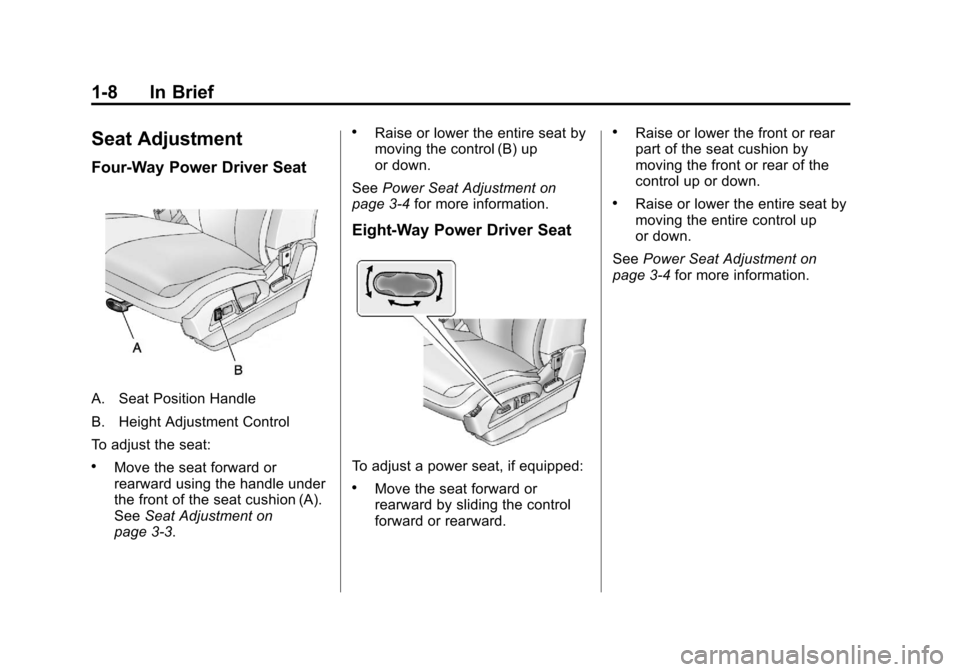
Four‐Way Power Driver Seat
A. Seat Position Handle
B. Height Adjustment Control
To adjust the seat:
.Move the seat forward or
rearward using the handle under
the front of the seat cushion (A).
SeeSeat Adjustment on
page 3‑3.
.Raise or lower the entire seat by
moving the control (B) up
or down.
See Power Seat Adjustment on
page 3‑4 for more information.
Eight‐Way Power Driver Seat
To adjust a power seat, if equipped:
.Move the seat forward or
rearward by sliding the control
forward or rearward.
.Raise or lower the front or rear
part of the seat cushion by
moving the front or rear of the
control up or down.
.Raise or lower the entire seat by
moving the entire control up
or down.
See Power Seat Adjustment on
page 3‑4 for more information.
Page 17 of 428
Black plate (11,1)Chevrolet Equinox Owner Manual - 2012
In Brief 1-11
To automatically recall RKE Memory
positions, unlock the driver door
with the RKE transmitter and open
the driver door. If the driver door is
already open, pressing the RKE
transmitterKbutton will also
activate the RKE Memory recall.
The driver seat and outside mirrors
will move to the previously saved
RKE Memory positions.
See Memory Seats on page 3‑7 for
more information.
Easy Exit Driver Seat
This feature moves the seat
rearward allowing the driver more
room to exit the vehicle.
To activate, turn the ignition off and
open the driver door. If the driver
door is already open, turning the
ignition off will activate the easy exit
driver seat.
This feature can be turned on or off
using the vehicle personalization
menu. See Vehicle Personalization
on page 5‑34 for more information.Heated Seats
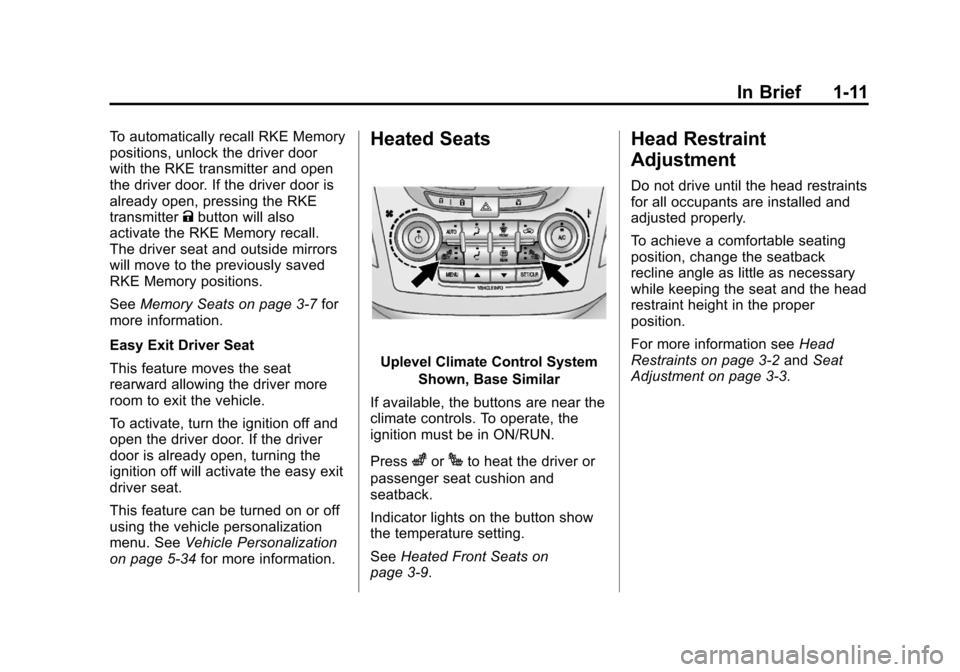
Uplevel Climate Control System
Shown, Base Similar
If available, the buttons are near the
climate controls. To operate, the
ignition must be in ON/RUN.
Press
zorJto heat the driver or
passenger seat cushion and
seatback.
Indicator lights on the button show
the temperature setting.
See Heated Front Seats on
page 3‑9.
Head Restraint
Adjustment
Do not drive until the head restraints
for all occupants are installed and
adjusted properly.
To achieve a comfortable seating
position, change the seatback
recline angle as little as necessary
while keeping the seat and the head
restraint height in the proper
position.
For more information see Head
Restraints on page 3‑2 andSeat
Adjustment on page 3‑3.
Page 59 of 428
Black plate (3,1)Chevrolet Equinox Owner Manual - 2012
Seats and Restraints 3-3
Rear Seats
The vehicle's rear seat has head
restraints in the outboard seating
positions that cannot be adjusted.
Rear outboard head restraints are
not designed to be removed.
Front Seats
Seat Adjustment
{WARNING
You can lose control of the
vehicle if you try to adjust a
manual driver seat while the
vehicle is moving. The sudden
movement could startle and
confuse you, or make you push a
pedal when you do not want to.
Adjust the driver seat only when
the vehicle is not moving.
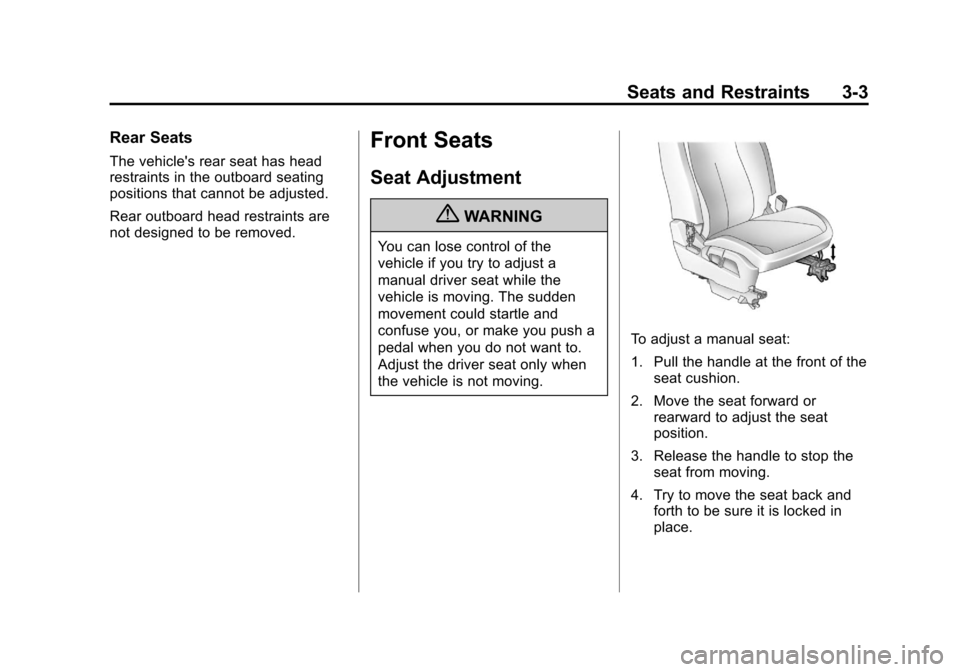
To adjust a manual seat:
1. Pull the handle at the front of theseat cushion.
2. Move the seat forward or rearward to adjust the seat
position.
3. Release the handle to stop the seat from moving.
4. Try to move the seat back and forth to be sure it is locked in
place.
Page 60 of 428
Black plate (4,1)Chevrolet Equinox Owner Manual - 2012
3-4 Seats and Restraints
Power Seat Adjustment
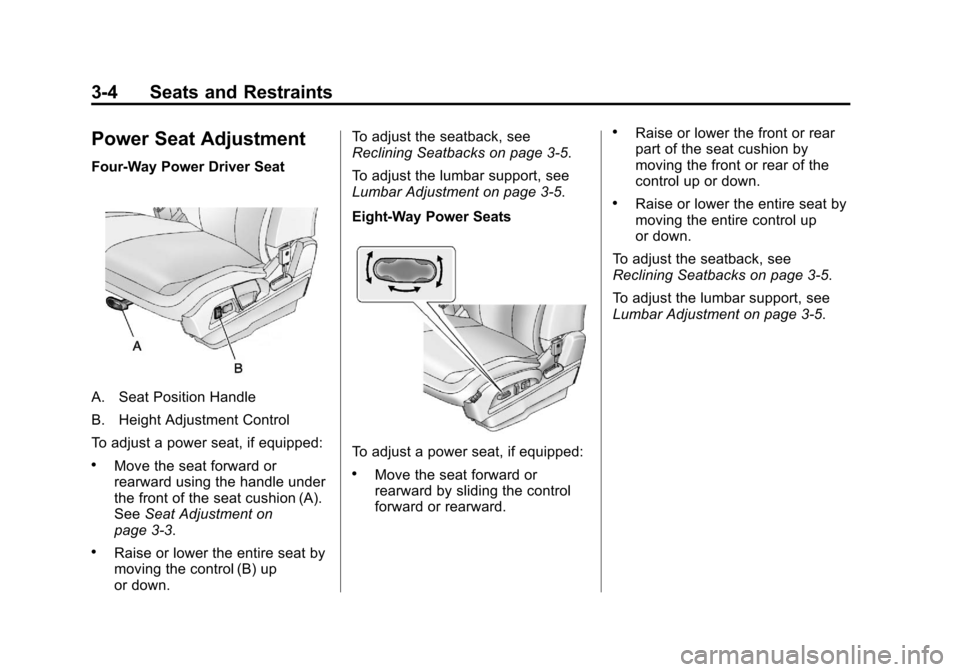
Four‐Way Power Driver Seat
A. Seat Position Handle
B. Height Adjustment Control
To adjust a power seat, if equipped:
.Move the seat forward or
rearward using the handle under
the front of the seat cushion (A).
SeeSeat Adjustment on
page 3‑3.
.Raise or lower the entire seat by
moving the control (B) up
or down. To adjust the seatback, see
Reclining Seatbacks on page 3‑5.
To adjust the lumbar support, see
Lumbar Adjustment on page 3‑5.
Eight‐Way Power Seats
To adjust a power seat, if equipped:
.Move the seat forward or
rearward by sliding the control
forward or rearward.
.Raise or lower the front or rear
part of the seat cushion by
moving the front or rear of the
control up or down.
.Raise or lower the entire seat by
moving the entire control up
or down.
To adjust the seatback, see
Reclining Seatbacks on page 3‑5.
To adjust the lumbar support, see
Lumbar Adjustment on page 3‑5.
Page 72 of 428
Black plate (16,1)Chevrolet Equinox Owner Manual - 2012
3-16 Seats and Restraints
To unlatch the belt, push the button
on the buckle.
Before a door is closed, be sure the
safety belt is out of the way. If a
door is slammed against a safety
belt, damage can occur to both the
safety belt and the vehicle.
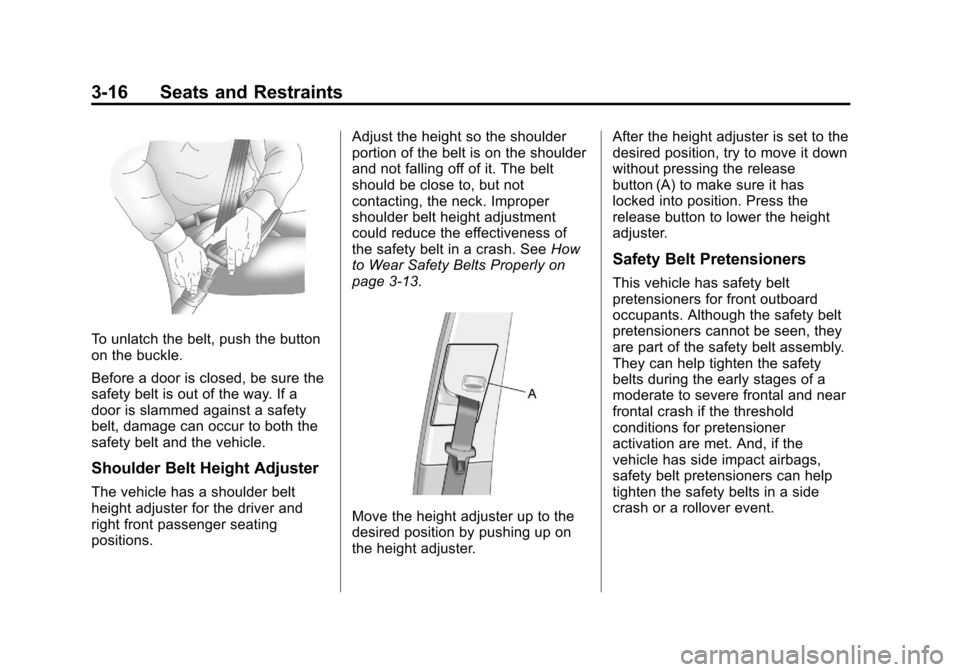
Shoulder Belt Height Adjuster
The vehicle has a shoulder belt
height adjuster for the driver and
right front passenger seating
positions.Adjust the height so the shoulder
portion of the belt is on the shoulder
and not falling off of it. The belt
should be close to, but not
contacting, the neck. Improper
shoulder belt height adjustment
could reduce the effectiveness of
the safety belt in a crash. See
How
to Wear Safety Belts Properly on
page 3‑13.
Move the height adjuster up to the
desired position by pushing up on
the height adjuster. After the height adjuster is set to the
desired position, try to move it down
without pressing the release
button (A) to make sure it has
locked into position. Press the
release button to lower the height
adjuster.
Safety Belt Pretensioners
This vehicle has safety belt
pretensioners for front outboard
occupants. Although the safety belt
pretensioners cannot be seen, they
are part of the safety belt assembly.
They can help tighten the safety
belts during the early stages of a
moderate to severe frontal and near
frontal crash if the threshold
conditions for pretensioner
activation are met. And, if the
vehicle has side impact airbags,
safety belt pretensioners can help
tighten the safety belts in a side
crash or a rollover event.
Page 152 of 428
Black plate (36,1)Chevrolet Equinox Owner Manual - 2012
5-36 Instruments and Controls
Easy Exit Driver Seat
When on, this feature will move the
driver seat rearward upon turning
the ignition off and the driver door
opening. This may be performed to
make it easier to exit the vehicle.
See the“Easy Exit Driver Seat”
information under Power Seat
Adjustment on page 3‑4 for more
information.
This allows you to turn the easy exit
seat feature on or off.
Press the MENU/SELECT knob
when “Easy Exit Driver Seat” is
highlighted. Turn the knob to select
“On” or“Off.” Press the knob to
confirm and go back to the
last menu.
Chime Volume
This allows the selection of the
chime volume level.
Press the MENU/SELECT knob
when “Chime Volume” is
highlighted. Turn the knob to select “Normal”
or“High.” Press the knob
to confirm and go back to the
last menu.
Reverse Tilt Mirror
When on, both the driver and
passenger mirrors will tilt downward
when vehicle is shifted to
R (Reverse) to improve visibility of
the ground near the rear wheels.
They will return to their previous
driving position when the vehicle is
shifted out of R (Reverse), the
ignition is turned to OFF, or the
vehicle is left in reverse. See Park
Tilt Mirrors on page 2‑17 for more
information.
This allows you to turn the park tilt
mirrors feature on or off.
Press the MENU/SELECT knob
when “Reverse Tilt Mirror” is
highlighted. Turn the knob to select
“On” or“Off.” Press the knob to
confirm and go back to the
last menu.Collision/Detection Systems
Select the Collision/Detection
Systems menu and the following will
be displayed:
.Park Assist
Park Assist
This allows the Ultrasonic Parking
Assist feature to be turned on or off.
Press the MENU/SELECT knob
when “Park Assist” is highlighted.
Turn the knob to select “On,” “Off,”
or “Tow Bar.” Press the knob to
confirm and go back to the
last menu.
See Ultrasonic Parking Assist on
page 9‑43 for more information
Languages
Select the Languages menu and the
following will be displayed:
.English
.French
.Spanish
Page 154 of 428
Black plate (38,1)Chevrolet Equinox Owner Manual - 2012
5-38 Instruments and Controls
Remote Lock/Unlock/Start
Select Remote Lock/Unlock/Start
and the following will be displayed:
.Remote Unlock Light Feedback
.Remote Lock Feedback
.Remote Door Unlock
.Memory Remote Recall
Remote Unlock Light Feedback
When on, the exterior lamps will
flash when unlocking the vehicle
with the RKE transmitter.
Press the MENU/SELECT knob
when “Remote Unlock Light
Feedback” is highlighted. Turn the
knob to select “Flash Lights”or
“Off.” Press the knob to confirm and
go back to the last menu.
Remote Lock Feedback
This allows selection of what type of
feedback is given when unlocking
the vehicle with the RKE transmitter.
Press the MENU/SELECT knob
when “Remote Lock Feedback” is
highlighted. Turn the knob to select “Lights and Horn,” “Lights Only,”
“Horn Only,”
or“Off. ”Press the knob
to confirm and go back to the
last menu.
Remote Door Unlock
This allows selection of which doors
will unlock when pressing the unlock
button on the RKE transmitter.
Press the MENU/SELECT knob
when “Remote Door Unlock” is
highlighted. Turn the knob to select
“All Doors” or“Driver Door.” Press
the knob to confirm and go back to
the last menu.
Memory Remote Recall
This allows the Memory Remote
Recall feature to be turned on or off.
When on, this feature will recall the
current driver's last seat, outside
mirrors upon unlocking the driver
door with the RKE, and opening that
door. The current driver is identified
when the RKE transmitter is used to
unlock the driver door. See “MemoryRemote Recall”
underPower Seat
Adjustment on page 3‑4 for more
information.
Memory Remote Recall is when the
memorized settings will be recalled
as you unlock the vehicle.
Press the MENU/SELECT knob
when “Memory Remote Recall” is
highlighted to toggle between “On”
or “Off.” Press
EBACK to confirm
the selection and go back to the
last menu.
Return to Factory Settings
Select “Return to Factory Settings”
to return all of the vehicle
personalization to the default
settings. Turn the knob to select
“Yes” or“No.” Press the knob to
confirm and go back to the
last menu.