2012 CHEVROLET EQUINOX steering
[x] Cancel search: steeringPage 132 of 428
Black plate (16,1)Chevrolet Equinox Owner Manual - 2012
5-16 Instruments and Controls
The following may correct an
emission system malfunction:
.Check that the fuel cap is fully
installed. SeeFilling the Tank on
page 9‑54. The diagnostic
system can determine if the fuel
cap has been left off or
improperly installed. A loose or
missing fuel cap allows fuel to
evaporate into the atmosphere.
A few driving trips with the cap
properly installed should turn the
light off.
.Check that good quality fuel is
used. Poor fuel quality causes
the engine not to run as
efficiently as designed and may
cause stalling after start-up,
stalling when the vehicle is
changed into gear, misfiring,
hesitation on acceleration,
or stumbling on acceleration.
These conditions might go away
once the engine is warmed up. If one or more of these conditions
occurs, change the fuel brand used.
It will require at least one full tank of
the proper fuel to turn the light off.
See
Recommended Fuel on
page 9‑51.
If none of the above have made the
light turn off, your dealer can check
the vehicle. The dealer has the
proper test equipment and
diagnostic tools to fix any
mechanical or electrical problems
that might have developed.Emissions Inspection and
Maintenance Programs
Some local governments may have
programs to inspect the on-vehicle
emission control equipment. For the
inspection, the emission system test
equipment is connected to the
vehicle’s Data Link
Connector (DLC).
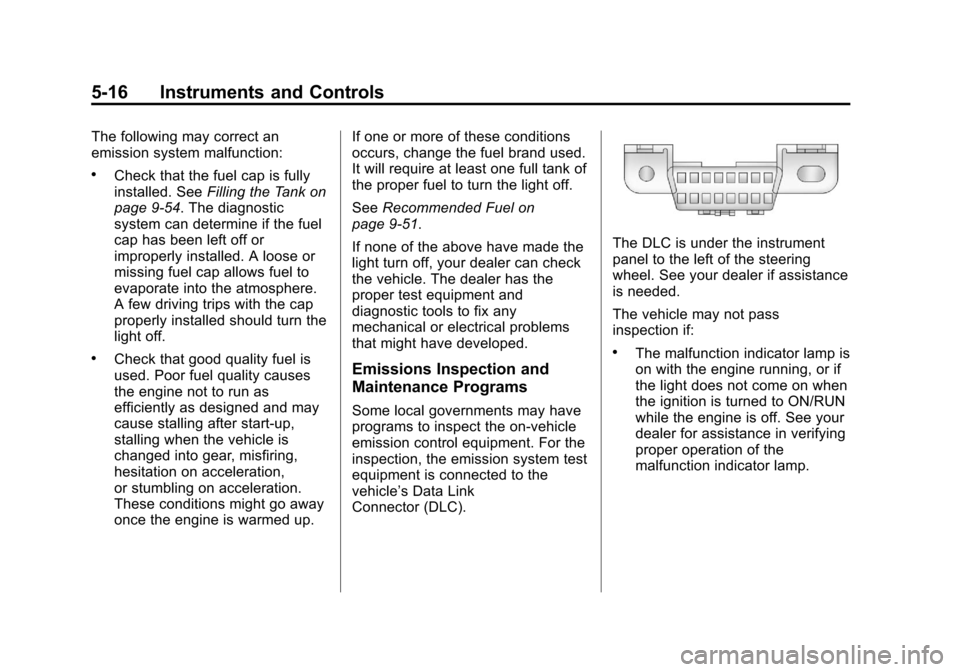
The DLC is under the instrument
panel to the left of the steering
wheel. See your dealer if assistance
is needed.
The vehicle may not pass
inspection if:
.The malfunction indicator lamp is
on with the engine running, or if
the light does not come on when
the ignition is turned to ON/RUN
while the engine is off. See your
dealer for assistance in verifying
proper operation of the
malfunction indicator lamp.
Page 148 of 428
Black plate (32,1)Chevrolet Equinox Owner Manual - 2012
5-32 Instruments and Controls
when you begin driving, the AWD
system needs service. See your
dealer.
SERVICE TRACTION
CONTROL
This message displays when there
is a problem with the Traction
Control System (TCS). SeeTraction
Control System (TCS) on
page 9‑35.
SERVICE STABILITRAK
This message displays if there is a
problem with the StabiliTrak system.
StabiliTrak
®System on page 9‑36.
STABILITRAK OFF
This message displays when the
StabiliTrak system is turned off. See
StabiliTrak
®System on page 9‑36
for more information.
TRACTION CONTROL OFF
This message displays when the
Traction Control System (TCS) is
turned off. Adjust your driving
accordingly.
TRACTION CONTROL ON
This message displays when the
Traction Control System (TCS) is
first turned on. See Traction Control
System (TCS) on page 9‑35 for
more information.
Airbag System Messages
SERVICE AIRBAG
This message displays if there is a
problem with the airbag system.
Take the vehicle to your dealer for
service.
Safety Belt Messages
BUCKLE SEATBELT
This message displays as a
reminder when the safety belt is not
buckled.
Anti-theft Alarm System
Messages
THEFT ATTEMPTED
This message displays if the vehicle
detects a tamper condition.
Service Vehicle Messages
SERVICE AC SYSTEM
This message is displayed if there is
a problem with the air conditioning
system. Take the vehicle to your
dealer for service.
SERVICE POWER STEERING
This message is displayed if there is
a problem with the power steering
system. Take the vehicle to your
dealer for service.
SERVICE VEHICLE SOON
This message is displayed if there is
a problem with the vehicle. Take the
vehicle to your dealer for service.
Page 158 of 428
Black plate (4,1)Chevrolet Equinox Owner Manual - 2012
6-4 Lighting
If after signaling a turn or a lane
change the arrows flash rapidly or
do not come on, a signal bulb may
be burned out.
Have the bulbs replaced. If the bulb
is not burned out, check the fuse;
seeFuses on page 10‑36 for more
information.
Fog Lamps
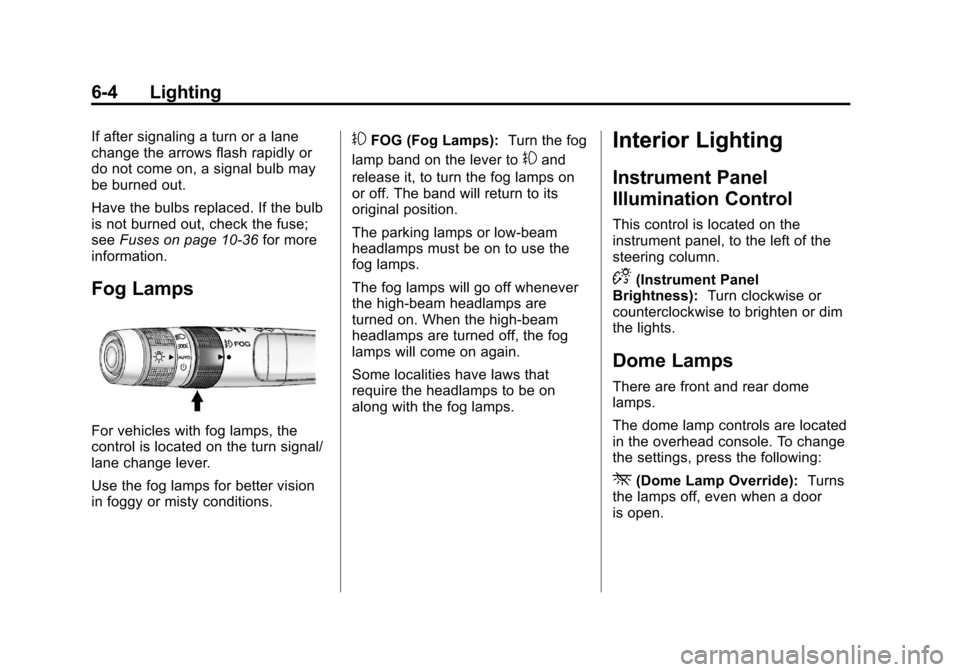
For vehicles with fog lamps, the
control is located on the turn signal/
lane change lever.
Use the fog lamps for better vision
in foggy or misty conditions.
#FOG (Fog Lamps): Turn the fog
lamp band on the lever to
#and
release it, to turn the fog lamps on
or off. The band will return to its
original position.
The parking lamps or low‐beam
headlamps must be on to use the
fog lamps.
The fog lamps will go off whenever
the high-beam headlamps are
turned on. When the high‐beam
headlamps are turned off, the fog
lamps will come on again.
Some localities have laws that
require the headlamps to be on
along with the fog lamps.
Interior Lighting
Instrument Panel
Illumination Control
This control is located on the
instrument panel, to the left of the
steering column.
D(Instrument Panel
Brightness): Turn clockwise or
counterclockwise to brighten or dim
the lights.
Dome Lamps
There are front and rear dome
lamps.
The dome lamp controls are located
in the overhead console. To change
the settings, press the following:
*(Dome Lamp Override): Turns
the lamps off, even when a door
is open.
Page 170 of 428
Black plate (10,1)Chevrolet Equinox Owner Manual - 2012
7-10 Infotainment System
Languages
The vehicle supports English,
French (Canadian), and Spanish.
The default language is English.
To change the display language,
seeVehicle Personalization on
page 5‑34 for more information.
English and Metric Unit
Conversion
To change the display units between
English and metric units, see Driver
Information Center (DIC) on
page 5‑24 for more information.
Cleaning the Display
Notice:Using abrasive cleaners
when cleaning glass surfaces
could scratch the glass. Use only
a soft cloth and do not spray
cleaner directly on the system as
it could affect the mechanical
parts. Do not wipe the panel with a hard
cloth or use a volatile liquid such as
paint thinner; it could scratch the
surface or erase the characters on
the buttons.
Operation
Controls
The infotainment system is operated
by using the pushbuttons,
multifunction knobs, display menus,
and steering wheel controls,
if equipped.
Turning the System On or Off
VOL/O(Volume/Power):
Press to
turn the system on and off.
Automatic Switch‐Off
If the infotainment system has been
turned on after the ignition is turned
off, the system will turn off
automatically after 10 minutes.
Volume Control
VOL/O(Volume/Power): Turn to
adjust the volume.
5/?(Mute): For vehicles with
OnStar, press and hold
5/?to
mute the infotainment system. Press
and hold
5/?again, or turn the
VOL/
Oknob to cancel mute.
For vehicles without OnStar, press
5/?to mute the infotainment
system. Press
5/?again, or turn
the VOL/
Oknob to cancel mute.
Menu System
Controls
The MENU/SEL knob and the
E
BACK button are used to navigate
the menu system.
Page 176 of 428
Black plate (16,1)Chevrolet Equinox Owner Manual - 2012
7-16 Infotainment System
To search for a programming type
determined by station:
1. Press the MENU/SEL knob.
2. Select FM category list. A list ofall programming types available
displays.
3. Select the programming type. A list of stations that transmit
programming of the selected
type displays.
4. Select the station. The category lists are updated
when the station lists are
updated.
Updating Station & Category Lists
If stations stored in the station list
can no longer be received:
1. Press the MENU/SEL knob.
2. Select Update AM or FM Station List, if the stations stored in the
station list are no longer
received. A station search will be
completed and the first station in
the updated list will play. To cancel the station search, press
the MENU/SEL knob.
Storing a Station as a Favorite
Stations from all bands can be
stored in any order in the favorite
pages.
Up to six stations can be stored in
each favorite page and the number
of available favorite pages can
be set.
Storing a Station as a Favorite
To store the station to a position in
the list, press the corresponding
button 1 to 6 until a beep is heard.
Retrieving Stations
Press the FAV button to open a
favorite page or to switch to another
favorite page. Briefly press one of
the 1 to 6 buttons to retrieve the
station.
AM-FM Radio (Radio with
CD and Touchscreen)
Playing the Radio
For vehicles equipped with the
MyLink or IntelliLink infotainment
system, see the separate MyLink/
IntelliLink Features and Functions
Guide for more information.
Audio Source
VOL/
O(Power/Volume):
1. Press to turn the radio on or off.
2. Turn to increase or decrease the volume of the active source
(i.e., current audio source, active
navigation voice guidance,
or traffic prompts).
The steering wheel controls can
also be used to adjust the volume.
See Steering Wheel Controls on
page 5‑2 for more information.
Page 197 of 428
Black plate (37,1)Chevrolet Equinox Owner Manual - 2012
Infotainment System 7-37
To minimize driver distraction,
before driving, and with the vehicle
parked:
.Become familiar with the
features of the cell phone.
Organize the phone book and
contact lists clearly and delete
duplicate or rarely used entries.
If possible, program speed dial
or other shortcuts.
.Review the controls and
operation of the infotainment
system.
.Pair cell phone(s) to the vehicle.
The system may not work with
all cell phones. See“Pairing”in
this section for more information.
.If the cell phone has voice
dialing capability, learn to use
that feature to access the
address book or contact list. See
“Voice Pass-Thru” in this section
for more information.
.See “Storing and Deleting Phone
Numbers” in this section for
more information.
{WARNING
When using a cell phone, it can
be distracting to look too long or
too often at the screen of the
phone or the infotainment
(navigation) system. Taking your
eyes off the road too long or too
often could cause a crash
resulting in injury or death. Focus
your attention on driving.
Vehicles with a Bluetooth system
can use a Bluetooth‐capable cell
phone with a Hands‐Free Profile to
make and receive phone calls. The
infotainment system and voice
recognition are used to control the
system. The system can be used
while in ON/RUN or ACC/
ACCESSORY. The range of the
Bluetooth system can be up to
9.1 m (30 ft). Not all phones support
all functions and not all phones work
with the Bluetooth system. See www.gm.com/bluetooth for more
information about compatible
phones.
Bluetooth Controls
Use the buttons located on the
infotainment system and the
steering wheel to operate the
Bluetooth system.
Steering Wheel Controls
b/g(Push To Talk) :
Press to
answer incoming calls, confirm
system information, and start voice
recognition.
$/i(End Call/Mute): Press to
end a call, reject a call, or cancel an
operation.
Page 202 of 428
Black plate (42,1)Chevrolet Equinox Owner Manual - 2012
7-42 Infotainment System
Ending a Call
Turn or press the MENU/SEL knob
and select Hang Up.
Muting a Call
To Mute a Call
Turn or press the MENU/SEL knob
and select Mute Call.
To Cancel Mute
Turn or press the MENU/SEL knob
and select Mute Call.
Dual Tone Multi-Frequency
(DTMF) Tones
The in‐vehicle Bluetooth system can
send numbers during a call. This is
used when calling a menu‐driven
phone system.
1. Turn or press the MENU/SELknob and select Enter Number.
2. Enter the character sequence. See “Entering a Character
Sequence” inOperation on
page 7‑10 for more information.
Bluetooth (Voice
Recognition)
Using Voice Recognition
For vehicles equipped with the
MyLink or IntelliLink infotainment
system, see the separate MyLink/
IntelliLink Features and Functions
Guide for more information.
To use voice recognition, press the
b/gbutton located on the steering
wheel. Use the commands below for
the various voice features. For
additional information, say “Help”
while you are in a voice
recognition menu.
Pairing
A Bluetooth‐enabled cell phone
must be paired to the Bluetooth
system and then connected to the
vehicle before it can be used. See
your cell phone manufacturer's user
guide for Bluetooth functions before
pairing the cell phone. If a Bluetooth
phone is not connected, calls will be
made using OnStar Hands‐Free Calling, if available. See
OnStar
Overview on page 14‑1 for more
information.
Pairing Information
.A Bluetooth phone with MP3
capability cannot be paired to
the vehicle as a phone and an
MP3 player at the same time.
.Up to five cell phones can be
paired to the Bluetooth system.
.The pairing process is disabled
when the vehicle is moving.
.Pairing only needs to be
completed once, unless the
pairing information on the cell
phone changes or the cell phone
is deleted from the system.
.Only one paired cell phone can
be connected to the Bluetooth
system at a time.
Page 217 of 428
Black plate (1,1)Chevrolet Equinox Owner Manual - 2012
Driving and Operating 9-1
Driving and
Operating
Driving Information
Distracted Driving . . . . . . . . . . . . . 9-2
Defensive Driving . . . . . . . . . . . . . 9-3
Drunk Driving . . . . . . . . . . . . . . . . . 9-3
Control of a Vehicle . . . . . . . . . . . 9-4
Braking . . . . . . . . . . . . . . . . . . . . . . . 9-4
Steering . . . . . . . . . . . . . . . . . . . . . . . 9-4
Off-Road Recovery . . . . . . . . . . . . 9-5
Loss of Control . . . . . . . . . . . . . . . . 9-5
Off-Road Driving . . . . . . . . . . . . . . 9-6
Driving on Wet Roads . . . . . . . . 9-11
Highway Hypnosis . . . . . . . . . . . 9-12
Hill and Mountain Roads . . . . . 9-12
Winter Driving . . . . . . . . . . . . . . . 9-13
If the Vehicle Is Stuck . . . . . . . . 9-15
Vehicle Load Limits . . . . . . . . . . 9-16
Starting and Operating
New Vehicle Break-In . . . . . . . . 9-20
Ignition Positions . . . . . . . . . . . . 9-21
Starting the Engine . . . . . . . . . . 9-23
Retained AccessoryPower (RAP) . . . . . . . . . . . . . . . 9-25
Engine Coolant Heater . . . . . . . 9-25 Shifting Into Park . . . . . . . . . . . . 9-26
Shifting out of Park . . . . . . . . . . 9-27
Parking over Things
That Burn . . . . . . . . . . . . . . . . . . 9-27
Engine Exhaust
Engine Exhaust . . . . . . . . . . . . . . 9-28
Running the Vehicle WhileParked . . . . . . . . . . . . . . . . . . . . . 9-28
Automatic Transmission
Automatic Transmission . . . . . 9-29
Manual Mode . . . . . . . . . . . . . . . . 9-31
Fuel Economy Mode . . . . . . . . . 9-31
Drive Systems
All-Wheel Drive . . . . . . . . . . . . . . 9-32
Brakes
Antilock BrakeSystem (ABS) . . . . . . . . . . . . . . 9-32
Parking Brake . . . . . . . . . . . . . . . 9-33
Brake Assist . . . . . . . . . . . . . . . . . 9-34
Hill Start Assist (HSA) . . . . . . . 9-34
Ride Control Systems
Traction Control System (TCS) . . . . . . . . . . . . . . 9-35
StabiliTrak
®System . . . . . . . . . 9-36
Cruise Control
Cruise Control . . . . . . . . . . . . . . . 9-38
Object Detection Systems
Forward Collision Alert (FCA) System . . . . . . . . . . . . . . . . . . . . . 9-40
Ultrasonic Parking Assist . . . . 9-43
Rear Vision Camera (RVC) . . . . . . . . . . . . . 9-45
Lane Departure Warning (LDW) . . . . . . . . . . . . . 9-48
Fuel
Fuel . . . . . . . . . . . . . . . . . . . . . . . . . 9-51
Recommended Fuel . . . . . . . . . 9-51
Gasoline Specifications (U.S.and Canada Only) . . . . . . . . . . 9-51
California Fuel Requirements . . . . . . . . . . . . . . 9-52
Fuels in Foreign Countries . . . 9-52
Fuel Additives . . . . . . . . . . . . . . . 9-52
Fuel E85 (85% Ethanol) . . . . . 9-53
Filling the Tank . . . . . . . . . . . . . . 9-54
Filling a Portable Fuel Container . . . . . . . . . . . . . . . . . . . 9-56