2012 CHEVROLET CRUZE turn signal
[x] Cancel search: turn signalPage 9 of 400

Black plate (3,1)Chevrolet Cruze Owner Manual - 2012
In Brief 1-3
A.Exterior Lamp Controls on
page 6‑1.
Front Fog Lamps on page 6‑4
(If Equipped).
Instrument Panel Illumination
Control on page 6‑5.
B. Air Vents on page 8‑6.
C. Headlamp High/Low-Beam
Changer on page 6‑2.
Turn and Lane‐Change Lever.
See Turn and Lane-Change
Signals on page 6‑4.
Driver Information Center (DIC)
Buttons. See Driver Information
Center (DIC) on page 5‑23.
D. Instrument Cluster on page 5‑8.
E. Horn on page 5‑3.
F. Driver Information Center (DIC)
on page 5‑23.
G. Steering Wheel Controls on
page 5‑2. H.
Windshield Wiper/Washer on
page 5‑3.
I. Infotainment on page 7‑2.
Satellite Radio on page 7‑14
(If Equipped).
J. Infotainment Display Screen.
K. Instrument Panel Storage on
page 4‑1.
L. Light Sensor. See Automatic
Headlamp System on page 6‑3.
M. Passenger Airbag. See Where
Are the Airbags? on page 3‑21.
N. Hood Release. See Hood on
page 10‑4.
O. Data Link Connector (DLC) (Out of View). See Malfunction
Indicator Lamp on page 5‑13.
P. Instrument Panel Fuse Block on
page 10‑40.
Q. Cruise Control on page 9‑40. R.
Steering Wheel Adjustment on
page 5‑2.
S. Driver Airbag. See Where Are
the Airbags? on page 3‑21.
T. Ignition Switch or Keyless Ignition Button (If Equipped).
See Ignition Positions (Key
Access) on page 9‑15 or
Ignition Positions (Keyless
Access) on page 9‑18.
U. Driver Knee Airbag. See Where
Are the Airbags? on page 3‑21.
V. Power Door Locks on
page 2‑11.
W. Hazard Warning Flashers on
page 6‑3.
X. Shift Lever. See Automatic
Transmission on page 9‑29 or
Manual Transmission on
page 9‑33.
Y. Traction Control System (TCS)
on page 9‑37.
StabiliTrak
®System on
page 9‑38.
Page 11 of 400
Black plate (5,1)Chevrolet Cruze Owner Manual - 2012
In Brief 1-5
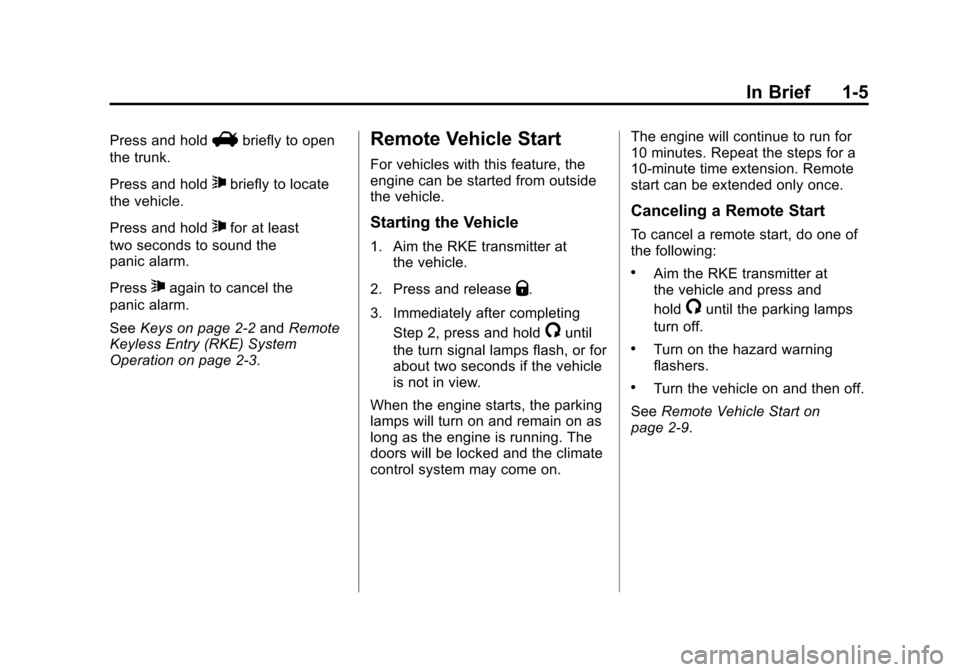
Press and holdVbriefly to open
the trunk.
Press and hold
7briefly to locate
the vehicle.
Press and hold
7for at least
two seconds to sound the
panic alarm.
Press
7again to cancel the
panic alarm.
See Keys on page 2‑2 andRemote
Keyless Entry (RKE) System
Operation on page 2‑3.
Remote Vehicle Start
For vehicles with this feature, the
engine can be started from outside
the vehicle.
Starting the Vehicle
1. Aim the RKE transmitter at the vehicle.
2. Press and release
Q.
3. Immediately after completing Step 2, press and hold
/until
the turn signal lamps flash, or for
about two seconds if the vehicle
is not in view.
When the engine starts, the parking
lamps will turn on and remain on as
long as the engine is running. The
doors will be locked and the climate
control system may come on. The engine will continue to run for
10 minutes. Repeat the steps for a
10-minute time extension. Remote
start can be extended only once.
Canceling a Remote Start
To cancel a remote start, do one of
the following:
.Aim the RKE transmitter at
the vehicle and press and
hold
/until the parking lamps
turn off.
.Turn on the hazard warning
flashers.
.Turn the vehicle on and then off.
See Remote Vehicle Start on
page 2‑9.
Page 24 of 400
Black plate (18,1)Chevrolet Cruze Owner Manual - 2012
1-18 In Brief
Cruise Control
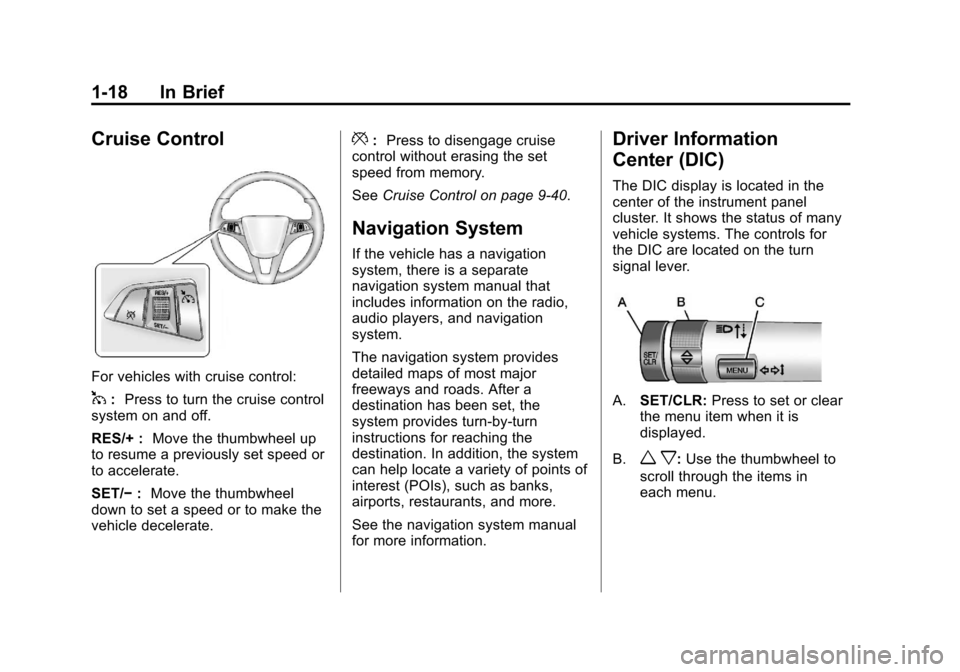
For vehicles with cruise control:
1:Press to turn the cruise control
system on and off.
RES/+ : Move the thumbwheel up
to resume a previously set speed or
to accelerate.
SET/− :Move the thumbwheel
down to set a speed or to make the
vehicle decelerate.
*: Press to disengage cruise
control without erasing the set
speed from memory.
See Cruise Control on page 9‑40.
Navigation System
If the vehicle has a navigation
system, there is a separate
navigation system manual that
includes information on the radio,
audio players, and navigation
system.
The navigation system provides
detailed maps of most major
freeways and roads. After a
destination has been set, the
system provides turn-by-turn
instructions for reaching the
destination. In addition, the system
can help locate a variety of points of
interest (POIs), such as banks,
airports, restaurants, and more.
See the navigation system manual
for more information.
Driver Information
Center (DIC)
The DIC display is located in the
center of the instrument panel
cluster. It shows the status of many
vehicle systems. The controls for
the DIC are located on the turn
signal lever.
A.SET/CLR: Press to set or clear
the menu item when it is
displayed.
B.
w x: Use the thumbwheel to
scroll through the items in
each menu.
Page 29 of 400
Black plate (23,1)Chevrolet Cruze Owner Manual - 2012
In Brief 1-23
Automatic Crash Response,
Emergency Services, Crisis Assist,
Stolen Vehicle Assistance, Vehicle
Diagnostics, Remote Door Unlock,
Roadside Assistance, Turn‐by‐Turn
Navigation, and Hands‐Free Calling
are available on most vehicles. Not
all OnStar services are available on
all vehicles. For more information,
see the OnStar Owner's Guide; visit
www.onstar.com (U.S.) or
www.onstar.ca (Canada); contact
OnStar at 1-888-4-ONSTAR
(1‐888‐466‐7827) or TTY
1‐877‐248‐2080; or push
the
Qbutton to speak with an
OnStar Advisor 24 hours a day,
seven days a week.
For a full description of OnStar
services and system limitations, see
the OnStar Owner's Guide in the
glove box. OnStar service is subject to the
OnStar Terms and Conditions
included in the OnStar Glove
Box Kit.
OnStar service requires wireless
communication networks and the
Global Positioning System (GPS)
satellite network. Not all OnStar
services are available everywhere
or on all vehicles at all times.
OnStar service cannot work unless
the vehicle is in a place where
OnStar has an agreement with a
wireless service provider for service
in that area, and the wireless
service provider has coverage,
network capacity, reception, and
technology compatible with OnStar's
service. Service involving location
information about the vehicle cannot
work unless GPS signals are
available, unobstructed, and
compatible with the OnStar
hardware. The vehicle must have a
working electrical system and
adequate battery power for the
OnStar equipment to operate.OnStar service may not work if the
OnStar equipment is not properly
installed or you have not maintained
it even if the vehicle is in good
working order and in compliance
with all government regulations.
If you try to add, connect, or modify
any equipment or software in the
vehicle, OnStar service may not
work. Other problems beyond
OnStar's control may prevent
service to you, such as hills, tall
buildings, tunnels, weather,
electrical system design and
architecture of the vehicle, damage
to important parts of the vehicle in a
crash, or wireless phone network
congestion or jamming.
See
Radio Frequency Statement on
page 13‑16 for information
regarding Part 15 of the Federal
Communications Commission (FCC)
rules and Industry Canada
Standards RSS-GEN/210/220/310.
Page 34 of 400
Black plate (4,1)Chevrolet Cruze Owner Manual - 2012
2-4 Keys, Doors, and Windows
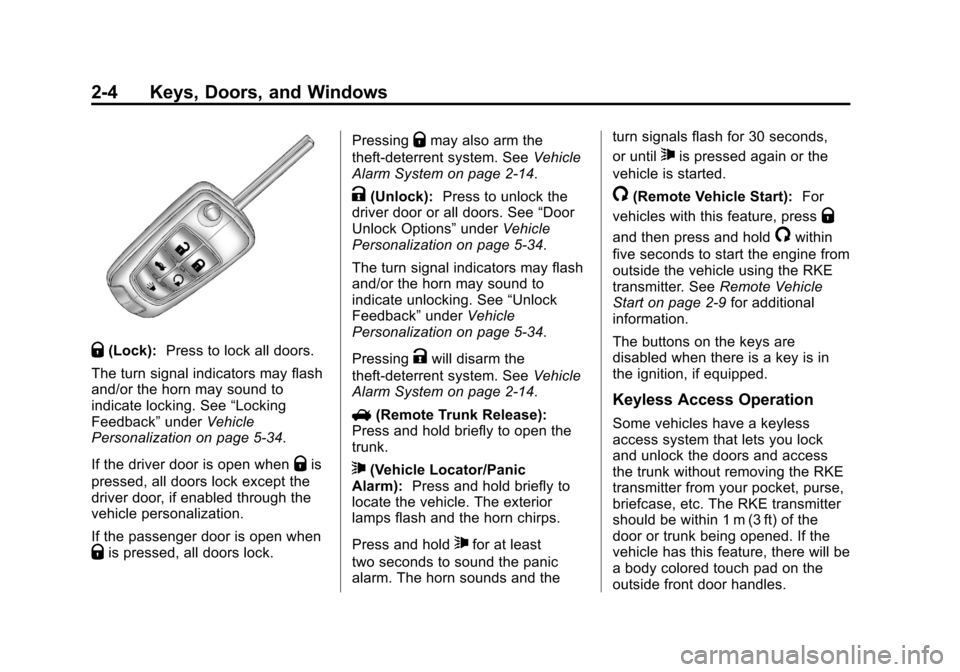
Q(Lock):Press to lock all doors.
The turn signal indicators may flash
and/or the horn may sound to
indicate locking. See “Locking
Feedback” underVehicle
Personalization on page 5‑34.
If the driver door is open when
Qis
pressed, all doors lock except the
driver door, if enabled through the
vehicle personalization.
If the passenger door is open when
Qis pressed, all doors lock. Pressing
Qmay also arm the
theft-deterrent system. See Vehicle
Alarm System on page 2‑14.
K(Unlock): Press to unlock the
driver door or all doors. See “Door
Unlock Options” underVehicle
Personalization on page 5‑34.
The turn signal indicators may flash
and/or the horn may sound to
indicate unlocking. See “Unlock
Feedback” underVehicle
Personalization on page 5‑34.
Pressing
Kwill disarm the
theft-deterrent system. See Vehicle
Alarm System on page 2‑14.
V (Remote Trunk Release):
Press and hold briefly to open the
trunk.
7(Vehicle Locator/Panic
Alarm): Press and hold briefly to
locate the vehicle. The exterior
lamps flash and the horn chirps.
Press and hold
7for at least
two seconds to sound the panic
alarm. The horn sounds and the turn signals flash for 30 seconds,
or until
7is pressed again or the
vehicle is started.
/(Remote Vehicle Start): For
vehicles with this feature, press
Q
and then press and hold/within
five seconds to start the engine from
outside the vehicle using the RKE
transmitter. See Remote Vehicle
Start on page 2‑9 for additional
information.
The buttons on the keys are
disabled when there is a key is in
the ignition, if equipped.
Keyless Access Operation
Some vehicles have a keyless
access system that lets you lock
and unlock the doors and access
the trunk without removing the RKE
transmitter from your pocket, purse,
briefcase, etc. The RKE transmitter
should be within 1 m (3 ft) of the
door or trunk being opened. If the
vehicle has this feature, there will be
a body colored touch pad on the
outside front door handles.
Page 39 of 400
Black plate (9,1)Chevrolet Cruze Owner Manual - 2012
Keys, Doors, and Windows 2-9
3. Remove the battery by pushingon the battery and sliding it
toward the key blade.
4. Insert the new battery, positive side facing up. Push the battery
down until it is held in place.
Replace with a CR2032 or
equivalent battery.
5. Snap the battery cover back on to the transmitter.
Remote Vehicle Start
The vehicle may have this feature
that allows you to start the engine
from outside the vehicle.
/(Remote Vehicle Start):
This button will be on the
RKE transmitter if the vehicle has
remote start.
Vehicles with an automatic climate
control system will default to a
heating or cooling mode depending
on the outside temperature during a
remote start. A vehicle without
automatic climate control will
default to the last used heating or cooling mode. Once the key is
turned to ON/RUN, the climate
control system will turn on at the
setting the vehicle was last set to.
If the vehicle has heated seats, they
may come on during a remote start.
See
Heated Front Seats on
page 3‑7 for more information.
Laws in some local communities
may restrict the use of remote
starters. For example, some laws
require a person using remote start
to have the vehicle in view. Check
local regulations for any
requirements.
There are other conditions which
can affect the performance of the
transmitter. See Remote Keyless
Entry (RKE) System on page 2‑3 for
additional information.
Starting the Vehicle
To start the engine using the remote
start feature:
1. Aim the RKE transmitter at the vehicle.
2. Press and release
Q. 3. Immediately after completing
Step 2, press and hold
/until
the turn signal lamps flash, or for
about two seconds if the vehicle
is not in view.
When the engine starts, the parking
lamps will turn on and remain on as
long as the engine is running. The
doors will be locked and the climate
control system may come on.
The engine will continue to run for
10 minutes. Repeat the steps for a
10-minute time extension. Remote
start can be extended only once.
Insert the key and turn it to ON/RUN
before driving.
Extending Engine Run Time
For a 10-minute extension, repeat
Steps 1 through 3 while the engine
is still running. The remote start can
be extended once.
When the remote start is extended,
the second 10 minutes will start
immediately.
Page 112 of 400
Black plate (4,1)Chevrolet Cruze Owner Manual - 2012
5-4 Instruments and Controls
Wipe Parking
If the ignition is turned to LOCK/
OFF while the wipers are on 1, 2,
or
3, they will immediately stop.
If the windshield wiper lever is then
moved to
9before the driver door
is opened, or within 10 minutes, the
wipers will restart and move to the
base of the windshield.
If the ignition is turned to LOCK/
OFF during a windshield wash, the
wipers will stop when they reach the
base of the windshield.
Windshield Washer
Pull the windshield wiper lever
toward you to spray windshield
washer fluid and activate the wipers.
The wipers will continue until the
lever is released or the maximum
wash time is reached.
When the windshield wiper lever is
released, additional wipes may
occur depending on how long the
windshield washer had been
activated. See Washer Fluid on
page 10‑22 for information on filling
the windshield washer fluid
reservoir.
{WARNING
In freezing weather, do not use
the washer until the windshield is
warmed. Otherwise the washer
fluid can form ice on the
windshield, blocking your vision.
Compass
The vehicle may have a compass
display in the Driver Information
Center (DIC). The compass receives
its heading and other information
from the Global Positioning
System (GPS) antenna, StabiliTrak,
and vehicle speed information.
Avoid covering the GPS antenna,
located on the roof, for long periods
of time with objects that may
interfere with the antenna's ability to
receive a satellite signal. The
compass system is designed to
operate for a certain number of
miles or degrees of turn before
needing a signal from the GPS
satellites. When the compass
display shows CAL, drive the
vehicle for a short distance in an
open area where it can receive a
GPS signal. The compass system
will automatically determine when
the GPS signal is restored and
provide a heading again.
Page 115 of 400
Black plate (7,1)Chevrolet Cruze Owner Manual - 2012
Instruments and Controls 5-7
Ashtrays
For vehicles with a removable
ashtray, the ashtray can be placed
into the front console cupholders.
To open the ashtray, lift the lid of the
ashtray. After using, close the lid.
To empty the ashtray for cleaning,
slightly turn the upper part of the
ashtray counterclockwise and
remove it.
Notice:If papers, pins, or other
flammable items are put in the
ashtray, hot cigarettes or other
smoking materials could ignite
them and possibly damage the
vehicle. Never put flammable
items in the ashtray.
Warning Lights,
Gauges, and
Indicators
Warning lights and gauges can
signal that something is wrong
before it becomes serious enough
to cause an expensive repair or
replacement. Paying attention to the
warning lights and gauges could
prevent injury.
Warning lights come on when there
could be a problem with a vehicle
function. Some warning lights come
on briefly when the engine is started
to indicate they are working. Gauges can indicate when there
could be a problem with a vehicle
function. Often gauges and warning
lights work together to indicate a
problem with the vehicle.
When one of the warning lights
comes on and stays on while
driving, or when one of the gauges
shows there may be a problem,
check the section that explains what
to do. Follow this manual's advice.
Waiting to do repairs can be costly
and even dangerous.