2012 CHEVROLET CRUZE buttons
[x] Cancel search: buttonsPage 136 of 400
Black plate (28,1)Chevrolet Cruze Owner Manual - 2012
5-28 Instruments and Controls
Vehicle Messages
Vehicle Messages
(Canada Base Level)
DIC messages display when the
status of the vehicle has changed
and action may be needed to
correct the condition. Multiple
messages appear one after another.
Press any of the DIC buttons on the
turn signal lever to acknowledge
and clear them from the display.
More urgent messages cannot be
cleared from the DIC display.
All messages should be taken
seriously. Clearing messages will
not correct the problem.
On the Canadian base level cluster,
vehicle messages appear as code
numbers.
25:Left front turn indicator failure
26: Left rear turn indicator failure
27: Right front turn indicator failure
28: Right rear turn indicator failure 35:
Replace battery in radio remote
control
53: Tighten gas cap
68: Service power steering
75: Service air conditioner
82: Change engine oil soon
84: Engine power is reduced
95: Service airbag
Vehicle Messages
(Canada Uplevel and
United States)
DIC messages display when the
status of the vehicle has changed
and action may be needed to
correct the condition. Multiple
messages appear one after another.
Press any of the DIC buttons on the
turn signal lever to acknowledge
and clear them from the display.
More urgent messages cannot be
cleared from the DIC display. All messages should be taken
seriously. Clearing messages will
not correct the problem.
On the Canadian uplevel cluster
and on vehicles sold in the United
States, vehicle messages are
displayed as text. The messages
and information about them follow.
Battery Voltage and
Charging Messages
BATTERY SAVER ACTIVE
This message displays when the
vehicle has detected that the battery
voltage is dropping beyond a
reasonable point. The battery saver
system starts reducing certain
features of the vehicle that you may
be able to notice. At the point that
features are disabled, this message
is displayed. It means that the
vehicle is trying to save the charge
in the battery. Turn off unnecessary
accessories to allow the battery to
recharge.
Page 155 of 400
Black plate (3,1)Chevrolet Cruze Owner Manual - 2012
Infotainment System 7-3
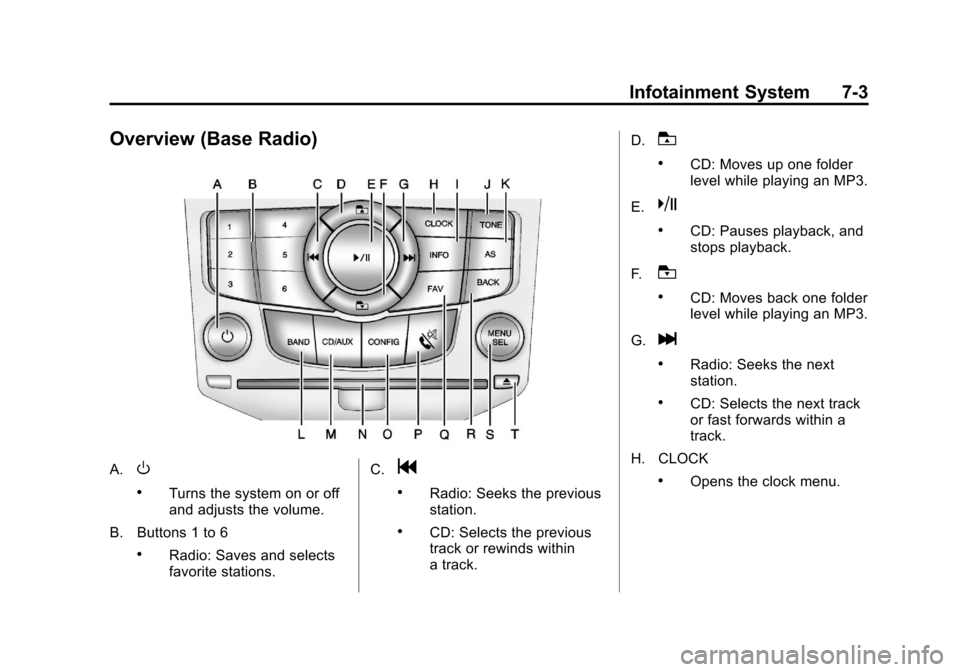
Overview (Base Radio)
A.O
.Turns the system on or off
and adjusts the volume.
B. Buttons 1 to 6
.Radio: Saves and selects
favorite stations. C.
g
.Radio: Seeks the previous
station.
.CD: Selects the previous
track or rewinds within
a track.D.
T
.CD: Moves up one folder
level while playing an MP3.
E.
k
.CD: Pauses playback, and
stops playback.
F.
U
.CD: Moves back one folder
level while playing an MP3.
G.
l
.Radio: Seeks the next
station.
.CD: Selects the next track
or fast forwards within a
track.
H. CLOCK
.Opens the clock menu.
Page 157 of 400
Black plate (5,1)Chevrolet Cruze Owner Manual - 2012
Infotainment System 7-5
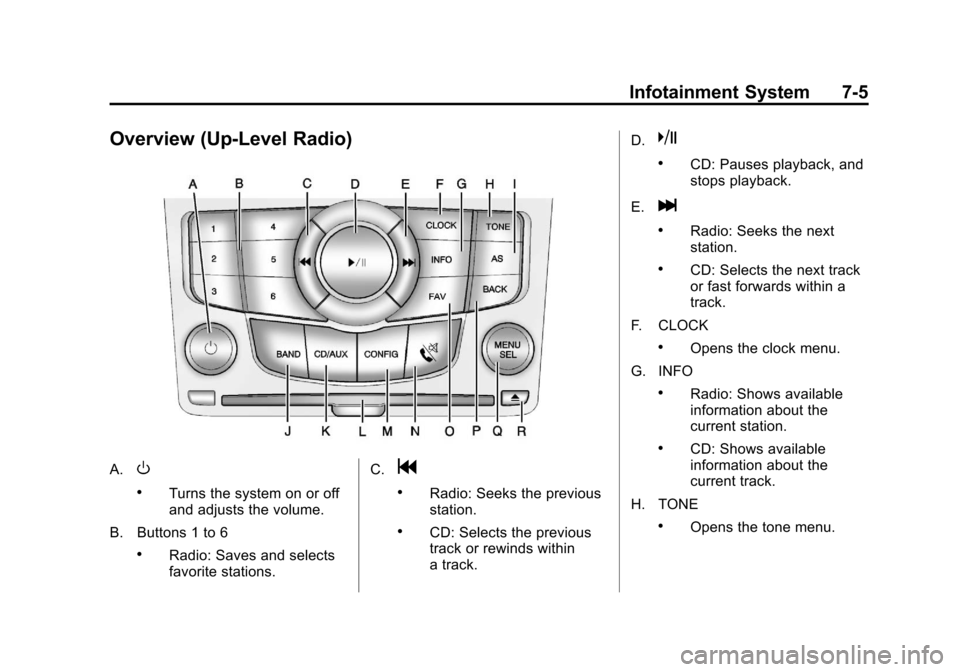
Overview (Up-Level Radio)
A.O
.Turns the system on or off
and adjusts the volume.
B. Buttons 1 to 6
.Radio: Saves and selects
favorite stations. C.
g
.Radio: Seeks the previous
station.
.CD: Selects the previous
track or rewinds within
a track.D.
k
.CD: Pauses playback, and
stops playback.
E.
l
.Radio: Seeks the next
station.
.CD: Selects the next track
or fast forwards within a
track.
F. CLOCK
.Opens the clock menu.
G. INFO
.Radio: Shows available
information about the
current station.
.CD: Shows available
information about the
current track.
H. TONE
.Opens the tone menu.
Page 158 of 400
Black plate (6,1)Chevrolet Cruze Owner Manual - 2012
7-6 Infotainment System
I. AS
.Radio: Opens the
autostore stations list.
J. BAND
.Changes the band while
listening to the radio.
.Selects the radio when
listening to a different
audio source.
K. CD/AUX
.Selects the CD player or
an external audio source.
L. CD Slot
.Insert a CD.
M. CONFIG
.Opens the settings menu.
N.
5\>
.Opens the phone
main menu.
.Mutes the audio system. O. FAV
.Radio: Opens the
favorites list.
P. BACK
.Menu: Moves one
level back.
.Character Input: Deletes
the last character.
Q. MENU or MENU/SEL
.Turn to open menus,
highlight menu items,
or set numeric values
while in a menu.
.Press to select menu
items.
.Radio: Manually selects
radio stations.
.CD: Selects tracks.
R.
Y
.Removes a disc from the
CD slot.
Operation
Controls
The infotainment system is
operated by using the pushbuttons,
multifunction knobs, menus shown
on the display, and steering wheel
controls, if equipped.
Turning the System On or Off
O(Volume/Power): Press to turn
the system on and off.
Automatic Switch‐Off
If the infotainment system has been
turned on after the ignition is turned
off, the system will turn off
automatically after 10 minutes.
Volume Control
O(Volume/Power): Turn to adjust
the volume.
5/>(Phone/Mute): Press5/>to mute the infotainment system.
Press
5/>again, or turn the
Oknob to cancel mute.
Page 164 of 400
Black plate (12,1)Chevrolet Cruze Owner Manual - 2012
7-12 Infotainment System
Radio
AM-FM Radio
Control Buttons
The buttons used to control the
radio are:
BAND:Press to turn the radio on
and choose between AM, FM, and
XM™, if equipped.
MENU or MENU/SEL: Turn to
navigate the available menus and to
search for stations.
INFO: Press to display additional
information that may be available for
the current song.
gorl: Press to search for
stations.
FAV: Press to open the favorites
list and select the favorites page.
1 to 6: Press to select preset
stations.
AS (Autostore): Press to open the
autostore list.
RDS (Radio Data System)
The radio may have RDS. The RDS
feature is available for use only on
FM stations that broadcast RDS
information. This feature only works
when the information from the radio
station is available. In rare cases, a
radio station could broadcast
incorrect information that causes the
radio features to work improperly.
If this happens, contact the radio
station.
While the radio is tuned to an
FM-RDS station, the station name
or call letters display.
Radio Menus
Radio menus are available for AM
and FM.
Turn the MENU or MENU/SEL knob
to open the main radio menu for
that band.
Selecting a Band
Press the BAND button to choose
AM, FM, or XM, if equipped. The
last station that was playing starts
playing again.
Selecting a Station
Seek Tuning
If the radio station is not known:
Briefly press
gorlto
automatically search for the next
available station. If a station is not
found, the radio switches to a more
sensitive search level. If a station
still is not found, the frequency that
was last active begins to play.
If the radio station is known:
Press and hold
gorluntil the
station on the display is reached,
then release the button.
Manual Tuning
Turn the MENU or MENU/SEL knob
to select the frequency on the
display.
Page 165 of 400
Black plate (13,1)Chevrolet Cruze Owner Manual - 2012
Infotainment System 7-13
Favorites List
1. Turn the MENU or MENU/SEL knob.
2. Select Favorites List.
3. Select the station.
Station Lists
1. Turn the MENU or MENU/ SEL knob.
2. Select AM or FM Station List. All receivable stations in the current
reception area are displayed. If a
station list has not been created,
an automatic station search
is done.
3. Select the station.
Category Lists
Most stations that broadcast an
RDS program type code specify the
type of programming transmitted.
Some stations change the program
type code depending on the
content. The system stores the
RDS stations sorted by program
type in the FM category list. To search for a programming type
determined by station:
1. Turn the MENU or MENU/
SEL knob.
2. Select FM category list. A list of all programming types available
displays.
3. Select the programming type. A list of stations that transmit
programming of the selected
type displays.
4. Select the station.
The category lists are updated when
the station lists are updated.
Updating Station & Category Lists
If stations stored in the station list
can no longer be received:
1. Turn the MENU or MENU/ SEL knob.
2. Select Update AM or FM Station List, if the stations stored in the
station list are no longer
received. A station search will be
completed and the first station in
the updated list will play. To cancel the station search, press
the MENU or MENU/SEL knob.
Storing a Station as a Favorite
Stations from all bands can be
stored in any order in the favorite
pages.
Up to six stations can be stored in
each favorite page and the number
of available favorite pages can
be set.
Storing Stations
To store the station to a position in
the list, press the corresponding
button 1 to 6 until a beep is heard.
Retrieving Stations
Press the FAV button to open a
favorite page or to switch to another
favorite page. Briefly press one of
the 1 to 6 buttons to retrieve the
station.
Page 166 of 400
Black plate (14,1)Chevrolet Cruze Owner Manual - 2012
7-14 Infotainment System
Autostore Stations
AS (Autostore):Autostore
searches and stores six FM and
six AM stations with the strongest
signal. To use autostore:
1. Press BAND to select FM or AM.
2. Press AS for at least two seconds until a beep
sounds. SEARCH displays on
the radio, followed by the
number of stations found.
3. The radio will automatically store the six strongest stations found
as autostore presets.
Press the AS button to alternate
between the autostore stations and
favorites.
AS displays on the radio when using
autostore presets.
Autostore does not delete
previously stored favorite stations.
Autostore does not function with
XM radio stations.
Satellite Radio
Vehicles with an XM Satellite Radio
tuner and a valid XM Satellite Radio
subscription can receive XM
programming.
XM Satellite Radio Service
XM is a satellite radio service based
in the 48 contiguous United States
and 10 Canadian provinces. XM
Satellite Radio has a wide variety of
programming and commercial-free
music, coast to coast, and in
digital-quality sound. A service fee
is required to receive the XM
service. If XM Service needs to be
reactivated, the radio will display
"No Subscription Please Renew" on
channel XM1. For more information,
contact XM at www.xmradio.com or
1-800-929-2100 in the U.S., and
www.xmradio.ca or
1-877-438-9677 in Canada.
Control Buttons
The buttons used to control the
XM radio are:
BAND: Press to turn the radio on
and choose between AM, FM,
and XM.
gorl: Press to go to the
previous or next channel.
FAV: Press to open the
favorites list.
1 to 6: Press to select a favorite.
MENU or MENU/SEL: Turn to
select a channel.
INFO: Press to display additional
information that may be available
about the current song.
k(Play/Pause): Press to pause
time shifted content, if equipped.
Page 168 of 400
Black plate (16,1)Chevrolet Cruze Owner Manual - 2012
7-16 Infotainment System
Storing a Channel as a Favorite
To store the channel to a position
in the list, press and hold the
corresponding 1 to 6 button until
the channel can be heard again.
Retrieving Channels
Press the FAV button to open a
favorite page or to change to
another favorite page. Briefly press
one of the 1 to 6 buttons to retrieve
the channel.
XM Messages
XL (Explicit Language
Channels):These channels, or
any others, can be blocked
by request, by calling
1-800-929-2100 in the U.S., and
1-877-438-9677 in Canada.
XM Updating: The encryption code
in the receiver is being updated.
No action is required. This process
should take no longer than
30 seconds. Loading XM:
The audio system is
acquiring and processing audio and
text data. No action is needed. This
message should disappear shortly.
Channel Off Air: This channel is
not currently in service. Tune in to
another channel.
Channel Unauth: This channel is
blocked or cannot be received with
your XM Subscription package.
Channel Unavailable: This
previously assigned channel is no
longer assigned. Tune to another
station.
No Artist Info: The system is
working properly. No artist
information is available at this time
on this channel.
No Title Info: The system is
working properly. No song title
information is available at this time
on this channel.
No CAT Info: The system is
working properly. No category
information is available at this time
on this channel. No Information:
The system is
working properly. No text or
informational messages are
available at this time on this
channel.
No Subscription Please Renew:
XM subscription needs to be
reactivated. Contact XM at
www.xmradio.com or
1-800-929-2100 in the U.S., and
www.xmradio.ca or
1-877-438-9677 in Canada.
No XM Signal: The system is
working properly. The vehicle may
be in a location where the XM signal
is being blocked. When the vehicle
is moved into an open area, the
signal should return.
CAT Not Found: The system is
working properly. There are no
channels available for the selected
category.
XM Radio ID: If tuned to channel 0,
this message alternates with the
XM Radio eight‐digit radio ID label.
This label is needed to activate
the service.