2012 CHEVROLET CRUZE ECO mode
[x] Cancel search: ECO modePage 199 of 400
Black plate (1,1)Chevrolet Cruze Owner Manual - 2012
Driving and Operating 9-1
Driving and
Operating
Driving Information
Distracted Driving . . . . . . . . . . . . . 9-2
Defensive Driving . . . . . . . . . . . . . 9-3
Drunk Driving . . . . . . . . . . . . . . . . . 9-3
Control of a Vehicle . . . . . . . . . . . 9-4
Braking . . . . . . . . . . . . . . . . . . . . . . . 9-4
Steering . . . . . . . . . . . . . . . . . . . . . . . 9-4
Off-Road Recovery . . . . . . . . . . . . 9-5
Loss of Control . . . . . . . . . . . . . . . . 9-5
Driving on Wet Roads . . . . . . . . . 9-6
Highway Hypnosis . . . . . . . . . . . . 9-7
Hill and Mountain Roads . . . . . . 9-7
Winter Driving . . . . . . . . . . . . . . . . . 9-8
If the Vehicle Is Stuck . . . . . . . . 9-10
Vehicle Load Limits . . . . . . . . . . 9-10
Starting and Operating
New Vehicle Break-In . . . . . . . . 9-15
Ignition Positions(Key Access) . . . . . . . . . . . . . . . 9-15
Ignition Positions (Keyless Access) . . . . . . . . . . . 9-18 Starting the Engine . . . . . . . . . . 9-20
Engine Heater . . . . . . . . . . . . . . . 9-22
Retained Accessory
Power (RAP) . . . . . . . . . . . . . . . 9-23
Shifting Into Park (Automatic
Transmission) . . . . . . . . . . . . . . 9-24
Shifting out of Park . . . . . . . . . . 9-25
Parking . . . . . . . . . . . . . . . . . . . . . . 9-27
Parking over Things That Burn . . . . . . . . . . . . . . . . . . 9-27
Engine Exhaust
Engine Exhaust . . . . . . . . . . . . . . 9-27
Running the Vehicle WhileParked . . . . . . . . . . . . . . . . . . . . . 9-28
Automatic Transmission
Automatic Transmission . . . . . 9-29
Manual Mode . . . . . . . . . . . . . . . . 9-31
Manual Transmission
Manual Transmission . . . . . . . . 9-33
Brakes
Antilock BrakeSystem (ABS) . . . . . . . . . . . . . . 9-35
Parking Brake . . . . . . . . . . . . . . . 9-36
Brake Assist . . . . . . . . . . . . . . . . . 9-36
Ride Control Systems
Traction Control System (TCS) . . . . . . . . . . . . . . 9-37
StabiliTrak
®System . . . . . . . . . 9-38
Cruise Control
Cruise Control . . . . . . . . . . . . . . . 9-40
Object Detection Systems
Ultrasonic Parking Assist . . . . 9-42
Fuel
Fuel . . . . . . . . . . . . . . . . . . . . . . . . . 9-44
Recommended Fuel . . . . . . . . . 9-44
Gasoline Specifications (U.S. and Canada Only) . . . . . . . . . . 9-44
California Fuel Requirements . . . . . . . . . . . . . . 9-45
Fuels in Foreign Countries . . . 9-45
Fuel Additives . . . . . . . . . . . . . . . 9-45
Filling the Tank . . . . . . . . . . . . . . 9-46
Filling a Portable Fuel Container . . . . . . . . . . . . . . . . . . . 9-48
Page 200 of 400
Black plate (2,1)Chevrolet Cruze Owner Manual - 2012
9-2 Driving and Operating
Towing
General TowingInformation . . . . . . . . . . . . . . . . . 9-48
Driving Characteristics and Towing Tips . . . . . . . . . . . . . . . . 9-49
Trailer Towing (Fuel Economy
Model) . . . . . . . . . . . . . . . . . . . . . 9-53
Trailer Towing (Except Fuel Economy Model) . . . . . . . . . . . 9-53
Towing Equipment . . . . . . . . . . . 9-55
Conversions and Add-Ons
Add-On Electrical Equipment . . . . . . . . . . . . . . . . . 9-55
Driving Information
Distracted Driving
Distraction comes in many forms
and can take your focus from the
task of driving. Exercise good
judgment and do not let other
activities divert your attention
away from the road. Many local
governments have enacted laws
regarding driver distraction. Become
familiar with the local laws in
your area.
To avoid distracted driving, always
keep your eyes on the road, hands
on the wheel, and mind on the drive.
.Do not use a phone in
demanding driving situations.
Use a hands-free method to
place or receive necessary
phone calls.
.Watch the road. Do not read,
take notes, or look up
information on phones or other
electronic devices.
.Designate a front seat
passenger to handle potential
distractions.
.Become familiar with vehicle
features before driving, such as
programming favorite radio
stations and adjusting climate
control and seat settings.
Program all trip information into
any navigation device prior to
driving.
.Wait until the vehicle is parked
to retrieve items that have fallen
to the floor.
.Stop or park the vehicle to tend
to children.
.Keep pets in an appropriate
carrier or restraint.
.Avoid stressful conversations
while driving, whether with a
passenger or on a cell phone.
Page 210 of 400
Black plate (12,1)Chevrolet Cruze Owner Manual - 2012
9-12 Driving and Operating
Steps for Determining Correct
Load Limit
1.Locate the statement
“The combined weight of
occupants and cargo should
never exceed XXX kg or
XXX lbs”on your vehicle's
placard.
2.Determine the combined
weight of the driver and
passengers that will be
riding in your vehicle.
3.Subtract the combined
weight of the driver and
passengers from XXX kg or
XXX lbs.
4.The resulting figure equals
the available amount of cargo
and luggage load capacity.
For example, if the “XXX”
amount equals 1400 lbs and
there will be five 150 lb
passengers in your vehicle,
the amount of available cargo and luggage load capacity
is 650 lbs (1400
−750
(5 x 150) = 650 lbs).
5.Determine the combined
weight of luggage and cargo
being loaded on the vehicle.
That weight may not safely
exceed the available cargo
and luggage load capacity
calculated in Step 4.
6.If your vehicle will be towing
a trailer, the load from your
trailer will be transferred to
your vehicle. Consult this
manual to determine how this
reduces the available cargo
and luggage load capacity of
your vehicle.
See Trailer Towing (Fuel
Economy Model) on page 9‑53
or Trailer Towing (Except Fuel
Economy Model) on page 9‑53
for important information on
towing a trailer, towing safety
rules, and trailering tips.Example 1
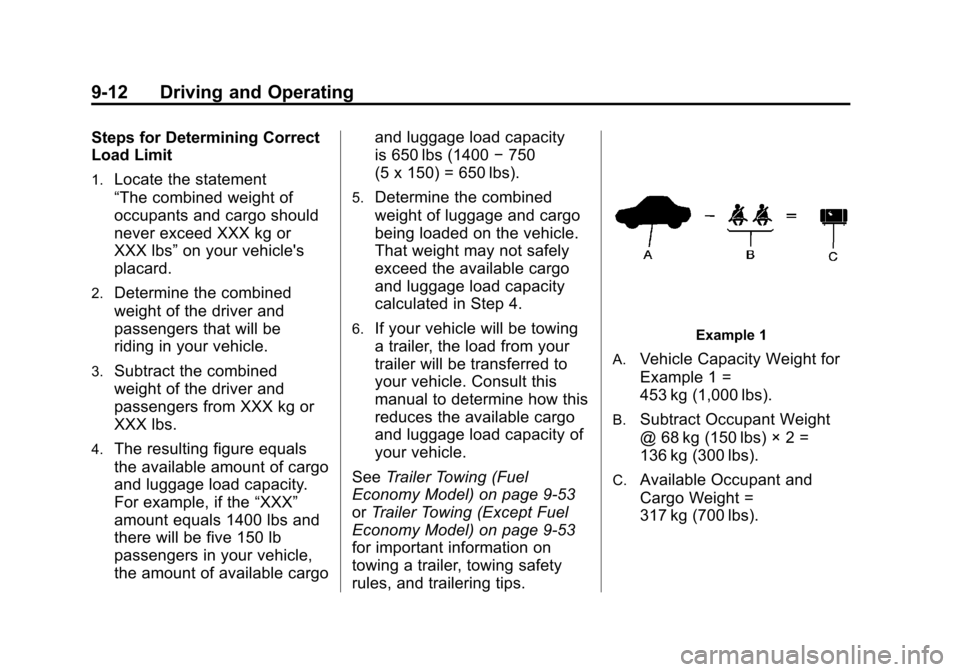
A.
Vehicle Capacity Weight for
Example 1 =
453 kg (1,000 lbs).
B.Subtract Occupant Weight
@ 68 kg (150 lbs) × 2 =
136 kg (300 lbs).
C.Available Occupant and
Cargo Weight =
317 kg (700 lbs).
Page 218 of 400

Black plate (20,1)Chevrolet Cruze Owner Manual - 2012
9-20 Driving and Operating
ON/RUN/START (Green LED
Light):This mode is for driving and
starting. With the ignition off, and
the brake pedal applied, pressing
the button once will place the
ignition system in ON/RUN/START.
Once engine cranking begins,
release the button. Engine cranking
will continue until the engine
starts. See Starting the Engine on
page 9‑20 for more information. The
ignition will then remain in ON/RUN.
Service Only Mode
This power mode is available for
service and diagnostics, and to
verify the proper operation of the
malfunction indicator lamp as may
be required for emission inspection
purposes. With the vehicle off, and
the brake pedal not applied,
pressing and holding the button for
more than five seconds will place
the vehicle in Service Only Mode.
The instruments and audio systems
will operate as they do in ON/RUN,
but the vehicle will not be able to be driven. The engine will not start in
Service Only Mode. Push the button
again to turn the vehicle off.
Starting the Engine
Place the transmission in the
proper gear.
Notice:
The engine is designed to
work with the electronics in the
vehicle. If you add electrical parts
or accessories, you could change
the way the engine operates.
Before adding electrical
equipment, check with your
dealer. If you do not, the engine
might not perform properly. Any
resulting damage would not be
covered by the vehicle warranty.
Automatic Transmission
Move the shift lever to P (Park) or
N (Neutral). The engine will not start
in any other position. To restart the
vehicle when it is already moving,
use N (Neutral) only. Notice:
Do not try to shift to
P (Park) if the vehicle is moving.
If you do, you could damage the
transmission. Shift to P (Park)
only when the vehicle is stopped.
Manual Transmission
The shift lever should be in Neutral
and the parking brake engaged.
Hold the clutch pedal down to the
floor and start the engine. The
vehicle will not start if the clutch
pedal is not all the way down.
Starting Procedure (Key Access)
1. With your foot off the accelerator pedal, turn the ignition key to
START. When the engine starts,
let go of the key. The idle speed
will go down as the engine
warms. Do not race the engine
immediately after starting it.
Allow the oil to warm up and
lubricate all moving parts.
The vehicle has a
Computer-Controlled Cranking
System. This feature assists in
starting the engine and protects
Page 229 of 400
Black plate (31,1)Chevrolet Cruze Owner Manual - 2012
Driving and Operating 9-31
Manual Mode
Driver Shift Control (DSC)
All Models Except Fuel Economy
Model
Notice:If you drive the vehicle at
a high rpm without upshifting
while using Driver Shift Control
(DSC), you could damage the
vehicle. Always upshift when
necessary while using DSC.
DSC allows you to shift an
automatic transmission similar to a
manual transmission.
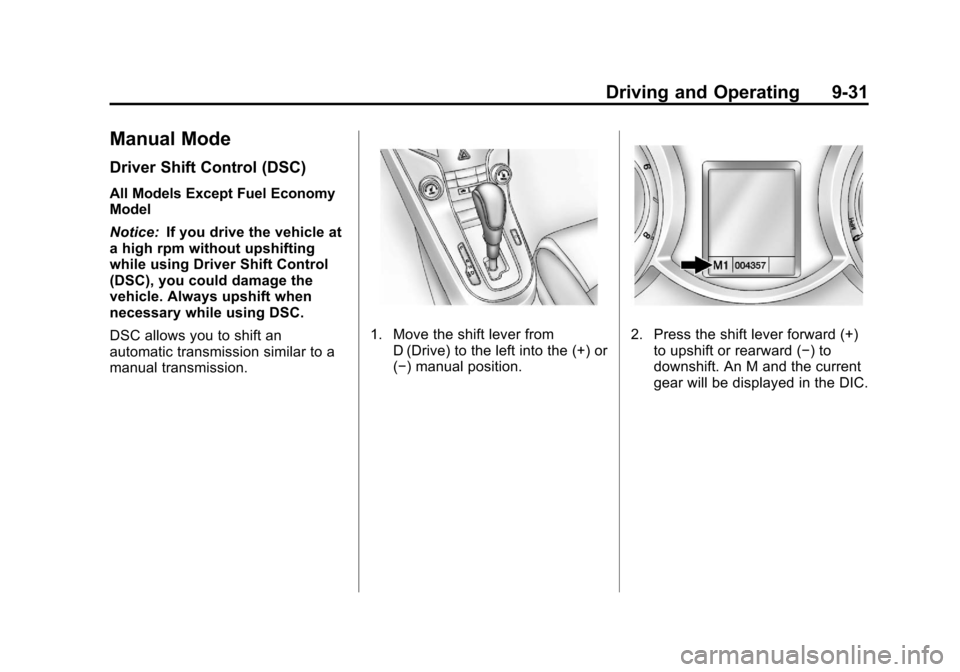
1. Move the shift lever from D (Drive) to the left into the (+) or
(−) manual position.2. Press the shift lever forward (+)to upshift or rearward (−) to
downshift. An M and the current
gear will be displayed in the DIC.
Page 230 of 400
Black plate (32,1)Chevrolet Cruze Owner Manual - 2012
9-32 Driving and Operating
While using the DSC feature, the
vehicle will have firmer, quicker
shifting. You can use this for
sport driving or when climbing or
descending hills, to stay in gear
longer, or to downshift for more
power or engine braking.
The transmission will only allow
you to shift into gears appropriate
for the vehicle speed and engine
revolutions per minute (rpm). The
transmission will not automatically
shift to the next lower gear if the
engine rpm is too high, nor to
the next higher gear when the
maximum engine rpm is reached.
If shifting is prevented for any
reason, the currently selected gear
will flash multiple times, indicating
that the transmission has not
shifted gears.
While in the DSC mode, the
transmission will automatically
downshift when the vehicle comes
to a stop. This will allow for more
power during take-off.When accelerating the vehicle from
a stop in snowy and icy conditions,
you may want to shift into second
gear. A higher gear allows the
vehicle to gain more traction on
slippery surfaces.
Electronic Range Select
(ERS) Mode
Fuel Economy Model
Notice:
If you drive the vehicle at
a high rpm without upshifting
while using Electronic Range
Select (ERS), you could damage
the vehicle. Always upshift when
necessary while using ERS.
ERS allows for the selection of the
range of gear positions. Use this
mode when driving downhill or
towing a trailer to limit the top gear
and vehicle speed. The shift
position indicator within the
Driver Information Center (DIC)
will display a number next to the
M indicating the highest available gear under manual mode and the
driving conditions when manual
mode was selected.
1. Move the shift lever from
D (Drive) to the left into the (+) or
(−) manual position.
2. Press the shift lever forward (+) to upshift or rearward (−) to
downshift. An M and the current
gear will be displayed in the DIC.
When shifting to M (Manual Mode),
the transmission will shift to the
range of the current gear. For this
range, the highest gear available is
displayed next to the M in the DIC.
See Driver Information Center (DIC)
on page 5‑23 for more information.
All gears below that number are
available to use. For example, when
4 (Fourth) is shown next to the M,
1 (First) through 4 (Fourth) gears are
shifted automatically. To shift to
5 (Fifth) gear, press the shift lever
forward (+) to upshift or shift into
D (Drive).
Page 231 of 400
Black plate (33,1)Chevrolet Cruze Owner Manual - 2012
Driving and Operating 9-33
M (Manual Mode) will prevent
shifting to a lower gear range if the
engine speed is too high. If vehicle
speed is not reduced within the time
allowed, the lower gear range shift
will not be completed. Slow the
vehicle, then press the shift lever
rearward (−) to downshift to the
desired lower gear range.
While using the ERS, cruise control
can be used.Manual Transmission
Shift Pattern
All Models
Except Fuel
Economy ModelFuel Economy
Model
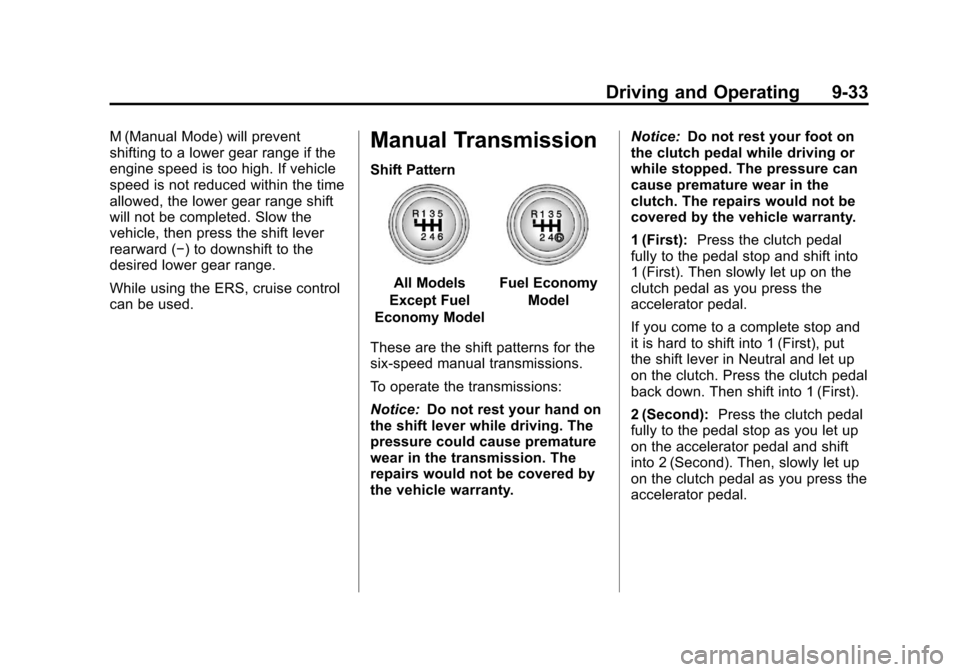
These are the shift patterns for the
six-speed manual transmissions.
To operate the transmissions:
Notice: Do not rest your hand on
the shift lever while driving. The
pressure could cause premature
wear in the transmission. The
repairs would not be covered by
the vehicle warranty. Notice:
Do not rest your foot on
the clutch pedal while driving or
while stopped. The pressure can
cause premature wear in the
clutch. The repairs would not be
covered by the vehicle warranty.
1 (First): Press the clutch pedal
fully to the pedal stop and shift into
1 (First). Then slowly let up on the
clutch pedal as you press the
accelerator pedal.
If you come to a complete stop and
it is hard to shift into 1 (First), put
the shift lever in Neutral and let up
on the clutch. Press the clutch pedal
back down. Then shift into 1 (First).
2 (Second): Press the clutch pedal
fully to the pedal stop as you let up
on the accelerator pedal and shift
into 2 (Second). Then, slowly let up
on the clutch pedal as you press the
accelerator pedal.
Page 247 of 400
Black plate (49,1)Chevrolet Cruze Owner Manual - 2012
Driving and Operating 9-49
.For information on equipment to
tow a trailer, see“Towing
Equipment.”
For information on towing a disabled
vehicle, see Towing the Vehicle on
page 10‑83. For information on
towing the vehicle behind another
vehicle such as a motor home, see
Recreational Vehicle Towing on
page 10‑84.
Driving Characteristics
and Towing Tips
{WARNING
The driver can lose control when
pulling a trailer if the correct
equipment is not used or the
vehicle is not driven properly.
For example, if the trailer is too
heavy, the brakes may not work
well —or even at all.
(Continued)
WARNING (Continued)
The driver and passengers could
be seriously injured. The vehicle
may also be damaged; the
resulting repairs would not be
covered by the vehicle warranty.
Pull a trailer only if all the steps in
this section have been followed.
Ask your dealer for advice and
information about towing a trailer
with the vehicle.
The vehicle can tow a trailer if
it is equipped with the proper trailer
towing equipment. To identify the
trailering capacity of the vehicle,
see Trailer Towing (Fuel Economy
Model) on page 9‑53 orTrailer
Towing (Except Fuel Economy
Model) on page 9‑53. Trailering
changes handling, acceleration,
braking, durability, and fuel
economy. With the added weight, the engine,
transmission, wheel assemblies,
and tires are forced to work harder
and under greater loads. The trailer
also adds wind resistance,
increasing the pulling requirements.
For safe trailering, correctly use the
proper trailering equipment.
The following information has
important trailering tips and rules for
your safety and that of your
passengers. Read this section
carefully before pulling a trailer.
Pulling a Trailer
Here are some important points:
.There are many laws, including
speed limit restrictions that apply
to trailering. Check for legal
requirements with state or
provincial police.
.Do not tow a trailer at all during
the first 1 600 km (1,000 mi) the
new vehicle is driven. The
engine or other parts could be
damaged.