2012 CHEVROLET CORVETTE four wheel drive
[x] Cancel search: four wheel drivePage 22 of 434
Black plate (16,1)Chevrolet Corvette Owner Manual - 2012
1-16 In Brief
Transmission
Manual Paddle Shift
(Automatic Transmission)
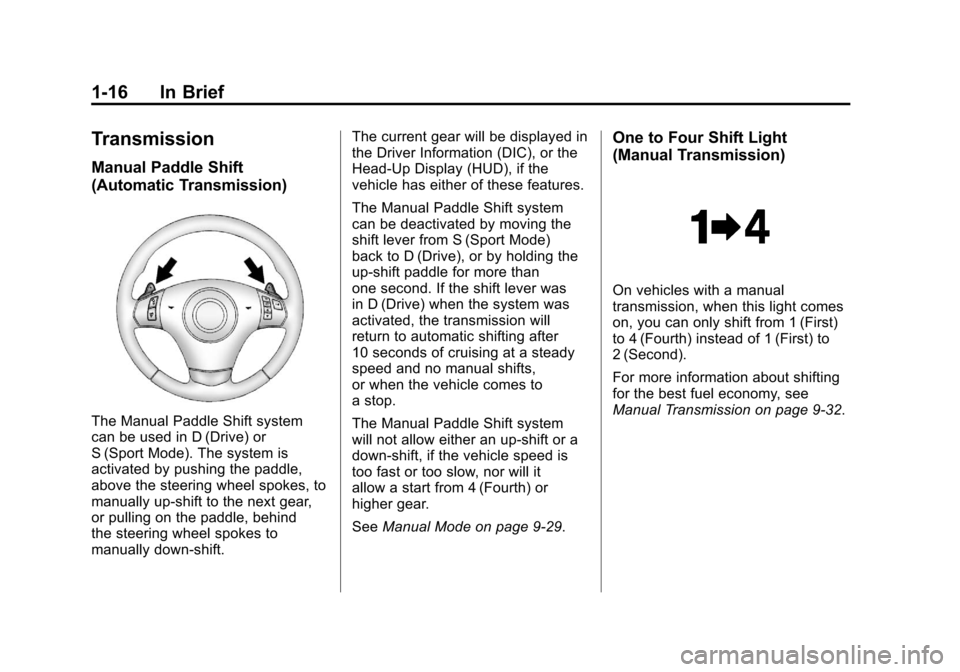
The Manual Paddle Shift system
can be used in D (Drive) or
S (Sport Mode). The system is
activated by pushing the paddle,
above the steering wheel spokes, to
manually up-shift to the next gear,
or pulling on the paddle, behind
the steering wheel spokes to
manually down-shift.The current gear will be displayed in
the Driver Information (DIC), or the
Head-Up Display (HUD), if the
vehicle has either of these features.
The Manual Paddle Shift system
can be deactivated by moving the
shift lever from S (Sport Mode)
back to D (Drive), or by holding the
up‐shift paddle for more than
one second. If the shift lever was
in D (Drive) when the system was
activated, the transmission will
return to automatic shifting after
10 seconds of cruising at a steady
speed and no manual shifts,
or when the vehicle comes to
a stop.
The Manual Paddle Shift system
will not allow either an up-shift or a
down-shift, if the vehicle speed is
too fast or too slow, nor will it
allow a start from 4 (Fourth) or
higher gear.
See
Manual Mode on page 9‑29.
One to Four Shift Light
(Manual Transmission)
On vehicles with a manual
transmission, when this light comes
on, you can only shift from 1 (First)
to 4 (Fourth) instead of 1 (First) to
2 (Second).
For more information about shifting
for the best fuel economy, see
Manual Transmission on page 9‑32.
Page 36 of 434
Black plate (4,1)Chevrolet Corvette Owner Manual - 2012
2-4 Keys, Doors, and Windows
Keyless Trunk Opening
Press the hatch/trunk release button
located on the rear of the hatch/
trunk lid above the license plate
to open the trunk if the RKE
transmitter is within range.
SeeHatch on page 2‑11 for
additional information.
There are other conditions that can
affect the performance of the
transmitter. See Remote Keyless
Entry (RKE) System on page 2‑3.
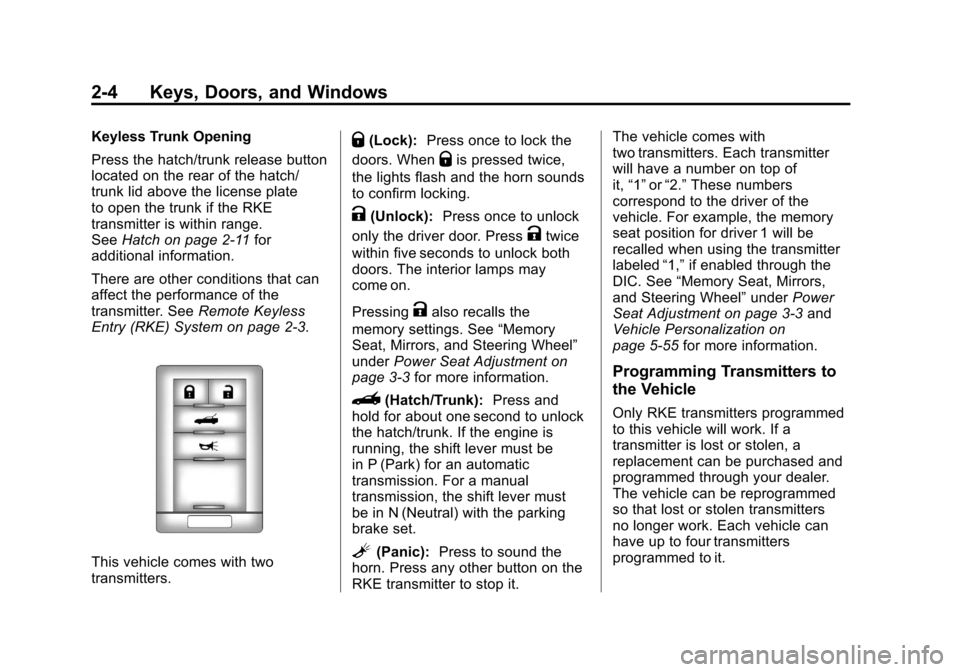
This vehicle comes with two
transmitters.
Q(Lock): Press once to lock the
doors. When
Qis pressed twice,
the lights flash and the horn sounds
to confirm locking.
K(Unlock): Press once to unlock
only the driver door. Press
Ktwice
within five seconds to unlock both
doors. The interior lamps may
come on.
Pressing
Kalso recalls the
memory settings. See “Memory
Seat, Mirrors, and Steering Wheel”
under Power Seat Adjustment on
page 3‑3 for more information.
}(Hatch/Trunk): Press and
hold for about one second to unlock
the hatch/trunk. If the engine is
running, the shift lever must be
in P (Park) for an automatic
transmission. For a manual
transmission, the shift lever must
be in N (Neutral) with the parking
brake set.
L(Panic): Press to sound the
horn. Press any other button on the
RKE transmitter to stop it. The vehicle comes with
two transmitters. Each transmitter
will have a number on top of
it,
“1” or“2.” These numbers
correspond to the driver of the
vehicle. For example, the memory
seat position for driver 1 will be
recalled when using the transmitter
labeled “1,”if enabled through the
DIC. See “Memory Seat, Mirrors,
and Steering Wheel” underPower
Seat Adjustment on page 3‑3 and
Vehicle Personalization on
page 5‑55 for more information.
Programming Transmitters to
the Vehicle
Only RKE transmitters programmed
to this vehicle will work. If a
transmitter is lost or stolen, a
replacement can be purchased and
programmed through your dealer.
The vehicle can be reprogrammed
so that lost or stolen transmitters
no longer work. Each vehicle can
have up to four transmitters
programmed to it.
Page 111 of 434
Black plate (1,1)Chevrolet Corvette Owner Manual - 2012
Instruments and Controls 5-1
Instruments and
Controls
Controls
Steering Wheel Adjustment . . . 5-2
Steering Wheel Controls . . . . . . 5-3
Horn . . . . . . . . . . . . . . . . . . . . . . . . . . 5-4
Windshield Wiper/Washer . . . . . 5-4
Compass . . . . . . . . . . . . . . . . . . . . . 5-5
Clock . . . . . . . . . . . . . . . . . . . . . . . . . 5-6
Power Outlets . . . . . . . . . . . . . . . . . 5-6
Cigarette Lighter . . . . . . . . . . . . . . 5-7
Ashtrays . . . . . . . . . . . . . . . . . . . . . . 5-7
Warning Lights, Gauges, and
Indicators
Warning Lights, Gauges, andIndicators . . . . . . . . . . . . . . . . . . . . 5-8
Instrument Cluster . . . . . . . . . . . . 5-9
Speedometer . . . . . . . . . . . . . . . . 5-12
Odometer . . . . . . . . . . . . . . . . . . . . 5-12
Tachometer . . . . . . . . . . . . . . . . . . 5-12
Fuel Gauge . . . . . . . . . . . . . . . . . . 5-13
Boost Gauge (ZR1) . . . . . . . . . . 5-14
Engine Oil Pressure Gauge . . . . . . . . . . . . . . . . . . . . . . 5-14 Engine Coolant Temperature
Gauge . . . . . . . . . . . . . . . . . . . . . . 5-16
Voltmeter Gauge . . . . . . . . . . . . . 5-17
Safety Belt Reminders . . . . . . . 5-17
Airbag Readiness Light . . . . . . 5-18
Passenger Airbag Status Indicator . . . . . . . . . . . . . . . . . . . . 5-18
Malfunction Indicator Lamp . . . . . . . . . . . . . 5-19
Brake System Warning Light . . . . . . . . . . . . . . . . . . . . . . . 5-22
Antilock Brake System (ABS) Warning Light . . . . . . . . . . . . . . 5-22
One-to-Four Shift Light (Manual Transmission) . . . . . 5-23
Traction Off Light . . . . . . . . . . . . 5-24
StabiliTrak
®OFF Light . . . . . . . 5-24
Active Handling System Light . . . . . . . . . . . . . . . . . . . . . . . 5-25
Tire Pressure Light . . . . . . . . . . 5-25
Security Light . . . . . . . . . . . . . . . . 5-26
High-Beam On Light . . . . . . . . . 5-27
Front Fog Lamp Light . . . . . . . . 5-27
Lamps On Reminder . . . . . . . . . 5-27
Information Displays
Driver Information Center (DIC) . . . . . . . . . . . . . . . 5-28
Head-Up Display (HUD) . . . . . 5-32
Vehicle Messages
Vehicle Messages . . . . . . . . . . . 5-36
Battery Voltage and Charging Messages . . . . . . . . . . . . . . . . . . 5-37
Brake System Messages . . . . 5-37
Convertible Top Messages . . . 5-38
Cruise Control Messages . . . . 5-39
Door Ajar Messages . . . . . . . . . 5-40
Engine Cooling System Messages . . . . . . . . . . . . . . . . . . 5-40
Engine Oil Messages . . . . . . . . 5-41
Engine Power Messages . . . . 5-42
Fuel System Messages . . . . . . 5-43
Key and Lock Messages . . . . . 5-43
Lamp Messages . . . . . . . . . . . . . 5-45
Ride Control System Messages . . . . . . . . . . . . . . . . . . 5-45
Safety Belt Messages . . . . . . . 5-49
Anti-theft Alarm System Messages . . . . . . . . . . . . . . . . . . 5-50
Service Vehicle Messages . . . 5-50
Starting the Vehicle Messages . . . . . . . . . . . . . . . . . . 5-50
Tire Messages . . . . . . . . . . . . . . . 5-51
Transmission Messages . . . . . 5-53
Vehicle Reminder Messages . . . . . . . . . . . . . . . . . . 5-54
Washer Fluid Messages . . . . . 5-54
Page 193 of 434
Black plate (7,1)Chevrolet Corvette Owner Manual - 2012
Infotainment System 7-7
Finding a Station
BAND:Press to switch between
FM1, FM2, or AM.
O/e(Tune): Turn to select radio
stations.
tSEEKu: Press to go to the
previous or to the next station and
stay there.
The radio only stops at stations with
a strong signal.
tSCANu: Press and holdt
orufor two seconds until
FREQUENCY SCAN displays. The
radio goes to a station, plays for a
few seconds, then goes on to the
next station. Press
toruagain to
stop scanning. To scan preset stations:
Press and hold
torufor
four seconds until PRESET SCAN
displays. The radio goes to the next
preset station, plays for a few
seconds, then goes to the next
preset station. Press
toruagain
or press one of the pushbuttons to
stop scanning presets.
The radio only scans stations with
a strong signal.
1–6 (Preset Pushbuttons):
Press to play stations that are
programmed to the radio preset
pushbuttons.
Storing Radio Stations
Drivers are encouraged to store
radio station while the vehicle is
parked. See Defensive Driving on
page 9‑3. Tune to stored radio
stations using the presets, favorites
button, and steering wheel controls,
if the vehicle has this feature.
Up to 30 stations (six FM1, six FM2,
six AM, six M1, and six XM2), and
equalization settings for each
station can be programmed on the
six numbered pushbuttons.
To set presets:
1. Turn the radio on.
2. Press BAND to select FM1, FM2, AM, XM1, or XM2.
3. Tune in the desired station.
4. Press AUTO EQ to select the equalization.
5. Press and hold one of the six numbered pushbuttons until
the radio beeps once.
6. Repeat the steps for each pushbutton.
Page 333 of 434
Black plate (59,1)Chevrolet Corvette Owner Manual - 2012
Vehicle Care 10-59
Winter Tires
Consider installing winter tires on
the vehicle if frequent driving on
snow or ice covered roads is
expected. All season tires provide
good overall performance on most
surfaces, but they may not offer
the traction or the same level of
performance as winter tires on
snow or ice covered roads.
Winter tires, in general, are
designed for increased traction
on snow and ice covered roads.
With winter tires, there may be
decreased dry road traction,
increased road noise, and shorter
tread life. After changing to winter
tires, be alert for changes in vehicle
handling and braking.See your dealer for details
regarding winter tire availability and
proper tire selection. Also, see
Buying New Tires on page 10‑74.
If using snow tires:
.Use tires of the same brand and
tread type on all four wheel
positions.
.Use only radial ply tires of the
same size, load range, and
speed rating as the original
equipment tires.
Winter tires with the same speed
rating as the original equipment tires
may not be available for H, V, W, Y,
and ZR speed rated tires. If winter
tires with a lower speed rating are
chosen, never exceed the tire's
maximum speed capability.
Run-Flat Tires
This vehicle, when new, had run-flat
tires. There is no spare tire, no tire
changing equipment, and no place
to store a tire in the vehicle.
The vehicle also has a Tire
Pressure Monitor System (TPMS)
that indicates a loss of tire pressure
in any of the tires.
{WARNING
If the low tire warning light
displays on the instrument panel
cluster, the handling capabilities
will be reduced during severe
maneuvers. Driving too fast could
cause loss of control and you or
others could be injured. Do not
drive over 90 km/h (55 mph)
when the low tire warning light is
displayed. Drive cautiously and
check the tire pressures as soon
as possible.