2012 CHEVROLET CORVETTE light
[x] Cancel search: lightPage 160 of 434

Black plate (50,1)Chevrolet Corvette Owner Manual - 2012
5-50 Instruments and Controls
BUCKLE SEATBELT
This message reminds you to
buckle the driver's safety belt.
This message displays and a sound
will be heard when the ignition is on,
the driver's safety belt is unbuckled,
and the vehicle is in motion. You
should buckle your safety belt.
If the driver remains unbuckled
when the ignition is on and the
vehicle is in motion, the reminder
will be repeated. If the driver's
safety belt is already buckled, this
message will not come on.
This message is an additional
reminder to the safety belt reminder
light in the instrument panel cluster.
SeeSafety Belt Reminders on
page 5‑17 for more information.
Anti-theft Alarm System
Messages
INTRUSION SENSOR OFF
This message may display when the
anti-theft alarm has been disarmed.
INTRUSION SENSOR ON
This message may display when the
anti-theft alarm has been armed.
Service Vehicle Messages
SERVICE AIR CONDITIONING
This message displays when the
electronic sensors that control
the air conditioning and heating
systems are no longer working.
Have the climate control system
serviced by your dealer if you
notice a drop in heating and air
conditioning efficiency.
SERVICE ELECTRICAL
SYSTEM
This message displays if an
electrical problem has occurred
within the Powertrain Control
Module (PCM). Have the vehicle
serviced by your dealer.
SERVICE VEHICLE SOON
This message displays and a sound
will be heard when there may be an
electrical or another system problem
with the vehicle. Have your vehicle
checked by your dealer if this
message keeps appearing.
Starting the Vehicle
Messages
PRESS BRAKE TO START
ENGINE (Automatic
Transmission Only)
This message displays if you try to
start the engine by pressing the
keyless ignition start button without
having the brake pressed. The
brake needs to be pressed when
starting the engine. See Ignition
Positions on page 9‑19 for more
information.
Page 161 of 434
Black plate (51,1)Chevrolet Corvette Owner Manual - 2012
Instruments and Controls 5-51
Tire Messages
HIGH TIRE PRESSURE
This message may be displayed
when one or more of the tires is
overinflated. This message also
displays LEFT FRONT,
RIGHT FRONT, LEFT REAR,
or RIGHT REAR to indicate which
tire is affected. You can receive
more than one tire pressure
message at a time. To read other
messages that may have been sent
at the same time, press the RESET
button . If a tire pressure message
appears on the DIC, stop as soon
as you can. Have the tire pressures
checked and set to those shown on
the Tire and Loading Information
label. SeeRun-Flat Tires on
page 10‑59, Vehicle Load Limits on
page 9‑14, Tire Pressure on
page 10‑66, and Tire Pressure
Monitor System on page 10‑68.
The DIC also shows the tire
pressure values. See Driver
Information Center (DIC) on
page 5‑28. To acknowledge the message, press
the RESET button. A message
reappears every 10 minutes until the
condition is corrected.
LOW TIRE PRESSURE or TIRE
LOW ADD AIR TO TIRE
{WARNING
When the LOW TIRE
PRESSURE or TIRE FLAT
message is displayed on the
Driver Information Center, your
vehicle's handling capabilities will
be reduced during severe
maneuvers. The active handling
system will be affected. See
Active Handling System on
page 9‑38. If you drive too fast,
you could lose control of your
vehicle. You or others could
be injured. Do not drive over
90 km/h (55 mph) when the LOW
TIRE PRESSURE or TIRE FLAT
(Continued)
WARNING (Continued)
message is displayed. Drive
cautiously and check your tire
pressures as soon as you can.
This message displays when one or
more of the tires is underinflated.
This message also displays LEFT
FRONT, RIGHT FRONT, LEFT
REAR, or RIGHT REAR to indicate
which tire is affected. Multiple
chimes sound and the tire pressure
light on the instrument panel cluster
turns on when this message is
displayed. See Tire Pressure Light
on page 5‑25. You can receive more
than one tire pressure message at a
time. To read other messages that
may have been sent at the same
time, press the RESET button. If a
tire pressure message appears on
the DIC, stop as soon as you can.
Have the tire pressures checked
and set to those shown on the
Tire and Loading Information label.
Page 162 of 434

Black plate (52,1)Chevrolet Corvette Owner Manual - 2012
5-52 Instruments and Controls
SeeRun-Flat Tires on page 10‑59,
Vehicle Load Limits on page 9‑14,
Tire Pressure on page 10‑66, and
Tire Pressure Monitor System on
page 10‑68. The DIC also shows
the tire pressure values. See Driver
Information Center (DIC) on
page 5‑28.
To acknowledge the message, press
the RESET button. A message
reappears every 10 minutes until
the condition is corrected.
SERVICE TIRE MONITOR
This message displays if a part on
the Tire Pressure Monitor
System (TPMS) is not working
properly. The tire pressure light also
flashes and then remains on during
the same ignition cycle. See Tire
Pressure Light on page 5‑25. Several conditions may cause this
message to appear. See
Tire
Pressure Monitor Operation on
page 10‑70 for more information.
If the warning comes on and stays
on, there may be a problem with the
TPMS. See your dealer.
TIRE FLAT
{WARNING
When the LOW TIRE
PRESSURE or TIRE FLAT
message is displayed on the
Driver Information Center, your
vehicle's handling capabilities
will be reduced during severe
maneuvers. If you drive too fast,
you could lose control of your
vehicle. You or others could be
injured.
(Continued)
WARNING (Continued)
Do not drive over 55 mph
(90 km/h) when the LOW TIRE
PRESSURE or TIRE FLAT
message is displayed. Drive
cautiously and check your tire
pressures as soon as you can.
This message displays when
one or more of the tires is flat.
This message also displays
LEFT FRONT, RIGHT FRONT,
LEFT REAR, or RIGHT REAR to
indicate which tire is affected.
Multiple chimes sound and the tire
pressure light on the instrument
panel cluster comes on when this
message is displayed. See Tire
Pressure Light on page 5‑25.
Page 168 of 434

Black plate (58,1)Chevrolet Corvette Owner Manual - 2012
5-58 Instruments and Controls
When the mode you want is
selected, press the OPTION button
to set your choice and advance to
the next personal option.
Approach Lights:This option
briefly turns on the parking lamps,
the high-beam headlamps, and the
back-up lamps during low light
periods when the RKE transmitter is
used to unlock the vehicle.
Press the OPTION button until
APPROACH LIGHTS appears on
the display, then press the RESET
button to scroll through the following
modes:
.OFF
.ON (default)
If you choose OFF, this option will
turn off. If you choose ON, the parking
lamps, the high-beam headlamps,
and the back-up lamps will come on
for 20 seconds during low light
periods when all of the following
occur:
.You press the unlock button on
the RKE transmitter.
.Both of the doors are closed.
.The vehicle is off or in RAP.
The lamps remain on for 20 seconds
or until a door is opened, the lock
button on the RKE transmitter is
pressed, or the vehicle is no longer
off or in RAP.
See Remote Keyless Entry (RKE)
System on page 2‑3 for more
information.
When the mode you want is
selected, press the OPTION button
to set your choice and advance to
the next personal option. Twilight Delay:
This option allows
you to set the amount of time you
want the parking lamps and
high-beam headlamps to remain on
after you exit the vehicle. This will
occur when the vehicle is off or in
RAP and the headlamps are on due
to the automatic headlamp system.
The parking lamps and high-beam
headlamps will remain on until the
driver selected time expires, the
exterior lamp control is activated,
or the vehicle is no longer off or
in RAP.
Press the OPTION button until
TWILIGHT DELAY appears on
the display, then press the
RESET button to scroll through
the following modes:
.OFF
.15 S
.30 S (default)
.90 S
If you choose OFF, this option will
turn off.
Page 169 of 434
Black plate (59,1)Chevrolet Corvette Owner Manual - 2012
Instruments and Controls 5-59
If you choose 15 S, the twilight
delay time will be set to 15 seconds.
If you choose 30 S, the twilight
delay time will be set to 30 seconds.
If you choose 90 S, the twilight
delay time will be set to 90 seconds.
When the mode you want is
selected, press the OPTION button
to set your choice and advance to
the next personal option.
Flash at Unlock:This option
activates the front and rear turn
signals for two short flashes when
the unlock or hatch/trunk button on
the RKE transmitter is pressed.
This will only occur when the
vehicle is off.
Press the OPTION button until
FLASH AT UNLOCK appears on
the display, then press the
RESET button to scroll through
the following modes:
.YES (default)
.NO If you choose YES, the front and
rear turn signals will flash twice
when you press the unlock button or
the hatch/trunk button on the RKE
transmitter.
If you choose NO, this option will
turn off.
When the mode you want is
selected, press the OPTION button
to set your choice and advance to
the next personal option.
Flash at Lock:
This option
activates the front and rear turn
signals for one long flash when the
lock button on the RKE transmitter
is pressed. This will only occur
when the vehicle is off. If the lock
button on the RKE transmitter is
pressed again within five seconds,
the horn will sound regardless of
which setting you have selected. Press the OPTION button until
FLASH AT LOCK appears on the
display, then press the RESET
button to scroll through the following
modes:
.YES (default)
.NO
If you choose YES, the front and
rear turn signals will flash once
when you press the lock button on
the RKE transmitter.
If you choose NO, this option will
turn off.
When the mode you want is
selected, press the OPTION button
to set your choice and advance to
the next personal option.
Page 176 of 434
Black plate (66,1)Chevrolet Corvette Owner Manual - 2012
5-66 Instruments and Controls
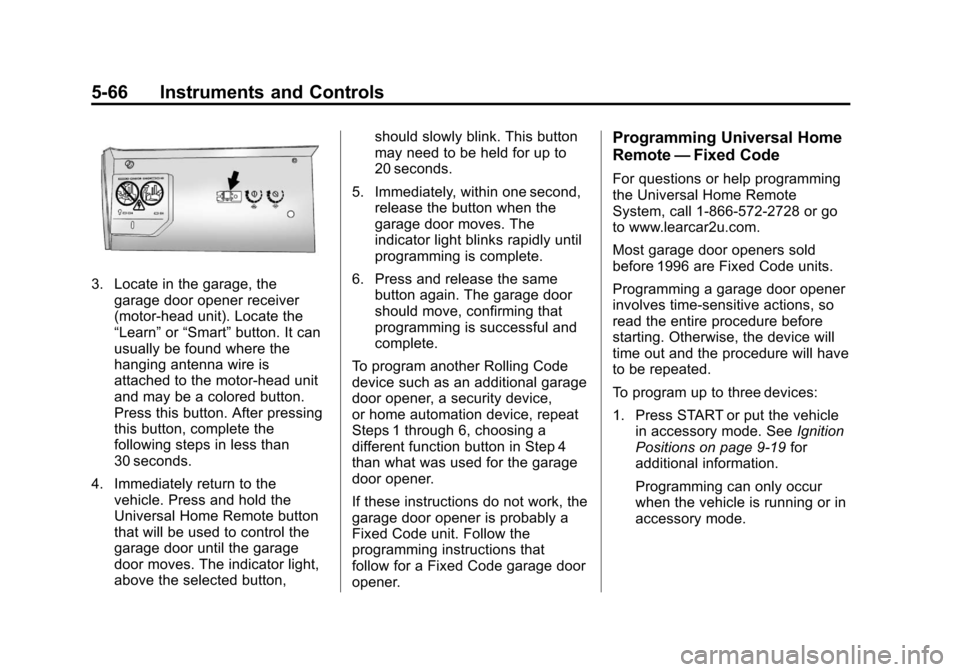
3. Locate in the garage, thegarage door opener receiver
(motor-head unit). Locate the
“Learn” or“Smart” button. It can
usually be found where the
hanging antenna wire is
attached to the motor-head unit
and may be a colored button.
Press this button. After pressing
this button, complete the
following steps in less than
30 seconds.
4. Immediately return to the vehicle. Press and hold the
Universal Home Remote button
that will be used to control the
garage door until the garage
door moves. The indicator light,
above the selected button, should slowly blink. This button
may need to be held for up to
20 seconds.
5. Immediately, within one second, release the button when the
garage door moves. The
indicator light blinks rapidly until
programming is complete.
6. Press and release the same button again. The garage door
should move, confirming that
programming is successful and
complete.
To program another Rolling Code
device such as an additional garage
door opener, a security device,
or home automation device, repeat
Steps 1 through 6, choosing a
different function button in Step 4
than what was used for the garage
door opener.
If these instructions do not work, the
garage door opener is probably a
Fixed Code unit. Follow the
programming instructions that
follow for a Fixed Code garage door
opener.
Programming Universal Home
Remote —Fixed Code
For questions or help programming
the Universal Home Remote
System, call 1-866-572-2728 or go
to www.learcar2u.com.
Most garage door openers sold
before 1996 are Fixed Code units.
Programming a garage door opener
involves time-sensitive actions, so
read the entire procedure before
starting. Otherwise, the device will
time out and the procedure will have
to be repeated.
To program up to three devices:
1. Press START or put the vehicle
in accessory mode. See Ignition
Positions on page 9‑19 for
additional information.
Programming can only occur
when the vehicle is running or in
accessory mode.
Page 178 of 434
Black plate (68,1)Chevrolet Corvette Owner Manual - 2012
5-68 Instruments and Controls
The switch positions on the
hand-held transmitter could be
labeled as follows:
.A switch in the up position
could be labeled as
“Up,” “+,”or“On.”
.A switch in the down
position could be labeled as
“Down,” “−,” or“Off.”
.A switch in the middle
position could be labeled as
“Middle,” “0,” or“Neutral.”
3. Write down the eight to 12 switch settings from left to right as
follows:
.When a switch is in the
up position, write “Left.”
.When a switch is in the
down position, write “Right.”
.If a switch is set between
the up and down position,
write“Middle.”
The switch settings written
down in Step 3 now
become the button strokes
to be entered into the
Universal Home Remote in
Step 5. Be sure to enter the
switch settings written down
in Step 3, in order from left
to right, into the Universal
Home Remote, when
completing Step 5.
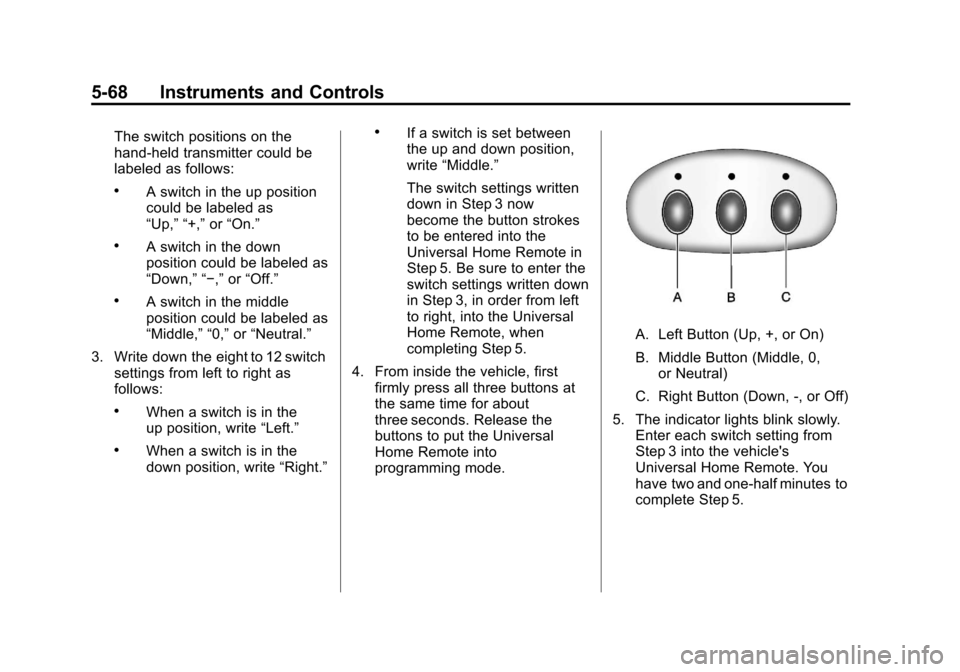
4. From inside the vehicle, first firmly press all three buttons at
the same time for about
three seconds. Release the
buttons to put the Universal
Home Remote into
programming mode.
A. Left Button (Up, +, or On)
B. Middle Button (Middle, 0,or Neutral)
C. Right Button (Down, -, or Off)
5. The indicator lights blink slowly. Enter each switch setting from
Step 3 into the vehicle's
Universal Home Remote. You
have two and one-half minutes to
complete Step 5.
Page 179 of 434
Black plate (69,1)Chevrolet Corvette Owner Manual - 2012
Instruments and Controls 5-69
Now press one button on the
Universal Home Remote for
each switch setting as follows:
.If you wrote“Left,”press
the left button (A) in the
vehicle.
.If you wrote “Right,”press
the right button (C) in the
vehicle.
.If you wrote “Middle,”press
the middle button (B) in the
vehicle.
6. After entering all of the switch positions, again, firmly press and
release all three buttons at the
same time. The indicator lights
turn on. 7. Press and hold the button that
will be used to control the
garage door until the garage
door moves. The indicator light
above the selected button
should slowly blink. This button
may need to be held for up to
55 seconds.
8. Immediately release the button when the garage door moves.
The indicator light blinks rapidly
until programming is complete.
9. Press and release the same button again. The garage door
should move, confirming that
programming is successful
and complete. To program another Fixed Code
device such as an additional garage
door opener, a security device,
or home automation device, repeat
Steps 1 through 9, choosing a
different button in Step 7 than
what was used for the garage
door opener.