2012 CHEVROLET CORVETTE tire pressure
[x] Cancel search: tire pressurePage 138 of 434
Black plate (28,1)Chevrolet Corvette Owner Manual - 2012
5-28 Instruments and Controls
Information Displays
Driver Information
Center (DIC)
The Driver Information Center (DIC)
display is located on the instrument
panel cluster and shows driver
personalization features and
warning/status messages.
The DIC comes on when the ignition
is turned on. After displaying
CORVETTE BY CHEVROLET, the
DIC shows the information that was
last displayed before the engine
was turned off.
If a problem is detected, a warning
message appears on the DIC
display. SeeVehicle Messages on
page 5‑36 for more information.
DIC Operation and Displays
Depending on the features on the
vehicle, the drive gear may display
on the DIC. See “Manual Paddle
Shift” under Automatic Transmission on page 9‑27
andHead-Up Display
(HUD) on page 5‑32 for more
information.
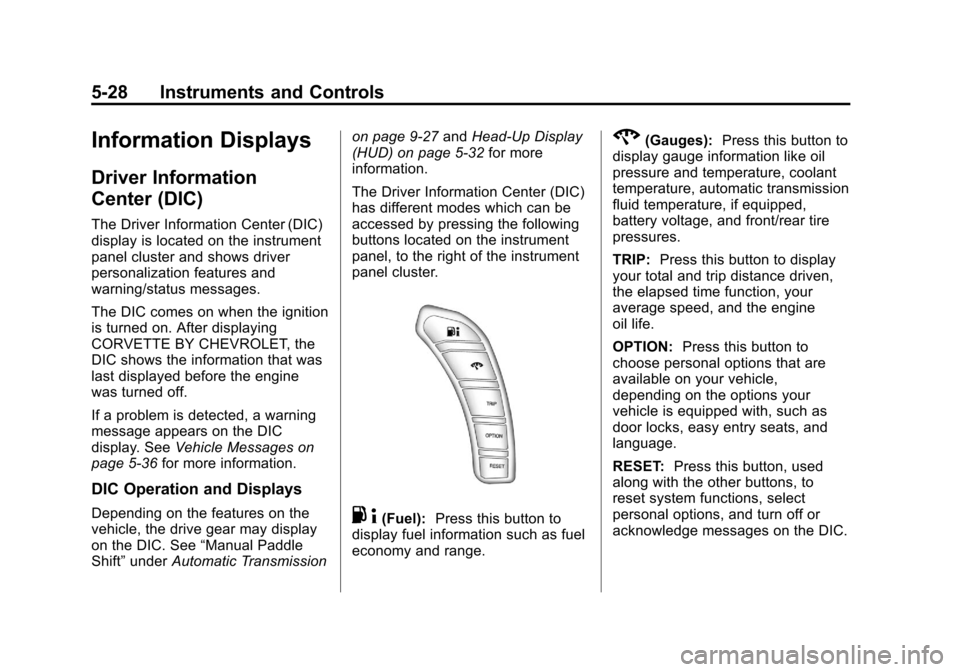
The Driver Information Center (DIC)
has different modes which can be
accessed by pressing the following
buttons located on the instrument
panel, to the right of the instrument
panel cluster.. 4(Fuel): Press this button to
display fuel information such as fuel
economy and range.
2(Gauges): Press this button to
display gauge information like oil
pressure and temperature, coolant
temperature, automatic transmission
fluid temperature, if equipped,
battery voltage, and front/rear tire
pressures.
TRIP: Press this button to display
your total and trip distance driven,
the elapsed time function, your
average speed, and the engine
oil life.
OPTION: Press this button to
choose personal options that are
available on your vehicle,
depending on the options your
vehicle is equipped with, such as
door locks, easy entry seats, and
language.
RESET: Press this button, used
along with the other buttons, to
reset system functions, select
personal options, and turn off or
acknowledge messages on the DIC.
Page 139 of 434
Black plate (29,1)Chevrolet Corvette Owner Manual - 2012
Instruments and Controls 5-29
Fuel Button
The fuel button displays average
fuel economy and instantaneous
fuel economy, calculated for your
specific driving conditions, and
range information.
Average Fuel Economy:The
average fuel economy is viewed as
a long-term approximation of your
overall driving conditions. You
should reset the average fuel
economy display every time you
refuel. If you press the RESET
button in this mode while you are
driving, the system will reset this
display and begin figuring fuel
economy from that point in time.
Press the fuel button to display
average fuel economy, such as:
.AVERAGE FUEL ECONOMY
11.7 L/100 km or
.AVERAGE FUEL ECONOMY
20.1 MPG Instantaneous Fuel Economy:
Instantaneous fuel economy reflects
only the fuel economy that the
vehicle has right now and will
change frequently as driving
conditions change. Unlike average
fuel economy, this menu item
cannot be reset.
Press the fuel button again to
display instantaneous fuel economy,
such as:
.INSTANT FUEL ECONOMY
11.7 L/100 km or
.INSTANT FUEL ECONOMY
20.1 MPG
Fuel Range: The range calculates
the remaining distance you can
drive without refueling. It is based
on fuel economy and the fuel
remaining in the tank.
Press the fuel button again to
display the range, such as:
.RANGE 48 km or
.RANGE 30 MI If the LOW FUEL warning is
displayed or if RANGE is less than
64 km (40 miles), the display will
read RANGE LOW.
The fuel economy data used to
determine fuel range is an average
of recent driving conditions. As your
driving conditions change, this data
is gradually updated automatically.
If the vehicle has been idling for a
long time, the range displayed on
the DIC could be abnormally low.
The vehicle must be driven
8 to 16 km (5 to 10 miles) to get an
accurate reading.
Gauges Button
The gauges button displays oil
pressure, oil temperature, coolant
temperature, transmission fluid
temperature for automatic
transmission vehicles only,
battery voltage, and tire pressure
information.
Page 140 of 434
Black plate (30,1)Chevrolet Corvette Owner Manual - 2012
5-30 Instruments and Controls
Oil Pressure:This display shows
the oil pressure.
Press the gauges button to display
the oil pressure, such as:
.OIL PRESSURE 276 kPa or
.OIL PRESSURE 40 PSI
Oil Temperature: This display
shows the oil temperature.
Press the gauges button again to
display the oil temperature, such as:
.OIL TEMPERATURE 112°C or
.OIL TEMPERATURE 234°F
If the oil temperature is low,
the display will show OIL
TEMPERATURE LOW. If the oil
temperature is high, the display will
show OIL TEMPERATURE HIGH.
Coolant Temperature:
This display shows the engine
coolant temperature. Press the gauges button again to
display the coolant temperature,
such as:
.COOLANT
TEMPERATURE 51°C or
.COOLANT
TEMPERATURE 123°F
If the coolant temperature is low, the
display will show COOLANT
TEMPERATURE LOW. If the
coolant temperature is high, the
display will show COOLANT
TEMPERATURE HIGH.
Transmission Fluid
Temperature: If you have an
automatic transmission vehicle,
this display shows the automatic
transmission fluid temperature.
Press the gauges button again to
display the automatic transmission
fluid temperature, such as:
.TRANS FLUID TEMP 51°C or
.TRANS FLUID TEMP 123°F If the transmission fluid temperature
is low, the display will show TRANS
FLUID TEMP LOW. If the
transmission fluid temperature is
high, the display will show TRANS
FLUID TEMP HIGH.
Battery Voltage:
This display
shows the current battery voltage.
Press the gauges button again to
display the battery voltage, such as:
.BATTERY VOLTAGE
13.5 VOLTS
Tire Pressure: This display shows
the tire pressure for each tire.
Press the gauges button again to
display the tire pressure for the
front tires, such as:
.FRONT TIRE PRESSURES
L 234 kPa R 228 kPa or
.FRONT TIRE PRESSURES
L 34 PSI R 33 PSI
Page 141 of 434

Black plate (31,1)Chevrolet Corvette Owner Manual - 2012
Instruments and Controls 5-31
Press the gauges button again to
display the tire pressure for the rear
tires, such as:
.REAR TIRE PRESSURES
L 234 kPa R 228 kPa or
.REAR TIRE PRESSURES
L 34 PSI R 33 PSI
TRIP Button
The TRIP button displays the
odometer, trip distance, elapsed
time, average speed, and oil life
remaining information.
Odometer:The odometer shows
how far your vehicle has been
driven in either kilometers or miles.
Press the TRIP button to display
odometer readings, such as:
.ODOMETER 20008 km or
.ODOMETER 12345 MI
You can also display the odometer
by turning on the parking lamps. Trip Odometers:
There are two trip
odometers. Press the TRIP button
to display TRIP ODOMETER A
readings and press the button again
to display TRIP ODOMETER B
readings, such as:
.TRIP ODOMETER A 209.9 km or
.TRIP ODOMETER A 130.5 MI
.TRIP ODOMETER B 483.5 km or
.TRIP ODOMETER B 300.5 MI
Both of the trip odometers can be
used simultaneously. The trip
odometers can be reset by pressing
the RESET button on the DIC.
The trip odometers are able to
display up to 3217.9 km (1999.9 mi).
This display will roll over to 0.0 if
the maximum displayed miles or
kilometers are reached.
There is also a miles since last
ignition feature that displays the
number of kilometers (miles) driven
since you last started the vehicle.
Press and hold the RESET button
for three seconds, then release it. The kilometers (miles) since the last
ignition cycle will be set into the trip
odometer.
Elapsed Timer:
Press the TRIP
button until ELAPSED TIMER is
displayed, such as
ELAPSED TIMER .00.
When the ignition is in on, the DIC
can be used as a stopwatch. The
display can show hours, minutes,
and seconds. The elapsed time
indicator will record up to 23 hours,
59 minutes, and 59 seconds, then it
will reset to zero and continue
counting. The display appears as
ELAPSED TIMER .00 in the elapsed
time function.
You can start or stop the elapsed
time by pressing the RESET button.
To reset the elapsed time to zero,
press the RESET button for
three seconds while the timer is
displayed.
Pressing and holding the RESET
button for at least 10 seconds will
reset the timer display to the time
since last ignition cycle.
Page 161 of 434
Black plate (51,1)Chevrolet Corvette Owner Manual - 2012
Instruments and Controls 5-51
Tire Messages
HIGH TIRE PRESSURE
This message may be displayed
when one or more of the tires is
overinflated. This message also
displays LEFT FRONT,
RIGHT FRONT, LEFT REAR,
or RIGHT REAR to indicate which
tire is affected. You can receive
more than one tire pressure
message at a time. To read other
messages that may have been sent
at the same time, press the RESET
button . If a tire pressure message
appears on the DIC, stop as soon
as you can. Have the tire pressures
checked and set to those shown on
the Tire and Loading Information
label. SeeRun-Flat Tires on
page 10‑59, Vehicle Load Limits on
page 9‑14, Tire Pressure on
page 10‑66, and Tire Pressure
Monitor System on page 10‑68.
The DIC also shows the tire
pressure values. See Driver
Information Center (DIC) on
page 5‑28. To acknowledge the message, press
the RESET button. A message
reappears every 10 minutes until the
condition is corrected.
LOW TIRE PRESSURE or TIRE
LOW ADD AIR TO TIRE
{WARNING
When the LOW TIRE
PRESSURE or TIRE FLAT
message is displayed on the
Driver Information Center, your
vehicle's handling capabilities will
be reduced during severe
maneuvers. The active handling
system will be affected. See
Active Handling System on
page 9‑38. If you drive too fast,
you could lose control of your
vehicle. You or others could
be injured. Do not drive over
90 km/h (55 mph) when the LOW
TIRE PRESSURE or TIRE FLAT
(Continued)
WARNING (Continued)
message is displayed. Drive
cautiously and check your tire
pressures as soon as you can.
This message displays when one or
more of the tires is underinflated.
This message also displays LEFT
FRONT, RIGHT FRONT, LEFT
REAR, or RIGHT REAR to indicate
which tire is affected. Multiple
chimes sound and the tire pressure
light on the instrument panel cluster
turns on when this message is
displayed. See Tire Pressure Light
on page 5‑25. You can receive more
than one tire pressure message at a
time. To read other messages that
may have been sent at the same
time, press the RESET button. If a
tire pressure message appears on
the DIC, stop as soon as you can.
Have the tire pressures checked
and set to those shown on the
Tire and Loading Information label.
Page 162 of 434

Black plate (52,1)Chevrolet Corvette Owner Manual - 2012
5-52 Instruments and Controls
SeeRun-Flat Tires on page 10‑59,
Vehicle Load Limits on page 9‑14,
Tire Pressure on page 10‑66, and
Tire Pressure Monitor System on
page 10‑68. The DIC also shows
the tire pressure values. See Driver
Information Center (DIC) on
page 5‑28.
To acknowledge the message, press
the RESET button. A message
reappears every 10 minutes until
the condition is corrected.
SERVICE TIRE MONITOR
This message displays if a part on
the Tire Pressure Monitor
System (TPMS) is not working
properly. The tire pressure light also
flashes and then remains on during
the same ignition cycle. See Tire
Pressure Light on page 5‑25. Several conditions may cause this
message to appear. See
Tire
Pressure Monitor Operation on
page 10‑70 for more information.
If the warning comes on and stays
on, there may be a problem with the
TPMS. See your dealer.
TIRE FLAT
{WARNING
When the LOW TIRE
PRESSURE or TIRE FLAT
message is displayed on the
Driver Information Center, your
vehicle's handling capabilities
will be reduced during severe
maneuvers. If you drive too fast,
you could lose control of your
vehicle. You or others could be
injured.
(Continued)
WARNING (Continued)
Do not drive over 55 mph
(90 km/h) when the LOW TIRE
PRESSURE or TIRE FLAT
message is displayed. Drive
cautiously and check your tire
pressures as soon as you can.
This message displays when
one or more of the tires is flat.
This message also displays
LEFT FRONT, RIGHT FRONT,
LEFT REAR, or RIGHT REAR to
indicate which tire is affected.
Multiple chimes sound and the tire
pressure light on the instrument
panel cluster comes on when this
message is displayed. See Tire
Pressure Light on page 5‑25.
Page 163 of 434

Black plate (53,1)Chevrolet Corvette Owner Manual - 2012
Instruments and Controls 5-53
This message is followed by the
MAXIMUM SPEED 90 km/h
(55 MPH) message, and then by the
REDUCED HANDLING message.
The Active Handling System will
intervene more quickly when a flat
tire has been detected. Adjust your
driving accordingly.
You can receive more than one tire
pressure message at a time. To
read other messages that may have
been sent at the same time, press
the RESET button. If a tire pressure
message appears on the DIC, stop
as soon as you can. Have the tire
pressures checked and set to those
shown on the Tire and Loading
Information label. SeeRun-Flat
Tires on page 10‑59, Vehicle Load
Limits on page 9‑14, Tire Pressure
on page 10‑66, and Tire Pressure
Monitor System on page 10‑68. The
DIC also shows the tire pressure
values. See Driver Information
Center (DIC) on page 5‑28. To acknowledge the message, press
the RESET button. A message
reappears every 10 minutes until
the condition is corrected.
Transmission Messages
SERVICE TRANSMISSION
This message displays when there
is a problem with the transmission.
See your dealer for service.
SHIFT TO PARK
If the vehicle has an automatic
transmission, this message displays
if the vehicle is not in P (Park) when
the engine is being turned off. The
vehicle will be in ACCESSORY.
Once the shift lever is moved to
P (Park), the vehicle will turn off.
The vehicle will remain in
ACCESSORY, without the 20 minute
time-out period, until the shift lever
is moved to P (Park) or until the
driver presses the pushbutton to
restart the vehicle. See
Ignition
Positions on page 9‑19 for more
information.
TRANSMISSION HOT IDLE
ENGINE
This message displays and
four chimes sound if the
transmission fluid temperature
rises above 132°C (270°F) or rises
rapidly. The transmission may
shift gears or apply the torque
converter clutch to reduce the fluid
temperature. Driving aggressively or
driving on long hills can cause the
transmission fluid temperature to be
higher than normal. If this message
appears, you may continue to drive
at a slower speed. Monitor the
transmission fluid temperature and
allow it to cool to at least 110°C
(230°F). The transmission fluid
temperature can be monitored with
the gauges button on the DIC. See
“DIC Operation and Displays” under
Driver Information Center (DIC) on
page 5‑28 andAutomatic
Transmission Fluid on page 10‑23.
Also check the engine coolant
temperature. If it is also hot, see
Engine Overheating on page 10‑34.
Page 234 of 434
Black plate (14,1)Chevrolet Corvette Owner Manual - 2012
9-14 Driving and Operating
Vehicle Load Limits
It is very important to know how
much weight your vehicle can
carry. This weight is called the
vehicle capacity weight and
includes the weight of all
occupants, cargo and all
nonfactory‐installed options.
Two labels on your vehicle show
how much weight it may
properly carry, the Tire and
Loading Information label and
the Certification label.
{WARNING
Do not load the vehicle any
heavier than the Gross
Vehicle Weight Rating
(GVWR), or either the
maximum front or rear Gross
Axle Weight Rating (GAWR).
This can cause systems to
break and change the way the
(Continued)
WARNING (Continued)
vehicle handles. This could
cause loss of control and a
crash. Overloading can also
shorten the life of the vehicle.
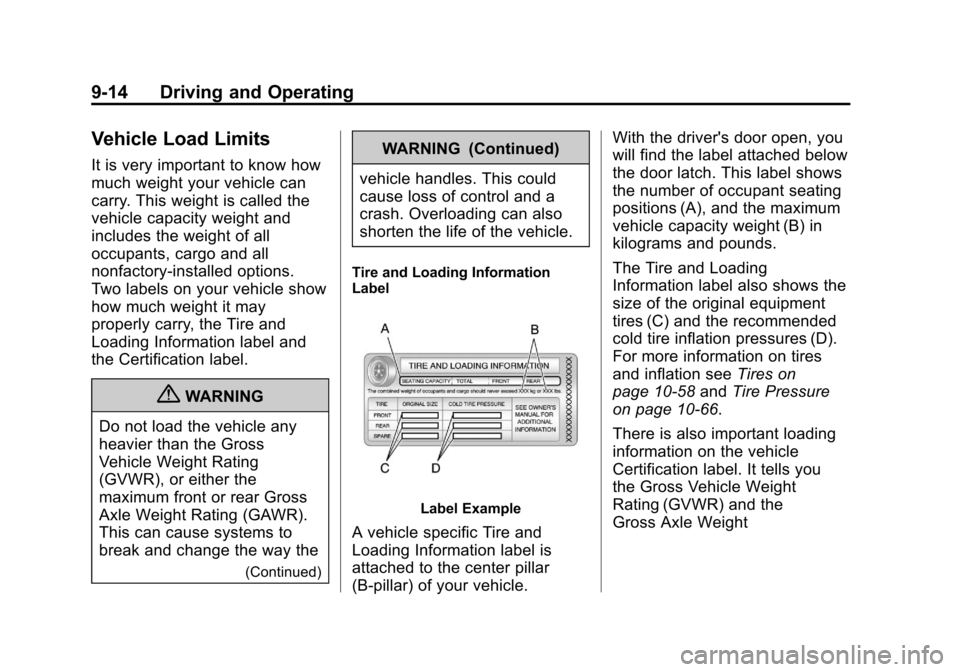
Tire and Loading Information
Label
Label Example
A vehicle specific Tire and
Loading Information label is
attached to the center pillar
(B-pillar) of your vehicle. With the driver's door open, you
will find the label attached below
the door latch. This label shows
the number of occupant seating
positions (A), and the maximum
vehicle capacity weight (B) in
kilograms and pounds.
The Tire and Loading
Information label also shows the
size of the original equipment
tires (C) and the recommended
cold tire inflation pressures (D).
For more information on tires
and inflation see
Tires on
page 10‑58 andTire Pressure
on page 10‑66.
There is also important loading
information on the vehicle
Certification label. It tells you
the Gross Vehicle Weight
Rating (GVWR) and the
Gross Axle Weight