2012 CHEVROLET COLORADO radio
[x] Cancel search: radioPage 162 of 394

Black plate (20,1)Chevrolet Colorado Owner Manual - 2012
7-20 Infotainment System
When in random, pressing and
releasing either SEEK arrow takes
the CD to the previous or to the next
random track.
Press and release this button again
to turn off random play. NO RDM
(no random) displays.
qSEEKr:Press the left SEEK
arrow to go to the start of the
previous track. Press the right
SEEK arrow to go to the start of the
next track. Pressing either SEEK
arrow for more than two seconds
searches the previous or next tracks
at two tracks per second. Release
the button to stop searching and to
play the track.
qTUNEr: Turn to reverse or
advance through the tracks in
all folders or playlists. The track
number and file name displays for
each track. Turning this knob while
in random reverses or advances the
tracks in sequential order. DISPL (Display):
Press this
knob to switch between track
mode, folder/playlist mode, and time
of day mode. The display shows
only eight characters, but there can
be up to four pages of text. If there
are more than eight characters
in the song, folder, or playlist
name, pressing this knob within
two seconds takes you to the next
page of text. If there are no other
pages to be shown, pressing this
knob within two seconds takes you
to the next display mode.
.Track mode displays the current
track number and the ID3 tag
song name.
.Folder/playlist mode displays the
current folder or playlist number
and the folder/playlist name.
.Time of day mode displays the
time of day and the ID3 tag
song name. To change the default on the
display, press the DISPL knob until
you see the desired display, then
press and hold this knob for two
two seconds. The radio produces
one beep and the selected display
is now the default.
INFO (Information):
INFO displays
when a current track has ID3 tag
information. Press this button to
display the artist name and album
contained in the tag. INFO
disappears from the display when
the information in the ID3 tag has
finished being read.
BAND: Press this button to listen to
the radio when a CD is playing. The
inactive CD remains inside the radio
for future listening.
CD AUX (Auxiliary): Press this
button to play a CD when listening
to the radio. The CD symbol
illuminates on the display when a
CD is loaded.
Page 163 of 394

Black plate (21,1)Chevrolet Colorado Owner Manual - 2012
Infotainment System 7-21
Z(Eject):Press this button to
eject a CD. Eject can activate while
either the ignition or radio is off.
CDs can be loaded with the ignition
and radio off if this button is pressed
first.
CD Messages
CHECK CD: If this message
displays and/or the CD comes out,
it could be for one of the following
reasons:
.It is very hot. When the
temperature returns to normal,
the CD should play.
.You are driving on a very rough
road. When the road becomes
smoother, the CD should play.
.The CD is dirty, scratched, wet,
or upside down.
.The air is very humid. If so, wait
about an hour and try again.
.The format of the CD might not
be compatible. See “Using an
MP3” later in this section.
.There could have been a
problem while burning the CD.
.The label could be caught in the
CD player.
If the CD is not playing correctly,
for any other reason, try a known
good CD.
If any error occurs repeatedly or
if an error cannot be corrected,
contact your dealer. If the radio
displays an error message, write it
down and provide it to your dealer
when reporting the problem.
Phone
Bluetooth
For vehicles equipped with
Bluetooth capability, the system
can interact with many cell phones,
allowing:
.Placement and receipt of calls in
a hands-free mode.
.Sharing of the cell phone’s
address book or contact list with
the vehicle.
To minimize driver distraction,
before driving, and with the vehicle
parked:
.Become familiar with the
features of the cell phone.
Organize the phone book and
contact lists clearly and delete
duplicate or rarely used entries.
If possible, program speed dial
or other shortcuts.
.Review the controls and
operation of the infotainment
system.
Page 170 of 394

Black plate (28,1)Chevrolet Colorado Owner Manual - 2012
7-28 Infotainment System
This feature can be used to verbally
access contacts stored in the cell
phone.
1. Press and release
g.
2. Say “Bluetooth.” This command
can be skipped.
3. Say “Voice.”
.The cell phone's normal
prompt messages will go
through its cycle according
to the phone's operating
instructions.
Dual Tone Multi-Frequency
(DTMF) Tones
The Bluetooth system can send
numbers and the numbers stored as
name tags during a call. You can
use this feature when calling a
menu driven phone system. Account
numbers can also be stored for use. Sending a Number or Name Tag
During a Call
1. Press
g. The system responds
“Ready,” followed by a tone.
2. Say “Dial.”
3. Say the number or name tag to send.
Clearing the System
Unless information is deleted out of
the in‐vehicle Bluetooth system, it
will be retained indefinitely. This
includes all saved name tags in
the phonebook and phone pairing
information. For information on how
to delete this information, see the
above sections on Deleting a Paired
Phone and Deleting Name Tags.
Other Information
The Bluetooth®word mark and
logos are owned by the Bluetooth®
SIG, Inc. and any use of such marks
by General Motors is under license.
Other trademarks and trade names
are those of their respective owners.
See Radio Frequency Statement on
page 13‑21 for information
regarding Part 15 of the Federal
Communications Commission (FCC)
rules and Industry Canada
Standards RSS-GEN/210/220/310.
Page 176 of 394

Black plate (2,1)Chevrolet Colorado Owner Manual - 2012
9-2 Driving and Operating
Fuel
Fuel . . . . . . . . . . . . . . . . . . . . . . . . . 9-48
Recommended Fuel . . . . . . . . . 9-49
Gasoline Specifications(U.S. and Canada Only) . . . . 9-49
California Fuel
Requirements . . . . . . . . . . . . . . 9-49
Fuels in Foreign Countries . . . 9-49
Fuel Additives . . . . . . . . . . . . . . . 9-50
Filling the Tank . . . . . . . . . . . . . . 9-51
Filling a Portable Fuel Container . . . . . . . . . . . . . . . . . . . 9-52
Towing
General TowingInformation . . . . . . . . . . . . . . . . . 9-53
Driving Characteristics and Towing Tips . . . . . . . . . . . . . . . . 9-53
Trailer Towing . . . . . . . . . . . . . . . . 9-57
Towing Equipment . . . . . . . . . . . 9-62
Conversions and Add-Ons
Add-On Electrical Equipment . . . . . . . . . . . . . . . . . 9-63
Pickup Conversion to Chassis Cab . . . . . . . . . . . . . . . 9-63
Driving Information
Distracted Driving
Distraction comes in many forms
and can take your focus from the
task of driving. Exercise good
judgment and do not let other
activities divert your attention
away from the road. Many local
governments have enacted laws
regarding driver distraction. Become
familiar with the local laws in
your area.
To avoid distracted driving, always
keep your eyes on the road, hands
on the wheel, and mind on the drive.
.Do not use a phone in
demanding driving situations.
Use a hands-free method to
place or receive necessary
phone calls.
.Watch the road. Do not
read, take notes, or look up
information on phones or other
electronic devices.
.Designate a front seat
passenger to handle potential
distractions.
.Become familiar with vehicle
features before driving, such
as programming favorite radio
stations and adjusting climate
control and seat settings.
Program all trip information into
any navigation device prior to
driving.
.Wait until the vehicle is parked
to retrieve items that have fallen
to the floor.
.Stop or park the vehicle to tend
to children.
.Keep pets in an appropriate
carrier or restraint.
.Avoid stressful conversations
while driving, whether with a
passenger or on a cell phone.
Page 277 of 394
Black plate (39,1)Chevrolet Colorado Owner Manual - 2012
Vehicle Care 10-39
Windshield Wipers
If the wiper motor overheats due to
heavy snow or ice, the windshield
wipers will stop until the motor cools
and will then restart.
Although the circuit is protected
from electrical overload, overload
due to heavy snow or ice may
cause wiper linkage damage.
Always clear ice and heavy snow
from the windshield before using the
windshield wipers.
If the overload is caused by an
electrical problem and not snow or
ice, be sure to get it fixed.
Fuses and Circuit
Breakers
The wiring circuits in the vehicle are
protected from short circuits by a
combination of fuses and circuit
breakers. This greatly reduces the
chance of fires caused by electrical
problems.
Look at the silver-colored band
inside the fuse. If the band is broken
or melted, replace the fuse. Be sure
you replace a bad fuse with a new
one of the identical size and rating.
If you ever have a problem on the
road and do not have a spare fuse,
you can borrow one that has the
same amperage. Just pick some
feature of the vehicle that you can
get along without—like the radio
or cigarette lighter —and use its
fuse, if it is the correct amperage.
Replace it as soon as you can.
Engine Compartment
Fuse Block
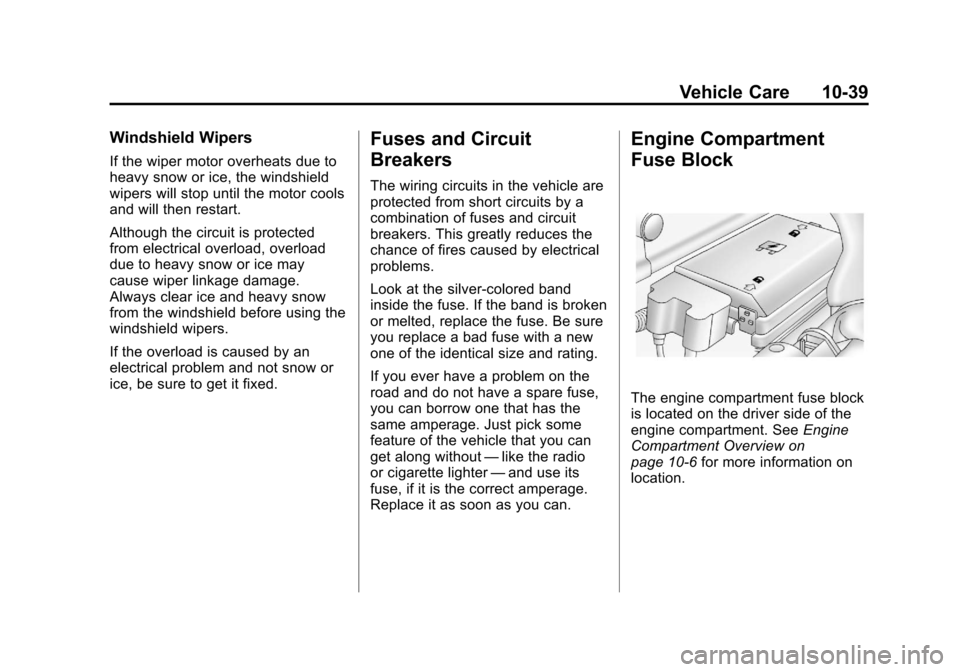
The engine compartment fuse block
is located on the driver side of the
engine compartment. See Engine
Compartment Overview on
page 10‑6 for more information on
location.
Page 280 of 394

Black plate (42,1)Chevrolet Colorado Owner Manual - 2012
10-42 Vehicle Care
FusesUsage
PWR/WNDW Power Windows
(If Equipped)
RDO Radio
REAR
PRK LAMP Rear Parking
Lamp 1, Passenger
Side Taillamp,
License Plate
Lamps
REAR PRK
LAMP2 Driver Side
Rear Taillamp,
Passenger Side
Airbag Indicator
Lighting,
Instrument Panel
Dimming Power
(2WD/4WD switch
lighting) Fuses
Usage
RT HDLP Passenger Side
Headlamp
RVC Regulated Voltage
Control
S/ROOF Not Used
STOP Stop Lamps
STRTR Starter Solenoid
Relay
TBC Truck Body
Controller
TCM Transmission
Control Module
TCCM Transfer Case
Control Module Fuses
Usage
TRAILER
BRAKE Trailer Brake
TRANS Transmission
Solenoid
TRN/
HAZRD FRT Turn/Hazard/
Courtesy/Cargo
Lamps/Mirrors
TRN/
HAZRD
REAR Rear Turn/Hazard
Lights
VSES/STOP Vehicle Stability
Enhancement
System/Stop
WPR Wiper
WSW Wiper/Washer
Switch
Page 292 of 394

Black plate (54,1)Chevrolet Colorado Owner Manual - 2012
10-54 Vehicle Care
Tire Pressure for
High-Speed Operation
{WARNING
Driving at high speeds, 160 km/h
(100 mph) or higher, puts an
additional strain on tires.
Sustained high-speed driving
causes excessive heat buildup
and can cause sudden tire failure.
You could have a crash and you
or others could be killed. Some
high-speed rated tires require
inflation pressure adjustment for
high-speed operation. When
speed limits and road conditions
are such that a vehicle can be
driven at high speeds, make sure
the tires are rated for high-speed
operation, in excellent condition,
and set to the correct cold tire
inflation pressure for the
vehicle load.Vehicles with P235/50R18 size tires
require inflation pressure adjustment
when driving the vehicle at speeds
of 160 km/h (100 mph) or higher.
Set the cold inflation pressure to the
maximum inflation pressure shown
on the tire sidewall, or 241 kPa
(35 psi), whichever is lower. See
the example following. Return the
tires to the recommended cold tire
inflation pressure when high-speed
driving has ended. See
Vehicle
Load Limits on page 9‑16 and
Tire Pressure on page 10‑52.
Example:
The maximum load and inflation
pressure is molded on the tire
sidewall, in small letters, near
the rim flange. It will read
something like this: Maximum load
690 kg (1521 lbs) 300 kPa (44 psi)
Max. Press.
For this example, set the inflation
pressure for high‐speed driving at
241 kPa (35 psi).
Tire Pressure Monitor
System
The Tire Pressure Monitor System
(TPMS) uses radio and sensor
technology to check tire pressure
levels. The TPMS sensors monitor
the air pressure in your tires and
transmit tire pressure readings to a
receiver located in the vehicle.
Each tire, including the spare
(if provided), should be checked
monthly when cold and inflated to
the inflation pressure recommended
by the vehicle manufacturer on
the vehicle placard or tire inflation
pressure label. (If your vehicle has
tires of a different size than the size
indicated on the vehicle placard or
tire inflation pressure label, you
should determine the proper tire
inflation pressure for those tires.)
Page 293 of 394

Black plate (55,1)Chevrolet Colorado Owner Manual - 2012
Vehicle Care 10-55
As an added safety feature, your
vehicle has been equipped with a
tire pressure monitoring system
(TPMS) that illuminates a low tire
pressure telltale when one or
more of your tires is significantly
under‐inflated.
Accordingly, when the low tire
pressure telltale illuminates, you
should stop and check your tires as
soon as possible, and inflate them
to the proper pressure. Driving on
a significantly under‐inflated tire
causes the tire to overheat and can
lead to tire failure. Under‐inflation
also reduces fuel efficiency and
tire tread life, and may affect the
vehicle's handling and stopping
ability.
Please note that the TPMS is
not a substitute for proper tire
maintenance, and it is the driver's
responsibility to maintain correct tire
pressure, even if under‐inflation has
not reached the level to trigger
illumination of the TPMS low tire
pressure telltale.Your vehicle has also been
equipped with a TPMS malfunction
indicator to indicate when the
system is not operating properly.
The TPMS malfunction indicator is
combined with the low tire pressure
telltale. When the system detects a
malfunction, the telltale will flash for
approximately one minute and then
remain continuously illuminated.
This sequence will continue upon
subsequent vehicle start‐ups as
long as the malfunction exists.
When the malfunction indicator is
illuminated, the system may not
be able to detect or signal low
tire pressure as intended. TPMS
malfunctions may occur for a variety
of reasons, including the installation
of replacement or alternate tires or
wheels on the vehicle that prevent
the TPMS from functioning properly.
Always check the TPMS malfunction
telltale after replacing one or more
tires or wheels on your vehicle to
ensure that the replacement or
alternate tires and wheels allow
the TPMS to continue to function
properly.
See
Tire Pressure Monitor
Operation on page 10‑56 for
additional information.
Federal Communications
Commission (FCC) Rules
and with Industry Canada
Standards
See Radio Frequency Statement on
page 13‑21 for information
regarding Part 15 of the Federal
Communications Commission (FCC)
Rules and with Industry Canada
Standards RSS-GEN/210/220/310.