2012 CHEVROLET AVALANCHE lock
[x] Cancel search: lockPage 38 of 508

Black plate (4,1)Chevrolet Avalanche Owner Manual - 2012
2-4 Keys, Doors, and Windows
K(Unlock):Press once to unlock
only the driver door. If
Kis pressed
again within three seconds, all
remaining doors, including the
tailgate, unlock. The interior lamps
may come on and stay on for
20 seconds or until the ignition is
turned on.
If enabled through the DIC, the turn
signal lamps flash twice to indicate
unlocking has occurred. See Vehicle
Personalization (With DIC Buttons)
on page 5‑45. If enabled through the
DIC, the exterior lights may turn on.
See “APPROACH LIGHTING” under
Vehicle Personalization (With DIC
Buttons) on page 5‑45.
Pressing
Kon the RKE transmitter
disarms the content theft‐deterrent
system. See Anti-theft Alarm
System on page 2‑17.
L(Vehicle Locator/Panic
Alarm): Press and release to
locate the vehicle. The turn signal
lamps flash and the horn sounds
three times.
Press and hold
Lfor more than
two seconds to activate the panic
alarm. The turn signal lamps flash
and the horn sounds repeatedly for
30 seconds. The alarm turns off
when the ignition is moved to
ON/RUN or
Lis pressed again.
The ignition must be in LOCK/OFF
for the panic alarm to work.
Programming Transmitters to
the Vehicle
Only RKE transmitters programmed
to this vehicle will work. If a
transmitter is lost or stolen, a
replacement can be purchased and
programmed through your dealer. When the replacement transmitter
is programmed to this vehicle, all
remaining transmitters must also be
reprogrammed. Any lost or stolen
transmitters will no longer work
once the new transmitter is
programmed. Each vehicle can
have up to eight transmitters
programmed to it. See your dealer
to program transmitters to the
vehicle.
Battery Replacement
Replace the battery if the REPLACE
BATTERY IN REMOTE KEY
message displays in the DIC. See
“REPLACE BATTERY IN REMOTE
KEY”
under Key and Lock
Messages on page 5‑40 for
additional information.
Notice: When replacing the
battery, do not touch any of the
circuitry on the transmitter. Static
from your body could damage the
transmitter.
Page 40 of 508

Black plate (6,1)Chevrolet Avalanche Owner Manual - 2012
2-6 Keys, Doors, and Windows
If the vehicle has the remote start
feature, the RKE transmitter
functions will have an increased
range of operation. However, the
range may be less while the vehicle
is running.
There are other conditions which
can affect the performance of the
transmitter. SeeRemote Keyless
Entry (RKE) System on page 2‑2 for
additional information.
/(Remote Start): This button will
be on the RKE transmitter if the
vehicle has remote start.
To start the vehicle using the remote
start feature:
1. Aim the RKE transmitter at the
vehicle.
2. Press and release
Q.
3. Immediately press and hold
/
until the turn signal lamps flash.
If you cannot see the vehicle's
lamps, press and hold
/for
two to four seconds. When the vehicle starts, the
parking lamps will turn on and
remain on while the vehicle is
running. The doors will be
locked and the climate control
system may come on.
The engine will continue to run
for 10 minutes. Repeat the steps
for a 10-minute time extension.
Remote start can be extended
only once.
After entering the vehicle during a
remote start, insert and turn the key
to ON/RUN to drive the vehicle.
To cancel a remote start:
.Aim the RKE transmitter at the
vehicle and press and hold
/
until the parking lamps turn off.
.Turn on the hazard warning
flashers.
.Turn the ignition on and then
back off. The vehicle can be remote started
two separate times between driving
sequences. The engine will run for
10 minutes after each remote start.
Or, you can extend the engine run
time by another 10 minutes within
the first 10 minute remote start time
frame, and before the engine stops.
For example, if
Qand then/are
pressed again after the vehicle
has been running for 5 minutes,
10 minutes are added, allowing the
engine to run for 15 minutes.
The additional 10 minutes are
considered a second remote vehicle
start.
Once two remote starts, or a single
remote start with one time extension
has been done, the vehicle must be
started with the key. After the key is
removed from the ignition, the
vehicle can be remote started again.
Page 41 of 508

Black plate (7,1)Chevrolet Avalanche Owner Manual - 2012
Keys, Doors, and Windows 2-7
The vehicle cannot be remote
started if the key is in the ignition,
the hood is not closed, or if there
is an emission control system
malfunction and the check engine
light is on.
Also, the engine will turn off during a
remote vehicle start if the coolant
temperature gets too high or if the
oil pressure gets low.
Remote Start Ready
If the vehicle does not have the
remote vehicle start feature, it may
have the remote start ready feature.
This feature allows your dealer to
add the manufacturer's remote
vehicle start feature.
See your dealer to add the
manufacturer's remote vehicle
start feature to the vehicle.
Door Locks
{WARNING
Unlocked doors can be
dangerous.
.Passengers, especially
children, can easily open the
doors and fall out of a moving
vehicle. When a door is
locked, the handle will not
open it. The chance of being
thrown out of the vehicle in a
crash is increased if the
doors are not locked. So, all
passengers should wear
safety belts properly and the
doors should be locked
whenever the vehicle is
driven.
.Young children who get into
unlocked vehicles may be
unable to get out. A child can
be overcome by extreme heat
and can suffer permanent(Continued)
WARNING (Continued)
injuries or even death from
heat stroke. Always lock the
vehicle whenever leaving it.
.Outsiders can easily enter
through an unlocked door
when you slow down or stop
the vehicle. Locking the doors
can help prevent this from
happening.
There are several ways to lock and
unlock the vehicle.
From outside, use the Remote
Keyless Entry (RKE) transmitter or
the key in the driver door.
From inside, use the power door
locks or manual door locks. To lock
or unlock the door with the manual
locks, push down or pull up on the
manual lock knob.
Page 42 of 508

Black plate (8,1)Chevrolet Avalanche Owner Manual - 2012
2-8 Keys, Doors, and Windows
Power Door Locks
With power door locks, the switches
on the front doors can be used to
lock and unlock the vehicle.
If available, the switches are on the
front doors.
K(Unlock):Press to unlock the
doors.
Q(Lock): Press to lock the doors.
Delayed Locking
When locking the doors with
the power lock switch and a
door is open, the doors will lock
five seconds after the last door is
closed. You will hear three chimes to
signal that the delayed locking
feature is in use. Pressing the power lock switch will
override the delayed locking feature
and immediately lock all the doors.
This feature will not operate if the
key is in the ignition.
You can also program this feature
using the Driver Information
Center (DIC). See
“Delay Door
Lock” under Vehicle Personalization
(With DIC Buttons) on page 5‑45.
Automatic Door Locks
The vehicle may have an automatic
lock/unlock feature. This feature can
be programmed using the Driver
Information Center (DIC). See
Vehicle Personalization (With DIC
Buttons) on page 5‑45 for more
information on DIC programming.
Lockout Protection
If the driver side power door lock
switch is pressed when the driver
door is open and the key is in the
ignition, all of the doors will lock and
then the driver door will unlock.
If the passenger side power door
lock switch is pressed when the
front passenger door is open and
the key is in the ignition, all of the
doors will lock and then the front
passenger door will unlock.
Safety Locks
The vehicle has rear door security
locks to prevent passengers from
opening the rear doors from the
inside.
Page 43 of 508

Black plate (9,1)Chevrolet Avalanche Owner Manual - 2012
Keys, Doors, and Windows 2-9
Open the rear doors to access the
security locks on the inside edge of
each door.
To set the locks, insert a key into
the slot and turn it to the horizontal
position. The door can only be
opened from the outside with the
door unlocked. To return the door to
normal operation, turn the slot to the
vertical position.
Doors
Midgate®
{WARNING
It can be dangerous to drive with
the cargo area covered and the
tailgate and the Midgate
®open
because carbon monoxide (CO)
gas can come into your vehicle.
You can not see or smell CO.
It can cause unconsciousness
and even death. If you must drive
with the cargo covers on and the
tailgate and Midgate open or if
electrical wiring or other cable
connections must pass through
the seal between the body and
the Midgate:
.Make sure all windows
are shut.
.Turn the fan on your heating
or cooling system to its
highest speed on the setting
(Continued)
WARNING (Continued)
that brings in outside air. This
will force outside air into your
vehicle. SeeDual Automatic
Climate Control System on
page 8‑4.
.If you have air outlets on or
under the instrument panel,
open them all the way. See
Engine Exhaust on
page 9‑31.
Midgate Operation
This vehicle is equipped with a
Midgate and a removable rear glass
panel. The Midgate allows you to
extend the length of the vehicle's
cargo area.
Page 44 of 508

Black plate (10,1)Chevrolet Avalanche Owner Manual - 2012
2-10 Keys, Doors, and Windows
The following are the main
components of the Midgate system:
A. Latch Levers
B. Grab Handles
C. Glass-Catch Release Button
D. Glass Lock Knobs
E. Glass Retaining Tabs
F. Midgate Release Handle
G. Glass Alignment Arrows
Rear Glass Removal and
Storage
{WARNING
If the removable rear glass is not
stored properly, it could be thrown
about the vehicle in a crash or
sudden maneuver. People in the
vehicle could be injured.
Whenever you store the rear
glass in the vehicle, always be
sure that it is stored securely in
the Midgate
®storage pocket.
Do not remove the rear glass when
the rear defroster is on. If you do,
you may see a discharge spark
coming from the latch area.
To remove the rear glass do the
following:
1. Fold the rear seats. See Rear
Seats on page 3‑10. The front
seats may have to be moved
forward slightly to allow the rear
seats to fold completely. Although the rear glass can be
removed without folding the rear
seats, you will not be able to
access the rear glass storage
pocket. Be sure to fold the seats
before removing the rear glass.
2. Squeeze and pull down the latch
levers (A), located near the
upper corners of the rear glass,
to unlatch. Once unlatched, the
glass-catch release button (C)
will catch the rear glass and
prevent it from falling forward.
Page 46 of 508
Black plate (12,1)Chevrolet Avalanche Owner Manual - 2012
2-12 Keys, Doors, and Windows
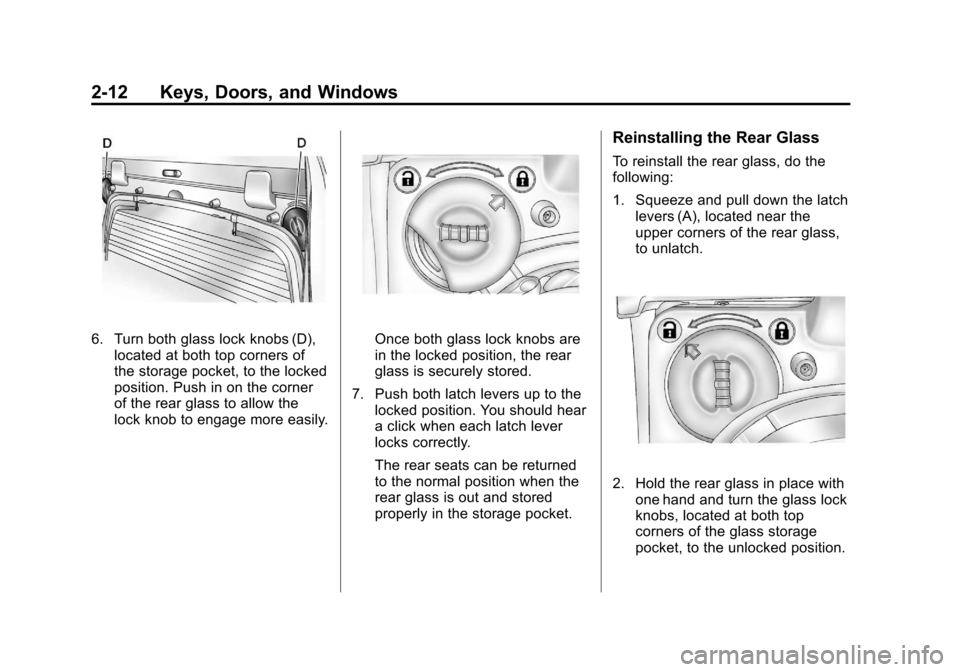
6. Turn both glass lock knobs (D),located at both top corners of
the storage pocket, to the locked
position. Push in on the corner
of the rear glass to allow the
lock knob to engage more easily.Once both glass lock knobs are
in the locked position, the rear
glass is securely stored.
7. Push both latch levers up to the locked position. You should hear
a click when each latch lever
locks correctly.
The rear seats can be returned
to the normal position when the
rear glass is out and stored
properly in the storage pocket.
Reinstalling the Rear Glass
To reinstall the rear glass, do the
following:
1. Squeeze and pull down the latchlevers (A), located near the
upper corners of the rear glass,
to unlatch.
2. Hold the rear glass in place withone hand and turn the glass lock
knobs, located at both top
corners of the glass storage
pocket, to the unlocked position.
Page 47 of 508
Black plate (13,1)Chevrolet Avalanche Owner Manual - 2012
Keys, Doors, and Windows 2-13
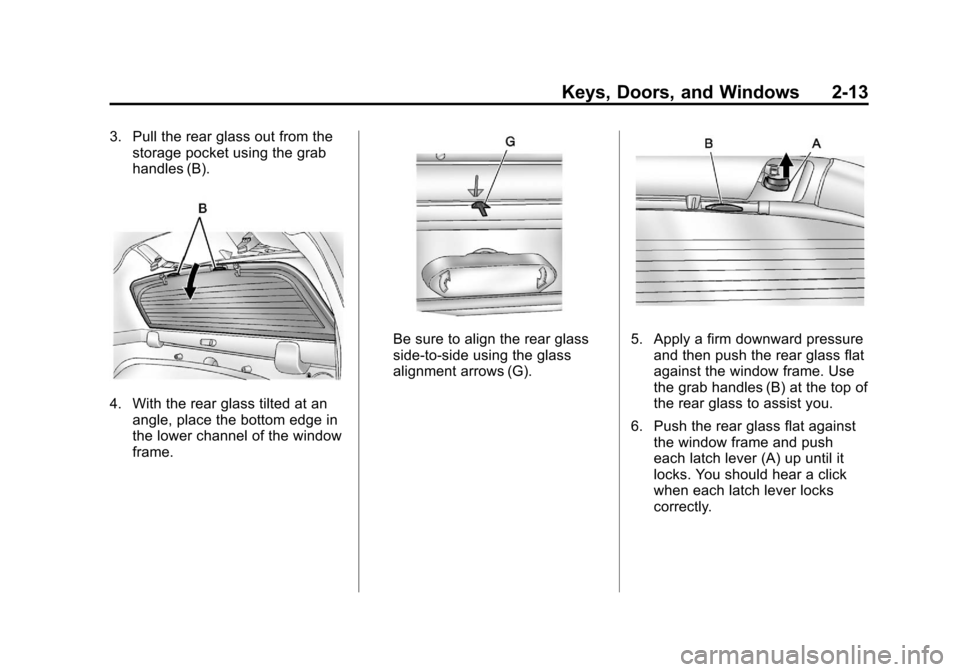
3. Pull the rear glass out from thestorage pocket using the grab
handles (B).
4. With the rear glass tilted at an
angle, place the bottom edge in
the lower channel of the window
frame.
Be sure to align the rear glass
side-to-side using the glass
alignment arrows (G).5. Apply a firm downward pressureand then push the rear glass flat
against the window frame. Use
the grab handles (B) at the top of
the rear glass to assist you.
6. Push the rear glass flat against the window frame and push
each latch lever (A) up until it
locks. You should hear a click
when each latch lever locks
correctly.