2012 CADILLAC SRX parking
[x] Cancel search: parkingPage 7 of 502

Black plate (1,1)Cadillac SRX Owner Manual (Include Mex) - 2012
In Brief 1-1
In Brief
Instrument Panel
Instrument Panel . . . . . . . . . . . . . . 1-2
Initial Drive Information
Initial Drive Information . . . . . . . . 1-4
Remote Keyless Entry (RKE)System . . . . . . . . . . . . . . . . . . . . . . 1-4
Remote Vehicle Start . . . . . . . . . 1-5
Door Locks . . . . . . . . . . . . . . . . . . . 1-5
Liftgate . . . . . . . . . . . . . . . . . . . . . . . . 1-5
Windows . . . . . . . . . . . . . . . . . . . . . . 1-6
Seat Adjustment . . . . . . . . . . . . . . 1-7
Memory Features . . . . . . . . . . . . . 1-8
Heated and Ventilated Seats . . . . . . . . . . . . . . . . . . . . . . . . 1-9
Head Restraint Adjustment . . . . 1-9
Safety Belts . . . . . . . . . . . . . . . . . . 1-10
Passenger Sensing System . . . . . . . . . . . . . . . . . . . . . 1-10
Mirror Adjustment . . . . . . . . . . . . 1-11
Steering Wheel Adjustment . . . . . . . . . . . . . . . . . 1-12 Throttle and Brake Pedal
Adjustment . . . . . . . . . . . . . . . . . 1-12
Interior Lighting . . . . . . . . . . . . . . 1-12
Exterior Lighting . . . . . . . . . . . . . 1-13
Windshield Wiper/Washer . . . . 1-13
Climate Controls . . . . . . . . . . . . . 1-15
Transmission . . . . . . . . . . . . . . . . 1-15Vehicle Features
Radio(s) . . . . . . . . . . . . . . . . . . . . . 1-16
Satellite Radio . . . . . . . . . . . . . . . 1-17
Portable Audio Devices . . . . . . 1-17
Bluetooth
®. . . . . . . . . . . . . . . . . . . 1-18
Mobile Apps . . . . . . . . . . . . . . . . . 1-18
Steering Wheel Controls . . . . . 1-18
Cruise Control . . . . . . . . . . . . . . . 1-19
Navigation System . . . . . . . . . . . 1-19
Driver Information Center (DIC) . . . . . . . . . . . . . . . 1-20
Rear Vision Camera (RVC) . . . . . . . . . . . . . 1-20
Ultrasonic Parking Assist . . . . 1-20
Storage Compartments . . . . . . 1-20
Power Outlets . . . . . . . . . . . . . . . 1-21
Universal Remote System . . . 1-21
Performance and Maintenance
Traction Control System (TCS) . . . . . . . . . . . . . . 1-21
StabiliTrak
®System . . . . . . . . . 1-22
Tire Pressure Monitor . . . . . . . . 1-22
Tire Sealant and Compressor Kit . . . . . . . . . . . . . 1-22
Engine Oil Life System . . . . . . 1-23
Fuel E85 (85% Ethanol) . . . . . 1-23
Driving for Better Fuel Economy . . . . . . . . . . . . . . . . . . . 1-23
Roadside Service . . . . . . . . . . . . 1-24
OnStar
®. . . . . . . . . . . . . . . . . . . . . 1-24
Page 9 of 502

Black plate (3,1)Cadillac SRX Owner Manual (Include Mex) - 2012
In Brief 1-3
A.Air Vents on page 8‑6.
B. Turn and Lane‐Change Lever. See Turn and Lane-Change
Signals on page 6‑6.
Driver Information Center (DIC)
Controls. See Driver Information
Center (DIC) on page 5‑28.
C. Cruise Control on page 9‑37.
Heated Steering Wheel on
page 5‑3 (If Equipped).
D. Instrument Cluster on
page 5‑11.
E. Steering Wheel Controls on
page 5‑2.
F. AM-FM Radio on page 7‑11.
Navigation System
(If Equipped). See Navigation
System Manual.
G. Driver Information Center (DIC) Display. See Driver Information
Center (DIC) on page 5‑28.
H. Clock (Analog Clock) on
page 5‑7 orClock (Digital
Clock) on page 5‑7. I.
Safety Locks on page 2‑13.
Power Door Locks on
page 2‑12.
Hazard Warning Flashers on
page 6‑5.
J. Exterior Lamp Controls on
page 6‑1.
Front Fog Lamps on page 6‑6
(If Equipped).
Instrument Panel Illumination
Control on page 6‑7.
K. Data Link Connector (DLC) (Out of View). See Malfunction
Indicator Lamp on page 5‑18.
L. Steering Wheel Adjustment on
page 5‑2.
M. Horn on page 5‑3.
N. Adjustable Pedal Control (If Equipped). See Adjustable
Throttle and Brake Pedal on
page 9‑17.
O. Start/Stop Button. See Ignition
Positions on page 9‑18. P.
Windshield Wiper/Washer on
page 5‑4.
Rear Window Wiper/Washer on
page 5‑6.
Q. Heated and Ventilated Front
Seats on page 3‑10
(If Equipped).
R. Parking Brake on page 9‑31.
S. Shift Lever. See Shifting Into
Park on page 9‑22.
T. StabiliTrak
®System on
page 9‑35.
Ultrasonic Parking Assist on
page 9‑40 (If Equipped).
Economy Mode (If Equipped).
See Fuel Economy Mode on
page 9‑29
U. Dual Automatic Climate Control
System on page 8‑1.
Page 11 of 502

Black plate (5,1)Cadillac SRX Owner Manual (Include Mex) - 2012
In Brief 1-5
Remote Vehicle Start
With this feature the engine can be
started from outside of the vehicle.
Starting the Vehicle
1. Press and releaseQon the
RKE transmitter.
2. Within two seconds, press and hold
/until the turn signal
lamps flash, or for at least
two seconds if the vehicle is
not in view.
When the vehicle starts, the parking
lamps will turn on and remain on as
long as the engine is running. The
doors will be locked and the climate
control system may come on.
The engine will continue to run for
10 minutes. Repeat the steps for a
10-minute time extension. Remote
start can be extended only once.
Canceling a Remote Start
To cancel a remote start, do any of
the following:
.Press and hold/until the
parking lamps turn off.
.Turn on the hazard warning
flashers.
.Turn the vehicle on and then off.
See Remote Vehicle Start on
page 2‑9.
Door Locks
To lock or unlock the doors from
the outside, press
QorKon the
Remote Keyless Entry (RKE)
transmitter. See Remote Keyless
Entry (RKE) System Operation on
page 2‑3.
To unlock a door from the inside,
pull once on the door handle to
unlock it, and a second time to
open it.
Power Door Locks
There is a power door lock switch
on the instrument panel and on the
front door panels.
Q: Press to lock the doors.
K: Press to unlock the doors.
See Power Door Locks on
page 2‑12.
Liftgate
Manual Liftgate Operation
For vehicles without keyless access,
unlock the vehicle before opening
the liftgate.
Press the touch pad located in the
handle of the liftgate, above the
license plate, and lift up to open.
Do not press the touch pad while
closing the liftgate. This will cause
the liftgate to be unlatched.
Page 19 of 502

Black plate (13,1)Cadillac SRX Owner Manual (Include Mex) - 2012
In Brief 1-13
Exterior Lighting
The exterior lamps control is located
on the instrument panel to the left of
the steering column.
The exterior lamps control has four
positions:
O:Briefly turn to this position to
turn the automatic light control off or
on again.
AUTO: Turns the headlamps on
automatically at normal brightness,
together with the parking lamps,
taillamps, license plate lamps, and
instrument panel lights.
;: Turns the parking lamps on
together with the taillamps, license
plate lamps, and instrument panel
lights.
5: Turns the headlamps on
together with the parking lamps,
taillamps, license plate lamps, and
instrument panel lights.
#: For vehicles with fog lamps,
press to turn the lamps on or off.
For more information, see:
.Exterior Lamp Controls on
page 6‑1.
.Daytime Running Lamps (DRL)
on page 6‑3.
Windshield Wiper/Washer
The windshield wiper/washer lever
is located on the right side of the
steering column. With the ignition in
ACC/ACCESSORY or ON/RUN/
START, move the windshield wiper
lever to select the wiper speed.
HI: Use for fast wipes.
LO: Use for slow wipes.
Page 26 of 502

Black plate (20,1)Cadillac SRX Owner Manual (Include Mex) - 2012
1-20 In Brief
Driver Information
Center (DIC)
The DIC display is located in the
center of the instrument panel
cluster. It shows the status of many
vehicle systems. The controls for
the DIC are located on the turn
signal lever.
A.SET/CLR: Press to set or clear
the menu item when it is
displayed.
B.
w x: Use the thumbwheel to
scroll through the items in
each menu. C.
MENU: Press to display the
Trip/Fuel menu and the Vehicle
Information menu. This button is
also used to return to or exit the
last screen displayed on
the DIC.
For more information, see Driver
Information Center (DIC) on
page 5‑28.
Rear Vision
Camera (RVC)
If available, the RVC displays a view
of the area behind the vehicle when
the vehicle is shifted into
R (Reverse). The display will appear
on either the inside rearview mirror
or navigation screen, if equipped.
To clean the camera lens, located
above the license plate, rinse it with
water and wipe it with a soft cloth.
See Rear Vision Camera (RVC) on
page 9‑43.
Ultrasonic Parking Assist
If available, Ultrasonic Front and
Rear Parking Assist (UFRPA) uses
sensors on the front and rear
bumpers to detect objects while
parking the vehicle. It operates at
speeds less than 8 km/h (5 mph).
UFRPA uses audio beeps to provide
distance and system information.
Keep the sensors on the vehicle's
front and rear bumpers clean to
ensure proper operation.
See Ultrasonic Parking Assist on
page 9‑40 for more information.
Storage Compartments
The glove box is air conditioned and
can be used to store items at a
lower temperature. Move the slide
control to open or close the opening
to adjust the air flow. See Glove Box
on page 4‑1 for more information.
Page 40 of 502

Black plate (10,1)Cadillac SRX Owner Manual (Include Mex) - 2012
2-10 Keys, Doors, and Windows
Other conditions can affect the
performance of the transmitter.
SeeRemote Keyless Entry (RKE)
System on page 2‑3 for additional
information.
Starting the Engine Using Remote
Start
1. Press and release
Qon the
RKE transmitter.
2. Within two seconds, press and hold
/until the turn signal
lamps flash. This confirms the
request to remote start the
vehicle has been received. If the
vehicle' s lamps are not visible,
press and hold
/for at least
two seconds. During the remote start the
doors will be locked and the
parking lamps will remain on as
long as the engine is running.
The engine will shut off after
10 minutes unless a time
extension is done or the ignition
is put in ON/RUN/START.
3. Press the brake pedal and select the ON/RUN/START ignition
mode to drive the vehicle.
Extending Engine Run Time
For a 10-minute extension, repeat
Steps 1 and 2 while the engine is
still running. The remote start can
only be extended once.
When the remote start is extended,
the second 10-minute period will
start immediately. For example, if the vehicle has
been running for five minutes, and
10 minutes are added, the engine
will run for a total of 15 minutes.
A maximum of two remote starts,
or a remote start with an extension,
are allowed between ignition cycles.
The vehicle's ignition must be
changed to ON/RUN/START and
then back to OFF before the remote
start procedure can be used again.
Shutting the Engine Off After a
Remote Start
To cancel a remote start, do any of
the following:.Press/until the parking lamps
turn off.
.Turn on the hazard warning
flashers.
.Turn the vehicle on and then
back off.
Page 131 of 502

Black plate (1,1)Cadillac SRX Owner Manual (Include Mex) - 2012
Instruments and Controls 5-1
Instruments and
Controls
Controls
Steering Wheel Adjustment . . . 5-2
Steering Wheel Controls . . . . . . 5-2
Heated Steering Wheel . . . . . . . 5-3
Horn . . . . . . . . . . . . . . . . . . . . . . . . . . 5-3
Windshield Wiper/Washer . . . . . 5-4
Rear Window Wiper/Washer . . . . . . . . . . . . . . . . . . . . . . 5-6
Headlamp Washer . . . . . . . . . . . . 5-6
Compass . . . . . . . . . . . . . . . . . . . . . 5-7
Clock (Analog Clock) . . . . . . . . . . 5-7
Clock (Digital Clock) . . . . . . . . . . 5-7
Power Outlets . . . . . . . . . . . . . . . . . 5-8
Cigarette Lighter . . . . . . . . . . . . . . 5-9
Ashtrays . . . . . . . . . . . . . . . . . . . . . 5-10
Warning Lights, Gauges, and
Indicators
Warning Lights, Gauges, and Indicators . . . . . . . . . . . . . . . . . . 5-10
Instrument Cluster . . . . . . . . . . . 5-11
Speedometer . . . . . . . . . . . . . . . . 5-12
Odometer . . . . . . . . . . . . . . . . . . . . 5-12
Tachometer . . . . . . . . . . . . . . . . . . 5-12 Fuel Gauge . . . . . . . . . . . . . . . . . . 5-12
Fuel Economy Gauge . . . . . . . . 5-13
Engine Coolant Temperature
Gauge . . . . . . . . . . . . . . . . . . . . . . 5-14
Safety Belt Reminders . . . . . . . 5-15
Airbag Readiness Light . . . . . . 5-16
Passenger Airbag Status
Indicator . . . . . . . . . . . . . . . . . . . . 5-17
Charging System Light . . . . . . 5-18
Malfunction Indicator Lamp . . . . . . . . . . . . . 5-18
Brake System Warning Light . . . . . . . . . . . . . . . . . . . . . . . 5-21
Electric Parking Brake Light . . . . . . . . . . . . . . . . . . . . . . . 5-21
Antilock Brake System (ABS) Warning Light . . . . . . . . . . . . . . 5-22
Traction Off Light . . . . . . . . . . . . 5-23
StabiliTrak
®OFF Light . . . . . . . 5-23
Traction Control System (TCS)/StabiliTrak
®Light . . . . 5-24
Tire Pressure Light . . . . . . . . . . 5-24
Engine Oil Pressure Light . . . . 5-25
Fuel Economy Light . . . . . . . . . 5-25
Low Fuel Warning Light . . . . . . 5-26
Security Light . . . . . . . . . . . . . . . . 5-26
High-Beam On Light . . . . . . . . . 5-26
Adaptive Forward Lighting (AFL) Light . . . . . . . . . . . . . . . . . 5-27 Front Fog Lamp Light . . . . . . . . 5-27
Lamps On Reminder . . . . . . . . . 5-27
Cruise Control Light . . . . . . . . . 5-28
Information Displays
Driver Information
Center (DIC) . . . . . . . . . . . . . . . 5-28
Vehicle Messages
Vehicle Messages . . . . . . . . . . . 5-32
Battery Voltage and ChargingMessages . . . . . . . . . . . . . . . . . . 5-33
Brake System Messages . . . . 5-33
Compass Messages . . . . . . . . . 5-34
Cruise Control Messages . . . . 5-34
Door Ajar Messages . . . . . . . . . 5-34
Engine Cooling System Messages . . . . . . . . . . . . . . . . . . 5-34
Engine Oil Messages . . . . . . . . 5-35
Engine Power Messages . . . . 5-35
Fuel System Messages . . . . . . 5-36
Key and Lock Messages . . . . . 5-36
Lamp Messages . . . . . . . . . . . . . 5-36
Object Detection System Messages . . . . . . . . . . . . . . . . . . 5-37
Ride Control System Messages . . . . . . . . . . . . . . . . . . 5-37
Airbag System Messages . . . . 5-38
Safety Belt Messages . . . . . . . 5-38
Page 134 of 502
Black plate (4,1)Cadillac SRX Owner Manual (Include Mex) - 2012
5-4 Instruments and Controls
Windshield Wiper/Washer
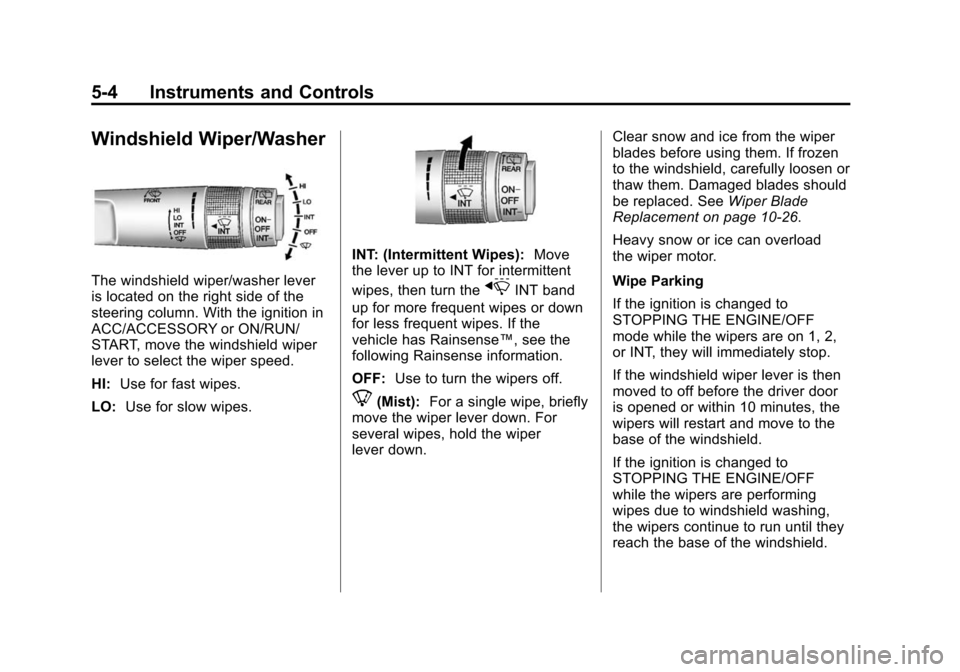
The windshield wiper/washer lever
is located on the right side of the
steering column. With the ignition in
ACC/ACCESSORY or ON/RUN/
START, move the windshield wiper
lever to select the wiper speed.
HI:Use for fast wipes.
LO: Use for slow wipes.
INT: (Intermittent Wipes): Move
the lever up to INT for intermittent
wipes, then turn the
xINT band
up for more frequent wipes or down
for less frequent wipes. If the
vehicle has Rainsense™, see the
following Rainsense information.
OFF: Use to turn the wipers off.
8(Mist): For a single wipe, briefly
move the wiper lever down. For
several wipes, hold the wiper
lever down. Clear snow and ice from the wiper
blades before using them. If frozen
to the windshield, carefully loosen or
thaw them. Damaged blades should
be replaced. See
Wiper Blade
Replacement on page 10‑26.
Heavy snow or ice can overload
the wiper motor.
Wipe Parking
If the ignition is changed to
STOPPING THE ENGINE/OFF
mode while the wipers are on 1, 2,
or INT, they will immediately stop.
If the windshield wiper lever is then
moved to off before the driver door
is opened or within 10 minutes, the
wipers will restart and move to the
base of the windshield.
If the ignition is changed to
STOPPING THE ENGINE/OFF
while the wipers are performing
wipes due to windshield washing,
the wipers continue to run until they
reach the base of the windshield.