2012 CADILLAC SRX light
[x] Cancel search: lightPage 179 of 502

Black plate (49,1)Cadillac SRX Owner Manual (Include Mex) - 2012
Instruments and Controls 5-49
If you live in Canada, or you are
having difficulty programming a
gate operator or garage door opener
by using the“Programming the
Universal Remote System”
procedures, regardless of where
you live, replace Step 2 under
“Programming the Universal
Remote System” with the following:
Continue to press and hold the
Universal Remote system button
while you press and release every
two seconds (cycle) the hand-held
transmitter button until the
frequency signal has been
successfully accepted by the
Universal Remote system. The
Universal Remote system indicator
light will flash slowly at first and then
rapidly. Proceed with Step 3 under
“Programming the Universal Remote
System” to complete.Universal Remote System
Operation
Using the Universal Remote
System
Press and hold the appropriate
Universal Remote system button for
at least half of a second. The
indicator light will come on while the
signal is being transmitted.
Erasing Universal Remote
System Buttons
All programmed buttons should be
erased when the vehicle is sold or
the lease ends.
To erase all programmed buttons on
the Universal Remote system
device:
1. Press and hold down the
two outside buttons until the
indicator light begins to flash.
This should take about
10 seconds.
2. Release both buttons.
Reprogramming a Single
Universal Remote System
Button
To reprogram any of the three
Universal Remote system buttons:
1. Press and hold the desired Universal Remote system
button. Do not release the
button.
2. The indicator light will begin to flash after 20 seconds. Without
releasing the button, proceed
with Step 1 of the section
“Programming the Universal
Remote System.”
If you have questions or need help
programming the Universal Remote
system, call 1‐800‐355‐3515 or go
to www.homelink.com. You may
also call the customer assistance
phone number under Customer
Assistance Offices (U.S. and
Canada) on page 13‑4 orCustomer
Assistance Offices (Mexico) on
page 13‑5.
Page 181 of 502
Black plate (1,1)Cadillac SRX Owner Manual (Include Mex) - 2012
Lighting 6-1
Lighting
Exterior Lighting
Exterior Lamp Controls . . . . . . . . 6-1
Headlamp High/Low-BeamChanger . . . . . . . . . . . . . . . . . . . . . 6-2
Flash-to-Pass . . . . . . . . . . . . . . . . . 6-2
Daytime Running Lamps (DRL) . . . . . . . . . . . . . . . . 6-3
Adaptive Forward Lighting (AFL) . . . . . . . . . . . . . . . 6-3
Twilight Sentinel . . . . . . . . . . . . . . 6-4
Hazard Warning Flashers . . . . . 6-5
Turn and Lane-Change Signals . . . . . . . . . . . . . . . . . . . . . . 6-6
Front Fog Lamps . . . . . . . . . . . . . . 6-6
Interior Lighting
Instrument Panel Illumination Control . . . . . . . . . . . . . . . . . . . . . . 6-7
Cargo Lamp . . . . . . . . . . . . . . . . . . 6-7
Courtesy Lamps . . . . . . . . . . . . . . 6-7
Dome Lamps . . . . . . . . . . . . . . . . . 6-7
Reading Lamps . . . . . . . . . . . . . . . 6-7
Lighting Features
Entry Lighting . . . . . . . . . . . . . . . . . 6-8
Exit Lighting . . . . . . . . . . . . . . . . . . . 6-8
Battery Load Management . . . . 6-8
Exterior Lighting
Exterior Lamp Controls
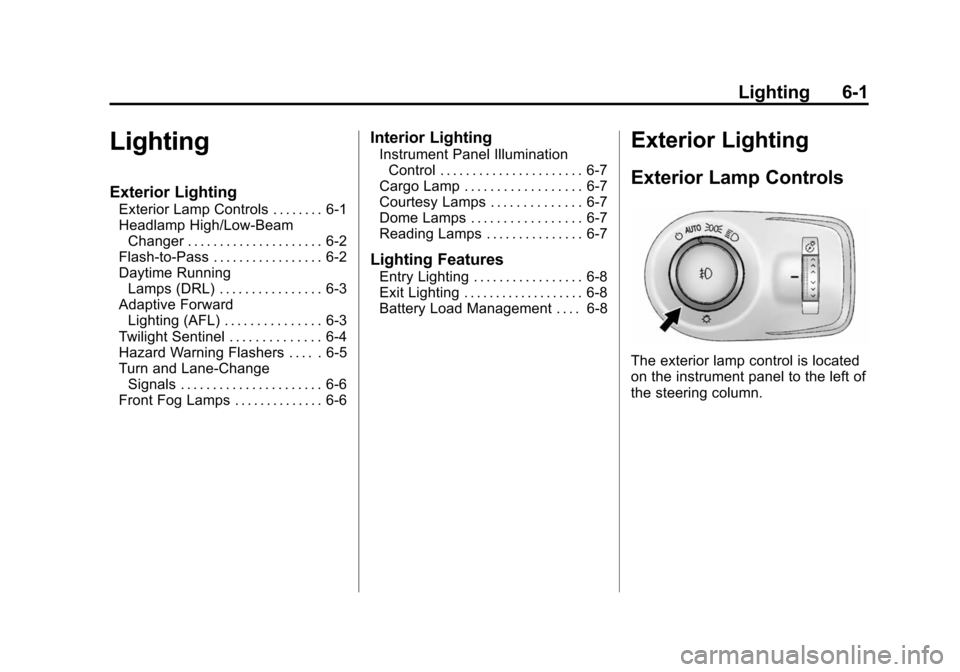
The exterior lamp control is located
on the instrument panel to the left of
the steering column.
Page 182 of 502

Black plate (2,1)Cadillac SRX Owner Manual (Include Mex) - 2012
6-2 Lighting
It controls the following systems:
.Headlamps
.Taillamps
.Parking Lamps
.License Plate Lamps
.Instrument Panel Lights
.Fog Lamps
The exterior lamps control has
four positions:
O(Off): Briefly turn to this position
to turn the automatic light control off
or on again.
AUTO (Automatic): Turns the
headlamps on automatically at
normal brightness, together with
the following:
.Parking Lamps
.Taillamps
.License Plate Lamps
.Instrument Panel Lights
;(Parking Lamps): Turns the
parking lamps on together with
the following:
.Taillamps
.License Plate Lamps
.Instrument Panel Lights
2(Headlamps): Turns the
headlamps on together with the
lamps listed below. A warning chime
sounds if the driver door is opened
when the ignition switch is off and
the headlamps are on.
.Parking Lamps
.Taillamps
.License Plate Lamps
.Instrument Panel Lights
#(Front Fog Lamps): For
vehicles with fog lamps, press to
turn the lamps on or off.
See Front Fog Lamps on page 6‑6.
Headlamp High/
Low-Beam Changer
Push the turn signal/lane change
lever away from you and release, to
turn the high beams on. To return to
low beams, push the lever again or
pull it toward you and release.
This indicator light turns on in the
instrument panel cluster when the
high‐beam headlamps are on.
Flash-to-Pass
The flash‐to‐pass feature works with
the low beams or Daytime Running
Lamps (DRL) on or off.
To flash the high beams, pull the
turn signal/lane change lever all the
way toward you, then release it.
Page 183 of 502

Black plate (3,1)Cadillac SRX Owner Manual (Include Mex) - 2012
Lighting 6-3
Daytime Running
Lamps (DRL)
Daytime Running Lamps (DRL) can
make it easier for others to see the
front of your vehicle during the day.
Fully functional daytime running
lamps are required on all vehicles
first sold in Canada.
A light sensor on top of the
instrument panel makes the DRL
work, so be sure it is not covered.
The DRL system makes the
low‐beam headlamps come on at a
reduced brightness or for vehicles
with High Intensity Discharge (HID)
headlamps, the DRL lights will come
on when the following conditions
are met:
.The ignition is in the
ON/RUN mode.
.The exterior lamps control is
in AUTO.
.The engine is running.When the DRL are on, only the
low‐beam headlamps, at a reduced
level of brightness, will be on. The
high‐beam headlamps, taillamps,
sidemarker, instrument panel lamps,
and other lamps will not be on.
The headlamps automatically
change from DRL to the regular
headlamps depending on the
darkness of the surroundings.
The other lamps that come on with
the headlamps will also come on.
When it is bright enough outside,
the headlamps go off and the DRL
come on.
To turn the DRL lamps off or on
again, turn the exterior lamps
control to the off position and then
release. For vehicles first sold in
Canada, the DRL cannot be
turned off.
Adaptive Forward
Lighting (AFL)
For vehicles with uplevel
headlamps, the Adaptive Forward
Lighting System (AFL) adjusts the
headlamps to provide greater road
illumination in various driving
conditions.
To enable AFL, set the exterior
lamp control to the AUTO position.
Moving the control out of the AUTO
position will deactivate the system.
AFL will operate when the vehicle
speed is greater than 3 km/h
(2 mph). AFL will not operate when
the transmission is in R (Reverse).
AFL is not immediately operable
after starting the vehicle; driving a
short distance is required to
calibrate the AFL. See
Exterior
Lamp Controls on page 6‑1.
Page 184 of 502

Black plate (4,1)Cadillac SRX Owner Manual (Include Mex) - 2012
6-4 Lighting
Curve Lighting
The light beam pivots based on the
steering wheel position and vehicle
speed of at least 10 km/h (6 mph).
The headlamps shine at an angle of
up to 15 degrees to the right or left
of the direction of travel.
Highway Lighting
If the vehicle is traveling straight
continuously at high speeds, the
light beam automatically raises
slightly to increase the headlamp
range.
City Lighting
If the vehicle speed is less than
50 km/h (31 mph), the headlamp
range is automatically reduced.Twilight Sentinel
This feature automatically turns the
lamps on and off. A light sensor on
top of the instrument panel makes
the Twilight Sentinel
®work, so be
sure it is not covered. With Twilight Sentinel the following
will happen:
.When it is dark enough outside,
and the exterior lamp control is
in the AUTO position, the
Daytime Running Lamps (DRL)
go off, and the headlamps and
parking lamps come on. The
other lamps that come on with
the headlamps also come on.
.When it is bright enough outside,
the headlamps go off, and the
DRL come on, as long as the
exterior lamp control is in the
AUTO position. See
Exterior
Lamp Controls on page 6‑1.
Page 185 of 502

Black plate (5,1)Cadillac SRX Owner Manual (Include Mex) - 2012
Lighting 6-5
If the vehicle is started in a dark
garage, the automatic headlamp
system comes on immediately. If it
is light outside when the vehicle
leaves the garage, there is a slight
delay before the automatic
headlamp system changes to the
DRL. During that delay, the
instrument panel cluster may not be
as bright as usual. Make sure the
instrument panel brightness control
is in full bright position. See
Instrument Panel Illumination
Control on page 6‑7for more
information.
The vehicle can be idled with the
lamps off, even when it is dark
outside. After starting the vehicle,
turn the exterior lamps control to off,
then release it. The lamps will
remain off until the control is turned
to off again. Twilight Sentinel also provides
exterior illumination as you leave
the vehicle. If Twilight Sentinel has
turned on the lamps when the
ignition is turned off, the lamps
remain on until one of the
following occurs:
.The exterior lamp control is
moved from
Oto the parking
lamp position.
.The delay time selected has
elapsed.
See Vehicle Personalization on
page 5‑40 to select the delay time.
You can also select no delay time.
If the ignition is turned off with the
exterior lamps control in the parking
lamp or headlamp position, the
Twilight Sentinel delay will not
occur. The lamps will turn off as
soon as the control is turned off.
The regular headlamp system
should be turned on when needed.
Hazard Warning Flashers
|(Hazard Warning Flashers):
Press this button on the instrument
panel, to make the front and rear
turn signal lamps flash on and off.
This warns others that you are
having trouble. Press again to
turn the flashers off.
Page 186 of 502

Black plate (6,1)Cadillac SRX Owner Manual (Include Mex) - 2012
6-6 Lighting
Turn and Lane-Change
Signals
An arrow on the instrument panel
cluster will flash in the direction of
the turn or lane change.
Move the lever all the way up or
down to signal a turn.
Raise or lower the lever until the
arrow starts to flash to signal a lane
change. The turn signal flashes
three times.
The lever returns to its starting
position when it is released.If after signaling a turn or lane
change the arrow flashes rapidly or
does not come on, a signal bulb
may be burned out.
Replace any burned out bulbs. If the
bulb is not burned out, check the
fuse. See
Fuses and Circuit
Breakers on page 10‑41 for more
information.Front Fog Lamps
The front fog lamp button is located
on the exterior lamp control, on the
outboard side of the steering wheel.
The ignition must be on to turn on
the fog lamps.
#(Front Fog Lamps): Press to
turn the fog lamps on or off. An
indicator light on the instrument
panel cluster comes on when the
fog lamps are on.
The fog lamps come on together
with the parking lamps.
Some localities have laws that
require the headlamps to be on
along with the fog lamps.
Page 187 of 502

Black plate (7,1)Cadillac SRX Owner Manual (Include Mex) - 2012
Lighting 6-7
Interior Lighting
Instrument Panel
Illumination Control
This feature controls the brightness
of the instrument panel lights.
D(Instrument Panel
Brightness): Turn the thumbwheel
up or down to brighten or dim the
instrument panel lights.
Cargo Lamp
The cargo lamp is located over the
rear compartment and is controlled
by the dome lamp. See Dome
Lamps on page 6‑7.
Courtesy Lamps
The courtesy lamps come on
automatically when any door is
opened and the dome lamp is in
the door position.
Dome Lamps
The dome lamp is located in the
overhead console.
To change the dome lamp settings,
press the following:
*(Dome Lamp Override):
Turns the lamp off, even when a
door is open.
1(Door): The lamp comes on
automatically when a door is
opened.
+(On): Turns the dome lamp on.
Reading Lamps
There are reading lamps located on
the overhead console and over the
rear passenger doors. These lamps
come on automatically when any
door is opened.
To manually turn the reading lamps
on or off:
.Press#or$next to each
overhead console reading lamp.
.Press the lamp lens on the rear
passenger reading lamps.