2012 CADILLAC SRX Radio control
[x] Cancel search: Radio controlPage 377 of 502
Black plate (45,1)Cadillac SRX Owner Manual (Include Mex) - 2012
Vehicle Care 10-45
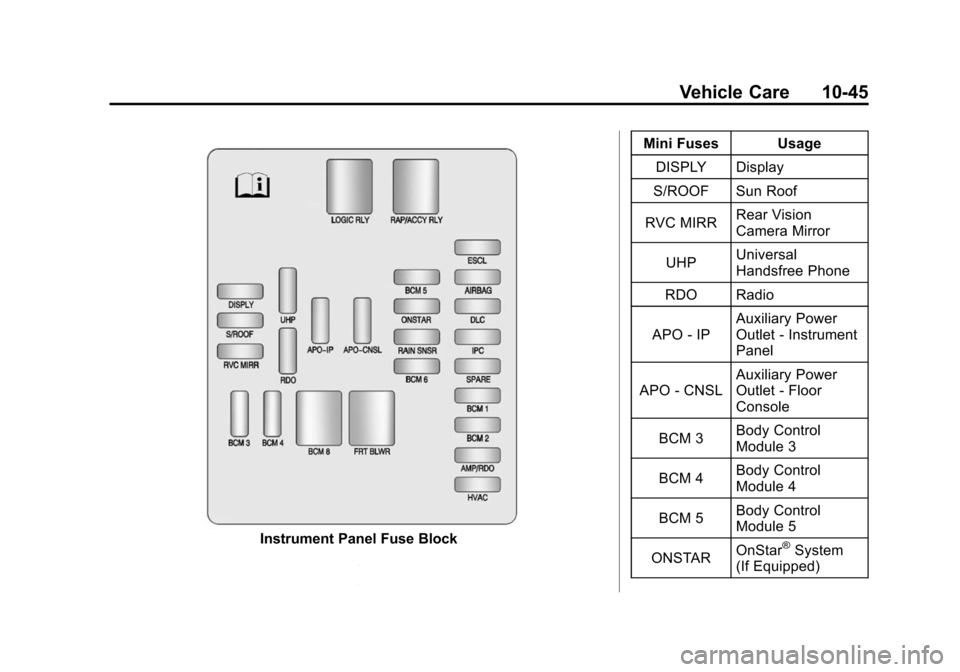
Instrument Panel Fuse BlockMini Fuses Usage
DISPLY Display
S/ROOF Sun Roof
RVC MIRR Rear Vision
Camera Mirror
UHP Universal
Handsfree Phone
RDO Radio
APO ‐IP Auxiliary Power
Outlet
‐Instrument
Panel
APO ‐CNSL Auxiliary Power
Outlet
‐Floor
Console
BCM 3 Body Control
Module 3
BCM 4 Body Control
Module 4
BCM 5 Body Control
Module 5
ONSTAR OnStar®System
(If Equipped)
Page 378 of 502

Black plate (46,1)Cadillac SRX Owner Manual (Include Mex) - 2012
10-46 Vehicle Care
Mini Fuses Usage
RAIN SNSR Rain Sensor
BCM 6 Body Control
Module 6
ESCL Electronic Steering
Column Lock
AIRBAG Sensing and
Diagnostic Module
DLC Data Link
Connection
IPC Instrument Panel
Cluster
SPARE Not Used
BCM 1 Body Control
Module 1
BCM 2 Body Control
Module 2
AMP/RDO Amplifier/Radio
HVAC Heating Ventilation
& Air Conditioning J‐Case
Fuses Usage
BCM 8 Body Control
Module 8
FRT BLWR Front Blower
Relays Usage
LOGIC RLY Logistics Relay
RAP/
ACCY RLY Retained
Accessory Power/
Accessory RelayRear Compartment
Fuse Block
The rear compartment fuse block is
located in the cargo area, on the
driver side of the vehicle behind the
lower trim panel. To open, turn the
latch with a flat bladed tool and pull
the trim panel from the edges to fold
it down.
The vehicle may not be equipped
with all of the fuses, relays, and
features shown.
Page 478 of 502

Black plate (20,1)Cadillac SRX Owner Manual (Include Mex) - 2012
13-20 Customer Information
Vehicle Data
Recording and
Privacy
This GM vehicle has a number of
sophisticated computers that record
information about the vehicle’s
performance and how it is driven.
For example, the vehicle uses
computer modules to monitor and
control engine and transmission
performance, to monitor the
conditions for airbag deployment
and deploy airbags in a crash, and,
if so equipped, to provide antilock
braking to help the driver control the
vehicle. These modules may store
data to help your dealer technician
service the vehicle. Some modules
may also store data about how you
operate the vehicle, such as rate of
fuel consumption or average speed.
These modules may also retain the
owner’s personal preferences, such
as radio presets, seat positions, and
temperature settings.
Event Data Recorders
This vehicle has an Event Data
Recorder (EDR). The main purpose
of an EDR is to record, in certain
crash or near crash-like situations,
such as an airbag deployment or
hitting a road obstacle, data that
will assist in understanding how a
vehicle's systems performed.
The EDR is designed to record data
related to vehicle dynamics and
safety systems for a short period of
time, typically 30 seconds or less.
The EDR in this vehicle is designed
to record such data as:
.How various systems in the
vehicle were operating.
.Whether or not the driver and
passenger safety belts were
buckled/fastened.
.How far, if at all, the driver was
pressing the accelerator and/or
brake pedal.
.How fast the vehicle was
traveling. This data can help provide a better
understanding of the circumstances
in which crashes and injuries occur.
Important:
EDR data is recorded
by the vehicle only if a non-trivial
crash situation occurs; no data is
recorded by the EDR under normal
driving conditions and no personal
data (e.g., name, gender, age, and
crash location) is recorded.
However, other parties, such as law
enforcement, could combine the
EDR data with the type of
personally identifying data routinely
acquired during a crash
investigation.
To read data recorded by an EDR,
special equipment is required, and
access to the vehicle or the EDR is
needed. In addition to the vehicle
manufacturer, other parties, such as
law enforcement, that have the
special equipment, can read the
information if they have access to
the vehicle or the EDR.
GM will not access this data or
share it with others except: with the
consent of the vehicle owner or,
Page 486 of 502

Black plate (6,1)Cadillac SRX Owner Manual (Include Mex) - 2012
14-6 OnStar
OnStar service cannot work unless
your vehicle is in a place where
OnStar has an agreement with a
wireless service provider for service
in that area, and the wireless
service provider has coverage,
network capacity, reception, and
technology compatible with OnStar’s
service. Service involving location
information about the vehicle cannot
work unless GPS signals are
available, unobstructed, and
compatible with the OnStar
hardware. OnStar service may not
work if the OnStar equipment is not
properly installed or it has not been
properly maintained. If equipment or
software is added, connected,
or modified, OnStar service may not
work. Other problems beyond
OnStar ’s control may prevent
service such as hills, tall buildings,
tunnels, weather, electrical system
design and architecture of the
vehicle, damage to the vehicle in a
crash, or wireless phone network
congestion or jamming. See
Radio Frequency Statement on
page 13‑21 for information
regarding Part 15 of the Federal
Communications Commission (FCC)
rules and Industry Canada
Standards RSS-GEN/210/220/310.
Services for People with
Disabilities
Advisors provide services to help
subscribers with physical disabilities
and medical conditions.
Push
Qfor help with:
.Locating a gas station with an
attendant to pump gas.
.Finding a hotel, restaurant, etc.,
that meets accessibility needs.
.Providing directions to the
closest hospital or pharmacy in
urgent situations.
TTY Users
OnStar has the ability to
communicate to the deaf,
hard‐of‐hearing, or speech‐impaired
customers while in the vehicle.
The available dealer‐installed
TTY system can provide in-vehicle
access to all of the OnStar services,
except Virtual Advisor and OnStar
Turn‐by‐Turn Navigation.
Onstar.com
The website provides access to
account information, manages
the OnStar subscription, and
allows viewing of videos of each
service. Get subscription plan
pricing and sign up for OnStar
Vehicle Diagnostics. Click on
the “My Account” tab on the
home page.
Page 489 of 502

Black plate (1,1)Cadillac SRX Owner Manual (Include Mex) - 2012
INDEX i-1
A
Accessories andModifications . . . . . . . . . . . . . . . . . 10-3
Accessory Power . . . . . . . . . . . . . . 9-22
Adaptive Forward Lighting (AFL) . . . . . . . . . . . . . . . . . 6-3
Adaptive Forward Lighting
(AFL) Light . . . . . . . . . . . . . . . . . . . 5-27
Add-On Electrical Equipment . . . . . . . . . . . . . . . . . . . 9-60
Additional Information,
OnStar
®. . . . . . . . . . . . . . . . . . . . . . 14-5
Adjustable Throttle and Brake Pedal . . . . . . . . . . . . . . . . . . 9-17
Adjustments Lumbar, Front Seats . . . . . . . . . . . 3-5
Thigh Support . . . . . . . . . . . . . . . . . 3-5
Air Cleaner/Filter, Engine . . . . . 10-12
Air Filter, Passenger Compartment . . . . . . . . . . . . . . . . . 8-7
Air Vents . . . . . . . . . . . . . . . . . . . . . . . 8-6
Airbag Adding Equipment to theVehicle . . . . . . . . . . . . . . . . . . . . . . 3-34 Airbag System
Check . . . . . . . . . . . . . . . . . . . . . . . . 3-35
How Does an Airbag
Restrain? . . . . . . . . . . . . . . . . . . . 3-28
Passenger Sensing System . . . . . . . . . . . . . . . . . . . . . . 3-30
What Makes an Airbag
Inflate? . . . . . . . . . . . . . . . . . . . . . . 3-27
What Will You See after an Airbag Inflates? . . . . . . . . . . . . . 3-28
When Should an Airbag
Inflate? . . . . . . . . . . . . . . . . . . . . . . 3-26
Where Are the Airbags? . . . . . . 3-25
Airbags Passenger Status Indicator . . . 5-17
Readiness Light . . . . . . . . . . . . . . 5-16
Servicing Airbag-EquippedVehicles . . . . . . . . . . . . . . . . . . . . . 3-34
System Check . . . . . . . . . . . . . . . . 3-23
Alarm System Anti-theft . . . . . . . . . . . . . . . . . . . . . . 2-18
All-Wheel Drive . . . . . . . . . 10-24, 9-30
AM-FM Radio . . . . . . . . . . . . . . . . . . 7-11
Antenna Multi-band . . . . . . . . . . . . . . . . . . . . 7-18 Anti-theft
Alarm System . . . . . . . . . . . . . . . . 2-18
Alarm System Messages . . . . . 5-38
Antilock Brake System (ABS) . . . . . . . . . . . . . . . . 9-30
Warning Light . . . . . . . . . . . . . . . . . 5-22
Appearance Care
Exterior . . . . . . . . . . . . . . . . . . . . . 10-96
Interior . . . . . . . . . . . . . . . . . . . . . . 10-99
Armrest Storage . . . . . . . . . . . . . . . . 4-2
Ashtrays . . . . . . . . . . . . . . . . . . . . . . . 5-10
Audio Players . . . . . . . . . . . . . . . . . 7-19 CD . . . . . . . . . . . . . . . . . . . . . . . . . . . 7-19
CD/DVD . . . . . . . . . . . . . . . . . . . . . . 7-21
Audio System Radio Reception . . . . . . . . . . . . . . 7-18
Rear Seat (RSA) . . . . . . . . . . . . . 7-45
Theft-Deterrent Feature . . . . . . . . 7-2
Automatic Dimming Mirrors . . . . . . . . . . . . . . 2-21
Automatic Transmission . . . . . . . 9-26
Fluid . . . . . . . . . . . . . . . . . . . . . . . . 10-12
Manual Mode . . . . . . . . . . . . . . . . . 9-28
Shift Lock ControlFunction Check . . . . . . . . . . . 10-25
Auxiliary Devices . . . . . . . . 7-28, 7-33
Page 498 of 502

Black plate (10,1)Cadillac SRX Owner Manual (Include Mex) - 2012
i-10 INDEX
R
Radio FrequencyIdentification (RFID) . . . . . . . . 13-21
Statement . . . . . . . . . . . . . . . . . . 13-21
Radios AM-FM Radio . . . . . . . . . . . . . . . . . 7-11
CD/DVD Player . . . . . . . . . . . . . . . 7-21
Reception . . . . . . . . . . . . . . . . . . . . 7-18
Satellite . . . . . . . . . . . . . . . . . . . . . . . 7-14
Reading Lamps . . . . . . . . . . . . . . . . . 6-7
Rear Axle Limited-Slip . . . . . . . . . . . . . . . . . . . 9-37
Rear Climate Control System . . . 8-5
Rear Seat Audio (RSA) System . . . . . . . . . . . . . . . . . . . . . . . 7-45
Rear Seat Entertainment
System . . . . . . . . . . . . . . . . . . . . . . . 7-35
Rear Seat Audio (RSA) . . . . . . . 7-45
Rear Seat Pass-through Door . . . . . . . . . . . 3-13
Rear Seats . . . . . . . . . . . . . . . . . . . . 3-11 Heated . . . . . . . . . . . . . . . . . . . . . . . 3-13
Rear Vision Camera (RVC) . . . . 9-43
Rear Window Washer/Wiper . . . . 5-6 Rearview Mirror
Automatic Dimming . . . . . . . . . . . 2-22
Rearview Mirrors . . . . . . . . . . . . . . 2-22
Reclining Seatbacks . . . . . . . . . . . . 3-6
Recommended Fuel . . . . . . . . . . . . . . . . . . . . . . . . . . 9-47
Recommended Fluids and
Lubricants . . . . . . . . . . . . . . . . . . . 11-13
Records Maintenance . . . . . . . . . . . . . . . . .11-16
Recreational Vehicle
Towing . . . . . . . . . . . . . . . . . . . . . . 10-92
Reimbursement Program, GM Mobility . . . . . . . . . . . . . . . . . . 13-7
Remote Keyless Entry (RKE) System . . . . . . . . . . . . . . . . . . . . . . . . 2-3
Remote Vehicle Start . . . . . . . . . . . 2-9
Replacement Bulbs . . . . . . . . . . . 10-40
Replacement Parts Airbags . . . . . . . . . . . . . . . . . . . . . . . 3-35
Maintenance . . . . . . . . . . . . . . . . .11-15
Replacing Airbag System . . . . . . 3-35
Replacing LATCH System Parts after a Crash . . . . . . . . . . . 3-53 Replacing Safety Belt
System Parts after a Crash . . . 3-22
Reporting Safety Defects Canadian Government . . . . . . 13-19
General Motors . . . . . . . . . . . . . 13-19
U.S. Government . . . . . . . . . . . 13-18
Restraints
Where to Put . . . . . . . . . . . . . . . . . 3-43
Retained Accessory Power (RAP) . . . . . . . . . . . . . . . . . 9-22
Reverse Tilt Mirrors . . . . . . . . . . . . 2-22
Ride Control Systems
Limited Slip Rear Axle . . . . . . . . 9-37
Messages . . . . . . . . . . . . . . . . . . . . 5-37
Selective . . . . . . . . . . . . . . . . . . . . . 9-37
Roads
Driving, Wet . . . . . . . . . . . . . . . . . . . 9-6
Roadside Service . . . . . . . . 13-7, 13-9
Roof Sunroof . . . . . . . . . . . . . . . . . . . . . . . 2-27
Roof Rack System . . . . . . . . . . . . . 4-11
Rotation, Tires . . . . . . . . . . . . . . . . 10-63
Routing, Engine Drive Belt . . . . . 12-3
Running the Vehicle While Parked . . . . . . . . . . . . . . . . . . . . . . . 9-25
Page 499 of 502

Black plate (11,1)Cadillac SRX Owner Manual (Include Mex) - 2012
INDEX i-11
S
Safety Belts . . . . . . . . . . . . . . . . . . . 3-14Care . . . . . . . . . . . . . . . . . . . . . . . . . . 3-22
Extender . . . . . . . . . . . . . . . . . . . . . . 3-21
How to Wear Safety BeltsProperly . . . . . . . . . . . . . . . . . . . . . 3-15
Lap-Shoulder Belt . . . . . . . . . . . . 3-16
Messages . . . . . . . . . . . . . . . . . . . . 5-38
Reminders . . . . . . . . . . . . . . . . . . . . 5-15
Replacing after a Crash . . . . . . 3-22
Use During Pregnancy . . . . . . . . 3-21
Safety Defects Reporting Canadian Government . . . . . . 13-19
General Motors . . . . . . . . . . . . . 13-19
U.S. Government . . . . . . . . . . . 13-18
Safety Locks . . . . . . . . . . . . . . . . . . . 2-13
Safety System Check . . . . . . . . . . 3-21
Satellite Radio . . . . . . . . . . . . . . . . . 7-14
Scheduling Appointments . . . . . 13-13
Sealant Kit, Tire . . . . . . . . . . . . . . 10-73 Seats
Adjustment, Front . . . . . . . . . . . . . . 3-4
Head Restraints . . . . . . . . . . . . . . . 3-2
Heated and Ventilated
Front . . . . . . . . . . . . . . . . . . . . . . . . 3-10
Heated, Rear . . . . . . . . . . . . . . . . . 3-13
Lumbar Adjustment, Front . . . . . 3-5
Memory . . . . . . . . . . . . . . . . . . . . . . . . 3-7
Power Adjustment, Front . . . . . . 3-4
Rear . . . . . . . . . . . . . . . . . . . . . . . . . . 3-11
Reclining Seatbacks . . . . . . . . . . . 3-6
Securing Child Restraints . . . . . . . . . . . . . . 3-54, 3-56
Security Light . . . . . . . . . . . . . . . . . . . . . . . . . . 5-26
Vehicle . . . . . . . . . . . . . . . . . . . . . . . 2-18
Security, OnStar
®. . . . . . . . . . . . . . 14-2
Selective Ride Control . . . . . . . . . 9-37 Service
Accessories and
Modifications . . . . . . . . . . . . . . . . 10-3
Doing Your Own Work . . . . . . . . 10-4
Engine Soon Light . . . . . . . . . . . . 5-18
Maintenance Records . . . . . . .11-16
Maintenance, General Information . . . . . . . . . . . . . . . . . . 11-1
Parts Identification Label . . . . . 12-1
Publications Ordering Information . . . . . . . . . . . . . . . . 13-17
Scheduling Appointments . . . 13-13
Vehicle Messages . . . . . . . . . . . . 5-38
Servicing the Airbag . . . . . . . . . . . 3-34
Shift Lock Control Function Check, Automatic
Transmission . . . . . . . . . . . . . . . . 10-25