2012 CADILLAC SRX lock
[x] Cancel search: lockPage 18 of 502

Black plate (12,1)Cadillac SRX Owner Manual (Include Mex) - 2012
1-12 In Brief
Steering Wheel
Adjustment
To adjust the steering wheel:
1. Pull the lever down.
2. Move the steering wheel upor down.
3. Pull or push the steering wheel closer or away from you.
4. Pull the lever up to lock the steering wheel in place.
Do not adjust the steering wheel
while driving.
Throttle and Brake Pedal
Adjustment
If the vehicle has this feature, the
position of the throttle and brake
pedals can be adjusted.
The switch used to adjust the
pedals is located on the right side of
the steering column, below the
wiper stalk. Pull the switch toward
you to move the pedals further from
the floor, or push the switch away
from you to move the pedals closer
to the floor.
See Adjustable Throttle and Brake
Pedal on page 9‑17.
Interior Lighting
Dome Lamps
The dome lamp controls are located
in the overhead console.
To change the dome lamp settings,
press the following:
*: Turns the lamp off, even when
a door is open.
1: The lamp comes on
automatically when a door is
opened.
+: Turns the dome lamp on.
Reading Lamps
There are reading lamps located on
the overhead console and over the
rear passenger doors. These lamps
come on automatically when any
door is opened.
To manually turn the reading lamps
on or off:
.For the overhead console
reading lamps, press the button
next to each lamp.
.For the rear passenger reading
lamps, press the lamp lens.
For more information on interior
lighting, see Instrument Panel
Illumination Control on page 6‑7.
Page 22 of 502

Black plate (16,1)Cadillac SRX Owner Manual (Include Mex) - 2012
1-16 In Brief
Vehicle Features
Radio(s)
VOL/O:Press to turn the system
on and off. Turn to increase or
decrease the volume.
RADIO/BAND: Press to choose
between FM, AM, or XM™,
if equipped.
TUNE or TUNE/INFO : Turn to
select radio stations.
Press the TUNE or TUNE/INFO
button to show available information
about the current station or track.
gSEEK: Press to seek the
previous station or track.
lSEEK: Press to seek the next
station or track.
/BACK or BACK/: Press to exit
or move backwards in a menu.
Buttons 1 ‐6: Press to save and
select favorite stations. For more information about these
and other radio features, see
Operation on page 7‑7.
Storing a Favorite Station
Stations from all bands can be
stored in the favorite lists in any
order. Up to six stations can be
stored in each favorite page and the
number of available favorite pages
can be set.
To store the station to a position in
the list, press the corresponding
numeric button 1-6 until the station
can be heard again.
For more information, see
“Storing a
Station as a Favorite” inAM-FM
Radio on page 7‑11.
Setting the Clock
The vehicle has a digital and an
analog clock.
For detailed instructions on setting
either clock, see Clock (Analog
Clock) on page 5‑7 orClock (Digital
Clock) on page 5‑7. Turning the Digital Clock On or Off
1. Press the CONFIG button.
2. Select Time and Date Settings.
3. Select Clock Displayed.
4. Press the MENU/SELECT
button to turn the clock on or off.
Setting the Time and Date
1. Press the CONFIG button.
2. Select Time and Date Settings.
3. Select Set Time or Set Date.
4. Turn the MENU/SELECT knob to adjust the highlighted value.
5. Press the MENU/SELECT knob to select the next value.
6. To save the time or date and return to the Time and Date
Settings menu, press the
BACK button at any time or
press the MENU/SELECT knob
after adjusting the minutes
or year.
Page 31 of 502

Black plate (1,1)Cadillac SRX Owner Manual (Include Mex) - 2012
Keys, Doors, and Windows 2-1
Keys, Doors, and
Windows
Keys and Locks
Keys . . . . . . . . . . . . . . . . . . . . . . . . . . 2-2
Remote Keyless Entry (RKE)System . . . . . . . . . . . . . . . . . . . . . . 2-3
Remote Keyless Entry (RKE) System Operation . . . . . . . . . . . 2-3
Remote Vehicle Start . . . . . . . . . 2-9
Door Locks . . . . . . . . . . . . . . . . . . 2-11
Power Door Locks . . . . . . . . . . . 2-12
Safety Locks . . . . . . . . . . . . . . . . . 2-13
Doors
Liftgate . . . . . . . . . . . . . . . . . . . . . . 2-14
Vehicle Security
Vehicle Security . . . . . . . . . . . . . . 2-18
Anti-theft Alarm System . . . . . . 2-18
Immobilizer . . . . . . . . . . . . . . . . . . 2-19
Immobilizer Operation . . . . . . . 2-19
Exterior Mirrors
Convex Mirrors . . . . . . . . . . . . . . 2-20
Power Mirrors . . . . . . . . . . . . . . . . 2-20
Folding Mirrors . . . . . . . . . . . . . . . 2-21
Heated Mirrors . . . . . . . . . . . . . . . 2-21
Automatic Dimming Mirror . . . 2-21
Reverse Tilt Mirrors . . . . . . . . . . 2-22
Interior Mirrors
Manual Rearview Mirror . . . . . . 2-22
Automatic Dimming Rearview Mirror . . . . . . . . . . . . . . . . . . . . . . . 2-22
Windows
Windows . . . . . . . . . . . . . . . . . . . . . 2-23
Power Windows . . . . . . . . . . . . . 2-24
Sun Visors . . . . . . . . . . . . . . . . . . . 2-26
Roof
Sunroof . . . . . . . . . . . . . . . . . . . . . . 2-27
Page 32 of 502

Black plate (2,1)Cadillac SRX Owner Manual (Include Mex) - 2012
2-2 Keys, Doors, and Windows
Keys and Locks
Keys
{WARNING
Leaving children in a vehicle with
the Remote Keyless Entry (RKE)
transmitter is dangerous for many
reasons; children or others could
be badly injured or even killed.
They could operate the power
windows or other controls or even
make the vehicle move. The
windows will function with the
RKE transmitter in the vehicle
and they could be seriously(Continued)
WARNING (Continued)
injured or killed if caught in the
path of a closing window. Do not
leave the RKE transmitter in a
vehicle with children.
This key, located inside the Remote
Keyless Entry (RKE) transmitter, is
used for the driver door and
glove box.
Page 33 of 502

Black plate (3,1)Cadillac SRX Owner Manual (Include Mex) - 2012
Keys, Doors, and Windows 2-3
To remove the key, press the button
near the bottom of the transmitter,
and pull the key out. Never pull the
key out without pressing the button.
See your dealer if a new key is
needed.
Notice:If the keys get locked in
the vehicle, it may have to be
damaged to get them out. Always
carry a spare key.
Contact Roadside Service if locked
out of the vehicle. See Roadside
Service (U.S. and Canada) on
page 13‑7 orRoadside Service
(Mexico) on page 13‑9. With an active OnStar subscription,
an OnStar Advisor may remotely
unlock the vehicle. See
OnStar
Overview on page 14‑1.
Remote Keyless Entry
(RKE) System
See Radio Frequency Statement on
page 13‑21 for information
regarding Part 15 of the Federal
Communications Commission (FCC)
rules and Industry Canada
Standards RSS-GEN/210/220/310.
If there is a decrease in the RKE
operating range:
.Check the distance. The
transmitter may be too far from
the vehicle.
.Check the location. Other
vehicles or objects may be
blocking the signal.
.Check the transmitter's battery.
See “Battery Replacement” later
in this section.
.If the transmitter is still not
working correctly, see your
dealer or a qualified technician
for service.
Remote Keyless Entry
(RKE) System Operation
The Remote Keyless Entry (RKE)
transmitter functions will work up to
60 m (195 ft) away from the vehicle.
Keep in mind that other conditions,
such as those previously stated, can
impact the performance of the
transmitter.
Page 34 of 502

Black plate (4,1)Cadillac SRX Owner Manual (Include Mex) - 2012
2-4 Keys, Doors, and Windows
With Remote Start and Power
Liftgate Shown, Without Similar
Q(Lock): Press to lock all doors.
The turn signal indicators may flash
and/or the horn may sound to
indicate locking, see “Locking
Feedback” underVehicle
Personalization on page 5‑40.
If the driver door is open when
Qis
pressed, all doors lock except the
driver door, if enabled through the
vehicle personalization. If the
passenger door is open when
Qis
pressed, all doors lock. Pressing
Qmay also arm the
theft-deterrent system. See
Anti-theft Alarm System on
page 2‑18.
K(Unlock): Press to unlock the
driver door or all doors, see “Door
Unlock Options” underVehicle
Personalization on page 5‑40. When
remotely unlocking the vehicle at
night the fog lamps and reverse
lamps will come on for about
20 seconds to light your approach to
the vehicle. The turn signal
indicators may flash and/or the horn
may sound to indicate unlocking.
See “Unlock Feedback” under
Vehicle Personalization on
page 5‑40.
Memory seat positions may be
recalled when unlocking the vehicle.
See “Memory Remote Recall” under
Vehicle Personalization on
page 5‑40 for more information.
Pressing
Kwill disarm the
theft-deterrent system. See
Anti-theft Alarm System on
page 2‑18. On some models, pressing and
holding
Kwill open all of the
windows.
/(Remote Start): For vehicles
with this feature, press
Qand then
press and hold
/within
two seconds to start the engine from
outside the vehicle using the RKE
transmitter. See Remote Vehicle
Start on page 2‑9 for additional
information.
L(Vehicle Locator/Panic
Alarm): Press and release one
time to locate the vehicle. The
exterior lamps flash and the horn
chirps. Press and hold
Lfor
three seconds to sound the panic
alarm. The horn sounds and the
turn signal lamps flash for
30 seconds, or until
Lis pressed
again or the vehicle is started.
8(Remote Liftgate Release):
Press until the liftgate begins to
move to open or close the power
liftgate.
Page 35 of 502

Black plate (5,1)Cadillac SRX Owner Manual (Include Mex) - 2012
Keys, Doors, and Windows 2-5
Keyless Access Operation
Some vehicles have the keyless
access system that lets you lock
and unlock the doors and access
the liftgate without removing the
remote transmitter from your pocket,
purse, briefcase, etc. The keyless
entry transmitter must be within 1 m
(3 ft) of the door being opened.
If the vehicle has this feature, there
will be a body colored touch pad on
the outside front door handles.
Keyless Unlocking
With the transmitter within 1 m (3 ft),
approach the front door and pull the
handle. If the transmitter is
recognized, the door will unlock
and open.
Entering any door other than the
driver door will always cause all of
the doors to unlock. This is not
customizable.To customize which doors unlock
when the driver
’s door is opened,
see “Passive Unlock” underVehicle
Personalization on page 5‑40.
Keyless Locking
If the vehicle has the keyless
access system, this feature allows
you to select whether the doors
automatically lock during normal
vehicle exit. When the vehicle is
turned off and all doors become
closed, the vehicle will determine
how many keyless access
transmitters remain in the vehicle
interior. If at least one keyless
access transmitter has been
removed from the interior of the
vehicle, the doors will lock after
eight seconds.
If there are two keyless access
transmitters in the vehicle and one
is removed, the other will be locked
in. A person approaching the outside of the locked vehicle without
an authorized keyless access
transmitter will not be able to open
the door, even with the transmitter in
the vehicle.
You may temporarily disable the
keyless locking feature by pressing
and holding the power door unlock
button on the instrument panel for
several seconds with a door open.
Keyless locking will then remain
disabled until the door lock switch is
pressed, or until the vehicle is
turned on.
To customize whether the doors
automatically lock when you exit the
vehicle, see
“Passive Locking”
under Vehicle Personalization on
page 5‑40.
Page 36 of 502
Black plate (6,1)Cadillac SRX Owner Manual (Include Mex) - 2012
2-6 Keys, Doors, and Windows
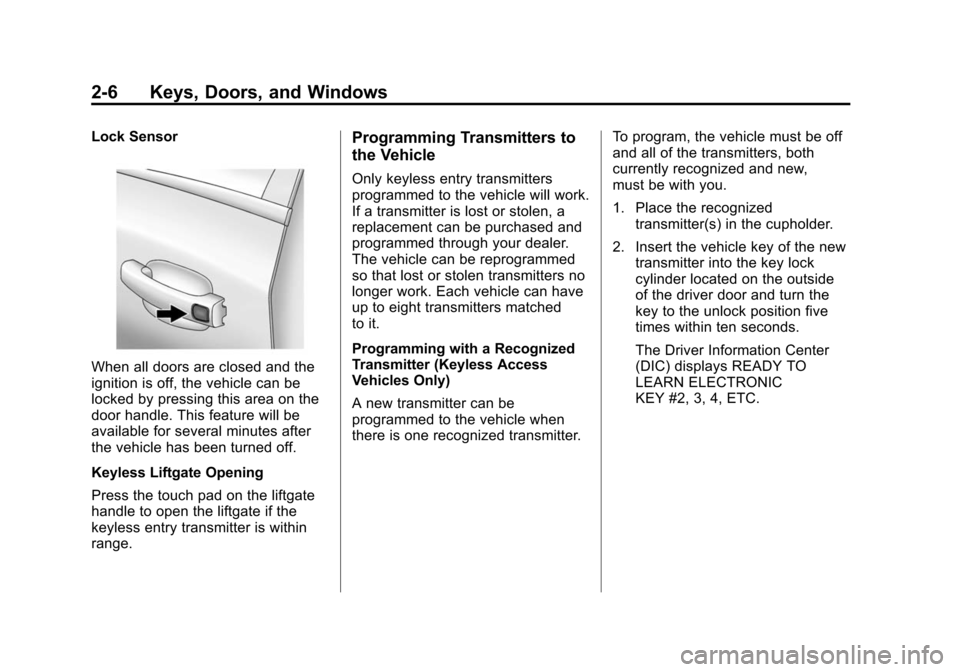
Lock Sensor
When all doors are closed and the
ignition is off, the vehicle can be
locked by pressing this area on the
door handle. This feature will be
available for several minutes after
the vehicle has been turned off.
Keyless Liftgate Opening
Press the touch pad on the liftgate
handle to open the liftgate if the
keyless entry transmitter is within
range.
Programming Transmitters to
the Vehicle
Only keyless entry transmitters
programmed to the vehicle will work.
If a transmitter is lost or stolen, a
replacement can be purchased and
programmed through your dealer.
The vehicle can be reprogrammed
so that lost or stolen transmitters no
longer work. Each vehicle can have
up to eight transmitters matched
to it.
Programming with a Recognized
Transmitter (Keyless Access
Vehicles Only)
A new transmitter can be
programmed to the vehicle when
there is one recognized transmitter.To program, the vehicle must be off
and all of the transmitters, both
currently recognized and new,
must be with you.
1. Place the recognized
transmitter(s) in the cupholder.
2. Insert the vehicle key of the new transmitter into the key lock
cylinder located on the outside
of the driver door and turn the
key to the unlock position five
times within ten seconds.
The Driver Information Center
(DIC) displays READY TO
LEARN ELECTRONIC
KEY #2, 3, 4, ETC.