2012 CADILLAC ESCALADE manual radio set
[x] Cancel search: manual radio setPage 240 of 538

Black plate (56,1)Cadillac Escalade/Escalade ESV Owner Manual - 2012
7-56 Infotainment System
Rear Seat Audio (RSA)
System
Vehicles with this feature allow the
rear seat passengers to listen to
and control any of the music
sources: radio, CD, DVD, or other
auxiliary sources. The rear seat
passengers can control the same
music sources the front seat
passengers are listening to
(dual control) or a different source.
For example, rear seat passengers
can listen to and control a CD
through the headphones, while the
driver listens to the radio through
the speakers. The rear seat
passengers have control of the
volume for each set of headphones.
The radio functionality is controlled
by both the RSA and the front radio,
only one band can be tuned to at
one time. Changing the band on the
RSA or the front radio will change
band on the other system.RSA functions can be operated
even when the main radio is off.
Audio can be heard through wired
headphones (not included) plugged
into the jacks on the RSA. If the
vehicle has this feature, audio can
also be heard on Channel 2 of the
wireless headphones.
The audio system allows the rear
speakers to continue playing even
when the RSA audio is active
through the headphones.
To listen to an iPod or portable
audio device through the RSA,
attach the iPod or portable audio
device to the auxiliary input (if
available), located below the RSA.
Turn the iPod on, then choose the
auxiliary input with the RSA SRCE
button. An iPod
®or portable audio
device can be connected to the front
auxiliary jack or the USB port.
P(Power): Press thePbutton to
turn RSA on and off.
Volume: Turn this knob to increase
or to decrease the volume of the
wired headphones. The left knob
controls the left headphones and
the right knob controls the right
headphones.
SRCE (Source): Press this
button to switch between the radio
(AM/FM), XM™ (if equipped),
CD, and if the vehicle has these
features, DVD, USB, auxiliary jack,
and rear auxiliary.
Page 241 of 538

Black plate (57,1)Cadillac Escalade/Escalade ESV Owner Manual - 2012
Infotainment System 7-57
© ¨(Seek):When listening to FM,
AM, or XM (if equipped), press
either the left
©or right¨seek
arrow to go to the previous or to the
next station or channels and stay
there. This function is inactive,
with some radios, if the front seat
passengers are listening to the
radio.
Press and hold either the left
©or
right
¨seek arrow until the display
flashes, to tune to an individual
station. The display stops flashing
after the buttons have not been
pushed for more than two seconds.
This function is inactive, with some
radios, if the front seat passengers
are listening to the radio. While listening to a disc, press the
right
¨seek arrow to go to the next
track or chapter on the disc. Press
the left
©seek arrow to go back to
the start of the current track or
chapter (if more than ten seconds
have played). This function is
inactive, with some radios, if the
front seat passengers are listening
to the disc.
When a DVD video menu is being
displayed, press either the left
©or
right
¨seek arrow to perform a
cursor up or down on the menu.
Hold the left
©or right¨seek arrow
to perform a cursor left or right on
the menu.
When a USB device is playing, the
right or left seek button can be used
to control the device. PROG (Program):
Press this
button to go to the next preset
radio station or channel set on the
main radio. This function is inactive,
with some radios, if the front seat
passengers are listening to the
radio.
When a CD or DVD audio disc is
playing, press this button to go to
the beginning of the CD or DVD
audio. This function is inactive,
with some radios, if the front seat
passengers are listening to the disc.
When a DVD video menu is being
displayed, press the PROG button
to perform the menu function, enter.
Page 242 of 538

Black plate (58,1)Cadillac Escalade/Escalade ESV Owner Manual - 2012
7-58 Infotainment System
Navigation
Using the Navigation
System
This section presents basic
information needed to operate the
navigation system.
Use the buttons located on the
navigation system along with the
available touch-sensitive screen
buttons on the navigation screen to
operate the system. SeeOverview
on page 7‑4 for more information.
Once the vehicle is moving, various
functions are disabled to reduce
driver distractions.
Navigation Control Buttons
The following control buttons are
located on the navigation system:
O/n(Power/Volume):
1. Press to turn the system on and off.
2. Turn to increase or decrease the volume to the audio system. 3. Press and hold for more than
two seconds to turn off the
navigation system, the Rear
Seat Entertainment (RSE), and
Rear Seat Audio (RSA). If the
vehicle has not been tuned off,
the RSE and the RSA can be
turned back on by pressing this
knob and continues play of the
last active source.
Z(Eject): Press to eject the
CD/DVD Disc. See CD/DVD Player
on page 7‑18.
w(Tuning Knob): Turn to go to
the next or previous frequency or
disc track or chapter. See CD/DVD
Player on page 7‑18 orMP3 on
page 7‑28 for more information.
AUDIO: Press to display the audio
screen. Press to switch between
AM, FM, or XM, if equipped, DISC,
or AUX (Auxiliary), or press on the
screen button. See CD/DVD Player
on page 7‑18, MP3 on page 7‑28,
and Auxiliary Devices on page 7‑30
for more information. FAV (Favorite):
Press to access
the preset stations. See “Storing
Radio Station Presets” under,
Overview on page 7‑4.
5(Phone): SeeOnStar Overview
on page 14‑1 (if equipped)
and Bluetooth on page 7‑100
(if equipped) for more information.
e(Sound): Press to access the
Sound menu to adjust the treble,
midrange, bass, fade, balance, and
Digital Signal Processing (DSP).
y/z(Scan Up/Down): Press to
scan the tracks/chapters up or down
on a disc.
y/©or¨/z(Seek/Scan)
(Previous/Next): Press the up
or down arrows to go to the next
or previous station. Press and
hold either arrow for more than
two seconds. The radio goes to a
station, plays for a few seconds,
then goes to the next station.
Page 265 of 538

Black plate (81,1)Cadillac Escalade/Escalade ESV Owner Manual - 2012
Infotainment System 7-81
5. Press and hold one of thebuttons at the bottom of the
screen until the name appears in
that preset destination screen
button. It is now available to
select from the Destination Entry
screen.
Configure Menu
Press CONFIG to adjust several
of the system's features and
preferences. The last selected
CONFIG screen is the screen
that displays: Sound, Radio, Nav
(navigation), Display, or Time.
Sound
Press CONFIG to enter the
configure menu options, then press
CONFIG again, repeatedly until
Sound is selected or press the
Sound screen button to make
speaker and DSP (Digital Signal
Processing) adjustments. See
“Sound Menu” under,AM-FM Radio
on page 7‑9 for more information.
Radio
Press CONFIG to enter the
configure menu options, then press
CONFIG again, repeatedly until
Radio is selected or press the Radio
screen button to make changes for
radio information displayed, preset
pages, XM (if equipped) categories,
and Bose AudioPilot. See “Radio
Menu” under,AM-FM Radio on
page 7‑9 for more information.
Nav (Navigation)
Press CONFIG to enter the
configure menu options, then press
CONFIG again, repeatedly until Nav
is selected or press the Nav screen
button.
Voice Prompt
Press the Voice Prompt screen
button to change the volume of
the voice prompts or to turn voice
guidance on and off.
Page 269 of 538
Black plate (85,1)Cadillac Escalade/Escalade ESV Owner Manual - 2012
Infotainment System 7-85
XM NavTraffic (USA and
Canada)
Vehicles with the navigation system
have an XM NavTraffic receiver. XM
NavTraffic is a subscription service
provided via XM Satellite Radio. XM
NavTraffic provides real-time traffic
information fully integrated to the
navigation system to display current
traffic conditions for a driver’s
chosen route. XM NavTraffic allows
drivers to make the most informed,
timesaving routing decisions.
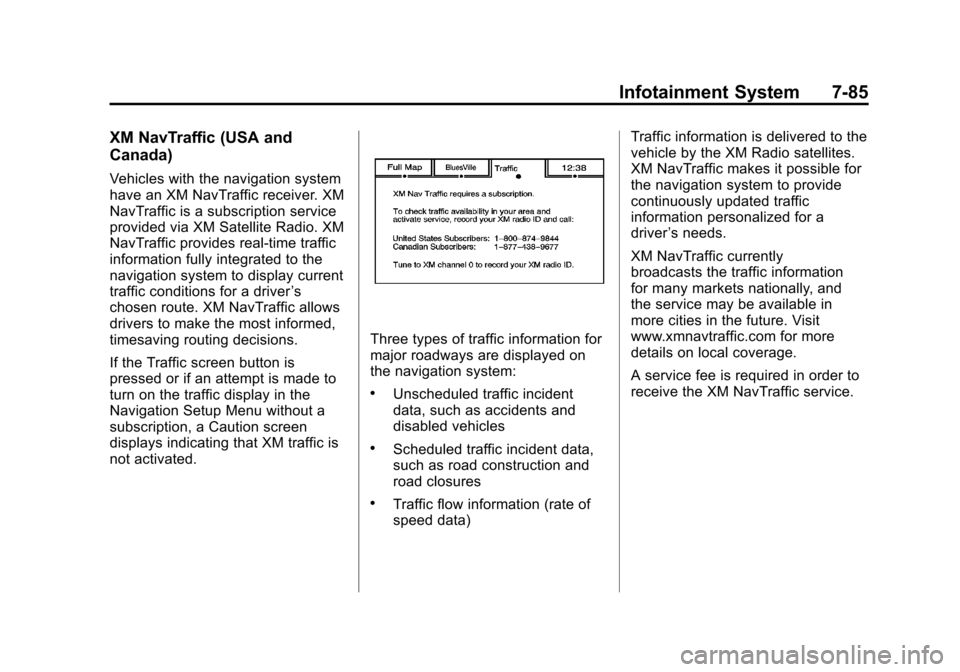
If the Traffic screen button is
pressed or if an attempt is made to
turn on the traffic display in the
Navigation Setup Menu without a
subscription, a Caution screen
displays indicating that XM traffic is
not activated.
Three types of traffic information for
major roadways are displayed on
the navigation system:
.Unscheduled traffic incident
data, such as accidents and
disabled vehicles
.Scheduled traffic incident data,
such as road construction and
road closures
.Traffic flow information (rate of
speed data) Traffic information is delivered to the
vehicle by the XM Radio satellites.
XM NavTraffic makes it possible for
the navigation system to provide
continuously updated traffic
information personalized for a
driver
’s needs.
XM NavTraffic currently
broadcasts the traffic information
for many markets nationally, and
the service may be available in
more cities in the future. Visit
www.xmnavtraffic.com for more
details on local coverage.
A service fee is required in order to
receive the XM NavTraffic service.
Page 283 of 538

Black plate (99,1)Cadillac Escalade/Escalade ESV Owner Manual - 2012
Infotainment System 7-99
Voice Tag Commands
The following are voice tag
commands that can be accessed
by clearly stating the commands
exactly as they are written. There
are up to 40 voice tag entries for
destinations.
Navigation go to [destination],
navigation select:These
commands instruct the system to
select a destination saved under
the voice tag you have stored. The
system prompts for a destination
name then waits for you to state
the name.
If not currently driving on a route,
the system automatically creates the
voice tag destination as the final
destination. If driving on a route, the
system automatically creates the
voice tag destination as a stopover.
Up to three stopovers can be
created. Storing Voice Tags
From the address book entry
information page, press the
Add Voice tag screen button. The
system responds
“Name Please?”
and you will have four seconds to
record a name. The system asks for
confirmation of the name before
saving it as a voice tag.
Navigation Help
This command instructs the system
to assist with navigation commands.
Display Commands
Use the following display commands
to set the display mode.
Display [set] day [mode]: Sets the
display to daytime mode.
Display [set] night [mode]: Sets
the display to night mode.
Display [set] auto [mode]: Sets
the display to automatic mode. The
system changes between day and
night mode automatically. System help:
Instructs the system
to assist with display commands.
Radio Commands
The following are radio commands
that can be accessed by clearly
stating the commands exactly as
they are written.
Radio [band] [select] AM,
radio [band] [select] FM, radio
[band] [select] XM (if equipped),
radio [band] [select] satellite
(if equipped): Instructs the system
to go to either the AM, FM, or XM
(if equipped).
Radio [select] (frequency) AM,
radio [select] (frequency) FM:
Instructs the system to go to a
specific frequency on either AM
or FM.
Radio [select] (channel) XM
(if equipped), radio [select]
(channel) satellite (if equipped):
Instructs the system to go to a
specific channel on the XM band
(if equipped).
Page 302 of 538
Black plate (2,1)Cadillac Escalade/Escalade ESV Owner Manual - 2012
9-2 Driving and Operating
Fuel E85 (85% Ethanol) . . . . . 9-53
Filling the Tank . . . . . . . . . . . . . . 9-54
Filling a Portable FuelContainer . . . . . . . . . . . . . . . . . . . 9-56
Towing
General TowingInformation . . . . . . . . . . . . . . . . . 9-57
Driving Characteristics and Towing Tips . . . . . . . . . . . . . . . . 9-57
Trailer Towing . . . . . . . . . . . . . . . . 9-61
Towing Equipment . . . . . . . . . . . 9-64
Trailer Sway Control (TSC) . . . . . . . . . . . . . . 9-68
Conversions and Add-Ons
Add-On ElectricalEquipment . . . . . . . . . . . . . . . . . 9-68
Driving Information
Distracted Driving
Distraction comes in many forms
and can take your focus from the
task of driving. Exercise good
judgment and do not let other
activities divert your attention
away from the road. Many local
governments have enacted laws
regarding driver distraction. Become
familiar with the local laws in
your area.
To avoid distracted driving, always
keep your eyes on the road, hands
on the wheel, and mind on the drive.
.Do not use a phone in
demanding driving situations.
Use a hands-free method to
place or receive necessary
phone calls.
.Watch the road. Do not
read, take notes, or look up
information on phones or other
electronic devices.
.Designate a front seat
passenger to handle potential
distractions.
.Become familiar with vehicle
features before driving, such
as programming favorite radio
stations and adjusting climate
control and seat settings.
Program all trip information into
any navigation device prior to
driving.
.Wait until the vehicle is parked
to retrieve items that have fallen
to the floor.
.Stop or park the vehicle to tend
to children.
.Keep pets in an appropriate
carrier or restraint.
.Avoid stressful conversations
while driving, whether with a
passenger or on a cell phone.
Page 425 of 538

Black plate (57,1)Cadillac Escalade/Escalade ESV Owner Manual - 2012
Vehicle Care 10-57
.Operating electronic devices or
being near facilities using radio
wave frequencies similar to the
TPMS could cause the TPMS
sensors to malfunction.
If the TPMS is not functioning
properly, it cannot detect or signal a
low tire condition. See your dealer
for service if the TPMS malfunction
light and DIC message comes on
and stays on.
TPMS Sensor Matching
Process
Each TPMS sensor has a unique
identification code. The identification
code needs to be matched to a new
tire/wheel position after rotating the
vehicle’s tires or replacing one or
more of the TPMS sensors. The
TPMS sensor matching process
should also be performed after
replacing a spare tire with a road
tire containing the TPMS sensor.
The malfunction light and the DIC
message should go off at the next
ignition cycle. The sensors are
matched to the tire/wheel positions, using a TPMS relearn tool, in the
following order: driver side front tire,
passenger side front tire, passenger
side rear tire, and driver side rear.
See your dealer for service or to
purchase a relearn tool.
There are two minutes to match
the first tire/wheel position, and
five minutes overall to match all
four tire/wheel positions. If it takes
longer, the matching process stops
and must be restarted.
The TPMS sensor matching process
is outlined below:
1. Set the parking brake.
2. Turn the ignition to ON/RUN with
the engine off.
3. Press
QandKon the
Remote Keyless Entry (RKE)
transmitter at the same time for
approximately five seconds. The
horn sounds twice to signal the
receiver is in relearn mode and
TIRE LEARNING ACTIVE
message displays on the DIC
screen. 4. Start with the driver side
front tire.
5. Place the relearn tool against the tire sidewall, near the valve
stem. Then press the button
to activate the TPMS sensor.
A horn chirp confirms that the
sensor identification code has
been matched to this tire and
wheel position.
6. Proceed to the passenger side front tire, and repeat the
procedure in Step 5.
7. Proceed to the passenger side rear tire, and repeat the
procedure in Step 5.
8. Proceed to the driver side rear tire, and repeat the procedure
in Step 5. The horn sounds
two times to indicate the sensor
identification code has been
matched to the driver side rear
tire, and the TPMS sensor
matching process is no longer
active. The TIRE LEARNING
ACTIVE message on the DIC
display screen goes off.