2012 CADILLAC ESCALADE air condition
[x] Cancel search: air conditionPage 135 of 538

Black plate (13,1)Cadillac Escalade/Escalade ESV Owner Manual - 2012
Instruments and Controls 5-13
Engine Coolant
Temperature Gauge
This gauge shows the engine
coolant temperature.
If the indicator on the gauge moves
towards the shaded area on the
thermostat, it means that the engine
coolant has overheated. If the
vehicle has been operating under
normal driving conditions, pull off
the road, stop the vehicle and turn
off the engine as soon as possible.See
Engine Overheating on
page 10‑19.
Safety Belt Reminders
Driver Safety Belt Reminder
Light
There is a driver safety belt
reminder light on the instrument
panel cluster.
When the vehicle is started, this
light flashes and a chime may come
on to remind the driver to fasten
their safety belt. Then the light stays
on solid until the belt is buckled.
This cycle may continue several
times if the driver remains or
becomes unbuckled while the
vehicle is moving. If the driver safety belt is buckled,
neither the light nor the chime
comes on.
Passenger Safety Belt
Reminder Light
When the vehicle is started, this
light flashes and a chime may come
on to remind front passengers to
fasten their safety belt. Then the
light stays on solid until the belt is
buckled.
For more information see
Passenger Airbag Status Indicator
on page 5‑14.
This cycle continues several times
if the front passenger remains or
becomes unbuckled while the
vehicle is moving.
Page 138 of 538

Black plate (16,1)Cadillac Escalade/Escalade ESV Owner Manual - 2012
5-16 Instruments and Controls
If it does not, have the vehicle
serviced by your dealer.
The light should go out once
the engine starts. If it stays on,
or comes on while driving, there
could be a problem with the
charging system. A charging system
message in the Driver Information
Center (DIC) can also appear.
SeeBattery Voltage and Charging
Messages on page 5‑29 for more
information. This light could indicate
that there are problems with a
generator drive belt, or that there
is an electrical problem. Have it
checked right away. If the vehicle
must be driven a short distance with
the light on, turn off accessories,
such as the radio and air
conditioner.
If the vehicle is a hybrid, see the
hybrid supplement for more
information.Malfunction
Indicator Lamp
A computer system called OBD II
(On-Board Diagnostics-Second
Generation) monitors the operation
of the vehicle to ensure emissions
are at acceptable levels, to produce
a cleaner environment. This light
comes on when the vehicle is
placed in ON/RUN, as a check to
show it is working. If it does not,
have the vehicle serviced by your
dealer. See Ignition Positions on
page 9‑22 for more information.
If the malfunction indicator lamp
comes on and stays on while the
engine is running, this indicates that
there is an OBD II problem and
service is required. Malfunctions often are indicated by
the system before any problem is
apparent. Being aware of the light
can prevent more serious damage
to the vehicle. This system assists
the service technician in correctly
diagnosing any malfunction.
Notice:
If the vehicle is
continually driven with this light
on, the emission controls might
not work as well, the vehicle fuel
economy might not be as good,
and the engine might not run as
smoothly. This could lead to
costly repairs that might not be
covered by the vehicle warranty.
Notice: Modifications made
to the engine, transmission,
exhaust, intake, or fuel system
of the vehicle or the replacement
of the original tires with other
than those of the same Tire
Performance Criteria (TPC) can
affect the vehicle's emission
controls and can cause this light
to come on. Modifications to
these systems could lead to
costly repairs not covered by the
Page 147 of 538

Black plate (25,1)Cadillac Escalade/Escalade ESV Owner Manual - 2012
Instruments and Controls 5-25
speed. The compass and outside air
temperature will also be shown in
the display. The temperature will be
shown in °C or °F depending on the
units selected.
T(Vehicle Information):Press
to display the oil life, units, side
blind zone system on/off, tire
pressure readings for vehicles
with the Tire Pressure Monitor
System (TPMS), compass zone
setting, and compass recalibration.
U(Customization): Press to
customize the feature settings
on your vehicle. See Vehicle
Personalization on page 5‑38 for
more information.
V(Set/Reset): Press to set or
reset certain functions and to turn
off or acknowledge messages on
the DIC.
Trip/Fuel Menu Items
3(Trip/Fuel): Press to scroll
through the following menu items:
Odometer
Press the trip/fuel button until
ODOMETER displays. This display
shows the distance the vehicle has
been driven in either kilometers (km)
or miles (mi).
To switch between English and
metric measurements, see “Units”
later in this section.
Trip Odometer
Press the trip/fuel button until TRIP
displays. This display shows the
current distance traveled in either
kilometers (km) or miles (mi)) since
the last reset for the trip odometer.
The trip odometer can be reset to
zero by pressing the set/reset
button while the trip odometer is
displayed. Fuel Range
Press the trip/fuel button until FUEL
RANGE displays. This display
shows the approximate number
of remaining kilometers (km) or
miles (mi) the vehicle can be driven
without refueling. The display will
show LOW if the fuel level is low.
The fuel range estimate is based on
an average of the vehicle's fuel
economy over recent driving history
and the amount of fuel remaining in
the fuel tank. This estimate will
change if driving conditions change.
For example, if driving in traffic and
making frequent stops, this display
may read one number, but if the
vehicle is driven on a freeway, the
number may change even though
the same amount of fuel is in the
fuel tank. This is because different
driving conditions produce different
fuel economies. Generally, freeway
driving produces better fuel
economy than city driving. Fuel
range cannot be reset.
Page 150 of 538
Black plate (28,1)Cadillac Escalade/Escalade ESV Owner Manual - 2012
5-28 Instruments and Controls
Tire Pressure
On vehicles with the Tire Pressure
Monitor System (TPMS), the
pressure for each tire can be
viewed in the DIC. The tire pressure
will be shown in either pounds
kilopascals (kPa) or per square
inch (psi). Press the vehicle
information button until the DIC
displays FRONT TIRES kPa (PSI)
LEFT ## RIGHT ##. Press the
vehicle information button again
until the DIC displays REAR
TIRES kPa (PSI) LEFT ##
RIGHT ##.
If a low tire pressure condition is
detected by the system while
driving, a message advising you to
add air to a specific tire will appear
in the display. SeeTire Pressure on
page 10‑52 andTire Messages on
page 5‑36 for more information. If the tire pressure display shows
dashes instead of a value, there
may be a problem with your vehicle.
If this consistently occurs, see your
dealer for service.
Battery Voltage
This display shows the current
battery voltage. If the voltage is in
the normal range, the value will
display. For example, the display
may read BATTERY VOLTAGE
13 VOLTS. If the voltage is low,
the display will show LOW. If the
voltage is high, the display will show
HIGH. Your vehicle's charging
system regulates voltage based on
the state of the battery. The battery
voltage may fluctuate when viewing
this information on the DIC. This is
normal. See
Charging System Light
on page 5‑15 for more information. If there is a problem with the battery
charging system, the DIC will
display a message. See
Battery
Voltage and Charging Messages on
page 5‑29.
Oil Pressure
This display will show the oil
pressure in either pounds
kilopascals (kPa) or per square
inch (psi).
Compass Zone Setting
This display allows for setting the
compass zone. See Compass on
page 5‑5 for more information.
Compass Recalibration
This display allows for calibrating
the compass. See Compass on
page 5‑5 for more information.
Blank Display
This display shows no information.
Page 153 of 538

Black plate (31,1)Cadillac Escalade/Escalade ESV Owner Manual - 2012
Instruments and Controls 5-31
Engine Cooling System
Messages
ENGINE HOT A/C (Air
Conditioning) TURNED OFF
This message displays when the
engine coolant becomes hotter than
the normal operating temperature.
SeeEngine Coolant Temperature
Gauge on page 5‑13. To avoid
added strain on a hot engine,
the air conditioning compressor
automatically turns off. When the
coolant temperature returns to
normal, the air conditioning
compressor turns back on. You can
continue to drive your vehicle.
If this message continues to appear,
have the system repaired by your
dealer as soon as possible to avoid
damage to the engine.
ENGINE OVERHEATED IDLE
ENGINE
Notice: If you drive the vehicle
while the engine is overheating,
severe engine damage may
occur. If an overheat warning
appears on the instrument panel
cluster and/or DIC, stop the
vehicle as soon as possible.
See Engine Overheating on
page 10‑19 for more information.
This message displays when the
engine coolant temperature is too
hot. Stop and allow the vehicle to
idle until it cools down. See Engine
Coolant Temperature Gauge on
page 5‑13.
See Overheated Engine Protection
Operating Mode on page 10‑21 for
information on driving to a safe
place in an emergency.
ENGINE OVERHEATED STOP
ENGINE
Notice: If you drive the vehicle
while the engine is overheating,
severe engine damage may
occur. If an overheat warning
appears on the instrument panel
cluster and/or DIC, stop the
vehicle as soon as possible.
See Engine Overheating on
page 10‑19 for more information.
This message displays and a chime
sounds if the engine cooling system
reaches unsafe temperatures for
operation. Stop and turn off the
vehicle as soon as it is safe to do
so to avoid severe damage. This
message clears when the engine
has cooled to a safe operating
temperature.
Page 158 of 538

Black plate (36,1)Cadillac Escalade/Escalade ESV Owner Manual - 2012
5-36 Instruments and Controls
.The message displays if an
engine or vehicle related
problem has been detected and
the vehicle needs service. See
your dealer.
The message turns off as soon as
the conditions that caused the
message to be displayed are no
longer present.
Airbag System Messages
SERVICE AIR BAG
This message displays if there is a
problem with the airbag system.
Have your dealer inspect the
system for problems. See Airbag
Readiness Light on page 5‑14 and
Airbag System on page 3‑27 for
more information.
Anti-theft Alarm System
Messages
SERVICE THEFT DETERRENT
SYSTEM
This message displays when there
is a problem with the theft-deterrent
system. The vehicle may or may not
restart so you may want to take the
vehicle to your dealer before turning
off the engine. See Immobilizer
Operation on page 2‑15 for more
information.
Tire Messages
SERVICE TIRE MONITOR
SYSTEM
On vehicles with the Tire Pressure
Monitor System (TPMS), this
message displays if a part on the
TPMS is not working properly. The
tire pressure light also flashes and
then remains on during the same
ignition cycle. See Tire Pressure
Light on page 5‑21. Several
conditions may cause this message to appear. See
Tire Pressure
Monitor Operation on page 10‑55 for
more information. If the warning
comes on and stays on, there may
be a problem with the TPMS. See
your dealer.
TIRE LEARNING ACTIVE
On vehicles with the Tire Pressure
Monitor System (TPMS), this
message displays when the TPMS
is re-learning the tire positions on
your vehicle. The tire positions must
be re-learned after rotating the tires
or after replacing a tire or sensor.
See Tire Inspection on page 10‑58,
Tire Rotation on page 10‑58, Tire
Pressure Monitor System on
page 10‑54, and Tire Pressure on
page 10‑52 for more information.
TIRE LOW ADD AIR TO TIRE
On vehicles with the Tire Pressure
Monitor System (TPMS), this
message displays when the
pressure in one or more of the
vehicle's tires needs to be checked.
Page 159 of 538

Black plate (37,1)Cadillac Escalade/Escalade ESV Owner Manual - 2012
Instruments and Controls 5-37
This message also displays LEFT
FRT (left front), RIGHT FRT
(right front), LEFT RR (left rear),
or RIGHT RR (right rear) to indicate
the location of the low tire. The low
tire pressure warning light will also
come on. SeeTire Pressure Light
on page 5‑21. You can receive more
than one tire pressure message at a
time. To read the other messages
that may have been sent at the
same time, press the set/reset
button or the trip odometer reset
stem. If a tire pressure message
appears on the DIC, stop as soon
as you can. Have the tire pressures
checked and set to those shown on
the Tire Loading Information label.
See Tires on page 10‑46, Vehicle
Load Limits on page 9‑15, and Tire
Pressure on page 10‑52. The DIC
also shows the tire pressure values.
See “DIC Operation and Displays
(With DIC Buttons)” earlier in this
section.Transmission Messages
MANUAL SHIFT
This message displays when the
automatic transmission is in manual
mode. See Manual Mode on
page 9‑32 for more information.
TRANSMISSION HOT IDLE
ENGINE
Notice:If you drive the vehicle
while the transmission fluid is
overheating and the transmission
temperature warning is displayed
on the instrument panel cluster
and/or DIC, you can damage the
transmission. This could lead to
costly repairs that would not be
covered by the warranty. Do not
drive the vehicle with overheated
transmission fluid or while the
transmission temperature
warning is displayed.
This message displays along with
four chimes if the transmission fluid
in the vehicle gets hot. Driving with
the transmission fluid temperature
high can cause damage to the vehicle. Stop the vehicle and let it
idle to allow the transmission to
cool. This message clears and
the chime stops when the fluid
temperature reaches a safe level.
Vehicle Reminder
Messages
ICE POSSIBLE DRIVE
WITH CARE
This message displays when ice
conditions are possible.
Washer Fluid Messages
WASHER FLUID LOW ADD
FLUID
This message displays when the
windshield washer fluid is low. Fill
the windshield washer fluid reservoir
as soon as possible. See
Engine
Compartment Overview on
page 10‑6 for the location of the
windshield washer fluid reservoir.
Also, see Washer Fluid on
page 10‑23 for more information.
Page 178 of 538
Black plate (4,1)Cadillac Escalade/Escalade ESV Owner Manual - 2012
6-4 Lighting
.The other vehicle's lamp(s)
cannot be detected due to dense
exhaust, smoke, fog, snow, road
spray, mist or other airborne
obstructions.
.Your vehicle's windshield is
dirty, cracked or obstructed by
something that blocks the view
of the IntelliBeam light sensor.
.Your vehicle's windshield is
covered with ice, dirt, haze or
other obstructions.
.Your vehicle is loaded such
that the front end of the vehicle
points upward, causing the
IntelliBeam sensor to aim high
and not detect headlamps and
taillamps.
.You are driving on winding or
hilly roads.
You may need to manually disable
or cancel the high-beam headlamps
by turning the low-beam headlamps
on, if any of the above conditions
exist. Disabling and Resetting
IntelliBeam at the Rearview Mirror
IntelliBeam can be disabled by
using the controls on the inside
rearview mirror.
AUTO
3(On/Off):
To disable
the system, press this button on
the inside rearview mirror. The
IntelliBeam indicator will turn off
and will not come back on until the
IntelliBeam button is pressed again.
(Stalk Disable): When IntelliBeam
has turned on the high-beams,
pull or push the high-beam stalk.
This will disable IntelliBeam.
The IntelliBeam indicator on the
mirror will turn off. To re-enable
IntelliBeam, press the IntelliBeam
button on the mirror.
A different sensitivity setting is
available for dealer diagnostics.
This is done by pushing and holding
this button for 20 seconds until the
IntelliBeam indicator light flashes
three times. If you accidentally
activate this, the vehicle's setting will automatically be reset each time
the ignition is turned off and then on
again.
Cleaning the IntelliBeam Light
Sensor
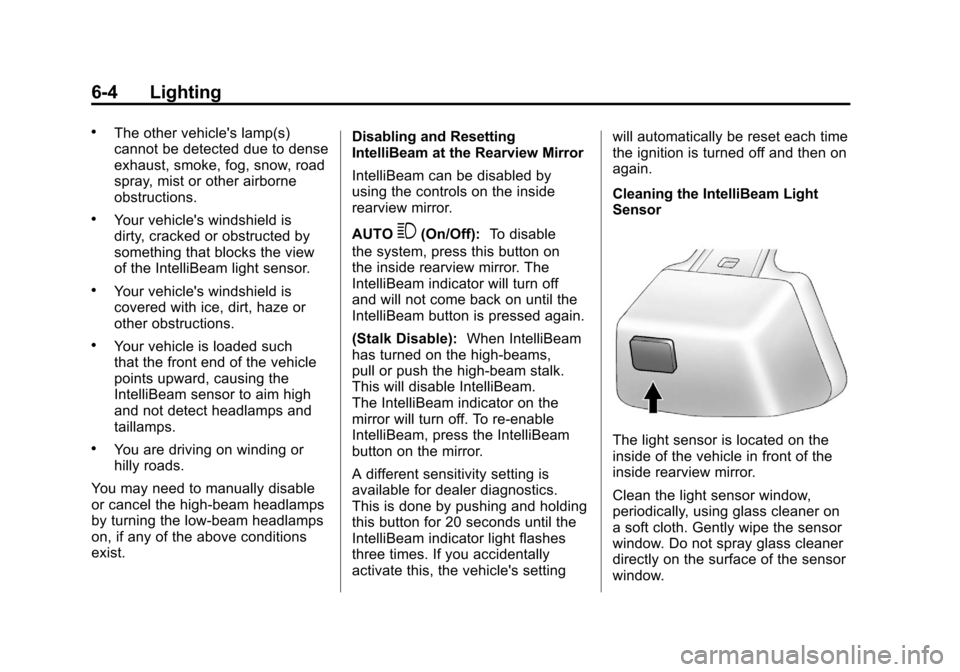
The light sensor is located on the
inside of the vehicle in front of the
inside rearview mirror.
Clean the light sensor window,
periodically, using glass cleaner on
a soft cloth. Gently wipe the sensor
window. Do not spray glass cleaner
directly on the surface of the sensor
window.