2012 CADILLAC ESCALADE EXT phone
[x] Cancel search: phonePage 229 of 494

Black plate (49,1)Cadillac Escalade EXT Owner Manual - 2012
Infotainment System 7-49
Address Book:Press to add this
POI to the address book. See “Nav”
under Configure Menu on page 7‑64
for information on editing address
book entries.
GO: Press to make this POI a
destination or a stopover.
Map: Press to display the map
showing the location of the POI.
Call: Press to dial the phone
number using your Bluetooth
®
phone (if “paired”with the vehicle)
or the OnStar Hands-Free Calling
system (if equipped). For more
information about Bluetooth calling,
see Bluetooth on page 7‑81.
OK: Press to display the map
screen.
Show POI: Press to display or
remove the POI icons from the map
screen. List all Categories:
Press to list all
POIs sorted alphabetically.
Delete: To delete a specific POI
category, select the category.
Clear All: Press this screen button
to clear all selected POI categories.
Driving on a Route
When driving on a routed
destination, the map screen
automatically displays the next
maneuver.
The pop-up displays the next
maneuver direction and the distance
from it.
When approximately 400 m (1/4 mi)
from the next maneuver, the screen
displays the name and a detailed
view of it.
Page 239 of 494
Black plate (59,1)Cadillac Escalade EXT Owner Manual - 2012
Infotainment System 7-59
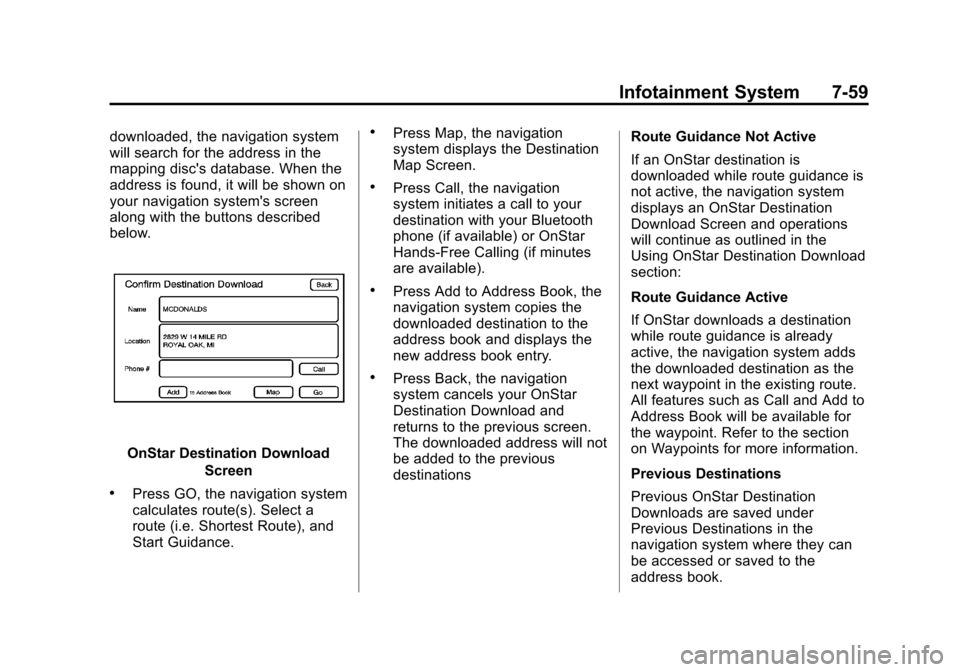
downloaded, the navigation system
will search for the address in the
mapping disc's database. When the
address is found, it will be shown on
your navigation system's screen
along with the buttons described
below.
OnStar Destination DownloadScreen
.Press GO, the navigation system
calculates route(s). Select a
route (i.e. Shortest Route), and
Start Guidance.
.Press Map, the navigation
system displays the Destination
Map Screen.
.Press Call, the navigation
system initiates a call to your
destination with your Bluetooth
phone (if available) or OnStar
Hands-Free Calling (if minutes
are available).
.Press Add to Address Book, the
navigation system copies the
downloaded destination to the
address book and displays the
new address book entry.
.Press Back, the navigation
system cancels your OnStar
Destination Download and
returns to the previous screen.
The downloaded address will not
be added to the previous
destinations Route Guidance Not Active
If an OnStar destination is
downloaded while route guidance is
not active, the navigation system
displays an OnStar Destination
Download Screen and operations
will continue as outlined in the
Using OnStar Destination Download
section:
Route Guidance Active
If OnStar downloads a destination
while route guidance is already
active, the navigation system adds
the downloaded destination as the
next waypoint in the existing route.
All features such as Call and Add to
Address Book will be available for
the waypoint. Refer to the section
on Waypoints for more information.
Previous Destinations
Previous OnStar Destination
Downloads are saved under
Previous Destinations in the
navigation system where they can
be accessed or saved to the
address book.
Page 240 of 494
Black plate (60,1)Cadillac Escalade EXT Owner Manual - 2012
7-60 Infotainment System
Important Notes regarding OnStar
Destination Download:
.If the navigation system is
turned off when the destination
download is attempted, the
navigation system will
automatically turn on and display
the OnStar Destination
Download Screen. The radio will
remain on after the download
occurs.
.If OnStar downloads a
destination and the address is
not found in the mapping disc’s
database and routing by
coordinates is not available, the
GO and Map buttons gray out
and routing will not be available.
Press the blue OnStar button for
further assistance.
.The Call button grays out when
there is no phone number
available for your destination
and while connected to OnStar.Map Destination Screen Functions
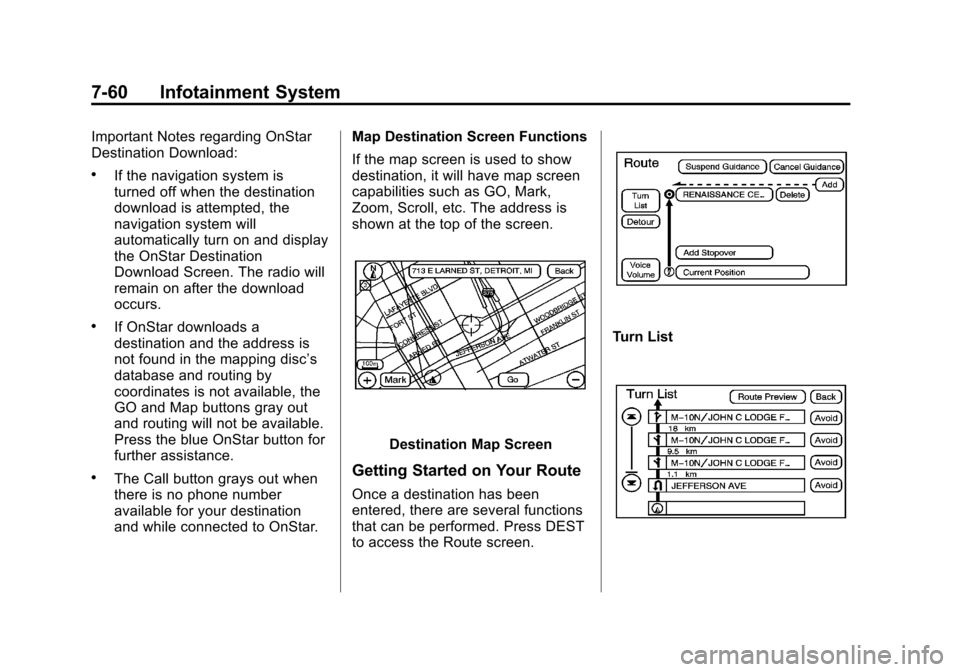
If the map screen is used to show
destination, it will have map screen
capabilities such as GO, Mark,
Zoom, Scroll, etc. The address is
shown at the top of the screen.
Destination Map Screen
Getting Started on Your Route
Once a destination has been
entered, there are several functions
that can be performed. Press DEST
to access the Route screen.
Turn List
Page 245 of 494

Black plate (65,1)Cadillac Escalade EXT Owner Manual - 2012
Infotainment System 7-65
Volume:Press + or −to increase
or to decrease the volume of the
voice prompts. The system will
respond with the adjusted voice
level.
Voice Guidance: Press On or Off
to turn voice instructions on and off
while traveling on a planned route.
Route Preference
Press the Route Preference screen
button to change route options
when the system calculates a route.
Allow Major Roads: This feature
allows the system to use major
roads when calculating a planned
route.
Allow Toll Roads: This feature
allows the system to use toll roads
when calculating a planned route.
Allow Ferrys: This feature allows
the system to use ferries when
calculating a planned route. Allow Time and Seasonal
Restricted Roads:
This feature
allows the system to use time
restricted and seasonal roads when
calculating a planned route.
Edit Address Book —How to Add
To add an address to the address
book, see “Adding Destinations to
the Address Book” under
Destination on page 7‑50.
Edit Address Book —Edit/View
To edit the name of an
address book:
1. Press CONFIG.
2. Press the Nav screen button.
3. Press Edit/View Address Book.
4. Select the Address book entry.
5. Press the Name screen button and use the alpha keyboard to
edit or add the name.
6. Press OK to save your changes, then press Back to return to the
Address Book information
screen.
To add or change the phone number
of an address book entry:
1. Press CONFIG.
2. Press the Nav screen button.
3. Press Edit/View Address Book.
4. Select the address book entry to change.
Page 246 of 494

Black plate (66,1)Cadillac Escalade EXT Owner Manual - 2012
7-66 Infotainment System
5. Press the Phone # screen buttonand use the numeric keyboard to
input or change the phone
number.
6. Press OK to save your changes, then press Back to return to the
Address Book information
screen.
To change the map icon of an
address book entry:
1. Press CONFIG.
2. Press the Nav screen button.
3. Press Edit/View Address Book.
4. Select the address book entry to change.
5. Press the Icon screen button.
6. Select an icon from the list.
To add a voice tag to an address
book entry:
1. Press CONFIG.
2. Press the Nav screen button.
3. Press Edit/View Address Book.
4. Press Add Voice Tag. 5. The system will ask for you to
state the name. You will have
four seconds to state the name.
The system will respond back
with the name and prompt you to
repeat the name for
confirmation.
To delete an address book entry:
1. Press CONFIG.
2. Press the Nav screen button.
3. Press Edit/View Address Book.
4. Select the address book entry to delete.
5. Press Delete to delete the address book entry.
6. A confirmation pop-up will display. Press OK to delete;
press Cancel to cancel the
operation.
To delete the entire address book:
1. Press CONFIG.
2. Press the Nav screen button.
3. Press Edit/View Address Book. 4. A list of all the address book
entries will display. Press and
hold Clear All.
5. A confirmation pop-up will display. Press OK to delete;
press Cancel to cancel the
operation.
Map Database Information
Use the Map Database Information/
Remove Map Data screen button to
view the coverage areas of the map
database or to replace the map
database.
Page 261 of 494
![CADILLAC ESCALADE EXT 2012 3.G Owners Manual Black plate (81,1)Cadillac Escalade EXT Owner Manual - 2012
Infotainment System 7-81
Radio [select] (channel) XM
(if equipped), radio [select]
(channel) satellite (if equipped):
Instructs the system t](/manual-img/23/7934/w960_7934-260.png "CADILLAC ESCALADE EXT 2012 3.G Owners Manual Black plate (81,1)Cadillac Escalade EXT Owner Manual - 2012
Infotainment System 7-81
Radio [select] (channel) XM
(if equipped), radio [select]
(channel) satellite (if equipped):
Instructs the system t")
Black plate (81,1)Cadillac Escalade EXT Owner Manual - 2012
Infotainment System 7-81
Radio [select] (channel) XM
(if equipped), radio [select]
(channel) satellite (if equipped):
Instructs the system to go to a
specific channel on the XM band
(if equipped).
Radio help:Instructs the system to
assist with radio commands.
CD Commands
The following are CD, MP3, and
DVD commands that can be
accessed by clearly stating the
commands exactly as they are
written.
CD, DVD, Disc: Use this command
to select a CD, DVD, or disc that is
currently loaded.
CD, DVD, Disc, [select] track (one,
two, three, etc.): Instructs the
system to select a specific track
number. CD, DVD, Disc select next
folder:
Use this command to select
the next folder on the MP3 or
audio DVD.
CD, DVD, Disc select previous
folder: Use this command to select
the previous folder on the MP3 or
audio DVD.
CD help, DVD help, Disc help:
Instructs the system to assist with
CD and DVD commands.
Auxiliary Commands
The following auxiliary commands
can be accessed by clearly stating
the commands exactly as they are
written. The commands are
available when the auxiliary source
is available.
Aux, Auxiliary: Use this command
to select the auxiliary device, when
a device is connected.
Voice Help
Provides a description of help
commands that can be used.Phone
Bluetooth
For vehicles equipped with
Bluetooth capability, the system can
interact with many cell phones,
allowing:
.Placement and receipt of calls in
a hands-free mode.
.Sharing of the cell phone’s
address book or contact list with
the vehicle.
To minimize driver distraction,
before driving, and with the vehicle
parked:
.Become familiar with the
features of the cell phone.
Organize the phone book and
contact lists clearly and delete
duplicate or rarely used entries.
If possible, program speed dial
or other shortcuts.
.Review the controls and
operation of the infotainment
system.
Page 262 of 494

Black plate (82,1)Cadillac Escalade EXT Owner Manual - 2012
7-82 Infotainment System
.Pair cell phone(s) to the vehicle.
The system may not work with
all cell phones. See“Pairing”in
this section for more information.
.If the cell phone has voice
dialing capability, learn to use
that feature to access the
address book or contact list. See
“Voice Pass-Thru” in this section
for more information.
.See “Storing and Deleting Phone
Numbers” in this section for
more information.
{WARNING
When using a cell phone, it can
be distracting to look too long or
too often at the screen of the
phone or the infotainment
(navigation) system. Taking your
eyes off the road too long or too
often could cause a crash
resulting in injury or death.
Focus your attention on driving. A Bluetooth system can use a
Bluetooth‐capable cell phone with a
Hands‐Free Profile to make and
receive phone calls. The system
can be used while the key is in the
ON/RUN or ACC/ACCESSORY
position. The range of the Bluetooth
system can be up to 9.1 m (30 ft).
Not all phones support all functions,
and not all phones work with the
in-vehicle Bluetooth system. See
www.gm.com/bluetooth for more
information on compatible phones.
Voice Recognition
The Bluetooth system uses voice
recognition to interpret voice
commands to dial phone numbers
and name tags.
For additional information, say
“Help”
while you are in a voice
recognition menu.
Noise: Keep interior noise levels to
a minimum. The system may not
recognize voice commands if there
is too much background noise. When to Speak:
A short tone
sounds after the system responds
indicating when it is waiting for a
voice command. Wait until the tone
and then speak.
How to Speak: Speak clearly in a
calm and natural voice.
Audio System
When using the in‐vehicle Bluetooth
system, sound comes through the
vehicle's front audio system
speakers and overrides the audio
system. Use the audio system
volume knob, during a call, to
change the volume level. The
adjusted volume level remains in
memory for later calls. To prevent
missed calls, a minimum volume
level is used if the volume is turned
down too low.
Bluetooth Controls
Use the buttons located on the
steering wheel to operate the
in‐vehicle Bluetooth system. See
Steering Wheel Controls on
page 5‑2 for more information.
Page 263 of 494

Black plate (83,1)Cadillac Escalade EXT Owner Manual - 2012
Infotainment System 7-83
b/g(Mute/Push To Talk):Press
to answer incoming calls, confirm
system information, and start
speech recognition.
c/x(End): Press to end a call,
reject a call, or cancel an operation.
Pairing
A Bluetooth enabled cell phone
must be paired to the Bluetooth
system and then connected to the
vehicle before it can be used. See
the cell phone manufacturer's user
guide for Bluetooth functions before
pairing the cell phone. If a Bluetooth
phone is not connected, calls will be
made using OnStar Hands‐Free
Calling, if equipped. See OnStar
Overview on page 14‑1 for more
information.
Pairing Information
.A Bluetooth phone with MP3
capability cannot be paired to
the vehicle as a phone and an
MP3 player at the same time.
.Up to five cell phones can be
paired to the Bluetooth system.
.The pairing process is disabled
when the vehicle is moving.
.Pairing only needs to be
completed once, unless the
pairing information on the cell
phone changes or the cell phone
is deleted from the system.
.Only one paired cell phone can
be connected to the Bluetooth
system at a time.
.If multiple paired cell phones are
within range of the system, the
system connects to the first
available paired cell phone in the
order that they were first paired
to the system. To connect to a
different paired phone, see
“Connecting to a Different
Phone” later in this section.
Pairing a Phone
1. Press and hold
b/gfor
two seconds. 2. Say
“Bluetooth.” This command
can be skipped.
3. Say “Pair.”The system responds
with instructions and a four‐digit
Personal Identification Number
(PIN). The PIN is used in Step 5.
4. Start the pairing process on the cell phone that you want to pair.
For help with this process, see
the cell phone manufacturer's
user guide.
5. Locate the device named “Your
Vehicle” in the list on the cell
phone. Follow the instructions
on the cell phone to enter the
PIN provided in Step 3. After the
PIN is successfully entered, the
system prompts you to provide a
name for the paired cell phone.
This name will be used to
indicate which phones are
paired and connected to the
vehicle. The system responds
with “
successfully paired” after the
pairing process is complete.