2012 CADILLAC CTS steering wheel
[x] Cancel search: steering wheelPage 269 of 496
Black plate (19,1)Cadillac CTS/CTS-V Owner Manual (Include Mex) - 2012
Driving and Operating 9-19
Using a tool to force the ignition
control knob from its cylinder could
damage it.
Make sure the keyless access
transmitter is inside the vehicle
when trying to turn the ignition
control knob.
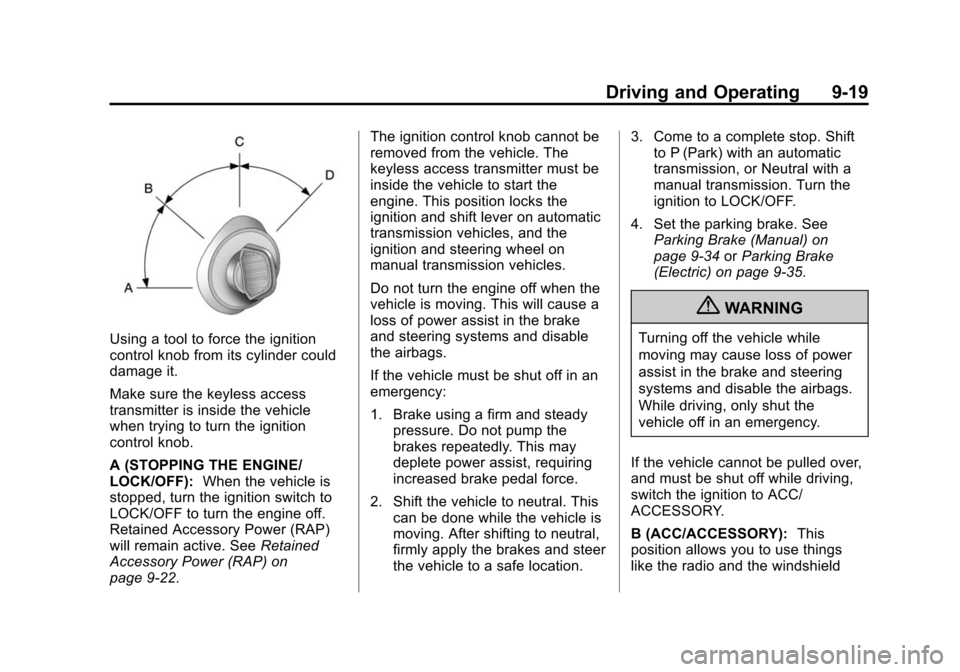
A (STOPPING THE ENGINE/
LOCK/OFF):When the vehicle is
stopped, turn the ignition switch to
LOCK/OFF to turn the engine off.
Retained Accessory Power (RAP)
will remain active. See Retained
Accessory Power (RAP) on
page 9‑22. The ignition control knob cannot be
removed from the vehicle. The
keyless access transmitter must be
inside the vehicle to start the
engine. This position locks the
ignition and shift lever on automatic
transmission vehicles, and the
ignition and steering wheel on
manual transmission vehicles.
Do not turn the engine off when the
vehicle is moving. This will cause a
loss of power assist in the brake
and steering systems and disable
the airbags.
If the vehicle must be shut off in an
emergency:
1. Brake using a firm and steady
pressure. Do not pump the
brakes repeatedly. This may
deplete power assist, requiring
increased brake pedal force.
2. Shift the vehicle to neutral. This can be done while the vehicle is
moving. After shifting to neutral,
firmly apply the brakes and steer
the vehicle to a safe location. 3. Come to a complete stop. Shift
to P (Park) with an automatic
transmission, or Neutral with a
manual transmission. Turn the
ignition to LOCK/OFF.
4. Set the parking brake. See Parking Brake (Manual) on
page 9‑34 orParking Brake
(Electric) on page 9‑35.
{WARNING
Turning off the vehicle while
moving may cause loss of power
assist in the brake and steering
systems and disable the airbags.
While driving, only shut the
vehicle off in an emergency.
If the vehicle cannot be pulled over,
and must be shut off while driving,
switch the ignition to ACC/
ACCESSORY.
B (ACC/ACCESSORY): This
position allows you to use things
like the radio and the windshield
Page 279 of 496

Black plate (29,1)Cadillac CTS/CTS-V Owner Manual (Include Mex) - 2012
Driving and Operating 9-29
M (Manual Mode):This position
allows the driver to select the range
of gears appropriate for current
driving conditions. See Driver Shift
Control (DSC) later in this section.
Notice: Spinning the tires or
holding the vehicle in one
place on a hill using only the
accelerator pedal may damage
the transmission. If you are stuck,
do not spin the tires. When
stopping on a hill, use the brakes
to hold the vehicle in place.
Manual Mode
Driver Shift Control (DSC) or
Tap Shift
Notice: Driving with the engine at
a high rpm without upshifting
while using Driver Shift Control
(DSC), could damage the vehicle.
Always upshift when necessary
while using DSC. Vehicles with DSC may either use
the shift lever or the tap shift
controls on back of the steering
wheel to manually shift the
automatic transmission.
To use the DSC feature using the
shift lever:
1. Move the shift lever to
the right from D (Drive) to
M (Manual Mode).
The vehicle will be in sport mode
and will shift automatically if the
shift lever is not moved forward
or rearward. The transmission
may remain in a gear longer
than it would in the normal
driving mode based on braking,
throttle input, and vehicle lateral
acceleration. SPORT MODE will
be displayed in the DIC
momentarily.
2. To go from sport mode to DSC, move the shift lever forward to
upshift or rearward to downshift. 3. To exit DSC and enter sport
mode, hold the shift lever in the
upshift/forward position briefly.
If equipped, the tap shift controls
are on the back of the steering
wheel. The tap shift controls can be
used in D (Drive), M (Manual Mode)
with Sport Mode automatic shift
active, or M (Manual Mode) with
Manual Shifting Mode.
Page 284 of 496

Black plate (34,1)Cadillac CTS/CTS-V Owner Manual (Include Mex) - 2012
9-34 Driving and Operating
If driving safely on a wet road and it
becomes necessary to slam on the
brakes and continue braking to
avoid a sudden obstacle, a
computer senses that the wheels
are slowing down. If one of the
wheels is about to stop rolling, the
computer will separately work the
brakes at each wheel.
ABS can change the brake pressure
to each wheel, as required, faster
than any driver could. This can help
the driver steer around the obstacle
while braking hard.
As the brakes are applied, the
computer keeps receiving updates
on wheel speed and controls
braking pressure accordingly.Remember: ABS does not change
the time needed to get a foot up to
the brake pedal or always decrease
stopping distance. If you get too
close to the vehicle in front of you,
there will not be enough time to
apply the brakes if that vehicle
suddenly slows or stops. Always
leave enough room up ahead to
stop, even with ABS.
Using ABS
Do not pump the brakes. Just hold
the brake pedal down firmly and let
ABS work. You might hear the ABS
pump or motor operating and feel
the brake pedal pulsate, but this is
normal.
Braking in Emergencies
ABS allows the driver to steer and
brake at the same time. In many
emergencies, steering can help
more than even the very best
braking.
Parking Brake (Manual)
The parking brake pedal is located
on the lower portion of the
instrument panel to the left of the
steering wheel.
To set the parking brake, hold the
brake pedal down, then push the
parking brake pedal down.
If the ignition is on, the brake
system warning light on the
instrument panel cluster should
come on. If it does not, you need to
Page 285 of 496

Black plate (35,1)Cadillac CTS/CTS-V Owner Manual (Include Mex) - 2012
Driving and Operating 9-35
have the vehicle serviced. See
Brake System Warning Light on
page 5‑22for more information.
To release the parking brake, pull
the release lever located to the left
of the steering wheel on the
instrument panel.
Notice:Driving with the parking
brake on can overheat the brake
system and cause premature
wear or damage to brake system
parts. Make sure that the parking
brake is fully released and the
brake warning light is off before
driving. A warning chime will sound if the
parking brake is set, the ignition is
on, and the vehicle begins to move.
To stop the chime, fully release the
parking brake.
If you are towing a trailer and
parking on a hill, see
Driving
Characteristics and Towing Tips on
page 9‑56 for more information.
Parking Brake (Electric)
{WARNING
On vehicles with a manual
transmission, releasing the clutch
and pressing the accelerator will
release the Electric Parking
Brake. If the vehicle is not in a
gear, the vehicle could move, and
you or others could be injured.
Make sure the vehicle is in a gear
before attempting to drive away.
To avoid unexpected vehicle
movement, do not partially
release the clutch or press the
(Continued)
WARNING (Continued)
accelerator pedal until you are
ready to release the parking
brake and drive away.
Vehicles with the electric parking
brake (EPB) have a switch in the
center console.
The EPB takes the place of the
manual parking brake system, the
foot pedal and release handle. The
EPB can always be activated, even
if the ignition is OFF. To avoid
Page 288 of 496

Black plate (38,1)Cadillac CTS/CTS-V Owner Manual (Include Mex) - 2012
9-38 Driving and Operating
Ride Control Systems
Traction Control
System (TCS)
The vehicle has a Traction Control
System (TCS) that limits wheel
spin. This is especially useful in
slippery road conditions. On a
rear-wheel-drive vehicle, the system
operates if it senses that one or
both of the rear wheels are spinning
or beginning to lose traction. On an
All-Wheel-Drive (AWD) vehicle, the
system will operate if it senses that
any of the wheels are spinning or
beginning to lose traction. When this
happens, the system brakes the
spinning wheel(s) and/or reduces
engine power to limit wheel spin.
The system may be heard or felt
while it is working, but this is
normal.The TCS/StabiliTrak light flashes
when the traction control system is
limiting wheel spin.
The TCS/StabiliTrak light comes on
and the SERVICE TRACTION
CONTROL message will be
displayed in the DIC if there is a
problem with the traction control
system. When the TCS/StabiliTrak
light is on, the system will not limit
wheel spin. Adjust your driving
accordingly. SeeTraction Control
System (TCS)/StabiliTrak
®Light on
page 5‑24 for more information.
TCS automatically comes on
whenever the vehicle is started.
To limit wheel spin, especially in
slippery road conditions, the system
should always be left on, but it may
be necessary to turn the system off if the vehicle is stuck in sand, mud
or snow and rocking the vehicle is
required. See
If the Vehicle Is Stuck
on page 9‑11 for more information.
See Winter Driving on page 9‑9 for
information on using TCS when
driving in snowy or icy conditions.
The TCS/StabiliTrak button is
located on the instrument panel
(CTS) or the steering
wheel (CTS-V).
Press and release the TCS/
StabiliTrak button and the traction
control system will turn off and
TRACTION CONTROL OFF will
be displayed in the DIC. Press the
button again to turn the system back
on. For information on turning
StabiliTrak off and on, see
StabiliTrak System following.
Page 289 of 496

Black plate (39,1)Cadillac CTS/CTS-V Owner Manual (Include Mex) - 2012
Driving and Operating 9-39
Adding non‐dealer accessories can
affect your vehicle's performance.
SeeAccessories and Modifications
on page 10‑3 for more information.
StabiliTrak®System
The vehicle has an electronic
stability control system called
StabiliTrak. It is an advanced
computer controlled system that
assists with directional control of the
vehicle in difficult driving conditions.
StabiliTrak activates when the
system senses a discrepancy
between the intended path and the
direction the vehicle is actually
traveling. StabiliTrak selectively
applies braking pressure at any one
of the vehicle's brakes to help steer
the vehicle in the direction which
you are steering.When the system activates, this
warning light flashes on the
instrument panel. A noise may be
heard or a vibration may be felt in
the brake pedal. This is normal.
Continue to steer the vehicle in the
intended direction.
If there is a problem detected with
StabiliTrak, SERVICE
STABILITRAK displays on the
Driver Information Center (DIC) and
the TCS/StabiliTrak warning light
comes on the instrument panel
cluster. When this message and
light displays, the system is not
operational. Driving should be adjusted accordingly. See
Driver
Information Center (DIC) on
page 5‑27 and Messages and
Traction Control System (TCS)/
StabiliTrak
®Light on page 5‑24 for
more information.
The TCS/StabiliTrak button is
located on the instrument panel
(CTS) or the steering
wheel (CTS-V).
StabiliTrak comes on automatically
whenever the vehicle is started. The
system should be left on to help
assist with directional control of the
vehicle.
Page 290 of 496

Black plate (40,1)Cadillac CTS/CTS-V Owner Manual (Include Mex) - 2012
9-40 Driving and Operating
If StabiliTrak needs to be turned off,
press and hold the TCS/StabiliTrak
button until the StabiliTrak Off light
comes on. The Stabilitrak Off light
comes on and a DIC message
displays. Press the TCS/StabiliTrak
button again to turn both systems
back on.
If cruise control is being used when
the StabiliTrak activates, the cruise
control will automatically disengage.
When road conditions allow,
reengage the cruise control. See
Cruise Control on page 9‑41for
more information.
Competitive Driving Mode
To select this optional handling
mode, press the TCS/
StabiliTrak button quickly two times
and STABILITRAK COMPETITIVE MODE displays in the Driver
Information Center (DIC). While in
the StabiliTrak Competitive Mode,
the StabiliTrak Off light comes on,
TCS does not limit wheel spin, and
more effort is required to turn the
steering wheel. Adjust your driving
accordingly.
Press the TCS/StabiliTrak button
again, or turn the ignition to ACC/
ACCESSORY and restart the
vehicle, to turn TCS back on and
turn the TCS/StabiliTrak warning
light off.
Notice:
When traction control is
turned off, or Competitive Driving
Mode is active, it is possible to
lose traction. If you attempt to
shift with the drive wheels
spinning with a loss of traction, it
is possible to cause damage to
the transmission. Do not attempt
to shift when the drive wheels do
not have traction. Damage caused
by misuse of the vehicle is not
covered. See the warranty book
for additional information.
Magnetic Ride Control
With this feature on the CTS-V, the
Magnetic Ride Control system
adjusts the ride of the vehicle to
Tour or Sport modes. Magnetic Ride
Control monitors the suspension
system to determine the proper
system response.
TOUR: Use for normal city and
highway driving. This setting
provides a smooth, soft ride.
SPORT: Use where road conditions
or personal preference demand
more control. This setting provides
more “feel,” or response to road
conditions.
The setting can be changed at any
time. Based on road conditions,
steering wheel angle, and the
vehicle speed, the system
automatically adjusts to provide the
best handling while providing a
smooth ride. The Tour and Sport
modes will feel similar on a smooth
road. Select a new setting whenever
driving conditions change.
Page 291 of 496

Black plate (41,1)Cadillac CTS/CTS-V Owner Manual (Include Mex) - 2012
Driving and Operating 9-41
The Driver Information Center (DIC)
briefly displays SUSPENSION
MODE TOUR or SUSPENSION
MODE SPORT on vehicle startup or
when a new mode is selected.
Press and release this button,
located in the center of the
instrument panel, to change modes.
Limited-Slip Rear Axle
Vehicles with a limited-slip rear axle
can give more traction on snow,
mud, ice, sand, or gravel. When
traction is low, this feature allows
the drive wheel with the most
traction to move the vehicle. The
limited-slip rear axle also gives the
driver enhanced control when
cornering hard or completing a
maneuver, such as a lane change.
Cruise Control
{WARNING
Cruise control can be dangerous
where you cannot drive safely at
a steady speed. So, do not use
the cruise control on winding
roads or in heavy traffic.
Cruise control can be dangerous
on slippery roads. On such roads,
fast changes in tire traction can
cause excessive wheel slip, and
you could lose control. Do not use
cruise control on slippery roads.
With cruise control, a speed of
about 40 km/h (25 mph) or more can
be maintained without keeping your
foot on the accelerator. Cruise
control does not work at speeds
below about 40 km/h (25 mph).
When the brakes are applied, the
cruise control turns off. If the vehicle has the Stabilitrak
®
system and begins to limit wheel
spin while you are using cruise
control, the cruise control will
automatically disengage. See
StabiliTrak
®System on page 9‑39.
When road conditions allow you to
safely use it again, the cruise
control can be turned back on.
CTS Shown, CTS‐V Similar
The cruise control buttons are
located on the left side of the
steering wheel.