2012 CADILLAC CTS automatic transmission
[x] Cancel search: automatic transmissionPage 269 of 496
Black plate (19,1)Cadillac CTS/CTS-V Owner Manual (Include Mex) - 2012
Driving and Operating 9-19
Using a tool to force the ignition
control knob from its cylinder could
damage it.
Make sure the keyless access
transmitter is inside the vehicle
when trying to turn the ignition
control knob.
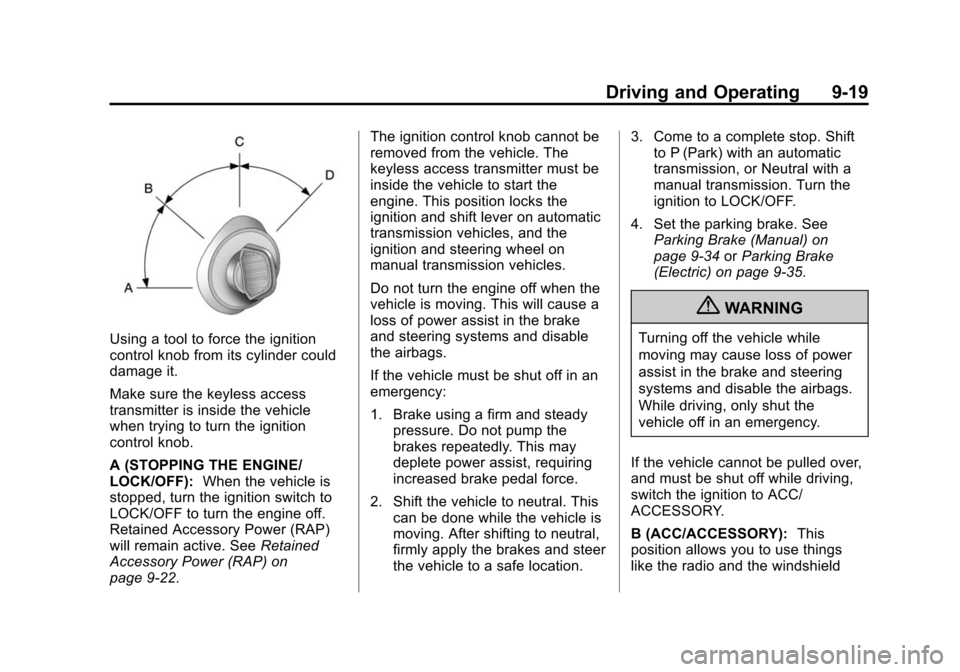
A (STOPPING THE ENGINE/
LOCK/OFF):When the vehicle is
stopped, turn the ignition switch to
LOCK/OFF to turn the engine off.
Retained Accessory Power (RAP)
will remain active. See Retained
Accessory Power (RAP) on
page 9‑22. The ignition control knob cannot be
removed from the vehicle. The
keyless access transmitter must be
inside the vehicle to start the
engine. This position locks the
ignition and shift lever on automatic
transmission vehicles, and the
ignition and steering wheel on
manual transmission vehicles.
Do not turn the engine off when the
vehicle is moving. This will cause a
loss of power assist in the brake
and steering systems and disable
the airbags.
If the vehicle must be shut off in an
emergency:
1. Brake using a firm and steady
pressure. Do not pump the
brakes repeatedly. This may
deplete power assist, requiring
increased brake pedal force.
2. Shift the vehicle to neutral. This can be done while the vehicle is
moving. After shifting to neutral,
firmly apply the brakes and steer
the vehicle to a safe location. 3. Come to a complete stop. Shift
to P (Park) with an automatic
transmission, or Neutral with a
manual transmission. Turn the
ignition to LOCK/OFF.
4. Set the parking brake. See Parking Brake (Manual) on
page 9‑34 orParking Brake
(Electric) on page 9‑35.
{WARNING
Turning off the vehicle while
moving may cause loss of power
assist in the brake and steering
systems and disable the airbags.
While driving, only shut the
vehicle off in an emergency.
If the vehicle cannot be pulled over,
and must be shut off while driving,
switch the ignition to ACC/
ACCESSORY.
B (ACC/ACCESSORY): This
position allows you to use things
like the radio and the windshield
Page 270 of 496

Black plate (20,1)Cadillac CTS/CTS-V Owner Manual (Include Mex) - 2012
9-20 Driving and Operating
wipers when the engine is off. This
position will allow you to turn off the
engine.
C (ON/RUN):This position is for
driving. It is the position the ignition
switch returns to after the engine
starts, and the control knob is
released. This position can also be
used for service and diagnostics,
and to verify the proper operation of
the malfunction indicator lamp as
may be required for emission
inspection purposes.
If you need to shift the transmission
out of P (Park), the ignition control
knob has to be in ACC/
ACCESSORY or ON/RUN.
The battery could be drained if you
leave the ignition in the ACC/
ACCESSORY or ON/RUN position
with the engine off. You may not be
able to start the vehicle if the battery
is allowed to drain for an extended
period of time.
D (START): This position starts the
engine.Starting the Engine
Place the transmission in the
proper gear.
If the vehicle has the keyless
access system, the keyless access
transmitter must be authenticated
in order for the ignition control knob
to turn. The transmitter can be
authenticated either by putting your
foot on the brake pedal or by
pushing the ignition control knob in.
Automatic Transmission
Move the shift lever to P (Park) or
N (Neutral). The engine will not start
in any other position. To restart the
engine when the vehicle is already
moving, use N (Neutral) only.
If the vehicle has the keyless
access system, your foot must be
on the brake pedal to start the
engine. To rotate the ignition control
knob, put your foot on the brake
pedal and turn the ignition control
knob to the START position. If the ignition control knob does not turn,
try pushing the knob in and turning
again. When the engine begins
cranking, let go of the ignition
control knob, it will return to the ON/
RUN position.
If the transmitter is not in the vehicle
or something is interfering with the
transmitter, the Driver Information
Center (DIC) will display
ELECTRONIC KEY NOT
DETECTED. See
Driver Information
Center (DIC) on page 5‑27 for more
information.
If the battery in the keyless access
transmitter needs replacing, the
DIC displays REPLACE BATTERY
IN REMOTE KEY. The vehicle can
still be driven. See “Battery
Replacement” underRemote
Keyless Entry (RKE) System
Operation (Key Access) on
page 2‑5 orRemote Keyless Entry
(RKE) System Operation (Keyless
Access) on page 2‑6 for more
information.
Page 274 of 496

Black plate (24,1)Cadillac CTS/CTS-V Owner Manual (Include Mex) - 2012
9-24 Driving and Operating
Leaving the Vehicle With the
Engine Running (Automatic
Transmission)
{WARNING
It can be dangerous to leave the
vehicle with the engine running.
The vehicle could move suddenly
if the shift lever is not fully in
P (Park) with the parking brake
firmly set. And, if you leave the
vehicle with the engine running, it
could overheat and even catch
fire. You or others could be
injured. Do not leave the vehicle
with the engine running.
If you have to leave the vehicle with
the engine running, the vehicle must
be in P (Park) and the parking brake
set. After shifting into P (Park), try to
move the shift lever out without first
pushing the button on the shift lever.
If you can, the shift lever was not
fully locked into P (Park).
Torque Lock (Automatic
Transmission)
Torque lock is when the weight
of the vehicle puts too much
force on the parking pawl in the
transmission. This happens when
parking on a hill and shifting the
transmission into P (Park) is not
done properly and then it is difficult
to shift out of P (Park). To prevent
torque lock, set the parking brake
and then shift into P (Park). To find
out how, see "Shifting Into Park"
listed previously.
If torque lock does occur, the
vehicle may need to be pushed
uphill by another vehicle to relieve
the parking pawl pressure, so you
can shift out of P (Park).
Shifting out of Park
This vehicle is equipped with an
electronic shift lock release system.
The shift lock release is
designed to:
.Prevent ignition key removal
unless the shift lever is in
P (Park) with the shift lever
button fully released, for vehicles
with key access.
.Prevent movement of the shift
lever out of P (Park), unless the
ignition is in ON/RUN or ACC/
ACCESSORY and the brake
pedal is applied.
The shift lock release is always
functional except in the case of an
uncharged or low voltage (less than
9 volt) battery.
If the vehicle has an uncharged
battery or a battery with low voltage,
try charging or jump starting the
battery. See Jump Starting on
page 10‑104 for more information.
Page 277 of 496

Black plate (27,1)Cadillac CTS/CTS-V Owner Manual (Include Mex) - 2012
Driving and Operating 9-27
{WARNING
It can be dangerous to get out of
the vehicle if the automatic
transmission shift lever is not fully
in P (Park) with the parking brake
firmly set. The vehicle can roll. Do
not leave the vehicle when the
engine is running unless you
have to. If you have left the
engine running, the vehicle can
move suddenly. You or others
could be injured. To be sure the
vehicle will not move, even when
you are on fairly level ground,
always set the parking brake and
move the shift lever to P (Park).
Follow the proper steps to be sure
the vehicle will not move. See
Shifting Into Park on page 9‑23.
If parking on a hill and pulling a
trailer, see Driving Characteristics
and Towing Tips on page 9‑56.
Automatic
Transmission
The shift lever is located on the
center console between the front
seats.
There are several different positions
for the shift lever.
P (Park): This position locks the
rear wheels. Use this position when
starting the engine because the
vehicle cannot move easily.
{WARNING
It is dangerous to get out of the
vehicle if the shift lever is not fully
in P (Park) with the parking brake
firmly set. The vehicle can roll.
Do not leave the vehicle when
the engine is running unless
you have to. If you have left the
engine running, the vehicle can
move suddenly. You or others
could be injured. To be sure the
vehicle will not move, even when
you are on fairly level ground,
always set the parking brake and
move the shift lever to P (Park).
See Shifting Into Park on
page 9‑23. If you are pulling a
trailer, see Driving Characteristics
and Towing Tips on page 9‑56.
Make sure the shift lever is fully in
P (Park) before starting the engine.
The vehicle has an electronic shift
lock release system. Fully apply the
regular brakes first and then press
Page 278 of 496

Black plate (28,1)Cadillac CTS/CTS-V Owner Manual (Include Mex) - 2012
9-28 Driving and Operating
the shift lever button before shifting
from P (Park) when the ignition key
is in ON/RUN. If you cannot shift out
of P (Park), ease pressure on the
shift lever and push the shift lever
all the way into P (Park) as you
maintain brake application. Then
press the shift lever button and
move the shift lever into another
gear. SeeShifting out of Park on
page 9‑24.
Notice: Shifting to R (Reverse)
while the vehicle is moving
forward could damage the
transmission. The repairs would
not be covered by the vehicle
warranty. Shift to R (Reverse) only
after the vehicle is stopped.
R (Reverse): Use this gear to
back up.
At low vehicle speeds, R (Reverse)
can be used to rock the vehicle
back and forth to get out of snow,
ice, or sand without damaging your
transmission. See If the Vehicle Is
Stuck on page 9‑11 for additional
information. N (Neutral):
In this position, the
engine does not connect with the
wheels. To restart when the vehicle
is already moving, use N (Neutral)
only. You can also use N (Neutral)
when the vehicle is being towed.
{WARNING
Shifting into a drive gear while the
engine is running at high speed is
dangerous. Unless your foot is
firmly on the brake pedal, the
vehicle could move very rapidly.
You could lose control and hit
people or objects. Do not shift
into a drive gear while the engine
is running at high speed.
Notice: Shifting out of P (Park) or
N (Neutral) with the engine
running at high speed may
damage the transmission. The
repairs would not be covered by
the vehicle warranty. Be sure the
engine is not running at high
speed when shifting the vehicle. D (Drive):
This position is for
normal driving. It provides the best
fuel economy. If you need more
power for passing, and you are:
.Going less than 55 km/h
(35 mph), push the accelerator
pedal about halfway down.
.Going about 55 km/h (35 mph) or
more, push the accelerator all
the way down.
The transmission will shift down
to a lower gear and have more
power.
Downshifting the transmission in
slippery road conditions could result
in skidding; see “Skidding”under
Loss of Control on page 9‑5
While in D (Drive), the CTS‐V
vehicle's first forward gear
automatic shift after starting the
vehicle will be from 1 (First).
Afterwards, the CTS‐V vehicles will
always start in 2 (Second) gear.
While in M (Manual Mode), for
increased performance, the vehicle
will start in 1 (First) gear.
Page 279 of 496

Black plate (29,1)Cadillac CTS/CTS-V Owner Manual (Include Mex) - 2012
Driving and Operating 9-29
M (Manual Mode):This position
allows the driver to select the range
of gears appropriate for current
driving conditions. See Driver Shift
Control (DSC) later in this section.
Notice: Spinning the tires or
holding the vehicle in one
place on a hill using only the
accelerator pedal may damage
the transmission. If you are stuck,
do not spin the tires. When
stopping on a hill, use the brakes
to hold the vehicle in place.
Manual Mode
Driver Shift Control (DSC) or
Tap Shift
Notice: Driving with the engine at
a high rpm without upshifting
while using Driver Shift Control
(DSC), could damage the vehicle.
Always upshift when necessary
while using DSC. Vehicles with DSC may either use
the shift lever or the tap shift
controls on back of the steering
wheel to manually shift the
automatic transmission.
To use the DSC feature using the
shift lever:
1. Move the shift lever to
the right from D (Drive) to
M (Manual Mode).
The vehicle will be in sport mode
and will shift automatically if the
shift lever is not moved forward
or rearward. The transmission
may remain in a gear longer
than it would in the normal
driving mode based on braking,
throttle input, and vehicle lateral
acceleration. SPORT MODE will
be displayed in the DIC
momentarily.
2. To go from sport mode to DSC, move the shift lever forward to
upshift or rearward to downshift. 3. To exit DSC and enter sport
mode, hold the shift lever in the
upshift/forward position briefly.
If equipped, the tap shift controls
are on the back of the steering
wheel. The tap shift controls can be
used in D (Drive), M (Manual Mode)
with Sport Mode automatic shift
active, or M (Manual Mode) with
Manual Shifting Mode.
Page 280 of 496

Black plate (30,1)Cadillac CTS/CTS-V Owner Manual (Include Mex) - 2012
9-30 Driving and Operating
To use the DSC feature using the
Tap Shift controls:
1. Move the shift lever tothe right from D (Drive) to
M (Manual Mode).
2. Tap the left control to downshift, and the right control to upshift.
3. To return to sport mode, hold the right upshift control briefly,
or hold the shift lever forward
briefly, or return the shift lever to
D (Drive).
With the shift lever in D (Drive), the
tap shift controls will activate a
temporary tap manual shift mode,
allowing the transmission to be
manually shifted. Automatic shifts
return after no manual shifts have
been done for seven to 10 second.
The temporary tap mode can also
be deactivated by holding the right
upshift control briefly.
The tachometer display indicates
which gear the vehicle is in. The
number indicates the requested
gear range when moving the shift
lever forward or rearward.
CTS-V vehicles use tracer lights
around the outside of the
tachometer as a performance
upshift light. These tracers flash to
indicate when to shift to the next
higher gear to avoid the engine
speed limit. See Tachometer on
page 5‑13 for more information. While using the DSC feature, the
vehicle will have firmer, quicker
shifting. You can use this for sport
driving or when climbing or
descending hills, to stay in gear
longer, or to downshift for more
power or engine braking.
The transmission will only allow
you to shift into gears appropriate
for the vehicle speed and engine
revolutions per minute (RPM). The
transmission will not automatically
shift to the next lower gear if the
engine rpm is too high, nor to the
next higher gear when the maximum
engine rpm is reached.
If shifting is prevented for any
reason, the currently selected gear
will flash multiple times, indicating
that the transmission has not shifted
gears.
Page 281 of 496

Black plate (31,1)Cadillac CTS/CTS-V Owner Manual (Include Mex) - 2012
Driving and Operating 9-31
While in the DSC mode, the
CTS automatic transmission will
automatically downshift when the
vehicle comes to a stop. This will
allow for more power during
acceleration.
The CTS-V automatic transmission
will not automatically downshift on
hard acceleration when in
DSC mode.
When accelerating the vehicle from
a stop in snowy and icy conditions,
it is suggested to shift into second
gear. A higher gear allows the
vehicle to gain more traction on
slippery surfaces.Manual Transmission
If the vehicle has a manual
transmission, the shift lever is
located on the center console
between the front seats. The
following explains how to operate
the manual transmission.
CTS
CTS—V
1 (First):Press the clutch pedal
and shift into 1 (First). Slowly let up
on the clutch pedal while pressing
on the accelerator pedal.
Shift into 1 (First) when you are
going less than 40 km/h (25 mph).
For CTS-V, shift into 1 (First) when
you are going less than 64 km/h
(40 mph). After a complete stop, if it
is hard to shift into 1 (First), let up
on the clutch pedal, then press it
back down and shift into 1 (First).