2012 BUICK REGAL ignition
[x] Cancel search: ignitionPage 48 of 440

Black plate (14,1)Buick Regal Owner Manual - 2012
2-14 Keys, Doors, and Windows
If the engine still does not start with
the other key, the vehicle needs
service. If the vehicle does start,
the first key may be damaged. See
your dealer who can service the
theft-deterrent system and have a
new key made.
Do not leave the key or device that
disarms or deactivates the
theft-deterrent system in the vehicle.
Immobilizer Operation
(Keyless Access)
This vehicle has a passive
theft-deterrent system.
The system does not have to be
manually armed or disarmed.
The vehicle is automatically
immobilized when the transmitter
leaves the vehicle.
The immobilization system is
disarmed when the ignition button is
pushed in and a valid transmitter is
found in the vehicle.
The security light, located in the
instrument panel cluster, comes on
if there is a problem with arming or
disarming the theft-deterrent
system.
The system has one or more
transmitters matched to an
immobilizer control unit in your
vehicle. Only a correctly matched
transmitter will start the vehicle.
If the transmitter is ever damaged,
you may not be able to start your
vehicle.
When trying to start the vehicle, the
security light comes on briefly when
the ignition is turned on.If the engine does not start and the
security light stays on, there is a
problem with the system. Turn the
ignition off and try again.
If the RKE transmitter appears to be
undamaged, try another transmitter.
Or, you may try placing the
transmitter in the transmitter pocket
located in the center console. See
“No Remote Detected”
underKey
and Lock Messages on page 5‑32.
If the engine does not start with the
other transmitter or when the
transmitter is in the pocket in the
center console, your vehicle needs
service. See your dealer who can
service the theft-deterrent system
and have a new transmitter
programmed to the vehicle.
Do not leave the key or device that
disarms or deactivates the
theft-deterrent system in the vehicle.
Page 51 of 440

Black plate (17,1)Buick Regal Owner Manual - 2012
Keys, Doors, and Windows 2-17
Power Windows
The power window switches located
on the driver door control all four
windows. The passenger doors
have a window switch that controls
that window. Push the switch down
to open the window. Pull the front of
the switch up to close it.The switches work when the
ignition is in ON/RUN or ACC/
ACCESSORY, or in Retained
Accessory Power (RAP). See
Retained Accessory Power (RAP)
on page 9‑24.
Express Window Operation
Windows with an express-up or
down feature allow the front
windows to be lowered or raised
without holding the switch. Rear
windows only have express down.
Pull a window switch up or push it
down all the way, release it, and the
window goes up or down
automatically. Stop the window by
pushing or pulling the switch.
Rear Window Lockout with
Power Safety Locks
For vehicles with power safety
locks, the rear window lockout
button is on the driver door. Press
vto disable the rear window
controls and turn on the rear door
power safety locks. The light on the
button comes on indicating the
feature is in use. The rear windows
can still be raised or lowered using
the driver window switches when
the lockout feature is active. To
Page 52 of 440
Black plate (18,1)Buick Regal Owner Manual - 2012
2-18 Keys, Doors, and Windows
restore power to the rear windows,
press the button again. The light on
the button goes out. If the light
flashes, the feature may not be
working properly.
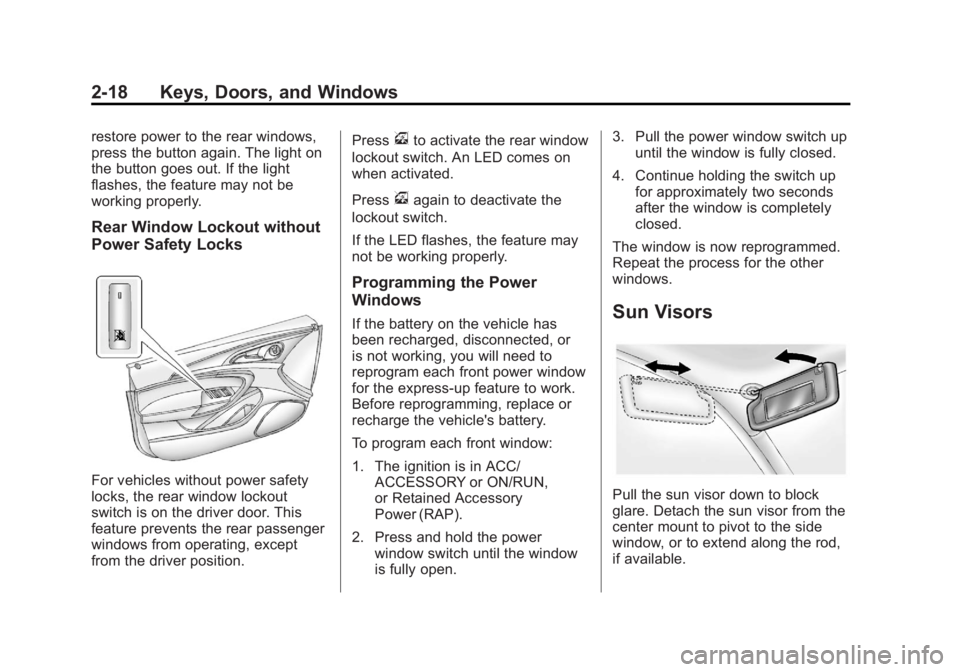
Rear Window Lockout without
Power Safety Locks
For vehicles without power safety
locks, the rear window lockout
switch is on the driver door. This
feature prevents the rear passenger
windows from operating, except
from the driver position.Press
vto activate the rear window
lockout switch. An LED comes on
when activated.
Press
vagain to deactivate the
lockout switch.
If the LED flashes, the feature may
not be working properly.
Programming the Power
Windows
If the battery on the vehicle has
been recharged, disconnected, or
is not working, you will need to
reprogram each front power window
for the express-up feature to work.
Before reprogramming, replace or
recharge the vehicle's battery.
To program each front window:
1. The ignition is in ACC/ ACCESSORY or ON/RUN,
or Retained Accessory
Power (RAP).
2. Press and hold the power window switch until the window
is fully open. 3. Pull the power window switch up
until the window is fully closed.
4. Continue holding the switch up for approximately two seconds
after the window is completely
closed.
The window is now reprogrammed.
Repeat the process for the other
windows.Sun Visors
Pull the sun visor down to block
glare. Detach the sun visor from the
center mount to pivot to the side
window, or to extend along the rod,
if available.
Page 53 of 440

Black plate (19,1)Buick Regal Owner Manual - 2012
Keys, Doors, and Windows 2-19
Roof
Sunroof
For vehicles with a sunroof, the
sunroof only operates when the
ignition is in ON/RUN or ACC/
ACCESSORY or in Retained
Accessory Power (RAP). See
Retained Accessory Power (RAP)
on page 9‑24for more information. To open or close the sunroof, press
the switch (A) to the first detent
position.
To express open or close the
sunroof with the safety function
enabled, press the open or close
sunroof switch (A) to the second
detent position and release. To stop
the movement, press the switch
again.
To automatically tilt or close the
sunroof, press the tilt open or close
sunroof switch (B).
If an object is in the path of the
sunroof while it is closing, the
anti-pinch feature will detect the
object and stop the sunroof. The
sunroof will then return to the
full-open or vent position.
The sunroof glass panel cannot be
opened or closed if the vehicle has
an electrical failure.
Initializing
After a power failure, the sunroof
operation may be limited. Have the
system initialized by a dealer
technician.
Dirt and debris may collect on the
sunroof seal or in the track. This
could cause an issue with sunroof
operation or noise. It could also plug
the water drainage system.
Periodically open the sunroof and
remove any obstacles or loose
debris. Wipe the sunroof seal and
roof sealing area using a clean
cloth, mild soap, and water. Do not
remove grease from the sunroof.
Page 62 of 440

Black plate (8,1)Buick Regal Owner Manual - 2012
3-8 Seats and Restraints
Uplevel Buttons Shown, BaseButtons Similar
If available, the buttons are on the
climate control panel. To operate,
the ignition must be on. Press
MorLto heat the driver or
passenger seat cushion and
seatback. Indicator lights on the
button or on the climate control
display show the current setting.
Press the button once for the
highest setting. With each press of
the button, the heated seat will
change to the next lower setting,
and then to the off setting. The
lights indicate three for the highest
setting and one for the lowest.
The passenger seat may take
longer to heat up. Remote Start Heated Seats
When it is cold outside, the
heated seats can be turned on
automatically during a remote
vehicle start. The heated seats will
be canceled when the ignition is
turned on. Press the button to use
the heated seats after the vehicle is
started.
The heated seat indicator lights do
not turn on during a remote start.
The temperature performance of an
unoccupied seat may be reduced.
This is normal.
The heated seats will not turn on
during a remote start unless the
heated seat feature is enabled in
the vehicle personalization menu.
See
Remote Vehicle Start on
page 2‑8 andVehicle
Personalization on page 5‑35 for
more information.
Page 117 of 440

Black plate (3,1)Buick Regal Owner Manual - 2012
Instruments and Controls 5-3
on page 7‑38orBluetooth (Voice
Recognition) on page 7‑41, OnStar
Overview on page 14‑1, or the
separate navigation manual for
more information.
$/i(Mute/End Call): Press to
silence the vehicle speakers only.
Press again to turn the sound on.
For vehicles with OnStar or
Bluetooth systems, press to reject
an incoming call, or end a
current call.
_SRC^(Rotary Control): Move
the thumbwheel up or down to
select an audio source.
Press
_or^to select the next or
previous favorite radio station, CD,
or MP3 track.
+
x− (Volume): Press + to
increase the volume. Press −to
decrease the volume.
Heated Steering Wheel
For vehicles with a heated steering
wheel, the button for this feature is
located near the climate control
system.
(: Press to turn the heated
steering wheel on or off. A light on
the button displays when the feature
is turned on.
The steering wheel takes about
three minutes to start heating.
Horn
Pressaon the steering wheel
pad to sound the horn.
Windshield Wiper/Washer
The windshield wiper lever is on the
right side of the steering column.
With the ignition in ACC/
ACCESSORY or ON/RUN, move
the windshield wiper lever to select
the wiper speed.
2: Use for fast wipes.
1: Use for slow wipes.
Page 118 of 440

Black plate (4,1)Buick Regal Owner Manual - 2012
5-4 Instruments and Controls
3(Adjustable Interval Wipes):
Move the lever to
3, then turn the
band up for more frequent wipes or
down for less frequent wipes.
9(Off): Use to turn the windshield
wipers off.
3(Mist): Briefly move the wiper
lever down for a single wipe or hold
down for several wipes.
Clear ice and snow from the wiper
blades before using them. If they
are frozen to the windshield,
carefully loosen or thaw them. Damaged wiper blades should be
replaced. See
Wiper Blade
Replacement on page 10‑32.
Heavy snow or ice can overload the
wipers. A circuit breaker stops them
until the motor cools.
Wipe Parking
If the ignition is turned to LOCK/
OFF while the wipers are on 1, 2,
or
3, they will immediately stop.
If the windshield wiper lever is then
moved to
9before the driver door
is opened, or within 10 minutes, the
wipers will restart and move to the
base of the windshield.
If the ignition is turned to LOCK/
OFF during a windshield wash, the
wipers will stop when they reach the
base of the windshield.
Windshield Washer
Pull the windshield wiper lever
toward you to spray windshield
washer fluid and activate the wipers.
The washer and wipers will continue
until the lever is released or the
maximum wash time is reached.
When the windshield wiper lever is
released, additional wipes may
occur depending on how long the
windshield washer had been
activated. See Washer Fluid on
page 10‑25 for information on filling
the windshield washer fluid
reservoir.
{WARNING
In freezing weather, do not use
the washer until the windshield is
warmed. Otherwise the washer
fluid can form ice on the
windshield, blocking your vision.
Page 120 of 440

Black plate (6,1)Buick Regal Owner Manual - 2012
5-6 Instruments and Controls
Setting the Clock (Radio with
CD and Touchscreen)
To set the time:
1. Press the CONFIG button toenter the menu options. Turn the
Multifunction knob to scroll
through the available setup
features. Press the Multifunction
knob or press the Time screen
button to display other options
within that feature.
2. Press + or −to decrease or
increase the Hours and Minutes
displayed on the clock.
12/24 HR Format: Press the 12 HR
screen button for standard time;
press the 24 HR screen button for
military time.
Day + or Day −:Press the Day +
or Day −display buttons to increase
or decrease the day.
Display: Press Display to turn the
display of the time on the screen on
or off.
Power Outlets
The accessory power outlets can be
used to plug in electrical equipment,
such as a cell phone or MP3 player.
There are two accessory power
outlets. One is located under the
armrest inside the center console
storage and the other is on the rear
of the center floor console.
The outlet is powered when the
ignition is in ON/RUN or ACC/
ACCESSORY, or until the driver
door is opened within 10 minutes of
turning off the vehicle. See Retained
Accessory Power (RAP) on
page 9‑24.
Open the protective cover to use the
accessory power outlet. Certain electrical accessories may
not be compatible with the
accessory power outlet and could
overload vehicle or adapter fuses.
If there is a problem, see your
dealer.
When adding electrical equipment,
be sure to follow the installation
instructions included with the
equipment. See
Add-On Electrical
Equipment on page 9‑52.
Notice: Hanging heavy
equipment from the power outlet
can cause damage not covered
by the vehicle warranty. The
power outlets are designed for
accessory power plugs only, such
as cell phone charge cords.