2012 BUICK LACROSSE steering wheel
[x] Cancel search: steering wheelPage 238 of 512

Black plate (58,1)Buick LaCrosse Owner Manual - 2012
7-58 Infotainment System
.See“Storing and Deleting Phone
Numbers” in this section for
more information.
{WARNING
When using a cell phone, it can
be distracting to look too long or
too often at the screen of the
phone or the infotainment
(navigation) system. Taking your
eyes off the road too long or too
often could cause a crash
resulting in injury or death. Focus
your attention on driving.
Vehicles with a Bluetooth system
can use a Bluetooth‐capable cell
phone with a Hands‐Free Profile to
make and receive phone calls. The
infotainment system and voice
recognition are used to control the
system. The system can be used
while in ON/RUN or ACC/
ACCESSORY. The range of the Bluetooth system can be up to 9.1 m
(30 ft). Not all phones support all
functions and not all phones work
with the Bluetooth system. See
www.gm.com/bluetooth for more
information about compatible
phones.
Bluetooth Controls
Use the buttons located on the
infotainment system and the
steering wheel to operate the
Bluetooth system.
Steering Wheel Controls
b/g(Push To Talk) :
Press to
answer incoming calls, confirm
system information, and start voice
recognition.
$/i(End Call): Press to end a
call, reject a call, or cancel an
operation. Infotainment System Controls
If equipped, the infotainment system
allows certain controls to be
selected on the infotainment display.
For information about how to
navigate the menu system using the
infotainment controls, see
Overview
(Radio with CD) on page 7‑3 or
Overview (Radio with CD/DVD and
MEM) on page 7‑5 orOverview
(Radio with CD and Touchscreen)
on page 7‑7 orAM-FM Radio (Radio
with CD/DVD/MEM) on page 7‑18 or
AM-FM Radio (Radio with CD and
Touchscreen) on page 7‑21.
5(Phone): Press to enter the
Phone main menu.
Voice Recognition
The voice recognition system uses
commands to control the system
and dial phone numbers.
Noise: The system may not
recognize voice commands if there
is too much background noise.
Page 243 of 512
Black plate (63,1)Buick LaCrosse Owner Manual - 2012
Infotainment System 7-63
Ending a Call
Turn the Menu knob to select Hang
Up, then press SELECT.
Muting a Call
To Mute a Call
Turn the Menu knob to select Mute
Call, then press SELECT.
To Cancel Mute
Turn the Menu knob to select Mute
Call, then press SELECT.
Dual Tone Multi-Frequency
(DTMF) Tones
The in‐vehicle Bluetooth system can
send numbers during a call. This is
used when calling a menu‐driven
phone system.
1. Turn the Menu knob to selectEnter Number, then press
SELECT.
2. Enter the character sequence. See “Entering a Character
Sequence” inOperation on
page 7‑13 for more information.
Bluetooth (Voice
Recognition)
Using Voice Recognition
For vehicles equipped with the
MyLink or IntelliLink infotainment
system, see the separate MyLink/
IntelliLink Features and Functions
Guide for more information.
To use voice recognition, press the
b/gbutton located on the steering
wheel. Use the commands below for
the various voice features. For
additional information, say "Help"
while you are in a voice
recognition menu.
Pairing
A Bluetooth‐enabled cell phone
must be paired to the Bluetooth
system and then connected to the
vehicle before it can be used. See
your cell phone manufacturer's user
guide for Bluetooth functions before
pairing the cell phone. If a Bluetooth
phone is not connected, calls will be
made using OnStar Hands‐Free
Calling, if available. See OnStar
Overview on page 14‑1 for more
information.
Pairing Information
.A Bluetooth phone with MP3
capability cannot be paired to
the vehicle as a phone and an
MP3 player at the same time.
.Up to five cell phones can be
paired to the Bluetooth system.
.The pairing process is disabled
when the vehicle is moving.
Page 249 of 512
Black plate (69,1)Buick LaCrosse Owner Manual - 2012
Infotainment System 7-69
Dual Tone Multi-Frequency
(DTMF) Tones
The Bluetooth system can send
numbers and the numbers stored as
name tags during a call. You can
use this feature when calling a
menu‐driven phone system.
Account numbers can also be
stored for use.
Sending a Number or Name Tag
During a Call
1. Press
b/g. The system
responds “Ready,”followed by
a tone.
2. Say “Dial.”
3. Say the number or name tag to send.
Clearing the System
Unless information is deleted out of
the in‐vehicle Bluetooth system, it
will be retained indefinitely. This
includes all saved name tags in the
phone book and phone pairing
information. For information on how
to delete this information, see the
previous sections on “Deleting a
Paired Phone” and“Deleting
Name Tags.”
Bluetooth (UHP
Mexico Only)
General Information
Vehicles with a Universal Hands‐
free Phone (UHP) system can use a
Bluetooth
®capable mobile phone
with a Hands-Free Profile to make
and receive phone calls. The
infotainment system and voice
control are used to control the
system. The system can be used
while the ignition is in ON/RUN or ACC/ACCESSORY. The range of
the UHP system can be up to 10 m
(33 ft). Not all phones support all
functions and not all phones work
with the UHP system.
Other Information
The Bluetooth word mark and logos
are owned by the Bluetooth®SIG,
Inc. and any use of such marks by
General Motors is under license.
Other trademarks and trade names
are those of their respective owners.
UHP Controls
Use the buttons located on the
infotainment system and the
steering wheel to operate the UHP
system.
Page 250 of 512
Black plate (70,1)Buick LaCrosse Owner Manual - 2012
7-70 Infotainment System
Steering Wheel Controls
Steering wheel controls can be
used to:
.Answer incoming calls
.Confirm system information
.Start voice recognition
.End a call
.Reject a call
.Cancel an operation
.Make outgoing calls using the
call list
b/g(Push To Talk) :Press to
answer incoming calls, to confirm
system information, and to start
voice control. Press and hold for two
to three seconds to access the
call list.
$/i(End call/Mute) : Press to
end a call, reject a call, or to cancel
an operation. To make outgoing calls using the
call list.
1. Press the
b/gbutton.
2. Highlight the phone number by toggling the SRC switch up
or down.
3. Dial the highlighted number by pressing the
b/gbutton.
Infotainment System Controls
For information about how to
navigate the menu system using the
navigation system controls, see the
separate Navigation System
Manual.
PHONE : Press to enter the Phone
main menu.
Voice Control
The voice control system uses
commands to control the system
and dial phone numbers.
Noise: The system may not
recognize voice commands if there
is too much background noise. When to Speak:
A tone sounds to
indicate that the system is ready for
a voice command. Wait for the tone
and then speak.
How to Speak: Speak clearly in a
calm and natural voice.
Audio System
When using the UHP system, sound
comes through the vehicle's front
audio system speakers and
overrides the audio system. Use the
VOL/
Oknob during a call to
change the volume level. The
adjusted volume level remains in
memory for later calls. The system
maintains a minimum volume level.
Turning Bluetooth On or Off
1. Press the CONFIG button.
2. Select Phone Settings, or touch Phone on a navigation radio.
3. Select Bluetooth.
4. Select Activation.
Page 254 of 512
Black plate (74,1)Buick LaCrosse Owner Manual - 2012
7-74 Infotainment System
3. Select the numbers to be dialed.For vehicles with a navigation
system, touch the numbers on
the infotainment screen. For
vehicles without a navigation
system, see “Entering a
Character Sequence” in for more
information.
4. Select Call to start dialing the number.
Accepting or Declining a Call
When an incoming call is received,
the infotainment system mutes and
a ring tone is heard in the vehicle.
To accept the incoming call, turn the
Menu knob to “Answer”and press
SELECT, or press the
b/gbutton
on the steering wheel controls.
To decline the incoming call, turn
the Menu knob to “decline”and
press SELECT, or press the
b/gbutton on the steering wheel
controls. Call Waiting
Call waiting must be supported on
the mobile phone and enabled by
the wireless service carrier to work.
To accept the incoming call, turn the
Menu knob to
“Answer”and press
SELECT, or press the
b/gbutton
on the steering wheel controls.
To decline the incoming call, turn
the Menu knob to “Decline”and
press SELECT, or press the
$/ibutton on the steering
wheel controls.
1. Press the PHONE button.
2. Select Switch Call from the menu.
Conference Calling
Conference calling and three way
calling must be supported on the
mobile phone and enabled by the
wireless service carrier to work. To start a conference calling while in
a call:
1. Press SELECT and select Enter
Number.
2. Enter the character sequence then select call.
3. After the call has been placed, press SELECT and choose
Merge Calls.
4. To add more callers to the conference call, repeat steps 1
through 3. The number of callers
that can be added are limited by
your wireless service carrier.
To disconnect from one caller while
in a conference call, select Detach
Number from the menu and select
the number to hang up on.
Page 255 of 512
Black plate (75,1)Buick LaCrosse Owner Manual - 2012
Infotainment System 7-75
Ending a Call
Press SELECT and select Hang Up,
or press the
$/ibutton on the
steering wheel controls.
To Mute a Call
Press SELECT and select
Mute Call.
To Cancel Mute
Press SELECT and select
Mute Call.
Dual Tone Multi-Frequency (DTMF)
Tones
The UHP system can send numbers
during a call. This is used when
calling a menu driven phone
system.
To access this system:
1. Press SELECT and select Enter Number.
2. Enter the character sequence.
Operating UHP Using Voice
Control
The voice control of the UHP
system enables you to operate
several functions of the mobile
phone using your voice. The UHP
system uses voice commands to
control the system and dial phone
numbers. After input of the
command the infotainment system
guides you through the dialogue
with appropriate questions and
feedback to achieve the desired
action. The commands and
numbers can be spoken without a
pause between the individual words.
In addition you can save telephone
numbers under a name tag that is
selectable by you. The telephone
connection can be set up with
this name.
In the event of incorrect operation or
incorrect codes, the voice control
gives you voice feedback and
requests you to re-enter the desired
command. Apart from this, the voice control acknowledges important
commands and will ask if
necessary.
In order that calls are made inside
the vehicle do not lead to
unintentional triggering of the mobile
phone, the voice control does not
start until it has been activated.
Activating the Voice Control
For vehicles without a navigation
system, press the
b/gbutton on
the steering wheel to activate the
voice control of the UHP system.
For vehicles with a navigation
system, press the
b/gbutton on
the steering wheel to activate the
voice control of the UHP system
The system responds with a tone.
After the tone, say ”Phone.“
For the duration of the dialogue any
audio source that is active is muted
and any traffic news fade-in is
cancelled.
Page 256 of 512
Black plate (76,1)Buick LaCrosse Owner Manual - 2012
7-76 Infotainment System
Adjusting the Volume for Voice
Output
Turn the volume knob of the
Infotainment system or press
the + / - buttons on the steering
wheel.
Canceling Dialogue
There are various possibilities of
deactivating the voice control and
cancelling the dialogue:
.Press the$/ibutton on the
steering wheel controls.
.Enter the command “Cancel.”
.Do not enter a command for
some time.
.The command is unrecognized
after three tries. Main Menu Commands
The UHP system has a set of main
menu commands that are available
when voice control is first started.
After the voice control is activated, a
short tone indicates that the voice
control system is waiting for a
command.
Available commands:
.“Dial”
.“Call”
.“Re-dial”
.“Save”
.“Delete”
.“Directory”
.“Pair”
.“Select device”
.“Voice feedback”
.“Help”
.“Cancel”Frequently Used Commands
Here is a list of frequently used
commands:
.“Help”: the dialogue is
terminated and all commands
available in the current context
are enumerated.
.“Cancel”: the voice control is
deactivated.
.“Yes”: a suitable action is
triggered depending on the
context.
.“No”: a suitable action is
triggered depending on the
context.
Voice Feedback
Each voice input is answered or
commented on by the infotainment
system by way of a voice output
that is adapted to the situation.
To switch the voice output on or off,
enter “Voice feedback” or press the
b/gbutton.
Page 267 of 512
Black plate (5,1)Buick LaCrosse Owner Manual - 2012
Climate Controls 8-5
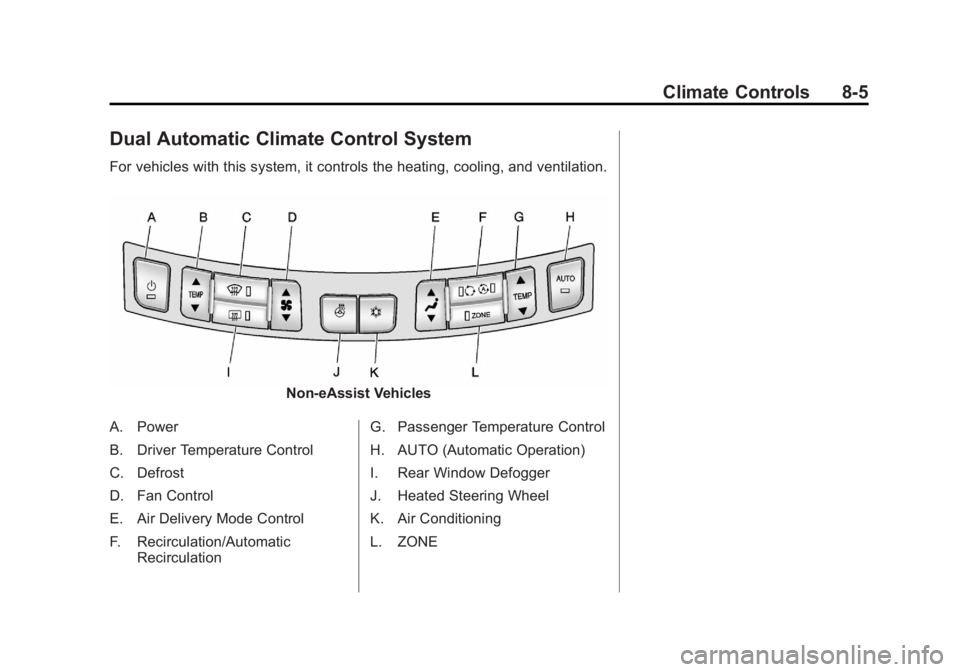
Dual Automatic Climate Control System
For vehicles with this system, it controls the heating, cooling, and ventilation.
Non-eAssist Vehicles
A. Power
B. Driver Temperature Control
C. Defrost
D. Fan Control
E. Air Delivery Mode Control
F. Recirculation/Automatic Recirculation G. Passenger Temperature Control
H. AUTO (Automatic Operation)
I. Rear Window Defogger
J. Heated Steering Wheel
K. Air Conditioning
L. ZONE