2012 BUICK LACROSSE Windows
[x] Cancel search: WindowsPage 56 of 512
Black plate (22,1)Buick LaCrosse Owner Manual - 2012
2-22 Keys, Doors, and Windows
Roof
Sunroof
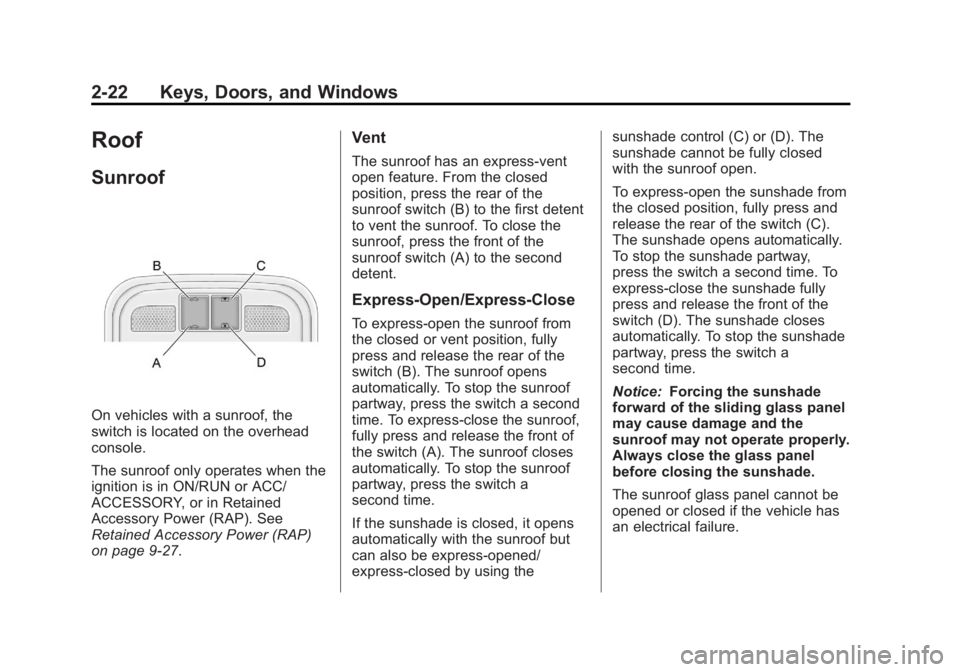
On vehicles with a sunroof, the
switch is located on the overhead
console.
The sunroof only operates when the
ignition is in ON/RUN or ACC/
ACCESSORY, or in Retained
Accessory Power (RAP). See
Retained Accessory Power (RAP)
on page 9‑27.
Vent
The sunroof has an express-vent
open feature. From the closed
position, press the rear of the
sunroof switch (B) to the first detent
to vent the sunroof. To close the
sunroof, press the front of the
sunroof switch (A) to the second
detent.
Express-Open/Express-Close
To express-open the sunroof from
the closed or vent position, fully
press and release the rear of the
switch (B). The sunroof opens
automatically. To stop the sunroof
partway, press the switch a second
time. To express-close the sunroof,
fully press and release the front of
the switch (A). The sunroof closes
automatically. To stop the sunroof
partway, press the switch a
second time.
If the sunshade is closed, it opens
automatically with the sunroof but
can also be express-opened/
express-closed by using thesunshade control (C) or (D). The
sunshade cannot be fully closed
with the sunroof open.
To express-open the sunshade from
the closed position, fully press and
release the rear of the switch (C).
The sunshade opens automatically.
To stop the sunshade partway,
press the switch a second time. To
express-close the sunshade fully
press and release the front of the
switch (D). The sunshade closes
automatically. To stop the sunshade
partway, press the switch a
second time.
Notice:
Forcing the sunshade
forward of the sliding glass panel
may cause damage and the
sunroof may not operate properly.
Always close the glass panel
before closing the sunshade.
The sunroof glass panel cannot be
opened or closed if the vehicle has
an electrical failure.
Page 57 of 512
Black plate (23,1)Buick LaCrosse Owner Manual - 2012
Keys, Doors, and Windows 2-23
Anti-Pinch Feature
If an object is in the path of the
sunroof while it is closing, the
anti-pinch feature will detect the
object and stop the sunroof from
closing at the point of the
obstruction. The sunroof and
sunshade will then return to the
open or vent position. To close the
sunroof once the obstruction has
been removed, refer to
"Express-Open/Express-Close"
earlier in this section.
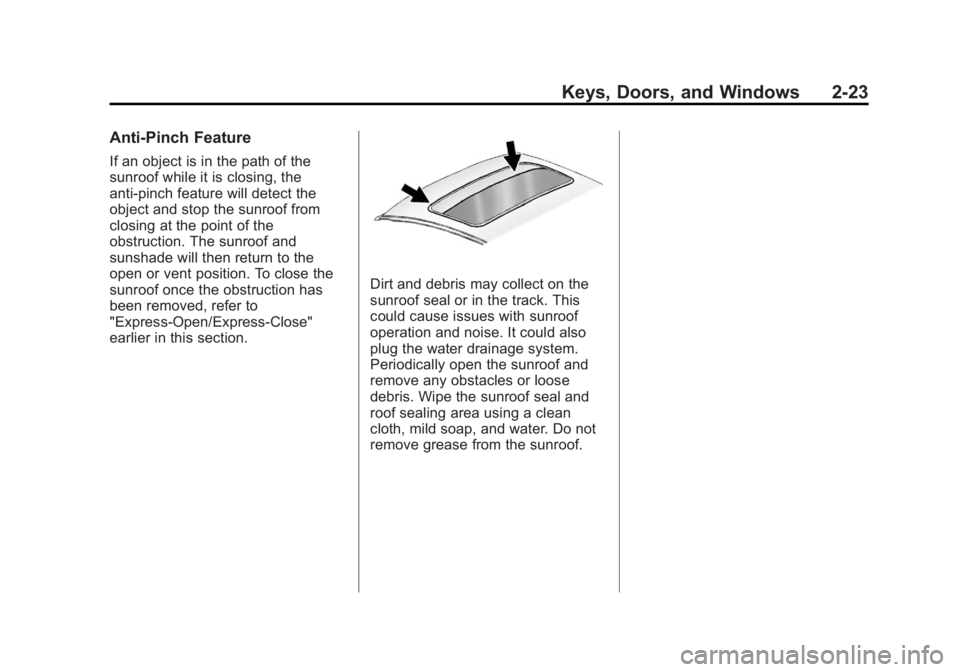
Dirt and debris may collect on the
sunroof seal or in the track. This
could cause issues with sunroof
operation and noise. It could also
plug the water drainage system.
Periodically open the sunroof and
remove any obstacles or loose
debris. Wipe the sunroof seal and
roof sealing area using a clean
cloth, mild soap, and water. Do not
remove grease from the sunroof.
Page 58 of 512

Black plate (24,1)Buick LaCrosse Owner Manual - 2012
2-24 Keys, Doors, and Windows
2NOTES
Page 81 of 512
Black plate (23,1)Buick LaCrosse Owner Manual - 2012
Seats and Restraints 3-23
{WARNING
Because airbags inflate with great
force and faster than the blink of
an eye, anyone who is up
against, or very close to any
airbag when it inflates can be
seriously injured or killed. Do not
sit unnecessarily close to any
airbag, as you would be if sitting
on the edge of the seat or leaning
forward. Safety belts help keep
you in position before and during
a crash. Always wear a safety
belt, even with airbags. The driver
should sit as far back as possible
while still maintaining control of
the vehicle.
Occupants should not lean on or
sleep against the door or side
windows in seating positions with
seat-mounted side impact airbags
and/or roof-rail airbags.
{WARNING
Children who are up against,
or very close to, any airbag
when it inflates can be seriously
injured or killed. Airbags plus
lap-shoulder belts offer protection
for adults and older children, but
not for young children and infants.
Neither the vehicle's safety belt
system nor its airbag system is
designed for them. Young
children and infants need the
protection that a child restraint
system can provide. Always
secure children properly in the
vehicle. To read how, seeOlder
Children on page 3‑36 orInfants
and Young Children on
page 3‑38.
There is an airbag readiness light
on the instrument panel cluster,
which shows the airbag symbol. The
system checks the airbag electrical
system for malfunctions. The light
tells you if there is an electrical
problem. See Airbag Readiness
Light on page 5‑16 for more
information.
Page 82 of 512
Black plate (24,1)Buick LaCrosse Owner Manual - 2012
3-24 Seats and Restraints
Where Are the Airbags?
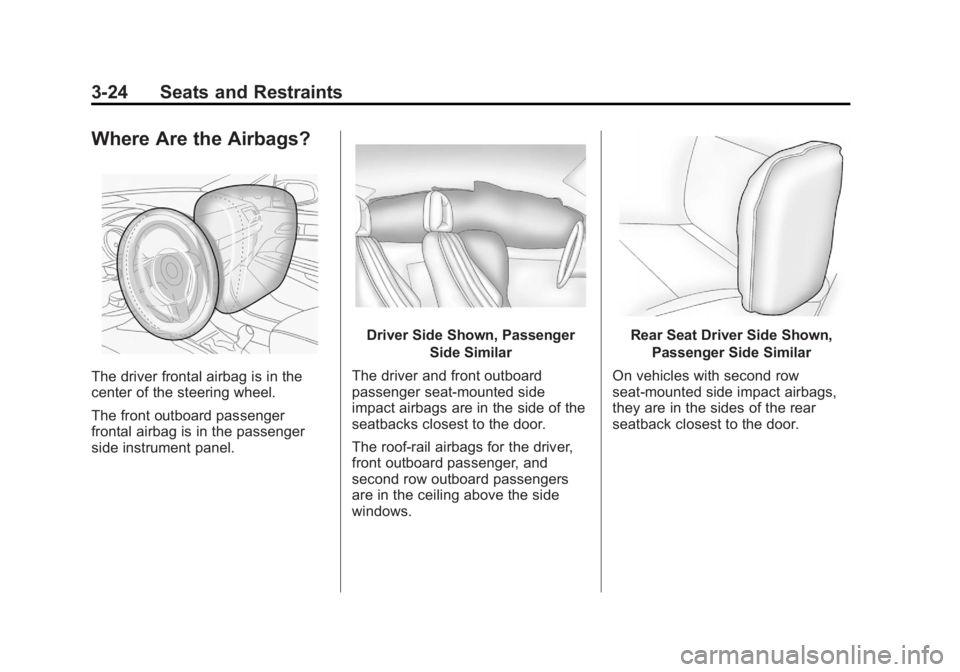
The driver frontal airbag is in the
center of the steering wheel.
The front outboard passenger
frontal airbag is in the passenger
side instrument panel.
Driver Side Shown, PassengerSide Similar
The driver and front outboard
passenger seat-mounted side
impact airbags are in the side of the
seatbacks closest to the door.
The roof-rail airbags for the driver,
front outboard passenger, and
second row outboard passengers
are in the ceiling above the side
windows.Rear Seat Driver Side Shown, Passenger Side Similar
On vehicles with second row
seat‐mounted side impact airbags,
they are in the sides of the rear
seatback closest to the door.
Page 160 of 512

Black plate (42,1)Buick LaCrosse Owner Manual - 2012
5-42 Instruments and Controls
You can receive more than one tire
pressure message at a time. To
read the other messages that may
have been sent at the same time,
press the SET/CLR button. The DIC
also shows the tire pressure values.
SeeDriver Information Center (DIC)
on page 5‑27.
SERVICE TIRE MONITOR
SYSTEM
This message displays if there is a
problem with the Tire Pressure
Monitor System (TPMS). See Tire
Pressure Monitor Operation on
page 10‑57 for more information.
TIRE LEARNING ACTIVE
This message displays when the
system is learning new tires. See
Tire Pressure Monitor Operation on
page 10‑57for more information.
Transmission Messages
SERVICE TRANSMISSION
This message displays if there is a
problem with the transmission. See
your dealer.
SHIFT TO PARK
This message displays when the
transmission needs to be shifted to
P (Park). This may appear when
attempting to remove the key from
the ignition or from the vehicle if the
vehicle is not in P (Park).
TRANSMISSION HOT —IDLE
ENGINE
This message displays and a chime
sounds if the transmission fluid in
the vehicle gets hot. Driving with the
transmission fluid temperature high
can cause damage to the vehicle.
Stop the vehicle and let it idle to
allow the transmission to cool. This
message clears when the fluid
temperature reaches a safe level.
Window Messages
OPEN, THEN CLOSE DRIVER
WINDOW
This message is displayed when the
window needs to be reprogrammed.
If the vehicle's battery has been
recharged or disconnected, you will
need to reprogram each front
window for the express-up feature to
work. See Power Windows on
page 2‑20 for more information.
OPEN, THEN CLOSE
PASSENGER WINDOW
This message is displayed when the
window needs to be reprogrammed.
If the vehicle's battery has been
recharged or disconnected, you will
need to reprogram each front
window for the express-up feature to
work. SeePower Windows on
page 2‑20 for more information.
Page 192 of 512

Black plate (12,1)Buick LaCrosse Owner Manual - 2012
7-12 Infotainment System
Set Time Format:Press the
12 Hours screen button for standard
time; press the 24 Hours screen
button for military time.
Set Date Format: Depending on
the region, the following date
formats may be available: MM/DD/
YYYY, DD.MM.YYYY, or YYYY/
MM/DD.
Display Digital Clock: Press
Display to turn the display of the
clock on the screen On or Off.
Radio Settings
Press the Config button on the
Home Page or the CONFIG button
on the faceplate to enter the menu
options. Turn the MENU knob or
touch-tap the scroll bar to scroll
through the available options. Press
the MENU knob or press Radio
Settings to display the radio settings
menu. Press this feature to make
changes for radio information
displayed, preset pages, Auto
Volume Control, and XM Categories Restore. See
Satellite Radio on
page 7‑24 (if equipped), for more
information about XM Categories.
The Radio Settings are:
Speed Dependent Volume: Select
OFF, Low, Medium, or High
sensitivity to automatically adjust
the volume to minimize the effects
of unwanted background noise that
can result from changing road
surfaces, driving speeds, or open
windows. This feature works best at
lower volume settings where
background noise is typically louder
than the sound system volume.
Startup Volume: Press to set the
maximum volume level for startup
that will be used even if a higher
volume had been set when the radio
was turned off.
Radio Favorites: Press to select
the number of FAV pages to be
used in the system. Add/Remove XM Categories:
Press to customize which available
XM Categories are used and
displayed in the system.
See
AM-FM Radio (Radio with CD/
DVD/MEM) on page 7‑18 orAM-FM
Radio (Radio with CD and
Touchscreen) on page 7‑21 for
more information.
Phone Settings
See Bluetooth (Overview) on
page 7‑57 orBluetooth
(Infotainment Controls) on
page 7‑59 orBluetooth (Voice
Recognition) on page 7‑63 or
Bluetooth (UHP Mexico Only) on
page 7‑69 in the“Phone” section for
more information on phone settings.
Vehicle Settings
See Vehicle Personalization on
page 5‑43 for more information.
Page 224 of 512
Black plate (44,1)Buick LaCrosse Owner Manual - 2012
7-44 Infotainment System
.The following restrictions apply
for the data stored on a USB
MP3 player or USB device:
‐Maximum folder structure
depth: 11 levels.
‐ Maximum number of MP3/
WMA files that can be
displayed: 1,000
.WMA with Digital Rights
Management (DRM) from online
music shops cannot be played.
WMA files can only be played
back safely if they were created
with Windows Media Player
version 8 or later.
‐Applicable playlist extensions
are: .m3u, .pls.
‐ Playlist entries must be in the
form of relative paths.
‐ The system attribute for
folders/files that contain audio
data must not be set. To play a USB device, do one of the
following:
.Connect the USB and it begins
to play.
.Press the Now Playing screen
button on the Home Page, then
press the SOURCE button on
the faceplate repeatedly to cycle
through all of the available audio
source screens, until the USB
source screen is selected.
While the USB source is active, use
the following to operate USB
function:
TUNE/
k(Play/Pause): Press to
start, pause, or resume play of the
current media source.
g(Seek Down):
1. Press to seek to the beginning of the current or previous track.
If the track has been playing for
less than five seconds, the
previous track plays. If playing
longer than five seconds, the
current track restarts.
2. Press and hold to reverse quickly through playback.
3. Release to return to playing speed. Elapsed time displays.
l(Seek Up):
1. Press to seek to the next track.
2. Press and hold to advance quickly through playback.
Release to return to playing
speed. Elapsed time displays.