2012 BUICK LACROSSE navigation system
[x] Cancel search: navigation systemPage 252 of 512
Black plate (72,1)Buick LaCrosse Owner Manual - 2012
7-72 Infotainment System
4. Select Pair Device or Add newHands‐free (HF) device on a
navigation radio. A four-digit
number appears on the display
and the UHP system goes into
discovery mode.
5. Start the pairing process on the mobile phone that will be paired
to the vehicle. Reference the
mobile phone manufacturer's
user guide for information on this
process.
Locate the device named UHP
followed by a four‐digit number
in the list on the mobile phone
and follow the instructions on the
mobile phone and enter the
four-digit code provided by the
system if necessary, then follow
the instructions on the
infotainment display screen.
6. Repeat Steps 1 through 5 to pair additional mobile phones. Viewing All Paired and Connected
Phones
To view all available mobile phones
that are paired to the UHP system:
1. Press the CONFIG button.
2. Select Phone Settings, or touch
Phone on a navigation radio.
3. Select Bluetooth.
4. Select Device List.
5. Repeat Steps 1 through 4 to pair additional mobile phones.
Deleting a Paired Phone
To remove a paired mobile phone
from the UHP system:
1. Press the CONFIG button.
2. Select Phone Settings, or touch Phone on a navigation radio.
3. Select Bluetooth.
4. Select Device List.
5. Select the mobile phone to delete and follow the on screen
prompts. Connecting to a Different Phone
To connect to a different paired
mobile phone, the new mobile
phone must be in the vehicle and
available to be connected to the
UHP system before the process is
started.
To connect to a different phone:
1. Press the CONFIG button.
2. Select Phone Settings, or touch
Phone on a navigation radio.
3. Select Bluetooth.
4. Select Device List.
5. Select the new mobile phone to link to and follow the on screen
prompts.
If delete is selected, the highlighted
mobile phone will be deleted.
Page 253 of 512
Black plate (73,1)Buick LaCrosse Owner Manual - 2012
Infotainment System 7-73
Making a Call Using Phone Book
and Call List
For mobile phones that support the
phone book and call list features,
the UHP system can use the
contacts and call lists stored on
your mobile phone to make calls.
See your mobile phone
manufacturer's user guide or
contact your wireless provider to
find out if this feature is supported
by your mobile phone.
The time it takes to download the
phone book and call list from your
mobile phone to the UHP system
can vary depending on the size of
the phone book and call list stored
on your mobile phone.
When a mobile phone supports the
phone book and call list features,
the Phone Book, and Call Lists
menus are automatically available.The Phone Book menu allows you
to access the phone book stored in
the mobile phone to make a call.
The Call Lists menu allows you to
access the phone numbers from the
Incoming Calls, Outgoing Calls, and
Missed Calls menus on your mobile
phone to make a call.
To make a call using the Phone
Book menu:
1. Press the PHONE button twice,
or press the PHONE button
once on vehicles with a
navigation system.
2. Select Phone Book.
3. You can search through the list by selecting the letter group the
phone book entry begins with, to
continue scrolling through the
entire list, turn the Menu knob.
4. Select the name or number you want to call. To make a call using the Call
Lists menu:
1. Press the PHONE button twice,
or press the PHONE button
once on vehicles with a
navigation system.
2. Select Call Lists.
3. Select the Incoming Calls, Outgoing Calls, or Missed
Calls list.
4. Select the name or number you want to call.
Making a Call
To make a call:
1. Press the PHONE button twice, or press the PHONE button
once on vehicles with a
navigation system.
2. Select Enter Number for vehicles without a navigation system.
Page 254 of 512
Black plate (74,1)Buick LaCrosse Owner Manual - 2012
7-74 Infotainment System
3. Select the numbers to be dialed.For vehicles with a navigation
system, touch the numbers on
the infotainment screen. For
vehicles without a navigation
system, see “Entering a
Character Sequence” in for more
information.
4. Select Call to start dialing the number.
Accepting or Declining a Call
When an incoming call is received,
the infotainment system mutes and
a ring tone is heard in the vehicle.
To accept the incoming call, turn the
Menu knob to “Answer”and press
SELECT, or press the
b/gbutton
on the steering wheel controls.
To decline the incoming call, turn
the Menu knob to “decline”and
press SELECT, or press the
b/gbutton on the steering wheel
controls. Call Waiting
Call waiting must be supported on
the mobile phone and enabled by
the wireless service carrier to work.
To accept the incoming call, turn the
Menu knob to
“Answer”and press
SELECT, or press the
b/gbutton
on the steering wheel controls.
To decline the incoming call, turn
the Menu knob to “Decline”and
press SELECT, or press the
$/ibutton on the steering
wheel controls.
1. Press the PHONE button.
2. Select Switch Call from the menu.
Conference Calling
Conference calling and three way
calling must be supported on the
mobile phone and enabled by the
wireless service carrier to work. To start a conference calling while in
a call:
1. Press SELECT and select Enter
Number.
2. Enter the character sequence then select call.
3. After the call has been placed, press SELECT and choose
Merge Calls.
4. To add more callers to the conference call, repeat steps 1
through 3. The number of callers
that can be added are limited by
your wireless service carrier.
To disconnect from one caller while
in a conference call, select Detach
Number from the menu and select
the number to hang up on.
Page 255 of 512
Black plate (75,1)Buick LaCrosse Owner Manual - 2012
Infotainment System 7-75
Ending a Call
Press SELECT and select Hang Up,
or press the
$/ibutton on the
steering wheel controls.
To Mute a Call
Press SELECT and select
Mute Call.
To Cancel Mute
Press SELECT and select
Mute Call.
Dual Tone Multi-Frequency (DTMF)
Tones
The UHP system can send numbers
during a call. This is used when
calling a menu driven phone
system.
To access this system:
1. Press SELECT and select Enter Number.
2. Enter the character sequence.
Operating UHP Using Voice
Control
The voice control of the UHP
system enables you to operate
several functions of the mobile
phone using your voice. The UHP
system uses voice commands to
control the system and dial phone
numbers. After input of the
command the infotainment system
guides you through the dialogue
with appropriate questions and
feedback to achieve the desired
action. The commands and
numbers can be spoken without a
pause between the individual words.
In addition you can save telephone
numbers under a name tag that is
selectable by you. The telephone
connection can be set up with
this name.
In the event of incorrect operation or
incorrect codes, the voice control
gives you voice feedback and
requests you to re-enter the desired
command. Apart from this, the voice control acknowledges important
commands and will ask if
necessary.
In order that calls are made inside
the vehicle do not lead to
unintentional triggering of the mobile
phone, the voice control does not
start until it has been activated.
Activating the Voice Control
For vehicles without a navigation
system, press the
b/gbutton on
the steering wheel to activate the
voice control of the UHP system.
For vehicles with a navigation
system, press the
b/gbutton on
the steering wheel to activate the
voice control of the UHP system
The system responds with a tone.
After the tone, say ”Phone.“
For the duration of the dialogue any
audio source that is active is muted
and any traffic news fade-in is
cancelled.
Page 277 of 512
Black plate (3,1)Buick LaCrosse Owner Manual - 2012
Driving and Operating 9-3
{WARNING
Taking your eyes off the road too
long or too often could cause a
crash resulting in injury or death.
Focus your attention on driving.
Refer to the infotainment section for
more information on using that
system, including pairing and using
a cell phone.
If equipped, refer to the navigation
manual for information on that
system, including pairing and using
a cell phone.
Defensive Driving
Defensive driving means “always
expect the unexpected.” The first
step in driving defensively is to wear
the safety belt. See Safety Belts on
page 3‑13.
.Assume that other road users
(pedestrians, bicyclists, and
other drivers) are going to be
careless and make mistakes.
Anticipate what they might do
and be ready.
.Allow enough following distance
between you and the driver in
front of you.
.Focus on the task of driving.
Drunk Driving
Death and injury associated with
drinking and driving is a global
tragedy.
{WARNING
Drinking and then driving is very
dangerous. Your reflexes,
perceptions, attentiveness, and
judgment can be affected by even
a small amount of alcohol. You
can have a serious —or even
fatal —collision if you drive after
drinking.
Do not drink and drive or ride with
a driver who has been drinking.
Ride home in a cab; or if you are
with a group, designate a driver
who will not drink.
Page 323 of 512
Black plate (49,1)Buick LaCrosse Owner Manual - 2012
Driving and Operating 9-49
Rear Vision
Camera (RVC)
This vehicle may have an RVC
system. Read this entire section
before using it.
The RVC system can assist the
driver when backing up by
displaying a view of the area behind
the vehicle.
{WARNING
The RVC system does not display
pedestrians, bicyclists, animals,
or any other object located
outside the camera's field of view,
below the bumper, or under the
vehicle.
Do not back the vehicle using
only the RVC screen or by using
the screen during longer, higher
speed backing maneuvers,
or where there could be(Continued)
WARNING (Continued)
cross-traffic. Perceived distances
may be different from actual
distances.
Failure to use proper care before
backing may result in injury,
death, or vehicle damage. Always
check before backing by checking
behind and around the vehicle.
An image appears on the navigation
screen with the message Check
Surroundings for Safety when the
vehicle is shifted into R (Reverse).
The navigation screen goes to the
previous screen after approximately
10 seconds once the vehicle is
shifted out of R (Reverse). To cancel the delay, do one of the
following:.Press a hard key on the
navigation system.
.Shift into P (Park).
.Reach a vehicle speed of
8 km/h (5 mph).
Turning the Rear Vision Camera
System On or Off
To turn the RVC system on or off:
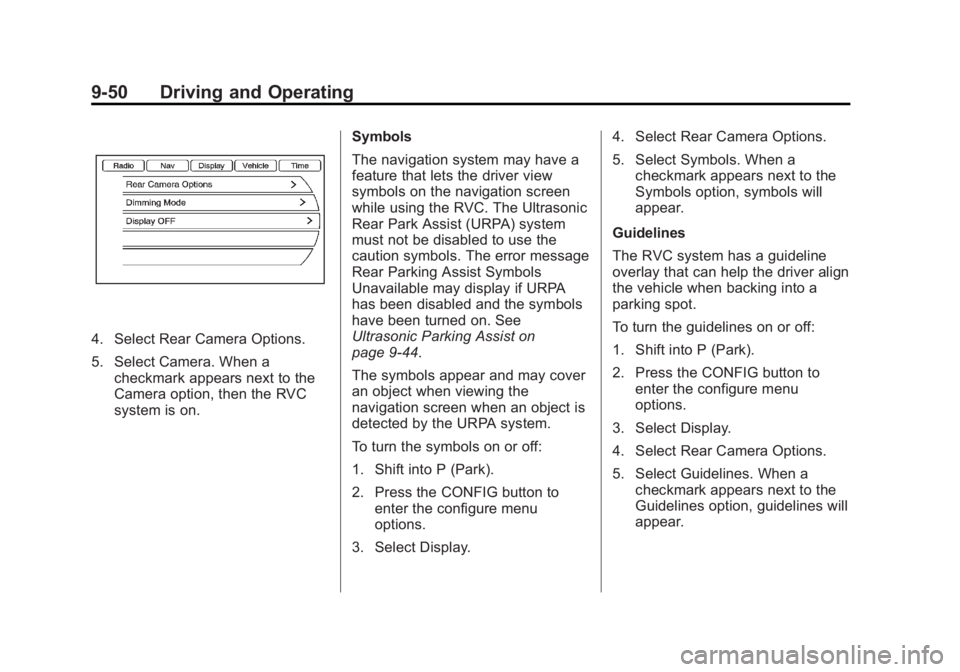
1. Shift into P (Park).
2. Press the CONFIG button to enter the configure menu
options.
3. Select Display.
Page 324 of 512
Black plate (50,1)Buick LaCrosse Owner Manual - 2012
9-50 Driving and Operating
4. Select Rear Camera Options.
5. Select Camera. When acheckmark appears next to the
Camera option, then the RVC
system is on. Symbols
The navigation system may have a
feature that lets the driver view
symbols on the navigation screen
while using the RVC. The Ultrasonic
Rear Park Assist (URPA) system
must not be disabled to use the
caution symbols. The error message
Rear Parking Assist Symbols
Unavailable may display if URPA
has been disabled and the symbols
have been turned on. See
Ultrasonic Parking Assist on
page 9‑44.
The symbols appear and may cover
an object when viewing the
navigation screen when an object is
detected by the URPA system.
To turn the symbols on or off:
1. Shift into P (Park).
2. Press the CONFIG button to
enter the configure menu
options.
3. Select Display. 4. Select Rear Camera Options.
5. Select Symbols. When a
checkmark appears next to the
Symbols option, symbols will
appear.
Guidelines
The RVC system has a guideline
overlay that can help the driver align
the vehicle when backing into a
parking spot.
To turn the guidelines on or off:
1. Shift into P (Park).
2. Press the CONFIG button to enter the configure menu
options.
3. Select Display.
4. Select Rear Camera Options.
5. Select Guidelines. When a checkmark appears next to the
Guidelines option, guidelines will
appear.
Page 469 of 512
Black plate (1,1)Buick LaCrosse Owner Manual - 2012
Customer Information 13-1
Customer
Information
Customer Information
Customer SatisfactionProcedure (U.S. and
Canada) . . . . . . . . . . . . . . . . . . . . 13-1
Customer Satisfaction Procedure (Mexico) . . . . . . . . 13-3
Customer Assistance Offices (U.S. and Canada) . . . . . . . . . 13-5
Customer Assistance Offices (Mexico) . . . . . . . . . . . . . . . . . . . . 13-5
Customer Assistance for Text Telephone (TTY) Users (U.S.
and Canada) . . . . . . . . . . . . . . . 13-6
Online Owner Center . . . . . . . . 13-6
GM Mobility Reimbursement Program (U.S. and
Canada) . . . . . . . . . . . . . . . . . . . . 13-7
Roadside Assistance Program (U.S. and Canada) . . . . . . . . . 13-7
Roadside Assistance Program (Mexico) . . . . . . . . . 13-10
Scheduling Service Appointments (U.S. and
Canada) . . . . . . . . . . . . . . . . . . 13-13 Courtesy Transportation
Program (U.S. and
Canada) . . . . . . . . . . . . . . . . . . 13-14
Collision Damage Repair (U.S. and Canada) . . . . . . . . 13-15
Service Publications Ordering Information . . . . . . 13-18
Reporting Safety Defects
Reporting Safety Defects tothe United States
Government . . . . . . . . . . . . . . . 13-19
Reporting Safety Defects to the Canadian
Government . . . . . . . . . . . . . . . 13-19
Reporting Safety Defects to General Motors . . . . . . . . . . . 13-20
Vehicle Data Recording and
Privacy
Vehicle Data Recording and
Privacy . . . . . . . . . . . . . . . . . . . . 13-20
Event Data Recorders . . . . . . 13-20
OnStar
®. . . . . . . . . . . . . . . . . . . . 13-21
Navigation System . . . . . . . . . 13-21
Radio Frequency Identification (RFID) . . . . . . . 13-22
Radio Frequency Statement . . . . . . . . . . . . . . . . . 13-22
Customer Information
Customer Satisfaction
Procedure (U.S. and
Canada)
Your satisfaction and goodwill are
important to your dealer and to
Buick. Normally, any concerns with
the sales transaction or the
operation of the vehicle will be
resolved by your dealer's sales or
service departments. Sometimes,
however, despite the best intentions
of all concerned, misunderstandings
can occur. If your concern has not
been resolved to your satisfaction,
the following steps should be taken:
STEP ONE: Discuss your concern
with a member of dealership
management. Normally, concerns
can be quickly resolved at that level.
If the matter has already been
reviewed with the sales, service,
or parts manager, contact the owner
of your dealership or the general
manager.