2012 BUICK LACROSSE clock
[x] Cancel search: clockPage 190 of 512

Black plate (10,1)Buick LaCrosse Owner Manual - 2012
7-10 Infotainment System
3. Press and hold to quicklyreverse through a track. Release
the button to return to playing
speed. See CD Player on
page 7‑28 andMP3 on
page 7‑33 for more information.
4. For AM, FM, or XM (if equipped), press to seek to the next strong
station.
Preset Buttons (1-6): The preset
buttons numbered one through six
can be used to select stored AM,
FM, and XM (if equipped) stations.
H(Clock Menu): Press to set
the time.
X(Eject): Press to eject a disc
from the CD player. See CD Player
on page 7‑28.
Touch Screen Buttons
Touch screen buttons are on the
screen and highlighted when a
feature is available. Some toggle
screen buttons highlight when active
and gray out when inactive.
Home Page
The infotainment system displays a
home page that makes accessing
many of the features an easy
process.
Back: If on page two of the Home
Page, press Back to return to page
one of the Home Page. If on page
one, Back serves no function.
Home: While navigating through
other menus, press to go back to
the Home Page to start a different
feature.
FAV: Press to display a page of
stored (favorite) AM, FM, or XM
(if equipped) stations. Keep
pressing FAV to scroll through the
favorite pages.
The Home Page Menu lists the
options Customize Home Page and
Restore Home Page Defaults.
Out of all available Home Page
icons, up to eight icons can be
selected and sorted for the first
Home Page screen.
Home Page Features
Various functions are disabled when
the vehicle is moving.
Press the Now Playing screen
button to display the active source
page. The sources available are
AM, FM, XM (if equipped), CD,
USB/iPod, and AUX.
See AM-FM Radio (Radio with CD/
DVD/MEM) on page 7‑18 orAM-FM
Radio (Radio with CD and
Touchscreen) on page 7‑21,
Satellite Radio on page 7‑24, and
CD Player on page 7‑28.
Press the Phone screen button to
display the Phone main page. See
Bluetooth (Overview) on page 7‑57
or Bluetooth (Infotainment Controls)
on page 7‑59 orBluetooth (Voice
Recognition) on page 7‑63 or
Bluetooth (UHP Mexico Only) on
page 7‑69.
Page 191 of 512

Black plate (11,1)Buick LaCrosse Owner Manual - 2012
Infotainment System 7-11
Press the Config screen button to
display the Config main page. From
this display, you can adjust features
such as time and date, radio,
phone, vehicle, and display.
Press the Tone screen button to
display the Tone main page. Adjust
the tone and speakers by pressing
the screen buttons to change the
levels of sound for treble, midrange,
bass, fade, and balance. See
AM-FM Radio (Radio with CD/DVD/
MEM) on page 7‑18orAM-FM
Radio (Radio with CD and
Touchscreen) on page 7‑21. Press the FM screen button to
display the FM main page and play
the current or last tuned FM station.
See
AM-FM Radio (Radio with CD/
DVD/MEM) on page 7‑18 orAM-FM
Radio (Radio with CD and
Touchscreen) on page 7‑21.
Press the AM screen button to
display the AM main page and play
the current or last tuned AM station.
See AM-FM Radio (Radio with CD/
DVD/MEM) on page 7‑18 orAM-FM
Radio (Radio with CD and
Touchscreen) on page 7‑21.
Press the XM screen button
(if equipped) to display the XM main
page and play the current or last
tuned XM channel. See AM-FM
Radio (Radio with CD/DVD/MEM)
on page 7‑18 orAM-FM Radio
(Radio with CD and Touchscreen)
on page 7‑21 andSatellite Radio on
page 7‑24. Press the CD screen button to
display the CD main page and play
the current or last CD track
selected. See
CD Player on
page 7‑28.
Press the USB screen button to
display the USB main page and play
the current or last track selected.
See Auxiliary Devices (Radio with
CD and Touchscreen) on page 7‑39.
Press the AUX screen button to
access any connected auxiliary
device. See Auxiliary Devices
(Radio with CD and Touchscreen)
on page 7‑39.
Time and Date Settings
From the Time & Date Settings
screen button, press to display the
Time & Date Settings menu.
Set Time: Press the up or down
arrows to increase or decrease the
Hours and Minutes displayed on the
clock.
Set Date: Press the up or down
arrows to increase or decrease
the day.
Page 192 of 512

Black plate (12,1)Buick LaCrosse Owner Manual - 2012
7-12 Infotainment System
Set Time Format:Press the
12 Hours screen button for standard
time; press the 24 Hours screen
button for military time.
Set Date Format: Depending on
the region, the following date
formats may be available: MM/DD/
YYYY, DD.MM.YYYY, or YYYY/
MM/DD.
Display Digital Clock: Press
Display to turn the display of the
clock on the screen On or Off.
Radio Settings
Press the Config button on the
Home Page or the CONFIG button
on the faceplate to enter the menu
options. Turn the MENU knob or
touch-tap the scroll bar to scroll
through the available options. Press
the MENU knob or press Radio
Settings to display the radio settings
menu. Press this feature to make
changes for radio information
displayed, preset pages, Auto
Volume Control, and XM Categories Restore. See
Satellite Radio on
page 7‑24 (if equipped), for more
information about XM Categories.
The Radio Settings are:
Speed Dependent Volume: Select
OFF, Low, Medium, or High
sensitivity to automatically adjust
the volume to minimize the effects
of unwanted background noise that
can result from changing road
surfaces, driving speeds, or open
windows. This feature works best at
lower volume settings where
background noise is typically louder
than the sound system volume.
Startup Volume: Press to set the
maximum volume level for startup
that will be used even if a higher
volume had been set when the radio
was turned off.
Radio Favorites: Press to select
the number of FAV pages to be
used in the system. Add/Remove XM Categories:
Press to customize which available
XM Categories are used and
displayed in the system.
See
AM-FM Radio (Radio with CD/
DVD/MEM) on page 7‑18 orAM-FM
Radio (Radio with CD and
Touchscreen) on page 7‑21 for
more information.
Phone Settings
See Bluetooth (Overview) on
page 7‑57 orBluetooth
(Infotainment Controls) on
page 7‑59 orBluetooth (Voice
Recognition) on page 7‑63 or
Bluetooth (UHP Mexico Only) on
page 7‑69 in the“Phone” section for
more information on phone settings.
Vehicle Settings
See Vehicle Personalization on
page 5‑43 for more information.
Page 329 of 512
Black plate (55,1)Buick LaCrosse Owner Manual - 2012
Driving and Operating 9-55
Filling the Tank
{WARNING
Fuel vapor burns violently and a
fuel fire can cause bad injuries.
To help avoid injuries to you and
others, read and follow all the
instructions on the fuel pump
island. Turn off the engine when
refueling. Do not smoke near fuel
or when refueling the vehicle. Do
not use cellular phones. Keep
sparks, flames, and smoking
materials away from fuel. Do not
leave the fuel pump unattended
when refueling the vehicle. This is
against the law in some places.
Do not re-enter the vehicle while
pumping fuel. Keep children away
from the fuel pump; never let
children pump fuel.
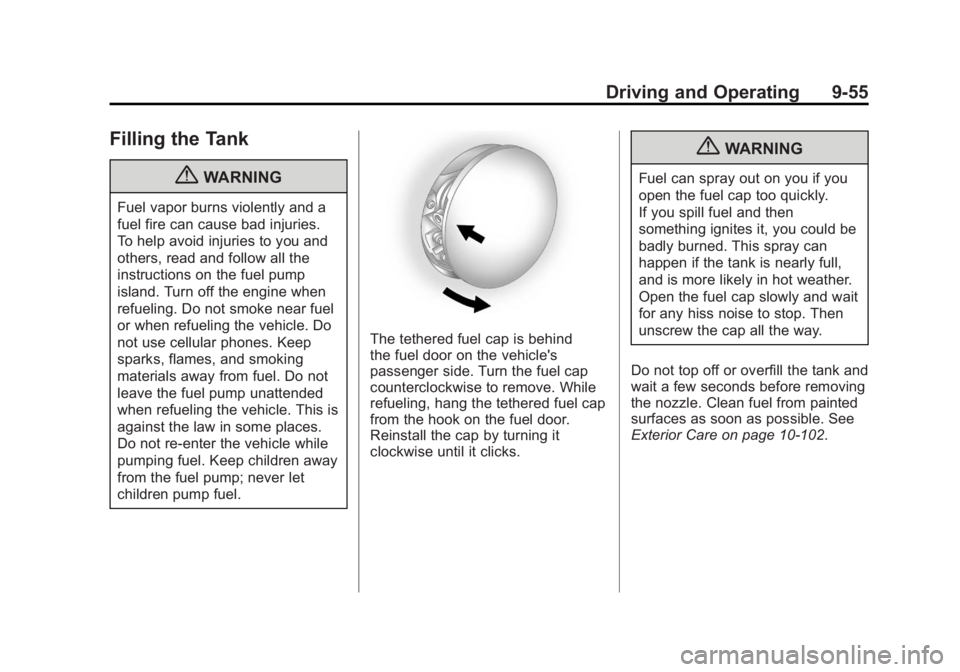
The tethered fuel cap is behind
the fuel door on the vehicle's
passenger side. Turn the fuel cap
counterclockwise to remove. While
refueling, hang the tethered fuel cap
from the hook on the fuel door.
Reinstall the cap by turning it
clockwise until it clicks.
{WARNING
Fuel can spray out on you if you
open the fuel cap too quickly.
If you spill fuel and then
something ignites it, you could be
badly burned. This spray can
happen if the tank is nearly full,
and is more likely in hot weather.
Open the fuel cap slowly and wait
for any hiss noise to stop. Then
unscrew the cap all the way.
Do not top off or overfill the tank and
wait a few seconds before removing
the nozzle. Clean fuel from painted
surfaces as soon as possible. See
Exterior Care on page 10‑102.
Page 356 of 512
Black plate (18,1)Buick LaCrosse Owner Manual - 2012
10-18 Vehicle Care
{WARNING
An electric engine cooling fan
under the hood can start up even
when the engine is not running
and can cause injury. Keep
hands, clothing, and tools away
from any underhood electric fan.
{WARNING
Steam and scalding liquids from a
hot cooling system can blow out
and burn you badly. They are
under pressure, and if you turn
the surge tank pressure
cap—even a little —they can
come out at high speed. Never
turn the cap when the cooling
system, including the surge tank
pressure cap, is hot. Wait for the
cooling system and surge tank
pressure cap to cool if you ever
have to turn the pressure cap.
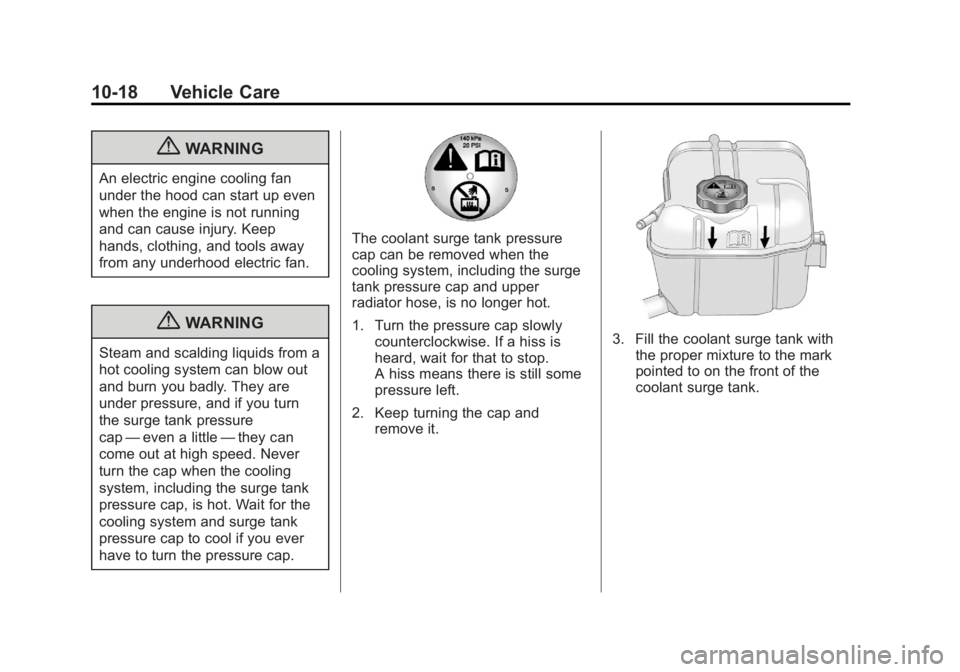
The coolant surge tank pressure
cap can be removed when the
cooling system, including the surge
tank pressure cap and upper
radiator hose, is no longer hot.
1. Turn the pressure cap slowly counterclockwise. If a hiss is
heard, wait for that to stop.
A hiss means there is still some
pressure left.
2. Keep turning the cap and remove it.
3. Fill the coolant surge tank withthe proper mixture to the mark
pointed to on the front of the
coolant surge tank.
Page 370 of 512
Black plate (32,1)Buick LaCrosse Owner Manual - 2012
10-32 Vehicle Care
Base
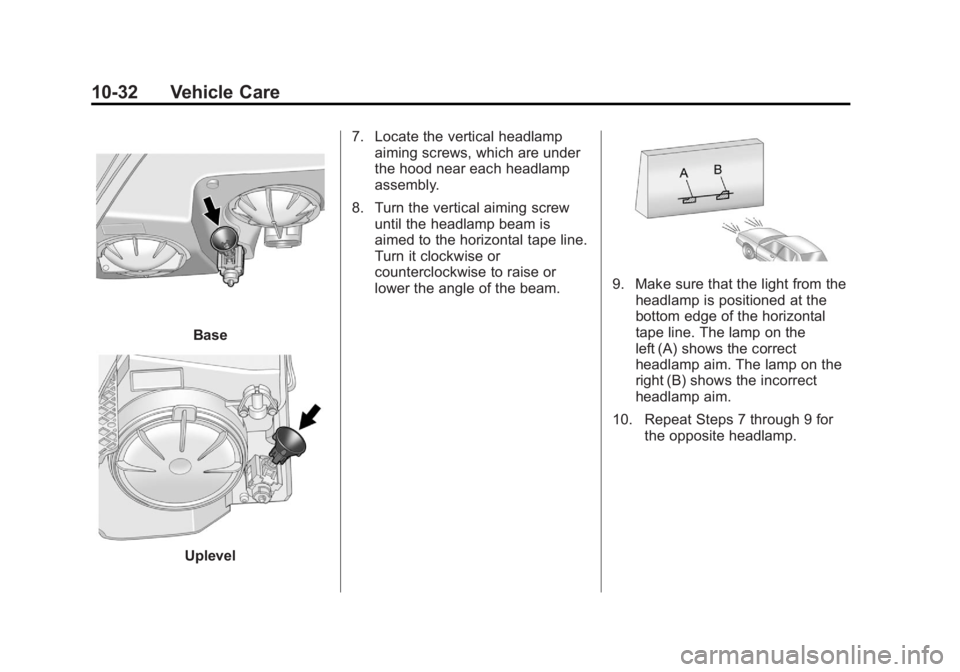
Uplevel7. Locate the vertical headlamp
aiming screws, which are under
the hood near each headlamp
assembly.
8. Turn the vertical aiming screw until the headlamp beam is
aimed to the horizontal tape line.
Turn it clockwise or
counterclockwise to raise or
lower the angle of the beam.
9. Make sure that the light from the
headlamp is positioned at the
bottom edge of the horizontal
tape line. The lamp on the
left (A) shows the correct
headlamp aim. The lamp on the
right (B) shows the incorrect
headlamp aim.
10. Repeat Steps 7 through 9 for the opposite headlamp.
Page 372 of 512
Black plate (34,1)Buick LaCrosse Owner Manual - 2012
10-34 Vehicle Care
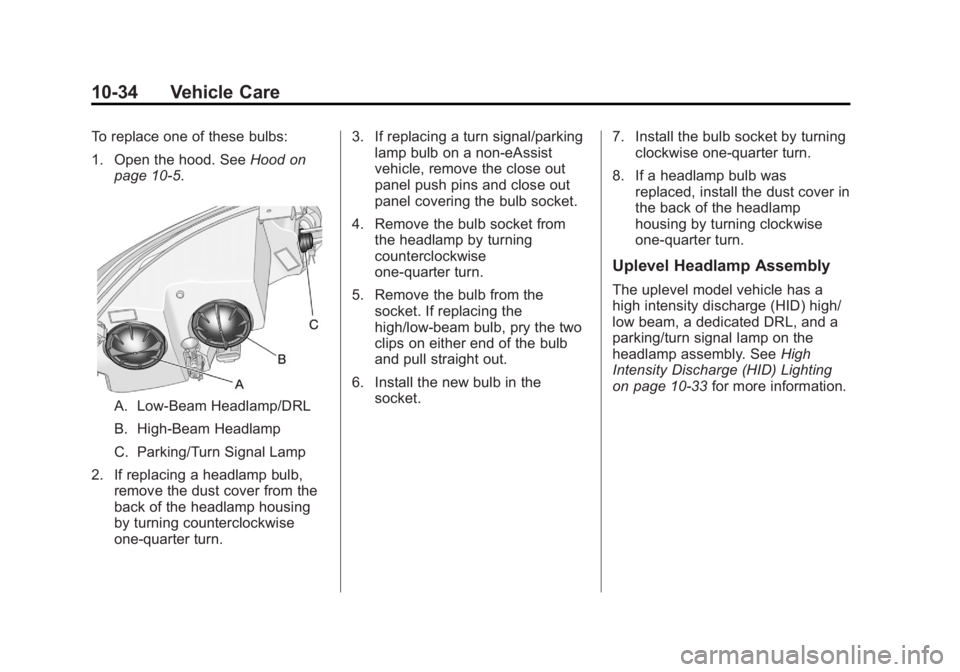
To replace one of these bulbs:
1. Open the hood. SeeHood on
page 10‑5.
A. Low-Beam Headlamp/DRL
B. High-Beam Headlamp
C. Parking/Turn Signal Lamp
2. If replacing a headlamp bulb, remove the dust cover from the
back of the headlamp housing
by turning counterclockwise
one‐quarter turn. 3. If replacing a turn signal/parking
lamp bulb on a non‐eAssist
vehicle, remove the close out
panel push pins and close out
panel covering the bulb socket.
4. Remove the bulb socket from the headlamp by turning
counterclockwise
one‐quarter turn.
5. Remove the bulb from the socket. If replacing the
high/low‐beam bulb, pry the two
clips on either end of the bulb
and pull straight out.
6. Install the new bulb in the socket. 7. Install the bulb socket by turning
clockwise one‐quarter turn.
8. If a headlamp bulb was replaced, install the dust cover in
the back of the headlamp
housing by turning clockwise
one‐quarter turn.
Uplevel Headlamp Assembly
The uplevel model vehicle has a
high intensity discharge (HID) high/
low beam, a dedicated DRL, and a
parking/turn signal lamp on the
headlamp assembly. See High
Intensity Discharge (HID) Lighting
on page 10‑33 for more information.
Page 373 of 512
Black plate (35,1)Buick LaCrosse Owner Manual - 2012
Vehicle Care 10-35
To replace one of these bulbs:
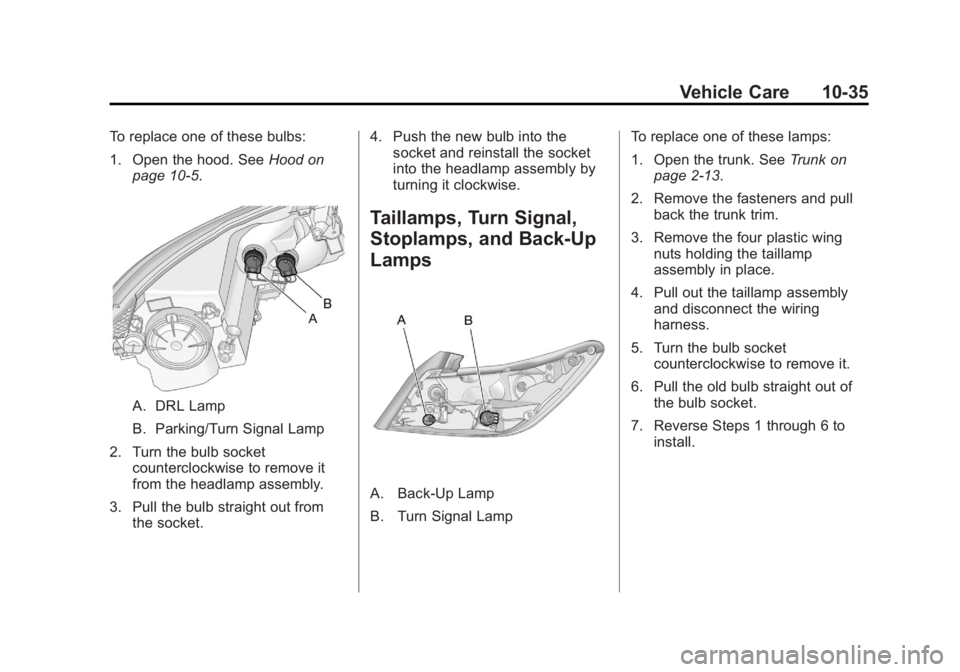
1. Open the hood. SeeHood on
page 10‑5.
A. DRL Lamp
B. Parking/Turn Signal Lamp
2. Turn the bulb socket counterclockwise to remove it
from the headlamp assembly.
3. Pull the bulb straight out from the socket. 4. Push the new bulb into the
socket and reinstall the socket
into the headlamp assembly by
turning it clockwise.
Taillamps, Turn Signal,
Stoplamps, and Back-Up
Lamps
A. Back‐Up Lamp
B. Turn Signal Lamp To replace one of these lamps:
1. Open the trunk. See
Trunk on
page 2‑13.
2. Remove the fasteners and pull back the trunk trim.
3. Remove the four plastic wing nuts holding the taillamp
assembly in place.
4. Pull out the taillamp assembly and disconnect the wiring
harness.
5. Turn the bulb socket counterclockwise to remove it.
6. Pull the old bulb straight out of the bulb socket.
7. Reverse Steps 1 through 6 to install.