2012 BMW X6 back seat
[x] Cancel search: back seatPage 144 of 312
Things to remember when driving
142
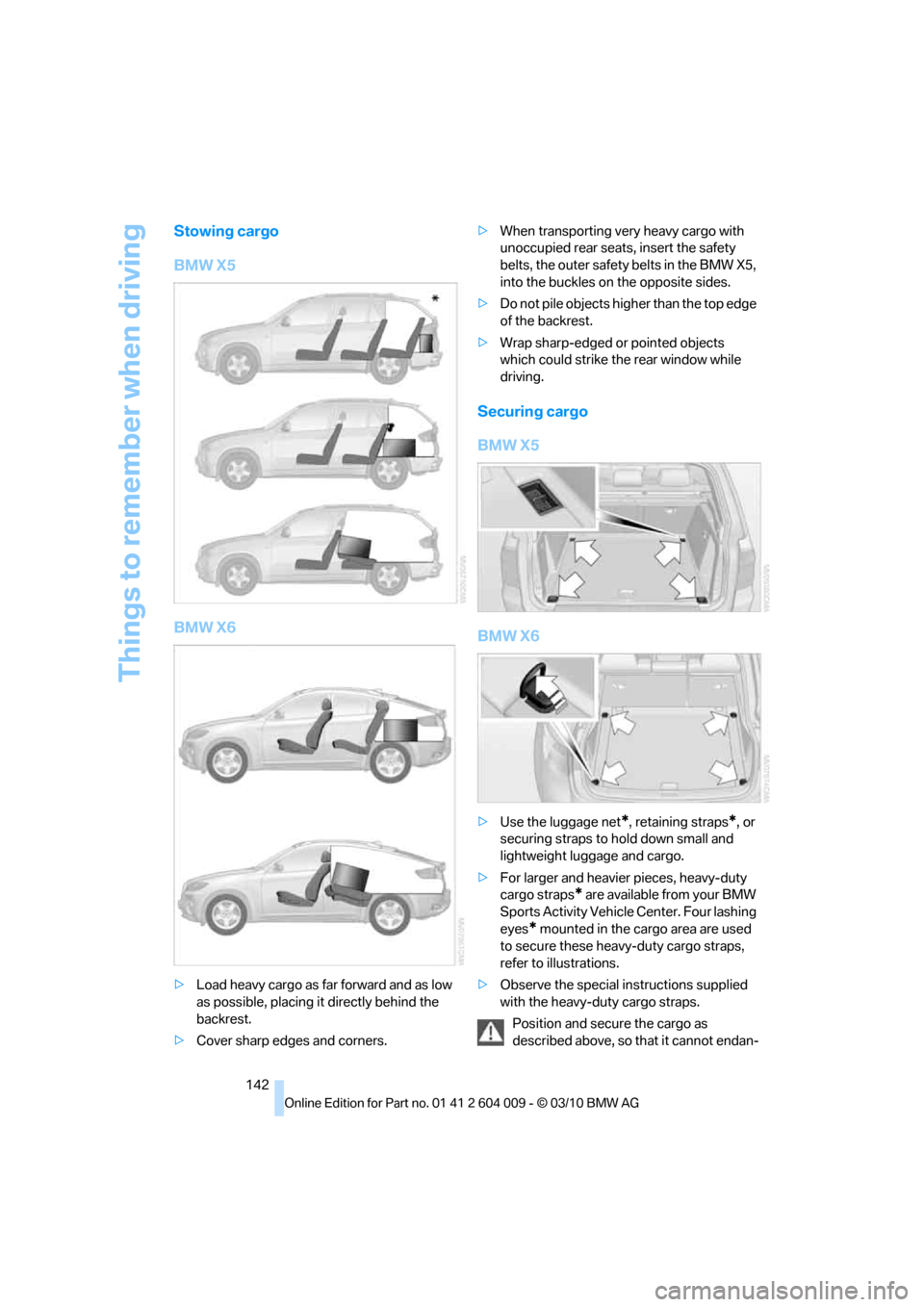
Stowing cargo
BMW X5
BMW X6
>Load heavy cargo as far forward and as low
as possible, placing it directly behind the
backrest.
>Cover sharp edges and corners.>When transporting very heavy cargo with
unoccupied rear seats, insert the safety
belts, the outer safety belts in the BMW X5,
into the buckles on the opposite sides.
>Do not pile objects higher than the top edge
of the backrest.
>Wrap sharp-edged or pointed objects
which could strike the rear window while
driving.
Securing cargo
BMW X5
BMW X6
>Use the luggage net*, retaining straps*, or
securing straps to hold down small and
lightweight luggage and cargo.
>For larger and heavier pieces, heavy-duty
cargo straps
* are available from your BMW
Sports Activity Vehicle Center. Four lashing
eyes
* mounted in the cargo area are used
to secure these heavy-duty cargo straps,
refer to illustrations.
>Observe the special instructions supplied
with the heavy-duty cargo straps.
Position and secure the cargo as
described above, so that it cannot endan-
Page 262 of 312

Care
260 Do not use aggressive, acid-containing,
strongly alkaline, or coarse cleansers and
do not use steam cleaners at temperatures
greater than 1407/606; otherwise you may
damage your vehicle.<
Aluminum running boards
A rust film on the aluminum running boards can
be removed with a special cleaning agent.
Outside sensors/cameras
Make sure that sensors and cameras out-
side the vehicle, e.g. Park Distance Con-
trol, Top View, or rear view camera, are kept
clean and free of ice in order to assure full func-
tionality.<
Interior care
Upholstery materials/cloth-covered
paneling
Clean regularly with a vacuum cleaner in order
to remove surface dirt.
In the event of more serious soiling such as bev-
erage stains, use a soft sponge or a lint-free
microfiber cloth in combination with suitable
interior cleaners. Follow the instructions on the
packaging.
Clean upholstery material over a large
area extending out to the seams. Avoid
intense friction.<
Open Velcro fasteners on pants or other
items of clothing can cause damage to
the seat covering. Make sure that the Velcro
fasteners are closed.<
Leather/leather-covered paneling
The leather used by BMW is a high quality
natural product. Slight patterns in the
grain are part of the typical properties of a natu-
ral leather.<
Dust and dirt from the road chafe in pores and
folds and result in considerable wear and cause
the leather surface to become prematurely brit-
tle. We therefore suggest that you clean the leather with a dust cloth or vacuum cleaner at
regular intervals.
Particularly with light-colored leather, make
sure to clean it regularly since it has a greater
tendency to become soiled.
Treat the leather twice a year with a leather
lotion since dirt and grease harm the protective
layer of the leather.
Carpeting/floor mats*
Floor mats can be removed for cleaning.
If the carpets are very dirty, clean with a microfi-
ber cloth and water or an interior cleaner. To
prevent matting of the carpet, rub back and
forth in the direction of travel only.
Plastic components inside
>Vinyl upholstery surfaces
>Lamp lenses
>Cover glass of instrument cluster
>Matte parts
Should be cleaned with water and, if necessary,
solvent-free plastic cleaner.
Fine wooden components
Use a damp cloth to clean fine wooden trim
panels and components. Follow up by drying
with a soft cloth.
Safety belts
Soiled seatbelt straps hinder the reeling, thus
reducing safety.
Do not use chemical cleansers as they
can destroy the webbing.<
Inside sensors/cameras
Clean inside sensors and cameras, such as
those of the high-beam assistant, using a lint-
free cloth moistened with glass cleaner.
Displays
Clean displays like the radio or the instrument
cluster using a display-cleaning cloth or a soft,
nonabrasive lint-free cloth.
Page 295 of 312

Reference 293
At a glance
Controls
Driving tips
Communications
Navigation
Entertainment
Mobility
Automatic climate control
– automatic air
distribution117,121
– in rear121
– switching off120,122
– ventilation in rear120
– with 2-zone control117
– with 4-zone control121
Automatic climate control in
rear
– activating on Control
Display121
– deactivating on Control
Display121
Automatic closing of doors,
refer to Automatic soft
closing30
Automatic curb monitor52
Automatic garage door
opener124
Automatic headlamps
– refer to High-beam
Assistant113
Automatic Hold61
– activating61
– deactivating61
– parking61
Automatic lighting
– refer to Automatic headlamp
control111
– refer to Daytime driving
lamps112
– refer to Interior lamps115
– refer to Pathway lighting112
Automatic low-beams, refer to
High-beam Assistant113
Automatic recirculated-air
control AUC119
Automatic Service
Request230
Automatic soft closing30
Automatic transmission with
Steptronic63
– deactivating selector lever
interlock64
– kickdown64
– with Comfort Access36AUTO program of the
automatic climate
control117,121
AUX-IN connection128,192
Available services230
Average fuel consumption78
– setting units86
Average speed, refer to
Computer78
Avoiding highways for
navigation158
Avoiding unintentional
alarms35
Axle weights, refer to
Weights283
B
Backrest contour, refer to
Lumbar support44
Backrests, refer to Seats43
Backrest width adjustment44
Backup lamps, replacing
bulbs264,266
Band-aids, refer to First-aid
kit273
Base plate for telephone or
mobile phone
– refer to Snap-in adapter222
Bass, tone setting168
Battery
– charging270
– jump starting274
– power failure270
Battery, refer to Vehicle
battery270
Battery disposal
– remote control with Comfort
Access37
– vehicle battery270
Battery for mobile phone223
Battery replacement
– remote control for DVD
system in rear198
– remote control with Comfort
Access37
Belts, refer to Safety belts48
Beverage holder, refer to
Cupholders128Blower, refer to Air
volume118,122
Bluetooth, activating/
deactivating214
BMW Assist,
activating228,230
BMW Advanced Diesel236
BMW Assist226
BMW homepage4
BMW maintenance
system256
BMW Search228
BMW TeleService226
BMW website4
Bottle holder, refer to
Cupholders128
Brake assistant95
Brake force display106
Brake lamps
– brake force display106
– replacing bulbs264,266
Brake pedal, refer to Braking
safely140
Brake rotors140
Brakes
– ABS Antilock Brake
System95
– brake assistant95
– brake force display106
– breaking-in138
– CBC Cornering Brake
Control95
– electronic brake-force
distribution95
– parking brake60
– refer to Braking safely140
– warning lamp13
Brake system138
– brake pads138
– breaking-in138
– disc brakes140
Braking safely140
Breakdown
– Flat Tire Monitor99
Breakdown, transporting your
vehicle275
Breakdown services, refer to
Roadside Assistance274
Breaking-in brake pads138
Page 296 of 312
Everything from A - Z
294 Breaking-in rear axle
differential138
Break-in period138
Brightness
– of Control Display86
– on Head-up Display109
Button for starting engine58
Buttons on steering wheel11
C
Calibrating driver's seat49
California Proposition 65
Warning6
Call
– accepting215
– ending216
– rejecting216
Calling, refer to Phone
numbers, dialing216
Calling, refer to the telephone
owner's manual
Camera
– refer to Rear view camera93
– refer to Top View90
Camera, Side View93
Can holder, refer to
Cupholders128
Capacities284
Capacity of cargo area283
Car battery, refer to Vehicle
battery270Care258
– car-care products258
– carpets260
– car washes258
– CD/DVD-player261
– chrome components259
– displays260
– exterior258
– fine wooden
components260
– hand washing259
– headlamps259
– high-pressure cleaning
jets259
– interior260
– leather260
– light-alloy wheels259
– paint259
– plastic components260
– rubber gaskets259
– running boards260
– safety belts260
– sensors and cameras260
– upholstery materials and
cloth-covered paneling260
– windows259
Cargo
– refer to Loading140
– securing142
– securing with ski bag135
Cargo area
– capacity283
– emergency actuation, refer
to Manually opening or
closing34
– emergency operation, refer
to Opening manually31
– expanding132
– opening
33
– opening/closing, refer to
Liftgate30,33
– opening/closing, refer to
Tailgate32
– opening from inside31
– opening from outside31
– opening with remote
control28
Cargo area, refer to Cargo
area131Cargo area cover, refer to
Luggage compartment
roller cover131
Caring for the vehicle
finish259
Car key, refer to Keys/remote
control26
Car phone
– installation location, refer to
Center armrest, front128
– refer to separate operating
instructions
Car phone, refer to
Telephone212
Car radio, refer to Radio171
Car wash258
– before driving in59
– with Comfort Access36
Car washes258
Catalytic converter, refer to
Hot exhaust system139
CBC Cornering Brake
Control95
CBS Condition Based
Service256
CD, audio playback180
CD, refer to Playing audio
tracks, DVD system in
rear202
CD/DVD changer
– magazine, loading183
CD-/DVD player in rear197
CD changer179,183
– controls168
– fast forward/reverse181
– random play sequence180
– selecting a track180
– switching on/off168
– tone control168
– volume168
CD player179
– controls168
– fast forward/reverse181
– random play sequence180
– selecting a track180
– switching on/off168
– tone control168
– volume168
Page 297 of 312

Reference 295
At a glance
Controls
Driving tips
Communications
Navigation
Entertainment
Mobility
Cell phone
– refer to Mobile phone
Center armrest
– front128
– rear131
Center brake lamp265,268
Center console14
Central locking system27
– Comfort Access35
– from inside vehicle30
Changes, technical, refer to
For your own safety5
Changes, technical, refer to
Parts and accessories5
Changing gears
– using shift paddles64
Changing language on
Control Display86
Changing tires249
Changing trips157
Changing units of measure on
Control Display86
Changing wheels268
Check Control82
Checking the air pressure,
refer to Tire inflation
pressure239
Children, transporting54
Child restraint devices54
Child restraint fixing system
LATCH55
Child restraint systems54
Child-safety locks57
Child seats54
Chime, refer to Check
Control82
Cigarette lighter, refer to
Lighter130
Cleaning your BMW, refer to
Care258
Clock76
– 12h/24h mode85
– setting time85
Closing
– from inside30
– using remote control28
Closing fuel filler cap234
Clothes hooks128
Cockpit10Cold start, refer to Starting
engine59
Combination instrument, refer
to Instrument panel12
Comfort Access35
– observe in car wash36
– replacing battery37
Comfort area, refer to Around
the center console14
Comfort start, refer to Starting
engine59
Compact wheel
– inflation pressure241
– wheel change268
Compartment for remote
control, refer to Ignition
lock58
Compartments, refer to
Storage compartments128
Compass, digital125
Computer78
– displaying information78
– opening via iDrive79
Concierge service227
Condition Based Service
CBS256
Confirmation signals,
adjusting for locking and
unlocking28
Connecting car vacuum
cleaner, refer to Connecting
electrical devices130
Connecting headphones197
Consumption, refer to
Average fuel
consumption78
Consumption indicator
– energy control77
Consumption statistics, refer
to Average fuel
consumption78
Contacts
– creating224
Control Center, refer to
iDrive16
Control Display, refer to
iDrive16
– setting brightness86
– switching on/off19Controller, refer to iDrive16
Controls, refer to Cockpit10
Controls DVD system in
rear196
Convenient opening and
closing
– glass sunroof28,29
– glass sunroof with Comfort
Access36
– windows28,29
– windows with Comfort
Access36
– with Comfort Access36
Coolant255
– checking level255
– temperature77
Cooling, maximum119
Copyright2
Cornering Brake Control
CBC95
Country codes DVD181
Courtesy lamps, refer to
Interior lamps115
Cradle for telephone or mobile
phone128
Criteria for route158
Cruise control67
– active cruise control68
Cruising range78
Cupholders128
Current playback
– external devices194
– of music collection189
Customer Relations229
Cylinders, refer to Engine
data280
D
Dashboard, refer to
Cockpit10
Dashboard lighting, refer to
Instrument lighting115
Data280
– capacities284
– dimensions281
– engine280
– technical data280
– weights283
Page 298 of 312

Everything from A - Z
296 Data memory257
Data transfer230
Date76
– display format85
– retrieving76
– setting85
Daytime driving lamps112
Defrosting windows118
Defrosting windows and
removing condensation118
Defrost position, refer to
Defrosting windows118
Deleting a trip157
Destination, entering by town/
city name149
Destination address
– entering149,155
Destination entry using BMW
Assist153
Destination for navigation
– entering149
– entering by voice155
– entering via map154
Destination guidance158
– bypassing a route
section159
– changing specified
route158
– continuing158
– starting158
– voice instructions160
– volume of voice
instructions160
Diesel exhaust fluid
– at low temperatures237
– at minimum236
– refilling yourself237
Diesel particulate filter139
Digital clock76
Digital compass125
Digital radio, refer to HD
Radio172
Dimensions281
Directional indicators, refer to
Turn signals65
Direction announcements,
refer to Voice
instructions160Directory for navigation, refer
to Address book151
Displacement, refer to Engine
data280
Display, refer to iDrive16
Displaying images204
Displaying special
destinations154
Display lighting, refer to
Instrument lighting115
Displays, refer to Instrument
panel12
Displays on the windshield,
refer to Head-up
Display109
Disposal
– battery of remote control
with Comfort Access37
– battery of the remote
control, DVD system in
rear198
– vehicle battery270
Distance, refer to
Computer79
Distance, selecting for active
cruise control70
Distance control, refer to
Active cruise control68
Distance to destination, refer
to Computer79
Distance warning, refer to
PDC Park Distance
Control88
Door entry lighting115
Door key, refer to Keys/
remote control26
Door lock29
Door locking, confirmation
signals28
Doors
– manual operation29
– remote control28
DOT Quality Grades247
Downhill driving assistance,
refer to HDC97
Draft-free ventilation120
Drinks holder, refer to
Cupholders128
Drive-off assistant99Driver's seat, calibrating49
Driving lamps, refer to Parking
lamps/low beams111
Driving on poor roads143
Driving stability control
systems95
Driving through water140
Driving tips, refer to General
driving notes138
Dry air, refer to Cooling
function119
Drying the air, refer to Cooling
function119
DSC Dynamic Stability
Control95
– indicator lamp13,96
DSC OFF, refer to Dynamic
Stability Control95
DTC Dynamic Traction
Control96
– activating96
– indicator lamp97
DVD
– country codes181
– settings182
– video playback181
DVD changer183
– malfunctions184
DVD changer, refer to CD
changer179
DVD menu182
DVD player, refer to CD
player179
DVD system in rear196
– CD/DVD player197
– connecting headphones197
– controls196
– displaying images from CD/
DVD204
– DVD country codes199
– external device207
– information on CD/DVD
player205
– playing audio tracks from
CD/DVD202
– playing video from CD/
DVD199
– remote control197
– switching on/off198
Page 300 of 312

Everything from A - Z
298 FM, waveband171
Fog lamps114
– indicator lamp13,114
Folding display screen open/
closed, DVD system in
rear196
Folding rear seat backrest132
Footwell lamps115
For your own safety5
4-wheel drive system, refer to
xDrive97
Free memory capacity, music
collection190
Front airbags107
Front passenger airbags107
– deactivating107
– refer to Exception of front
passenger seat54
Front seat adjustment43
FTM Flat Tire Monitor99
– false alarms100
– indicating a flat tire100
– initializing the system100
– snow chains250
– system limits100
– warning lamp100
Fuel235
– capacity284
– display78
– high-quality brands235
– quality235
– saving138
– specifications235
Fuel clock, refer to Fuel
gauge78
Fuel consumption display
– computer, average fuel
consumption78
Fuel display, refer to Fuel
gauge78
Fuel filler flap234
– closing234
– opening234
– releasing manually234
Fuses271
G
Garage door opener, refer to
Integrated universal remote
control124
Gasoline, refer
to Required fuel235
Gasoline display, refer to Fuel
gauge78
Gas station
recommendations159
Gearshifts
– automatic transmission with
Steptronic64
General driving
notes138,139
Glass sunroof
– convenient opening and
closing from outside29
– convenient opening and
closing with Comfort
Access36
– remote control28
Glass sunroof, electric40
– opening, closing40
– power interruption41
– raising40
Glove compartment127
– lighting127
GPS navigation, refer to
Navigation system148
Grills, refer to Ventilation120
Grills of the automatic climate
control116
Gross vehicle weight, refer to
Weights283
H
Handbrake, refer to Parking
brake60
– Automatic Hold61
Hands-free system, refer to
Microphone14
Hand washing259
Have diesel exhaust fluid
– refilled237
Hazard warning flashers15
HDC Hill Descent Control97HD Radio172
Head airbags107
Headlamp control,
automatic111
Headlamp flasher65
Headlamps111
– cleaning, refer to Washer/
wiper system65
– replacing bulbs262
Head Light, refer to Adaptive
Light Control112
Head restraints45
– sitting safely42
Head-up Display109
Heated
– mirrors51
– rear window118
– seats49,50
– steering wheel53
Heating116
– exterior mirrors51
– interior116
– rear window118
– residual heat119
– seats49,50
– steering wheel53
Heating with engine switched
off, refer to Residual
heat119
Heavy cargo, refer to Securing
cargo142
Height
– on Head-up Display109
Height, refer to
Dimensions281
Height adjustment
– seats43
– steering wheel52
High-beam Assistant113
High beams65,113
– headlamp flasher65
– indicator lamp13
High-beams, automatically
switching on and off, refer to
High-beam Assistant113
High-pressure cleaning
jets259
High water, refer to Driving
through water140
Page 302 of 312

Everything from A - Z
300 LATCH child restraint fixing
system55
Leather care260
LEDs light-emitting
diodes263
Length, refer to
Dimensions281
License plate lamp, replacing
bulbs265,268
Liftgate30,33
– adjusting opening
height31,33
– automatic operation31
– closing31,33
– locking and unlocking from
inside30
– manually opening or
closing34
– opening33
– opening from inside31
– opening from outside31
– opening manually31
Light
– refer to High-beam
Assistant113
Light-emitting diodes
LEDs263
Lighter130
Lighter socket130
Lighting
– instruments115
– lamps and bulbs262
– of the vehicle, refer to
Lamps111
Light switch111
Load141
Loading140
– securing cargo142
– stowing cargo142
– vehicle140
Load securing equipment,
refer to Securing cargo142
Lock buttons in the doors,
refer to Locking30Locking
– from inside30
– setting confirmation
signals28
– using remote control28
– without key, refer to Comfort
Access35
Locking and unlocking doors
– from inside30
– setting confirmation
signals28
Locking without key, refer to
Comfort Access
35
Low beams111
– automatic111
Lower back support, refer to
Lumbar support44
Low-sulfur diesel235
Lug bolts269
– tightening torque, refer to
After mounting270
– wrench269
Luggage compartment
capacity, refer to Cargo area
capacity283
Luggage compartment roller
cover131
Luggage rack, refer to Roof-
mounted luggage rack143
Lumbar support44
M
M+S tires, refer to Winter
tires250
Main menu, iDrive17
Maintenance
– refer to Service and
Warranty Information
Booklet for US models256
– refer to Warranty and
Service Guide Booklet for
Canadian models256
Maintenance, refer to Service
requirements79
Maintenance system256Malfunction
– door lock29
– driver's door29
– fuel filler flap234
– liftgate31
– parking brake62
Malfunction warnings, refer to
Check Control82
Manual air distribution118
Manual mode, automatic
transmission with
Steptronic64
Manual operation
– door lock29
– driver's door29
– fuel filler flap234
Manual operation, Side
View92
Map display160
Map for navigation
– changing scale161
– entering destination154
Master key, refer to Keys/
remote control26
Maximum cooling119
Maximum speed
– for winter tires250
– with compact wheel270
Memory, refer to Seat, mirror
and steering wheel
memory44
Menus, refer to iDrive16
Messages218
Messages from the concierge
service219
Microfilter121
Microphone
– for mobile phone14
– for telephone14
– for voice activation
system14
Mirror dimming feature52