2012 BMW X5 XDRIVE 50I Jack
[x] Cancel search: JackPage 37 of 317

Closing
Danger of pinching
Make
sure that the closing path of the tail‐
gate is clear; otherwise, injuries may result.◀ The tailgate closes automatically when the but‐
ton on the inside of the tailgate is pressed.
To stop the closing process:
▷
Press the button on the inside of the tailgate.
▷ Press the button on the exterior of the tail‐
gate.
Closing is not canceled when you put the vehicle
into motion.
Automatic closing
The tailgate closes automatically without
button
operation if it is weighed down by an ad‐
ditional weight of approx. 11 lbs/5 kg, such as
snow or ice.◀
Manually opening or closing
In case of an electrical malfunction:
1. Push out cover 1 on the tailgate with a
screwdriver. 2.
Push the catch 2 in the direction of the ar‐
row. 3.
Open or close the tailgate slowly and with‐
out making sudden movements.
Do not use force to open or close
If the tailgate offers increased resistance,
do
not forcefully open or close the tailgate; oth‐
erwise, injury or damage may result.◀
Comfort Access*
The concept
The vehicle can be accessed without activating
the remote control.
All you need to do is to have the remote control
with you, e.g., in your jacket pocket.
The vehicle automatically detects the remote
control when it is nearby or in the passenger
compartment.
Comfort Access supports the following func‐
tions:
▷ Unlocking/locking of the vehicle.
▷ Unlocking of the tailgate separately.
▷ Starting the engine.
▷ Convenient closing.
Functional requirement
▷ To lock the vehicle, the remote control must
be located outside of the vehicle.
▷ The next unlocking and locking cycle is not
possible until after approx. 2 seconds.
▷ The engine can only be started if the remote
control is inside the vehicle.
Comparison with ordinary remote
control
The
functions can be controlled by pressing the
buttons or via Comfort Access.
Should a short delay occur when opening or
closing the windows or the glass sunroof*/pan‐
oramic glass sunroof*, the system checks
whether a remote control is located in the vehi‐
cle. Please repeat opening or closing if neces‐
sary. Seite 37
37Online Edition for Part no. 01 40 2 606 735 - 03 11 500
Reference Mobility Communication Entertainment Navigation Driving tips
Controls At a glance
Page 86 of 317
Safety
Airbags
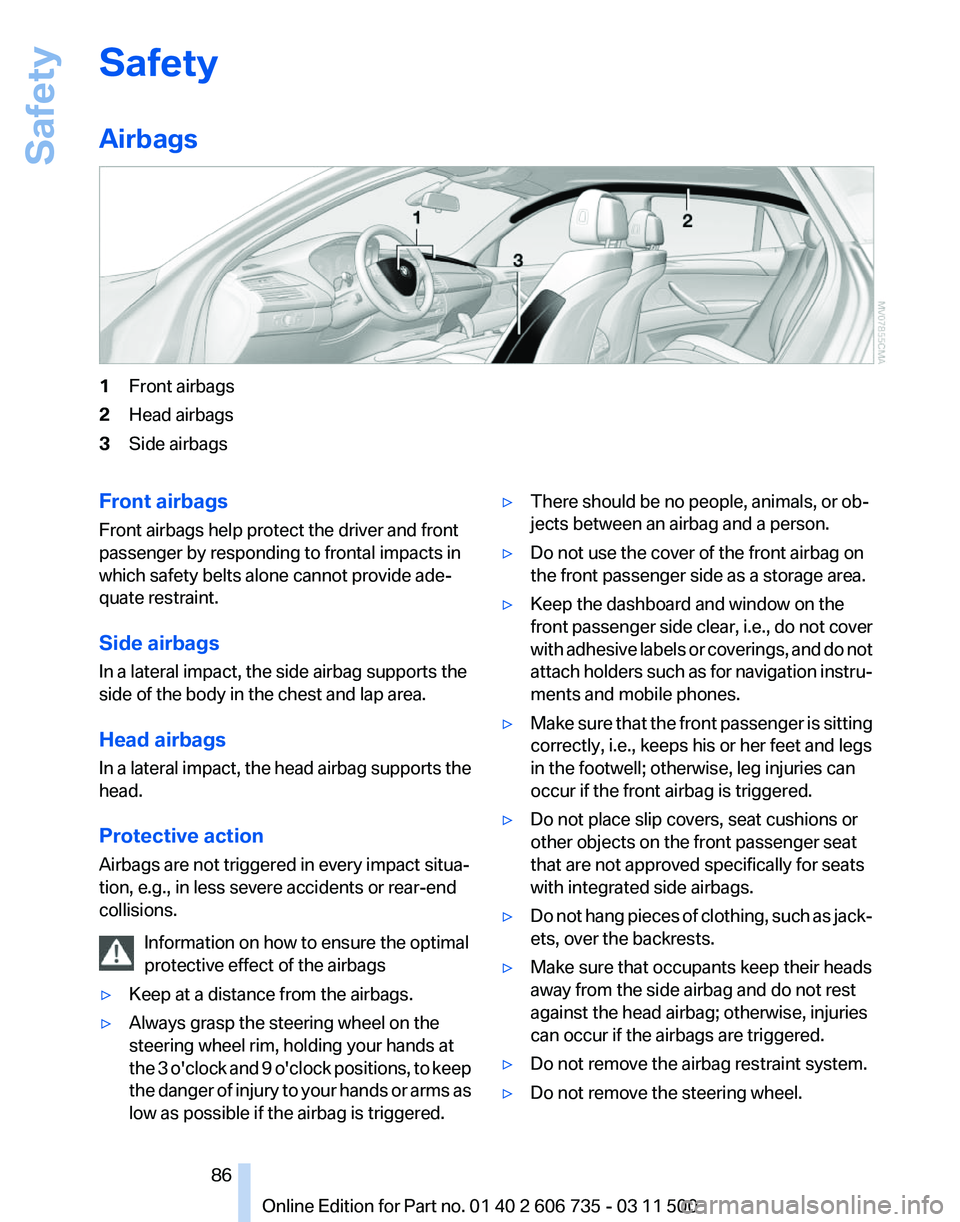
1
Front airbags
2 Head airbags
3 Side airbags
Front airbags
Front airbags help protect the driver and front
passenger by responding to frontal impacts in
which safety belts alone cannot provide ade‐
quate restraint.
Side airbags
In a lateral impact, the side airbag supports the
side of the body in the chest and lap area.
Head airbags
In
a lateral impact, the head airbag supports the
head.
Protective action
Airbags are not triggered in every impact situa‐
tion, e.g., in less severe accidents or rear-end
collisions.
Information on how to ensure the optimal
protective effect of the airbags
▷ Keep at a distance from the airbags.
▷ Always grasp the steering wheel on the
steering wheel rim, holding your hands at
the
3 o'clock and 9 o'clock positions, to keep
the danger of injury to your hands or arms as
low as possible if the airbag is triggered. ▷
There should be no people, animals, or ob‐
jects between an airbag and a person.
▷ Do not use the cover of the front airbag on
the front passenger side as a storage area.
▷ Keep the dashboard and window on the
front
passenger side clear, i.e., do not cover
with adhesive labels or coverings, and do not
attach holders such as for navigation instru‐
ments and mobile phones.
▷ Make sure that the front passenger is sitting
correctly, i.e., keeps his or her feet and legs
in the footwell; otherwise, leg injuries can
occur if the front airbag is triggered.
▷ Do not place slip covers, seat cushions or
other objects on the front passenger seat
that are not approved specifically for seats
with integrated side airbags.
▷ Do not hang pieces of clothing, such as jack‐
ets, over the backrests.
▷ Make sure that occupants keep their heads
away from the side airbag and do not rest
against the head airbag; otherwise, injuries
can occur if the airbags are triggered.
▷ Do not remove the airbag restraint system.
▷ Do not remove the steering wheel.
Seite 86
86 Online Edition for Part no. 01 40 2 606 735 - 03 11 500
Safety
Page 200 of 317
DVD system in rear*
General information
With the DVD system in the rear you can play
CDs
and DVDs with audio, video and image data.
The DVD system can also play data from at‐
tached external audio and video devices. Audio
output is possible both via headphones and via
the vehicle speakers.
You can control the DVD system using the but‐
tons on the CD-/DVD player or using the remote
control.
Some functions are operated using the remote
control.
Enabling DVD system
The DVD system can be enabled via iDrive.
1. "Settings"
2. "Allow rear control"
3. "Rear DVD system active" Controls
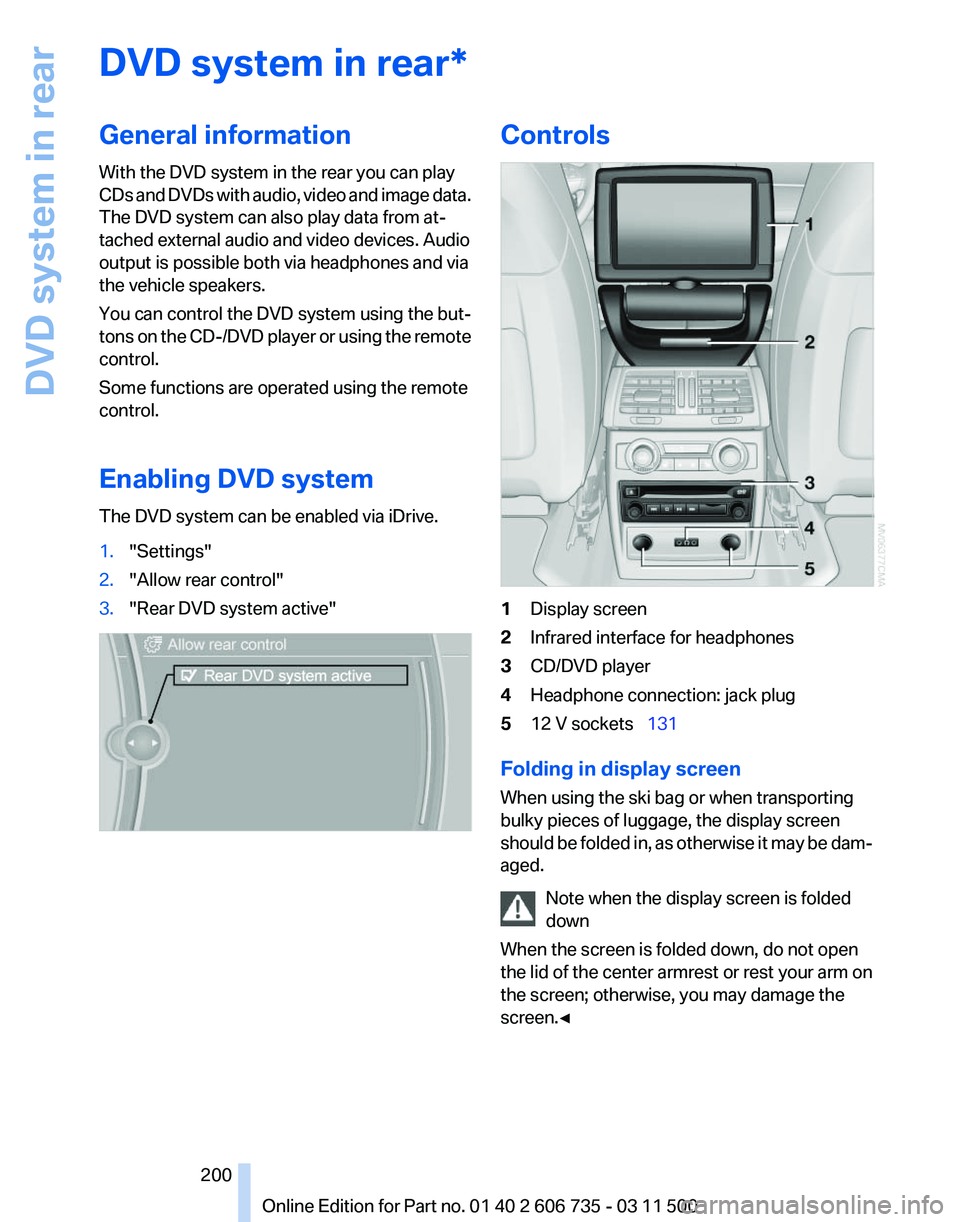
1
Display screen
2 Infrared interface for headphones
3 CD/DVD player
4 Headphone connection: jack plug
5 12 V sockets 131
Folding in display screen
When using the ski bag or when transporting
bulky pieces of luggage, the display screen
should
be folded in, as otherwise it may be dam‐
aged.
Note when the display screen is folded
down
When the screen is folded down, do not open
the lid of the center armrest or rest your arm on
the screen; otherwise, you may damage the
screen.◀ Seite 200
200 Online Edition for Part no. 01 40 2 606 735 - 03 11 500
DVD system in rear
Page 201 of 317
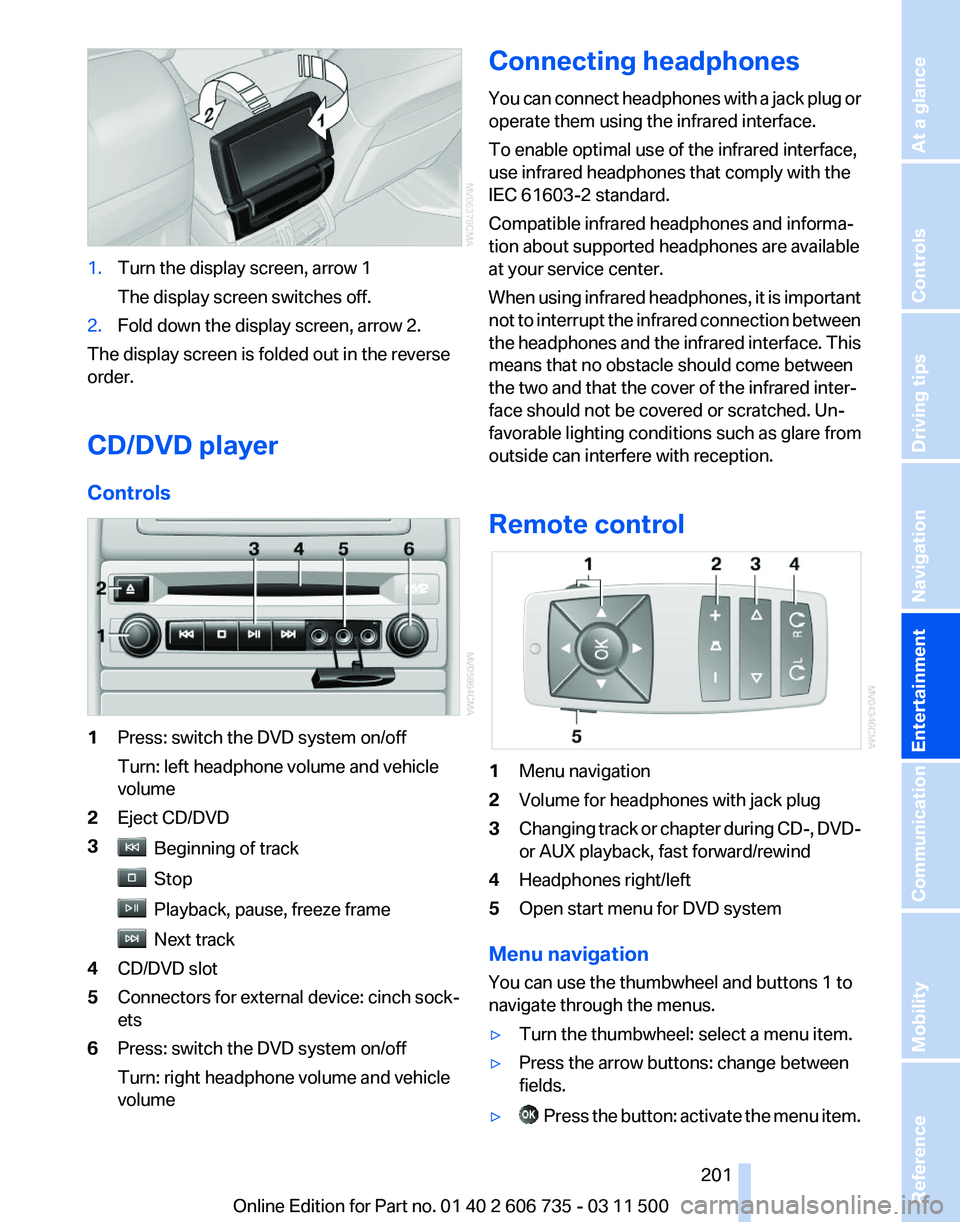
1.
Turn the display screen, arrow 1
The display screen switches off.
2. Fold down the display screen, arrow 2.
The display screen is folded out in the reverse
order.
CD/DVD player
Controls 1
Press: switch the DVD system on/off
Turn: left headphone volume and vehicle
volume
2 Eject CD/DVD
3 Beginning of track
Stop
Playback, pause, freeze frame
Next track
4 CD/DVD slot
5 Connectors for external device: cinch sock‐
ets
6 Press: switch the DVD system on/off
Turn: right headphone volume and vehicle
volume Connecting headphones
You
can connect headphones with a jack plug or
operate them using the infrared interface.
To enable optimal use of the infrared interface,
use infrared headphones that comply with the
IEC 61603-2 standard.
Compatible infrared headphones and informa‐
tion about supported headphones are available
at your service center.
When using infrared headphones, it is important
not to interrupt the infrared connection between
the headphones and the infrared interface. This
means that no obstacle should come between
the two and that the cover of the infrared inter‐
face should not be covered or scratched. Un‐
favorable lighting conditions such as glare from
outside can interfere with reception.
Remote control 1
Menu navigation
2 Volume for headphones with jack plug
3 Changing track or chapter during CD-, DVD-
or AUX playback, fast forward/rewind
4 Headphones right/left
5 Open start menu for DVD system
Menu navigation
You can use the thumbwheel and buttons 1 to
navigate through the menus.
▷ Turn the thumbwheel: select a menu item.
▷ Press the arrow buttons: change between
fields.
▷ Press the button: activate the menu item.
Seite 201
201Online Edition for Part no. 01 40 2 606 735 - 03 11 500
Reference Mobility Communication
Entertainment Navigation Driving tips Controls At a glance
Page 276 of 317

They do not need to be replaced immediately in
the event of a puncture.
When mounting new tires or changing from
summer
to winter tires or vice versa, use run-flat
tires for your own safety.
BMW X6: do not rotate the front wheels to the
rear or vice versa, as otherwise the handling
characteristics will be negatively affected.
The tools for changing wheels are available as
accessories from your service center.
Jacking points for the vehicle jack The jacking points for the vehicle jack are lo‐
cated in the positions shown.
Compact wheel*
Safety
precautions in the event of a flat tire
or wheel change
Park the vehicle as far as possible from passing
traffic and on solid ground. Switch on the hazard
warning system.
Set the parking brake and engage transmission
position P.
Have all vehicle occupants get out of the vehicle
and ensure that they remain outside the imme‐
diate area in a safe place, such as behind a
guardrail.
If a warning triangle or portable hazard warning
lamp* is required, set it up on the roadside at an
appropriate distance from the rear of the vehicle.
Comply with all safety guidelines and regula‐
tions. Change the wheel only on a level, firm surface
which is not slippery. The vehicle or the jack
could slip to the side if you attempt to raise the
vehicle on a soft or slippery surface such as
snow, ice, tiles, etc.
Position the jack on a firm support surface.
Do not use a wooden block or similar object as
a
support base for the jack, as this would prevent
it from extending to its full support height and
reduce its load-carrying capacity.
To avoid serious or fatal injury: never lie under
the vehicle, and never start the engine while it is
supported by the jack.◀
What you will need
To avoid rattling noises later on, note the posi‐
tions of the tools before removing them, then
return them to their initial positions after com‐
pleting work.
The tools are located in the mount under the
floor panel flap. 1
Vehicle jack*
2 Vehicle jack crank*
3 Lug bolts wrench*
Removing compact wheel
The compact wheel is located in the cargo area
under the floor panel.
Seite 276
276 Online Edition for Part no. 01 40 2 606 735 - 03 11 500
Replacing components
Page 277 of 317

1.
Remove the tool mount.
2. Release the wing nut 1.
3. Remove the washer 2 laterally.
4. Remove the compact wheel.
Preparing wheel change
1. Observe the safety precautions above.
2. Loosen the lug bolts a half turn.
Jacking up vehicle
1. Position the vehicle jack at the jacking point
closest to the wheel so that the entire sur‐
face of the jack base rests on the ground
perpendicularly beneath the jacking point.
The vehicle jack is designed for
changing wheels only.
The vehicle jack is designed for changing
wheels
only. Do not attempt to raise another
vehicle model with it or to raise any load of
any kind. To do so could cause accidents
and personal injury.◀ 2.
Guide the jack head into the rectangular re‐
cess of the jacking point when cranking up,
refer to illustration detail. 3.
Jack the vehicle up until the wheel you are
changing is raised from the ground.
Mounting a wheel
1. Unscrew the lug bolts and remove the
wheel.
2. Remove accumulations of mud or dirt from
the
mounting surfaces of the wheel and hub.
Also clean the lug bolts.
3. Position the new wheel or compact wheel.
Secure the wheel by screwing at least two
lug bolts into opposite bolt holes.
When
you mount wheels other than Genuine
BMW light-alloy wheels, different lug bolts
may also be required.
4. Screw in the remaining lug bolts. Tighten all
the bolts securely in a diagonal pattern.
5. Lower the vehicle and remove the jack from
beneath the vehicle.
After mounting
1. Tighten the lug bolts in a diagonal pattern.
Checking that the lug bolts are tight
To ensure safety, always have the lug
bolts checked with a calibrated torque
wrench as soon as possible to ensure that
they are tightened to the specified torque.
Otherwise, incorrectly tightened lug bolts
are a hidden safety risk. The tightening tor‐
que equals 101 lb ft/140 Nm.
◀ 2.
Stow the defective wheel in the cargo area.
Seite 277
277Online Edition for Part no. 01 40 2 606 735 - 03 11 500
Reference
Mobility Communication Entertainment Navigation Driving tips Controls At a glance
Page 308 of 317

High beams, indicator
lamp 15
High-pressure washers 285
Hill Descent Control HDC 98
Hill drive-off assistant, refer to Drive-off assistant 100
Hills 144
Holder for beverages 135
Holder for remote control, re‐ fer to Ignition lock 61
Homepage 6
Hood 264
Hood, opening 264
Horn 12
Hot exhaust system 142
Hotline 240
House number, entering for navigation 154
Hydraulic brake assistant 96
Hydroplaning 143
I
Ice warning, refer to External temperature warning 71
Icy roads, refer to External temperature warning 71
Identification marks, tires 258
iDrive 18
iDrive, changing settings 78
iDrive, changing the lan‐ guage 80
iDrive, changing the units of measure and display for‐
mat 80
iDrive, setting the bright‐ ness 80
iDrive, setting the date 79
iDrive, setting the time 79
Ignition 61
Ignition
key position 1, refer to
Radio ready state 61
Ignition key position 2, refer to Ignition on 61
Ignition key, refer to Remote control with integrated
key 28
Ignition lock 61 Ignition, switched off 61
Ignition, switched on 61
Images, displaying, rear DVD
system 208
Indication of a flat tire 89, 91
Indicator and warning lamps 15
Inflation pressure monitor, re‐ fer to Flat Tire Monitor 88
Inflation
pressure, refer to Tire
inflation pressure 252
Information on the navigation data 152
Initialization after power fail‐ ure 278
Initializing
– Compass, refer to Calibrat‐ ing 129
– Panoramic glass sunroof 43
Initializing, Flat Tire Monitor
FTM 89
Initializing, glass sunroof 44
Initializing, refer to Setting the date 79
Initializing, refer to Setting the time 79
Initializing,
Tire Pressure Mon‐
itor TPM 91
Installation location, tele‐ phone 134
Instrument cluster 14
Instrument lighting 84
Instrument panel, refer to In‐ strument cluster 14
Instruments, refer to Cock‐ pit 12
Integrated key 28
Integrated universal remote control 127
Interactive map 157
Interior equipment 127
Interior lamps 84
Interior lamps
– Remote control 30
Interior mirror 54
Interior rearview mirror, auto‐ matic dimming 55
Interior rearview mirror, com‐ pass 129 Interior temperature, setting,
automatic climate con‐
trol 119
Intermediate
destinations 159
Internet page 6
Intersection, entering for navi‐ gation 154
iPod/iPhone 193
J
Jacking points for the vehicle jack 276
Jack, refer to Vehicle jack 276
Joystick, refer to Selector lever 69
Jump-starting 281
K
Keyless Go, refer to Comfort Access 37
Keyless opening and closing, refer to Comfort Access 37
Key Memory, refer to Personal Profile 28
Key, refer to Integrated key/re‐ mote control 28
Kickdown
– Automatic transmission with Steptronic 69
Knocking control 248
L
Label, run-flat tire 261
Lamp and bulb replacement, lamp replacement 270
Lamps 81
Lamps, automatic headlamp control 81, 82
Lamps, High-beam Assis‐ tant 83
Lamps, parking lamps/low beams 81
Lamps, replacing, refer to Lamp and bulb replace‐
ment 270
Lane departure warning 93
Seite 308
308 Online Edition for Part no. 01 40 2 606 735 - 03 11 500
Everything from A to Z
Page 314 of 317

Units, average fuel consump‐
tion 80
Units, temperature 80
Universal garage door opener, refer to Integrated universal
remote control 127
Universal remote control 127
Unlocking
– From the outside 30
– Setting the unlocking char‐ acteristics 30
– Tailgate 38
– Without remote control, refer to Comfort Access 37
Unlocking, from the inside 33
Unlocking, hood 264
Updates made after the edito‐ rial deadline 6
Update, software 199
Upholstery care 286
Upper tailgate 33
Upper tailgate, automatic op‐ eration 34
Upper tailgate, closing 34
Upper
tailgate, emergency op‐
eration, refer to Opening
manually 34
Upper tailgate, opening from the inside 34
Upper tailgate, opening from the outside 34
Upper tailgate, opening man‐ ually 34
USB audio interface 193
V
Vacuum cleaner, connecting, refer to Connecting electrical
devices 131
Vehicle
– Identification number 216
– Identification number, refer to Engine compartment 263
Vehicle battery, changing 278
Vehicle, breaking in 142
Vehicle care 286
Vehicle care, refer to Care 285 Vehicle jack
276
Vehicle paint 286
Vehicle storage 287
Vehicle, switching off 62
Vehicle wash 285
Ventilation 123
Ventilation,
3rd row seats 123
Ventilation, automatic climate control in rear 125
Ventilation, draft-free 123
Ventilation, in rear 123
Ventilation, refer to Parked-car ventilation 125
Vents of automatic climate control 119
Version of the navigation data 152
Video playback 183
Video playback, iPhone 195
Video playback, snap-in adapter 195
Voice activation
– Navigation 158
Voice activation, mobile
phone 224
Voice activation, short com‐ mands 295
Voice activation system 24
Volume, setting 172
W
Warning and indicator lamps 15
Warning messages, refer to Check Control 76
Warning signal volumes 173
Warning triangle 281
Washer/wiper system 67
Washer/wiper system, rain sensor 67
Washer/wiper system, washer fluid 68
Washer/wiper system, wind‐ shield washer nozzles 68
Washer fluid 68
Washer fluid reservoir 68
Washing, vehicle 285 Waste tray, refer to Ash‐
tray 130
Water
on roads, refer to Driving
through water 143
Weights 292
Welcome lamps 81
Wheelbase, refer to Dimen‐ sions 291
Wheel change 275
Wheels and tires 252
Wheels, changing 260
Wheels, Flat Tire Monitor FTM 88
Wheels, Tire Pressure Monitor TPM 90
Width, refer to Dimen‐ sions 291
Window, convenient opera‐ tion 30
Windows
– Safety switch 41
Windows, defrosting and de‐
fogging, automatic climate
control 121
Windows,
pinch protection 41
Windshield, cleaning 67
Windshield, defrosting, refer to Defrosting windows 121
Windshield wash 67
Windshield washer fluid 68
Windshield wash, rear win‐ dow 68
Windshield wash, reservoir for washer fluid 68
Windshield wash, washer fluid 68
Windshield wash, washer noz‐ zles 68
Windshield wiper blades, changing 270
Windshield wiper, refer to Washer/wiper system 67
Winter diesel 249
Winter storage, care 287
Winter tires, setting the speed limit 78
Winter tires, suitable tires 261
Winter tires, tread 259
Wiper blades, changing 270
Seite 314
314 Online Edition for Part no. 01 40 2 606 735 - 03 11 500
Everything from A to Z