2012 BMW M6 CONVERTIBLE overheating
[x] Cancel search: overheatingPage 45 of 297

▷Vehicle system too low.▷Convertible top drive is overheating.▷Movement of the convertible top not al‐
lowed because of national regulations.▷Vehicle speed is too high.
Before opening and closing
▷Follow the safety instructions for the
convertible top.▷Make sure that the cargo area partition in the
cargo area is folded down.▷Make sure that the cargo does not push
against the cargo area partition from below.▷Make sure that the trunk lid is closed.
Convertible top switch
1Switch2LEDs
Opening and closing from the inside
In order to protect the battery, move the
convertible top only when the engine is running
if possible.
Before closing the convertible top, remove any
foreign objects from the windshield frame; oth‐
erwise, closing may be prevented.
▷Press and hold the switch. The
convertible top opens while the
switch is being pressed.▷Pull the switch and hold it. The
convertible top closes while the
switch is being pulled.Push or pull switch until the convertible top is
completely open or closed and the end of the
procedure is indicated by a corresponding
Check Control message. Always make sure that
the convertible top well storage cover is com‐
pletely closed. If the convertible top is com‐
pletely open or closed, convertible top and
convertible top well storage cover are latched.
The side windows and the rear window go down
when the convertible top control switch is pulled
or pushed.
LEDs▷Left LED lights up green: convertible top is
opened or closed. If the operation is com‐
pleted, the LED goes out and a correspond‐
ing Check Control message is displayed.▷Right LED flashes red after the switch is re‐
leased: operating sequence has not yet con‐
cluded.▷Right LED comes on red when the switch is
pulled: cargo area partition is flipped up,
trunk lid is not closed or there is a malfunc‐
tion. Convertible top cannot be moved.
In addition to the red LED, a check control mes‐
sage is displayed.
Interruption Always open/close the convertible top
completely
A convertible top that is not opened or closed
completely is not locked and represents a haz‐
ard.◀
The convertible top movement is interrupted if
the switch is released. The sequence can be
continued in the desired direction using the
switch.
If there is a longer interruption, convertible top
and convertible top well storage cover remain
approx. 10 minutes in the current position be‐
fore they slowly go down. The convertible top
and the convertible top well storage cover are
Seite 45Opening and closingControls45
Online Edition for Part no. 01 40 2 900 735 - 03 12 490
Page 72 of 297
6.If necessary, change the starting engine
speed by 500 rpm via cruise control.7.Release brake. When the selector lever is
released, the vehicle accelerates. Keep the
accelerator pedal depressed.
Upshifting occurs automatically as long as
the accelerator pedal is fully depressed.
Notes
Launch Control is available only after a certain
distance has been driven.
Did not use Launch Control during the break-in,
refer to page 142, period.
To maintain driving stability, always activate
DSC if possible.
Shift Lights
The concept
Shift Lights in the Head-Up Display indicate the
optimum shifting point in Sequential mode, refer
to page 69. Thus, with a sporty driving style, the
best possible vehicle acceleration is achieved.
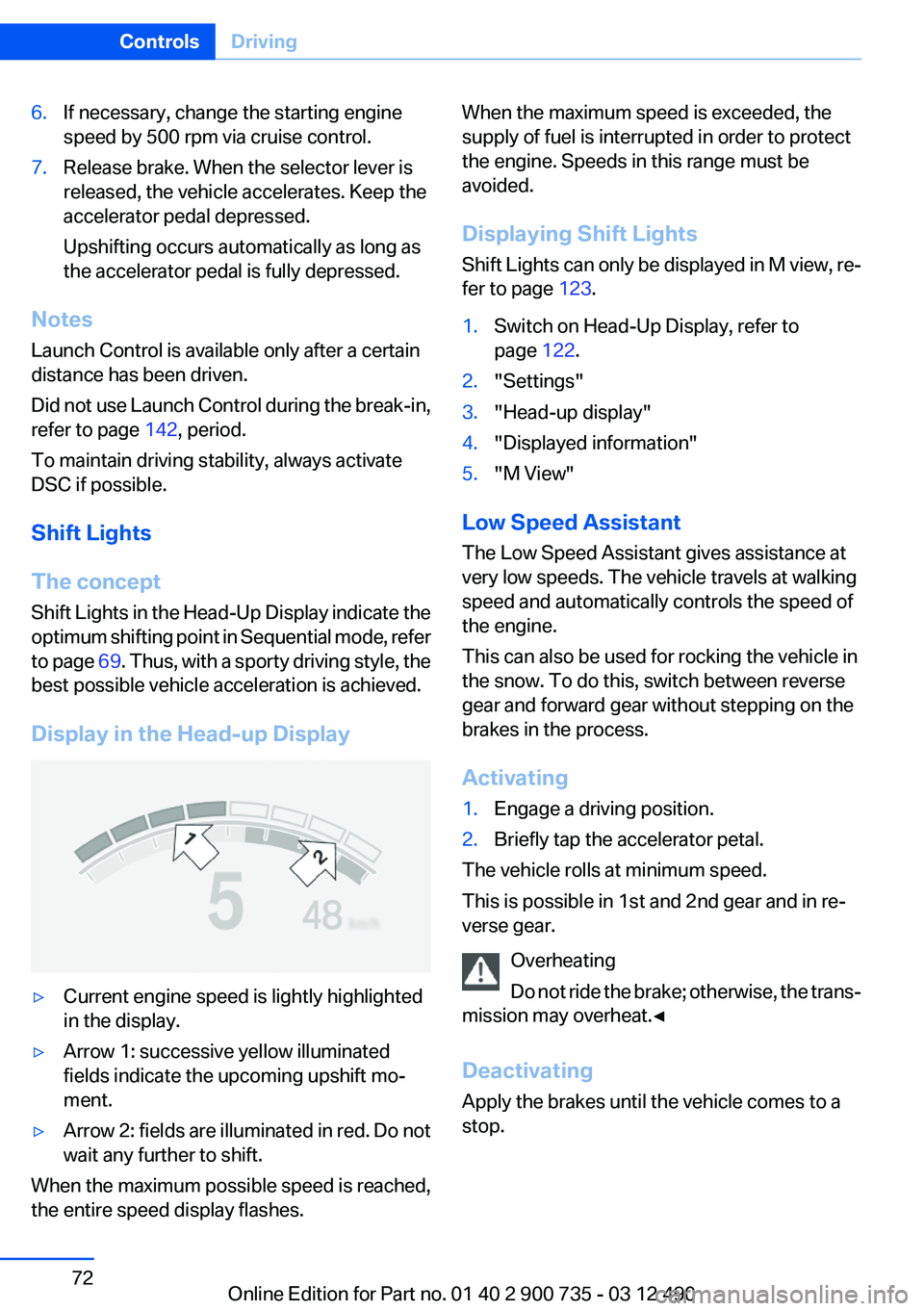
Display in the Head-up Display
▷Current engine speed is lightly highlighted
in the display.▷Arrow 1: successive yellow illuminated
fields indicate the upcoming upshift mo‐
ment.▷Arrow 2: fields are illuminated in red. Do not
wait any further to shift.
When the maximum possible speed is reached,
the entire speed display flashes.
When the maximum speed is exceeded, the
supply of fuel is interrupted in order to protect
the engine. Speeds in this range must be
avoided.
Displaying Shift Lights
Shift Lights can only be displayed in M view, re‐
fer to page 123.1.Switch on Head-Up Display, refer to
page 122.2."Settings"3."Head-up display"4."Displayed information"5."M View"
Low Speed Assistant
The Low Speed Assistant gives assistance at
very low speeds. The vehicle travels at walking
speed and automatically controls the speed of
the engine.
This can also be used for rocking the vehicle in
the snow. To do this, switch between reverse
gear and forward gear without stepping on the
brakes in the process.
Activating
1.Engage a driving position.2.Briefly tap the accelerator petal.
The vehicle rolls at minimum speed.
This is possible in 1st and 2nd gear and in re‐
verse gear.
Overheating
Do not ride the brake; otherwise, the trans‐
mission may overheat.◀
Deactivating
Apply the brakes until the vehicle comes to a
stop.
Seite 72ControlsDriving72
Online Edition for Part no. 01 40 2 900 735 - 03 12 490
Page 73 of 297

System limits
This transmission has an overheating protection
mechanism, which protects the clutch from ex‐
treme stress.▷Indicator lamp lights up yellow:
transmission too hot.
Avoid high engine stress and fre‐
quent starts.▷Indicator lamp lights up red: transmission is
overheating.
Further driving at a moderate pace is possi‐
ble. At the next opportunity, stop the car,
shut off the engine and allow the transmis‐
sion to cool down.
Avoid fast starts, and on inclines did not accel‐
erate lightly while letting the clutch slip; other‐
wise, the transmission may overheat.
During traffic jams or at very low speeds, use the
Low Speed Assistant, refer to page 72.
M Driving Dynamics Control
The concept
The M Driving Dynamics Control affects the re‐
sponse of the vehicle to accelerator pedal move‐
ments.
Programs
Response behavior options:
▷"Efficient": comfortable. Minimal fuel con‐
sumption.
Ideal e. g. in city traffic or on snow.▷"Sport": sporty, dynamic.▷"Sport Plus": spontaneous, direct. Maxi‐
mum dynamics.Selecting a channel
Via M Drive1."Settings"2."M Drive 1" or"M Drive 2"3. Select the symbol.4.Select the desired channel.
When M Drive is active, setting is immedi‐
ately applied.
To activate M Drive with the selected settings,
press the corresponding button on the steering
wheel:
▷▷
Using the button
Press button repeatedly until the desired
program is displayed in the instrument
cluster.
Display in the instrument cluster Engine Dynamics Control with selected
program with activated Display of the
system states of the driving dynamics,
refer to page 83.
Seite 73DrivingControls73
Online Edition for Part no. 01 40 2 900 735 - 03 12 490
Page 145 of 297

LoadingVehicle equipment
All standard, country-specific and optional
equipment that is offered in the model series is
described in this chapter. Therefore, equipment
is also described that is not available in a vehicle,
e. g., because of the selected optional equip‐
ment or country variant. This also applies for
safety-related functions and systems.
General information Overloading the vehicle
To avoid exceeding the approved carrying
capacity of the tires, never overload the vehicle.
Overloading can lead to overheating and in‐
creases the rate at which damage develops in‐
side the tires. This could result in a sudden loss
of tire inflation pressure.◀
No fluids in the trunk
Make sure that fluids do not leak into the
trunk; otherwise, the vehicle may be damaged. ◀
Determining the load limit1.Locate the following statement on your ve‐
hicle’s placard:▷The combined weight of occupants and
cargo should never exceed XXX kg or
YYY lbs. Otherwise, damage to the ve‐hicle and unstable driving situations may
result.2.Determine the combined weight of the
driver and passengers that will be riding in
your vehicle.3.Subtract the combined weight of the driver
and passengers from XXX kilograms or YYY
pounds.4.The resulting figure equals the available
amount of cargo and luggage load capacity.
For example, if the YYY amount equals
1,000 lbs and there will be four 150 lbs pas‐
sengers in your vehicle, the amount of avail‐
able cargo and luggage load capacity is
400 lbs: 1,000 lbs minus 600 lbs = 400 lbs.5.Determine the combined weight of luggage
and cargo being loaded on the vehicle. That
weight may not safely exceed the available
cargo and luggage load capacity calculated
in Step 4.
Load
The maximum load is the sum of the weight of
the occupants and the cargo.
The greater the weight of the occupants, the
less cargo that can be transported.
Seite 145LoadingDriving tips145
Online Edition for Part no. 01 40 2 900 735 - 03 12 490
Page 291 of 297

M
Maintenance 255
Maintenance require‐ ments 255
Maintenance, service require‐ ments 83
Maintenance system, BMW 255
Malfunction displays, refer to Check Control 78
Manual air distribution 126
Manual air volume 126
Manual brake, refer to Parking brake 67
Manual operation, backup camera 115
Manual operation, door lock 37
Manual operation, exterior mir‐ rors 58
Manual operation, fuel filler flap 238
Manual operation, Park Dis‐ tance Control PDC 113
Manual operation, Side View 119
Manual operation, Top View 117
Map, destination entry 157
Map in split screen 164
Map view 162
Marking on approved tires 245
Massage seat, front 53
Master key, refer to Remote control 30
Maximum cooling 127
Maximum speed, winter tires 246
M differential, active 108
MDM, M Dynamic Mode 107
M double-clutch transmis‐ sion 68
M Drive 59 M Driving Dynamics Con‐
trol 73
M Dynamic Mode MDM 107
Measure, units of 88
Medical kit 264
Memory for seat, mirrors, steering wheel 56
Menu in instrument cluster 84
Menus, operating, iDrive 16
Menus, refer to iDrive operat‐ ing concept 17
Message list, traffic bulle‐ tins 164
Messages 221
Messages, refer to Check Control 78
Microfilter 128
Minimum tread, tires 244
Mirror 57
Mirror memory 56
Mobile communication devi‐ ces in the vehicle 143
Mobile phone 206
Mobility System 246
Modifications, technical, refer to Safety 6
Moisture in headlamp 258
Monitor, refer to Control Dis‐ play 16
Mounting of child restraint fix‐ ing systems 61
MP3 player 195
M technology 0
Multifunction steering wheel, buttons 12
Multimedia 183
Music collection 190
Music search 191
Music, storing 190
M view, Head-up Display 123
N
Navigation 152
Navigation data 167 Neck restraints, front, refer to
Head restraints 55
New wheels and tires 245
Night Vision with pedestrian detection 119
Notes 224
Nylon rope for tow-starting/ towing 267
O
OBD Onboard Diagnos‐ tics 256
Obstacle marking, backup camera 116
Odometer 81
Office 218
Oil 252
Oil, adding 252
Oil additives 253
Oil change 253
Oil change interval, service re‐ quirements 83
Oil filler neck 252
Oil types, alternative 253
Oil types, approved 253
Old batteries, disposal 261
Onboard Diagnostics OBD 256
Onboard monitor, refer to Control Display 16
Onboard vehicle tool kit 257
Opening/closing from in‐ side 37
Opening/closing via door lock 37
Opening/closing with remote control 34
Operating concept, iDrive 16
Optional equipment, standard equipment 6
Outside air, refer to Automatic recirculated-air control 127
Overheating of engine, refer to Coolant temperature 81 Seite 291Everything from A to ZReference291
Online Edition for Part no. 01 40 2 900 735 - 03 12 490