2012 BMW ACTIVEHYBRID 5 turn signal bulb
[x] Cancel search: turn signal bulbPage 70 of 319
The indicator lamp lights up.
Automatic Hold is activated.
Deactivating Press the button again.
The LED and the letters AUTO H go
out.
Automatic Hold is deactivated.
If the vehicle is being held by Automatic Hold,
press on the brake pedal to deactivate it.
When the parking brake is set manually, Auto‐
matic Hold is deactivated automatically.
Driving
Automatic Hold is activated: the vehicle is auto‐
matically secured against rolling when it stops.
The indicator lamp lights up green.
Step on the accelerator pedal to drive
off.
The brake is released automatically.
The indicator lamp goes out.
Lower lamp: indicator lamp in Canadian models
Before driving into a car wash
Deactivate Automatic Hold; otherwise, the
parking brake will be set when the vehicle is sta‐
tionary and the vehicle will no longer be able to
roll.◀
Parking
The parking brake is automatically set if the en‐
gine is switched off while the vehicle is being
held by Automatic Hold.
The indicator lamp changes from green
to red.
The parking brake is not set if the engine
is switched off while the vehicle is coast‐
ing to a halt. Automatic Hold is deacti‐
vated.
Lower lamp: indicator lamp in Canadian modelsTake the remote control with you
Take the remote control with you when
leaving the vehicle so that children, for example,
cannot release the parking brake.◀
Malfunction
In the event of a failure or malfunction of the
parking brake, secure the vehicle against rolling
using a wheel chock, for example, when leaving
it.
Turn signal, high beams,
headlamp flasher
Turn signal
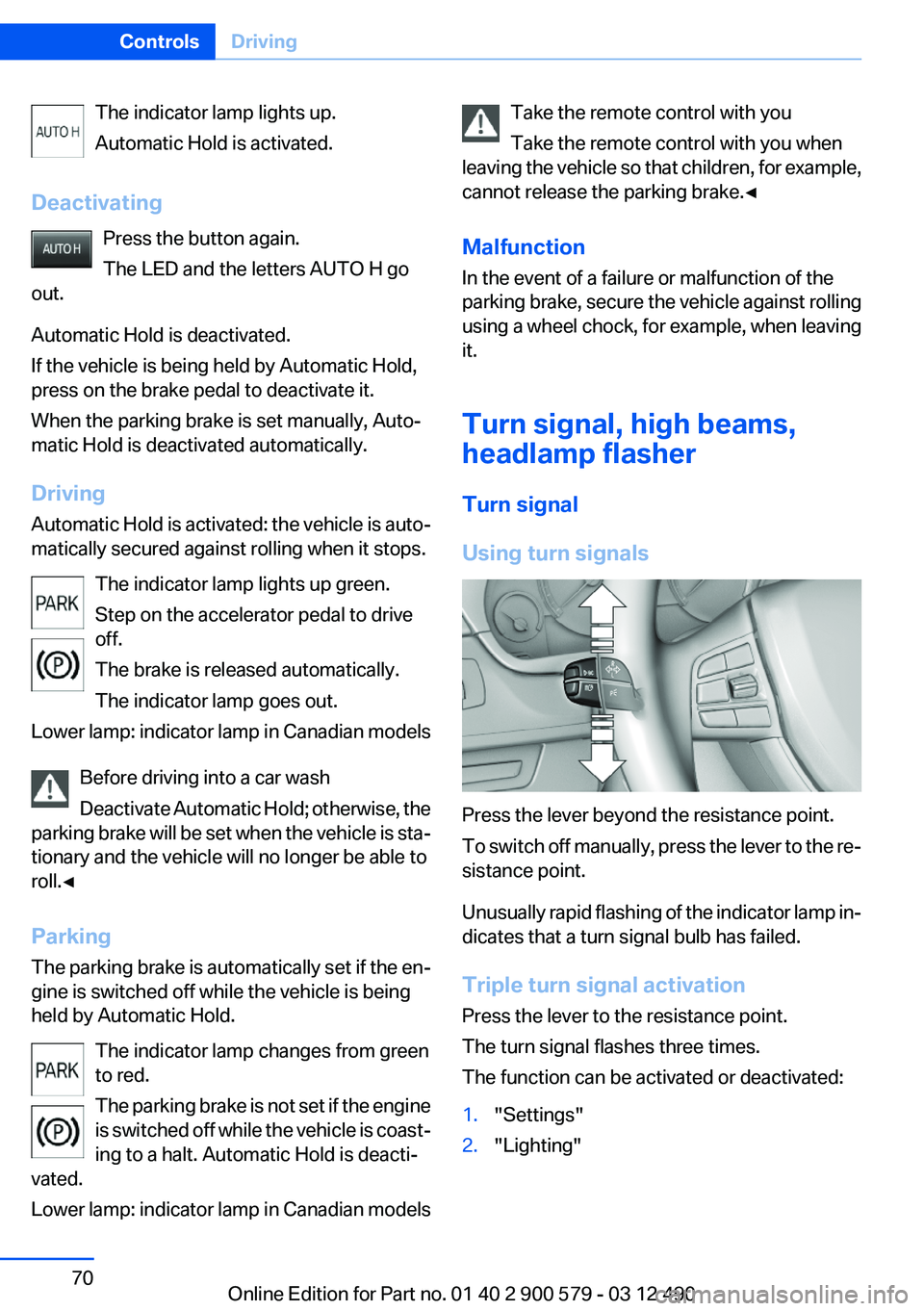
Using turn signals
Press the lever beyond the resistance point.
To switch off manually, press the lever to the re‐
sistance point.
Unusually rapid flashing of the indicator lamp in‐
dicates that a turn signal bulb has failed.
Triple turn signal activation
Press the lever to the resistance point.
The turn signal flashes three times.
The function can be activated or deactivated:
1."Settings"2."Lighting"Seite 70ControlsDriving70
Online Edition for Part no. 01 40 2 900 579 - 03 12 490
Page 276 of 319

Danger of burns
Only change bulbs when they are cool;
otherwise, there is the danger of getting
burned.◀
Working on the lighting system
When working on the lighting system, you
should always switch off the lights affected to
prevent short circuits.
To avoid possible injury or equipment damage
when replacing bulbs, observe any instructions
provided by the bulb manufacturer.◀
Do not perform work/bulb replacement on
xenon headlamps
Have any work on the xenon lighting system, in‐
cluding bulb replacement, performed only by a
service center. Due to the high voltage present
in the system, there is the danger of fatal injuries
if work is carried out improperly.◀
Do not touch the bulbs
Do not touch the glass of new bulbs with
your bare hands, as even minute amounts of
contamination will burn into the bulb's surface
and reduce its service life.
Use a clean tissue, cloth or something similar, or
hold the bulb by its base.◀
Light-emitting diodes (LEDs)
Light-emitting diodes installed behind a cover
serve as the light source for controls, display el‐
ements and other equipment.
These light-emitting diodes, which are related
to conventional lasers, are officially designated
as Class 1 light-emitting diodes.
Do not remove the covers
Do not remove the covers, and never stare
into the unfiltered light for several hours; other‐
wise, irritation of the retina could result.◀Headlamp glass
Condensation can form on the inside of the ex‐
ternal lamps in cool or humid weather. When
driving with the light switched on, the conden‐
sation evaporates after a short time. The head‐
lamp glasses do not need to be changed.
If the headlamps do not dim despite driving with
the light switched on, increasing humidity forms,
e. g. water droplets in the light, have the service
center check this.
Front lamps, bulb replacement
Halogen headlamps
At a glance1High beams2Parking lamps3Low beams4Turn signal
Low beams and high beams
Follow the general instructions on lamps and
bulbs, refer to page 275.
These lights feature LED technology.
Contact your service center in the event of a
malfunction.
Parking lamps and roadside parking lamps,
lateral turn signal lamp
Follow the general instructions on lamps and
bulbs, refer to page 275.
These lights feature LED technology.
Seite 276MobilityReplacing components276
Online Edition for Part no. 01 40 2 900 579 - 03 12 490
Page 277 of 319
Contact your service center in the event of a
malfunction.
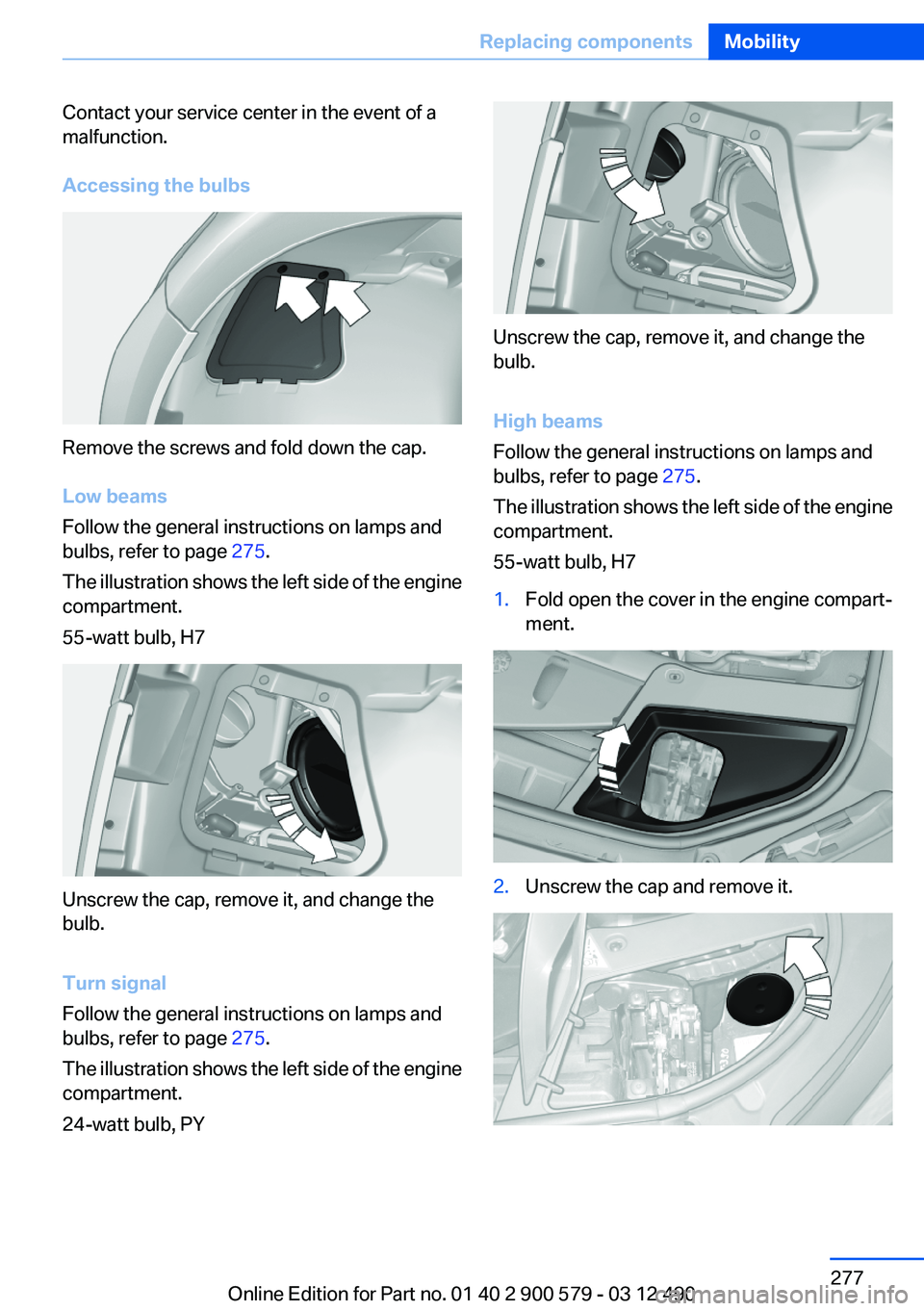
Accessing the bulbs
Remove the screws and fold down the cap.
Low beams
Follow the general instructions on lamps and
bulbs, refer to page 275.
The illustration shows the left side of the engine
compartment.
55-watt bulb, H7
Unscrew the cap, remove it, and change the
bulb.
Turn signal
Follow the general instructions on lamps and
bulbs, refer to page 275.
The illustration shows the left side of the engine
compartment.
24-watt bulb, PY
Unscrew the cap, remove it, and change the
bulb.
High beams
Follow the general instructions on lamps and
bulbs, refer to page 275.
The illustration shows the left side of the engine
compartment.
55-watt bulb, H7
1.Fold open the cover in the engine compart‐
ment.2.Unscrew the cap and remove it.Seite 277Replacing componentsMobility277
Online Edition for Part no. 01 40 2 900 579 - 03 12 490
Page 278 of 319

3.Unscrew the bulb holder counterclockwise.4.Remove the bulb and replace it.5.Insert the new bulb and attach the cover in
the reverse order.
Xenon headlamps
Because of the long life of these bulbs, the like‐
lihood of failure is very low. Switching the lamps
on and off frequently shortens their life.
If a xenon bulb fails, switch on the front fog lamps
and continue the trip with great care. Comply
with local regulations.
Do not perform work/bulb replacement on
xenon headlamps
Have any work on the xenon lighting system, in‐
cluding bulb replacement, performed only by a
service center. Due to the high voltage present
in the system, there is the danger of fatal injuries
if work is carried out improperly.◀
For checking and adjusting headlamp aim,
please contact your BMW center.
At a glance1Corner-illuminating lamps2Parking lamp, daytime running lights3Low beams/high beams4Turn signal
Parking lamps and roadside parking lamps,
turn signal lamp
Follow the general instructions on lamps and
bulbs, refer to page 275.
These lights feature LED technology.
Contact your service center in the event of a
malfunction.
Corner-illuminating lamps
Follow the general instructions on lamps and
bulbs, refer to page 275.
The illustration shows the left side of the engine
compartment.
Seite 278MobilityReplacing components278
Online Edition for Part no. 01 40 2 900 579 - 03 12 490
Page 279 of 319
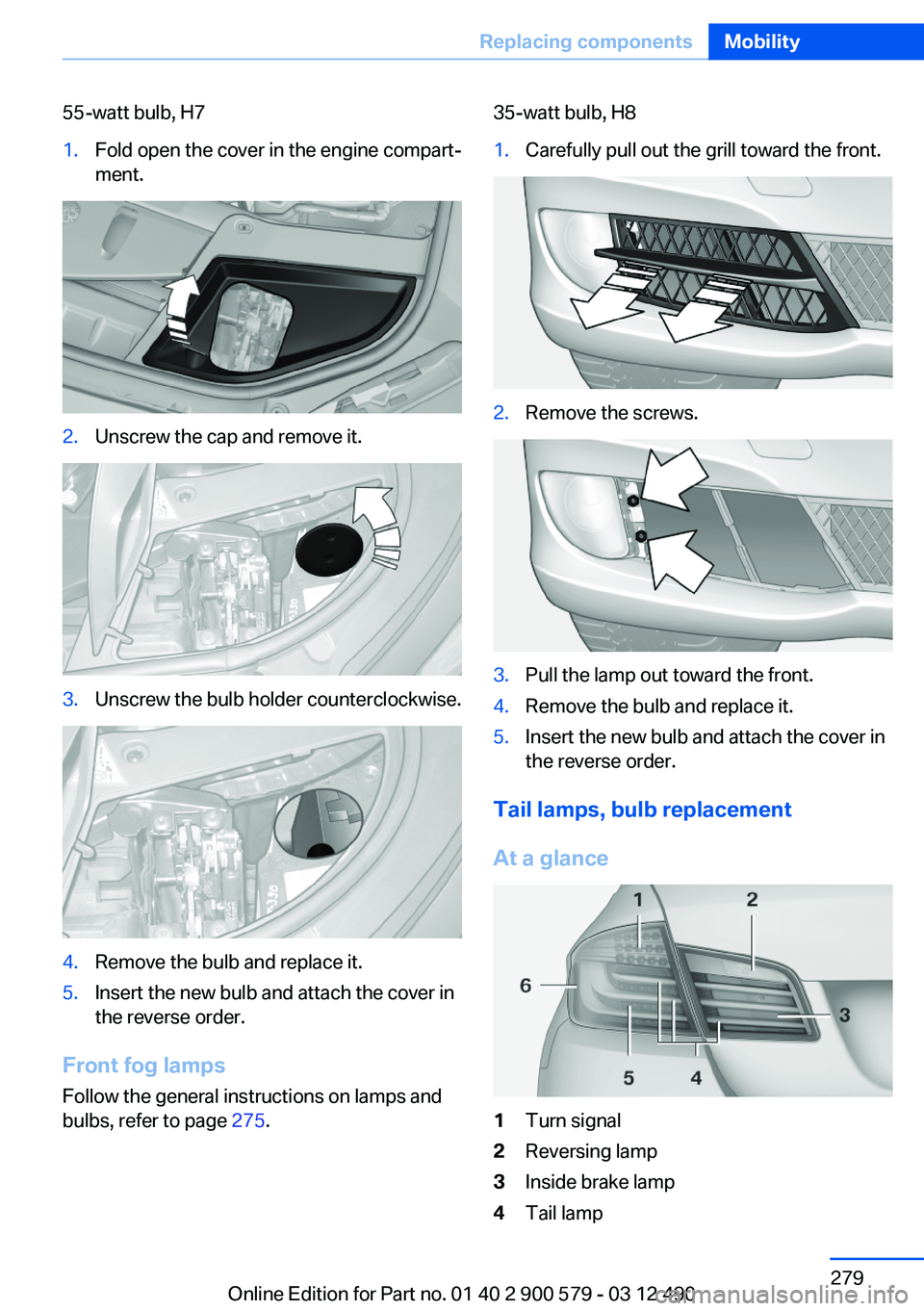
55-watt bulb, H71.Fold open the cover in the engine compart‐
ment.2.Unscrew the cap and remove it.3.Unscrew the bulb holder counterclockwise.4.Remove the bulb and replace it.5.Insert the new bulb and attach the cover in
the reverse order.
Front fog lamps
Follow the general instructions on lamps and
bulbs, refer to page 275.
35-watt bulb, H81.Carefully pull out the grill toward the front.2.Remove the screws.3.Pull the lamp out toward the front.4.Remove the bulb and replace it.5.Insert the new bulb and attach the cover in
the reverse order.
Tail lamps, bulb replacement
At a glance
1Turn signal2Reversing lamp3Inside brake lamp4Tail lampSeite 279Replacing componentsMobility279
Online Edition for Part no. 01 40 2 900 579 - 03 12 490
Page 280 of 319
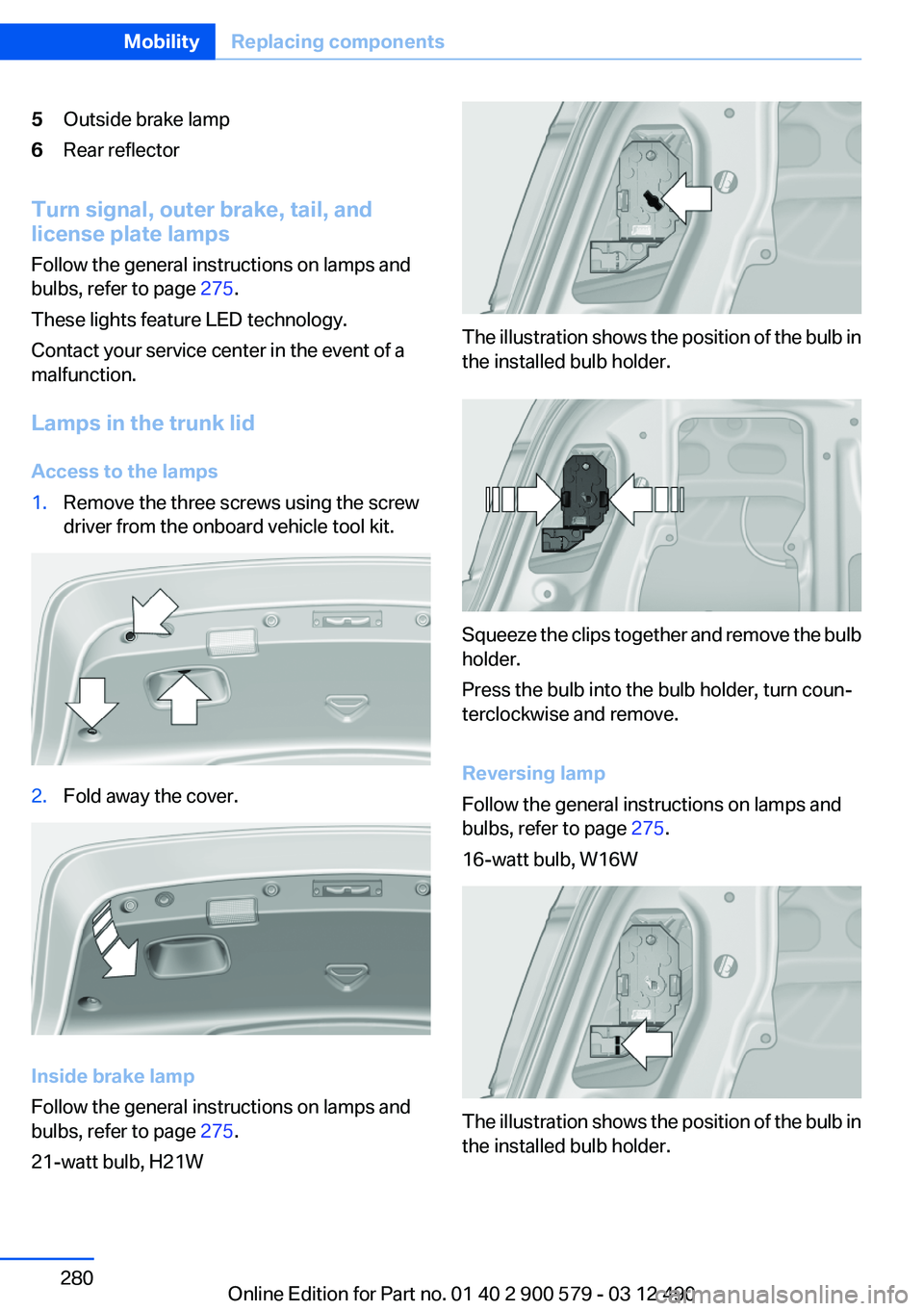
5Outside brake lamp6Rear reflector
Turn signal, outer brake, tail, and
license plate lamps
Follow the general instructions on lamps and
bulbs, refer to page 275.
These lights feature LED technology.
Contact your service center in the event of a
malfunction.
Lamps in the trunk lid
Access to the lamps
1.Remove the three screws using the screw
driver from the onboard vehicle tool kit.2.Fold away the cover.
Inside brake lamp
Follow the general instructions on lamps and
bulbs, refer to page 275.
21-watt bulb, H21W
The illustration shows the position of the bulb in
the installed bulb holder.
Squeeze the clips together and remove the bulb
holder.
Press the bulb into the bulb holder, turn coun‐
terclockwise and remove.
Reversing lamp
Follow the general instructions on lamps and
bulbs, refer to page 275.
16-watt bulb, W16W
The illustration shows the position of the bulb in
the installed bulb holder.
Seite 280MobilityReplacing components280
Online Edition for Part no. 01 40 2 900 579 - 03 12 490
Page 309 of 319

Bar for tow-starting/tow‐ing 286
Bass 186
Battery replacement, auxiliary air conditioning remote con‐
trol 138
Battery replacement, remote control for parked-car heat‐
ing/ventilation 140
Battery replacement, remote control, rear entertain‐
ment 218
Battery replacement, vehicle battery 281
Battery replacement, vehicle remote control 32
Battery, vehicle 281
Belts, safety belts 53
Beverage holder, cu‐ pholder 148
Blinds, sun protection 46
Bluetooth audio 212
Bluetooth connection, activat‐ ing/deactivating 227
BMW ActiveHybrid 27
BMW Assist 249
BMW Homepage 6
BMW Internet page 6
BMW Live 252
BMW Maintenance Sys‐ tem 273
BMW Search 251
Bottle holder, refer to Cu‐ pholder 148
Brake assistant 107
Brake discs, breaking in 154
Brake force display 105
Brake lamps, brake force dis‐ play 105
Brake lamps, bulb replace‐ ment 280
Brake lights, adaptive 105
Brake pads, breaking in 154
Braking, notes 157
Breakdown assis‐ tance 283, 284 Breaking in 154
Brightness of Control Dis‐ play 87
Bulb replacement 275
Bulb replacement, front 276
Bulb replacement, rear 279
Bulbs and lamps 275
Button, Start/Stop 64
Bypassing, refer to Jump- starting 284
C
Calendar 243
California Proposition 65 Warning 7
Camera, backup camera 118
Camera, care 292
Camera, Side View 121
Camera, Top View 120
Can holder, refer to Cu‐ pholder 148
Car battery 281
Car care products 290
Care, displays 292
Care, vehicle 290
Cargo 158
Cargo area lid 39
Cargo area, storage compart‐ ments 149
Cargo straps, securing cargo 159
Car key, refer to Remote con‐ trol 32
Carpet, care 291
Car wash 289
Catalytic converter, refer to Hot exhaust system 156
CBS Condition Based Serv‐ ice 273
CD/DVD 196
CD/DVD player, rear 217
CDs, storing 203
Cell phone 226
Center armrest 147
Center console 14 Central locking system 35
Central screen, refer to Control Display 16
Changes, technical, refer to Safety 7
Changing parts 275
Changing wheels 281
Changing wheels/tires 265
CHARGE, energy recovery 68
Charge indicator, high-voltage battery 81
Check Control 77
Children, seating position 60
Children, transporting safely 60
Child restraint fixing sys‐ tem 60
Child restraint fixing system LATCH 61
Child restraint fixing systems, mounting 60
Child safety locks 63
Child seat, mounting 60
Child seats 60
Chrome parts, care 291
Cigarette lighter 143
Cleaning, displays 292
Climate control 130
Climate control wind‐ shield 156
Clock 80
Closing/opening from in‐ side 39
Closing/opening via door lock 38
Closing/opening with remote control 36
Clothes hooks 149
Combination switch, refer to Turn signals 70
Combination switch, refer to Wiper system 71
Combustion engine, start‐ ing 66
COMFORT+ program, Driving Experience Switch 110 Seite 309Everything from A to ZReference309
Online Edition for Part no. 01 40 2 900 579 - 03 12 490
Page 316 of 319

Storage compartment, remotecontrol 149
Storage compartments 146
Storage compartments, loca‐ tions 146
Storage, tires 267
Storing the vehicle 292
Street, entering for naviga‐ tion 167
Summer tires, tread 265
Supplementary text mes‐ sage 78
Surround View 116
Suspension settings 109
Switch for Dynamic Driving Control 109
Switch-on times, parked-car heating 139
Switch-on times, parked-car ventilation 136
Switch, refer to Cockpit 12
Symbols 6
T
Tachometer 79
Tail and brake lamps 280
Tailgate 39
Tailgate, automatic 40
Tailgate, opening with no- touch activation 43
Tailgate via remote control 37
Tail lamps 279
Tail lamps, bulb replace‐ ment 280
Tasks 244
Technical changes, refer to Safety 7
Technical data 296
TeleServices 250
Temperature, automatic cli‐ mate control 131
Temperature display, external temperature 80
Temperature, engine oil 79
Terminal, jump-starting 285 Text messages 241
Text message, supplemen‐ tary 78
Theft alarm system, refer to Alarm system 44
Theft protection, refer to Cen‐ tral locking system 35
Thermal camera, refer to Night Vision 125
Tilt alarm sensor 45
Time of arrival 85
Tire damage 265
Tire identification marks 263
Tire inflation pressure 261
Tire inflation pressure monitor, refer to FTM 100
Tire Pressure Monitor TPM 97
Tires, changing 265
Tires, everything on wheels and tires 261
Tires, run-flat tires 267
Tire tread 265
Toll roads, route 174
Tone 186
Tools 275
Top View 119
Total vehicle weight 297
Tow fitting 287
Towing 286
Town/city, navigation 167
Tow-starting 286
TPM Tire Pressure Moni‐ tor 97
Traction control 108
Traffic bulletins, naviga‐ tion 178
Transmission, automatic 73
Transporting children safely 60
Tread, tires 265
Treble, tone 186
Trip computer 85
Triple turn signal activa‐ tion 70
Trip odometer 80 Trunk lid 39
Trunk lid, automatic 40
Trunk lid, emergency unlock‐ ing 42
Trunk lid, hotel function 41
Trunk lid, opening with no- touch activation 43
Trunk lid via remote con‐ trol 37
Turning circle 297
Turning circle lines, backup camera 117
Turn signals, operation 70
Turn signals, rear, bulb re‐ placement 280
U
Unintentional alarm 45
Units of measure 87
Universal remote control 141
Unlock button, automatic transmission 74
Unlocking/locking from in‐ side 39
Unlocking/locking via door lock 38
Unlocking/locking with remote control 36
Updates made after the edito‐ rial deadline 7
Updating software 215
Upholstery care 290
USB audio interface 209
USB interface 146
V
Vehicle battery 281
Vehicle battery, replacing 281
Vehicle, breaking in 154
Vehicle care 290
Vehicle equipment 6
Vehicle identification number, refer to Identification numberSeite 316ReferenceEverything from A to Z316
Online Edition for Part no. 01 40 2 900 579 - 03 12 490