2012 BMW ACTIVEHYBRID 5 tailgate
[x] Cancel search: tailgatePage 40 of 319

Opening from the outside▷Press the button on the trunk lid.▷Press the button on the remote
control for approx. 1 second.▷With Comfort Access the trunk lid opens
with no-touch activation, refer to page 43.
Opening from the inside
Push the button in the driver's footwell.
If the vehicle is stationary, the trunk lid opens if
it is not locked.
Closing
Recessed grips in the interior trim of the trunk
lid make it easier to pull down the lid.
Danger of pinching
Make sure that the closing path of the
trunk lid is clear; otherwise, injuries may result. ◀
Do not place the remote control in the
cargo area
Take the remote control with you and do not
leave it in the cargo area; otherwise, the remote
control is locked inside the vehicle when the
trunk lid is closed.◀
Locking the vehicle
Press the button on the inside of the trunk lid.
When the driver's door is closed, the vehicle is
completely locked.
Automatic tailgate operation
Opening
The trunk lid opens fully.
▷Press the button on the exterior of the trunk
lid.▷Press the button on the remote
control for approx. 1 second.▷Push the button in the driver's foot‐
well.
Pressing the button again stops the motion.
The opening procedure is likewise interrupted:
▷When starting the engine.▷When the vehicle starts moving.Seite 40ControlsOpening and closing40
Online Edition for Part no. 01 40 2 900 579 - 03 12 490
Page 155 of 319

Average energy recovery:
During a slight deceleration by
gently pressing the brake pedal.
Maximum energy recovery:
By pressing the brake pedal
harder.
Brake according to the situation
Brake in accordance with the traffic con‐
ditions, or there is the risk of accident.◀
Optimum energy recovery
As soon as the display shows the maximum en‐
ergy recovery, only press the brake pedal harder
if required by the situation.
Driving situation examples for energy
recovery
The following examples of situations which are
suitable for energy recovery:▷Coasting to a halt in front of traffic lights:
Avoid late or hard braking as much as pos‐
sible, for instance in front of a red light.
Instead, let the vehicle coast to a halt.
Driving situation examples for fuel
economy
In many driving situations, the hybrid system al‐
lows for a particularly efficient energy manage‐
ment.
▷Stop-and-go traffic:
The hybrid system switches the combus‐
tion engine off and on automatically.▷Driving with constant speed:
The electric motor relieves the combustion
engine periodically by also being switched
on.Discharge of the high-voltage battery
In normal operation, a sufficient charging of the
high-voltage battery is ensured by energy re‐
covery. Longer idle times can reduce the charge
of the high-voltage battery.
Do not allow a vehicle to sit idle for long
with a low charging state
Before storing the vehicle for an extended pe‐
riod, check the battery charge indicator to en‐
sure that the high-voltage battery is fully
charged. If necessary, charge the high-voltage
battery by driving the vehicle. Check the state of
charge after no more than three months have
passed and, if necessary, recharge the high-
voltage battery by driving the vehicle. Allowing
the high-voltage battery charge to drop too low
will damage the battery.◀
Fast charging
In exceptional cases it can be charged in place,
such as before extended idle phases in order to
prevent damage to the high-voltage battery.1.Starting the engine.2.Engage position P and set parking brake.3.Press and hold down brake pedal.4.Use the accelerator pedal to maintain an en‐
gine speed of approx. 2,000 rpm.
After a few minutes, the high-voltage battery is
fully charged again.
Use the battery charge indicator in the instru‐
ment cluster to check the charge status.
General driving notes
Closing the trunk lid Drive with the trunk lid closed
Only drive with the tailgate closed; other‐
wise, in the event of an accident or braking or
evasive maneuvers, passengers or other road
users may be injured or the vehicle may be dam‐
Seite 155Things to remember when drivingDriving tips155
Online Edition for Part no. 01 40 2 900 579 - 03 12 490
Page 156 of 319
aged. In addition, exhaust fumes may enter the
passenger compartment.◀
If driving with the tailgate open cannot be
avoided:▷Close all windows and the glass sunroof.▷Greatly increase the blower speed.▷Drive moderately.
Hot exhaust system
Hot exhaust system
High temperatures are generated in the
exhaust system.
Do not remove the heat shields installed and
never apply undercoating to them. When driv‐
ing, standing at idle and while parking, take care
to avoid possible contact between the hot ex‐
haust system and any highly flammable materi‐
als such as hay, leaves, grass, etc. Such contact
could lead to a fire, and with it the risk of serious
personal injury as well as property damage.
Do not touch hot exhaust pipes; otherwise, there
is the danger of getting burned.◀
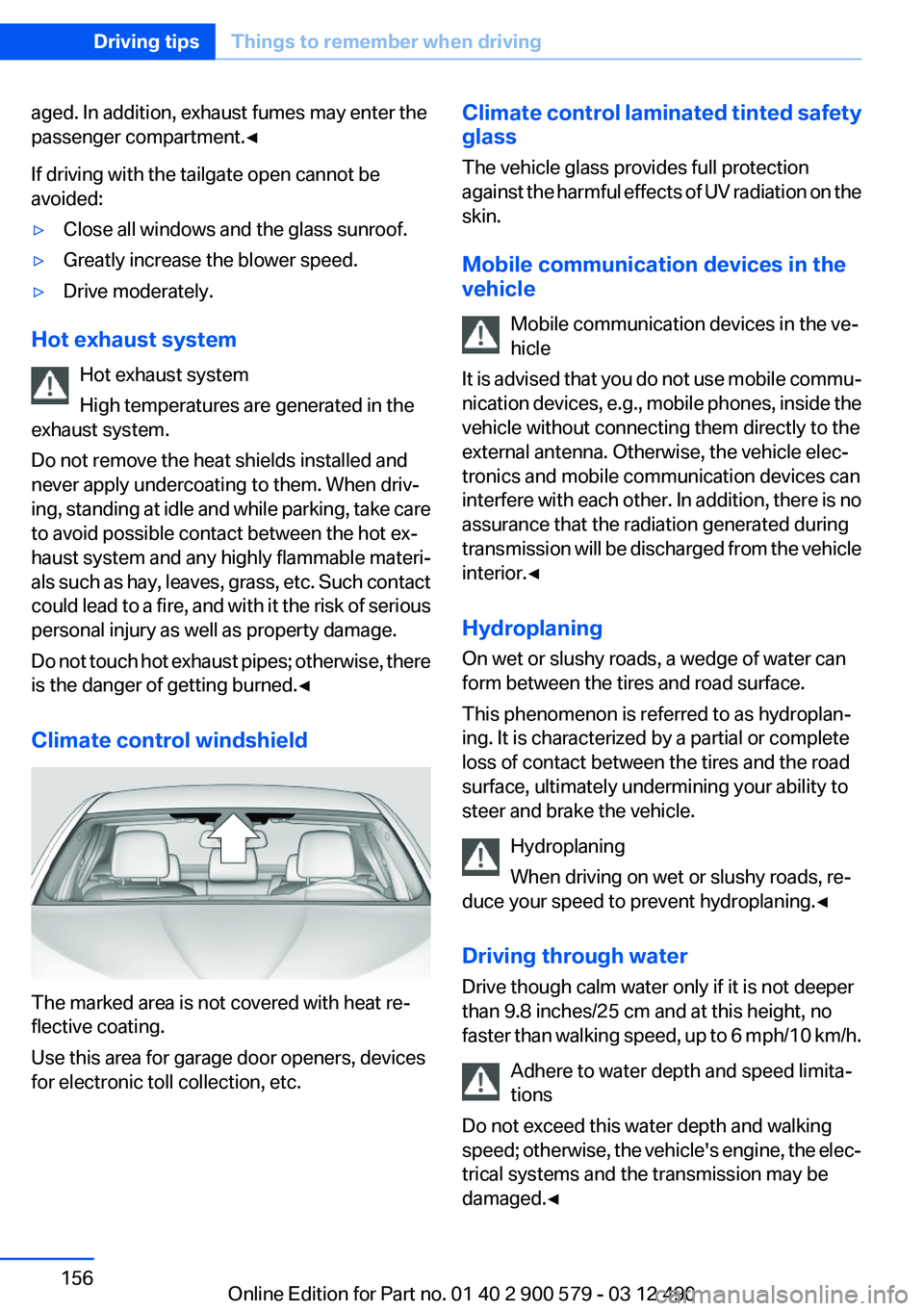
Climate control windshield
The marked area is not covered with heat re‐
flective coating.
Use this area for garage door openers, devices
for electronic toll collection, etc.
Climate control laminated tinted safety
glass
The vehicle glass provides full protection
against the harmful effects of UV radiation on the
skin.
Mobile communication devices in the
vehicle
Mobile communication devices in the ve‐
hicle
It is advised that you do not use mobile commu‐
nication devices, e.g., mobile phones, inside the
vehicle without connecting them directly to the
external antenna. Otherwise, the vehicle elec‐
tronics and mobile communication devices can
interfere with each other. In addition, there is no
assurance that the radiation generated during
transmission will be discharged from the vehicle
interior.◀
Hydroplaning
On wet or slushy roads, a wedge of water can
form between the tires and road surface.
This phenomenon is referred to as hydroplan‐
ing. It is characterized by a partial or complete
loss of contact between the tires and the road
surface, ultimately undermining your ability to
steer and brake the vehicle.
Hydroplaning
When driving on wet or slushy roads, re‐
duce your speed to prevent hydroplaning.◀
Driving through water
Drive though calm water only if it is not deeper
than 9.8 inches/25 cm and at this height, no
faster than walking speed, up to 6 mph/10 km/h.
Adhere to water depth and speed limita‐
tions
Do not exceed this water depth and walking
speed; otherwise, the vehicle's engine, the elec‐
trical systems and the transmission may be
damaged.◀Seite 156Driving tipsThings to remember when driving156
Online Edition for Part no. 01 40 2 900 579 - 03 12 490
Page 308 of 319

Everything from A to Z
IndexA
ABS, Antilock Brake Sys‐ tem 107
Activated-charcoal filter 133
Activate drive readiness 65
Active Blind Spot Detec‐ tion 104
ActiveHybrid, system 27
Active Protection 105
Active seat, front 51
Active seat ventilation, front 52
Adaptive brake lights, refer to Brake force display 105
Adaptive light control 91
Additional telephone 226
Additives, oil 271
Adjustments, seats/head re‐ straints 49
After washing vehicle 290
Airbags 94
Airbags, indicator/warning light 95
Air circulation, refer to Recir‐ culated-air mode 132
Air, dehumidifying, refer to Cooling function 132
Air distribution, manual 131
Air pressure, tires 261
Air vents, refer to Ventila‐ tion 133
Air volume, automatic climate control 131
Alarm system 44
Alarm, unintentional 45
All around the center con‐ sole 14
All around the headliner 15
All around the steering wheel 12 ALL program, automatic cli‐
mate control 132
All-season tires, refer to Win‐ ter tires 266
Alternating-code hand-held transmitter 142
Alternative oil types 271
AM/FM station 188
Announcement, navigation, refer to Spoken instruc‐
tions 176
Antifreeze, washer fluid 73
Antilock Brake System, ABS 107
Anti-slip control, refer to DSC 107
Applications 254
Appointments 243
Approved axle load 297
Approved engine oils 271
Apps 254
Apps, video playback 211
Armrest, refer to Center arm‐ rest 147
Arrival time 85
Ashtray 143
Ashtray, front 143
Ashtray, rear 144
Assistance for the combustion engine 68
Assistance, Roadside Assis‐ tance 284
Assistance when driving off 107
Assist, BMW 249
ASSIST, Hybrid system 68
Audio playback 197
Audio playback, Blue‐ tooth 212
AUTO H button, refer to Auto‐ matic Hold 69 AUTO intensity 131
Automatic car wash 289
Automatic climate con‐ trol 130
Automatic Curb Monitor 58
Automatic deactivation, front passenger airbags 96
Automatic deactivation of the hybrid system 287
Automatic engine start-stop function 66
Automatic headlamp con‐ trol 90
Automatic Hold 69
Automatic locking 39
Automatic recirculated-air control 132
Automatic Soft Closing, doors 39
Automatic tailgate 40
Automatic transmission with Steptronic 73
AUTO program, automatic cli‐ mate control 131
AUTO program, intensity 131
Auxiliary air conditioning 137
Auxiliary air conditioning/heat‐ ing system 136
AUX-IN port 208
Average fuel consumption 84
Average speed 84
Axle loads, weights 297
B
Backrest curvature, refer to Lumbar support 51
Backup camera 116
Balance 186
Band-Aids, refer to First aid kit 284 Seite 308ReferenceEverything from A to Z308
Online Edition for Part no. 01 40 2 900 579 - 03 12 490
Page 316 of 319

Storage compartment, remotecontrol 149
Storage compartments 146
Storage compartments, loca‐ tions 146
Storage, tires 267
Storing the vehicle 292
Street, entering for naviga‐ tion 167
Summer tires, tread 265
Supplementary text mes‐ sage 78
Surround View 116
Suspension settings 109
Switch for Dynamic Driving Control 109
Switch-on times, parked-car heating 139
Switch-on times, parked-car ventilation 136
Switch, refer to Cockpit 12
Symbols 6
T
Tachometer 79
Tail and brake lamps 280
Tailgate 39
Tailgate, automatic 40
Tailgate, opening with no- touch activation 43
Tailgate via remote control 37
Tail lamps 279
Tail lamps, bulb replace‐ ment 280
Tasks 244
Technical changes, refer to Safety 7
Technical data 296
TeleServices 250
Temperature, automatic cli‐ mate control 131
Temperature display, external temperature 80
Temperature, engine oil 79
Terminal, jump-starting 285 Text messages 241
Text message, supplemen‐ tary 78
Theft alarm system, refer to Alarm system 44
Theft protection, refer to Cen‐ tral locking system 35
Thermal camera, refer to Night Vision 125
Tilt alarm sensor 45
Time of arrival 85
Tire damage 265
Tire identification marks 263
Tire inflation pressure 261
Tire inflation pressure monitor, refer to FTM 100
Tire Pressure Monitor TPM 97
Tires, changing 265
Tires, everything on wheels and tires 261
Tires, run-flat tires 267
Tire tread 265
Toll roads, route 174
Tone 186
Tools 275
Top View 119
Total vehicle weight 297
Tow fitting 287
Towing 286
Town/city, navigation 167
Tow-starting 286
TPM Tire Pressure Moni‐ tor 97
Traction control 108
Traffic bulletins, naviga‐ tion 178
Transmission, automatic 73
Transporting children safely 60
Tread, tires 265
Treble, tone 186
Trip computer 85
Triple turn signal activa‐ tion 70
Trip odometer 80 Trunk lid 39
Trunk lid, automatic 40
Trunk lid, emergency unlock‐ ing 42
Trunk lid, hotel function 41
Trunk lid, opening with no- touch activation 43
Trunk lid via remote con‐ trol 37
Turning circle 297
Turning circle lines, backup camera 117
Turn signals, operation 70
Turn signals, rear, bulb re‐ placement 280
U
Unintentional alarm 45
Units of measure 87
Universal remote control 141
Unlock button, automatic transmission 74
Unlocking/locking from in‐ side 39
Unlocking/locking via door lock 38
Unlocking/locking with remote control 36
Updates made after the edito‐ rial deadline 7
Updating software 215
Upholstery care 290
USB audio interface 209
USB interface 146
V
Vehicle battery 281
Vehicle battery, replacing 281
Vehicle, breaking in 154
Vehicle care 290
Vehicle equipment 6
Vehicle identification number, refer to Identification numberSeite 316ReferenceEverything from A to Z316
Online Edition for Part no. 01 40 2 900 579 - 03 12 490