When the mobile phone is used via the vehicle,
heed the operating manual of the mobile phone.
Pairing/unpairing the mobile
phone
General information
The following functions are available:▷Use of a mobile phone as a telephone.▷Use of a mobile phone as an additional tele‐
phone.▷Use of a mobile phone as an audio source.▷Use of an audio device as an audio source.
Requirements
▷The mobile phone is suitable.▷The mobile phone is ready for operation.▷Bluetooth is activated in the vehicle and on
the mobile phone.▷Bluetooth presettings may need to be made
on the mobile phone, e.g., for a connection
without confirmation or visibility, refer to the
mobile phone operating instructions.▷Deactivate Bluetooth audio if necessary.▷A number with at least four and a maximum
of 16 digits was defined as the Bluetooth
passkey. It is only required once for pairing.▷The ignition is switched on.
Activating/deactivating Bluetooth
Bluetooth is not permitted everywhere. Comply
with all safety guidelines and regulations.
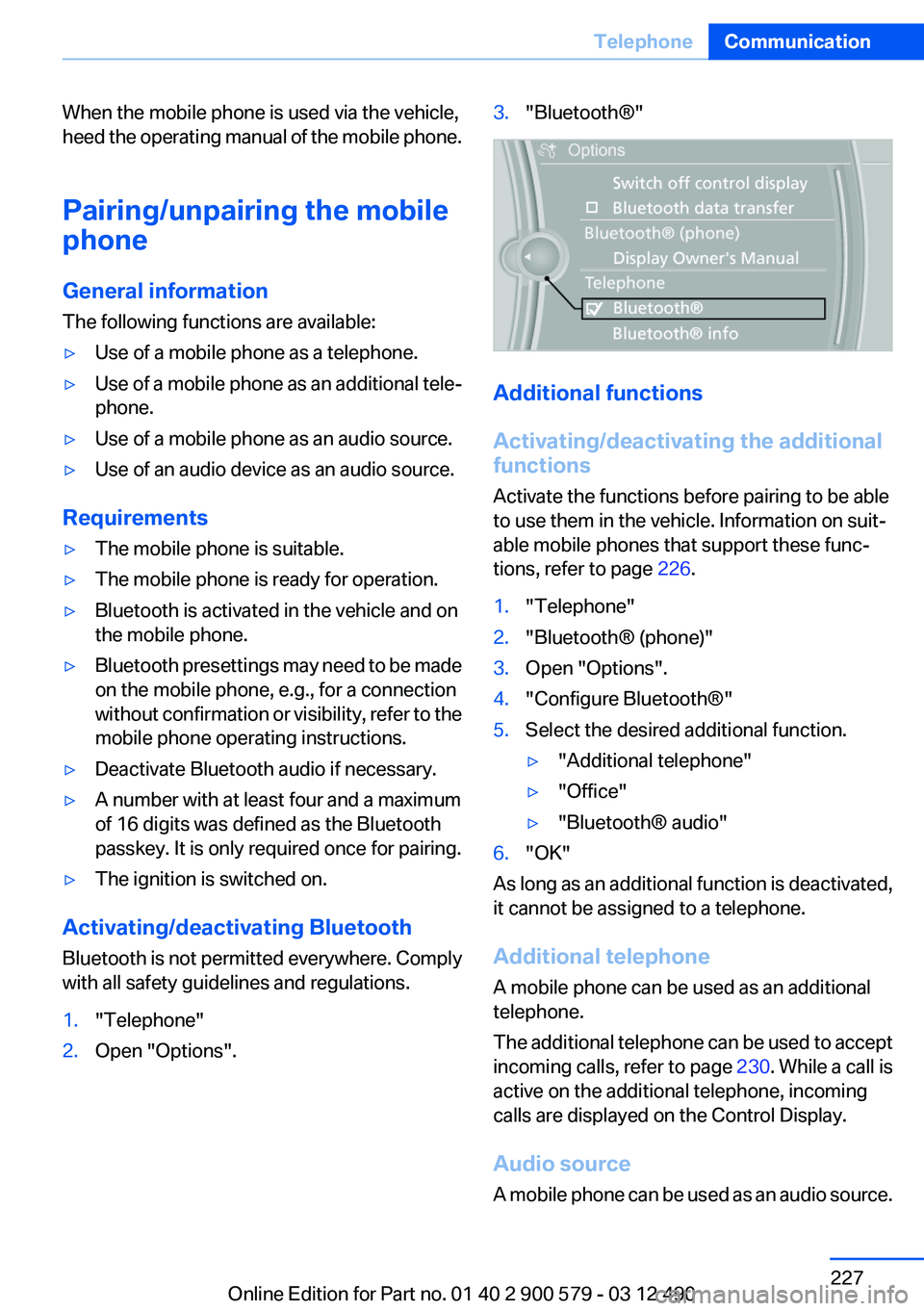
1."Telephone"2.Open "Options".3."Bluetooth®"
Additional functions
Activating/deactivating the additional
functions
Activate the functions before pairing to be able
to use them in the vehicle. Information on suit‐
able mobile phones that support these func‐
tions, refer to page 226.
1."Telephone"2."Bluetooth® (phone)"3.Open "Options".4."Configure Bluetooth®"5.Select the desired additional function.▷"Additional telephone"▷"Office"▷"Bluetooth® audio"6."OK"
As long as an additional function is deactivated,
it cannot be assigned to a telephone.
Additional telephone
A mobile phone can be used as an additional
telephone.
The additional telephone can be used to accept
incoming calls, refer to page 230. While a call is
active on the additional telephone, incoming
calls are displayed on the Control Display.
Audio source
A mobile phone can be used as an audio source.
Seite 227TelephoneCommunication227
Online Edition for Part no. 01 40 2 900 579 - 03 12 490
Deleting all entries1.›Delete phonebook‹
The dialog for deleting the phone book is
opened.2.Confirm the query with ›Yes‹.3.Confirm the query again with ›Yes‹.
Reading and selecting entries
1.›Read phonebook‹
The dialog for reading the phone book is
opened.2.Say ›Dial number‹ when the desired entry is
read.
Selecting an entry
1.›Dial name‹2.Say the name after being prompted to do so.3.Confirm the query with ›Yes‹.
Adjusting the volume
Turn the knob during an announcement.
▷The volume remains constant even if the
volume of other audio sources is changed.▷The volume is stored for the remote control
currently in use.
Notes
Do not use the voice operation to initiate an
Emergency Request. In stressful situations, the
voice and vocal pitch can change. This can un‐
necessarily delay the establishment of a tele‐
phone connection.
Instead, use the SOS button, refer to
page 283, in the vicinity of the interior mirror.
Environmental conditions
▷Say the commands, numbers, and letters
smoothly and with normal volume, empha‐
sis, and speed.▷Always say commands in the language of
the system. The language for the mobilephone voice operation is preset and cannot
be changed in the Control Display.▷Keep the doors, windows, and glass sun‐
roof closed to prevent noise interference.▷Avoid making other noise in the vehicle
while speaking.
Snap-in adapter
General information
Detailed information about snap-in adapters,
which support the functions of the mobile
phone, is available from the service center.
Notes
At high temperatures, the charge functions of
the mobile phone can be limited under certain
circumstances, and the functions are no longer
executed.
When the mobile phone is used via the vehicle,
heed the operating manual of the mobile phone.
Installation position
In the center armrest.
Inserting the snap-in adapter
1.Press the button and remove the cover.Seite 236CommunicationTelephone236
Online Edition for Part no. 01 40 2 900 579 - 03 12 490
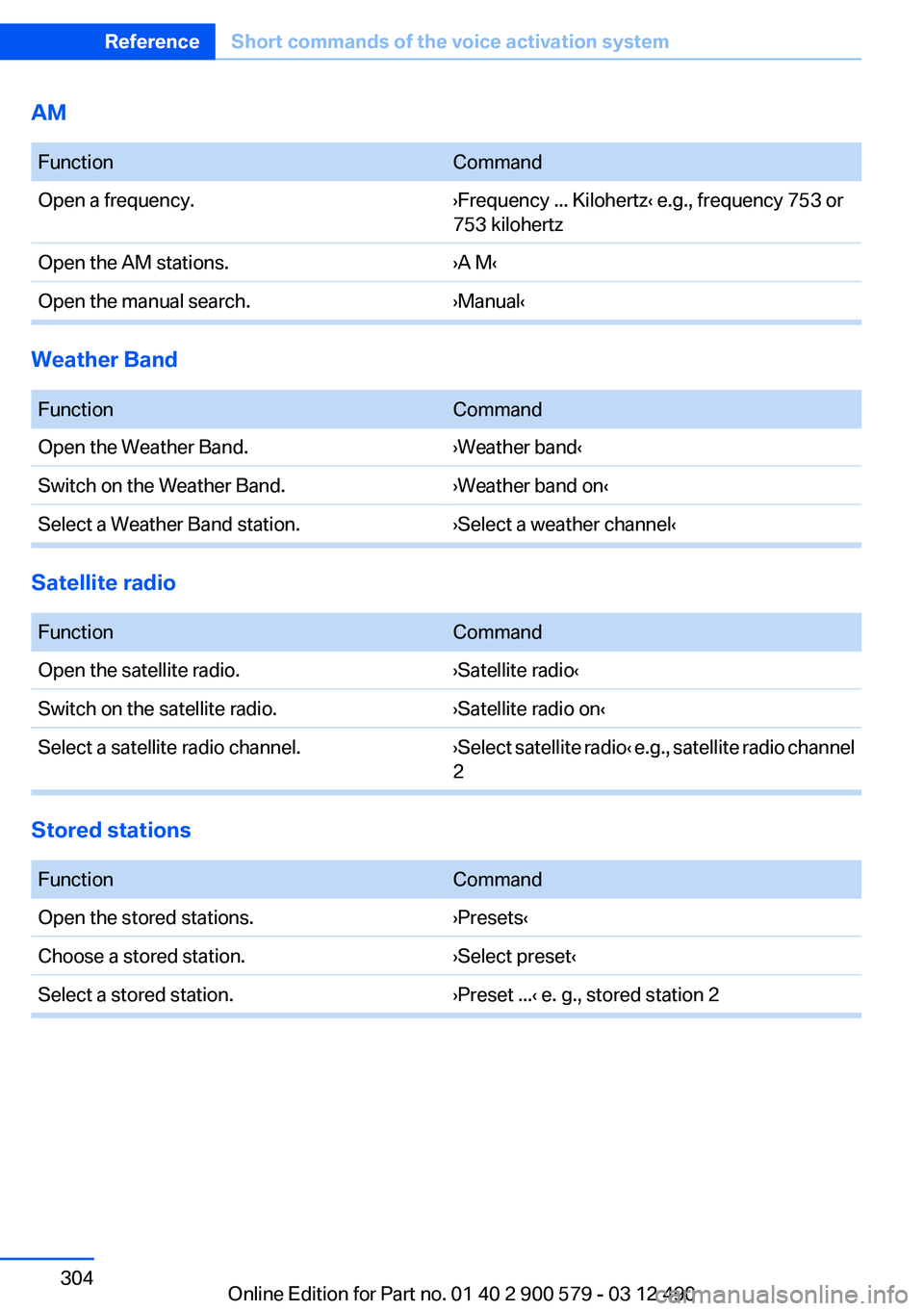
AM
FunctionCommandOpen a frequency.›Frequency ... Kilohertz‹ e.g., frequency 753 or
753 kilohertzOpen the AM stations.›A M‹Open the manual search.›Manual‹
Weather Band
FunctionCommandOpen the Weather Band.›Weather band‹Switch on the Weather Band.›Weather band on‹Select a Weather Band station.›Select a weather channel‹
Satellite radio
FunctionCommandOpen the satellite radio.›Satellite radio‹Switch on the satellite radio.›Satellite radio on‹Select a satellite radio channel.› Select satellite radio ‹ e.g., satellite radio channel
2
Stored stations
FunctionCommandOpen the stored stations.›Presets‹Choose a stored station.›Select preset‹Select a stored station.›Preset ...‹ e. g., stored station 2Seite 304ReferenceShort commands of the voice activation system304
Online Edition for Part no. 01 40 2 900 579 - 03 12 490
Oil change interval, service re‐quirements 82
Oil filler neck 270
Oil types, alternative 271
Oil types, approved 271
Old batteries, disposal 282
Onboard Diagnostics OBD 274
Onboard monitor, refer to Control Display 16
Onboard vehicle tool kit 275
Opening/closing from in‐ side 39
Opening/closing via door lock 38
Opening/closing with remote control 36
Operating concept, iDrive 16
Optional equipment, standard equipment 6
Outside air, refer to Automatic recirculated-air control 132
Overheating of engine, refer to Coolant temperature 80
P
Paint, vehicle 290
Pair mobile phone 227
Panic mode 37
Parallel parking assistant 121
Park Distance Control PDC 114
Parked-car heating 139
Parked-car ventilation 136
Parked vehicle, condensa‐ tion 157
Parking aid, refer to PDC 114
Parking assistant 121
Parking brake 68
Parking lamps 89
Parking with Auto Hold 69
Passenger side mirror, tilting downward 58
Pathway lines, backup cam‐ era 117 PDC Park Distance Con‐
trol 114
Pedestrian detection, refer to Night Vision 125
People detection, refer to Night Vision 125
Personal information 238
Personal Profile 33
Phone 226
Pinch protection system, glass sunroof 47
Pinch protection system, win‐ dows 46
Plastic, care 291
PlugIn 255
Position, storing 168
Postal code, entering in navi‐ gation 167
Power failure 282
Power sunroof, glass 47
Power windows 45
Pressure, tire air pres‐ sure 261
Pressure warning FTM, tires 100
Profile, refer to Personal Pro‐ file 33
Programmable memory but‐ tons, iDrive 20
Protective function, glass sun‐ roof 47
Protective function, win‐ dows 46
Push-and-turn switch, refer to Controller 16
R
Radiator fluid 272
Radio 188
Radio-operated key, refer to Remote control 32
Radio ready state 64
Rain sensor 72
Random 197
Random playback 197 RDS 189
Reading out loud 245
Rear automatic climate con‐ trol 134
Rear entertainment 217
Rear lamps 279
Rear socket 145
Rear source, selecting for rear entertainment 220
Rearview mirror 57
Rear window defroster 132
Recirculated-air mode 132
Recommended tire brands 266
Refueling 258
Remaining range 80
Reminders 245
Remote control/key 32
Remote control, auxiliary air conditioning 137
Remote control, auxiliary air conditioning, key 137
Remote control, malfunc‐ tion 38
Remote control, parked-car heating 140
Remote control, rear enter‐ tainment 218
Remote control, universal 141
Renaming a station 189
Replacement fuse 282
Replacing parts 275
Replacing wheels/tires 265
Reporting safety defects 8
Reserve warning, refer to Range 80
Reset, Tire Pressure Monitor TPM 98
Residual cooling 135
Residual heat, automatic cli‐ mate control 132
Retaining straps, securing cargo 159
Retreaded tires 266
Reversing lamp, bulb replace‐ ment 280 Seite 314ReferenceEverything from A to Z314
Online Edition for Part no. 01 40 2 900 579 - 03 12 490