2012 BMW ACTIVEHYBRID 5 seats
[x] Cancel search: seatsPage 146 of 319

Storage compartmentsVehicle equipment
All standard, country-specific and optional
equipment that is offered in the model series is
described in this chapter. Therefore, equipment
is also described that is not available in a vehicle,
e. g., because of the selected optional equip‐
ment or country variant. This also applies for
safety-related functions and systems.
Notes No loose objects in the passenger com‐
partment
Do not stow any objects in the passenger com‐
partment without securing them; otherwise,
they may present a danger to occupants for in‐
stance during braking and avoidance maneu‐
vers.◀
Do not place anti-slip mats on the dash‐
board
Do not place anti-slip mats on the dashboard.
The mat materials could damage the dash‐
board.◀
Storage compartments
The following storage compartments are avail‐
able in the vehicle interior:▷Glove compartment on the driver's and front
passenger side, refer to page 146.▷Storage compartment, refer to page 149, in
the center console for remote control: auto‐
matic transmission.▷Storage compartment in the center armrest,
refer to page 147, in the front and rear.▷Compartments in the doors.▷Pockets on the backrests of the front seats.▷Net in the front passenger footwell.Glove compartment
Front passenger side
Opening
Pull the handle.
The light in the glove compartment switches on.
Close the glove compartment again im‐
mediately
Close the glove compartment immediately after
use while driving; otherwise, injury may occur
during accidents.◀
Closing
Fold up the cover.
USB interface for data transfer
Connection for importing and exporting data on
USB devices, e.g.:
▷Personal Profile settings, refer to page 33.Seite 146ControlsStorage compartments146
Online Edition for Part no. 01 40 2 900 579 - 03 12 490
Page 147 of 319
▷Music collection, refer to page 203.
Observe the following when connecting:
▷Do not use force when plugging the con‐
nector into the USB interface.▷Do not connect devices such as fans or
lamps to the USB interface.▷Do not connect USB hard drives.▷Do not use the USB interface to recharge
external devices.
Driver's side
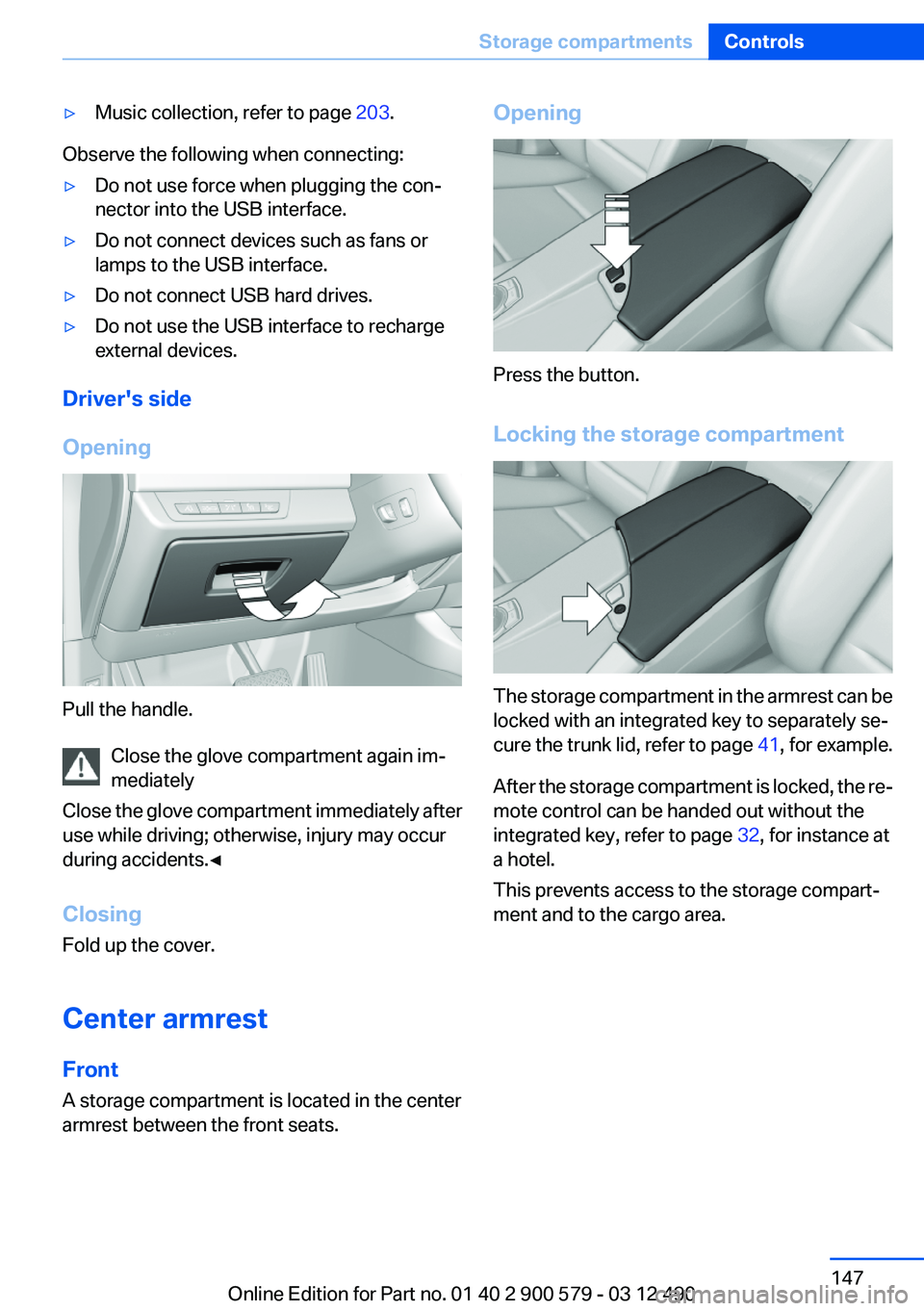
Opening
Pull the handle. Close the glove compartment again im‐
mediately
Close the glove compartment immediately after
use while driving; otherwise, injury may occur
during accidents.◀
Closing
Fold up the cover.
Center armrest
Front
A storage compartment is located in the center
armrest between the front seats.
Opening
Press the button.
Locking the storage compartment
The storage compartment in the armrest can be
locked with an integrated key to separately se‐
cure the trunk lid, refer to page 41, for example.
After the storage compartment is locked, the re‐
mote control can be handed out without the
integrated key, refer to page 32, for instance at
a hotel.
This prevents access to the storage compart‐
ment and to the cargo area.
Seite 147Storage compartmentsControls147
Online Edition for Part no. 01 40 2 900 579 - 03 12 490
Page 218 of 319

Notes▷Do not cover lower screen edge, since this
is where the sensors and the infrared inter‐
face are installed.▷When loading the rear seats and adjusting
the backrest of the front seat, fold in the
screens.▷When cleaning the screen, follow the care
instructions, refer to page 292.
Remote control
In the center armrest in the rear
Storage is possible in a horizontal position in the
center armrest.
Menu navigation
Press the but‐
tonFunctionOperating concept as for the
front controller.
Turn the wheel: highlight a
menu item.
Press the center knob: con‐
firm the selection.
Pressing arrow keys corre‐
sponds to moving controller:
switching between panels.Open the main menu.Press the but‐
tonFunctionDisplays the previous menu.Opens the "Options" menu.Changes the station, track or
chapter.
Press and hold the button:
fast forward/reverse.Adjusts the volume.Switches the volume adjust‐
ment to the left/right.
With Professional rear enter‐
tainment: Toggles between
the screens.
The transmission time of the remote control is
limited by law. To execute a function again,
press or turn the required button again.
Replacing the batteries No rechargeable batteries
Do not use rechargeable batteries, as
damage may result from the substances in the
batteries.◀
1.Remove the cover. Press on the cover, ar‐
row 1, and push forward, arrow 2.2.Insert batteries of the same type.3.Close the cover.Seite 218EntertainmentRear entertainment218
Online Edition for Part no. 01 40 2 900 579 - 03 12 490
Page 308 of 319

Everything from A to Z
IndexA
ABS, Antilock Brake Sys‐ tem 107
Activated-charcoal filter 133
Activate drive readiness 65
Active Blind Spot Detec‐ tion 104
ActiveHybrid, system 27
Active Protection 105
Active seat, front 51
Active seat ventilation, front 52
Adaptive brake lights, refer to Brake force display 105
Adaptive light control 91
Additional telephone 226
Additives, oil 271
Adjustments, seats/head re‐ straints 49
After washing vehicle 290
Airbags 94
Airbags, indicator/warning light 95
Air circulation, refer to Recir‐ culated-air mode 132
Air, dehumidifying, refer to Cooling function 132
Air distribution, manual 131
Air pressure, tires 261
Air vents, refer to Ventila‐ tion 133
Air volume, automatic climate control 131
Alarm system 44
Alarm, unintentional 45
All around the center con‐ sole 14
All around the headliner 15
All around the steering wheel 12 ALL program, automatic cli‐
mate control 132
All-season tires, refer to Win‐ ter tires 266
Alternating-code hand-held transmitter 142
Alternative oil types 271
AM/FM station 188
Announcement, navigation, refer to Spoken instruc‐
tions 176
Antifreeze, washer fluid 73
Antilock Brake System, ABS 107
Anti-slip control, refer to DSC 107
Applications 254
Appointments 243
Approved axle load 297
Approved engine oils 271
Apps 254
Apps, video playback 211
Armrest, refer to Center arm‐ rest 147
Arrival time 85
Ashtray 143
Ashtray, front 143
Ashtray, rear 144
Assistance for the combustion engine 68
Assistance, Roadside Assis‐ tance 284
Assistance when driving off 107
Assist, BMW 249
ASSIST, Hybrid system 68
Audio playback 197
Audio playback, Blue‐ tooth 212
AUTO H button, refer to Auto‐ matic Hold 69 AUTO intensity 131
Automatic car wash 289
Automatic climate con‐ trol 130
Automatic Curb Monitor 58
Automatic deactivation, front passenger airbags 96
Automatic deactivation of the hybrid system 287
Automatic engine start-stop function 66
Automatic headlamp con‐ trol 90
Automatic Hold 69
Automatic locking 39
Automatic recirculated-air control 132
Automatic Soft Closing, doors 39
Automatic tailgate 40
Automatic transmission with Steptronic 73
AUTO program, automatic cli‐ mate control 131
AUTO program, intensity 131
Auxiliary air conditioning 137
Auxiliary air conditioning/heat‐ ing system 136
AUX-IN port 208
Average fuel consumption 84
Average speed 84
Axle loads, weights 297
B
Backrest curvature, refer to Lumbar support 51
Backup camera 116
Balance 186
Band-Aids, refer to First aid kit 284 Seite 308ReferenceEverything from A to Z308
Online Edition for Part no. 01 40 2 900 579 - 03 12 490
Page 309 of 319

Bar for tow-starting/tow‐ing 286
Bass 186
Battery replacement, auxiliary air conditioning remote con‐
trol 138
Battery replacement, remote control for parked-car heat‐
ing/ventilation 140
Battery replacement, remote control, rear entertain‐
ment 218
Battery replacement, vehicle battery 281
Battery replacement, vehicle remote control 32
Battery, vehicle 281
Belts, safety belts 53
Beverage holder, cu‐ pholder 148
Blinds, sun protection 46
Bluetooth audio 212
Bluetooth connection, activat‐ ing/deactivating 227
BMW ActiveHybrid 27
BMW Assist 249
BMW Homepage 6
BMW Internet page 6
BMW Live 252
BMW Maintenance Sys‐ tem 273
BMW Search 251
Bottle holder, refer to Cu‐ pholder 148
Brake assistant 107
Brake discs, breaking in 154
Brake force display 105
Brake lamps, brake force dis‐ play 105
Brake lamps, bulb replace‐ ment 280
Brake lights, adaptive 105
Brake pads, breaking in 154
Braking, notes 157
Breakdown assis‐ tance 283, 284 Breaking in 154
Brightness of Control Dis‐ play 87
Bulb replacement 275
Bulb replacement, front 276
Bulb replacement, rear 279
Bulbs and lamps 275
Button, Start/Stop 64
Bypassing, refer to Jump- starting 284
C
Calendar 243
California Proposition 65 Warning 7
Camera, backup camera 118
Camera, care 292
Camera, Side View 121
Camera, Top View 120
Can holder, refer to Cu‐ pholder 148
Car battery 281
Car care products 290
Care, displays 292
Care, vehicle 290
Cargo 158
Cargo area lid 39
Cargo area, storage compart‐ ments 149
Cargo straps, securing cargo 159
Car key, refer to Remote con‐ trol 32
Carpet, care 291
Car wash 289
Catalytic converter, refer to Hot exhaust system 156
CBS Condition Based Serv‐ ice 273
CD/DVD 196
CD/DVD player, rear 217
CDs, storing 203
Cell phone 226
Center armrest 147
Center console 14 Central locking system 35
Central screen, refer to Control Display 16
Changes, technical, refer to Safety 7
Changing parts 275
Changing wheels 281
Changing wheels/tires 265
CHARGE, energy recovery 68
Charge indicator, high-voltage battery 81
Check Control 77
Children, seating position 60
Children, transporting safely 60
Child restraint fixing sys‐ tem 60
Child restraint fixing system LATCH 61
Child restraint fixing systems, mounting 60
Child safety locks 63
Child seat, mounting 60
Child seats 60
Chrome parts, care 291
Cigarette lighter 143
Cleaning, displays 292
Climate control 130
Climate control wind‐ shield 156
Clock 80
Closing/opening from in‐ side 39
Closing/opening via door lock 38
Closing/opening with remote control 36
Clothes hooks 149
Combination switch, refer to Turn signals 70
Combination switch, refer to Wiper system 71
Combustion engine, start‐ ing 66
COMFORT+ program, Driving Experience Switch 110 Seite 309Everything from A to ZReference309
Online Edition for Part no. 01 40 2 900 579 - 03 12 490
Page 315 of 319

Roadside Assistance 250
Roadside parking lamps 90
Roller sunblinds 46
Roof load capacity 297
Roof-mounted luggage rack 159
Rope for tow-starting/tow‐ ing 286
Route 175
Route criteria, route 174
Route, displaying 175
Routes, avoiding 174
Route section, bypassing 175
RSC Run Flat System Compo‐ nent, refer to Run-flat
tires 267
Rubber components, care 291
Run-flat tires 267
S
Safe braking 157
Safety 7
Safety belt reminder for driv‐ er's seat and front passenger
seat 54
Safety belts 53
Safety belts, care 291
Safety of the hybrid sys‐ tem 287
Safety Package, refer to Active Protection 105
Safety switch, windows 46
Safety systems, airbags 94
Satellite radio 190
Saving fuel 0
Scale, changing during navi‐ gation 177
Screen, refer to Control Dis‐ play 16
Screwdriver 275
Screw thread for tow fit‐ ting 287
Search, refer to BMW Search 251 Seat belts, refer to Safety
belts 53
Seat heating, front 52
Seat heating, rear 52
Seating position for chil‐ dren 60
Seat, mirror, and steering wheel memory 56
Seats 49
Seat ventilation, front 52
Selection list in instrument cluster 83
Selector lever, automatic transmission 74
Sensors, care 292
Service and warranty 8
Service requirements, Condi‐ tion Based Service CBS 273
Service requirements, dis‐ play 82
Service, Roadside Assis‐ tance 284
Settings on Control Dis‐ play 86
Settings, storing for seat, mir‐ rors, steering wheel 56
Shifting, automatic transmis‐ sion 73
Shift paddles on steering wheel 75
Short commands 299
Shoulder support 51
Side airbags 94
Side View 120
Signaling, horn 12
Signals when unlocking 37
Silent Start, electric drive read‐ iness 65
Sitting safely 49
Size 296
Slide/tilt glass roof 47
Smallest turning circle 297
Smoker's package 143
Snap-in adapter, mobile phone 236
Snow chains 267 Socket 144
Socket, OBD Onboard Diag‐ nostics 274
Software applications, iPhone 254
Software update 215
Spare fuse 282
Special destinations, naviga‐ tion 169
Specified engine oil types 271
Speed, average 84
Speed limit in the com‐ puter 85
Speed Volume, volume equal‐ ization 187
Split screen 20
Split screen map settings 178
Spoken instructions, naviga‐ tion 176
SPORT+ program, Dynamic Driving Control 109
Sport automatic transmis‐ sion 75
SPORT program, Dynamic Driving Control 109
Sport program, transmis‐ sion 74
Stability control systems 107
Start/Stop button 64
Start function during malfunc‐ tion 33
Starting the combustion en‐ gine 66
State/province, selecting for navigation 166
Stations, stored 194
Station, storing 188
Status display, tires 97
Status information, iDrive 19
Status of Owner's Manual 7
Steering wheel, adjusting 59
Steering wheel heating 59
Steering wheel memory 56
Steptronic, automatic trans‐ mission 73 Seite 315Everything from A to ZReference315
Online Edition for Part no. 01 40 2 900 579 - 03 12 490