2012 BMW ACTIVEHYBRID 5 high beam
[x] Cancel search: high beamPage 125 of 319

The parking assistant may identify parking
spaces that are not suitable for parking.
Ultrasound sensors
The ultrasounds sensors used to measure park‐
ing spaces are located in the side turn signals.
To ensure full operability:
▷Keep the sensors clean and free of ice.▷When using high-pressure washers, do not
spray the sensors for long periods and main‐
tain a distance of at least 12 in/30 cm.
Night Vision with pedestrian
detection
The concept
Night Vision with pedestrian detection is a night
vision system.
An infrared camera records the area in front of
the vehicle and displays the image on the Con‐
trol Display.
The picture is a heat image. The system has an
integrated pedestrian detection function that
detects pedestrians and cyclists. Warm objects
that are similar in shape to human beings are
detected by the system.
Personal responsibility
Night Vision cannot replace the driver's
personal judgment of the visibility conditions
and the traffic situation. The view ahead and the
actual visibility conditions must always be the
basis on which the vehicle speed is adjusted;
otherwise, there is a risk to road safety.◀
Heat image
The image shows the heat radiated by objects
in the field of view of the camera.
Warm objects have a light appearance and cold
objects, a dark appearance.
The ability to detect an object depends on the
temperature difference between the object and
the background and on the level of heat radiation
emitted by the object. Objects that are similar in
temperature to the environment or that radiate
very little heat are difficult to detect.
For safety reasons, when driving at speeds
above approx. 3 mph/5 km/h and in low ambient
light, the image is only displayed when the low
beams are switched on.
A still image is displayed at regular intervals for
a fraction of a second.
Pedestrian detection
The pedestrian detection and warning system
only operates in darkness and only when a heat
image is displayed.
Seite 125Driving comfortControls125
Online Edition for Part no. 01 40 2 900 579 - 03 12 490
Page 276 of 319

Danger of burns
Only change bulbs when they are cool;
otherwise, there is the danger of getting
burned.◀
Working on the lighting system
When working on the lighting system, you
should always switch off the lights affected to
prevent short circuits.
To avoid possible injury or equipment damage
when replacing bulbs, observe any instructions
provided by the bulb manufacturer.◀
Do not perform work/bulb replacement on
xenon headlamps
Have any work on the xenon lighting system, in‐
cluding bulb replacement, performed only by a
service center. Due to the high voltage present
in the system, there is the danger of fatal injuries
if work is carried out improperly.◀
Do not touch the bulbs
Do not touch the glass of new bulbs with
your bare hands, as even minute amounts of
contamination will burn into the bulb's surface
and reduce its service life.
Use a clean tissue, cloth or something similar, or
hold the bulb by its base.◀
Light-emitting diodes (LEDs)
Light-emitting diodes installed behind a cover
serve as the light source for controls, display el‐
ements and other equipment.
These light-emitting diodes, which are related
to conventional lasers, are officially designated
as Class 1 light-emitting diodes.
Do not remove the covers
Do not remove the covers, and never stare
into the unfiltered light for several hours; other‐
wise, irritation of the retina could result.◀Headlamp glass
Condensation can form on the inside of the ex‐
ternal lamps in cool or humid weather. When
driving with the light switched on, the conden‐
sation evaporates after a short time. The head‐
lamp glasses do not need to be changed.
If the headlamps do not dim despite driving with
the light switched on, increasing humidity forms,
e. g. water droplets in the light, have the service
center check this.
Front lamps, bulb replacement
Halogen headlamps
At a glance1High beams2Parking lamps3Low beams4Turn signal
Low beams and high beams
Follow the general instructions on lamps and
bulbs, refer to page 275.
These lights feature LED technology.
Contact your service center in the event of a
malfunction.
Parking lamps and roadside parking lamps,
lateral turn signal lamp
Follow the general instructions on lamps and
bulbs, refer to page 275.
These lights feature LED technology.
Seite 276MobilityReplacing components276
Online Edition for Part no. 01 40 2 900 579 - 03 12 490
Page 277 of 319
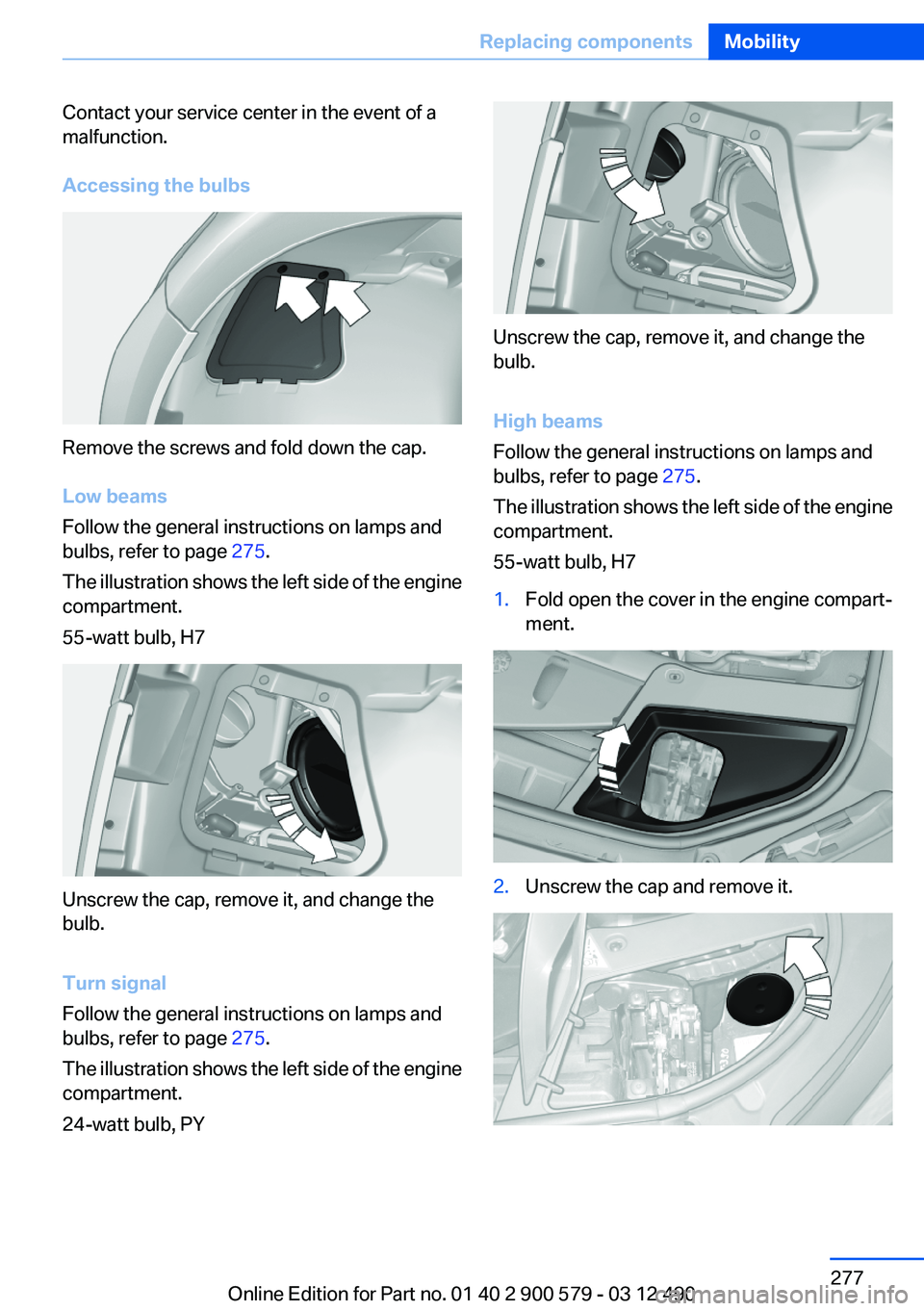
Contact your service center in the event of a
malfunction.
Accessing the bulbs
Remove the screws and fold down the cap.
Low beams
Follow the general instructions on lamps and
bulbs, refer to page 275.
The illustration shows the left side of the engine
compartment.
55-watt bulb, H7
Unscrew the cap, remove it, and change the
bulb.
Turn signal
Follow the general instructions on lamps and
bulbs, refer to page 275.
The illustration shows the left side of the engine
compartment.
24-watt bulb, PY
Unscrew the cap, remove it, and change the
bulb.
High beams
Follow the general instructions on lamps and
bulbs, refer to page 275.
The illustration shows the left side of the engine
compartment.
55-watt bulb, H7
1.Fold open the cover in the engine compart‐
ment.2.Unscrew the cap and remove it.Seite 277Replacing componentsMobility277
Online Edition for Part no. 01 40 2 900 579 - 03 12 490
Page 278 of 319

3.Unscrew the bulb holder counterclockwise.4.Remove the bulb and replace it.5.Insert the new bulb and attach the cover in
the reverse order.
Xenon headlamps
Because of the long life of these bulbs, the like‐
lihood of failure is very low. Switching the lamps
on and off frequently shortens their life.
If a xenon bulb fails, switch on the front fog lamps
and continue the trip with great care. Comply
with local regulations.
Do not perform work/bulb replacement on
xenon headlamps
Have any work on the xenon lighting system, in‐
cluding bulb replacement, performed only by a
service center. Due to the high voltage present
in the system, there is the danger of fatal injuries
if work is carried out improperly.◀
For checking and adjusting headlamp aim,
please contact your BMW center.
At a glance1Corner-illuminating lamps2Parking lamp, daytime running lights3Low beams/high beams4Turn signal
Parking lamps and roadside parking lamps,
turn signal lamp
Follow the general instructions on lamps and
bulbs, refer to page 275.
These lights feature LED technology.
Contact your service center in the event of a
malfunction.
Corner-illuminating lamps
Follow the general instructions on lamps and
bulbs, refer to page 275.
The illustration shows the left side of the engine
compartment.
Seite 278MobilityReplacing components278
Online Edition for Part no. 01 40 2 900 579 - 03 12 490
Page 312 of 319

Head restraints, front 54
Head restraints, rear 55
Head-Up Display 128
Head-up Display, care 292
Heavy cargo, stowing 159
Height, vehicle 296
High-beam Assistant 91
High beams 71
High beams/low beams, refer to High-beam Assistant 91
High-voltage battery, Charge indicator 81
Hills 157
Hill start assistant, refer to Drive-off assistant 107
Hints 6
Holder for beverages 148
Homepage 6
Hood 268
Horn 12
Hotel function, trunk lid 41
Hot exhaust system 156
House number, entering for navigation 167
HUD Head-Up Display 128
Hybrid system, at a glance 27
Hybrid system, automatic de‐ activation 287
Hybrid system, contact with water 287
Hybrid system, displays 81
Hybrid system, driving tips 154
Hybrid system, safety 287
Hydroplaning 156
I
Ice warning, refer to External temperature warning 80
Icy roads, refer to External temperature warning 80
Identification marks, tires 263
Identification number, refer to Important in the engine com‐
partment 268 iDrive 16
Ignition key, refer to Remote control 32
Ignition off 64
Ignition on 64
Indication of a flat tire 98, 101
Individual air distribution 131
Individual settings, refer to Personal Profile 33
Inflation pressure, tires 261
Inflation pressure warning FTM, tires 100
Info display, refer to Com‐ puter 84
Information on the navigation data 181
Initialize, Tire Pressure Moni‐ tor TPM 98
Initializing, Flat Tire Monitor FTM 101
Instrument cluster 76
Instrument cluster, electronic displays 77
Instrument lighting 93
Integrated key 32
Integrated universal remote control 141
Intensity, AUTO program 131
Interactive map 171
Interior equipment 141
Interior lamps 93
Interior lamps via remote con‐ trol 37
Interior motion sensor 45
Interior rearview mirror 58
Interior rearview mirror, auto‐ matic dimming feature 58
Intermediate destinations 173
Internet page 6
Intersection, entering for navi‐ gation 167
Interval display, service re‐ quirements 82
iPod/iPhone 209 J
Jacking points for the vehicle jack 281
Jack, refer to Vehicle jack 281
Joystick, automatic transmis‐ sion 74
Jump-starting 284
K
Key/remote control 32
Keyless Go, refer to Comfort Access 42
Key Memory, refer to Personal Profile 33
Kickdown, automatic trans‐ mission 74
Knee airbag 94
L
Lamp replacement 275
Lamp replacement, front 276
Lamp replacement, rear 279
Lamps 89
Lamps and bulbs 275
Lane departure warning 102
Lane margin, warning 102
Language on Control Dis‐ play 87
Lashing eyes, securing cargo 159
LATCH child restraint fixing system 61
Leather, care 290
LEDs, light-emitting di‐ odes 276
Length, vehicle 297
Letters and numbers, enter‐ ing 21
License plate lamp, bulb re‐ placement 280
Light-alloy wheels, care 291
Light control 91 Seite 312ReferenceEverything from A to Z312
Online Edition for Part no. 01 40 2 900 579 - 03 12 490
Page 313 of 319

Light-emitting diodes,LEDs 276
Lighter, front 143
Lighter, rear 144
Lighting 89
Lighting via remote control 37
Light switch 89
Load 158
Loading 158
Lock, door 38
Locking/unlocking from in‐ side 39
Locking/unlocking via door lock 38
Locking/unlocking with re‐ mote control 36
Locking, automatic 39
Locking, central 35
Locking via trunk lid 40
Lock, power window 46
Locks, doors, and win‐ dows 63
Low beams 89
Low beams, automatic, refer to High-beam Assistant 91
Lower back support 51
Luggage rack, refer to Roof- mounted luggage rack 159
Lumbar support 51
M
Maintenance 273
Maintenance require‐ ments 273
Maintenance, service require‐ ments 82
Maintenance system, BMW 273
Malfunction displays, refer to Check Control 77
Manual air distribution 131
Manual air volume 131
Manual brake, refer to Parking brake 68 Manual mode, transmis‐
sion 74
Manual operation, backup camera 117
Manual operation, door lock 39
Manual operation, exterior mir‐ rors 58
Manual operation, fuel filler flap 258
Manual operation, Park Dis‐ tance Control PDC 115
Manual operation, Side View 121
Manual operation, Top View 119
Map, destination entry 171
Map in split screen 178
Map view 176
Marking on approved tires 266
Marking, run-flat tires 267
Massage seat, front 51
Master key, refer to Remote control 32
Maximum cooling 131
Maximum speed, winter tires 266
Measure, units of 87
Medical kit 284
Memory for seat, mirrors, steering wheel 56
Menu in instrument cluster 83
Menus, operating, iDrive 16
Menus, refer to iDrive operat‐ ing concept 17
Message list, traffic bulle‐ tins 178
Messages 241
Messages, refer to Check Control 77
Microfilter 133
Minimum tread, tires 265
Mirror 57
Mirror memory 56 Mobile communication devi‐
ces in the vehicle 156
Mobile phone 226
Mode, ECO PRO 162
Modifications, technical, refer to Safety 7
Moisture in headlamp 276
Monitor, refer to Control Dis‐ play 16
Mounting of child restraint fix‐ ing systems 60
MP3 player 208
Multifunction steering wheel, buttons 12
Multimedia 196
Music collection 203
Music search 205
Music, storing 203
N
Navigation 166
Navigation data 181
Neck restraints, front, refer to Head restraints 54
Neck restraints, rear, refer to Head restraints 55
New wheels and tires 265
Night Vision with pedestrian detection 125
Notes 244
Nylon rope for tow-starting/ towing 286
O
OBD Onboard Diagnos‐ tics 274
Obstacle marking, backup camera 118
Odometer 80
Office 238
Oil 270
Oil, adding 270
Oil additives 271
Oil change 271 Seite 313Everything from A to ZReference313
Online Edition for Part no. 01 40 2 900 579 - 03 12 490