2012 BMW 6 SERIES ECU
[x] Cancel search: ECUPage 264 of 303

With LED headlamps, all front lamps are de‐
signed with LED technology or as a light module.
Contact your service center in the event of a
malfunction.
Follow the General instructions on lamps and
bulbs., refer to page 262
Turning lamp on the Xenon headlamp
Follow the General instructions on lamps and
bulbs., refer to page 262
The illustration shows the left side of the engine
compartment.
55-watt bulb, H31.Turn the cap and remove it.2.Detach the wire bracket.3.Disconnect the cable at the plug-in connec‐
tion and remove the bulb.4.Insert the new bulb. Ensure that the bulb has
the correct orientation. Because of its
shape, the bulb can only be inserted in one
direction.5.Secure the bulb with the wire bracket.6.Connect the bulb.7.Mount the cap.Tail lamps, bulb replacement
At a glance1Turn signal/brake lamp2Reversing lamp3Inside brake lamp4Tail lamp5Outside brake lamp6Rear reflector
Turn signal, outer brake, tail, and
license plate lamps
Follow the general instructions on lamps and
bulbs, refer to page 262.
These lights are made using LED technology.
Contact your service center in the event of a
malfunction.
Lamps in the trunk lid
Access to the lamps
If necessary, remove the fasteners using the
screwdriver from the onboard vehicle tool kit
and fold away the cover.
Seite 264MobilityReplacing components264
Online Edition for Part no. 01 40 2 607 971 - 09 11 490
Page 266 of 303
to ensure that all comfort functions are fully
available and that any Check Control messages
are no longer displayed.
Charging the battery
In the vehicle, only charge the battery via the
terminals, refer to page 269, in the engine com‐
partment with the engine off.
Power failure
After a temporary power loss, some equipment
needs to be reinitialized.
Individual settings need to be reprogrammed:▷Seat, mirror, and steering wheel memory:
store the positions again.▷Time: update.▷Date: update.▷Radio station: save again.▷Navigation system: wait for the operability of
the navigation.
Disposing of old batteries
Have old batteries disposed of by your
service center or bring them to a recy‐
cling center.
Maintain the battery in an upright position for
transport and storage. Secure the battery so
that it does not tip over during transport.
Fuses
Notes Replacing fuses
Never attempt to repair a blown fuse and
do not replace a defective fuse with a substitute
of another color or amperage rating; this could
lead to a circuit overload, ultimately resulting in
a fire in the vehicle.◀
Plastic tweezers and information on the fuse
types and locations are stored in the fuse box in
the cargo area.
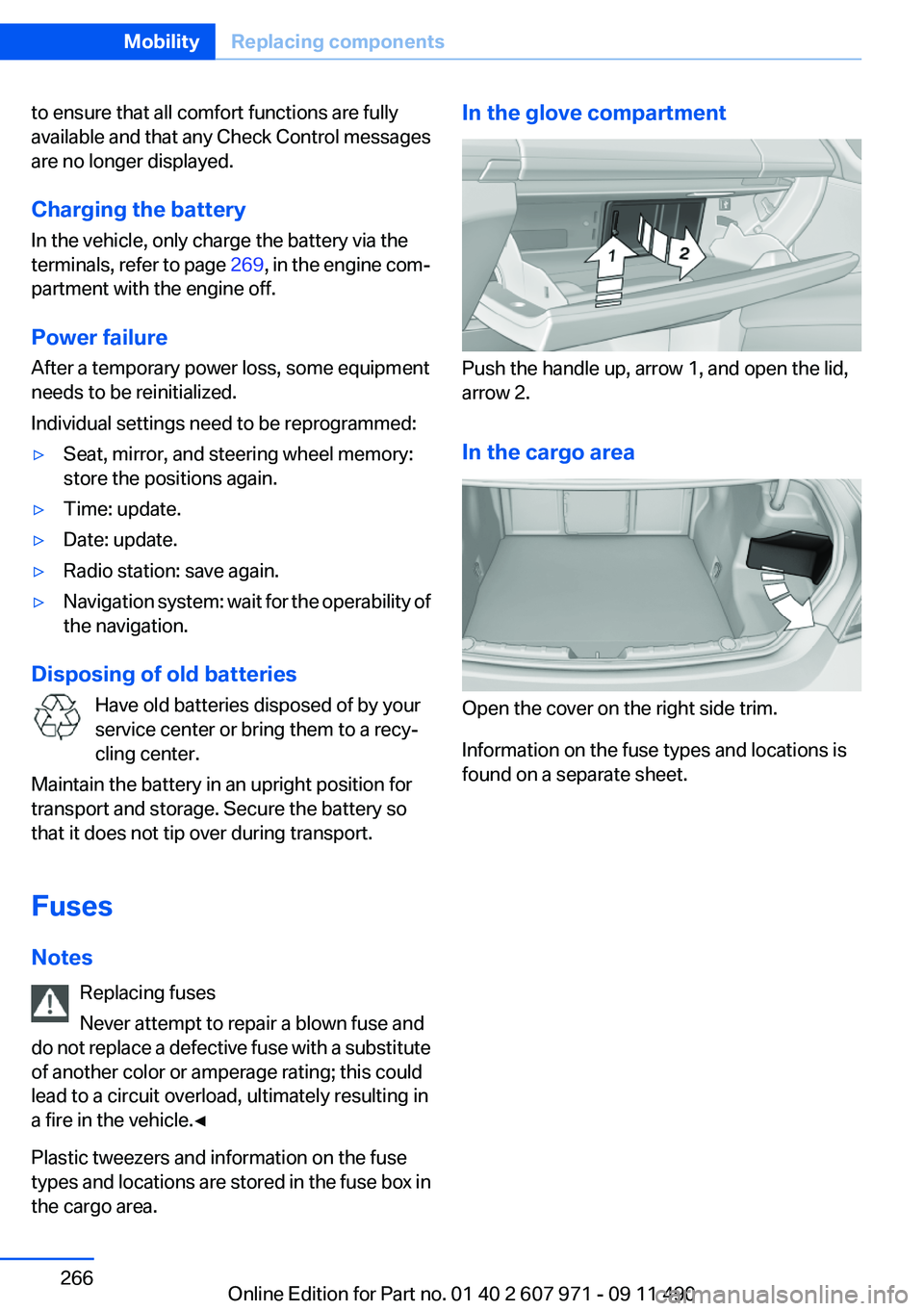
In the glove compartment
Push the handle up, arrow 1, and open the lid,
arrow 2.
In the cargo area
Open the cover on the right side trim.
Information on the fuse types and locations is
found on a separate sheet.
Seite 266MobilityReplacing components266
Online Edition for Part no. 01 40 2 607 971 - 09 11 490
Page 271 of 303
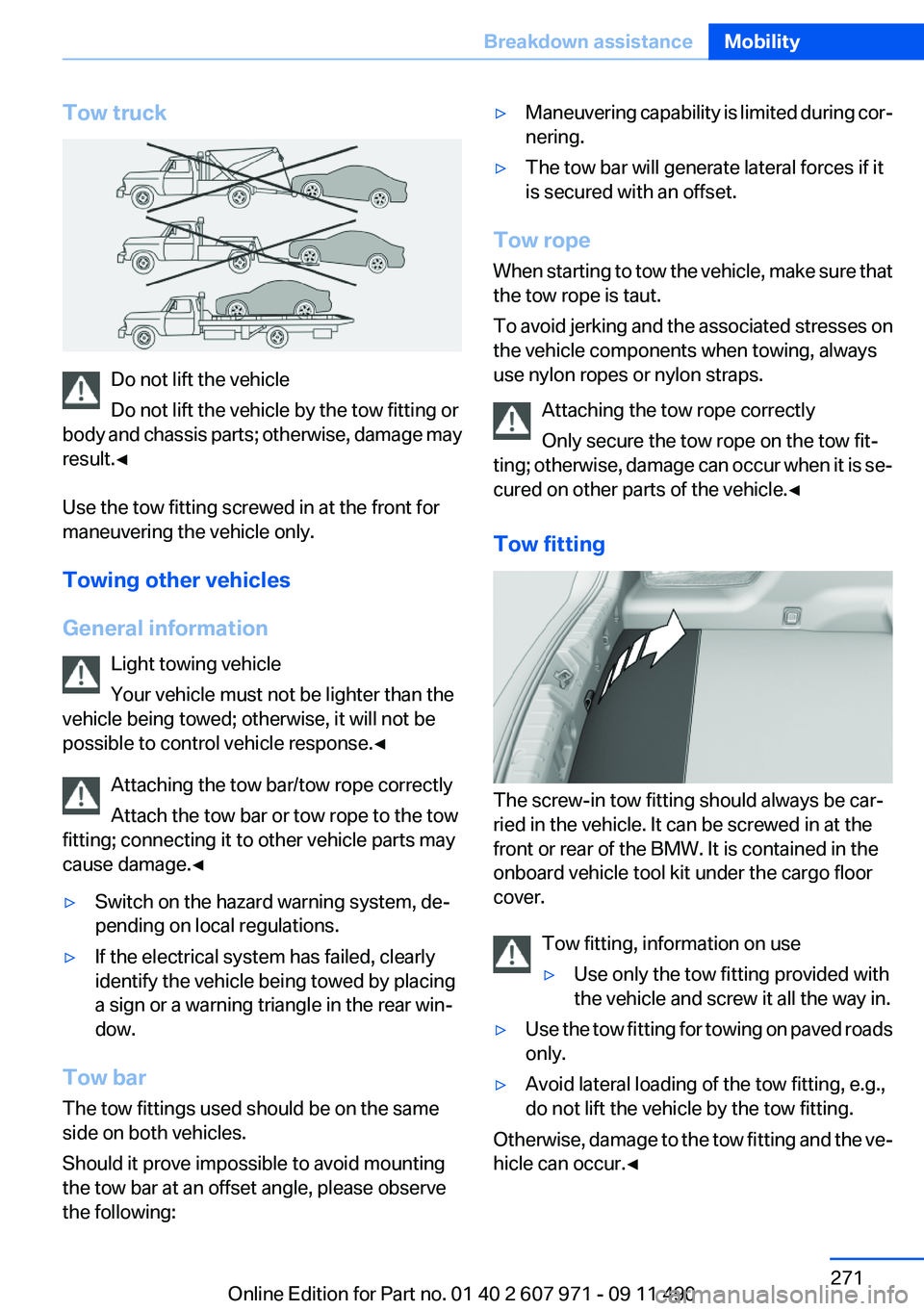
Tow truck
Do not lift the vehicle
Do not lift the vehicle by the tow fitting or
body and chassis parts; otherwise, damage may
result.◀
Use the tow fitting screwed in at the front for
maneuvering the vehicle only.
Towing other vehicles
General information Light towing vehicle
Your vehicle must not be lighter than the
vehicle being towed; otherwise, it will not be
possible to control vehicle response.◀
Attaching the tow bar/tow rope correctly
Attach the tow bar or tow rope to the tow
fitting; connecting it to other vehicle parts may
cause damage.◀
▷Switch on the hazard warning system, de‐
pending on local regulations.▷If the electrical system has failed, clearly
identify the vehicle being towed by placing
a sign or a warning triangle in the rear win‐
dow.
Tow bar
The tow fittings used should be on the same
side on both vehicles.
Should it prove impossible to avoid mounting
the tow bar at an offset angle, please observe
the following:
▷Maneuvering capability is limited during cor‐
nering.▷The tow bar will generate lateral forces if it
is secured with an offset.
Tow rope
When starting to tow the vehicle, make sure that
the tow rope is taut.
To avoid jerking and the associated stresses on
the vehicle components when towing, always
use nylon ropes or nylon straps.
Attaching the tow rope correctly
Only secure the tow rope on the tow fit‐
ting; otherwise, damage can occur when it is se‐
cured on other parts of the vehicle.◀
Tow fitting
The screw-in tow fitting should always be car‐
ried in the vehicle. It can be screwed in at the
front or rear of the BMW. It is contained in the
onboard vehicle tool kit under the cargo floor
cover.
Tow fitting, information on use
▷Use only the tow fitting provided with
the vehicle and screw it all the way in.▷Use the tow fitting for towing on paved roads
only.▷Avoid lateral loading of the tow fitting, e.g.,
do not lift the vehicle by the tow fitting.
Otherwise, damage to the tow fitting and the ve‐
hicle can occur.◀
Seite 271Breakdown assistanceMobility271
Online Edition for Part no. 01 40 2 607 971 - 09 11 490
Page 275 of 303

Upholstery material care
Vacuum regularly with a vacuum cleaner.
If they are very dirty, e.g., beverage stains, use a
soft sponge or microfiber cloth with a suitable
interior cleaner.
Clean the upholstery down to the seams using
large sweeping motions. Avoid rubbing the ma‐
terial vigorously.
Damage from Velcro® fasteners
Open Velcro® fasteners on pants or other
articles of clothing can damage the seat covers.
Ensure that any Velcro® fasteners are closed. ◀
Caring for special components
Light-alloy wheels
Use wheel cleaner, particularly during the winter
months. Do not use aggressive, acidic, strongly
alkaline or abrasive cleaners, or steam jets
above 140 ℉/60 ℃; follow the manufacturer's
instructions.
Chrome surfaces
Carefully clean components such as the radiator
grille or door handles with an ample supply of
water, possibly with shampoo added, particu‐
larly when they have been exposed to road salt.
Rubber components
Aside from water, treat only with rubber cleans‐
ers.
When cleaning rubber seals, do not use any sil‐
icon-containing car care products in order to
avoid damage or reduced noise damping.
Fine wood parts
Clean fine wood facing and fine wood compo‐
nents only with a moist rag. Then dry with a soft
cloth.
Plastic components
These include:▷Imitation leather surfaces.▷Headliner.▷Lamp lenses.▷Instrument cluster cover.▷Matte black spray-coated components.▷Painted parts in the interior.
Clean with a microfiber cloth.
Lightly dampen the cloth with water.
Do not soak the headliner.
Do not use cleansers that contain alcohol
or solvents
Do not use cleansers that contain alcohol or sol‐
vents, such as lacquer thinners, heavy-duty
grease removers, fuel, or such; this could lead to
surface damage.◀
Safety belts
Dirty belt straps impede the reeling action and
thus have a negative impact on safety.
Chemical cleaning
Do not clean chemically; this can destroy
the webbing.◀
Use only a mild soapy solution, with the safety
belts clipped into their buckles.
Do not allow the reels to retract the safety belts
until they are dry.
Floor carpets and floor mats No objects in the area around the pedals
Keep floor mats, carpets, and any other
objects out of the area of motion of the pedals;
otherwise, the function of the pedals could be
impeded while driving
Do not place additional floor mats over existing
mats or other objects.
Only use floor mats that have been approved for
the vehicle and can be properly fixed in place.
Ensure that the floor mats are securely fastened
again after they were removed for cleaning, for
example.◀
Seite 275CareMobility275
Online Edition for Part no. 01 40 2 607 971 - 09 11 490
Page 293 of 303

Battery replacement, vehicleremote control 30
Battery, vehicle 265
Belts, safety belts 48
Beverage holder, cu‐ pholder 142
Blinds, sun protection 42
Bluetooth audio 202
BMW Assist 233
BMW homepage 6
BMW Internet page 6
BMW Maintenance Sys‐ tem 260
BMW Search 235
Bottle holder, refer to Cu‐ pholder 142
Brake assistant 98
Brake assistant, adaptive 98
Brake discs, breaking in 146
Brake force display 97
Brake lamps, brake force dis‐ play 97
Brake lamps, bulb replace‐ ment 264
Brake lights, adaptive 97
Brake pads, breaking in 146
Braking, notes 147
Breakdown assis‐ tance 267, 268
Breaking in 146
Brightness of Control Dis‐ play 79
Bulb replacement 262
Bulb replacement, front 263
Bulb replacement, rear 264
Bulbs and lamps 262
Button, RES 108
Button, Start/Stop 57
Bypassing, refer to starting aid 269
C
Calendar 228
California Proposition 65 Warning 7 Camera, backup camera 120
Camera, care 276
Camera, Side View 123
Camera, Top View 122
Can holder, refer to Cu‐ pholder 142
Car battery 265
Car care products 274
Care, displays 276
Care, vehicle 274
Cargo 149
Cargo area lid 38
Cargo area, storage compart‐ ments 143
Cargo straps, securing cargo 150
Car key, refer to Remote con‐ trol 30
Carpet, care 275
Car wash 273
Catalytic converter, refer to Hot exhaust system 147
CBS Condition Based Serv‐ ice 260
CD/DVD 187
CDs, storing 194
Cell phone 210
Center armrest 142
Center console 14
Center speaker 177
Central locking system 33
Central screen, refer to Control Display 16
Central speaker 177
Changes, technical, refer to Safety 6
Changing parts 262
Changing wheels 265
Changing wheels/tires 251
Check Control 70
Checking the oil level 257
Children, seating position 54
Children, transporting safely 54
Child restraint fixing sys‐ tem 54 Child restraint fixing system
LATCH 55
Child restraint fixing systems, mounting 54
Child seat, mounting 54
Child seats 54
Chrome parts, care 275
Cigarette lighter 138
Cleaning, displays 276
Climate control 131
Climate control wind‐ shield 147
Clock 73
Closing/opening from in‐ side 37
Closing/opening via door lock 36
Closing/opening with remote control 34
Collision warning 112
Combination switch, refer to Turn signals 63
Combination switch, refer to Wiper system 64
COMFORT+ program, Driving Experience Switch 104
Comfort Access 39
COMFORT program, Driving Experience Switch 104
Computer 76
Concierge service 234
Condensation on win‐ dows 132
Condensation under the vehi‐ cle 148
Condition Based Service CBS 260
Confirmation signal 35
Contacts 223, 231
Control Display 16
Control Display, settings 78
Controller 16
Control systems, driving sta‐ bility 98
Convenient opening 34
Coolant 258 Seite 293Everything from A to ZReference293
Online Edition for Part no. 01 40 2 607 971 - 09 11 490
Page 295 of 303

Engine start, refer to Startingthe engine 58
Engine start, Starting aid 269
Engine stop 58
Engine temperature 72
Entering/exiting vehicle, assis‐ tance, steering wheel 53
Entering a car wash 273
Equalizer 176
Equipment, interior 136
ESP Electronic Stability Pro‐ gram, refer to DSC 98
Exchanging wheels/tires 251
Exhaust system 147
Exterior mirror, automatic dim‐ ming feature 52
Exterior mirrors 51
External devices 199
External start 269
External temperature dis‐ play 73
External temperature warn‐ ing 73
Eyes for securing cargo 150
F
Fader 176
Failure message, refer to Check Control 70
False alarm, refer to Uninten‐ tional alarm 41
Fan, refer to Air volume 132
Fault displays, refer to Check Control 70
Filler neck for engine oil 257
Fine wood, care 275
First aid kit 268
Fitting for towing, refer to Tow fitting 271
Flat tire, changing wheels 265
Flat Tire Monitor FTM 92
Flat tire, Tire Pressure Monitor TPM 89
Flat tire, warning lamp 90, 93
Flooding 147 Floor carpet, care 275
Floor mats, care 275
FM/AM station 179
Fold-out position, windshield wipers 65
Foot brake 147
Front airbags 86
Front fog lamps 84
Front lamps 263
Front passenger airbags, au‐ tomatic deactivation 88
Front passenger airbags, indi‐ cator lamp 88
Front seats 45
FTM Flat Tire Monitor 92
Fuel cap 242
Fuel consumption, current 74
Fuel consumption, refer to Average fuel consump‐
tion 76
Fuel filler flap 242
Fuel gauge 72
Fuel quality 244
Fuel, tank capacity 282
Fuse 266
G
Garage door opener, refer to Integrated universal remote
control 136
Gas station recommenda‐ tion 168
Gear change, automatic trans‐ mission 67
Gear shift indicator 75
General driving notes 146
Glass sunroof, powered with tilt function 43
Glove compartment 141
Gong, volume equaliza‐ tion 177
GPS navigation, refer to Navi‐ gation system 158
Gray display of the map 171 Gross vehicle weight, ap‐
proved 281
Gross weight, permissible for trailer towing 281
H
Hand brake, refer to Parking brake 61
Hand-held transmitter, alter‐ nating code 137
Hazard warning flashers 267
HDC Hill Descent Control 100
HD Radio 180
Head airbags 86
Headlamp control, auto‐ matic 82
Headlamp courtesy delay fea‐ ture 82
Headlamp courtesy delay fea‐ ture via remote control 35
Headlamp flasher 64
Headlamp glass 263
Headlamps 263
Headlamps, care 274
Headlamp washer system 64
Headliner 15
Head restraints 45
Head restraints, front 49
Head-up Display 129
Head-up Display, care 276
Heavy cargo, stowing 150
Height, seats 45
Height, vehicle 280
High-beam Assistant 83
High beams 64
High beams/low beams, refer to High-beam Assistant 83
Hill Descent Control HDC 100
Hills 148
Hill start assistant, refer to Drive-off assistant 98
Hints 6
Holder for beverages 142
Homepage 6
Hood 255 Seite 295Everything from A to ZReference295
Online Edition for Part no. 01 40 2 607 971 - 09 11 490
Page 296 of 303

Horn 12
Hotel function, trunk lid 38
Hot exhaust system 147
House number, entering for navigation 159
Hydroplaning 147
I
Ice warning, refer to External temperature warning 73
Icy roads, refer to External temperature warning 73
Identification marks, tires 249
Identification number, refer to Important in the engine com‐
partment 255
iDrive 16
Ignition key, refer to Remote control 30
Ignition off 57
Ignition on 57
Indication of a flat tire 90, 93
Indicator and warning mes‐ sages 70
Indicator lamps 70
Individual air distribution 132
Individual settings, refer to Personal Profile 31
Inflation pressure, tires 245
Inflation pressure warning FTM, tires 92
Info display, refer to Com‐ puter 76
Information on the navigation data 172
Initialization, Integral Active Steering 102
Initializing, Flat Tire Monitor FTM 93
Initializing, Tire Pressure Mon‐ itor TPM 90
Instrument cluster 69
Instrument cluster, electronic displays 70
Instrument lighting 84 Integral Active Steering 101
Integrated key 30
Integrated universal remote control 136
Intensity, AUTO program 132
Interactive map 163
Interior equipment 136
Interior lamps 85
Interior lamps via remote con‐ trol 35
Interior motion sensor 41
Interior rearview mirror 52
Interior rearview mirror, auto‐ matic dimming feature 52
Intermediate destinations 165
Internet page 6
Intersection, entering for navi‐ gation 159
Interval display, service re‐ quirements 74
iPod/iPhone 199
J
Jacking points for the vehicle jack 265
Jack, refer to Vehicle jack 265
Joystick, automatic transmis‐ sion 67
K
Key/remote control 30
Keyless Go, refer to Comfort Access 39
Key Memory, refer to Personal Profile 31
Kickdown, automatic trans‐ mission 67
Knee airbag 86
L
Lamp replacement 262
Lamp replacement, front 263
Lamp replacement, rear 264 Lamps 81
Lamps and bulbs 262
Lane departure warning 94
Lane margin, warning 94
Language on Control Dis‐ play 79
Lashing eyes, securing cargo 150
LATCH child restraint fixing system 55
Leather, care 274
LED headlamps 263
LEDs, light-emitting di‐ odes 263
Length, vehicle 281
Letters and numbers, enter‐ ing 21
License plate lamp, bulb re‐ placement 264
Light-alloy wheels, care 275
Light control 83
Light-emitting diodes, LEDs 263
Lighting 81
Lighting, speaker 177
Lighting via remote control 35
Light switch 81
Load 149
Loading 149
Lock, door 36
Locking/unlocking from in‐ side 37
Locking/unlocking via door lock 36
Locking/unlocking with re‐ mote control 34
Locking, automatic 37
Locking, central 33
Locking via trunk lid 38
Low beams 81
Low beams, automatic, refer to High-beam Assistant 83
Lower back support 46
Lumbar support 46 Seite 296ReferenceEverything from A to Z296
Online Edition for Part no. 01 40 2 607 971 - 09 11 490
Page 298 of 303

Park Distance ControlPDC 115
Parked-car ventilation 134
Parked vehicle, condensa‐ tion 148
Parking aid, refer to PDC 115
Parking assistant 123
Parking brake 61
Parking lamps 81
Parking with Auto Hold 62
Passenger side mirror, tilting downward 52
Pathway lines, backup cam‐ era 118
PDC Park Distance Con‐ trol 115
Pedestrian detection, refer to Night Vision 126
People detection, refer to Night Vision 126
Permissible axle load 281
Personal information 222
Personal Profile 31
Phone 210
Pinch protection system, glass sunroof 43
Pinch protection system, win‐ dows 42
Plastic, care 275
PlugIn 238
Position, storing 160
Postal code, entering in navi‐ gation 159
Power failure 266
Power sunroof, glass 43
Power windows 41
Pressure, tire air pres‐ sure 245
Pressure warning FTM, tires 92
Profile, refer to Personal Pro‐ file 31
Programmable memory but‐ tons, iDrive 20
Protective function, glass sun‐ roof 43 Protective function, win‐
dows 42
Push-and-turn switch, refer to Controller 16
R
Radiator fluid 258
Radio 179
Radio-operated key, refer to Remote control 30
Radio ready state 58
Rain sensor 65
Random 188
Random playback 188
RDS 180
Reading out loud 230
Rear axle steering 101
Rear lamps 264
Rearview mirror 51
Rear window defroster 133
Recirculated-air mode 133
Recommended tire brands 252
Refueling 242
Remaining range 73
Reminders 229
Remote control/key 30
Remote control, malfunc‐ tion 36
Remote control, universal 136
Replacement fuse 266
Replacing parts 262
Replacing wheels/tires 251
Reporting safety defects 8
RES button 108
Reserve warning, refer to Range 73
Resetting, Tire Pressure Mon‐ itor TPM 90
Residual heat, automatic cli‐ mate control 133
Retaining straps, securing cargo 150
Retreaded tires 252 Reversing lamp, bulb replace‐
ment 264
Roadside Assistance 234
Roadside parking lamps 82
Roller sunblinds 42
Roll stabilization, refer to Adaptive Drive 101
Roll stabilization, refer to Dy‐ namic Drive 101
Rope for tow-starting/tow‐ ing 271
Route 167
Route criteria, route 166
Route, displaying 167
Routes, avoiding 166
Route section, bypassing 167
RSC Runflat System Compo‐ nent, refer to Run-flat
tires 253
Rubber components, care 275
Run-flat tires 253
S
Safe braking 147
Safety 6
Safety belt reminder 49
Safety belts 48
Safety belts, care 275
Safety systems, airbags 86
Satellite radio 181
Saving fuel 151
Scale, changing during navi‐ gation 169
Screen, refer to Control Dis‐ play 16
Screwdriver 262
Screw thread for tow fit‐ ting 272
Search, refer to BMW Search 235
Seat belts, refer to Safety belts 48
Seat heating, front 47 Seite 298ReferenceEverything from A to Z298
Online Edition for Part no. 01 40 2 607 971 - 09 11 490