2012 BMW 535I trunk manual unlock
[x] Cancel search: trunk manual unlockPage 37 of 335

Locking the doors and trunk lid at once
To lock all doors and the trunk lid at once:1.With the doors closed, lock the vehicle using
the button for the central locking system in
the interior.2.Unlock and open the driver's or front pas‐
senger door.3.Lock the vehicle.▷Lock the driver's door using the
integrated key in the door lock, or▷Press down the lock button of the front
passenger door and close the door from
the outside.
The fuel filler flap can only be locked using the
remote control.
Manual operation
If an electrical malfunction occurs, lock or unlock
the vehicle using the integrated key via the door
lock on the driver's door.
Opening and closing: from the
inside
Locking and unlocking
Pressing the buttons locks and unlocks the
doors and the trunk lid when the front doors are
closed, but they are not secured against theft.
The fuel filler flap remains unlocked.
Unlocking and opening▷Either unlock the doors together using the
button for the central locking system and
then pull the door handle above the armrest
or▷Pull the door opener twice individually on
each door: the first time unlocks the door,
the second time opens it.
Automatic locking
The setting is stored for the remote control cur‐
rently in use.
1."Settings"2."Door locks"3.Select the desired function:▷"Lock if no door is opened"
The vehicle locks automatically after a
short period of time if a door is not
opened.▷"Lock after start. to drive"
The vehicle locks automatically after
you drive away.
Doors
Automatic Soft Closing
To close the doors, push lightly.
It is closed automatically.
Danger of pinching
Make sure that the closing path of the
doors is clear; otherwise, injuries may result.◀
Seite 37Opening and closingControls37
Online Edition for Part no. 01 40 2 607 879 - 09 11 490
Page 39 of 335
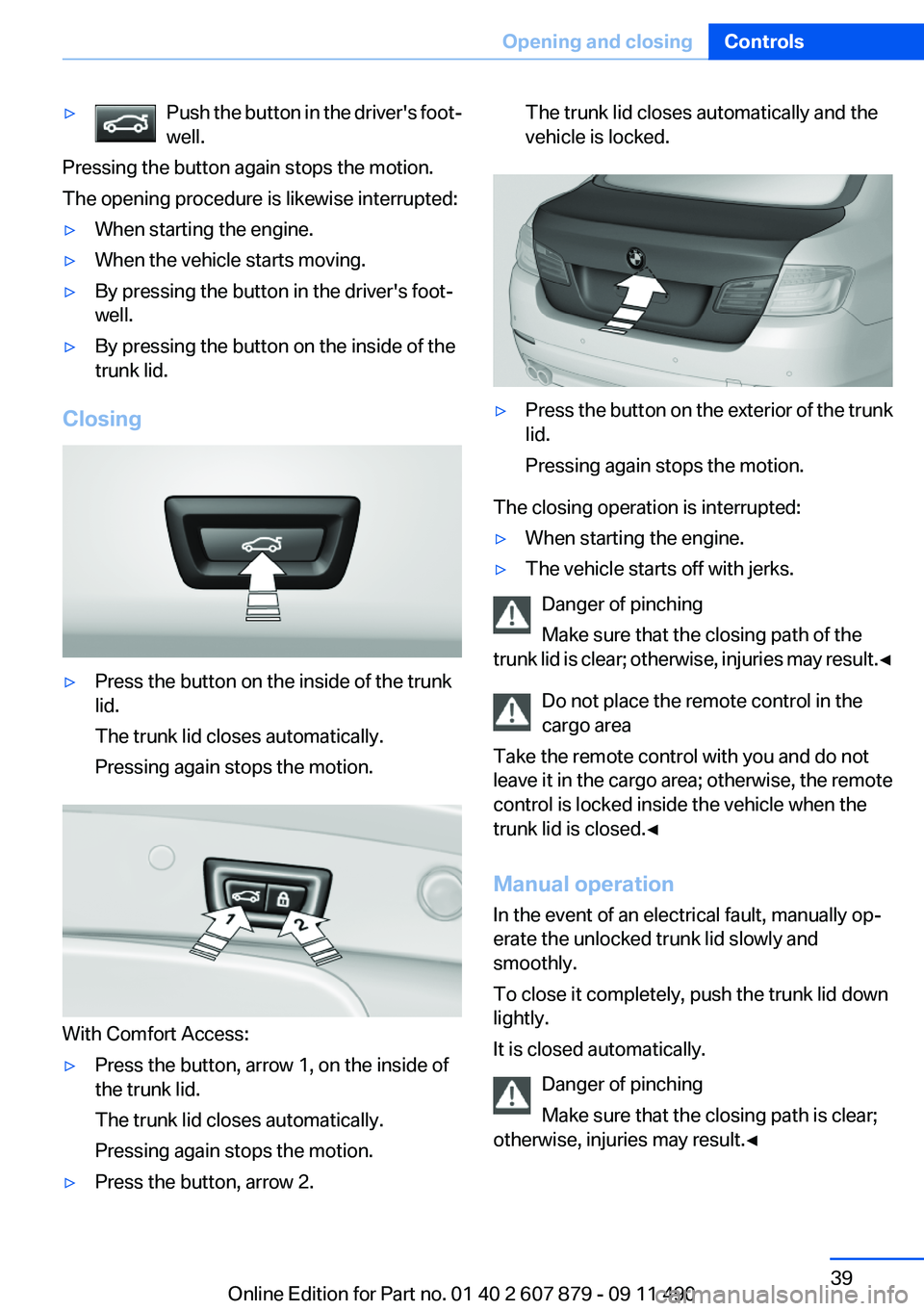
▷Push the button in the driver's foot‐
well.
Pressing the button again stops the motion.
The opening procedure is likewise interrupted:
▷When starting the engine.▷When the vehicle starts moving.▷By pressing the button in the driver's foot‐
well.▷By pressing the button on the inside of the
trunk lid.
Closing
▷Press the button on the inside of the trunk
lid.
The trunk lid closes automatically.
Pressing again stops the motion.
With Comfort Access:
▷Press the button, arrow 1, on the inside of
the trunk lid.
The trunk lid closes automatically.
Pressing again stops the motion.▷Press the button, arrow 2.The trunk lid closes automatically and the
vehicle is locked.▷Press the button on the exterior of the trunk
lid.
Pressing again stops the motion.
The closing operation is interrupted:
▷When starting the engine.▷The vehicle starts off with jerks.
Danger of pinching
Make sure that the closing path of the
trunk lid is clear; otherwise, injuries may result. ◀
Do not place the remote control in the
cargo area
Take the remote control with you and do not
leave it in the cargo area; otherwise, the remote
control is locked inside the vehicle when the
trunk lid is closed.◀
Manual operation
In the event of an electrical fault, manually op‐
erate the unlocked trunk lid slowly and
smoothly.
To close it completely, push the trunk lid down
lightly.
It is closed automatically.
Danger of pinching
Make sure that the closing path is clear;
otherwise, injuries may result.◀
Seite 39Opening and closingControls39
Online Edition for Part no. 01 40 2 607 879 - 09 11 490
Page 329 of 335
Locking/unlocking with re‐mote control 34
Locking, automatic 37
Locking, central 33
Locking via trunk lid 38
Lock, power window 44
Locks, doors, and win‐ dows 61
Low beams 89
Low beams, automatic, refer to High-beam Assistant 91
Lower back support 49
Luggage rack, refer to Roof- mounted luggage rack 164
Lumbar support 49
M
Maintenance 288
Maintenance require‐ ments 288
Maintenance, service require‐ ments 82
Maintenance system, BMW 288
Malfunction displays, refer to Check Control 78
Manual air distribution 140
Manual air volume 140
Manual brake, refer to Parking brake 66
Manual mode, transmis‐ sion 73
Manual operation, backup camera 126
Manual operation, door lock 37
Manual operation, exterior mir‐ rors 56
Manual operation, fuel filler flap 262
Manual operation, Park Dis‐ tance Control PDC 124
Manual operation, Side View 130 Manual operation, Top
View 129
Manual transmission 71
Map, destination entry 177
Map in split screen 184
Map view 182
Marking on approved tires 279
Marking, run-flat tires 280
Massage seat, front 49
Master key, refer to Remote control 30
Maximum cooling 141
Maximum speed, winter tires 279
Measure, units of 87
Medical kit 299
Memory for seat, mirrors, steering wheel 54
Menu, EfficientDynamics 168
Menu in instrument cluster 83
Menus, operating, iDrive 16
Menus, refer to iDrive operat‐ ing concept 17
Message list, traffic bulle‐ tins 184
Messages 245
Messages, refer to Check Control 78
Microfilter 142
Minimum tread, tires 277
Mirror 55
Mirror memory 54
Mobile communication devi‐ ces in the vehicle 161
Mobile phone 230
Mode, ECO PRO 167
Modifications, technical, refer to Safety 6
Moisture in headlamp 291
Monitor, refer to Control Dis‐ play 16
Mounting of child restraint fix‐ ing systems 58
MP3 player 212 Multifunction steering wheel,
buttons 12
Multimedia 200
Music collection 207
Music search 209
Music, storing 207
N
Navigation 172
Navigation data 186
Neck restraints, front, refer to Head restraints 52
Neck restraints, rear, refer to Head restraints 53
New wheels and tires 278
Night Vision with pedestrian detection 134
Notes 249
Nylon rope for tow-starting/ towing 302
O
OBD Onboard Diagnos‐ tics 289
Obstacle marking, backup camera 127
Odometer 81
Office 242
Oil 284
Oil, adding 285
Oil additives 285
Oil change 286
Oil change interval, service re‐ quirements 82
Oil filler neck 285
Oil level check 284
Oil types, alternative 286
Oil types, approved 285
Old batteries, disposal 296
Onboard Diagnostics OBD 289
Onboard monitor, refer to Control Display 16
Onboard vehicle tool kit 290 Seite 329Everything from A to ZReference329
Online Edition for Part no. 01 40 2 607 879 - 09 11 490
Page 332 of 335
Supplementary text mes‐sage 80
Surround View 126
Switch-on times, parked-car ventilation 145
Switch, refer to Cockpit 12
Symbols 6
T
Tachometer 80
Tail and brake lamps 295
Tailgate 38
Tailgate, automatic 38
Tailgate, opening with no- touch activation 41
Tailgate via remote control 35
Tail lamps 294
Tail lamps, bulb replace‐ ment 295
Tasks 248
Technical changes, refer to Safety 6
Technical data 310
TeleService 254
Temperature, automatic cli‐ mate control 140
Temperature display, external temperature 81
Temperature, engine oil 80
Tempomat, refer to Active Cruise Control 114
Terminal, starting aid 300
Text messages 245
Text message, supplemen‐ tary 80
Theft alarm system, refer to Alarm system 42
Theft protection, refer to Cen‐ tral locking system 33
Thermal camera, refer to Night Vision 134
Through-loading system 150
Tilt alarm sensor 43
Time of arrival 85
Tire damage 278 Tire identification marks 276
Tire inflation pressure 265
Tire inflation pressure monitor, refer to FTM 100
Tire Pressure Monitor TPM 97
Tires, changing 278
Tires, everything on wheels and tires 265
Tires, run-flat tires 280
Tire tread 277
Toll roads, route 180
Tone 190
Tools 290
Top View 128
Total vehicle weight 311
Tow fitting 302
Towing 301
Town/city, navigation 173
Tow-starting 301
Tow truck 301
TPM Tire Pressure Moni‐ tor 97
Traction control 108
Traffic bulletins, naviga‐ tion 184
Transmission, automatic 72
Transmission, manual 71
Transporting children safely 58
Tread, tires 277
Treble, tone 190
Trip computer 85
Triple turn signal activa‐ tion 69
Trip odometer 81
Truck for tow-starting/tow‐ ing 301
Trunk lid 38
Trunk lid, automatic 38
Trunk lid, emergency unlock‐ ing 40
Trunk lid, hotel function 40
Trunk lid, opening with no- touch activation 41 Trunk lid via remote con‐
trol 35
Turning circle 311
Turning circle lines, backup camera 127
Turn signals, operation 69
Turn signals, rear, bulb re‐ placement 295
U
Unintentional alarm 43
Units of measure 87
Universal remote control 146
Unlock button, automatic transmission 72
Unlocking/locking from in‐ side 37
Unlocking/locking via door lock 36
Unlocking/locking with remote control 34
Updates made after the edito‐ rial deadline 6
Updating software 219
Upholstery care 306
USB audio interface 213
USB interface 153
V
Variable steering, Integral Ac‐ tive Steering 110
Vehicle battery 296
Vehicle battery, replacing 296
Vehicle, breaking in 160
Vehicle care 305
Vehicle equipment 6
Vehicle identification number, refer to Identification number
in the engine compart‐
ment 282
Vehicle jack 296
Vehicle paint 305
Vehicle storage 307
Vehicle wash 304 Seite 332ReferenceEverything from A to Z332
Online Edition for Part no. 01 40 2 607 879 - 09 11 490