2012 BMW 535I mirror
[x] Cancel search: mirrorPage 166 of 335
Saving fuelVehicle equipment
All standard, country-specific and optional
equipment that is offered in the model series is
described in this chapter. Therefore, equipment
is also described that is not available in a vehicle,
e. g., because of the selected optional equip‐
ment or country variant. This also applies for
safety-related functions and systems.
General information
Your vehicle contains advanced technology for
the reduction of fuel consumption and emis‐
sions.
Fuel consumption depends on a number of dif‐
ferent factors.
The implementation of certain measures, driv‐
ing style and regular maintenance can have an
influence on fuel consumption and on the envi‐
ronmental impact.
Remove unnecessary cargo
Additional weight increases fuel consumption.
Remove attached parts
following use
Remove auxiliary mirrors, roof or rear luggage
racks which are no longer required following
use.
Attached parts on the vehicle impair the aero‐
dynamics and increase the fuel consumption.Close the windows and glass
sunroof
Driving with the glass sunroof and windows
open results in increased air resistance and
raises fuel consumption.
Check the tire inflation
pressure regularly
Check and, if necessary, correct the tire inflation
pressure at least twice a month and before start‐
ing on a long trip.
Low tire inflation pressure increases rolling re‐
sistance and thus raises fuel consumption and
tire wear.
Drive away without delay
Do not wait for the engine to warm up while the
vehicle remains stationary. Start driving right
away, but at moderate engine speeds.
This is the fastest way for the cold engine to
reach its operating temperature.
Look well ahead when driving
Avoid unnecessary acceleration and braking.
By maintaining a suitable distance to the vehicle
driving ahead of you.
Driving smoothly and looking ahead reduces
fuel consumption.
Avoid high engine speeds
Use 1st gear to get the vehicle in motion. Be‐
ginning with 2nd gear, accelerate rapidly. When
accelerating, shift up before reaching high en‐
gine speeds.Seite 166Driving tipsSaving fuel166
Online Edition for Part no. 01 40 2 607 879 - 09 11 490
Page 168 of 335
▷Blue display: efficient driving style as long as
the mark moves within the blue range.▷Gray display: adjust driving style, e. g. by
backing off the accelerator pedal.
The display switches to blue as soon as all con‐
ditions for fuel-economy-optimized driving are
met.
ECO PRO Tip - driving instruction The arrow indicates that the driv‐
ing style can be adjusted to be
more fuel efficient by backing off
the accelerator.
Additional symbols
SymbolMeasureFor efficient driving style, back off the
accelerator.Reduce speed to the selected ECO
PRO speed.Automatic transmission: switch from
S to D or avoid manual shift interven‐
tions.Manual shift transmission: follow
shifting instructions.Manual shift transmission: engage
neutral for engine stop.
Configuring ECO PRO
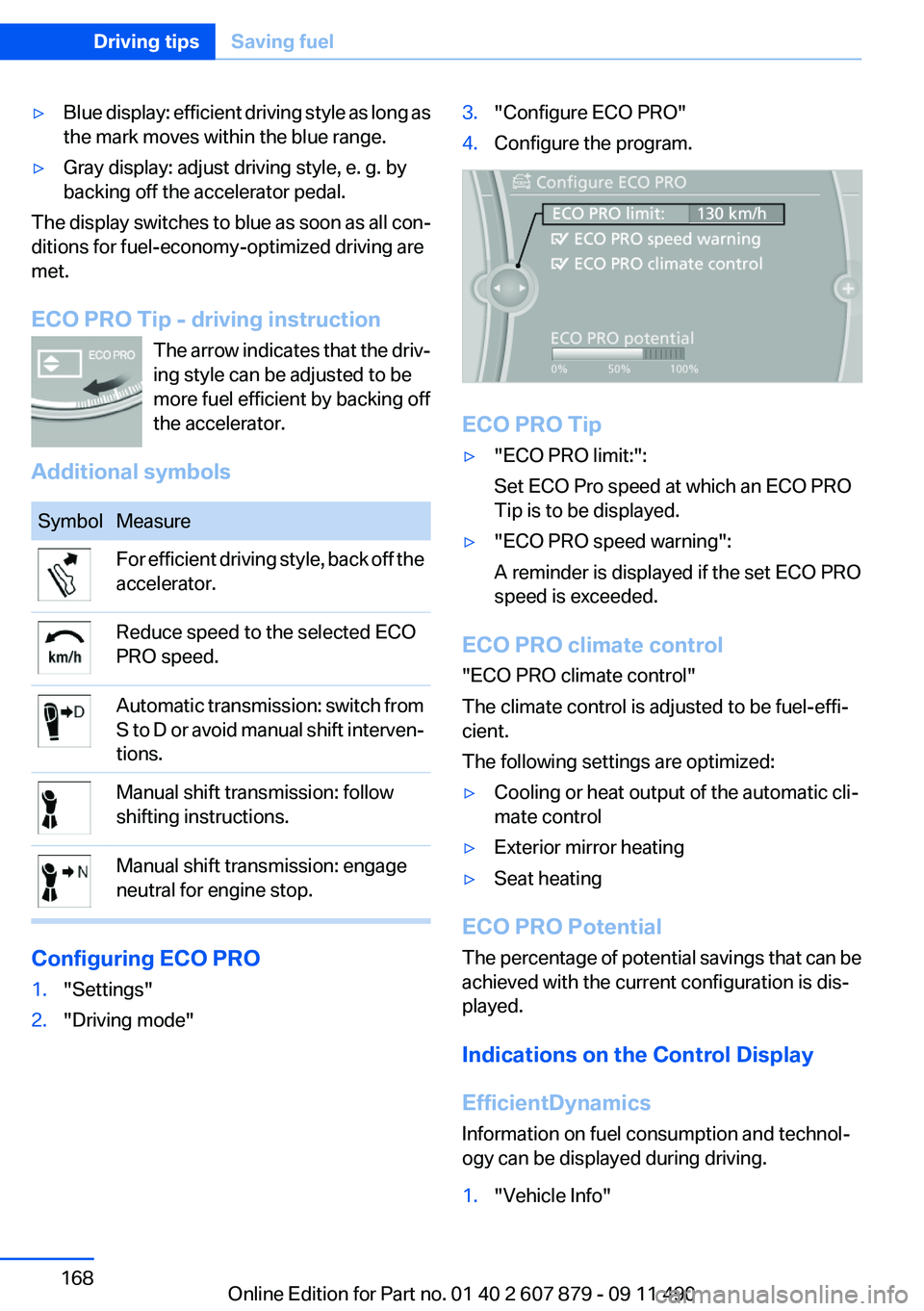
1."Settings"2."Driving mode"3."Configure ECO PRO"4.Configure the program.
ECO PRO Tip
▷"ECO PRO limit:":
Set ECO Pro speed at which an ECO PRO
Tip is to be displayed.▷"ECO PRO speed warning":
A reminder is displayed if the set ECO PRO
speed is exceeded.
ECO PRO climate control
"ECO PRO climate control"
The climate control is adjusted to be fuel-effi‐
cient.
The following settings are optimized:
▷Cooling or heat output of the automatic cli‐
mate control▷Exterior mirror heating▷Seat heating
ECO PRO Potential
The percentage of potential savings that can be
achieved with the current configuration is dis‐
played.
Indications on the Control Display
EfficientDynamics
Information on fuel consumption and technol‐
ogy can be displayed during driving.
1."Vehicle Info"Seite 168Driving tipsSaving fuel168
Online Edition for Part no. 01 40 2 607 879 - 09 11 490
Page 240 of 335

Deleting an entry1.›Delete name‹2.Say the name after being prompted to do so.3.Confirm the query with ›Yes‹.
Deleting all entries
1.›Delete phonebook‹
The dialog for deleting the phone book is
opened.2.Confirm the query with ›Yes‹.3.Confirm the query again with ›Yes‹.
Reading and selecting entries
1.›Read phonebook‹
The dialog for reading the phone book is
opened.2.Say ›Dial number‹ when the desired entry is
read.
Selecting an entry
1.›Dial name‹2.Say the name after being prompted to do so.3.Confirm the query with ›Yes‹.
Adjusting the volume
Turn the knob during an announcement.
▷The volume remains constant even if the
volume of other audio sources is changed.▷The volume is stored for the remote control
currently in use.
Notes
Do not use the voice operation to initiate an
Emergency Request. In stressful situations, the
voice and vocal pitch can change. This can un‐
necessarily delay the establishment of a tele‐
phone connection.
Instead, use the SOS button, refer to
page 298, in the vicinity of the interior mirror.
Environmental conditions▷Say the commands, numbers, and letters
smoothly and with normal volume, empha‐
sis, and speed.▷Always say commands in the language of
the system. The language for the mobile
phone voice operation is preset and cannot
be changed in the Control Display.▷Keep the doors, windows, and glass sun‐
roof closed to prevent noise interference.▷Avoid making other noise in the vehicle
while speaking.
Snap-in adapter
General information
Detailed information about snap-in adapter,
which supports the functions of the mobile
phone, available from the service center.
Notes
At high temperatures, the charge function of the
mobile phone can be limited where appropriate
and the functions are no longer executed.
When the mobile phone is used via the vehicle,
heed the operating manual of the mobile phone.
Installation position
In the center armrest.
Inserting the snap-in adapter
1.Press the button and remove the cover.Seite 240CommunicationTelephone240
Online Edition for Part no. 01 40 2 607 879 - 09 11 490
Page 296 of 335

Squeeze the clips together and remove the bulb
holder.
Pull out the bulb and replace it.
Changing wheels
Notes
The vehicle equipment does not include a spare
tire.
When using run-flat tires or tire sealants, a tire
does not need to be changed immediately in the
event of pressure loss due to a flat tire.
The tools for changing wheels are available as
accessories from your service center.
Jacking points for the vehicle jack
The jacking points for the vehicle jack are lo‐
cated in the positions shown.
Vehicle battery
Maintenance
The battery is maintenance-free, i.e., the elec‐
trolyte will last for the life of the battery.
Your service center will be glad to advise you on
questions regarding the battery.
Battery replacement Use approved vehicle batteries only.
Only use vehicle batteries that have been
approved for your vehicle by the manufacturer;
otherwise, the vehicle could be damaged and
systems or functions may not be fully availa‐
ble.◀
After a battery replacement, have the battery
registered on the vehicle by your service center
to ensure that all comfort functions are fully
available and that any Check Control messages
are no longer displayed.
Charging the battery
In the vehicle, only charge the battery via the
terminals, refer to page 300, in the engine com‐
partment with the engine off.
Power failure
After a temporary power loss, some equipment
needs to be reinitialized.
Individual settings need to be reprogrammed:▷Seat, mirror, and steering wheel memory:
store the positions again.▷Time: update.▷Date: update.▷Radio station: save again.▷Navigation system: wait for the operability of
the navigation.
Disposing of old batteries
Have old batteries disposed of by your
service center or bring them to a recy‐
cling center.
Seite 296MobilityReplacing components296
Online Edition for Part no. 01 40 2 607 879 - 09 11 490
Page 304 of 335
CareVehicle equipment
All standard, country-specific and optional
equipment that is offered in the model series is
described in this chapter. Therefore, equipment
is also described that is not available in a vehicle,
e. g., because of the selected optional equip‐
ment or country variant. This also applies for
safety-related functions and systems.
Car washes
Notes Steam jets or high-pressure washers
When using steam jets or high-pressure
washers, hold them a sufficient distance away
and use a maximum temperature of 140 ℉/
60 ℃.
Holding them too close or using excessively
high pressures or temperatures can cause dam‐
age or preliminary damage that may then lead to
long-term damage.
Follow the operating instructions for the high-
pressure washer.◀
Cleaning sensors/cameras with high-
pressure washers
When using high-pressure washers, do not
spray the exterior sensors and cameras, e.g.,
Park Distance Control, for extended periods of
time and only from a distance of at least 12 in/
30 cm.◀
Wash your vehicle frequently, particularly in win‐
ter.
Intense soiling and road salt can damage the ve‐
hicle.Washing in automatic car washes
Give preference to cloth car washes or those
that use soft brushes in order to avoid paint
damage.
Notes
Note the following:▷Make sure that the wheels and tires are not
damaged by the transport mechanisms.▷Fold in the exterior mirrors; otherwise, they
may be damaged, depending on the width of
the vehicle.▷Deactivate the rain sensor, refer to page 70,
to avoid unintentional wiper activation.▷In some cases, an unintentional alarm can be
triggered by the interior motion sensor of the
alarm system. Follow the instructions on
avoiding an unintentional alarm, refer to
page 43.
Guide rails in car washes
Avoid car washes with guide rails higher
than 4 in/10 cm; otherwise, the vehicle body
could be damaged.◀
Before driving into a car wash
In order to ensure that the vehicle can roll in a car
wash, take the following steps:
Manual transmission:
1.Release the parking brake, refer to page 66.2.Drive into the car wash.3.Shift to neutral.4.Switch the engine off.5.Switch on the ignition.Seite 304MobilityCare304
Online Edition for Part no. 01 40 2 607 879 - 09 11 490
Page 310 of 335
Technical dataVehicle equipment
All standard, country-specific and optional
equipment that is offered in the model series is
described in this chapter. Therefore, equipmentis also described that is not available in a vehicle,
e. g., because of the selected optional equip‐
ment or country variant. This also applies for
safety-related functions and systems.
Dimensions
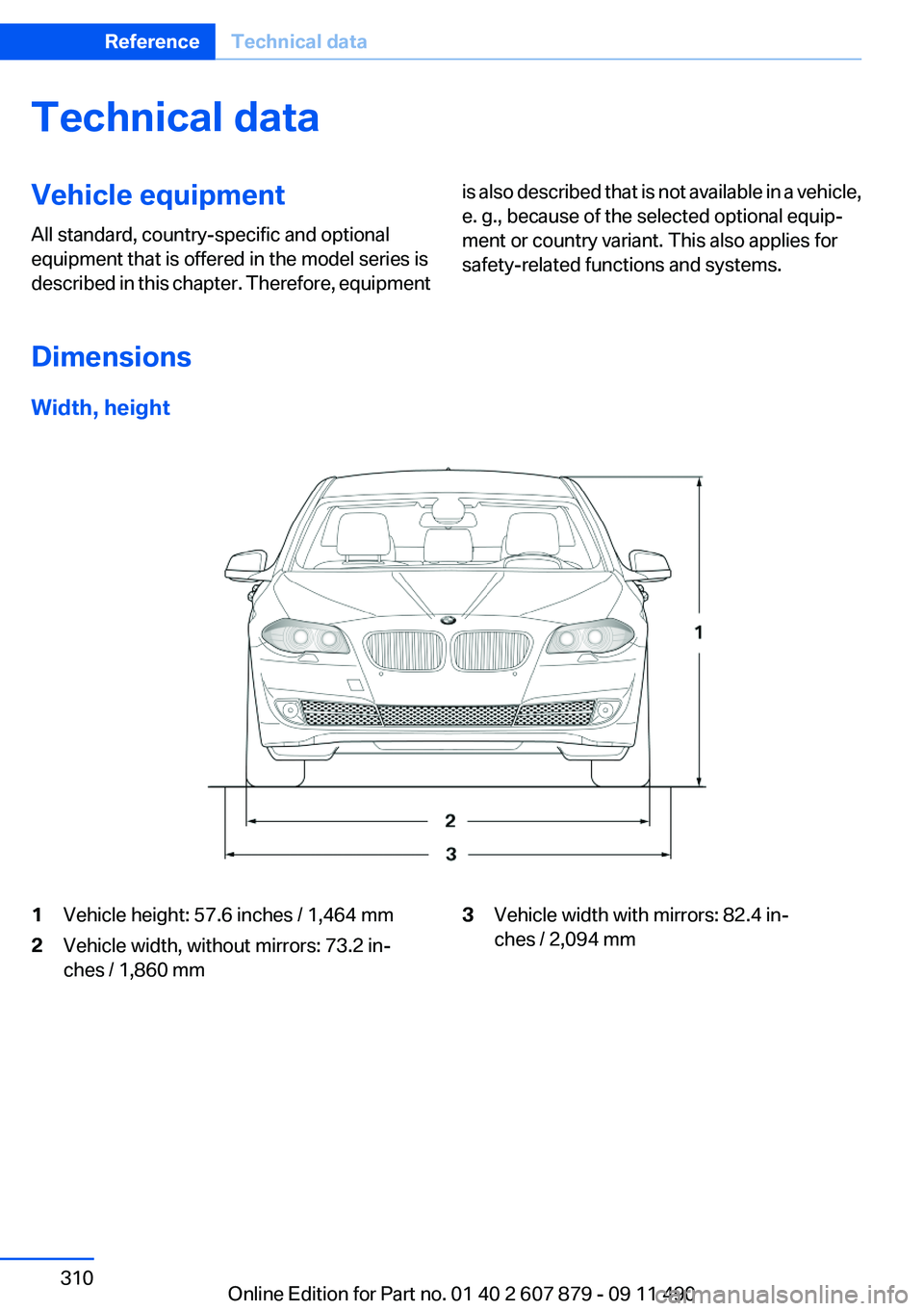
Width, height
1Vehicle height: 57.6 inches / 1,464 mm2Vehicle width, without mirrors: 73.2 in‐
ches / 1,860 mm3Vehicle width with mirrors: 82.4 in‐
ches / 2,094 mmSeite 310ReferenceTechnical data310
Online Edition for Part no. 01 40 2 607 879 - 09 11 490
Page 326 of 335
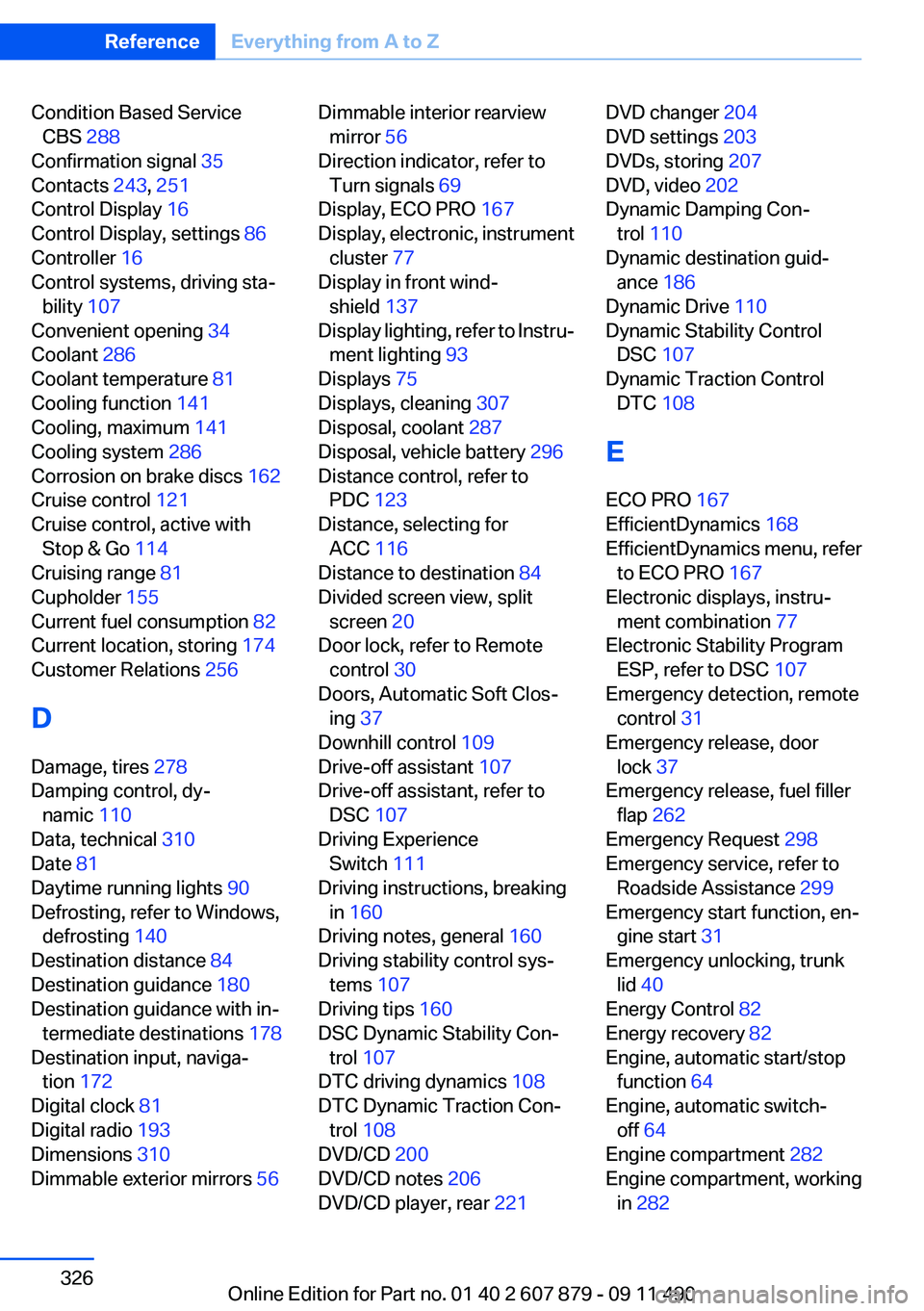
Condition Based ServiceCBS 288
Confirmation signal 35
Contacts 243, 251
Control Display 16
Control Display, settings 86
Controller 16
Control systems, driving sta‐ bility 107
Convenient opening 34
Coolant 286
Coolant temperature 81
Cooling function 141
Cooling, maximum 141
Cooling system 286
Corrosion on brake discs 162
Cruise control 121
Cruise control, active with Stop & Go 114
Cruising range 81
Cupholder 155
Current fuel consumption 82
Current location, storing 174
Customer Relations 256
D
Damage, tires 278
Damping control, dy‐ namic 110
Data, technical 310
Date 81
Daytime running lights 90
Defrosting, refer to Windows, defrosting 140
Destination distance 84
Destination guidance 180
Destination guidance with in‐ termediate destinations 178
Destination input, naviga‐ tion 172
Digital clock 81
Digital radio 193
Dimensions 310
Dimmable exterior mirrors 56 Dimmable interior rearview
mirror 56
Direction indicator, refer to Turn signals 69
Display, ECO PRO 167
Display, electronic, instrument cluster 77
Display in front wind‐ shield 137
Display lighting, refer to Instru‐ ment lighting 93
Displays 75
Displays, cleaning 307
Disposal, coolant 287
Disposal, vehicle battery 296
Distance control, refer to PDC 123
Distance, selecting for ACC 116
Distance to destination 84
Divided screen view, split screen 20
Door lock, refer to Remote control 30
Doors, Automatic Soft Clos‐ ing 37
Downhill control 109
Drive-off assistant 107
Drive-off assistant, refer to DSC 107
Driving Experience Switch 111
Driving instructions, breaking in 160
Driving notes, general 160
Driving stability control sys‐ tems 107
Driving tips 160
DSC Dynamic Stability Con‐ trol 107
DTC driving dynamics 108
DTC Dynamic Traction Con‐ trol 108
DVD/CD 200
DVD/CD notes 206
DVD/CD player, rear 221 DVD changer 204
DVD settings 203
DVDs, storing 207
DVD, video 202
Dynamic Damping Con‐ trol 110
Dynamic destination guid‐ ance 186
Dynamic Drive 110
Dynamic Stability Control DSC 107
Dynamic Traction Control DTC 108
E
ECO PRO 167
EfficientDynamics 168
EfficientDynamics menu, refer to ECO PRO 167
Electronic displays, instru‐ ment combination 77
Electronic Stability Program ESP, refer to DSC 107
Emergency detection, remote control 31
Emergency release, door lock 37
Emergency release, fuel filler flap 262
Emergency Request 298
Emergency service, refer to Roadside Assistance 299
Emergency start function, en‐ gine start 31
Emergency unlocking, trunk lid 40
Energy Control 82
Energy recovery 82
Engine, automatic start/stop function 64
Engine, automatic switch- off 64
Engine compartment 282
Engine compartment, working in 282 Seite 326ReferenceEverything from A to Z326
Online Edition for Part no. 01 40 2 607 879 - 09 11 490
Page 327 of 335

Engine coolant 286
Engine oil 284
Engine oil, adding 285
Engine oil additives 285
Engine oil change 286
Engine oil filler neck 285
Engine oil temperature 80
Engine oil types, alterna‐ tive 286
Engine oil types, ap‐ proved 285
Engine start during malfunc‐ tion 31
Engine start, refer to Starting the engine 63
Engine start, Starting aid 299
Engine stop 63
Engine temperature 80
Entering a car wash 304
Equalizer 190
Equipment, interior 146
ESP Electronic Stability Pro‐ gram, refer to DSC 107
Exchanging wheels/tires 278
Exhaust system 161
Exterior mirror, automatic dim‐ ming feature 56
Exterior mirrors 55
External devices 212
External start 299
External temperature dis‐ play 81
External temperature warn‐ ing 81
Eyes for securing cargo 164
F
Fader 190
Failure message, refer to Check Control 78
False alarm, refer to Uninten‐ tional alarm 43
Fan, refer to Air volume 140
Fault displays, refer to Check Control 78 Filler neck for engine oil 285
Fine wood, care 306
First aid kit 299
Fitting for towing, refer to Tow fitting 302
Flat tire, changing wheels 296
Flat Tire Monitor FTM 100
Flat tire, Tire Pressure Monitor TPM 97
Flat tire, warning lamp 98, 101
Flooding 161
Floor carpet, care 306
Floor mats, care 306
FM/AM station 192
Fold-out position, windshield wipers 71
Foot brake 161
Front airbags 94
Front fog lamps 93
Front fog lamps, front, bulb re‐ placement 294
Front lamps 291
Front passenger airbags, au‐ tomatic deactivation 96
Front passenger airbags, indi‐ cator lamp 96
FTM Flat Tire Monitor 100
Fuel cap 262
Fuel consumption, current 82
Fuel consumption, refer to Average fuel consump‐
tion 84
Fuel filler flap 262
Fuel gauge 80
Fuel quality 264
Fuel, tank capacity 313
Fuse 297
G
Garage door opener, refer to Integrated universal remote
control 146
Gas station recommenda‐ tion 182 Gear change, automatic trans‐
mission 72
Gear shift indicator 83
General driving notes 160
Glass sunroof, powered 45
Glove compartment 153
Gong, volume equaliza‐ tion 191
GPS navigation, refer to Navi‐ gation system 172
Gray display of the map 185
Gross vehicle weight, ap‐ proved 311
Gross weight, permissible for trailer towing 311
H
Hand brake, refer to Parking brake 66
Hand-held transmitter, alter‐ nating code 147
Hazard warning flashers 298
HDC Hill Descent Control 109
HD Radio 193
Head airbags 94
Headlamp control, auto‐ matic 90
Headlamp courtesy delay fea‐ ture 90
Headlamp courtesy delay fea‐ ture via remote control 35
Headlamp flasher 69
Headlamp glass 291
Headlamps 291
Headlamps, care 305
Headlamp washer system 69
Headliner 15
Headphones, rear entertain‐ ment 225
Head restraints 47
Head restraints, front 52
Head restraints, rear 53
Head-up Display 137
Head-up Display, care 307
Heavy cargo, stowing 164 Seite 327Everything from A to ZReference327
Online Edition for Part no. 01 40 2 607 879 - 09 11 490