2012 BMW 528I reset
[x] Cancel search: resetPage 216 of 335
peratures; refer to the audio device operating
instructions.
Depending on the configuration of the audio
files, e.g., bit rates greater than 256 kbit/s, the
files may not play back correctly in each case.
Information on connection▷The connected audio device is supplied with
a max. power of 500 mA if supported by the
device. Therefore, do not additionally con‐
nect the device to a socket in the vehicle;
otherwise, playback may be compromised.▷Do not use force when plugging the con‐
nector into the USB interface.▷Do not connect devices such as fans or
lamps to the USB audio interface.▷Do not connect USB hard drives.▷Do not use the USB audio interface to re‐
charge external devices.
Bluetooth audio
At a glance
▷Music files on external devices such as audio
devices or mobile phones can be played
back via Bluetooth.
Use of a mobile phone as an audio source,
refer to page 231.▷The sound is output on the vehicle loud‐
speakers.▷The volume of the sound output is depend‐
ent on the device. If necessary, adjust the
volume on the device.▷Up to four external devices can be paired
with the vehicle.
Requirements
▷The device is suitable. Information under
www.bmwusa.com/bluetooth.▷The device is ready for operation.▷The ignition is switched on.▷Bluetooth is activated on the vehicle, refer to
page 231, and on the device.▷Bluetooth presettings must be made on the
device, such as for a connection without
confirmation or visibility; refer to the device
operating instructions.▷A number with at least four and a maximum
of 16 digits is defined as the Bluetooth pass‐
key. It is only required once for pairing.
Pairing and connecting
Pairing a device
To avoid becoming distracted and posing
an unnecessary hazard both to your own vehi‐
cle's occupants and to other road users, only
pair the device while the vehicle is stationary.◀
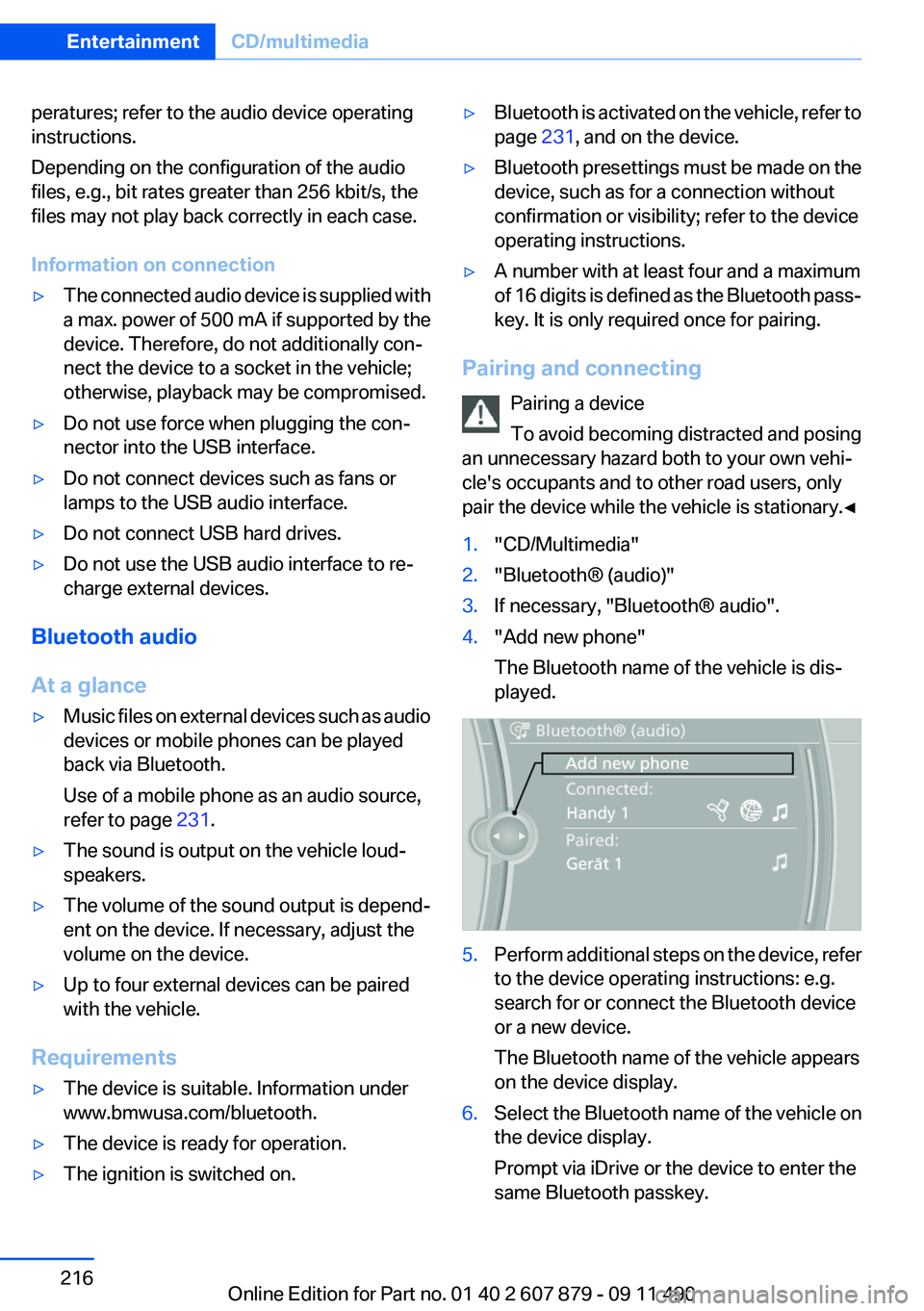
1."CD/Multimedia"2."Bluetooth® (audio)"3.If necessary, "Bluetooth® audio".4."Add new phone"
The Bluetooth name of the vehicle is dis‐
played.5.Perform additional steps on the device, refer
to the device operating instructions: e.g.
search for or connect the Bluetooth device
or a new device.
The Bluetooth name of the vehicle appears
on the device display.6.Select the Bluetooth name of the vehicle on
the device display.
Prompt via iDrive or the device to enter the
same Bluetooth passkey.Seite 216EntertainmentCD/multimedia216
Online Edition for Part no. 01 40 2 607 879 - 09 11 490
Page 231 of 335
Notes
At high temperatures, the charge function of the
mobile phone can be limited where appropriate
and the functions are no longer executed.
When the mobile phone is used via the vehicle,
heed the operating manual of the mobile phone.
Pairing/unpairing the mobile
phone
General information
The following functions are available:▷Use of a mobile phone as a telephone.▷Use of a mobile phone as an additional tele‐
phone.▷Use of a mobile phone as an audio source.▷Use of an audio device as an audio source,
refer to page 216.
Requirements
▷The mobile phone is suitable.▷The mobile phone is ready for operation.▷Bluetooth is activated in the vehicle and on
the mobile phone.▷Bluetooth presettings may need to be made
on the mobile phone, e.g., for a connection
without confirmation or visibility, refer to the
mobile phone operating instructions.▷Deactivate Bluetooth audio if necessary.▷A number with at least four and a maximum
of 16 digits was defined as the Bluetooth
passkey. It is only required once for pairing.▷The ignition is switched on.
Activating/deactivating Bluetooth
Bluetooth is not permitted everywhere. Comply
with all safety guidelines and regulations.
1."Telephone"2."Options" Open.3."Bluetooth®"Additional functions
Activating/deactivating the additional
functions
Activate the functions before pairing to be able
to use them in the vehicle. Information on suit‐
able mobile phones, refer to page 230, that sup‐
port these functions.1."Telephone"2."Bluetooth® (phone)"3."Options" Open.4."Configure Bluetooth®"5.Select the desired additional function.▷"Additional telephone"▷"Office"▷"Bluetooth® audio"6."OK"
As long as an additional function is deactivated,
it cannot be assigned to a telephone.
Additional telephone
A mobile phone can be used as an additional
telephone.
The additional telephone can be used to accept
incoming calls, refer to page 234. While a call is
active on the additional telephone, incoming
calls are displayed on the Control Display.
Audio source
A mobile phone can be used as an audio source.
Pairing and connecting cell phone Pairing the mobile phone
To avoid becoming distracted and posing
an unnecessary hazard both to your own vehi‐
cle's occupants and to other road users, only
pair the mobile phone while the vehicle is sta‐
tionary.◀
Seite 231TelephoneCommunication231
Online Edition for Part no. 01 40 2 607 879 - 09 11 490
Page 240 of 335
Deleting an entry1.›Delete name‹2.Say the name after being prompted to do so.3.Confirm the query with ›Yes‹.
Deleting all entries
1.›Delete phonebook‹
The dialog for deleting the phone book is
opened.2.Confirm the query with ›Yes‹.3.Confirm the query again with ›Yes‹.
Reading and selecting entries
1.›Read phonebook‹
The dialog for reading the phone book is
opened.2.Say ›Dial number‹ when the desired entry is
read.
Selecting an entry
1.›Dial name‹2.Say the name after being prompted to do so.3.Confirm the query with ›Yes‹.
Adjusting the volume
Turn the knob during an announcement.
▷The volume remains constant even if the
volume of other audio sources is changed.▷The volume is stored for the remote control
currently in use.
Notes
Do not use the voice operation to initiate an
Emergency Request. In stressful situations, the
voice and vocal pitch can change. This can un‐
necessarily delay the establishment of a tele‐
phone connection.
Instead, use the SOS button, refer to
page 298, in the vicinity of the interior mirror.
Environmental conditions▷Say the commands, numbers, and letters
smoothly and with normal volume, empha‐
sis, and speed.▷Always say commands in the language of
the system. The language for the mobile
phone voice operation is preset and cannot
be changed in the Control Display.▷Keep the doors, windows, and glass sun‐
roof closed to prevent noise interference.▷Avoid making other noise in the vehicle
while speaking.
Snap-in adapter
General information
Detailed information about snap-in adapter,
which supports the functions of the mobile
phone, available from the service center.
Notes
At high temperatures, the charge function of the
mobile phone can be limited where appropriate
and the functions are no longer executed.
When the mobile phone is used via the vehicle,
heed the operating manual of the mobile phone.
Installation position
In the center armrest.
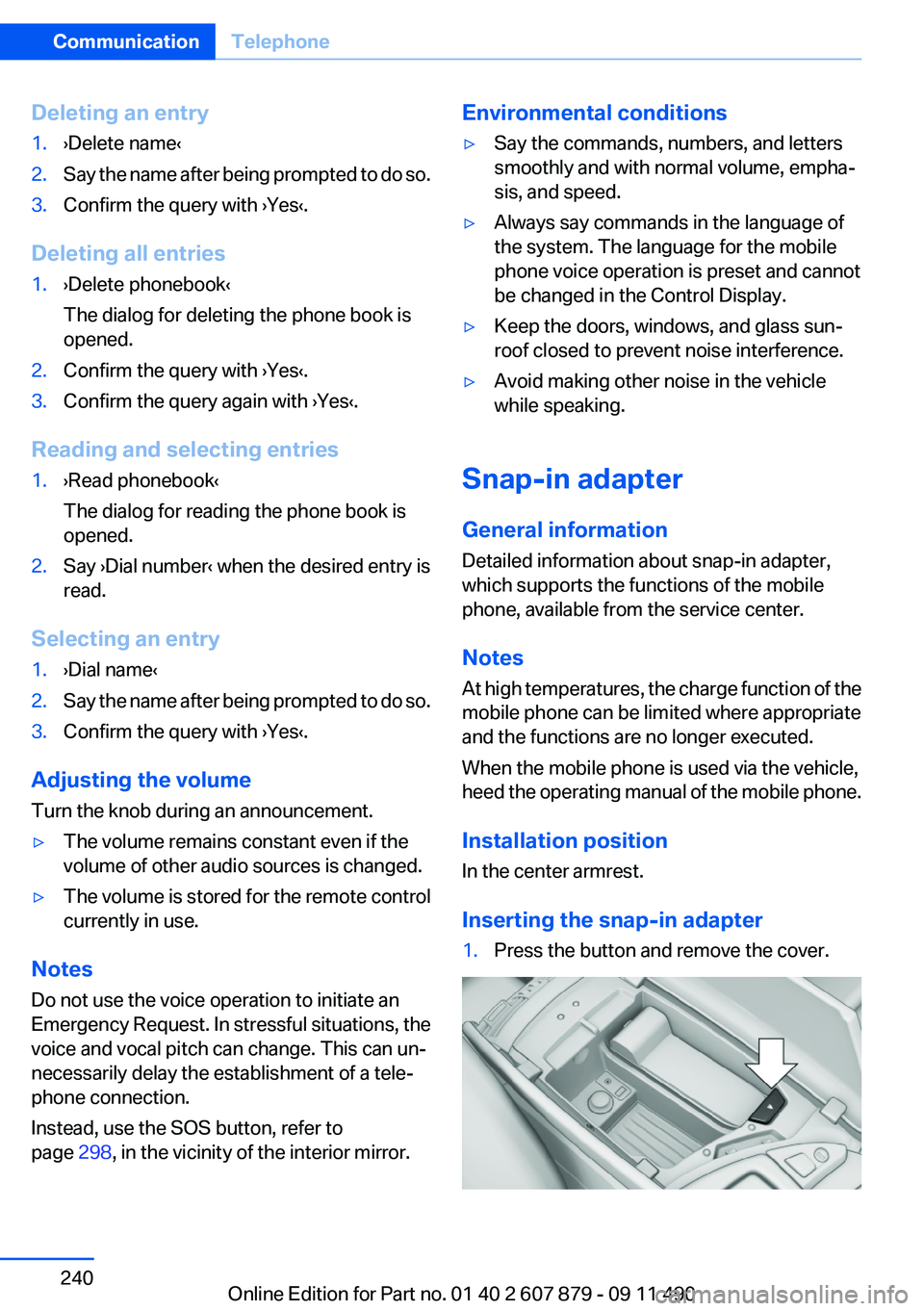
Inserting the snap-in adapter
1.Press the button and remove the cover.Seite 240CommunicationTelephone240
Online Edition for Part no. 01 40 2 607 879 - 09 11 490
Page 319 of 335
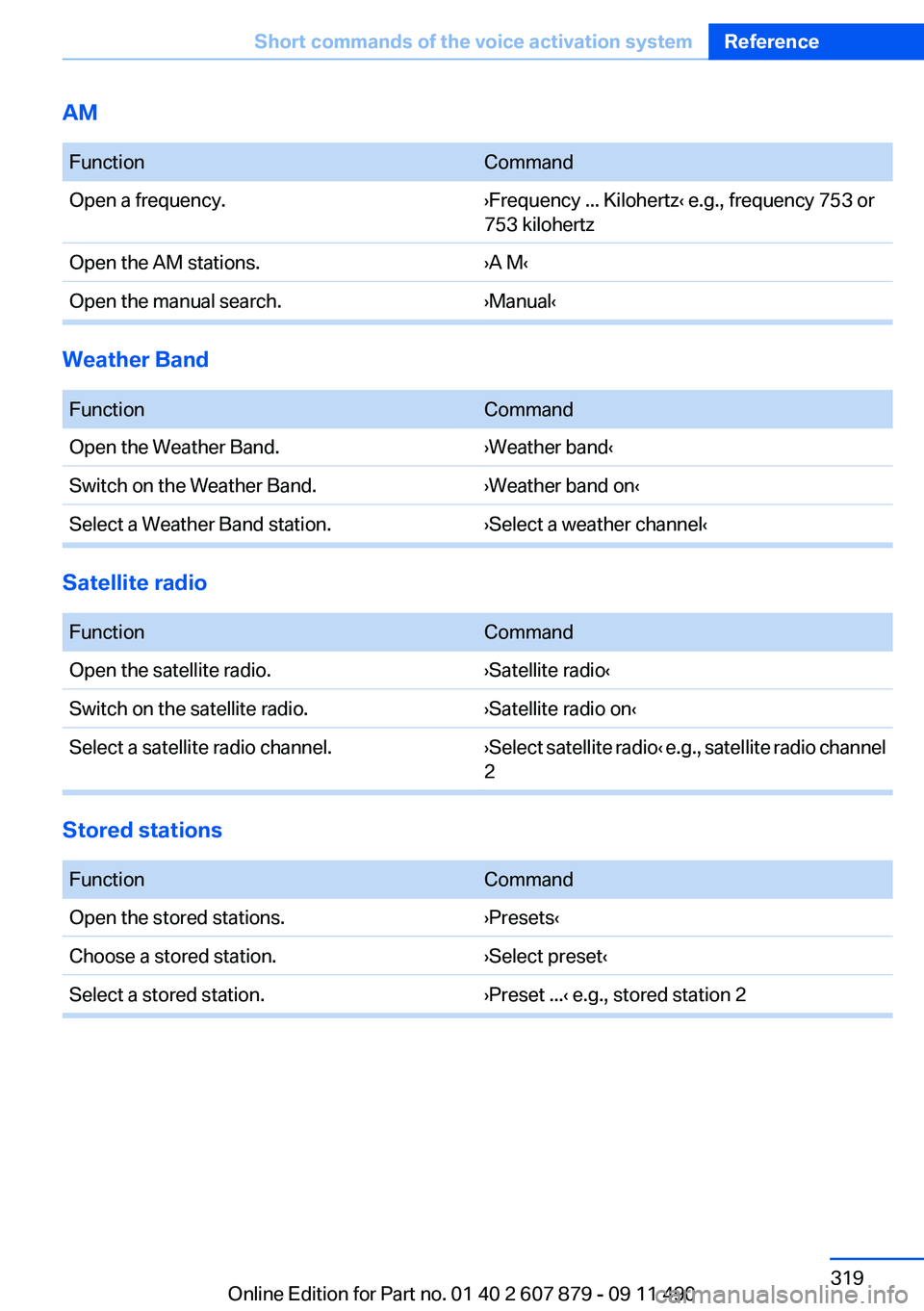
AM
FunctionCommandOpen a frequency.›Frequency ... Kilohertz‹ e.g., frequency 753 or
753 kilohertzOpen the AM stations.›A M‹Open the manual search.›Manual‹
Weather Band
FunctionCommandOpen the Weather Band.›Weather band‹Switch on the Weather Band.›Weather band on‹Select a Weather Band station.›Select a weather channel‹
Satellite radio
FunctionCommandOpen the satellite radio.›Satellite radio‹Switch on the satellite radio.›Satellite radio on‹Select a satellite radio channel.› Select satellite radio ‹ e.g., satellite radio channel
2
Stored stations
FunctionCommandOpen the stored stations.›Presets‹Choose a stored station.›Select preset‹Select a stored station.›Preset ...‹ e.g., stored station 2Seite 319Short commands of the voice activation systemReference319
Online Edition for Part no. 01 40 2 607 879 - 09 11 490
Page 330 of 335
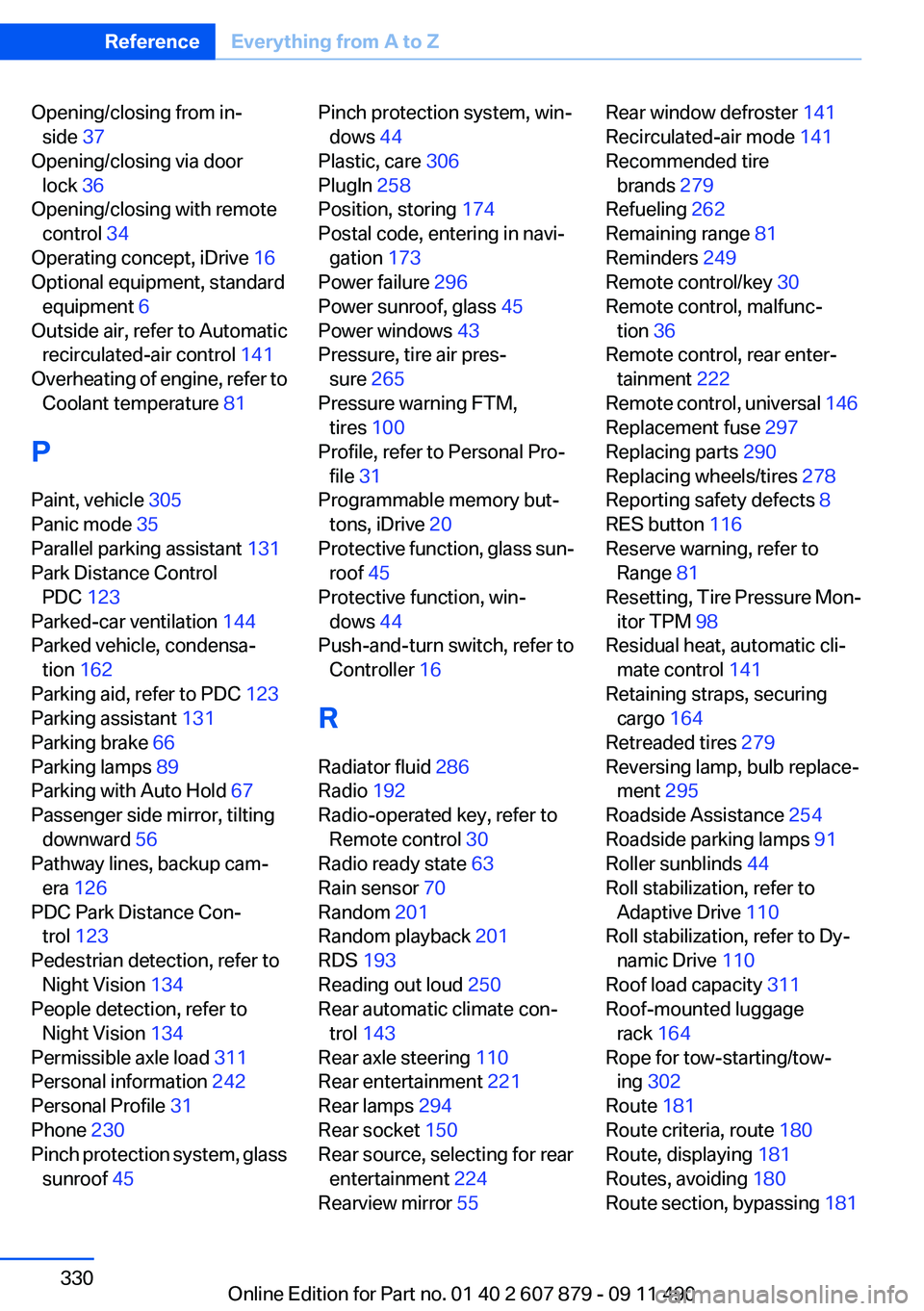
Opening/closing from in‐side 37
Opening/closing via door lock 36
Opening/closing with remote control 34
Operating concept, iDrive 16
Optional equipment, standard equipment 6
Outside air, refer to Automatic recirculated-air control 141
Overheating of engine, refer to Coolant temperature 81
P
Paint, vehicle 305
Panic mode 35
Parallel parking assistant 131
Park Distance Control PDC 123
Parked-car ventilation 144
Parked vehicle, condensa‐ tion 162
Parking aid, refer to PDC 123
Parking assistant 131
Parking brake 66
Parking lamps 89
Parking with Auto Hold 67
Passenger side mirror, tilting downward 56
Pathway lines, backup cam‐ era 126
PDC Park Distance Con‐ trol 123
Pedestrian detection, refer to Night Vision 134
People detection, refer to Night Vision 134
Permissible axle load 311
Personal information 242
Personal Profile 31
Phone 230
Pinch protection system, glass sunroof 45 Pinch protection system, win‐
dows 44
Plastic, care 306
PlugIn 258
Position, storing 174
Postal code, entering in navi‐ gation 173
Power failure 296
Power sunroof, glass 45
Power windows 43
Pressure, tire air pres‐ sure 265
Pressure warning FTM, tires 100
Profile, refer to Personal Pro‐ file 31
Programmable memory but‐ tons, iDrive 20
Protective function, glass sun‐ roof 45
Protective function, win‐ dows 44
Push-and-turn switch, refer to Controller 16
R
Radiator fluid 286
Radio 192
Radio-operated key, refer to Remote control 30
Radio ready state 63
Rain sensor 70
Random 201
Random playback 201
RDS 193
Reading out loud 250
Rear automatic climate con‐ trol 143
Rear axle steering 110
Rear entertainment 221
Rear lamps 294
Rear socket 150
Rear source, selecting for rear entertainment 224
Rearview mirror 55 Rear window defroster 141
Recirculated-air mode 141
Recommended tire brands 279
Refueling 262
Remaining range 81
Reminders 249
Remote control/key 30
Remote control, malfunc‐ tion 36
Remote control, rear enter‐ tainment 222
Remote control, universal 146
Replacement fuse 297
Replacing parts 290
Replacing wheels/tires 278
Reporting safety defects 8
RES button 116
Reserve warning, refer to Range 81
Resetting, Tire Pressure Mon‐ itor TPM 98
Residual heat, automatic cli‐ mate control 141
Retaining straps, securing cargo 164
Retreaded tires 279
Reversing lamp, bulb replace‐ ment 295
Roadside Assistance 254
Roadside parking lamps 91
Roller sunblinds 44
Roll stabilization, refer to Adaptive Drive 110
Roll stabilization, refer to Dy‐ namic Drive 110
Roof load capacity 311
Roof-mounted luggage rack 164
Rope for tow-starting/tow‐ ing 302
Route 181
Route criteria, route 180
Route, displaying 181
Routes, avoiding 180
Route section, bypassing 181 Seite 330ReferenceEverything from A to Z330
Online Edition for Part no. 01 40 2 607 879 - 09 11 490