Page 299 of 325

Floor mats can be removed from the passenger
compartment for cleaning.
If the floor carpets are very dirty, clean with a
microfiber cloth and water or a textile cleaner. To
prevent matting of the carpet, rub back and forth
in the direction of travel only.
Sensors/cameras
To clean sensors and cameras, use a cloth mois‐
tened with a small amount of glass cleaner.
Displays/screens
Clean the displays with a microfiber cloth.
Cleaning displays
Do not use chemical or household cleans‐
ers.
Keep all fluids and moisture away from the unit.
Otherwise, they could affect or damage surfa‐
ces or electrical components.
Avoid pressing too hard when cleaning and do
not use abrasive materials; otherwise, damage
can result.◀
Special feature on the Control Display
If necessary, a microfiber cloth dampened with
glass cleaner can also be used for cleaning the
Control Display.
Moisten microfiber cloth only slightly
Moisten microfiber cloth only slightly, oth‐
erwise, damage may result.◀
Suitable glass cleaners are available from the
service center.
Long-term vehicle storage
Your service center can advise you on what to
consider when storing the vehicle for longer
than three months.Seite 299CareMobility299
Online Edition for Part no. 01 40 2 608 633 - 11 09 490
Page 306 of 325
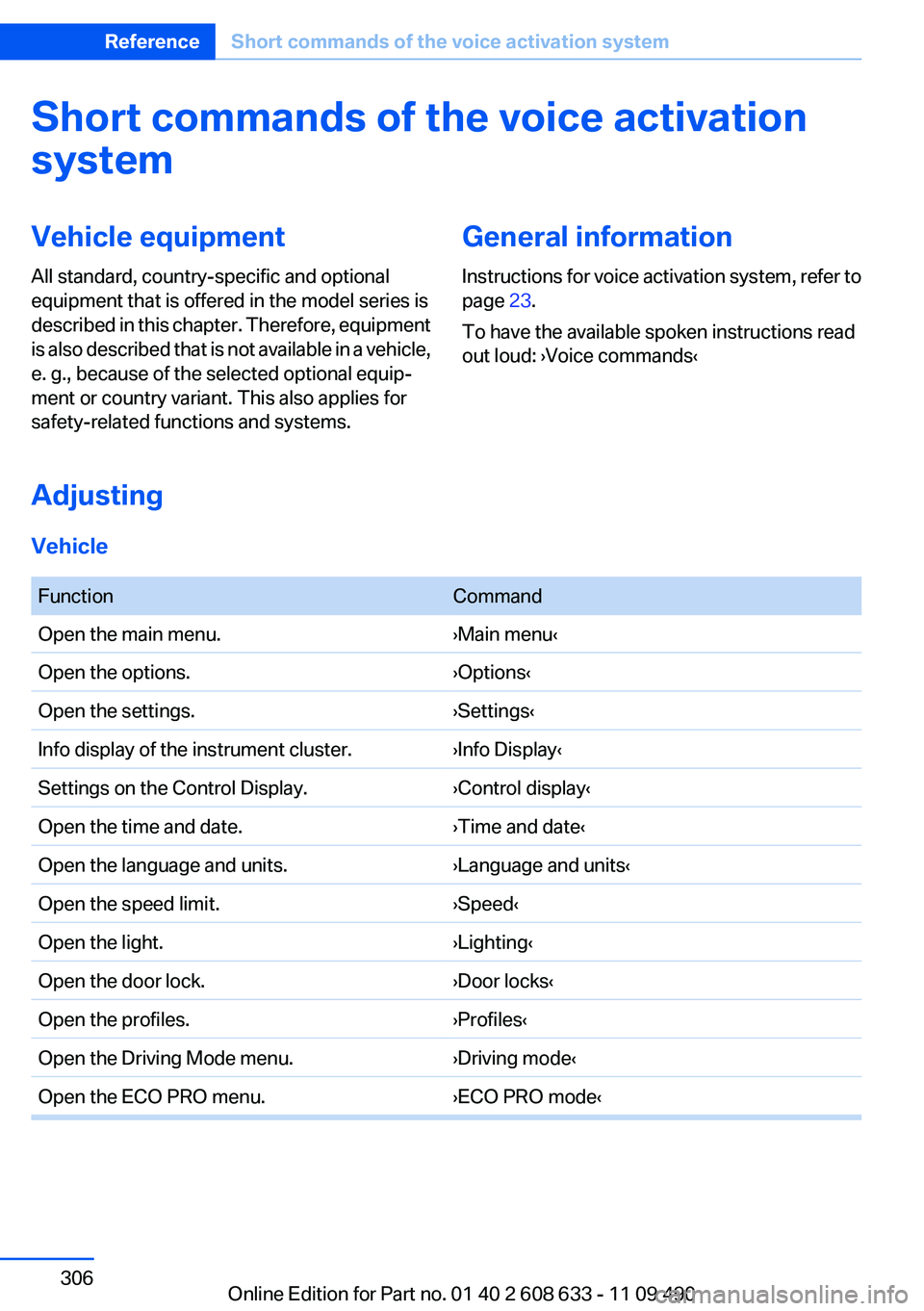
Short commands of the voice activation
systemVehicle equipment
All standard, country-specific and optional
equipment that is offered in the model series is
described in this chapter. Therefore, equipment
is also described that is not available in a vehicle,
e. g., because of the selected optional equip‐
ment or country variant. This also applies for
safety-related functions and systems.General information
Instructions for voice activation system, refer to
page 23.
To have the available spoken instructions read
out loud: ›Voice commands‹
Adjusting
Vehicle
FunctionCommandOpen the main menu.›Main menu‹Open the options.›Options‹Open the settings.›Settings‹Info display of the instrument cluster.›Info Display‹Settings on the Control Display.›Control display‹Open the time and date.›Time and date‹Open the language and units.›Language and units‹Open the speed limit.›Speed‹Open the light.›Lighting‹Open the door lock.›Door locks‹Open the profiles.›Profiles‹Open the Driving Mode menu.›Driving mode‹Open the ECO PRO menu.›ECO PRO mode‹Seite 306ReferenceShort commands of the voice activation system306
Online Edition for Part no. 01 40 2 608 633 - 11 09 490
Page 307 of 325
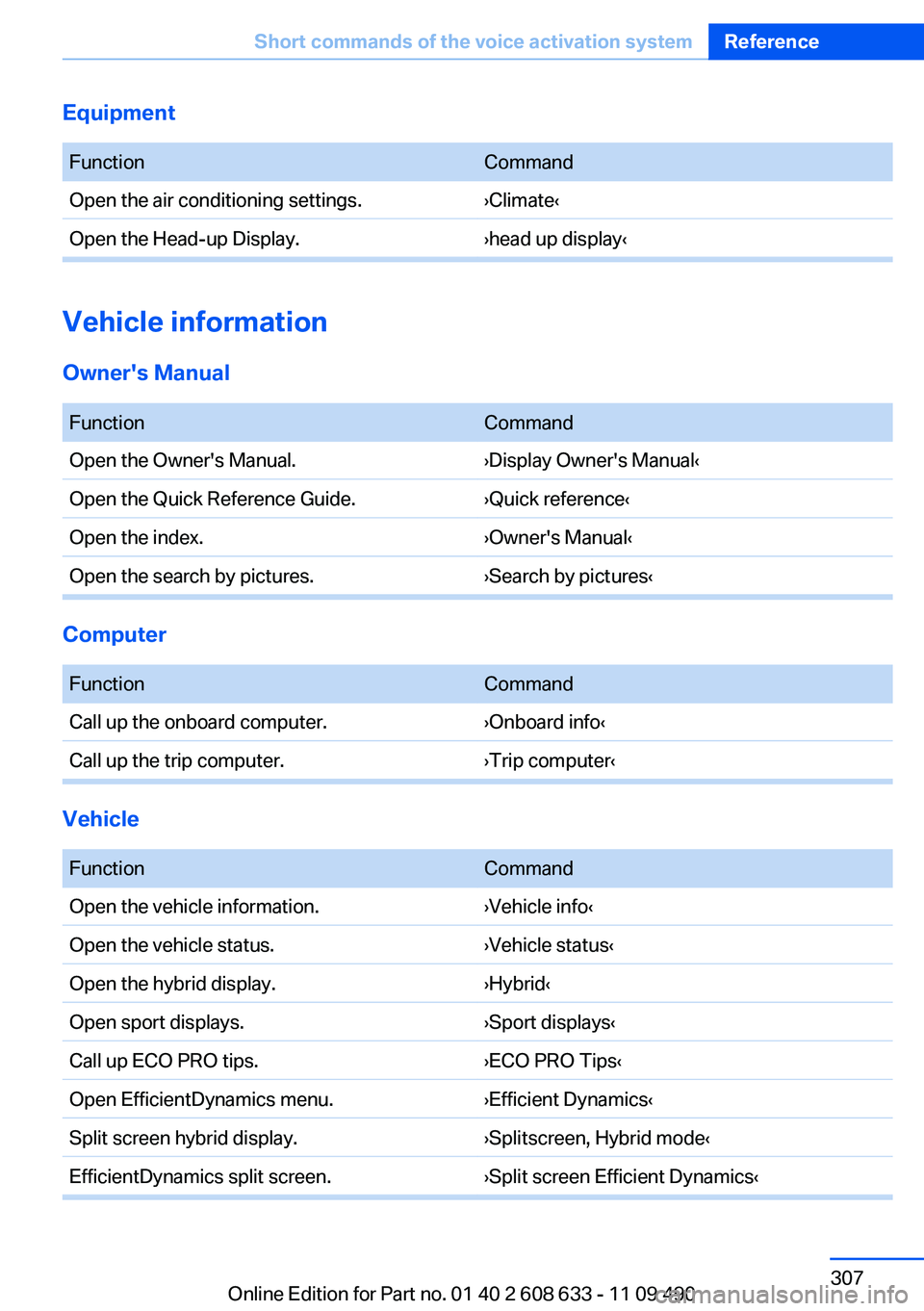
Equipment
FunctionCommandOpen the air conditioning settings.›Climate‹Open the Head-up Display.›head up display‹
Vehicle information
Owner's Manual
FunctionCommandOpen the Owner's Manual.›Display Owner's Manual‹Open the Quick Reference Guide.›Quick reference‹Open the index.›Owner's Manual‹Open the search by pictures.›Search by pictures‹
Computer
FunctionCommandCall up the onboard computer.›Onboard info‹Call up the trip computer.›Trip computer‹
Vehicle
FunctionCommandOpen the vehicle information.›Vehicle info‹Open the vehicle status.›Vehicle status‹Open the hybrid display.›Hybrid‹Open sport displays.›Sport displays‹Call up ECO PRO tips.›ECO PRO Tips‹Open EfficientDynamics menu.›Efficient Dynamics‹Split screen hybrid display.›Splitscreen, Hybrid mode‹EfficientDynamics split screen.›Split screen Efficient Dynamics‹Seite 307Short commands of the voice activation systemReference307
Online Edition for Part no. 01 40 2 608 633 - 11 09 490
Page 308 of 325
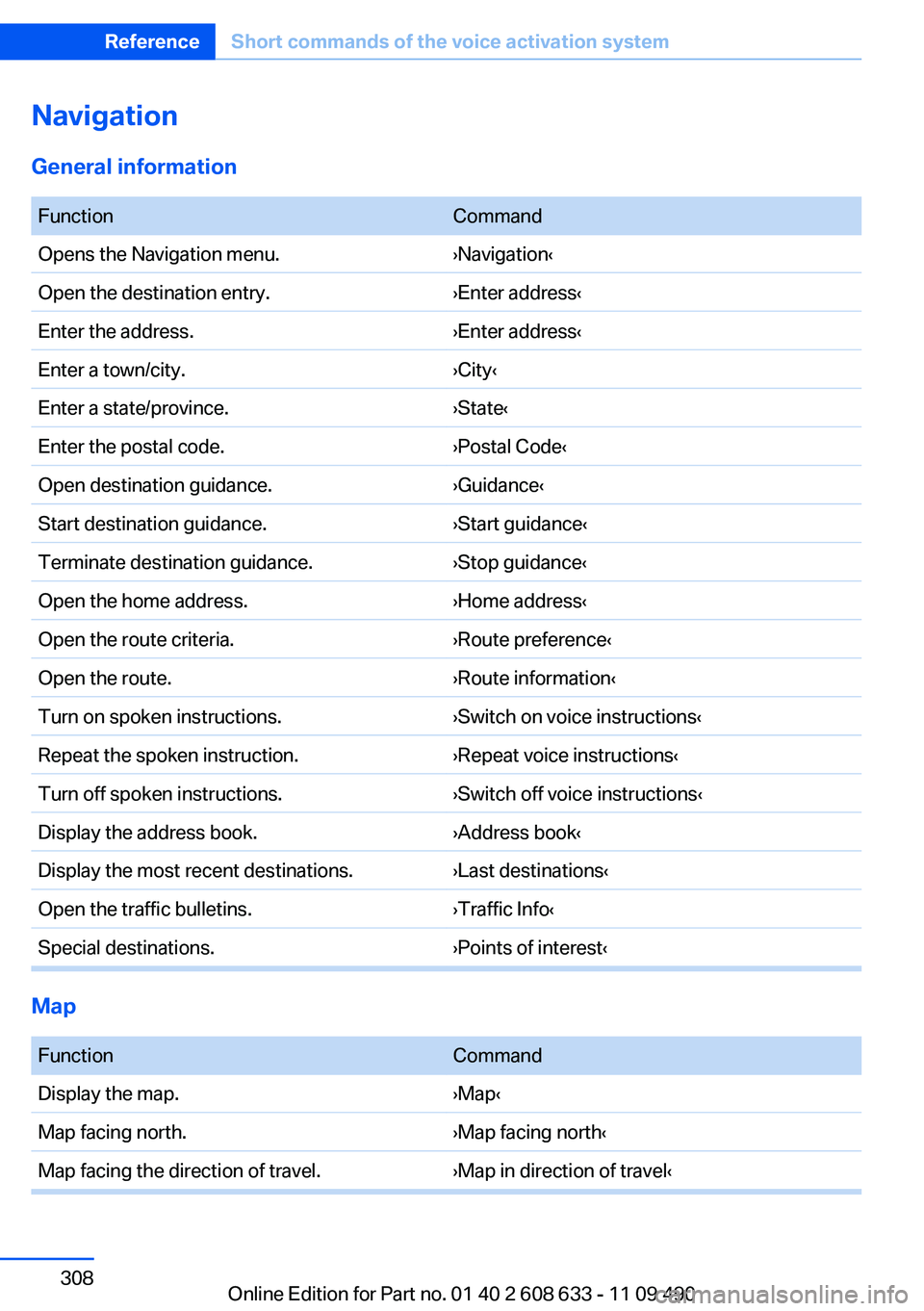
Navigation
General information
FunctionCommandOpens the Navigation menu.›Navigation‹Open the destination entry.›Enter address‹Enter the address.›Enter address‹Enter a town/city.›City‹Enter a state/province.›State‹Enter the postal code.›Postal Code‹Open destination guidance.›Guidance‹Start destination guidance.›Start guidance‹Terminate destination guidance.›Stop guidance‹Open the home address.›Home address‹Open the route criteria.›Route preference‹Open the route.›Route information‹Turn on spoken instructions.›Switch on voice instructions‹Repeat the spoken instruction.›Repeat voice instructions‹Turn off spoken instructions.›Switch off voice instructions‹Display the address book.›Address book‹Display the most recent destinations.›Last destinations‹Open the traffic bulletins.›Traffic Info‹Special destinations.›Points of interest‹
Map
FunctionCommandDisplay the map.›Map‹Map facing north.›Map facing north‹Map facing the direction of travel.›Map in direction of travel‹Seite 308ReferenceShort commands of the voice activation system308
Online Edition for Part no. 01 40 2 608 633 - 11 09 490
Page 311 of 325
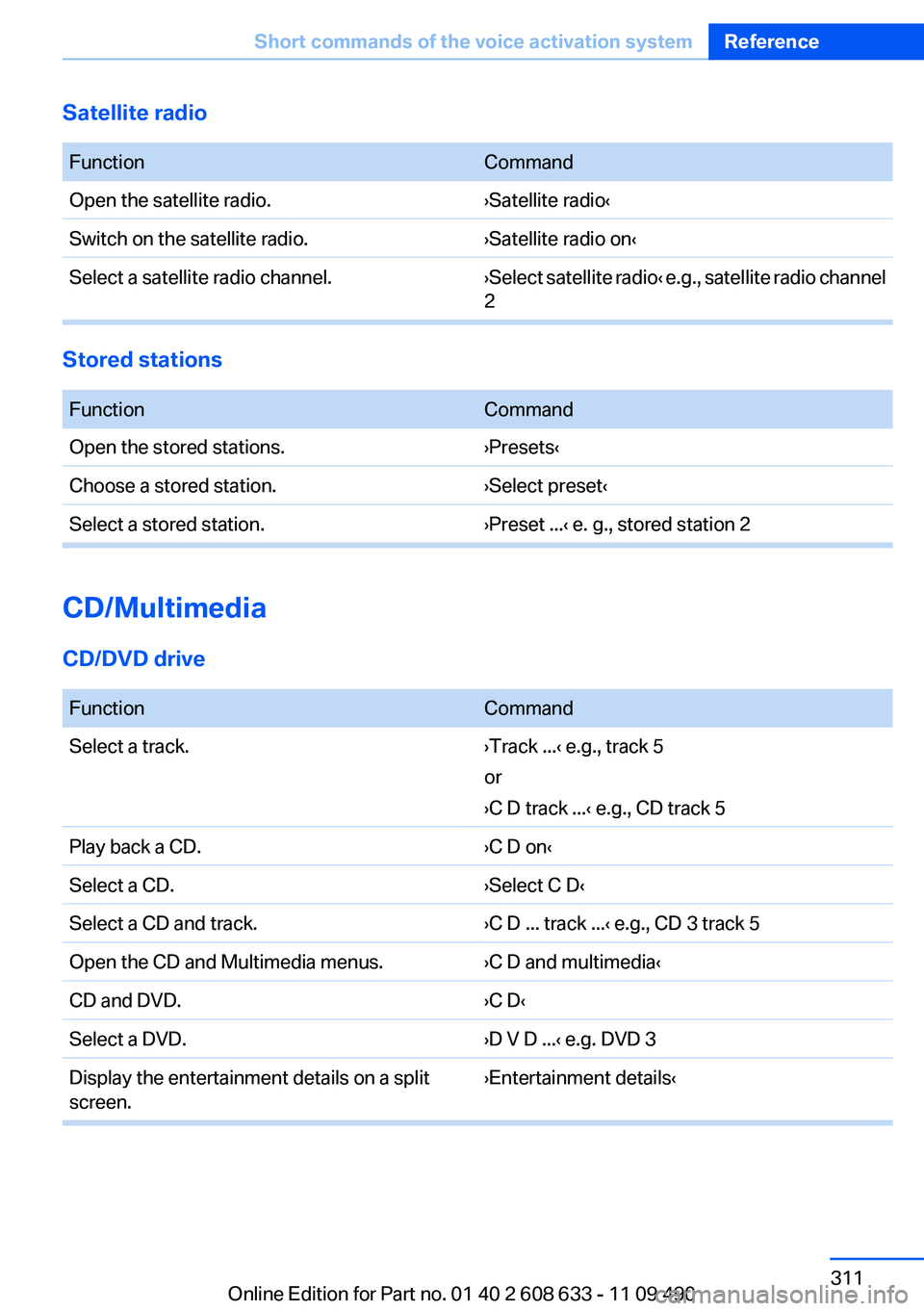
Satellite radio
FunctionCommandOpen the satellite radio.›Satellite radio‹Switch on the satellite radio.›Satellite radio on‹Select a satellite radio channel.› Select satellite radio ‹ e.g., satellite radio channel
2
Stored stations
FunctionCommandOpen the stored stations.›Presets‹Choose a stored station.›Select preset‹Select a stored station.›Preset ...‹ e. g., stored station 2
CD/Multimedia
CD/DVD drive
FunctionCommandSelect a track.›Track ...‹ e.g., track 5
or
›C D track ...‹ e.g., CD track 5Play back a CD.›C D on‹Select a CD.›Select C D‹Select a CD and track.›C D ... track ...‹ e.g., CD 3 track 5Open the CD and Multimedia menus.›C D and multimedia‹CD and DVD.›C D‹Select a DVD.›D V D ...‹ e.g. DVD 3Display the entertainment details on a split
screen.›Entertainment details‹Seite 311Short commands of the voice activation systemReference311
Online Edition for Part no. 01 40 2 608 633 - 11 09 490
Page 312 of 325
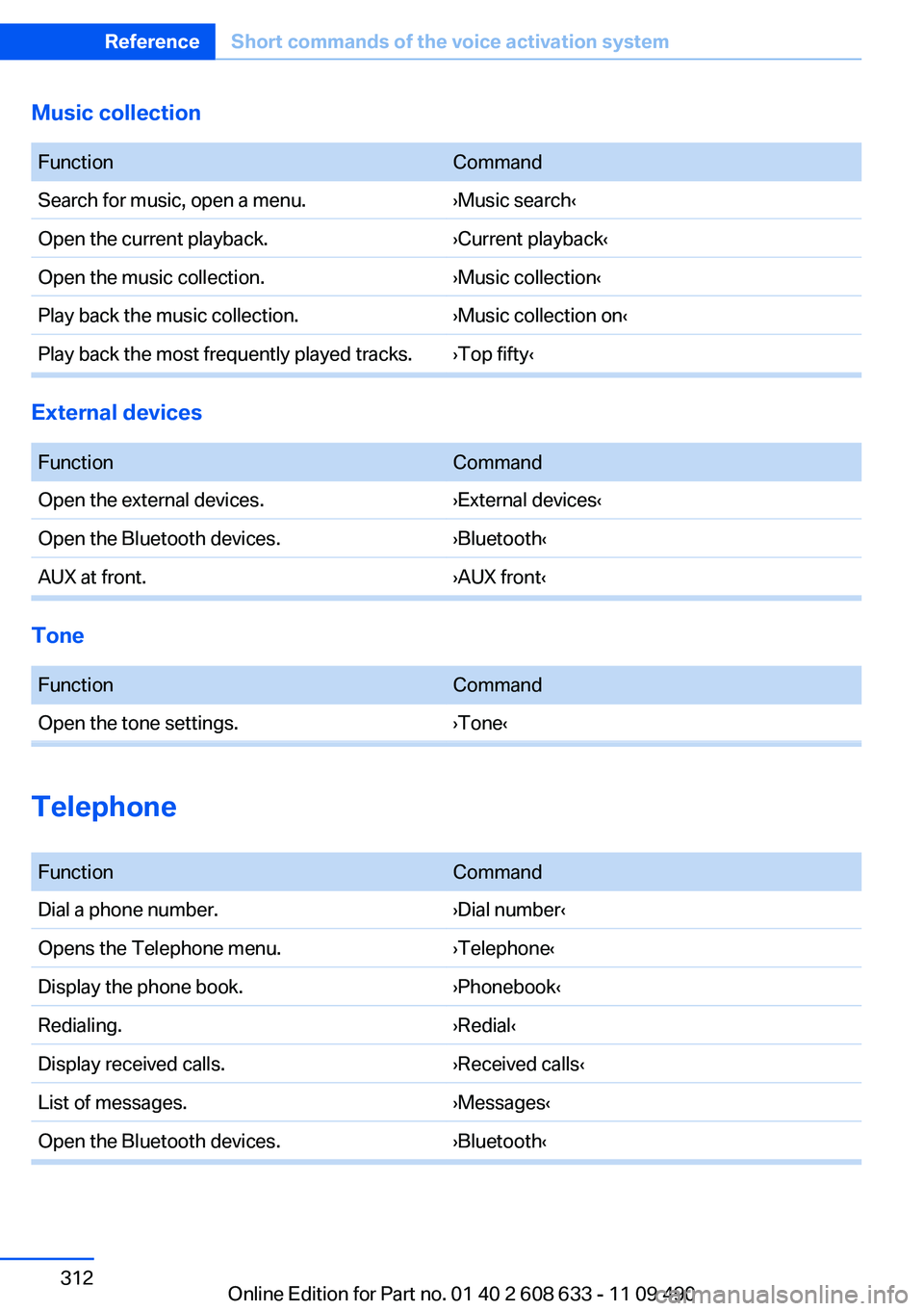
Music collection
FunctionCommandSearch for music, open a menu.›Music search‹Open the current playback.›Current playback‹Open the music collection.›Music collection‹Play back the music collection.›Music collection on‹Play back the most frequently played tracks.›Top fifty‹
External devices
FunctionCommandOpen the external devices.›External devices‹Open the Bluetooth devices.›Bluetooth‹AUX at front.›AUX front‹
Tone
FunctionCommandOpen the tone settings.›Tone‹
Telephone
FunctionCommandDial a phone number.›Dial number‹Opens the Telephone menu.›Telephone‹Display the phone book.›Phonebook‹Redialing.›Redial‹Display received calls.›Received calls‹List of messages.›Messages‹Open the Bluetooth devices.›Bluetooth‹Seite 312ReferenceShort commands of the voice activation system312
Online Edition for Part no. 01 40 2 608 633 - 11 09 490
Page 313 of 325
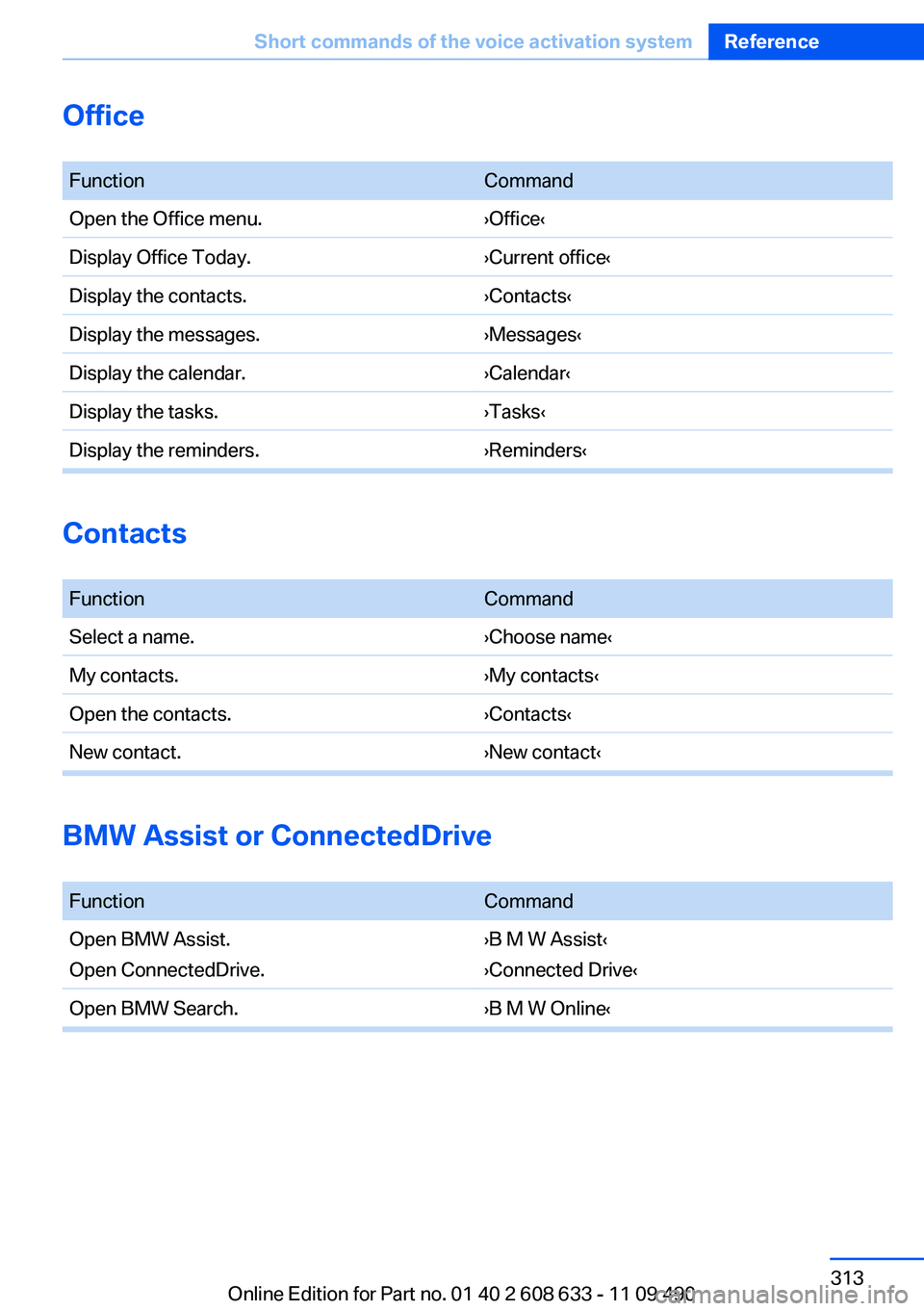
Office
FunctionCommandOpen the Office menu.›Office‹Display Office Today.›Current office‹Display the contacts.›Contacts‹Display the messages.›Messages‹Display the calendar.›Calendar‹Display the tasks.›Tasks‹Display the reminders.›Reminders‹
Contacts
FunctionCommandSelect a name.›Choose name‹My contacts.›My contacts‹Open the contacts.›Contacts‹New contact.›New contact‹
BMW Assist or ConnectedDrive
FunctionCommandOpen BMW Assist.
Open ConnectedDrive.›B M W Assist‹
›Connected Drive‹Open BMW Search.›B M W Online‹Seite 313Short commands of the voice activation systemReference313
Online Edition for Part no. 01 40 2 608 633 - 11 09 490
Page 314 of 325

Everything from A to Z
IndexA
ABS, Antilock Brake Sys‐ tem 104
ACC, Active Cruise Control with Stop & Go 109
Activated-charcoal filter 139
Active Blind Spot Detec‐ tion 101
Active Cruise Control with Stop & Go, ACC 109
Active Protection 102
Adaptive brake lights, refer to Brake force display 102
Adaptive light control 88
Additional telephone 228
Additives, oil 275
Adjustments, seats/head re‐ straints 45
After washing vehicle 297
Airbags 91
Airbags, indicator/warning light 92
Air circulation, refer to Recir‐ culated-air mode 135, 138
Air distribution, manual 135, 138
Air drying, refer to Cooling function 135, 137
Air flow, air conditioner 135
Air pressure, tires 263
Air vents, refer to Ventila‐ tion 139
Air volume, automatic climate control 138
Alarm system 40
Alarm, unintentional 41
All around the center con‐ sole 14
All around the headliner 15 All around the steering
wheel 12
All-season tires, refer to Win‐ ter tires 270
Alternating-code hand-held transmitter 142
Alternative oil types 275
AM/FM station 190
Announcement, navigation, refer to Spoken instruc‐
tions 178
Antifreeze, washer fluid 66
Antilock Brake System, ABS 104
Anti-slip control, refer to DSC 104
Applications 255
Appointments 243
Approved engine oils 275
Apps 255
Apps, video playback 213
Arrival time 82
Ash tray 145
Assistance, Roadside Assis‐ tance 291
Assistance when driving off 108
Assist, BMW 250
Assist system information, on Control Display 85
Audio playback 199
Audio playback, Blue‐ tooth 213
AUTO intensity 137
Automatic car wash 296
Automatic climate con‐ trol 134
Automatic climate control with enhanced features 136
Automatic Cruise Control with Stop & Go 109 Automatic Curb Monitor 52
Automatic deactivation, front passenger airbags 93
Automatic headlamp con‐ trol 87
Automatic locking 37
Automatic recirculated-air control 138
Automatic transmission with Steptronic 67
AUTO program, automatic cli‐ mate control 137
AUTO program, climate con‐ trol 135
AUTO program, intensity 137
Auto Start/Stop function 61
AUX-IN port 210
Average fuel consumption 82
Average speed 82
Axle loads, weights 304
B
Backrest curvature, refer to Lumbar support 47
Backrest, width 47
Backup camera 123
Balance 188
Band-Aids, refer to First aid kit 291
Bar for tow-starting/tow‐ ing 294
Bass 188
Battery replacement, vehicle battery 287
Battery replacement, vehicle remote control 30
Battery, vehicle 287
Belts, safety belts 48
Beverage holder, cu‐ pholder 150 Seite 314ReferenceEverything from A to Z314
Online Edition for Part no. 01 40 2 608 633 - 11 09 490