2012 BMW 328I SEDAN rear fog lamp
[x] Cancel search: rear fog lampPage 12 of 325
CockpitVehicle equipment
All standard, country-specific and optional
equipment that is offered in the model series is
described in this chapter. Therefore, equipmentis also described that is not available in a vehicle,
e. g., because of the selected optional equip‐
ment or country variant. This also applies for
safety-related functions and systems.
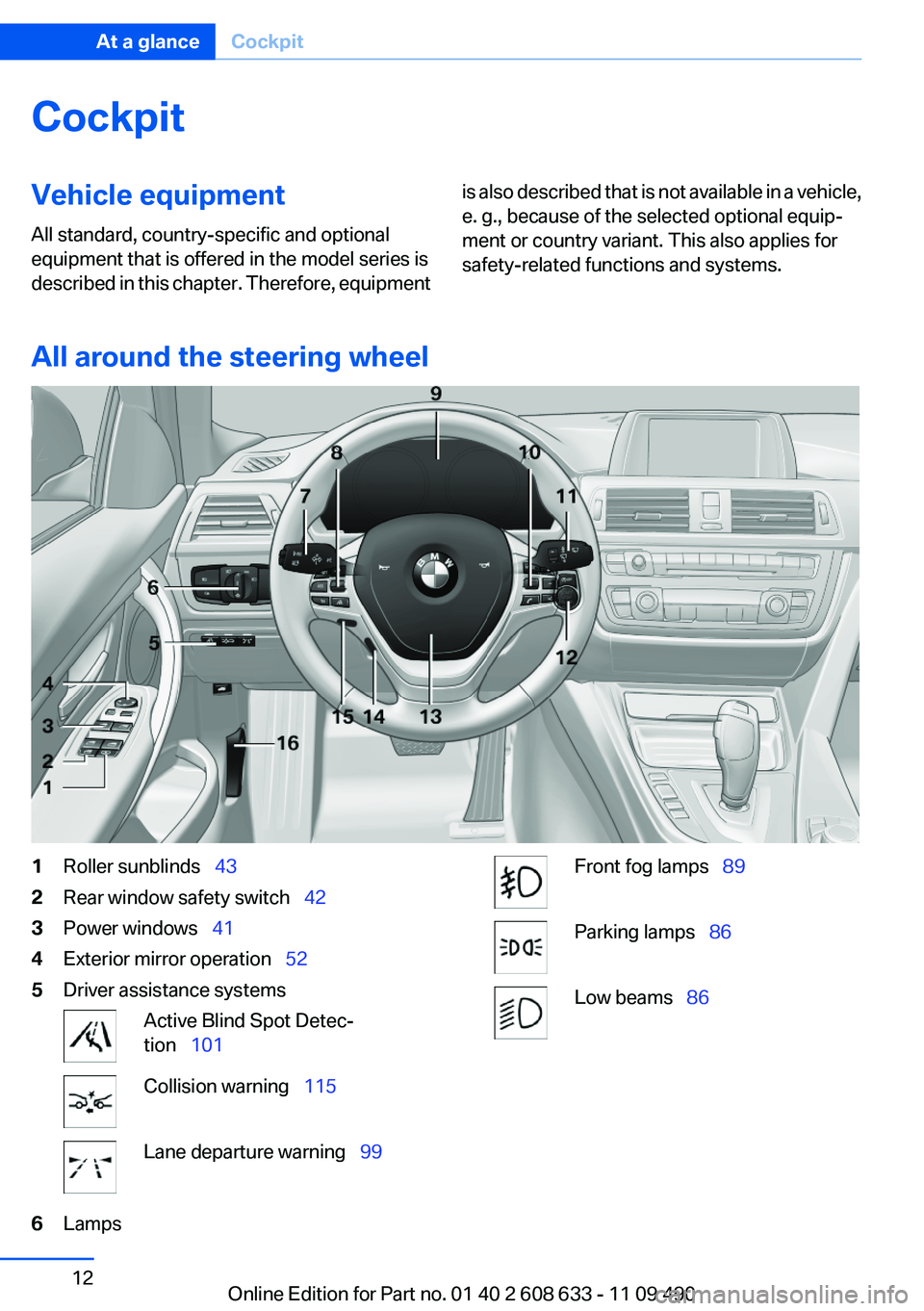
All around the steering wheel
1Roller sunblinds 432Rear window safety switch 423Power windows 414Exterior mirror operation 525Driver assistance systemsActive Blind Spot Detec‐
tion 101Collision warning 115Lane departure warning 996LampsFront fog lamps 89Parking lamps 86Low beams 86Seite 12At a glanceCockpit12
Online Edition for Part no. 01 40 2 608 633 - 11 09 490
Page 74 of 325
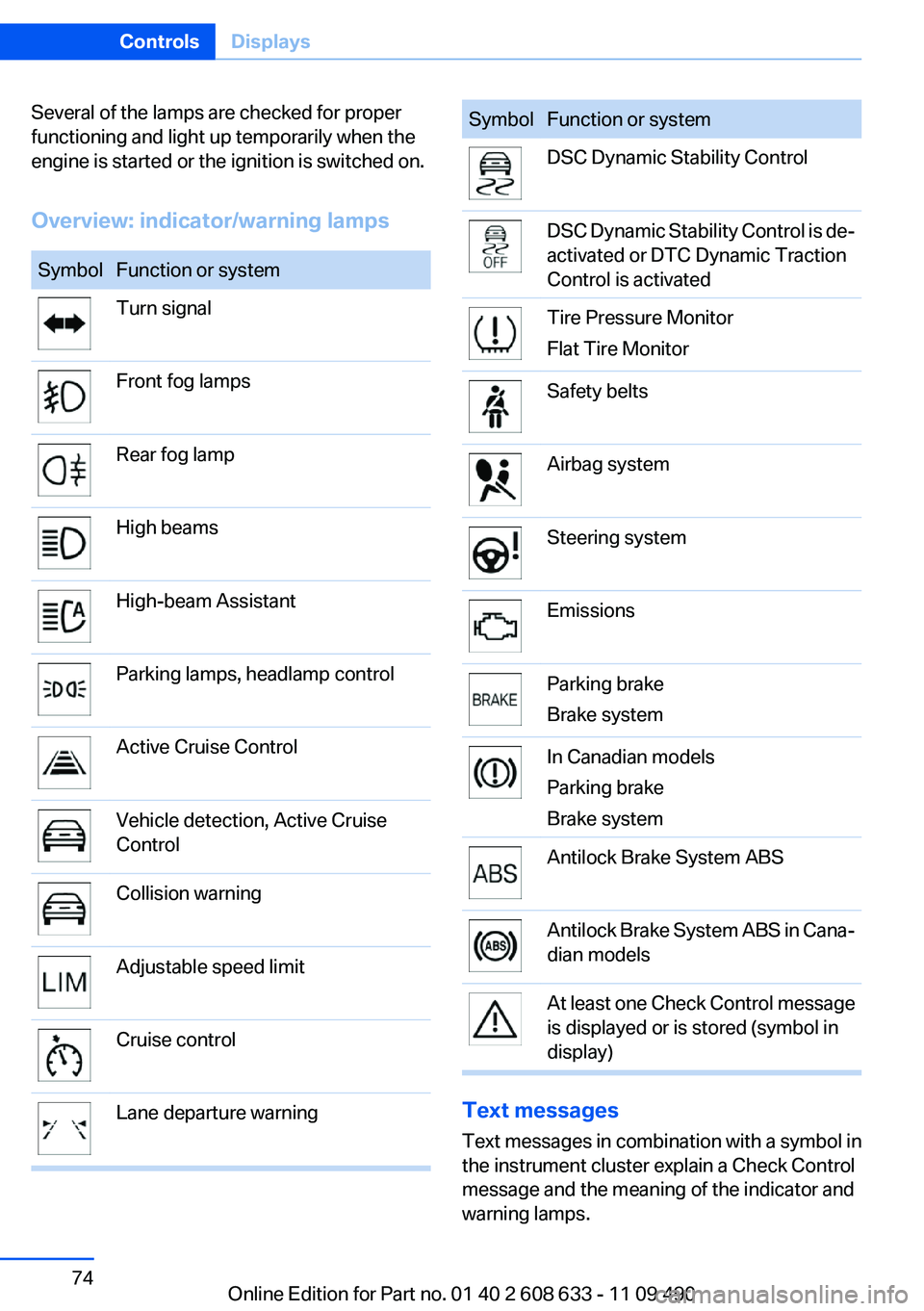
Several of the lamps are checked for proper
functioning and light up temporarily when the
engine is started or the ignition is switched on.
Overview: indicator/warning lampsSymbolFunction or systemTurn signalFront fog lampsRear fog lampHigh beamsHigh-beam AssistantParking lamps, headlamp controlActive Cruise ControlVehicle detection, Active Cruise
ControlCollision warningAdjustable speed limitCruise controlLane departure warningSymbolFunction or systemDSC Dynamic Stability ControlDSC Dynamic Stability Control is de‐
activated or DTC Dynamic Traction
Control is activatedTire Pressure Monitor
Flat Tire MonitorSafety beltsAirbag systemSteering systemEmissionsParking brake
Brake systemIn Canadian models
Parking brake
Brake systemAntilock Brake System ABSAntilock Brake System ABS in Cana‐
dian modelsAt least one Check Control message
is displayed or is stored (symbol in
display)
Text messages
Text messages in combination with a symbol in
the instrument cluster explain a Check Control
message and the meaning of the indicator and
warning lamps.
Seite 74ControlsDisplays74
Online Edition for Part no. 01 40 2 608 633 - 11 09 490
Page 86 of 325
LampsVehicle equipment
All standard, country-specific and optional
equipment that is offered in the model series is
described in this chapter. Therefore, equipment
is also described that is not available in a vehicle,
e. g., because of the selected optional equip‐
ment or country variant. This also applies for
safety-related functions and systems.
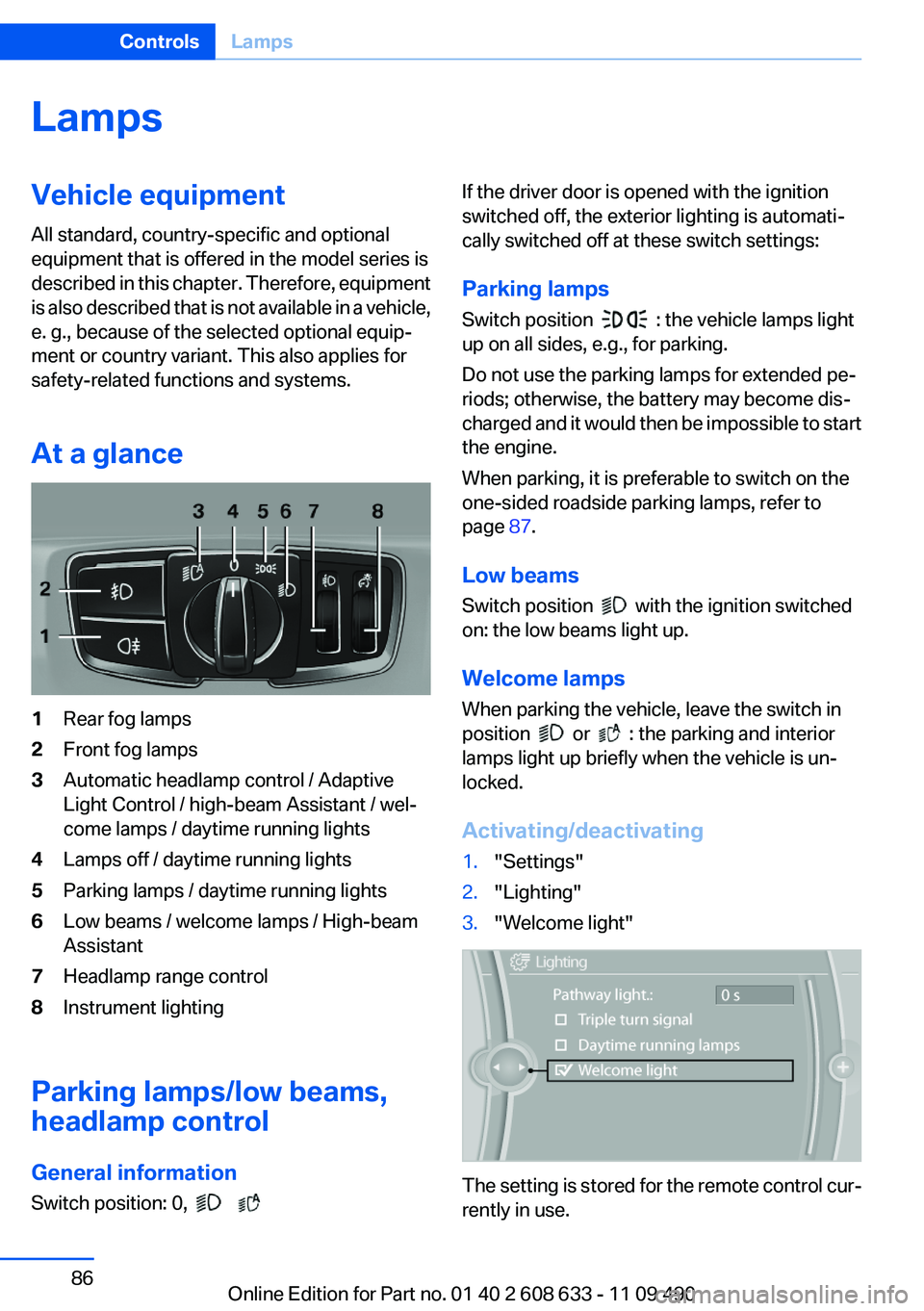
At a glance1Rear fog lamps2Front fog lamps3Automatic headlamp control / Adaptive
Light Control / high-beam Assistant / wel‐
come lamps / daytime running lights4Lamps off / daytime running lights5Parking lamps / daytime running lights6Low beams / welcome lamps / High-beam
Assistant7Headlamp range control8Instrument lighting
Parking lamps/low beams,
headlamp control
General information
Switch position: 0,
If the driver door is opened with the ignition
switched off, the exterior lighting is automati‐
cally switched off at these switch settings:
Parking lamps
Switch position
: the vehicle lamps light
up on all sides, e.g., for parking.
Do not use the parking lamps for extended pe‐
riods; otherwise, the battery may become dis‐
charged and it would then be impossible to start
the engine.
When parking, it is preferable to switch on the
one-sided roadside parking lamps, refer to
page 87.
Low beams
Switch position
with the ignition switched
on: the low beams light up.
Welcome lamps
When parking the vehicle, leave the switch in
position
or : the parking and interior
lamps light up briefly when the vehicle is un‐
locked.
Activating/deactivating
1."Settings"2."Lighting"3."Welcome light"
The setting is stored for the remote control cur‐
rently in use.
Seite 86ControlsLamps86
Online Edition for Part no. 01 40 2 608 633 - 11 09 490
Page 88 of 325
Adaptive light control
The concept
Adaptive light control is a variable headlamp
control system that enables dynamic illumina‐
tion of the road surface.
Depending on the steering angle and other pa‐
rameters, the light from the headlamp follows
the course of the road.
In tight curves, e.g., on mountainous roads or
when turning, one of the two front fog lamps is
switched on as a turning lamp. As a result the
inside of the curve is better lighted.
Activating
Switch position
with the ignition switched
on.
The turning lamps are automatically switched
on depending on the steering angle or the use
of turn signals.
To avoid blinding oncoming traffic, the Adaptive
Light Control directs light towards the front pas‐
senger side when the vehicle is at a standstill.
When driving in reverse, only the turning lamp is
active.
Malfunction
A Check Control message is displayed.
Adaptive light control is malfunctioning or has
failed. Have the system checked as soon as pos‐
sible.
High-beam Assistant
The concept
When the low beams are switched on, this sys‐
tem automatically switches the high beams on
and off or suppresses the light in the areas that
blind oncoming traffic. The procedure is con‐
trolled by a sensor on the front of the interior
rearview mirror. The assistant ensures that the
high beams are switched on whenever the traffic
situation allows. The driver can intervene at any
time and switch the high beams on and off as
usual.
Activating
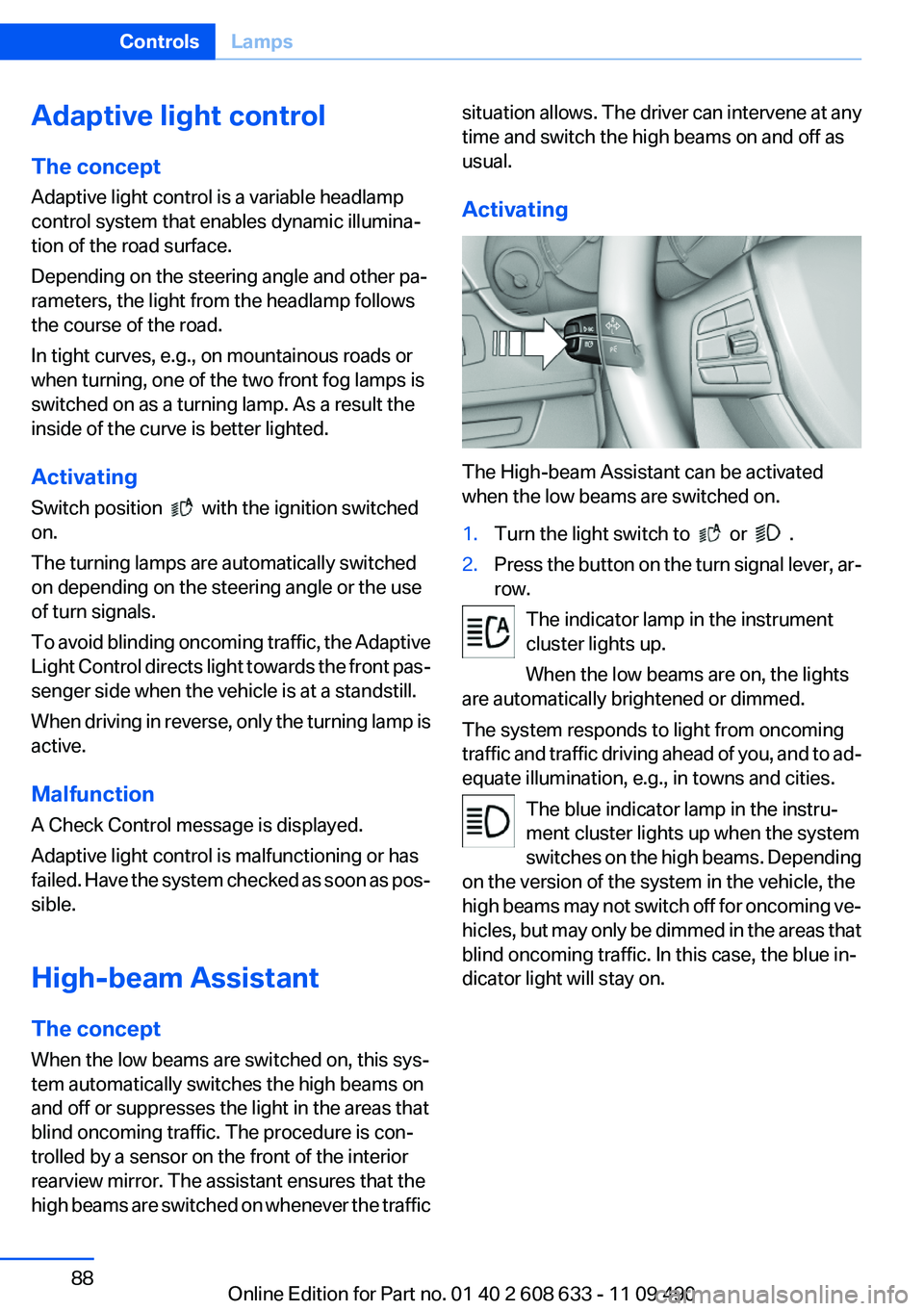
The High-beam Assistant can be activated
when the low beams are switched on.
1.Turn the light switch to or .2.Press the button on the turn signal lever, ar‐
row.
The indicator lamp in the instrument
cluster lights up.
When the low beams are on, the lights
are automatically brightened or dimmed.
The system responds to light from oncoming
traffic and traffic driving ahead of you, and to ad‐
equate illumination, e.g., in towns and cities.
The blue indicator lamp in the instru‐
ment cluster lights up when the system
switches on the high beams. Depending
on the version of the system in the vehicle, the
high beams may not switch off for oncoming ve‐
hicles, but may only be dimmed in the areas that
blind oncoming traffic. In this case, the blue in‐
dicator light will stay on.
Seite 88ControlsLamps88
Online Edition for Part no. 01 40 2 608 633 - 11 09 490
Page 89 of 325
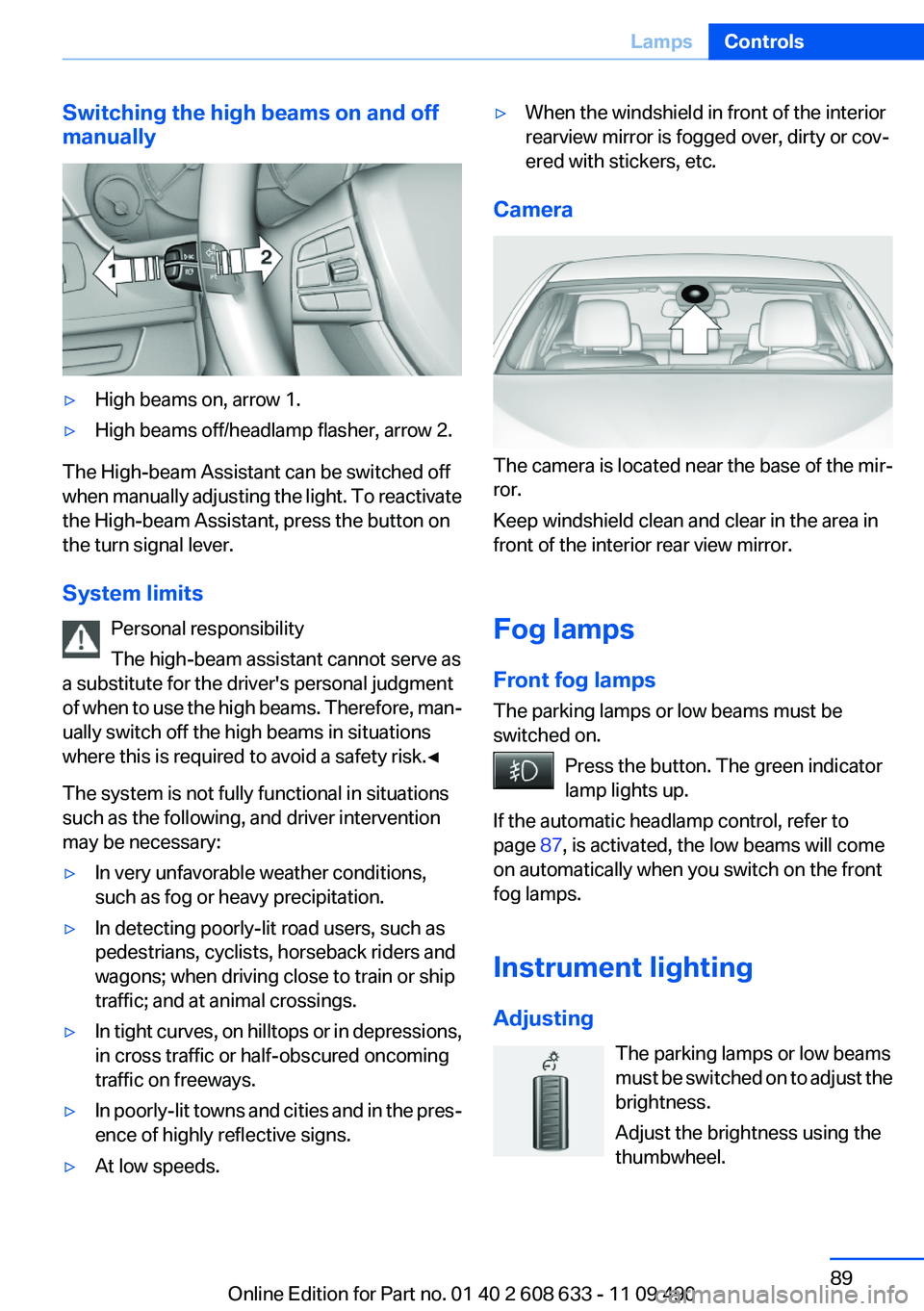
Switching the high beams on and off
manually▷High beams on, arrow 1.▷High beams off/headlamp flasher, arrow 2.
The High-beam Assistant can be switched off
when manually adjusting the light. To reactivate
the High-beam Assistant, press the button on
the turn signal lever.
System limits Personal responsibility
The high-beam assistant cannot serve as
a substitute for the driver's personal judgment
of when to use the high beams. Therefore, man‐
ually switch off the high beams in situations
where this is required to avoid a safety risk.◀
The system is not fully functional in situations
such as the following, and driver intervention
may be necessary:
▷In very unfavorable weather conditions,
such as fog or heavy precipitation.▷In detecting poorly-lit road users, such as
pedestrians, cyclists, horseback riders and
wagons; when driving close to train or ship
traffic; and at animal crossings.▷In tight curves, on hilltops or in depressions,
in cross traffic or half-obscured oncoming
traffic on freeways.▷In poorly-lit towns and cities and in the pres‐
ence of highly reflective signs.▷At low speeds.▷When the windshield in front of the interior
rearview mirror is fogged over, dirty or cov‐
ered with stickers, etc.
Camera
The camera is located near the base of the mir‐
ror.
Keep windshield clean and clear in the area in
front of the interior rear view mirror.
Fog lamps
Front fog lamps
The parking lamps or low beams must be
switched on.
Press the button. The green indicator
lamp lights up.
If the automatic headlamp control, refer to
page 87, is activated, the low beams will come
on automatically when you switch on the front
fog lamps.
Instrument lighting
Adjusting The parking lamps or low beams
must be switched on to adjust the
brightness.
Adjust the brightness using the
thumbwheel.
Seite 89LampsControls89
Online Edition for Part no. 01 40 2 608 633 - 11 09 490
Page 101 of 325
Active Blind Spot Detection
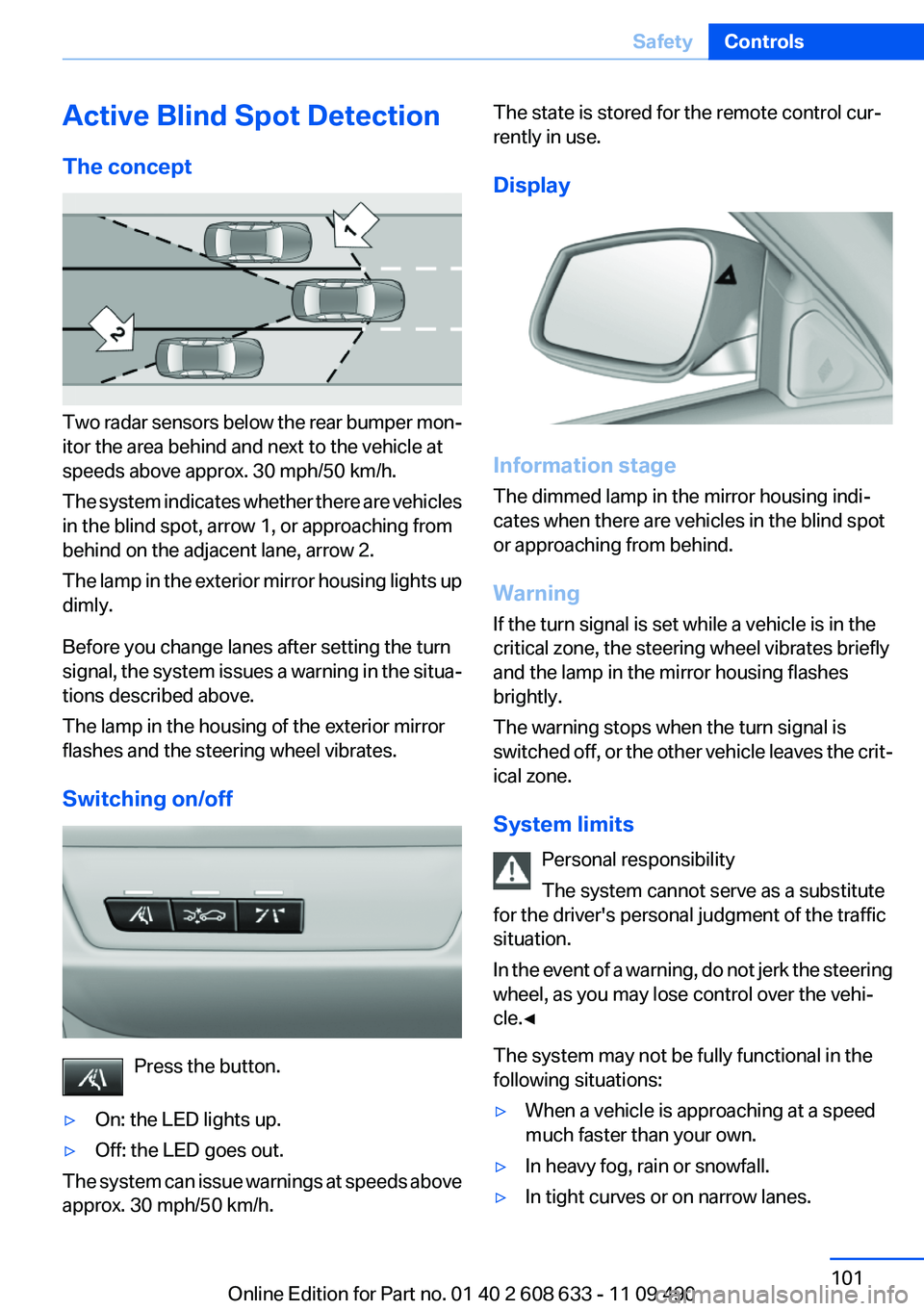
The concept
Two radar sensors below the rear bumper mon‐
itor the area behind and next to the vehicle at
speeds above approx. 30 mph/50 km/h.
The system indicates whether there are vehicles
in the blind spot, arrow 1, or approaching from
behind on the adjacent lane, arrow 2.
The lamp in the exterior mirror housing lights up
dimly.
Before you change lanes after setting the turn
signal, the system issues a warning in the situa‐
tions described above.
The lamp in the housing of the exterior mirror
flashes and the steering wheel vibrates.
Switching on/off
Press the button.
▷On: the LED lights up.▷Off: the LED goes out.
The system can issue warnings at speeds above
approx. 30 mph/50 km/h.
The state is stored for the remote control cur‐
rently in use.
Display
Information stage
The dimmed lamp in the mirror housing indi‐
cates when there are vehicles in the blind spot
or approaching from behind.
Warning
If the turn signal is set while a vehicle is in the
critical zone, the steering wheel vibrates briefly
and the lamp in the mirror housing flashes
brightly.
The warning stops when the turn signal is
switched off, or the other vehicle leaves the crit‐
ical zone.
System limits Personal responsibility
The system cannot serve as a substitute
for the driver's personal judgment of the traffic
situation.
In the event of a warning, do not jerk the steering
wheel, as you may lose control over the vehi‐
cle.◀
The system may not be fully functional in the
following situations:
▷When a vehicle is approaching at a speed
much faster than your own.▷In heavy fog, rain or snowfall.▷In tight curves or on narrow lanes.Seite 101SafetyControls101
Online Edition for Part no. 01 40 2 608 633 - 11 09 490
Page 116 of 325
▷Off: the LED goes out.
The state is stored for the remote control cur‐
rently in use.
Configuring the warning time
After the warning function is switched on, the
warning time can be set via the iDrive. For a late
warning time, prewarning is deactivated.
These settings have no effect on the time of the
warning from the Active Cruise Control that
prompts the driver to intervene or brake.
Display in the instrument cluster
The collision warning can be issued in the in‐
strument cluster, in the Head-up Display, and
acoustically.
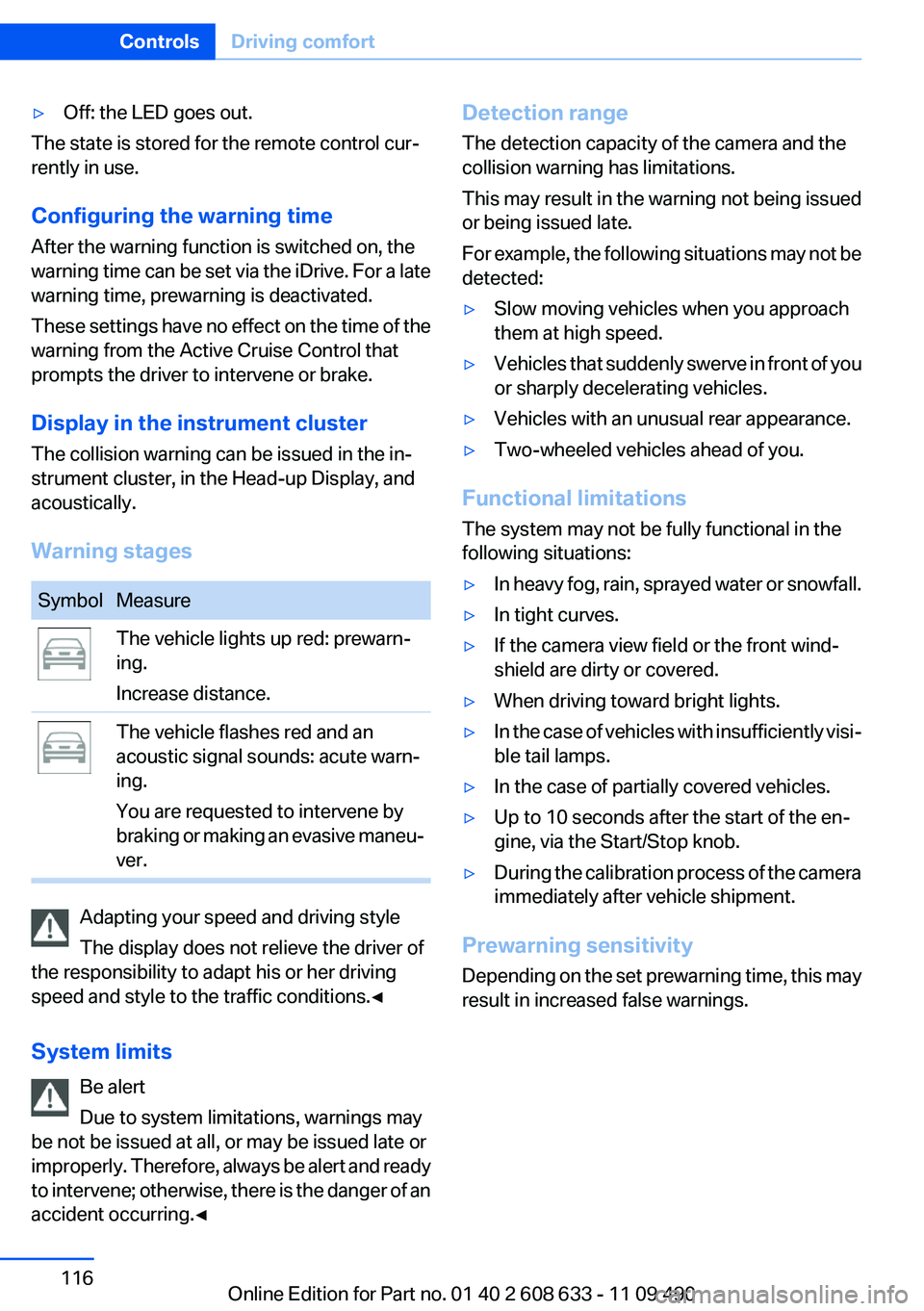
Warning stages
SymbolMeasureThe vehicle lights up red: prewarn‐
ing.
Increase distance.The vehicle flashes red and an
acoustic signal sounds: acute warn‐
ing.
You are requested to intervene by
braking or making an evasive maneu‐
ver.
Adapting your speed and driving style
The display does not relieve the driver of
the responsibility to adapt his or her driving
speed and style to the traffic conditions.◀
System limits Be alert
Due to system limitations, warnings may
be not be issued at all, or may be issued late or
improperly. Therefore, always be alert and ready
to intervene; otherwise, there is the danger of an
accident occurring.◀
Detection range
The detection capacity of the camera and the
collision warning has limitations.
This may result in the warning not being issued
or being issued late.
For example, the following situations may not be
detected:▷Slow moving vehicles when you approach
them at high speed.▷Vehicles that suddenly swerve in front of you
or sharply decelerating vehicles.▷Vehicles with an unusual rear appearance.▷Two-wheeled vehicles ahead of you.
Functional limitations
The system may not be fully functional in the
following situations:
▷In heavy fog, rain, sprayed water or snowfall.▷In tight curves.▷If the camera view field or the front wind‐
shield are dirty or covered.▷When driving toward bright lights.▷In the case of vehicles with insufficiently visi‐
ble tail lamps.▷In the case of partially covered vehicles.▷Up to 10 seconds after the start of the en‐
gine, via the Start/Stop knob.▷During the calibration process of the camera
immediately after vehicle shipment.
Prewarning sensitivity
Depending on the set prewarning time, this may
result in increased false warnings.
Seite 116ControlsDriving comfort116
Online Edition for Part no. 01 40 2 608 633 - 11 09 490
Page 317 of 325
Engine stop 61
Engine temperature 75
Entering a car wash 296
Equalizer 188
Equipment, interior 141
ESP Electronic Stability Pro‐ gram, refer to DSC 104
Exchanging wheels/tires 269
Exhaust system 156
Exterior mirror, automatic dim‐ ming feature 53
Exterior mirrors 52
External devices 210
External start 291
External temperature dis‐ play 76
External temperature warn‐ ing 76
Eyes for securing cargo 160
F
Fader 188
Failure message, refer to Check Control 73
False alarm, refer to Uninten‐ tional alarm 41
Fan, refer to Air flow 135
Fan, refer to Air volume 138
Fault displays, refer to Check Control 73
Filler neck for engine oil 274
Fine wood, care 298
First aid kit 291
Fitting for towing, refer to Tow fitting 294
Flat tire, changing wheels 287
Flat Tire Monitor FTM 97
Flat tire, Tire Pressure Monitor TPM 94
Flat tire, warning lamp 95, 98
Flooding 157
Floor carpet, care 298
Floor mats, care 298
FM/AM station 190
Fogged up windows 135 Fold-out position, windshield
wipers 66
Foot brake 157
Front airbags 91
Front fog lamps 89
Front fog lamps, front, bulb re‐ placement 284
Front lamps 280
Front passenger airbags, au‐ tomatic deactivation 93
Front passenger airbags, indi‐ cator lamp 93
FTM Flat Tire Monitor 97
Fuel cap 260
Fuel consumption, current 77
Fuel consumption, refer to Average fuel consump‐
tion 82
Fuel filler flap 260
Fuel gauge 75
Fuel quality 262
Fuel, tank capacity 305
Fuse 288
G
Garage door opener, refer to Integrated universal remote
control 141
Gas station recommenda‐ tion 178
Gear change, automatic trans‐ mission 67
Gear shift indicator 78
General driving notes 156
Glass sunroof, powered 43
Glove compartment 148
Gong, volume equaliza‐ tion 189
GPS navigation 168
Gray display of the map 181
Gross vehicle weight, ap‐ proved 304
Gross weight, permissible for trailer towing 304 H
Handbrake, refer to parking brake 63
Hand-held transmitter, alter‐ nating code 142
Hazard warning flashers 290
HD Radio 191
Head airbags 91
Headlamp control, auto‐ matic 87
Headlamp courtesy delay fea‐ ture 87
Headlamp flasher 64
Headlamp glass 280
Headlamps 280
Headlamps, care 297
Headlamp washer system 65
Headliner 15
Head restraints 45
Head restraints, front 49
Head restraints, rear 50
Head-up Display 128
Head-up Display, care 299
Heavy cargo, stowing 160
Height, vehicle 302
High-beam Assistant 88
High beams 64
High beams/low beams, refer to High-beam Assistant 88
Hills 158
Hill start assistant, refer to Drive-off assistant 108
Hints 6
Holder for beverages 150
Homepage 6
Hood 273
Horn 12
Hotel function, trunk lid 38
Hot exhaust system 156
House number, entering for navigation 169
Hydroplaning 157 Seite 317Everything from A to ZReference317
Online Edition for Part no. 01 40 2 608 633 - 11 09 490