2012 AUDI A5 COUPE cruise control
[x] Cancel search: cruise controlPage 113 of 316

95 mph (150 km/h) if the driver removes the
foot from the accelerator .
Selector lever position!
The text message Selector lever position! ap
pears when the selector lever is moved to po
sition
N. In thi s position, adaptive cruise con
trol is not avai lab le .
Driver intervention prompt
Applies to vehicles: with adaptive cruise control
The driver intervention prompt co/ls on the
driver to toke over the situation.
Fig. 121 Instrument clus te r: Driver inte rven tion
pr ompt
In certain situations, the braking power of the
adaptive cruise control is not sufficient to
maintain an adequate distance from the ob
ject ahead . In this situation, the adaptive
cru ise control calls on
you as the driver to take
action.
The
driver intervention prompt alerts you vis
ually and audib ly .
- A red vehicle is shown in the instrument
cluster disp lay
¢ fig . 121 .
-The text DISTANCE! appears in the status
line .
Adaptive cruise control 111
- The indicator light in the Instrument cluster
blinks red.
- A warning tone sounds.
(0 Tips
-If the adaptive cruise control initiates
braking, the hydraulic brake system is
under pressure . Th erefore, the brake
pedal distance is shorter and the pedal
"feels" harder.
- Adaptive cruise contro l is swi tched off af
ter pressing the footbrake. The speed
saved up this point can be resumed.
- To resume the saved speed, re lease the
brake pedal and press the control lever
¢ page 105, Turning adaptive cruise
control off temporarily.
- If you use the accelerator to go faster
than the speed of the object ahead of
you, the
driver intervention prompt will
not be accompan ied by a warn ing signal.
- If the speed you previously set is exceed
ed, the indicator light in the speedome
ter will switch off.
MMI settings
App lies to vehicles: with adaptive cruise control
Individual settings for adoptive cruise control
con be selected in the MMI*.
Settings for the driving program can be ad
justed individually to the particular user and saved in the MM!*.
,,. Select:
I CAR ! function button > Adaptive
Cruise Control
> Driving program .
Setting the driving program
In the driving program menu you can adjust
the characteristics of adaptive cruise control
to what you want using
dynamic , standard or
comfort.
Saving settings
Your individua l settings are automatically
saved and assigned to the remote control key
being used ( remote key storage). If the key is .,..
Page 114 of 316
112 Adapti ve crui se control
given to another person, the saved settings
remain as they are.
System limitations
General information
App lies to vehicles: with adaptive cruise control
Some driving situations which affect the func
tion of the radar sensor are described below.
When driving, the adaptive cru ise control is
governed by physical and system-specified
limits. Also, under certain circumstances, the
ACC system may react unexpectedly or late
from the driver's po int of view. Therefore, al
ways be attentive and intervene, if necessary:
- when driving around curves¢
page 112
-when vehicles in front are not in line with
your vehicle ¢
page 112
-when other vehicles are changing lanes
r:=>page 113
-when other veh icles are difficult to detect
r:=> page 113.
A WARNING
The radar sensor's vision can be reduced by
rain, snow and heavy spray. This can result
in vehicles driving ahead being inade
quately d etected or, in some c ircumstan
ces, not detected at a ll.
If ne cess ary, take
a ction yourself!
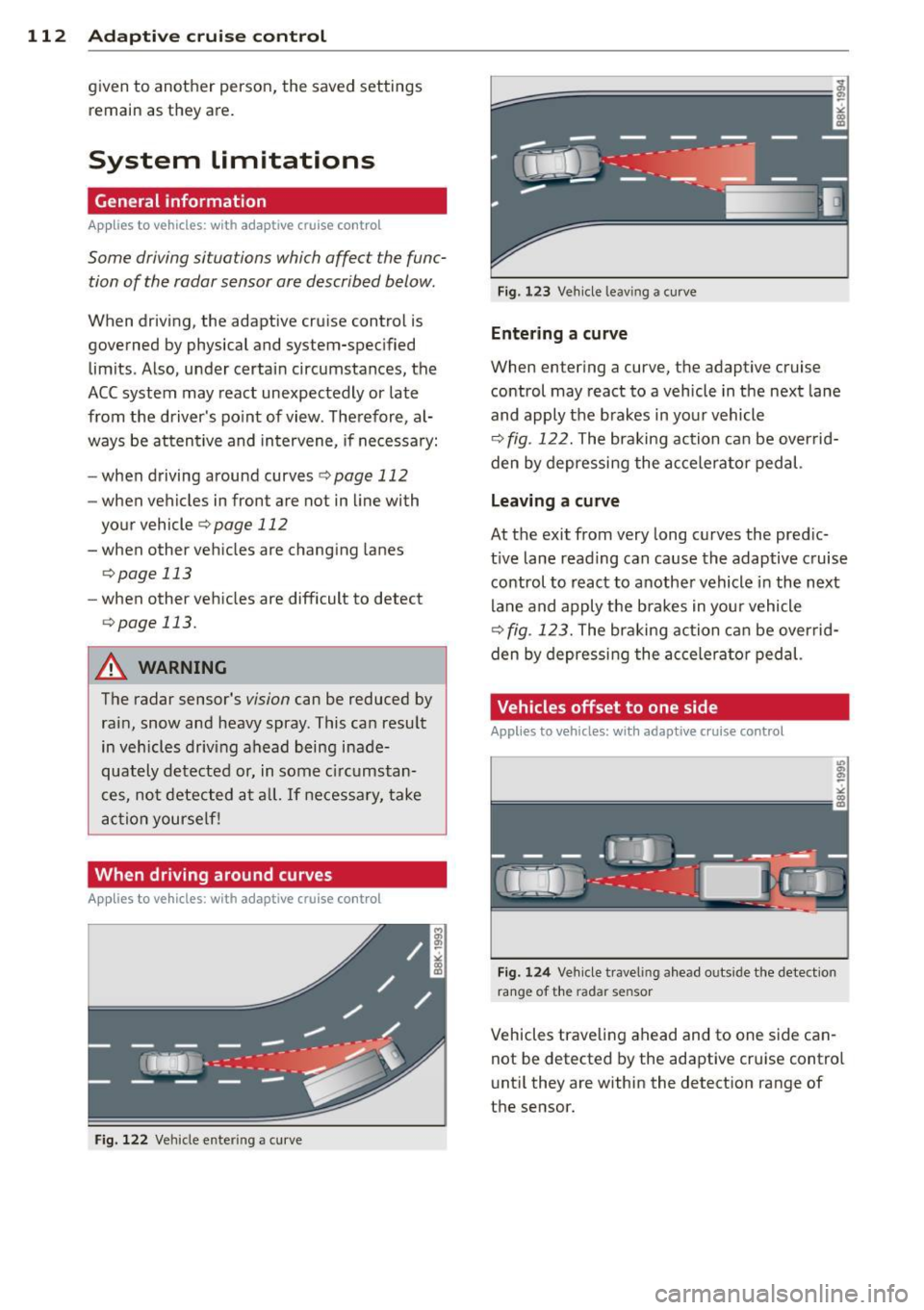
When driving around curves
Applies to vehicles: with adaptive cruise control
Fig. 122 Vehicle entering a cu rve
Fig. 123 Ve hicle leav ing a cu rve
Entering a curve
When enter ing a curve, the adaptive cruise
control may react to a vehicle in the next lane
and apply the brakes in yo ur vehicle
r:=> fig. 122. The braking action can be overrid
den by depressing the accelera tor pedal.
Leaving a curv e
At the exit from very long curves the pred ic
t ive lane reading can cause the adaptive cruise
control to react to another vehicle in the next
lane and apply the b rakes in your vehicle
r=>fig . 123. The braking action can be over rid
den by depressi ng the acce le ra tor pedal.
, Vehicles offset to one side
Applies to vehicles: with adaptive cruise control
Fig. 124 Ve hicle traveling a head outside the detect ion
range of the radar sensor
Vehicles trave ling ahead and to one s ide can
not be detected by the adaptive cru ise contro l
unt il they are within the detect ion range of
the sensor.
Page 115 of 316

Lane changes by other vehicles
Applies to vehicles: with adaptive cruise control
Fig. 125 A vehicle changes lanes
Vehicles which move into your lane a short
d istance ahead cannot be identified by the
adapt ive cruise control until they are in the ra
dar sensor's detection range.
Vehicles that are difficult to detect
Applies to vehicles: with a daptive cruise control
Fig . 126 Two -wheeled vehicle driving ahead
Vehicles that are difficult to detect, e.g. two
wheeled vehicles ahead, vehicles with high ground clearance, protruding load, are fre
quently detected late or not at all, under
some circumstances.
Adaptive cruise control 113
Stationary vehicles
Applies to vehicles: wit h adaptive cruise control
Fig. 127 Turning and stationary veh icle
Fig. 128 Sheering out and stat ionary vehicle
If a vehicle that has been detected by the ACC
system turns
off or sheers out, and there is a
stationary vehicle ahead of that vehicle, the
ACC system does not respond to the station
ary veh icle
~ fig. 12 7 and ~ fig. 128.
Audi braking guard
Description
Appl ies to vehicles: wit h adaptive cruise control
Audi braking guard warns you of a threaten
ing collision with a vehicle ahead.
Fig. 129 D isplay in the instrument cluster
Page 116 of 316

114 Adaptive cruise control
The Audi braking guard is active from a speed
of approx. 20 mph (30 km/h) and works within the system limits¢
page 112 even when
the adaptive cruise contro l is deactivated.
A radar sensor is bui lt into the front of the ve
hicle
¢ page 102, fig. 110. The system is in
tended to measure the distance to reflective
surfaces. If a measurement is not possible,
the system does not respond .
When the measurement has taken p lace, the
system can assess a hazardous situation,
when a vehicle ahead suddenly brakes or when
your own vehicle is driving at high speed to
wards a much slower vehicle ahead . As soon
as the system assumes that a possible colli
sion with the vehicle ahead can on ly be avo id
ed by immediate all-out braking or by an
avoiding maneuver, a warning appears.
The system has a pre-set response time to be
able to warn in good t ime . This system re
sponse time is automat ically reduced if you
accelerate actively, for example to join a high
way. Braking, transverse acceleration and the
steering angle can lead to a reduced system
response time . The warning is deactivated if
you begin to overtake with fu ll acce leration.
The system draws your attention to two differ
ent hazardous situations:
Distance
The distance warn ing is issued in the event of
inadequate distance to the veh icle ahead ape
riod of more than 5 seconds . If the distance is
l ess than 30 feet (9 meters) at 50 mph
(80 km/h) , for example, an optical display is
faded in on the instrument cluster¢
fig. 129.
If the vehicle ahead brakes sharply, a collision
cannot be avoided , even in the case of an im
mediate response. In this case, increase the
distance to the vehicle ahead.
Speed
If there is a much slower veh icle ahead in your
la ne, or if the vehicle ahead brakes sharply,
the Audi braking guard ca lculates the point
from which a collision can only be avoided by all-out braking or
by an avoiding maneuver. If
a warning does sound, a possib le collision
with the vehicle in front can be avoided
through an evas ive maneuver or by braking .
T he warning is given in two stages:
-Pre-warning: An optical display appears in
the instrument cluster and a warning tone
so unds.
- Acute warning: If you do not respond to the
pre-warn ing, the second stage , the acute
warning, is issued . A brake jolt reminds you
to concentrate on the road again.
Under heavy brea king, brake assist
¢
page 209 also helps you obtain max imum
braking efficiency.
.&_ WARNING ~
Always pay attention to traffic, even when
the Audi braking guard is switched on. You
are a lways responsible for your speed and
the distance between your vehicle and oth·
er vehicles.
-Always keep the lega lly stipulated safety
d istance between your vehicle and the
veh icle ahead • danger of accident!
- The Audi braking guard does not respond
outside the system limits, for example if
you approach a stationary obstacle (end
of a traff ic jam or breakdown vehicle).
- Please observe that the Audi braking
guard is subject to restrictions in narrow
bends due to the field of vision of the ra
dar senso r. T his may possibly lead to ob
stacles not being detected.
- The radar sensor's
vision can be reduced
by rain, snow and heavy spray. This can
resu lt in vehicles driving ahead being in
adequately detected or, in some circum
stances, not detected at all. Always
watch where yo u are driving .
- Reflecting objects such as e.g . crash bar
riers or the entrance to a tunne l may im
pair the function of the radar sensor .
Page 117 of 316

Settings in the MMI
Applies to vehicles: with adaptive cruise control
The settings of the Audi braking guard are
performed in the MMI*.
Settings regarding the system and the early
warn ing can be adjusted to the respective user
and saved in the MM!*.
Switching the system on and off
~ Select: ICARlf unction button> Audi brak
ing guard .
~ Select System On to switch the system on
or
Off to switch the system off.
Switching the early wa rning on and off
~ Se lect: ICARI > Audi braking guard .
~ Select Early warning On to switch the
acoustic and optical warning on or
Off to
switch the system
off.
(D Tips
When handing over the keys to another
person, the prev ious settings are adopted
if the Audi braking guard is act ivated
¢page 41.
Driver's information in the instrument
cluster display
Applies to vehicles: with adaptive cruise control
braking guard activated
This drive r's information appea rs when a
brake jolt has been carried out due to an acute
warning.
Braking guard off
This driver 's information appears when the
system has been deactivated via the MM!*.
Furt hermore the informat io n appears each
time short ly after the beginning of the jour
ney when the system is switched
off.
This driver's information also appears when
the system is not available due to a malfunc
tion or if you switch the ESP/ ASR
off
¢ page 204. In this state the system no lon
ger warns of a pending collision.
Adaptive cruise control 115
Page 283 of 316

Fuses and bulbs 281
No. Fuse Location, Instrument Panel right
8
Vehicle electrical system control
5
module 1
9 Adaptive Cruise Control
10 Shift gate
11 Heater washer flu id nozzles
12 Climate control
13 Cell phone prep 5
14 Airbag
s
15 Terminal 15 25
16 Terminal 15 engine
40
Fuse panel@ (brown)
1 Automatic dimming
interior s rearview mirror
2 Clutch sensor 5
3 Gasoline fuel pump 25
5 Left seat heating with/without
15/30
seat heating
Fig. 228 Righ t cockpi t: fuse panel wi th pla stic clip
6 Electronic Stabilization Program 10 No. Consumer
7 Horn 25 Fuse panel@ (black)
8
Left door window regulator mo-
30
tor 5
Steering column switch module
5
6 Electronic Stabilization Program 5
9 Wiper motor 30
10 Electronic Stabilization Program
25
7
Terminal 15 diagnostic connec-
5
tor
11 Left doors 15
12 Rain and light sensor 5
8
Gateway (Databus diagnostic in-
5
terface)
Fuse panel © (red)
Fuse panel@ (brown)
3 lumbar support
10
1 C0-/DVD player
5
4 Dynamic steering 35
2 Audi drive select switch module 5
5 Antenna (Avant)
5
3 MMI/Radio
5/20
6
Vehicle electrical system control
35
module
1
7
Vehicle electrical system control
20
module 1 Instrument cluster
5
5 Gateway (instrument cluster
5
control module)
6 Ignition lock 5
8
Vehicle electrical system control
30
module 1
9 sunroof 20
10 Vehicle electrical system control
30
module 1
7 Rotary light switch 5
8 Climate control system blower
40
9 Steering column lock 5
10 Climate control 10
11 sunroof shade (Avant) 20 11 Terminal 30
diagnostic connec-
tor 10
12 Convenience electronics
5
12 Steering column switch module
5
Page 300 of 316

298 ~l :..:.: nd ~e ~x :._ ______________________________ _
A
A/C mode 83,88
Accessories .. ....... ...... ... ... .. . 295
Adaptive cruise control . . . . . . . . . . . . . . . 102
Changing speed . . . . . . . . . . . . . . . . . . . 105
Driver information . . . . . . . . . . . . . . . . . 107
Driver intervention prompt . .. .. .. .. . 111
Driving in traffic . . . . . . . . . . . . . . . . . . . 103
Driving program . ........... .. .. .. . 111
Error messages .......... .... .... . 109
Open road .. ............. .. .. .. .. . 103
Override ... ................ ..... . 103
Request for driver to assume contro l . . 103
Save speed ............... ... .... . 104
Setting distance . . . . . . . . . . . . . . . . . . . 106
Settings . . . . . . . . . . . . . . . . . . . . . . . . . 111
Setting time interval .......... .... . 106
Special driving situations ...... .. .. . 112
Status messages ... ...... .. .. .. .. . 109
Switching on and off .... .. .. .. .. ... 104
System limits . ........... .... .... . 112
Temporarily turning off .. .. .. .. .. .. . 105
Warning/indicator lights ............ 108
Adaptive dampers . .......... ... .. .. . 124
Adaptive light ............. .. .. ......
52
defective ................ .... .... .. 36
Adding
Engine coolant ............ ... .... .
245
Engine oi l .. ................ ..... . 242
Windshield washer fluid ... .. .. .... . 251
Addit ional accessories
Addit ives 295
Eng ine oil .. ................ ... .. . 242
Adjusting
Steering column manually . .. .. .... ..
92
Adj usting front seats ....... .. .. .. .. . . 61
Airbag system . . . . . . . . . . . . . . . . . 162, 181
Advanced Airbag System ....... .. ... 166
Advanced Airbag System components . 169
Care ... .. ............... .. .. .... . 175
Children . .... ........... .. .. .. .. . 187
Child restraints .............. ..... . 188
Components (front airbags) . ... .... . 169
Danger of fitting a child safety seat on
the front passenger seat . . . . . . . . . . . .
163
Disposal . ................. .. .... . 175
Front airbags . . . . . . . . . . . . . . . . 166, 167
How do the front airbags work? ... ... 171
How many airbags does my vehicle
have? ... ... .. .. .. .............. .
169
How the Advanced Airbag System com-
ponents work together ......... ....
170
Important safety instructions on the
knee airbag system ...... ...... .. ..
179
Important things to know .......... . 162
Indicator light . ... ............ .. .. 173
Knee airbags ..... ... .......... .... 177
Monitoring . ..... ................ . 173
PASSENGER AIR BAG OF F light . . . . . . . 173
Repairs .......................... 175
Safety instructions ............. .... 175
Side airbags ... .. ............. .... 180
Side curtain airbags ............ .... 182
Weight-sensing mat ............... 187
When must the system be inspected? 173
All-wheel drive
Winter tires ... .. ... .......... ....
267
Alloy wheels .. .. . .. ............ .. .. 225
All wheel drive 210
Alternator
Malfunction ... ... ................ .
30
Anti-freeze
refer to Engine coolant system ....... 244
Anti-lock brake system
How the ABS system works ..........
208
Warning/indicator lights ............ . 16
Anti-Slip Regulation System (ASR)
How the system works ............. .
206
Anti-theft systems
Electronic immobilizer ...............
39
Ashtray .. .. .. .. .. .... ......... .... . 75
ASR
How the Anti -Slip Regulation System
works
Asterisk
206
What does it mean when something is marked with an asterisk? . . . . . . . . . . . . . . 6
Audi braking guard ................. .
113
Error messages .................. . 115
Settings .. .... .. ............. .... 115
Status messages ... ........... .. .. 115
Switching on and off ........... .... 115
Page 303 of 316

Cruise control Changing speed ....... ... ... ... ... 100
Prese lect speed . . . . . . . . . . . . . . . . . . . 100
Sw itching off ... .. .... ... .... .. .. . 1 00
Sw it ching on .... ......... .... .. .. .. 99
Warn ing/ indicator lights ........ .... . 16
also refer to Adapt ive cruise control .. . 102
Cruising range . . . . . . . . . . . . . . . . . . . . . . . 22
Cup holders .. .. .. ......... .. .. .. .. .. 75
D
Data ....... ................... .... 292
Data recorde r ............. .... .. .. . 204
D ate display . .... .. . .... .. .... .. .. .. 12
Daytime running lights ............ 50, 51
Declaration of complianc e
Adaptive cruise control .... .. .. .. .. . 296
Aud i side assist ... .... ... .. .. .. .. . 296
Cell phone package ....... .. .. .. .. . 296
Conven ience key ................. .. 296
Elect ronic immobilizer . .. .. .. .. .. .. . 296
H omelink ® universal remote control .. 296
Remote control key ... .... .. .. .. .. . 296
Tire pressure monitor ing system .. .. . 296
Defective light bulb warning ..... ... ... 35
Defrosting the windows . . . . . . . . . . . 82, 88
D efrosting w indows . . . . . . . . . . . . . . 8 2, 88
Deluxe au tomatic clim ate control . . . . . . . 79
A ir di stribu tion ... ..... .... ... .. .. .. 82
Automatic mode .................. . 81
Controls . . . . . . . . . . . . . . . . . . . . . . . . . . 80
D efrost .. .. .. .. ......... .. .. .. .. .. 82
D escr ipt io n .............. .... .. .. .. 79
Economical use . . . . . . . . . . . . . . . . . . . . 83
F an ... .. .. ... .. .. ..... ... .. .. .... 81
Rear window defogger . . . . . . . . . . . . . . . 83
Recirculation mode . . . . . . . . . . . . . . . . . 82
Temperature .. ........... .. .. .. .. .. 81
Turn ing on and off ........ .. .. .. .. .. 81
D eluxe automatic climate con trol p lus . . . 83
Air distribution . ... .... ... .. .. .. .. .. 87
Air vents ... .. .... .... ... .. .. .. .... 89
Air vents (rea r) ....... .... .. .. .. .. .. 89
Au tomatic mode . . . . . . . . . . . . . . . . . . . 86
Automatic recirculation . . . . . . . . . . . . . . 90
Basic settings . . . . . . . . . . . . . . . . . . . . . . 90
Controls . . . . . . . . . . . . . . . . . . . . . . . . . . 85
Inde x 301
Defrost ... .. .... .. . .. .. ..... ... .. . 88
Description . ... .... . ... ...... ... .. . 83
Econom ica l use .. .. . .. ..... ... .. .. . 90
Fan .. ...... .. .. .................. 87
Rear window defogger . ............. . 88
Recircu lation mode . .............. .. 87
Synchronization .. .. . .. ... .... ... .. . 90
T emperature ..... .. ..... ........... 86
T urning on and off .. . ... ....... .... . 86
Determ ining correct load limit ...... .. 261
Digital clock . . . . . . . . . . . . . . . . . . . . . . . . 12
D igital compass . . . . . . . . . . . . . . . . . . . . . 59
Digital speedomete r ................. . 21
Dimens ions . .. .. .. .. .. .... ....... .. 291
Dimming the rearview m irror ........ .. S8
Distance contro l system
refer to Adaptiv e cr uise control ... .. .. 102
Doors Emergency lo cking ................. . 44
Driver informat ion system ........... .. 19
Defective light bulb wa rni ng .... .... .. 35
Digital speedomet er .... .... ... .. .. . 21
Drive r informat io n messages .... .. .. . 29
En hanced shift ind icator ........ .. .. . 25
Open door or rear lid wa rning . ... .. .. . 21
Outside temperature disp lay . . . . . . . . . . 20
Sound system disp lay .. .. ... ... .. .. . 19
D river seat
refer to Sea ting posi tion . . . . . . . . . . . . 145
Driver's seat memory Activating remote control key . . . . . . . . . 66
Driving lights . .. .. .... ............. . 49
D rivi ng messages . . . . . . . . . . . . . . . . . . . . 29
Drivi ng safely . . . . . . . . . . . . . . . . . . . . . . 144
Driving through water . .. .. ... ... .. .. 214
Driving time . . . . . . . . . . . . . . . . . . . . . . . . 22
Duplicate key . .. .. ... ............ .. . 37
D ust and pollen filter
Del uxe a utomat ic climate control plus .. 83
Dust filte r
Del uxe automat ic climate control . .. .. . 79
Del uxe a utomat ic cli mate control p lus . . 83
Dynam ic s teering . . . . . . . . . . . . 14, 34, 124
E
Easy entry funct ion . . . . . . . . . . . . . . . 63, 64
•
•