Page 97 of 370

95
uuGauges and Multi-Information Display uMulti-Information Display
Continued
Instrument Panel
■Customization flow
Press the / button to select Keyless Memory SettingsTM and press the SEL/RESET button.34
SEL/RESETCHG SETTING
DEFAULT ALL
EXIT
ACC SETUP*
EXITSECURITY RELOCK TIMER
TRIP COMPUTER TRIP A INFO RESET
ADJUST ALARM VOLUME
AUTO INTERIOR ILLUMINATION
KEYLESS START GUIDANCE SCREENS*
LANGUAGE SELECTION
ADJUST OUTSIDE TEMP. DISPLAY
MEMORY POSITION LINK
AUTO TILT AND TELESCOPE STEERING WHEEL
DOOR UNLOCK MODE
KEYLESS ACCESS LIGHT FLASH
KEYLESS ACCESS BEEP
INTERIOR LIGHT DIMMING TIME
HEADLIGHT AUTO OFF TIMER
AUTO LIGHT SENSITIVITY
AUTO DOOR LOCK
AUTO DOOR UNLOCK
KEY AND REMOTE UNLOCK MODE
KEYLESS LOCK ACKNOWLEDGMENT
PRE-RUNNING CAR DETECT BEEP
ACC DISPLAY SPEED UNIT
34
34
34
34
34
34
34
34
34
34
METER SETUP
POSITION SETUP
KEYLESS ACCESS SETUP*
LIGHTING SETUP
DOOR/WINDOW SETUP
SEL/RESET
SEL/RESET
SEL/RESET
SEL/RESET
SEL/RESET
SEL/RESET
SEL/RESET
* Not available on all models
Page 98 of 370

96
uuGauges and Multi-Information Display uMulti-Information Display
Instrument Panel
■List of customizable options
*1: Not available on all models
*2: Default Setting Setup Group Customizable Features
DescriptionSelectable settings
ACC Setup
*1
Pre-running Car Detect
Beep Causes the system to beep when a vehicle ahead of
you gets too close.
ON*2, OFF
ACC Display Speed Unit Changes the ACC display speed unit. km/h
*2 (Canada), mph*2 (U.S.)
Meter Setup
Language SelectionChanges the displayed language.English*2, French, Spanish
Adjust Outside Temp.
DisplayAdjusts the temperature reading by a few degrees.-5°F ~ ±0°F*2 ~ +5°F (U.S.)
-3°C ~ ±0°C*2 ~ +3°C (Canada)
Trip Computer Trip A Info
ResetChanges the setting of how to reset trip meter A,
average fuel economy A, average speed A, and
elapsed time A.WITH REFUEL*2, MANUAL
ONLY , IGN OFF
Adjust Alarm VolumeChanges the indicator al arm volume into three
levels.HIGH, MID*2, LOW
Auto Interior IlluminationChanges the interior light sensitivity to your liking.MAX, HIGH, MID*2, LOW ,
MIN , OFF
Keyless Start Guidance
Screens*1Changes the display of the keyless start guidance
screens.ON*2, OFF
Page 101 of 370
99
uuGauges and Multi-Information Display uMulti-Information Display
Continued
Instrument Panel
■Example of customization settings
The steps for changing the TRIP COMPUTER TRIP A INFO RESET setting to
MANUAL ONLY are shown below. The default se tting for Trip Computer Trip A
Info Reset is WITH REFUEL .
1.Press / button to select CHG
SETTING , then press the SEL/RESET
button.
2. Press the / button until METER
SETUP appears on the display.
3. Press the SEL/RESET button.
u LANGUAGE SELECTION appears first in
the display.
34
34
Page 102 of 370
100
uuGauges and Multi-Information Display uMulti-Information Display
Instrument Panel
4. Press the / button until TRIP
COMPUTER TRIP A INFO RESET appears
on the display, then press the SEL/RESET
button.
5. Press the / button and select
MANUAL ONLY , then press the
SEL/RESET button.
6. Press the / button until EXIT appears
in the display, then press the SEL/RESET
button.
7. Repeat Step 6 until you return to the
normal screen.34
34
34
Page 104 of 370
102
Controls
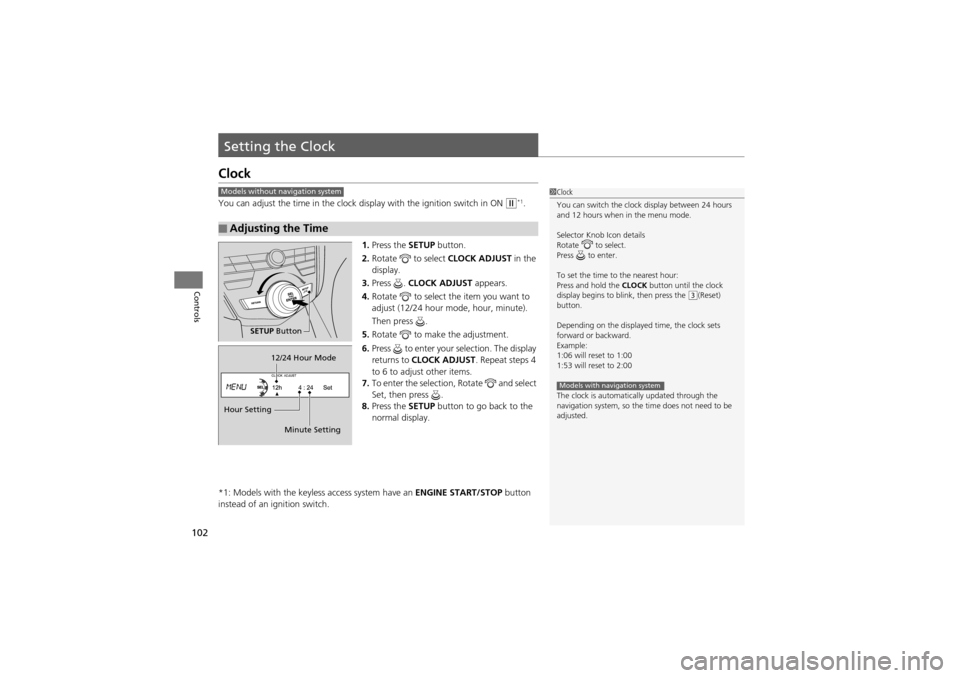
Setting the Clock
Clock
You can adjust the time in the clock display with the ignition switch in ON w*1.
1. Press the SETUP button.
2. Rotate to select CLOCK ADJUST in the
display.
3. Press . CLOCK ADJUST appears.
4. Rotate to select the item you want to
adjust (12/24 hour mode, hour, minute).
Then press .
5. Rotate to make the adjustment.
6. Press to enter your selection. The display
returns to CLOCK ADJUST . Repeat steps 4
to 6 to adjust other items.
7. To enter the selection, Rotate and select
Set, then press .
8. Press the SETUP button to go back to the
normal display.
*1: Models with the keyless access system have an ENGINE START/STOP button
instead of an ignition switch.
■Adjusting the Time
1 Clock
You can switch the clock display between 24 hours
and 12 hours when in the menu mode.
Selector Knob Icon details
Rotate to select.
Press to enter.
To set the time to the nearest hour:
Press and hold the CLOCK button until the clock
display begins to b link, then press the
(3(Reset)
button.
Depending on the displayed time, the clock sets
forward or backward.
Example:
1:06 will reset to 1:00
1:53 will reset to 2:00
The clock is automatically updated through the
navigation system, so the time does not need to be
adjusted.
Models with navigation system
Models without navigation system
SETUP Button
Hour Setting 12/24 Hour Mode
Minute Setting
Page 105 of 370

103Continued
Controls
Locking and Unlocking the Doors
Key Types and Functions
This vehicle comes with the following keys:Use the keys to start and stop the engine, and
to lock and unlock all the doors, tailgate, and
fuel fill door. You can also use the remote
transmitter or keyless access system
* to lock
and unlock all the doors, tailgate, and fuel fill
door.
The seat automatically moves to the preset
position when you unlock the door using the
remote transmitter or keyless access system
*.2 Driving Position Memory System P. 138
■Master Keys
1Key Types and Functions
All of the keys have an immobilizer system. The
immobilizer system helps to protect against vehicle
theft.
2 Immobilizer System P. 120
The keys contain precision electronics.
Adhere to the following advice to prevent damage to
the electronics:
•Do not leave the keys in direct sunlight, or in
locations with high temperature or high humidity.
•Do not drop the keys or set heavy objects on them.•Keep the keys away from liquids.•Do not take the keys apa rt except for replacing the
battery.
If the circuits in the keys are damaged, the engine
may not start, and the remo te transmitter or keyless
access system may not work.
If the keys do not work properly, have them
inspected by a dealer.
Retractable
Master Key*Keyless Access
Remote*
* Not available on all models
Page 140 of 370

138
uuOperating the Switches Around the Steering Wheel uDriving Position Memory System
Controls
Driving Position Memory System
You can store two driver’s seat (excep t for power lumbar), steering wheel and
outside mirror positions with the driving position memory system.
When you unlock and open the driver’s door with a remote transmitter, or keyless
access system
*, the seat and outside mirrors adjust automatically to one of the two
preset positions.
The steering wheel will move to the stored position when you insert the key into the
ignition switch.
The multi-information disp lay shows you which remote transmitter you used to
unlock the vehicle when you enter.
• Driver 1 transmitter is lin ked to memory button 1.
• Driver 2 transmitter is lin ked to memory button 2.
1Driving Position Memory System
Using the multi-information display, you can disable
the automatic seat, steering wheel and outside
mirrors adjustment function.
2 Customized Features P. 94
Driver 1Driver 2
* Not available on all models
Page 172 of 370
170
uuAudio System uAudio System Theft Protection
Features
Audio System Theft Protection
The audio system is disabled when it is disconnected from the po wer source, such as
when the battery is disc onnected or goes dead.
■Entering the audio security code
ENTER CODE appears on the display when the power is reconnected.
1. Turn on the audio system.
2. Enter the audio security code using the pr eset buttons. If you enter an incorrect
digit, continue to the last digit, then try again. If you do not enter the code
correctly after 10 tries, you need to visit a dealer to have the system reset.
1 Audio System Theft Protection
Find the audio system’s security code and serial
number on the radio code card.
Do not store the card in your vehicle. If you lose the
radio code card, you must obtain the information
from a dealer.


