Page 456 of 650

�µ
�µ �µ
�µ �µ
�µ
Select this option to delete
the current message.
Select this option to hear
a voice read the entire message.
This gives you more information
than the screen can display at one
time. When you select the Voice
option, it changes to a Stop
Reading option. Select the option
again to stop the voice.
To set your AcuraLink pref erences
(thetypesof messagesyouwantto
receive, if any), visit the My Acura
website at, and
choose what you would like to
receive. If you do not have internet
access, call Acura Client Relations at
(800) 382-2238; they can set your
message pref erences f or you.
To make a call, your
compatible phone must be paired to
the vehicle’s HandsFreeLink system,
powered on, and located within the
vehicle(seepage ). Select this
option to call the Acura dealer you
purchased your vehicle f rom.
AcuraLink also directs you to this
dealer so you can schedule a
maintenance appointment or receive
inf ormation about a message. If your
assigned servicing dealer changes,
AcuraLink will reset to call that
dealer.
Select this option to call a
phone number embedded in the
message. When you select ,
HandsFreeLink(HFL)
dials the number f or you. Select this
option to get more inf ormation about
the current diagnostic message. To
use this option, your cell phone must
be paired with HFL. In addition, the
paired phone must have a compatible
data service and be set up with the
AcuraLink system to make a data
connection. Go to to f ind out which data
services are currently compatible
with AcuraLink.
Select this
option to f ind the nearest Acura
dealer using the navigation system.
432
www.owners.acura.com
Bluetooth
Bluetooth www.acura.com/
handsf reelink
Delete
Voice
Message Pref erences
Call Your Dealer
Call Call Diagnostic Inf o
Find Acura Dlr.
AcuraLink(U.S. models only)
452
11/01/14 19:14:01 31TK4630_457
Features
2012 TL
Page 459 of 650

These messages provide detailed
inf ormation about the service
needed f or your vehicle. When a
maintenance message appears on
the multi-information display, a list of
needed maintenance items is
provided through an AcuraLink
message. These messages tell you
the exact maintenance needed,
helping you to avoid unnecessary
maintenance costs.You can use the following
message options:
Reschedule the appointment with
the dealer.
Call your dealer f or an
appointment.
Find the nearest dealer. You can make an appointment with
your dealer through AcuraLink
when you receive a Maintenance
Minder message.
To use the automated appointment
f unction, you should visit the My
Acura website at
, register some
required settings, and complete the
Phone-Data Connection set-up (see
page ). Your
compatible phone should also be
paired and linked to your vehicle
(see page ).
Make an appointment f rom the
schedule at the dealer.
432
463
www.owners.acura.com
Bluetooth
CONT INUED
Maintenance MinderA ut omat ed A ppoint ment
AcuraLink(U.S. models only)
Features
455
TM
11/01/14 19:14:38 31TK4630_460
2012 TL
Page 463 of 650
Using automated appointments, your
registered dealer through My Acura
is automatically selected. If you want
to select another dealer, such as in
case of an emergency, f ind the
nearest dealer and call the dealer
directly with HFL.
When a maintenance appointment is
due soon, you will also receive an
appointment reminder message.If your vehicle is af f ected by a recall
or other important saf ety
inf ormation, a letter will be mailed to
you about the issue and how to f ix it.
You will also receive a reminder
message through AcuraLink. You
canthenusethemessageoptionsto
call your dealer f or an appointment
or to f ind the nearest dealer.For this reason, it is important that
we retain your current phone
number. Please update your
inf ormation using My Acura at
www.owners.acura.com.
AcuraLink(U.S. models only)
Recall/Campaigns
Features
459
11/01/14 19:15:17 31TK4630_464
2012 TL
Page 467 of 650
�µ
�µ
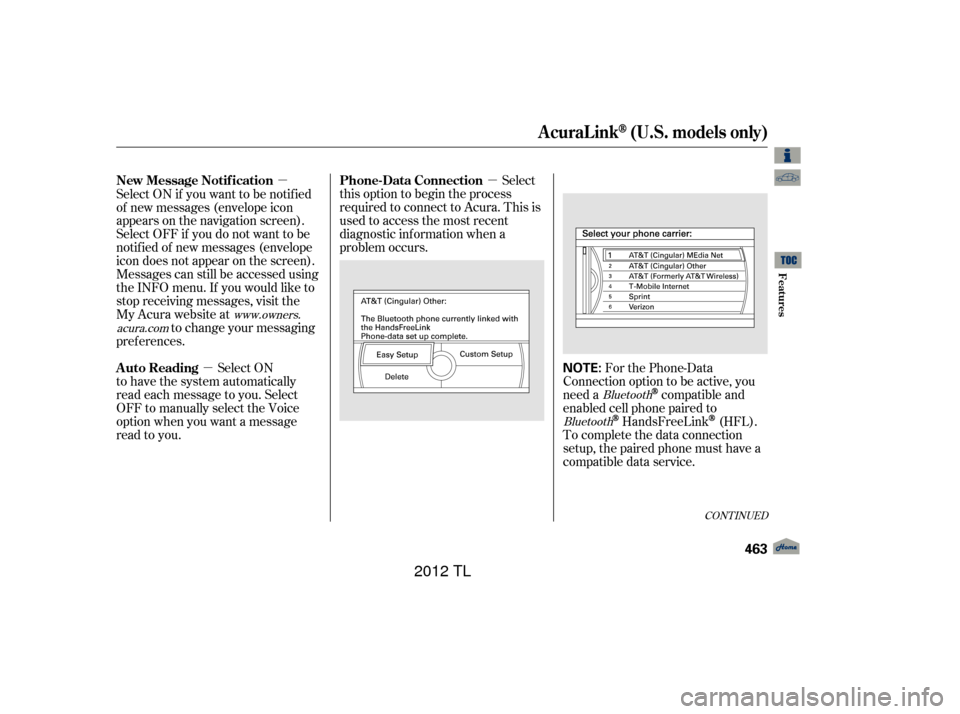
�µ For the Phone-Data
Connection option to be active, you
need a
compatible and
enabled cell phone paired to
HandsFreeLink(HFL).
To complete the data connection
setup, the paired phone must have a
compatible data service.
Select
this option to begin the process
required to connect to Acura. This is
used to access the most recent
diagnostic inf ormation when a
problem occurs.
Select ON if you want to be notif ied
of new messages (envelope icon
appears on the navigation screen).
Select OFF if you do not want to be
notif ied of new messages (envelope
icon does not appear on the screen).
Messages can still be accessed using
the INFO menu. If you would like to
stop receiving messages, visit the
My Acura website at
to change your messaging
pref erences.
Select ON
to have the system automatically
read each message to you. Select
OFF to manually select the Voice
option when you want a message
read to you.
Bluetooth
Bluetooth
www.owners.
acura.com
CONT INUED
Phone-Data Connection
New Message Notif ication
Auto Reading
AcuraLink(U.S. models only)
Features
463
NOTE:
11/01/14 19:15:56 31TK4630_468
2012 TL
Page 468 of 650

�µ
The def ault setting is prompt. When
a diagnostic inf o message appears,
and you select the Check Now option,
the system will prompt you bef ore
connecting to the Acura server. If
you do not wish to connect at that
time, select No at the prompt, and
you will see the inf ormation f rom the
onboard database. The ‘‘Auto’’
setting will remove the prompt when
you select the Check Now option and
will automatically connect to the
Acura server. This setting only
applies when you have a
enabled phone that is paired with
HFLandyouhavecompletedthe
Phone-Data Connection setup.
To find more information on
compatible and enabled
cell phones, visit or call
the HandsFreeLink
consumer
support at 1-888-528-7876.
Bluetooth As required by the FCC:
This device complies with Part 15 of theFCC rules. Operation is subject to thef ollowing two conditions: (1) This devicemay not cause harmf ul interf erence, and(2) this device must accept anyinterf erence received, includinginterf erence that may cause undesiredoperation.
Changes or modif ications not expresslyapproved by the party responsible f orcompliance could void the user’sauthority to operate the equipment.
Bluetooth
www.acura.com/handsfree link
Connect to the Acura Server
AcuraLink(U.S. models only)
464
11/01/14 19:16:02 31TK4630_469
Features
2012 TL
Page 483 of 650

Your dealer has Acura accessories
that allow you to personalize your
vehicle. These accessories have
been designed and approved f or your
vehicle, and are covered by warranty.Bef ore installing any accessory:
Make sure the accessory does not
obscure any lights, or interf ere
with proper vehicle operation or
perf ormance.
Although non-Acura accessories may
f it on your vehicle, they may not
meet f actory specif ications, and
could adversely af f ect your vehicle’s
handling, stability, and reliability. Bef ore installing any electronic
accessory, have the installer
contact your dealer for assistance.
If possible, have your dealer
inspect the f inal installation.
Do not install accessories on the
side pillars or across the rear
windows. Accessories installed in
theseareasmayinterferewith
proper operation of the side
curtain airbags. Be sure electronic accessories do
not overload electrical circuits
(see page ) or interf ere with
proper operation of your vehicle.
When properly installed, cellular
phones, alarms, two-way radios, and
low-powered audio systems should
not interf ere with your vehicle’s
computer controlled systems, such
as your airbags, anti-lock brakes, and
tire pressure monitoring system.
Modif ying your vehicle, or installing
non-Acura accessories, may make
your vehicle unsaf e. Bef ore you
make any modif ications or add any
accessories,besuretoreadthe
f ollowing inf ormation.
600
A ccessories
A ccessories and Modif ications
Bef ore Driving
479
Improper accessories or
modifications can affect your
vehicle’s handling, stability, and
performance, and cause a
crash in which you can be hurt
or killed.
Follow all instructions in this
owner’s manual regarding
accessories and modifications.
11/01/14 19:18:19 31TK4630_484
2012 TL
Page 634 of 650

U.S. Owners:Canadian Owners:
When you call or write, please give
us this inf ormation:
If you are dissatisf ied with the
decision made by the dealership’s
management, contact Acura Client
Relations Acura dealership personnel are
trained prof essionals. They should
be able to answer all your questions.
If you encounter a problem that your
dealership does not solve to your
satisf action, please discuss it with
the dealership’s management. The
service manager or general manager
can help. Almost all problems are
solved in this way. Vehicle Identif ication Number
(see page )
Name and address of the dealer
who services your vehicle
Date of purchase
Odometer reading of your vehicle
Your name, address, and tele-
phone number
A detailed description of the
problem
Name of the dealer who sold the
vehicle to you
In Puerto Rico
and the U. S. Virgin Islands:
612
Client Service Inf ormation
630
American Honda Motor Co., Inc.
Acura Client Relations
Mail Stop 500-2N-7E
1919 Torrance Blvd.
Torrance, CA 90501-2746
Tel: (800) 382-2238Honda Canada Inc.
Acura Client Services
180 Honda Boul
evard
Markham, ON
L6C 0H9
Tel: 1-888-9-ACURA-9
Fax: 1-877-939-0909
E-Mail: [email protected]
Vortex Motor Corp.
Bella International
P.O. Box 190816
San Juan, PR 00919-0816
Tel: (787) 620-7546
11/01/14 19:43:54 31TK4630_635
Warrant y and Client Relat ions
2012 TL
Page 637 of 650

T he publications shown below can be purchased f rom Helm
Incorporated. You can order by phone or online:Call Helm Inc. at 1-800-782-4356 (credit card orders only)
Go online at
If you are interested in other years or models, contact Helm Inc.
at 1-800-782-4356.
Covers maintenance and recommended procedures f or
repair to engine and chassis components. It is written
f or the journeyman mechanic, but it is simple enough
f or most mechanically inclined owners to understand.
Complements the Service Manual by providing in-depth
troubleshooting inf ormation f or each electrical circuit
in your vehicle.
Describes the procedures involved in the replacement
of damaged body parts.
Authorized Manuals
Purchasing Factory Authorized Manuals
(U.S. only) Service Manual:
Electrical T roubleshooting Manual:
Body Repair Manual:
Authorized Manuals
633
Form Description
2009-2012 Acura TL Service Manual
2012 Acura TL Electrical Troubleshooting Manual 2009-2011 Model Series Acura TLBody Repair Manual
2012 Acura TL Owner’s Manual
2012 Acura TL Navigation Manual
2012 Acura TL Maintenance Journal
2012 Acura TL Advanced Technology Guide Order Form for Previous Years-
Indicate Year and Model Desired
Publication
Form Number 61TK403
61TK403EL 61TK4300
31TK4630
31TK4820
31TK4M30 31TK4Q30 ACU-R
www.helminc.com
11/01/14 19:44:29 31TK4630_638
2012 TL
